Browser-laptop: Autofill Credit Card section could benefit from validation (length, content, etc)
Did you search for similar issues before submitting this one?
Yes
Describe the issue you encountered:
Credit Card field should not take more than standard 19 characters. No check done for only numeric values.
Expected behavior:
Should only accept numbers and max length should be 19.
- Platform (Win7, 8, 10? macOS? Linux distro?):
Windows 10 x64 - Brave Version:
0.11.6 Beta 3 - Steps to reproduce:
- Open auttofill and add an entry under credit card
- Accepts more than 19 char in card field. Also able to enter char and save it. (Should not allow)
- Screenshot if needed:

- Any related issues:
 srirambv
All 20 comments
cc: @darkdh
srirambv
on 24 Aug 2016
Could you separate the editing issue and update it to https://github.com/brave/browser-laptop/issues/3368? It's the same root cause and it might be better to leave field length issue here. Thanks.
 darkdh
on 24 Aug 2016
darkdh
on 24 Aug 2016
Done
srirambv
on 24 Aug 2016
Perhaps we could concern ourselves with validating the number and tie the activation of the save control to a positive result?
https://gist.github.com/DiegoSalazar/4075533
 alexwykoff
on 24 Aug 2016
alexwykoff
on 24 Aug 2016
@alexwykoff The validation would be a nice touch I created a separate issue for it so we can discuss more :smile:
https://github.com/brave/browser-laptop/issues/3377~~
 bsclifton
on 24 Aug 2016
bsclifton
on 24 Aug 2016
I should mention that Chrome does not check the validation of the field.

I think it's better to save whatever user input for this milestone
darkdh
on 25 Aug 2016
maybe move this into a general data validation ticket for another release? Chrome doesn't do any validation and I can enter letters into the CC field if I want
 bridiver
on 25 Aug 2016
bridiver
on 25 Aug 2016
Updated title- this would be a great one to hear input from @bradleyrichter
This is a potential opportunity to give us an advantage over other browsers by performing validation and catching user errors with the information provided
Besides length check, we can also consider the approach @alexwykoff has mentioned of not allowing to save input (or giving a warning maybe) if the input doesn't pass a validation test. If we did that some questions:
- What should the warning message(s) look like?
- Should the validation be toggle-able, for getting around edge cases or if it's bothersome for the user?
More information which can be used for validation can be found here:
https://en.wikipedia.org/wiki/Payment_card_number
Maybe as a separate issue, we can alert folks on the Autofill screen if their card is nearing (or has passed) expiration
bsclifton
on 25 Aug 2016
I think it's a good idea, just wanted to move out of 0.11.6
bridiver
on 25 Aug 2016
Totally agree- Since milestone was removed, I closed #3377 and will put the details in the post above :smile: (ignore the accidental re-tag below, I was trying to view the milestone screen)
bsclifton
on 25 Aug 2016
Checkbox idea is good here since we don't yet know of reasons why validation may be problematic. [x] "validate card number as I type"
Regarding improvements over the competition, (thanks @bsclifton ) how about showing the user which sites contain the expiring credit card number ahead of time so they can update them all with a low pain threshold before auto-payments fail? (assuming this is not a privacy concern.)
 bradleyrichter
on 25 Aug 2016
bradleyrichter
on 25 Aug 2016
Would it be possible to show logo/name of the card provider next to the card number. When you have multiple card details stored the dropdown looks very empty with just the ...card number

srirambv
on 7 Sep 2016
@srirambv great suggestion! I'm not sure if there are legal requirements around the logo and how it's displayed, but showing a logo is possible for sure
cc: @bradleyrichter
bsclifton
on 7 Sep 2016
SGTM - here are the fontawesome icons:


bradleyrichter
on 7 Sep 2016
Actually I'm pretty sure those are already available from the auto fill client and we just need to use them
On Sep 6, 2016, at 3:50 PM, Brad Richter [email protected] wrote:
SGTM - here are the fontawesome icons:
—
You are receiving this because you commented.
Reply to this email directly, view it on GitHub, or mute the thread.
bridiver
on 7 Sep 2016
I would love to tackle this!
As I understand we still want to do a validation for the credit card ( at least min and max characters? ). But what about the Credit card name and expiry dates?
 MargarytaChepiga
on 4 Mar 2018
MargarytaChepiga
on 4 Mar 2018
When I was trying to reproduce the issue, I noticed the following:
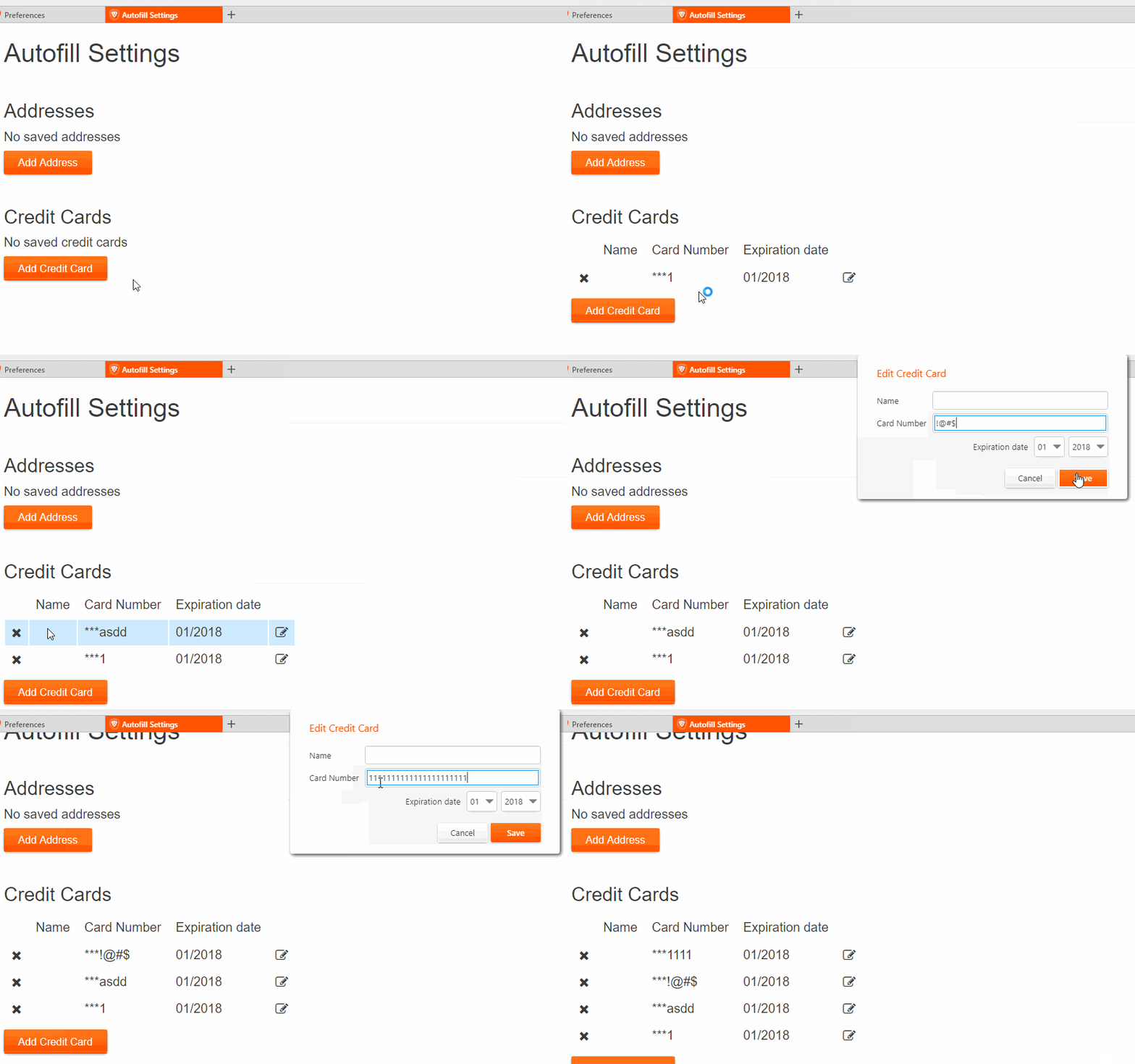
So I have been looking into the code to see where we are adding the credit card and I found something interesting. I suppose that the following function is the one which executes when we don't have any credit card and we want to add one:
https://github.com/brave/browser-laptop/blob/5143bd31919679cf385085020310dfcd8aa117a1/js/about/autofill.js#L150
and we are calling it right here:
https://github.com/brave/browser-laptop/blob/5143bd31919679cf385085020310dfcd8aa117a1/js/about/autofill.js#L234
However, I am not sure where do we actually save the credit card. Cause once I add it, it seems like the following get's executed too:
https://github.com/brave/browser-laptop/blob/5143bd31919679cf385085020310dfcd8aa117a1/js/about/autofill.js#L85
So I am not quite sure where to do the validation. But as I understand that's where we saving the credit card:
https://github.com/brave/browser-laptop/blob/5143bd31919679cf385085020310dfcd8aa117a1/app/renderer/components/autofill/autofillCreditCardPanel.js#L66
MargarytaChepiga
on 8 Mar 2018
@MargarytaChepiga one approach could be to disable the save button until the number provided is valid. You could then run validation on keydown / keyup for the text field (and also with expiration)
In that same code, if you have enough to detect which type of card it is (ex: it's valid and starts with 4, it's a VISA) you could then consider showing an icon next to it. As soon as the field becomes invalid, hide any icon
Another approach might be to look for an existing credit card React component that we can integrate with (something which may be on npm). We'd need to open a security review either way before accepting this, but it might be that someone has already solved this problem and has support for cards used internationally
bsclifton
on 10 Mar 2018
Thank you so much @bsclifton for clarifying things for me! :smiley:
So far I have completed a simple length and numeric validation for credit card number:
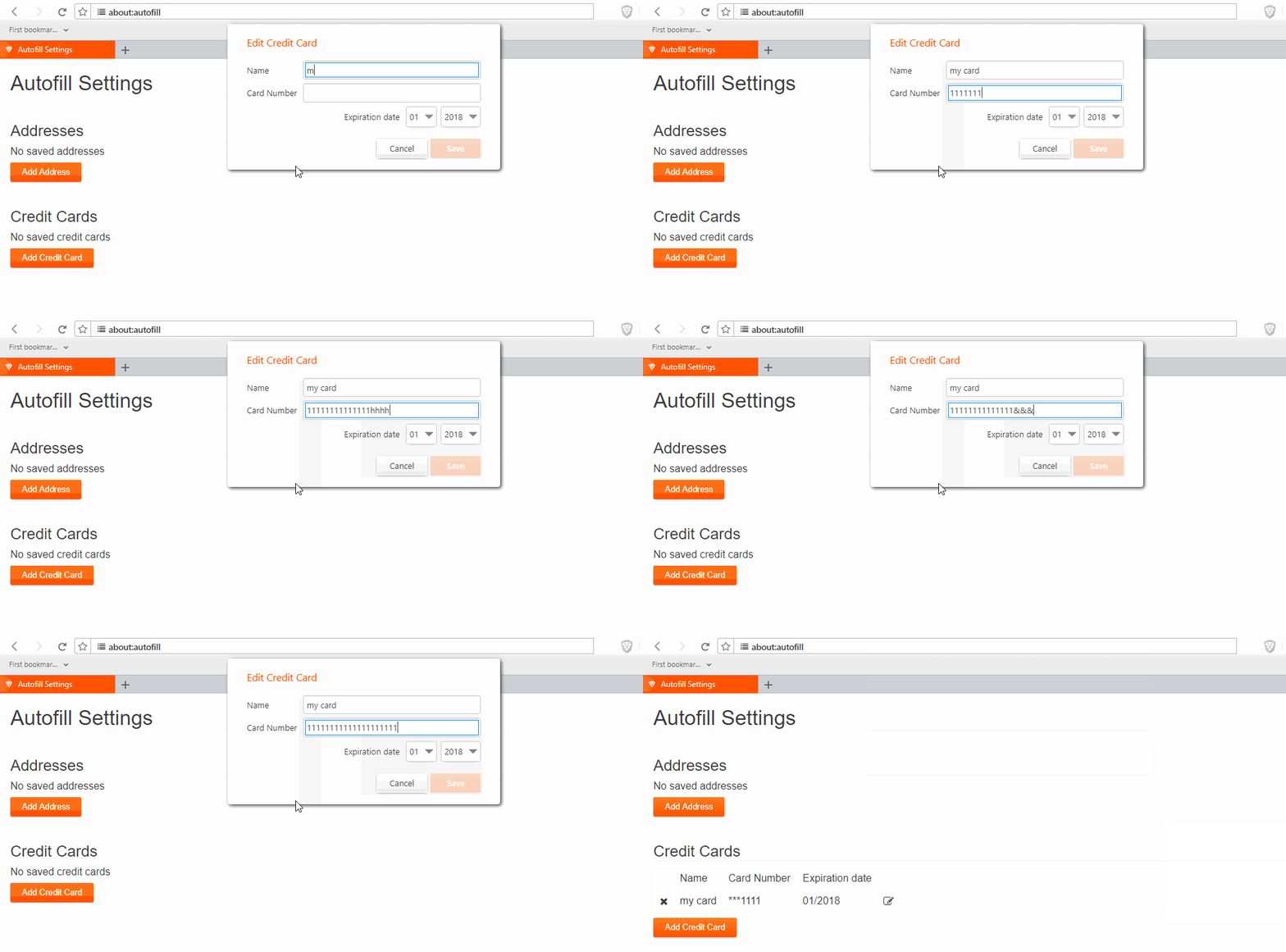
Where length should be between 13 and 19 characters (according to this credit card validator).
I can also detect a credit card type, for example:
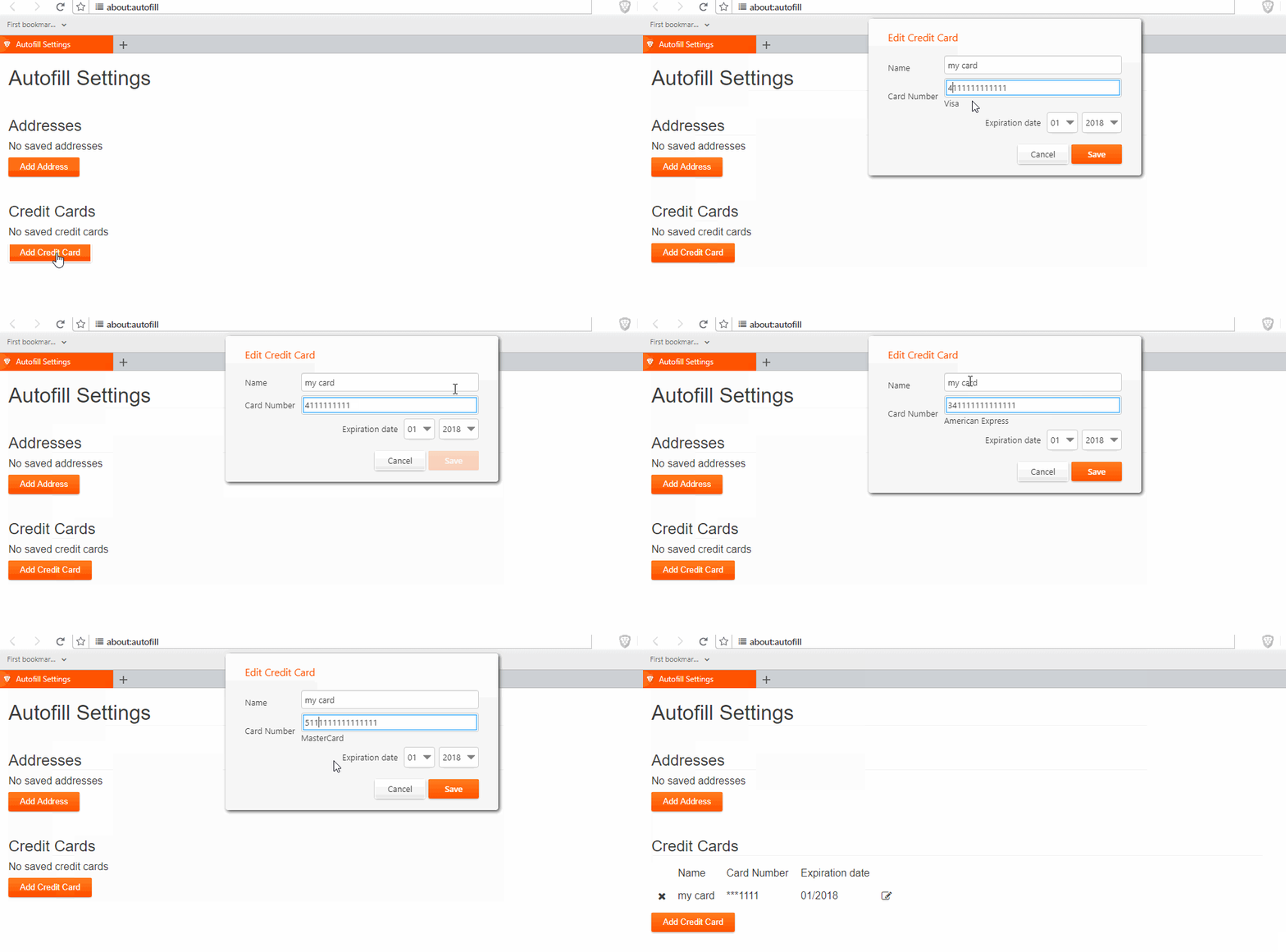
Where the UI change is only for the debugging purposes :sweat_smile:
However, I haven't got to the icon part yet.
I also looked up for some React components, some of them are really cool and it looks like we could consider using them. Please take a look at these ones, and let me know what you think:
This one looks really great, but as I understand it provides more of UI rather than validation ( has an icon though :sweat_smile: )- Update: Last one accepts only up to 16 characters for the credit card number, which won't work for some of the credit cards.
MargarytaChepiga
on 21 Mar 2018
I feel safe saying that we won't be able to address this with browser-laptop. Closing as wontfix in favor of attempted a fix in Brave Core:
https://github.com/brave/brave-browser/issues/369
bsclifton
on 18 Jun 2018
Related issues
 jonathansampson
·
3Comments
jonathansampson
·
3Comments
 eljuno
·
3Comments
eljuno
·
3Comments
 bbondy
·
3Comments
bbondy
·
3Comments
 mykkymk
·
3Comments
mykkymk
·
3Comments
 briannyeko
·
3Comments
briannyeko
·
3Comments
Most helpful comment
Thank you so much @bsclifton for clarifying things for me! :smiley:


So far I have completed a simple length and numeric validation for credit card number:
Where length should be between 13 and 19 characters (according to this credit card validator).
I can also detect a credit card type, for example:
Where the UI change is only for the debugging purposes :sweat_smile:
However, I haven't got to the icon part yet.
I also looked up for some React components, some of them are really cool and it looks like we could consider using them. Please take a look at these ones, and let me know what you think:
Credit Card Validation
Credit Card Validator
This one looks really great, but as I understand it provides more of UI rather than validation ( has an icon though :sweat_smile: )