Bromite: Cannot download files (SD card not found)
Bromite version
Version: 80.0.3987.78
Arch: arm64
Android version: 10.0
Device model: Moto G5S Plus
Is the bug reproducible with latest version?
Yes.
Can the bug be reproduced with corresponding Chromium version?
No.
Is the bug a crash?
No.
Describe the bug
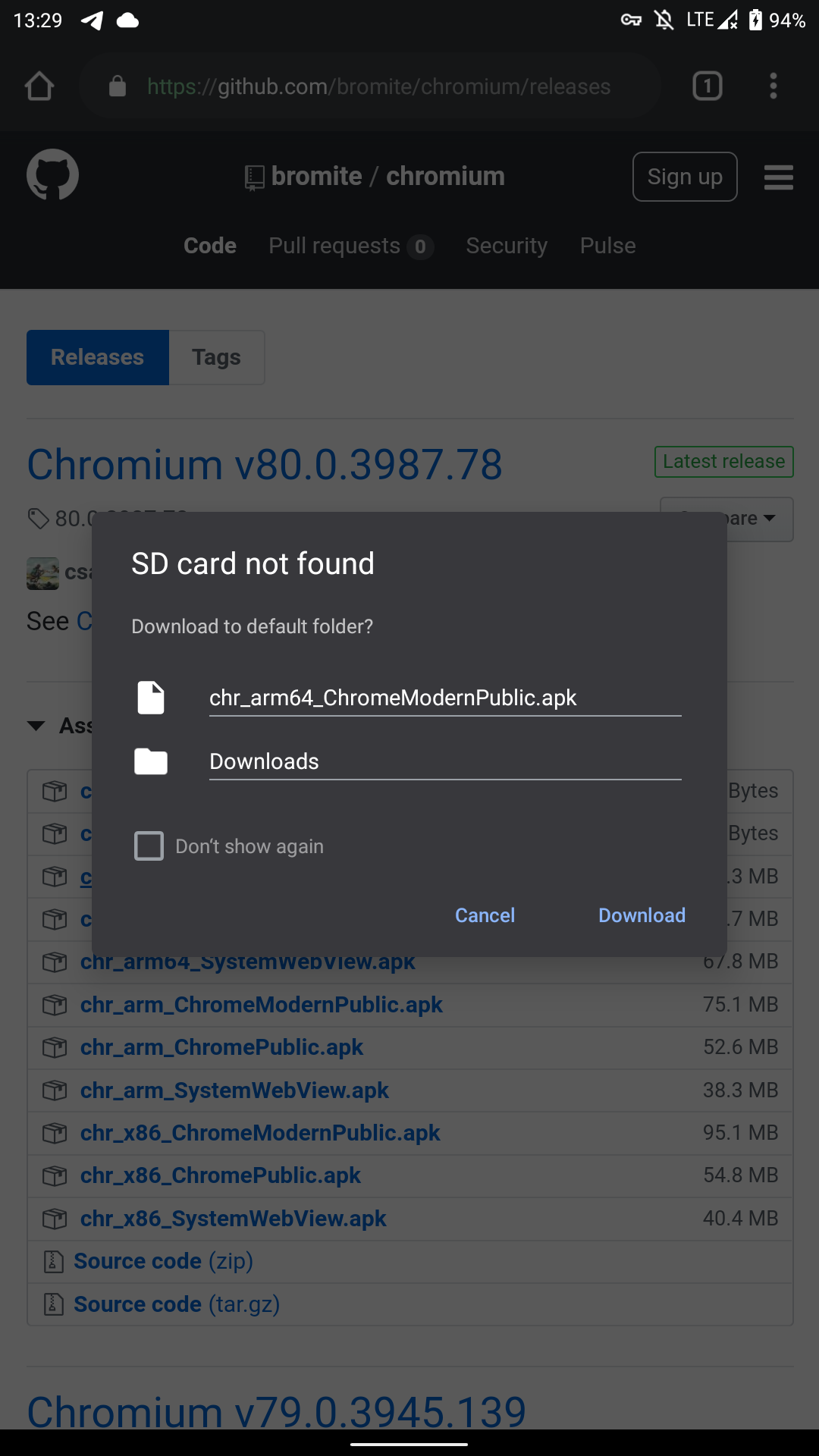
When I try to download something, It shows me a "SD card not found" error message.
Steps to reproduce the bug
Steps to reproduce the behavior:
- Try to download any file
- See error
Expected behavior
The file is downloaded.
Screenshot
 alissonlauffer
All 33 comments
same issue encountered on my pixel 4 xl. using the arm64 build.
 norbertc
on 8 Feb 2020
norbertc
on 8 Feb 2020
Do these devices have an external microSD card?
And also: what happens when clicking Download?
 csagan5
on 9 Feb 2020
csagan5
on 9 Feb 2020
When clicking 'Download' the popup re-opens immediately. You can hammer it. Nothing in logcat.
LOS17.1 (arm-v7)
 BlueMax
on 9 Feb 2020
BlueMax
on 9 Feb 2020
Do these devices have an external microSD card?
And also: what happens when clicking
Download?
Currently I'm using just the internal storage of my smartphone (which is an eMMC storage). The behavior is the same as @BlueMax said.
alissonlauffer
on 9 Feb 2020
currently appears that the problem is only occurring on Android 10.
alissonlauffer
on 9 Feb 2020
logcat when trying to press download repeatedly:
02-10 01:07:32.388  1302  1498 E InputDispatcher: Window handle Window{cc9b457 u0 org.bromite.bromite/com.google.android.apps.chrome.Main} has no registered input channel
02-10 01:07:33.966 22906 26083 D OpenGLRenderer: endAllActiveAnimators on 0x736f369800 (InsetDrawable) with handle 0x737219d140
02-10 01:07:33.970  1302  2007 E InputDispatcher: Window handle Window{fd0b29d u0 org.bromite.bromite/com.google.android.apps.chrome.Main} has no registered input channel
02-10 01:07:33.981  1302  1498 E InputDispatcher: Window handle Window{fd0b29d u0 org.bromite.bromite/com.google.android.apps.chrome.Main} has no registered input channel
02-10 01:07:34.411 22906 26083 D OpenGLRenderer: endAllActiveAnimators on 0x736f441300 (InsetDrawable) with handle 0x73a31a09e0
02-10 01:07:34.416  1302  1498 E InputDispatcher: Window handle Window{f931e10 u0 org.bromite.bromite/com.google.android.apps.chrome.Main} has no registered input channel
02-10 01:07:34.837 22906 26083 D OpenGLRenderer: endAllActiveAnimators on 0x736f51fa00 (InsetDrawable) with handle 0x73721518e0
02-10 01:07:34.841  1302  2007 E InputDispatcher: Window handle Window{cca1a79 u0 org.bromite.bromite/com.google.android.apps.chrome.Main} has no registered input channel
02-10 01:07:34.851  1302  2007 E InputDispatcher: Window handle Window{cca1a79 u0 org.bromite.bromite/com.google.android.apps.chrome.Main} has no registered input channel
02-10 01:07:35.244 22906 26083 D OpenGLRenderer: endAllActiveAnimators on 0x736f5d7100 (InsetDrawable) with handle 0x737219d700
02-10 01:07:35.253  1302  1498 E InputDispatcher: Window handle Window{ad5eb0f u0 org.bromite.bromite/com.google.android.apps.chrome.Main} has no registered input channel
I've rolled back to the last version of 79. Version 80 has a number of new bugs.
 MatthewKelly
on 9 Feb 2020
MatthewKelly
on 9 Feb 2020
@BlueMax @alissonlauffer but does the device have a microSD inserted?
I've rolled back to the last version of 79. Version 80 has a number of new bugs.
That will expose you to security vulnerabilities.
csagan5
on 10 Feb 2020
@BlueMax @alissonlauffer but does the device have a microSD inserted?
No. It's weird because on Chromium build it works fine.
alissonlauffer
on 10 Feb 2020
@alissonlauffer Chromium comes with different defaults; please go to Settings -> Download and disable the prompt for download and see if the problem persists.
On Android 10 the security model is different and that might be part of the issue and the reason why Chromium had made changes to the download functionality.
csagan5
on 10 Feb 2020
@alissonlauffer on the Chromium build with the prompt enabled it will show the same error, there is already an error reported upstream: https://bugs.chromium.org/p/chromium/issues/detail?id=1045642
csagan5
on 10 Feb 2020
Having the same issue with a OnePlus 7 and Android 10, on latest bromite version
 gonrhcp
on 11 Feb 2020
gonrhcp
on 11 Feb 2020
@gonrhcp
go to Settings -> Download and disable the prompt for download and see if the problem persists.
csagan5
on 11 Feb 2020
Mi 9T/K20 with Android 10, same problem and I don't even have SD card. @csagan5 's temp fix is working though.
 tiagossa1
on 11 Feb 2020
tiagossa1
on 11 Feb 2020
@tiagossa1 thanks for reporting; that is not a temp fix though: the feature is broken in Chromium, see https://bugs.chromium.org/p/chromium/issues/detail?id=1045642
So until they fix that bug (if they will) there is nothing else we can do here; if you do not have a microSD card then your best option is to disable the prompt, although that is less secure.
csagan5
on 11 Feb 2020
@csagan5 unfortunately, the prompt is returning automatically. I disabled the "ask to where to save file” in settings but it still prompts when I tried to download some files in apkmirror. upon checking the settings again, it is enabled automatically.
norbertc
on 17 Feb 2020
For me the workaround is not working. But what I noticed is that as soon as the prompt pops up, the download starts and continues unless you press cancel. You can find it at
/data/data/org.bromite.bromite/cache
as a temp file, just copy it to download folder and rename it.
 azakosath
on 18 Feb 2020
azakosath
on 18 Feb 2020
@norbertc @azakosath please ask upstream on the Chromium issue tracker about a solution/workaround for this issue; it has nothing to do with Bromite patches.
csagan5
on 18 Feb 2020
@csagan5 upstream marked it as closed(wontfix) but the following commit relates to this bug.
norbertc
on 18 Feb 2020
@norbertc it is marked as wontfix but a commit has been done for it that looks like a fix? Odd. In this case we will get it in Bromite on next release.
csagan5
on 19 Feb 2020
I have included the upstream fix in latest version 80.0.3987.118, can someone please check if it addresses the issue?
csagan5
on 22 Feb 2020
@csagan5 unfortunately, issue still persist on my pixel 4 xl.
edit: also this issue does not exist in the latest chromium version. i was able to download files using the chromium version.
edit 2: posted too soon. I encountered the issue on another attempt on chromium version.
norbertc
on 22 Feb 2020
Yes, now I realise that the DCHECK removal is pointless for this bug because no DCHECKs run on non-debug builds.
A solution should come from upstream, if you can reproduce it with Chromium then you should report it there.
csagan5
on 22 Feb 2020
Funny fact: Google Chrome is force-disabling the "Ask where to save files" option. Even if enabled, no pop-up is shown.
alissonlauffer
on 22 Feb 2020
Related issue downstream (Vanadium): https://github.com/GrapheneOS/Vanadium/issues/56
@alissonlauffer upstream started affecting the functionality ~8 months ago, see the discussion in https://github.com/GrapheneOS/Vanadium/issues/17
From my understanding this is due to the more strict security settings of Android 10.
Even if enabled, no pop-up is shown.
I added a patch in Bromite back then to fix this issue.
csagan5
on 22 Feb 2020
one workaround that worked for me is to allow bromite to install unknown apps. e.g. app info on bromite -> enable install unknown apps. it results in download error message in the notification but the file was really downloaded.
norbertc
on 23 Feb 2020
one workaround that worked for me is to allow bromite to install unknown apps. e.g. app info on bromite -> enable install unknown apps. it results in download error message in the notification but the file was really downloaded.
This worked for me
 adrkable
on 28 Feb 2020
adrkable
on 28 Feb 2020
one workaround that worked for me is to allow bromite to install unknown apps. e.g. app info on bromite -> enable install unknown apps. it results in download error message in the notification but the file was really downloaded.
Fixed the issue but would like to see a proper fix be implemented
 apptester235
on 29 Feb 2020
apptester235
on 29 Feb 2020
@norbertc @apptester235 you can report your findings upstream on the Chromium issue, it might help finding a solution. I do not know if it is already fixed in v81.
csagan5
on 29 Feb 2020
It is not yet fixed in v81, however Chromium developers are discussing a fix here: https://chromium-review.googlesource.com/c/chromium/src/+/2057806
There are some security concerns mentioned there but there is hope to have this fixed in next release of Bromite.
csagan5
on 4 Mar 2020
The fix has been committed, however it is available in Chromium v82. I will backport it for Bromite v81.
csagan5
on 7 Mar 2020
Please confirm that this issue is solved in latest 81.0.4044.63
csagan5
on 13 Mar 2020
@csagan5 it's now working properly. thanks!
norbertc
on 13 Mar 2020
Related issues
 frankpreel
·
15Comments
frankpreel
·
15Comments
 ghost
·
24Comments
ghost
·
24Comments
 Nickdv9
·
18Comments
Nickdv9
·
18Comments
 andrin55
·
16Comments
andrin55
·
16Comments
 dadosch
·
31Comments
dadosch
·
31Comments
Most helpful comment
one workaround that worked for me is to allow bromite to install unknown apps. e.g. app info on bromite -> enable install unknown apps. it results in download error message in the notification but the file was really downloaded.