Bromite: Video playback broken on Android 10 arm64
Affected device/platforms
| Android OS version | CPU | GPU | disable AImageReader | disable hw video decode | users |
| ------------- | ------------- | ------------- | ------------- | ------------- | ------------- |
| 9 | 64-bit | Adreno 540| ✔ | ✔ | @HigH-HawK |
| 10 | 64bit | Adreno 640 | ? | ✔ | @proteriax @Jaminanim |
| 10 | 64bit | Adreno 540 | ? | ✔ | @kkkrist @l-easwar-akiyama @r3muxd |
| 10 | 64bit | Adreno 630 | ? | ✔ | @ben-page @valpamp |
| 10 | 64bit | ARM Mali-G76 | ✔ | ✔ | @aluo-x |
| 10 | 64bit | Adreno 506 | ? | ✔ | @kyelbek |
Bromite version
Version: 79.0.3945.94
Arch: arm64
Android version: 10.0.3
Device model: OnePlus 7
Is this bug about the SystemWebView?
No
Is the bug reproducible with latest version?
Yes
Can the bug be reproduced with corresponding Chromium version?
No
Is the bug a crash?
No
Describe the bug
- Video playback is broken on Vimeo and other video websites other than YouTube.
- Attempting to play a video on a web page will cause the page to flicker.
Steps to reproduce the bug
Steps to reproduce the behavior:
- Go to https://vimeo.com/channels/staffpicks/323783503
- Click play
Expected behavior
Video starts playing.
Actual behavior
It does not.
Screenshots

 proteriax
All 132 comments
Cannot reproduce this issue. @nikolowry perhaps you can test too?
 csagan5
on 21 Dec 2019
csagan5
on 21 Dec 2019
Can't reproduce this issue either. Video played fine for me.
 subi54
on 21 Dec 2019
subi54
on 21 Dec 2019
@subi54 thanks for testing.
@proteriax any clue in your adb logcat? perhaps your Android OS does not have some codec decoding capability?
csagan5
on 21 Dec 2019
I'm also experiencing this, on Twitter for example. The first couple of frames play (with sound), then the player crashes. On Chrome 79.0.3945.93 the same videos do play without any issues. I'm on a Pixel 2 XL with Android 10 (Dec). Will try to pull a logcat.
 kkkrist
on 21 Dec 2019
kkkrist
on 21 Dec 2019
I'm able to reproduce the issue on YouTube.
As @kkkrist said,
The first couple of frames play (with sound), then the player crashes.
the same videos do play without any issues.
This exactly describes the issue. Pulling a logcat now, few moments please...
 icejr
on 21 Dec 2019
icejr
on 21 Dec 2019
@kkkrist @icejr sure, take your time. I might have reproduced it sometimes as well, but over longer periods of playback time.
I think the issue might have affected v78 as well.
csagan5
on 21 Dec 2019
I'm have this issue for most videos as well. I actually get the Bronite keeps stopping dialog. Although, the Close App button doesn't kill Bromite. It did not happen on the last release. And the sites work in Chrome stable.
This is from a Rooted, but otherwise stock Pixel 3 XL with Android 10 and the December patch.
[logcat_12-21-2019_16-10-15.zip]
 ben-page
on 21 Dec 2019
ben-page
on 21 Dec 2019
Here are some logs:
[removed]
This issue wasn't present in v78 on my end, would've noticed for sure I think.
kkkrist
on 21 Dec 2019
The crash found in your logcat:
[12-21 22:57:27.025 11775:11775 F/DEBUG]*** *** *** *** *** *** *** *** *** *** *** *** *** *** *** ***
[12-21 22:57:27.026 11775:11775 F/DEBUG]Build fingerprint: 'google/taimen/taimen:10/QQ1A.191205.008/5974827:user/release-keys'
[12-21 22:57:27.026 11775:11775 F/DEBUG]Revision: 'rev_10'
[12-21 22:57:27.026 11775:11775 F/DEBUG]ABI: 'arm64'
[12-21 22:57:27.027 11775:11775 F/DEBUG]Timestamp: 2019-12-21 22:57:27+0100
[12-21 22:57:27.027 11775:11775 F/DEBUG]pid: 11707, tid: 11760, name: ImageReader-1x1  >>> org.bromite.bromite:privileged_process0 <<<
[12-21 22:57:27.027 11775:11775 F/DEBUG]uid: 10292
[12-21 22:57:27.027 11775:11775 F/DEBUG]signal 6 (SIGABRT), code -6 (SI_TKILL), fault addr --------
[12-21 22:57:27.027 11775:11775 F/DEBUG]    x0  0000000000000000  x1  0000000000002df0  x2  0000000000000006  x3  00000070ecefe980
[12-21 22:57:27.027 11775:11775 F/DEBUG]    x4  802322110c49122b  x5  802322110c49122b  x6  802322110c49122b  x7  42606863644c3fff
[12-21 22:57:27.027 11775:11775 F/DEBUG]    x8  00000000000000f0  x9  000000717e9384e0  x10 0000000000000000  x11 0000000000000001
[12-21 22:57:27.027 11775:11775 F/DEBUG]    x12 000000000001ac70  x13 0000000000000002  x14 0000000000000000  x15 0000007180af3020
[12-21 22:57:27.027 11775:11775 F/DEBUG]    x16 000000717ea048c0  x17 000000717e9e2060  x18 00000070a06ca000  x19 00000000000000ac
[12-21 22:57:27.027 11775:11775 F/DEBUG]    x20 0000000000002dbb  x21 00000000000000b2  x22 0000000000002df0  x23 00000000ffffffff
[12-21 22:57:27.027 11775:11775 F/DEBUG]    x24 00000070eceff020  x25 00000070ecefed50  x26 0000007180860138  x27 00000000000fd000
[12-21 22:57:27.027 11775:11775 F/DEBUG]    x28 0000007089252000  x29 00000070ecefea30
[12-21 22:57:27.027 11775:11775 F/DEBUG]    sp  00000070ecefe960  lr  000000717e996170  pc  000000717e9961a0
[12-21 22:57:27.040 11775:11775 F/DEBUG]
backtrace:
[12-21 22:57:27.040 11775:11775 F/DEBUG]      #00 pc 00000000000821a0  /apex/com.android.runtime/lib64/bionic/libc.so (abort+176) (BuildId: b58d049709674405423a8d8de1a37f56)
[12-21 22:57:27.041 11775:11775 F/DEBUG]      #01 pc 00000000000186d4  /system/lib64/libmediandk.so (__cfi_check_fail+24) (BuildId: 070ca91395586cffc473ba31eee93910)
[12-21 22:57:27.041 11775:11775 F/DEBUG]      #02 pc 000000000001ade4  /system/lib64/libmediandk.so (__cfi_check+7652) (BuildId: 070ca91395586cffc473ba31eee93910)
[12-21 22:57:27.041 11775:11775 F/DEBUG]      #03 pc 0000000000046ef4  /apex/com.android.runtime/bin/linker64 (__dl__ZN15CFIShadowWriter7CfiFailEmPvS0_S0_+124) (BuildId: 52561db5295b9b5f246e5c95d06a6b3c)
[12-21 22:57:27.041 11775:11775 F/DEBUG]      #04 pc 0000000000001160  /apex/com.android.runtime/lib64/bionic/libdl.so (__cfi_slowpath+64) (BuildId: 12e0c86c59cc11545d28655d0e51c65a)
[12-21 22:57:27.041 11775:11775 F/DEBUG]      #05 pc 0000000000029f2c  /system/lib64/libmediandk.so (AImageReader::CallbackHandler::onMessageReceived(android::sp<android::AMessage> const&)+404) (BuildId: 070ca91395586cffc473ba31eee93910)
[12-21 22:57:27.041 11775:11775 F/DEBUG]      #06 pc 0000000000016960  /system/lib64/libstagefright_foundation.so (android::AHandler::deliverMessage(android::sp<android::AMessage> const&)+48) (BuildId: c58afc2199618f4e88ce8d6482bcc221)
[12-21 22:57:27.041 11775:11775 F/DEBUG]      #07 pc 000000000001a4a4  /system/lib64/libstagefright_foundation.so (android::AMessage::deliver()+100) (BuildId: c58afc2199618f4e88ce8d6482bcc221)
[12-21 22:57:27.041 11775:11775 F/DEBUG]      #08 pc 00000000000173cc  /system/lib64/libstagefright_foundation.so (android::ALooper::loop()+564) (BuildId: c58afc2199618f4e88ce8d6482bcc221)
[12-21 22:57:27.041 11775:11775 F/DEBUG]      #09 pc 00000000000137c0  /system/lib64/libutils.so (android::Thread::_threadLoop(void*)+312) (BuildId: 1a9baf080e66cccc6106194a0c4147f8)
[12-21 22:57:27.041 11775:11775 F/DEBUG]      #10 pc 00000000000c1794  /system/lib64/libandroid_runtime.so (android::AndroidRuntime::javaThreadShell(void*)+140) (BuildId: de057b63e21f6c0880ad2d2827b8a843)
[12-21 22:57:27.041 11775:11775 F/DEBUG]      #11 pc 00000000000e2364  /apex/com.android.runtime/lib64/bionic/libc.so (__pthread_start(void*)+36) (BuildId: b58d049709674405423a8d8de1a37f56)
[12-21 22:57:27.041 11775:11775 F/DEBUG]      #12 pc 0000000000083d98  /apex/com.android.runtime/lib64/bionic/libc.so (__start_thread+64) (BuildId: b58d049709674405423a8d8de1a37f56)
It is a stagefright/ImageReader crash, and I think it's already reported upstream: https://bugs.chromium.org/p/chromium/issues/detail?id=977583
Can the bug be reproduced with corresponding Chromium version?
No
@proteriax the bug can most likely be reproduced with Chromium, you could not test with the corresponding version because it was/is not yet released.
csagan5
on 21 Dec 2019
There is already a patch in Bromite to counteract the buggy AImageReader in Android 10, I will add in next release the additional workaround specified in the upstream issue; please follow the upstream issue for the proper solution.
csagan5
on 21 Dec 2019
Thanks for having looked into it! The Chrome version I mentioned above and which plays videos just fine is indeed 32-bit (came pre-installed and was updated via Play Store), the Bromite version I was using is 64-bit.
kkkrist
on 21 Dec 2019
@kkkrist we use Chromium to verify whether bugs like these are from upstream or from Bromite patches, unfortunately the Chromium version matching to current Bromite version is not available at the moment but will be in the next days.
If upstream does not test/release/maintain the 64-bit version we might have to drop it too, although there are some advantages in using it.
csagan5
on 22 Dec 2019
@csagan5 Thank you. I didn’t notice the latest Chromium version does not match.
proteriax
on 22 Dec 2019
This is still happening on 79.0.3945.100. For me, I just open a YouTube link, sometime it plays for 1-2 seconds, then refreshes the page and plays for another 1-2 secs, then it doesn't play at all.
Sometimes, I'm lucky and after the first crash, it loads the video just fine.
 tiagossa1
on 27 Dec 2019
tiagossa1
on 27 Dec 2019
@tiagossa1 @proteriax @kkkrist @luisnogueira @godwintgn can you please test with the corresponding Chromium version 79.0.3945.100?
csagan5
on 28 Dec 2019
Yes, it's still crashing on Twitter videos with the 64-bit version, whereas 32-bit works. Same with Chromium 79.0.3945.100.
kkkrist
on 28 Dec 2019
@kkkrist thanks for testing. Since it is happening with the corresponding Chromium version then the best way to get this fixed is to ask about it upstream (no need to mention Bromite, the Chromium issue tracker is about Chromium).
The fixes reported in https://bugs.chromium.org/p/chromium/issues/detail?id=977583 were not effective as they are already in place for current version.
csagan5
on 28 Dec 2019
I have read that #disable-accelerated-video-decode can mitigate this issue on arm64.
csagan5
on 30 Dec 2019
Just wanted to add some more context to this issue, I cannot replicate it but I believe that's due to being on Android 9 (Lineageos 16 with MicroG) -- so this seems to be isolated to Android 10.
 nikolowry
on 30 Dec 2019
nikolowry
on 30 Dec 2019
@csagan5 That fixes the problem. Looks like there's no force closing disabling Accelerated Video Decode. It's working just fine.
tiagossa1
on 30 Dec 2019
@nikolowry the issue can be replicated on Android 9 without Bromite's patch; for Android 10 the patch is instead ineffective.
It seems to be a bug within Android stagefright itself, so we have to wait upstream on this.
csagan5
on 31 Dec 2019
Same problem on *107 latest version.....
 yasars
on 1 Jan 2020
yasars
on 1 Jan 2020
I have read that
#disable-accelerated-video-decodecan mitigate this issue on arm64.
Can confirm that this solves the issue in Android 10 (December Security Patch).
Device - Oneplus 5T
 l-easwar-akiyama
on 4 Jan 2020
l-easwar-akiyama
on 4 Jan 2020
Since latest version 79.0.3945.111 the video decoding acceleration is automatically disabled on Android 10+ and arm64; can someone please confirm that there are no crashes even after setting #disable-accelerated-video-decode to default?
csagan5
on 8 Jan 2020
Now no crashes but i can't play videos on facebook .. after click play its black .. i have set enable and disable the option same thing
yasars
on 8 Jan 2020
@csagan5
So I have been running Android 10 for around 2 months now, and have not experienced any crashes using Bromite for ARMv8 in the three weeks I have been using v79, both on youtube and on facebook. For youtube, I seem to have no trouble playing 4K video.
However I am using a device with a Huawei Kirin 980 chipset which also had Mali drivers updated to 18.0.01rel0 during the update to Android 10. It is possible that this is an issue isolated to Qualcomm devices.
Edit: I would be curious if those with exynos devices on Android 10 can comment as well, since both Exynos and Kirin use Mali GPUs
 aluo-x
on 9 Jan 2020
aluo-x
on 9 Jan 2020
Also the recent patch released with 79.0.3945.111 has made it impossible to re-enable hardware accelerated video decode on Android 10, 64 bit builds. Would be great if it could be modified so that we could re-enable if we are not experiencing crashes.
aluo-x
on 9 Jan 2020
I would be curious if those with exynos devices on Android 10 can comment as well, since both Exynos and Kirin use Mali GPUs
@aluo-x that's an interesting theory, would be nice to verify it.
the recent patch released with 79.0.3945.111 has made it impossible to re-enable hardware accelerated video decode on Android 10, 64 bit builds.
That is correct, as I based my rationale on two facts:
- upstream is eventually going to fix the problem, and then the patch can be removed
- there are no Android 10 arm64 devices unaffected by the crash, since it is a bug in the Android runtime
Apparently I was incorrect on (2)? I would be fine to make a new flag for this, but first: can we verify that hardware acceleration is being disabled on Android 10 arm64 devices with 79.0.3945.111?
@aluo-x also, you could ask upstream about the correlation with GPU type? I always assume that there are 100s more users/developers upstream which can confirm/deny
csagan5
on 9 Jan 2020
I have installes on android 10 the latest from 3 hour arm version and videos working ... Will not test the arm64 version :(
yasars
on 11 Jan 2020
@l-easwar-akiyama @tiagossa1 @kkkrist @proteriax can you please verify that on Android 10 with arm64 changing the value of #disable-accelerated-video-decode flag does not lead to any crash with 79.0.3945.111 or superior?
csagan5
on 12 Jan 2020
I just did some testing on my Pixel 2 XL (Android 10, January patch) with Twitter videos and Bromite 64-bit.
- 79.0.3945.107 64-bit crashes w/ hardware-accelerated video decode enabled, doesn't crash when disabled
- 79.0.3945.111 64-bit does not crash at all, regardless whether hardware-accelerated video decode is enabled or disabled
- 79.0.3945.123 64-bit does not crash at all, regardless whether hardware-accelerated video decode is enabled or disabled
Does this make any sense? Is the "#disable-accelerated-video-decode" flag doing anything at all in version 79.0.3945.111 and up?
kkkrist
on 12 Jan 2020
Does this make any sense? Is the "#disable-accelerated-video-decode" flag doing anything at all in version 79.0.3945.111 and up?
@kkkrist thanks for testing; that is correct, the flag is uneffective since 79.0.3945.111 but only for devices on Android 10 and running the arm64 version. There is a hard override, so to speak, which will be kept until upstream bug https://bugs.chromium.org/p/chromium/issues/detail?id=977583 is closed.
@aluo-x I think it is a good compromise to keep the flag off until upstream addresses the issue; someone could help them update the GPU blacklist by adding specific models, if needed.
csagan5
on 12 Jan 2020
I was actually able to get HW acceleration to work on sargo and can no longer re-produce crashes.
Still investigating what the actual problem is.
 renlord
on 14 Jan 2020
renlord
on 14 Jan 2020
@renlord As in chrome://gpu shows HW acceleration is enabled?
aluo-x
on 14 Jan 2020
@aluo-x
Have a look at these:
https://github.com/GrapheneOS/Vanadium/pull/52
https://github.com/GrapheneOS/Vanadium/pull/53
renlord
on 14 Jan 2020
@renlord can you reproduce https://github.com/bromite/bromite/issues/467?
As per the chrome://gpu outputs, thanks. I see the diff is:
--- crashing.txt    2020-01-17 00:27:37.885246883 +0100
+++ fixed.txt   2020-01-17 00:27:55.605247074 +0100
@@ -75,16 +75,16 @@
 Raster is using a single thread.
 Disabled Features: multiple_raster_threads
 Version Information
-Data exported  2020-01-15T03:06:27.187Z
-Chrome version Chrome/79.0.3945.93
+Data exported  2020-01-15T03:07:46.881Z
+Chrome version Chrome/79.0.3945.116
 Operating system   Android 10
-Software rendering list URL    https://chromium.googlesource.com/chromium/src/+/5cacf84ee348e7ccedc2330d2520f9f342b3cfec/gpu/config/software_rendering_list.json
-Driver bug list URL    https://chromium.googlesource.com/chromium/src/+/5cacf84ee348e7ccedc2330d2520f9f342b3cfec/gpu/config/gpu_driver_bug_list.json
+Software rendering list URL    https://chromium.googlesource.com/chromium/src/+/64953db9f4468d309c976ee1823310d82c7ca6af/gpu/config/software_rendering_list.json
+Driver bug list URL    https://chromium.googlesource.com/chromium/src/+/64953db9f4468d309c976ee1823310d82c7ca6af/gpu/config/gpu_driver_bug_list.json
 ANGLE commit id    48aa52f7305a
-2D graphics backend    Skia/79 64f0af0f6548f7b8c45e7e3b2630e34deb04c1aa
+2D graphics backend    Skia/79 104d6dd34927d32b92c5f5b2a671b49fbe079080
 Command Line   --use-mobile-user-agent --top-controls-show-threshold=0.5 --top-controls-hide-threshold=0.5 --use-mobile-user-agent --enable-viewport --validate-input-event-stream --enable-longpress-drag-selection --touch-selection-strategy=direction --main-frame-resizes-are-orientation-changes --disable-composited-antialiasing --enable-dom-distiller --flag-switches-begin --flag-switches-end
 Driver Information
-Initialization time    189
+Initialization time    156
 In-process GPU false
 Passthrough Command Decoder    false
 Sandboxed  false
If we look at https://github.com/chromium/chromium/compare/5cacf84ee348e7ccedc2330d2520f9f342b3cfec...64953db9f4468d309c976ee1823310d82c7ca6af there are no differences for software_rendering_list.json and gpu_driver_bug_list.json and the Skia diff is also inconsequential.
Comparing the two Chromium tags gives a clue: https://github.com/chromium/chromium/compare/79.0.3945.93...79.0.3945.116
There is a bugfix for https://bugs.chromium.org/p/chromium/issues/detail?id=1027766 through commit https://github.com/chromium/chromium/commit/25607156d15800712a7056e43cd343049ef1af1a
I will remove in Bromite the hard-disable for the hardware acceleration. @renlord it is not clear to me however if the workaround from https://bugs.chromium.org/p/chromium/issues/detail?id=977583 is still necessary, as that has/had a larger impact (not only Android10/arm64).
Luckily we can test that using the corresponding Chromium builds, which have no such patches.
Can affected users here (not using arm64) please verify whether latest Chromium build is still affected by the crash bug?
csagan5
on 17 Jan 2020
This problem resurfaced after the last update.
proteriax
on 28 Jan 2020
@proteriax the hard-coded #disable-accelerated-video-decode has been removed because the crash affects only specific hardware, like yours. You can set the flag manually (and remember to remove it once upstream fixes the bug, if ever), or switch to the arm version (losing all the data).
@renlord removing the hard-coded flag causes this type of issues as you can see, so the crash does not seem solved for all GPU models. Also in this comment I was asking to test with Bromite's Chromium build to try to figure out if the upstream bugfix worked only for your GPU model.
csagan5
on 29 Jan 2020
With release 80, both GitHub.com/bromite/bromite and GitHub.com/bromite/chromium are crashing on video playback on a Mali arm64 device.
aluo-x
on 8 Feb 2020
@aluo-x I assume in both cases with the video decoding flag (or other related) unchanged?
csagan5
on 9 Feb 2020
That's correct. Both are new installs. Disabling hardware video decode "fixes" it. For reference, the 32 bit chromium build from the official sources work. Haven't tested the 32 bit bromite builds.
I think for now nothing should be done, it's still possibly working for certain hardware configurations, and hopefully most bromite users know about chrome:flags.
Edit: I've rolled back to the latest M79 bromite, and video decode works with hardware acceleration on an ARM64 build.
aluo-x
on 9 Feb 2020
I've rolled back to the latest M79 bromite, and video decode works with hardware acceleration on an ARM64 build.
@aluo-x thanks for your tests; this is known but supposedly due to different Android APIs used by v79?
csagan5
on 10 Feb 2020
So tested more thoroughly today, with hardware video decode enabled (verified in chrome://gpu):
M79 latest 32bit bromite: no crash
M79 latest 64bit bromite: no crash
M80 latest 32bit chromium (official): no crash
M80 latest 32bit bromite: no crash
M80 latest 64bit chromium (bromite): crash
M80 latest 64bit bromite: crash
This is on Mali GPU with Android 10
aluo-x
on 11 Feb 2020
@aluo-x if we could find out what changes between M79 and M80 specifically for hw-accelerated video decode, we could try a fix. But I am afraid upstream is much better equipped for this task.
According to last comment on the upstream issue they might be tracking it for a fix in M81.
csagan5
on 11 Feb 2020
Just my 2¢: until Chrome officially ships 64bit builds, there is a high probability of this type of upstream issue. It might be smart for a Bromite to recommend the 32-bit build. And create a separate F-Droid repository, since F-Droid tries to "update" you to the 64-bit build.
ben-page
on 11 Feb 2020
So strictly speaking there is a fix for chrome M80.
However I think it would be more reasonable for this to be fixed upstream and NOT patching this in Bromite, it is simply not realistic for @csagan5 to constantly monitor and patch these breakages which are ultimately chrome bugs.
aluo-x
on 12 Feb 2020
So strictly speaking there is a fix for chrome M80.
@aluo-x that fix is already present in Bromite, see https://github.com/bromite/bromite/blob/80.0.3987.78/build/patches/Revert-Merge-to-M78-Enable-AImageReader-by-default.patch
It is evidently not sufficient.
until Chrome officially ships 64bit builds, there is a high probability of this type of upstream issue. It might be smart for a Bromite to recommend the 32-bit build. And create separate a separate F-Droid repository, since F-Droid tries to "update" you to the 64-bit build.
@ben-page the F-Droid repository is Bromite's own one, not F-Droid's, so it can be changed as needed. It is true that 64-bit builds are officially unsupported by upstream (and thus not tested and subject to breakage), but they have worked until now so there is a lot of users which have this installed.
I am afraid that proposing only the 32bit version would force the 64bit version users to have the data wiped, is that correct?
Another course of action would be to find the corresponding Android bug and check whether it is a security bug or not; usually security bugs are fixed faster. See for example https://github.com/GrapheneOS/platform_frameworks_av/commit/10af999ca8a27cd7ad6f82fed7139f2713939f4c by @thestinger
csagan5
on 12 Feb 2020
@nikolowry if you have time you could try building M80 Chromium or Bromite for arm64 with is_cfi=false, just in case it works around the crash (should not be the case).
csagan5
on 12 Feb 2020
I am afraid that proposing only the 32bit version would force the 64bit version users to have the data wiped, is that correct?
With Titanium Backup (Pro) on a rooted device, it's possible to restore just the data portion of the app backup after having switched from 64bit to 32bit and vice versa. That's how I did my testing.
kkkrist
on 12 Feb 2020
@csagan5 I could try at some point this week, but I don't experience this issue on the arm64 builds running on an Essential PH-1 with LineageOS 16 with MicroG.
I do have some GPU related flags set that differ from the the defaults though. They are:
#ignore-gpu-blacklist: Enabled#disable-webgl: Disabled#enable-gpu-rasterization: Enabled#enable-oop-rasterization: Enabled#enable-zero-copy: Enabled
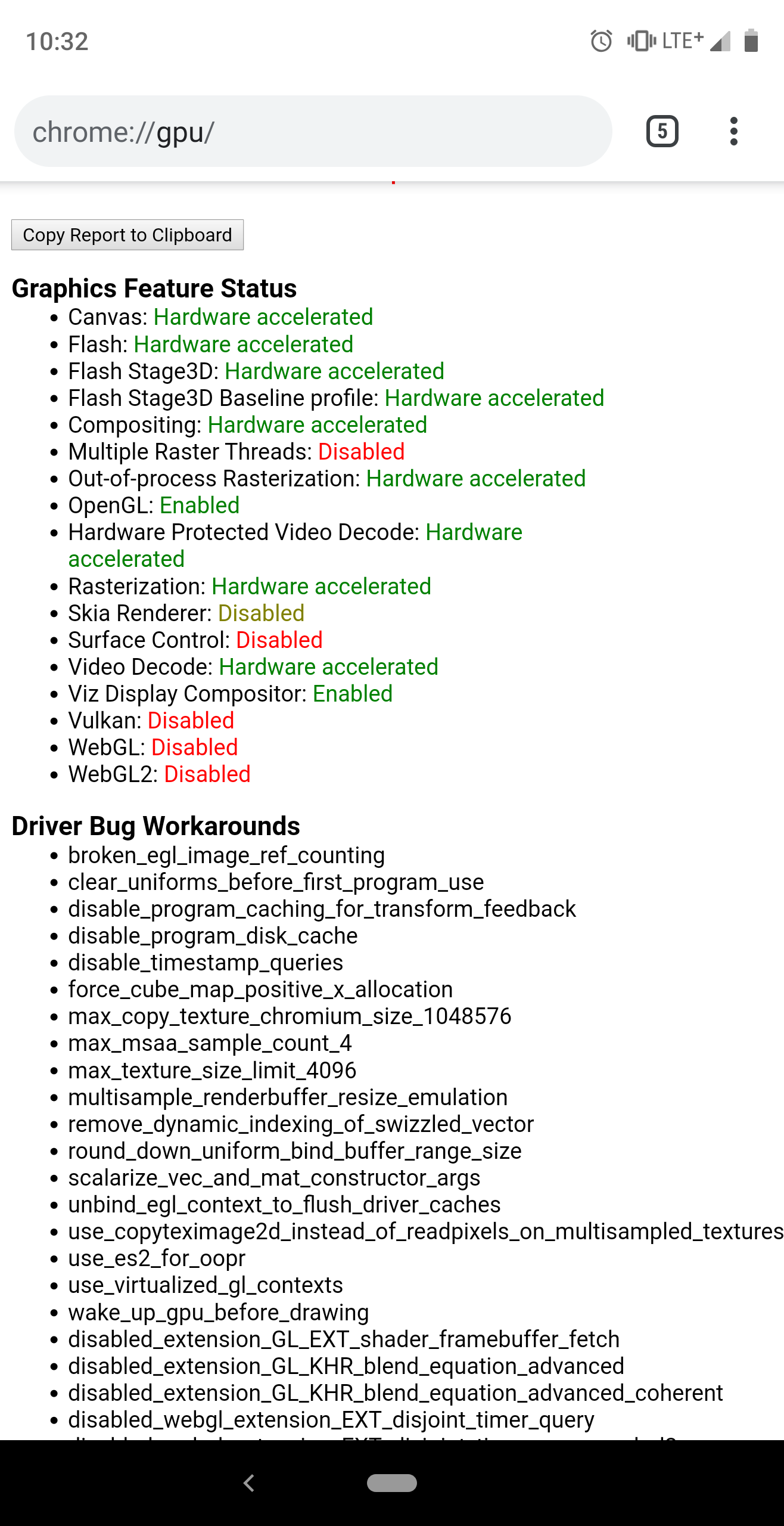
Here's the report and a screenshot from chrome://gpu:
Data exported | 2020-02-12T15:22:50.167Z
-- | --
Chrome version | Chrome/79.0.3945.136
Operating system | Android 9
Software rendering list URL | https://chromium.9oo91esource.qjz9zk/chromium/src/+/cb5aa81cb0a3a2c674b93bc7ffb34a86cd3b4802/gpu/config/software_rendering_list.json
Driver bug list URL | https://chromium.9oo91esource.qjz9zk/chromium/src/+/cb5aa81cb0a3a2c674b93bc7ffb34a86cd3b4802/gpu/config/gpu_driver_bug_list.json
ANGLE commit id | 362168eb695d
2D graphics backend | Skia/80 97c9a95908bc8c7a6794259b35f366a3291e2d0f
Command Line | --use-mobile-user-agent --top-controls-show-threshold=0.5 --top-controls-hide-threshold=0.5 --use-mobile-user-agent --enable-viewport --validate-input-event-stream --enable-longpress-drag-selection --touch-selection-strategy=direction --main-frame-resizes-are-orientation-changes --disable-composited-antialiasing --enable-dom-distiller --flag-switches-begin --disable-webgl --enable-gpu-rasterization --enable-oop-rasterization --enable-zero-copy --ignore-gpu-blacklist --max-connections-per-host=15 --enable-features=LazyFrameLoading,LazyImageLoading,TabGridLayoutAndroid --flag-switches-end
nikolowry
on 12 Feb 2020
The issue is a CFI violation caught inside the AOSP code, rather than Chromium. However, it's currently unknown if this is an AOSP bug or a Chromium bug. It could be that Chromium is passing in a function pointer with an invalid type. It's known exactly where the call to the function pointer triggering the CFI violation occurs, but we haven't yet identified the function being called and how it violates CFI. It's a bit painful with how it crosses the boundaries of these programs.
https://github.com/GrapheneOS/platform_frameworks_av/commit/7f7b234d7c05c3bdb304d886a317fd895e18021e temporarily disables CFI enforcement for this function while we're working on this. It's something that we could really use help with if anyone has low level programming experience and time available to debug this. I personally don't have the time to spare for it, and it's just one of a dozen issues like this where I've had to temporarily work around it while waiting for help.
 thestinger
on 12 Feb 2020
thestinger
on 12 Feb 2020
I could try at some point this week
@nikolowry no worries, I am going to try myself. Can you start to revert those flags to default until you can reproduce the crash?
csagan5
on 13 Feb 2020
@csagan5 set gpu related flags to default, disabled "Force GPU rendering" in System's developer options and can't replicate on Android 9.0 with the original Vimeo link.
I see you updated the title to include "Android 10", but let me know if I'm missing something to replicate on 9
nikolowry
on 13 Feb 2020
@nikolowry as far as I am aware the current patch in Bromite covers Android < 10 so the upstream issue is limited only to Android 10
csagan5
on 13 Feb 2020
@csagan5 gotcha, I'll circle back if this is still an issue after Lineage 17.1 is released
nikolowry
on 13 Feb 2020
I have built the latest version of Bromite with is_cfi=false, users which are experiencing the crash please revert the #disable-accelerated-video-decode flag to default and test with this version: https://fdroid.bromite.org/bromite/rel_80.0.3987.95_arm64_ChromeModernPublic_nocfi.apk
csagan5
on 14 Feb 2020
Just tested the nocfi version, Android 10, hardware video decode enabled. Crashes with the same error message as before.
GpuProcessHost: The GPU process was protected from out of memory kill
aluo-x
on 14 Feb 2020
I think it's entirely an AOSP bug and the reason it's not triggered by upstream is that they don't use 64-bit builds. Disabling CFI in Chromium would likely work around it if the function pointer at fault was in Chromium but it seems that it's an AOSP codebase function pointer. The problem may be more subtle than just a wrongly typed function pointer triggering a CFI violation which would explain why we've had trouble debugging it.
thestinger
on 15 Feb 2020
@aluo-x can you share the crash? just to look up if something changed compared to the CFI one
@thestinger if I were to look in Chromium codebase to see what changed between v79 and v80 regarding this bug, how do you think I could limit the scope of my search?
csagan5
on 15 Feb 2020
@csagan5 will do. But earliest I can pull it will probably be on the 20th. Super busy before then.
aluo-x
on 15 Feb 2020
The actual upstream issue might be: https://bugs.chromium.org/p/chromium/issues/detail?id=838725
@aluo-x can you please also test if enabling the flag #enable-oop-rasterization has an effect? It was previously enabled by default in v79, now disabled instead.
csagan5
on 15 Feb 2020
@csagan5 seems to crash with oop enabled or disabled in flags (and restarting chrome)
aluo-x
on 15 Feb 2020
@aluo-x thanks for your tests; in case you or someone else wants to continue tests on Android10 I have created another version which reverts some changes between v79 and v80 regarding AImageReader: https://fdroid.bromite.org/bromite/rel_80.0.3987.95_arm64_ChromeModernPublic_nocfi_bugbl.apk
Please report back if this fixes the crash or not.
Patch here: https://github.com/bromite/bromite/pull/491
csagan5
on 15 Feb 2020
@csagan5 this does the trick! No more crashing with hardware video decode
aluo-x
on 15 Feb 2020
@aluo-x great! Thanks for testing. I found the solution by looking at a diff between v79 and v80, the patch proposed by upstream does not fully disable AImageReader while restoring the v79 GPU blacklist for it does the trick.
I will release the fix for next version of Bromite; @thestinger you can pick the patch for Vanadium too.
csagan5
on 15 Feb 2020
@aluo-x thanks for your tests; in case you or someone else wants to continue tests on Android10 I have created another version which reverts some changes between v79 and v80 regarding
AImageReader: https://fdroid.bromite.org/bromite/rel_80.0.3987.95_arm64_ChromeModernPublic_nocfi_bugbl.apkPlease report back if this fixes the crash or not.
Patch here: #491
Doesn't work for me on Android 10 Stock ZTE axon ... Bromite is broken when playing facebook videos too... After installing the patched apk
yasars
on 15 Feb 2020
@yasars please report the crash found with adb logcat and make sure it's generated right after the crash.
csagan5
on 15 Feb 2020
@csagan5 I think it's ultimately an AOSP bug and what's happening with Chromium is that they're increasing their use of AImageReader and no longer have a way to avoid it.
thestinger
on 15 Feb 2020
I think it's ultimately an AOSP bug and what's happening with Chromium is that they're increasing their use of AImageReader and no longer have a way to avoid it.
@thestinger the disable_aimagereader GPU workaround is still supported: https://github.com/chromium/chromium/search?q=disable_aimagereader&type=Code
The only changes related to AImageReader between v79 and v80 were about that workaround for ARM devices, so I conclude it might happen in the future but we are not there yet; if AImageReader was partially disabled by disable_aimagereader then the other devices with the GPUs that are marked for the workaround would also experience crashes.
The ARM blacklist flag was introduced to fix these two upstream issues:
- https://bugs.chromium.org/p/chromium/issues/detail?id=951832
- https://bugs.chromium.org/p/chromium/issues/detail?id=838725
In the second one it is better explained the strategy behind these changes (it also explains that AImageReader is dynamically loaded to be backwards-compatible).
csagan5
on 15 Feb 2020
It turns out (#497) that what fixes the crash on Android 10 will introduce it for Android 9, although I could not yet see a log. @nikolowry maybe you can submit that if you can reproduce it on 9
csagan5
on 19 Feb 2020
The issue on Android9 is due to the disable_aimagereader workaround not being enabled. In next release I will make it enabled for both Android9 and Android10, for ARM64 CPUs.
This should hopefully be the best compromise until the NDK bug is fixed.
csagan5
on 20 Feb 2020
I installed the latest version (80.0.3987.109) on Android 9 and am encountering the app crashes now, when searching for something on Google, which shows Youtube videos. It starts like a small preview (a few picture frames) of that video and than the crash popup comes up. When I click on "Close app" it just closes the popup but leaves the app open.
I attached the phone to my laptop and tried running logcat while trying to reproduce it, hopefully this logcat output is of any help:
--------- beginning of crash
02-21 22:32:26.065  5895  6029 F libc    : Fatal signal 6 (SIGABRT), code -6 (SI_TKILL) in tid 6029 (ImageReader-1x1), pid 5895 (ileged_process0)
02-21 22:32:26.149  6042  6042 F DEBUG   : *** *** *** *** *** *** *** *** *** *** *** *** *** *** *** ***
02-21 22:32:26.149  6042  6042 F DEBUG   : Build fingerprint: 'htc/ocmdugl_00401/htc_ocmdugl:9/PPRL.190405.003/1088049.2:user/release-keys'
02-21 22:32:26.149  6042  6042 F DEBUG   : Revision: '0'
02-21 22:32:26.149  6042  6042 F DEBUG   : ABI: 'arm64'
02-21 22:32:26.149  6042  6042 F DEBUG   : pid: 5895, tid: 6029, name: ImageReader-1x1  >>> org.bromite.bromite:privileged_process0 <<<
02-21 22:32:26.149  6042  6042 F DEBUG   : signal 6 (SIGABRT), code -6 (SI_TKILL), fault addr --------
02-21 22:32:26.149  6042  6042 F DEBUG   :     x0  0000000000000000  x1  000000000000178d  x2  0000000000000006  x3  0000000000000008
02-21 22:32:26.149  6042  6042 F DEBUG   :     x4  612d66716e2e6f6f  x5  612d66716e2e6f6f  x6  612d66716e2e6f6f  x7  7f7f7f7f7f7f7f7f
02-21 22:32:26.149  6042  6042 F DEBUG   :     x8  0000000000000083  x9  1a26e64784f6a511  x10 0000000000000000  x11 fffffffc7ffffbdf
02-21 22:32:26.150  6042  6042 F DEBUG   :     x12 0000000000000001  x13 000000005e504c69  x14 0039ef1efb72b6e2  x15 00007df16a1486fd
02-21 22:32:26.150  6042  6042 F DEBUG   :     x16 0000007a698722a8  x17 0000007a697b0250  x18 0000000000000001  x19 0000000000001707
02-21 22:32:26.150  6042  6042 F DEBUG   :     x20 000000000000178d  x21 649aaa0af867eead  x22 0000007a6a6dd240  x23 0000007a65c73960
02-21 22:32:26.150  6042  6042 F DEBUG   :     x24 0000007a65c74410  x25 00000079c8802000  x26 00000079cb3a9588  x27 0000000000000000
02-21 22:32:26.150  6042  6042 F DEBUG   :     x28 00000079e13fb350  x29 00000079c88ff140
02-21 22:32:26.150  6042  6042 F DEBUG   :     sp  00000079c88ff100  lr  0000007a697a4d7c  pc  0000007a697a4da4
02-21 22:32:26.164  6042  6042 F DEBUG   :
02-21 22:32:26.164  6042  6042 F DEBUG   : backtrace:
02-21 22:32:26.164  6042  6042 F DEBUG   :     #00 pc 0000000000021da4  /system/lib64/libc.so (abort+116)
02-21 22:32:26.164  6042  6042 F DEBUG   :     #01 pc 000000000001dac8  /system/lib64/libclang_rt.ubsan_standalone-aarch64-android.so (__sanitizer::Abort()+56)
02-21 22:32:26.164  6042  6042 F DEBUG   :     #02 pc 000000000001b688  /system/lib64/libclang_rt.ubsan_standalone-aarch64-android.so (__sanitizer::Die()+164)
02-21 22:32:26.164  6042  6042 F DEBUG   :     #03 pc 0000000000026b6c  /system/lib64/libclang_rt.ubsan_standalone-aarch64-android.so (__ubsan_handle_cfi_check_fail_abort+68)
02-21 22:32:26.164  6042  6042 F DEBUG   :     #04 pc 0000000000014084  /system/lib64/libmediandk.so (__cfi_check_fail+108)
02-21 22:32:26.164  6042  6042 F DEBUG   :     #05 pc 000000000001ac14  /system/lib64/libmediandk.so (__cfi_check+7188)
02-21 22:32:26.164  6042  6042 F DEBUG   :     #06 pc 00000000000224a4  /system/bin/linker64 (__dl__ZN15CFIShadowWriter7CfiFailEmPvS0_S0_+128)
02-21 22:32:26.164  6042  6042 F DEBUG   :     #07 pc 0000000000001140  /system/lib64/libdl.so (__cfi_slowpath_diag+64)
02-21 22:32:26.164  6042  6042 F DEBUG   :     #08 pc 0000000000026fd8  /system/lib64/libmediandk.so (AImageReader::CallbackHandler::onMessageReceived(android::sp<android::AMessage> const&)+520)
02-21 22:32:26.164  6042  6042 F DEBUG   :     #09 pc 0000000000019904  /system/lib64/libstagefright_foundation.so (android::AHandler::deliverMessage(android::sp<android::AMessage> const&)+92)
02-21 22:32:26.164  6042  6042 F DEBUG   :     #10 pc 0000000000020f70  /system/lib64/libstagefright_foundation.so (android::AMessage::deliver()+180)
02-21 22:32:26.164  6042  6042 F DEBUG   :     #11 pc 000000000001c490  /system/lib64/libstagefright_foundation.so (android::ALooper::loop()+556)
02-21 22:32:26.164  6042  6042 F DEBUG   :     #12 pc 000000000000f9d4  /system/lib64/libutils.so (android::Thread::_threadLoop(void*)+280)
02-21 22:32:26.164  6042  6042 F DEBUG   :     #13 pc 00000000000b590c  /system/lib64/libandroid_runtime.so (android::AndroidRuntime::javaThreadShell(void*)+140)
02-21 22:32:26.164  6042  6042 F DEBUG   :     #14 pc 0000000000082dc8  /system/lib64/libc.so (__pthread_start(void*)+36)
02-21 22:32:26.164  6042  6042 F DEBUG   :     #15 pc 00000000000235f8  /system/lib64/libc.so (__start_thread+68)
02-21 22:32:26.398  3073  3092 I ActivityManager: Showing crash dialog for package org.bromite.bromite u0
If this is not what is needed, I'm happy to do the logcat run again, if you can give me any hints on what I need to do 👍
 HigH-HawK
on 21 Feb 2020
HigH-HawK
on 21 Feb 2020
@HigH-HawK the issue is fixed in 80.0.3987.118 for both Android9/Android10 ARM64 devices
csagan5
on 22 Feb 2020
@csagan5 Wow that was quick 😄 I just installed the new version and can confirm that it is fixed. Great work 👍
HigH-HawK
on 22 Feb 2020
All the problems seem to be related to the Android native AImageReader support and probably its dynamic loading in Chromium has a role too; users which have disabled hardware video decoding with #disable-accelerated-video-decode can now restore it to default as it is safe to turn on.
csagan5
on 22 Feb 2020
Thank you after many times... You fix this horrible bug thx dev @csagan5
Last update fixxed all problems :)
yasars
on 22 Feb 2020
@thestinger upstream drops the disable_aimagereader workaround from v81: https://github.com/chromium/chromium/commit/dcd5a39518246eb999f1cc63bf1ec95d93fd5b2f
I will revert it and keep the workaround until there is confirmation that it is not needed anymore.
csagan5
on 23 Feb 2020
Upstream has done the same in v81: chromium/chromium@28955702ab5514868951f4417582d5af958f9cc0
csagan5
on 11 Mar 2020
Please confirm that this issue is still solved in latest 81.0.4044.63
csagan5
on 13 Mar 2020
Confirmed for 81.0.4044.63 👍🏼
HigH-HawK
on 13 Mar 2020
Just installed Bromite (81.0.4044.63) today on LineageOS 17.1 kuntao (test build) and can confirm it's still crashing. Either on Vimeo link provided in ticket and YouTube. When it comes to YT, first crash usually occurs after two seconds of playback. Some videos will play fine after a crash when page refresh itself but only for resolutions lower than 720p.
This ROM sadly have some audio issues for now but I can confirm that everything works properly on Jelly Browser so I guess it's not Lineage fault probably.
Logcat
You can skip to line 201 for crash.
 kyelbek
on 14 Mar 2020
kyelbek
on 14 Mar 2020
Still crashing here too, but not as before. Now it's only video error, app itself doesn't crash. My guess it has something to do with apex updates. Strangely, v80.0.3987.118 works flawlessly.
 deadbabe
on 15 Mar 2020
deadbabe
on 15 Mar 2020
I'm getting video crashing again after updating from Bromite v80.0.3987.118 to Bromite v81.0.4044.63.
 Jaminanim
on 15 Mar 2020
Jaminanim
on 15 Mar 2020
@kyelbek @deadbabe @Jaminanim which version of Android do you use? Which GPU? I assume you installed the arm64 ChromeModernPublic APK.
csagan5
on 15 Mar 2020
@csagan5 Android 10; Adreno 640; yes, I installed arm64_ChromeModernPublic.apk.
Jaminanim
on 15 Mar 2020
@csagan5 Android 10, SD625 (Adreno 506) and yes, arm64 sdk21+ so it's modern apk if I remember correctly.
kyelbek
on 15 Mar 2020
Ok, thanks; looks like upstream patch left out something, I will see to fix this on next Bromite release.
csagan5
on 16 Mar 2020
Setting chrome://flags/#disable-accelerated-video-decode to disabled fixes the crash for me for now.
 scanno
on 17 Mar 2020
scanno
on 17 Mar 2020
Setting chrome://flags/#disable-accelerated-video-decode to disabled fixes the crash for me for now.
For me it only results in a partial mitigation: disabling accelerated video decoding makes m.youtube.com videos play flawlessly, but on m.facebook.com the video stays frozen at 0:00.
If I re-enable it the behaviour seems to be the same I was experiencing before the recent fix. I'm on OnePlus 6, Android 10, Oxygen OS 10.3.2.
 valpamp
on 18 Mar 2020
valpamp
on 18 Mar 2020
@kyelbek @Jaminanim @valpamp you all have Adreno GPUs and ARM64 CPUs; can you please go to chrome://gpu and tell me about the following:
- is
disable_aimagereaderin the driver bug workarounds list? - your
GL_VENDOR
The upstream patch has left over some changes related to this bugfix, I will attempt to reintroduce them after your feedback.
I have added a table on the issue description to track the status.
but on m.facebook.com the video stays frozen at 0:00.
@valpamp can you check if there are crashes in adb logcat? It might be a different bug.
csagan5
on 18 Mar 2020
Although not addressed to me:
disable_aimagereader is in the workaround list and GL_VENDOR = Qualcomm
scanno
on 18 Mar 2020
Although not addressed to me:
@scanno I did not address you because you did not report your GPU and which APK you installed (arm or arm64 version); can you report those too?
csagan5
on 18 Mar 2020
I am using ARM64 and have a adreno 640.
In all honesty I have to add that I build myself.
scanno
on 18 Mar 2020
@scanno that can come useful later to test patches, but for now we need to test with Bromite official build to have an uniform test and avoid build glitches (like @renlord had before).
Since you have disable_aimagereader in your workaround list, can you put here the adb logcat of the crash? Remember to revert disable-accelerated-video-decode before the test.
csagan5
on 18 Mar 2020
@csagan5
disable_aimagereader isn't listed.
GL_VENDOR: Qualcomm
Jaminanim
on 18 Mar 2020
@csagan5 need to see if my build and official bromite can be installed next to each other since personal build is located on the system partition as part of my own android build.
Ah nevermind. Different package name.
scanno
on 18 Mar 2020
@csagan5 taken from ARM64 bromite build:
```
03-18 09:29:02.195 F/DEBUG (20548): *
03-18 09:29:02.195 F/DEBUG (20548): Build fingerprint: 'Xiaomi/raphael_eea/raphael:10/QKQ1.190825.002/V11.0.5.0.QFKEUXM:user/release-keys'
03-18 09:29:02.195 F/DEBUG (20548): Revision: '0'
03-18 09:29:02.195 F/DEBUG (20548): ABI: 'arm64'
03-18 09:29:02.196 F/DEBUG (20548): Timestamp: 2020-03-18 09:29:02+0100
03-18 09:29:02.196 F/DEBUG (20548): pid: 20496, tid: 20526, name: ImageReader-1x1 >>> org.bromite.bromite:privileged_process1 <<<
03-18 09:29:02.196 F/DEBUG (20548): uid: 10162
03-18 09:29:02.196 F/DEBUG (20548): signal 6 (SIGABRT), code -6 (SI_TKILL), fault addr --------
03-18 09:29:02.196 F/DEBUG (20548): x0 0000000000000000 x1 000000000000502e x2 0000000000000006 x3 0000007afff2d9a0
03-18 09:29:02.196 F/DEBUG (20548): x4 0000000000000080 x5 0000000000000080 x6 0000000000000080 x7 ff6a626467625e68
03-18 09:29:02.196 F/DEBUG (20548): x8 00000000000000f0 x9 bc37eb2703ed0008 x10 0000000000000001 x11 0000000000000000
03-18 09:29:02.196 F/DEBUG (20548): x12 fffffff0fffffbdf x13 0000000000000158 x14 0002cea4d3da8dbd x15 000000002e3caf88
03-18 09:29:02.196 F/DEBUG (20548): x16 0000007bf34568c0 x17 0000007bf34340e0 x18 0000007afe2ba000 x19 0000000000005010
03-18 09:29:02.196 F/DEBUG (20548): x20 000000000000502e x21 00000000ffffffff x22 0000007bf41126e0 x23 0000007afff2dbc0
03-18 09:29:02.196 F/DEBUG (20548): x24 0000007afff2e020 x25 0000007afff2dd50 x26 0000007afff2e020 x27 0000007b637f2020
03-18 09:29:02.196 F/DEBUG (20548): x28 0000000000000000 x29 0000007afff2da40
03-18 09:29:02.196 F/DEBUG (20548): sp 0000007afff2d980 lr 0000007bf33e8f48 pc 0000007bf33e8f74
03-18 09:29:02.209 F/DEBUG (20548):
03-18 09:29:02.209 F/DEBUG (20548): backtrace:
03-18 09:29:02.209 F/DEBUG (20548): #00 pc 0000000000081f74 /apex/com.android.runtime/lib64/bionic/libc.so (abort+160) (BuildId: 67d12a65ecd9b3b007b36a5324b4cc31)
03-18 09:29:02.209 F/DEBUG (20548): #01 pc 00000000000186d8 /system/lib64/libmediandk.so (__cfi_check_fail+24) (BuildId: e7bf8c29e72edf89814e59adacc499b8)
03-18 09:29:02.209 F/DEBUG (20548): #02 pc 000000000001ade4 /system/lib64/libmediandk.so (__cfi_check+7652) (BuildId: e7bf8c29e72edf89814e59adacc499b8)
03-18 09:29:02.209 F/DEBUG (20548): #03 pc 00000000000476b4 /apex/com.android.runtime/bin/linker64 (__dl__ZN15CFIShadowWriter7CfiFailEmPvS0_S0_+124) (BuildId: 3282bb4ca9121f1bdf07991b358ec711)
03-18 09:29:02.209 F/DEBUG (20548): #04 pc 0000000000001144 /apex/com.android.runtime/lib64/bionic/libdl.so (__cfi_slowpath+64) (BuildId: ee5a54c32874d345e4d2f02a4cbace8a)
03-18 09:29:02.209 F/DEBUG (20548): #05 pc 0000000000029edc /system/lib64/libmediandk.so (AImageReader::CallbackHandler::onMessageReceived(android::sp
03-18 09:29:02.209 F/DEBUG (20548): #06 pc 00000000000168b4 /system/lib64/libstagefright_foundation.so (android::AHandler::deliverMessage(android::sp
03-18 09:29:02.209 F/DEBUG (20548): #07 pc 000000000001a324 /system/lib64/libstagefright_foundation.so (android::AMessage::deliver()+100) (BuildId: 56d46d1e5583b3c4c5065b0726c0f3e5)
03-18 09:29:02.210 F/DEBUG (20548): #08 pc 00000000000172fc /system/lib64/libstagefright_foundation.so (android::ALooper::loop()+560) (BuildId: 56d46d1e5583b3c4c5065b0726c0f3e5)
03-18 09:29:02.210 F/DEBUG (20548): #09 pc 000000000001361c /system/lib64/libutils.so (android::Thread::_threadLoop(void)+316) (BuildId: 0b777f39593103e3b0e56138d7a31fb6)
03-18 09:29:02.210 F/DEBUG (20548): #10 pc 00000000000c2b80 /system/lib64/libandroid_runtime.so (android::AndroidRuntime::javaThreadShell(void)+140) (BuildId: 338bb88f440565302388ebcd064c77cc)
03-18 09:29:02.210 F/DEBUG (20548): #11 pc 00000000000e10d8 /apex/com.android.runtime/lib64/bionic/libc.so (__pthread_start(void)+36) (BuildId: 67d12a65ecd9b3b007b36a5324b4cc31)
03-18 09:29:02.210 F/DEBUG (20548): #12 pc 0000000000083ab0 /apex/com.android.runtime/lib64/bionic/libc.so (__start_thread+64) (BuildId: 67d12a65ecd9b3b007b36a5324b4cc31)
````
scanno
on 18 Mar 2020
And yes disable_aimagereader is listed in Driver Bug Workarounds
scanno
on 18 Mar 2020
@kyelbek @Jaminanim @valpamp you all have Adreno GPUs and ARM64 CPUs; can you please go to
chrome://gpuand tell me about the following:* is `disable_aimagereader` in the driver bug workarounds list? * your `GL_VENDOR`The upstream patch has left over some changes related to this bugfix, I will attempt to reintroduce them after your feedback.
I have added a table on the issue description to track the status.
but on m.facebook.com the video stays frozen at 0:00.
@valpamp can you check if there are crashes in
adb logcat? It might be a different bug.
disable_aimagereader is in the Driver Bug Workarounds list, and GL_VENDOR = Qualcomm.
This is the output of adb logcat, I hope I managed to recognize the relevant lines:
logcat.txt
valpamp
on 18 Mar 2020
disable_aimagereader is in the Driver Bug Workarounds list, and GL_VENDOR = Qualcomm.
This is the output of adb logcat, I hope I managed to recognize the relevant lines:
logcat.txt
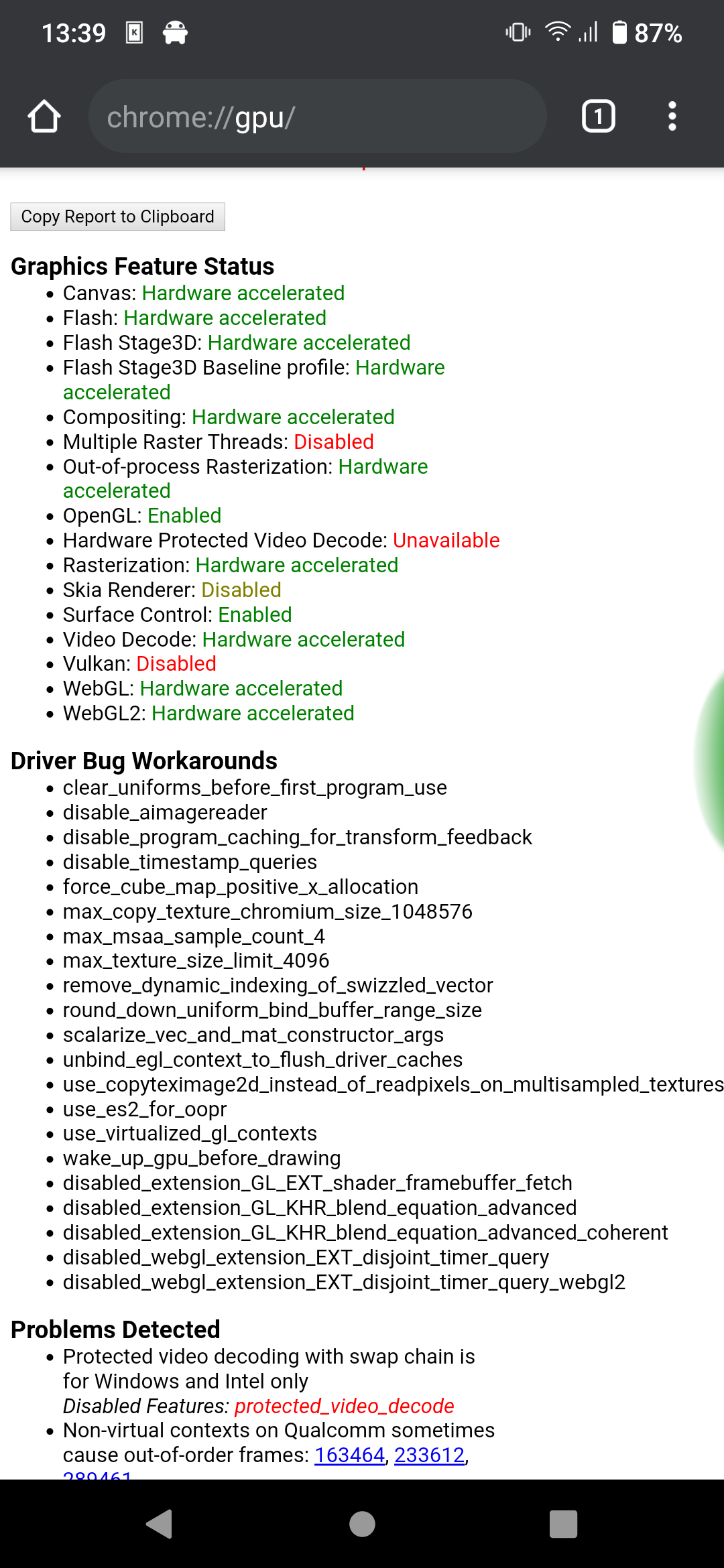
Thanks for reporting these @valpamp. I can only see chromium: [WARNING:gpu_process_host.cc(1204)] The GPU process has crashed 1 time(s) in your log, do you see a block like in this comment?
And yes disable_aimagereader is listed in Driver Bug Workarounds
@scanno if you have disable_aimagereader there should not be a crash about AImageReader, this is odd.
disable_aimagereader isn't listed.
GL_VENDOR: Qualcomm
@Jaminanim can you please repeat the test with this version? https://fdroid.bromite.org/bromite/rel_81.0.4044.70_arm64_ChromeModernPublic_sf.apk
csagan5
on 18 Mar 2020
@csagan5 indeed weird
Will check on another phone, bromite is crashing there too (adreno 630). Also disable_aimagereader is listed on that phone.
scanno
on 18 Mar 2020
@csagan5 disable_aimagereader is on the workaround list in my case, GL_VENDOR = Qualcomm.
I didn't touch chrome flags when providing my logcat but I disabled hw acceleration now for testing purposes and can confirm that Vimeo, YouTube and Instagram/Facebook videos are working correctly now.
kyelbek
on 18 Mar 2020
Thanks for reporting these @valpamp. I can only see
chromium: [WARNING:gpu_process_host.cc(1204)] The GPU process has crashed 1 time(s)in your log, do you see a block like in this comment?
Found it, here you go:
logcat.txt
Thanks a lot for your great work.
valpamp
on 18 Mar 2020
@valpamp from the crash dump it looks the same as the others, a crash related to AImageReader. However I find it odd that it does not happen for you on YouTube.
@scanno @kyelbek @valpamp it seems like that disable_aimagereader is no more effective in v81 for Android10. Can you please test with this APK? https://fdroid.bromite.org/bromite/rel_81.0.4044.70_arm64_ChromeModernPublic_sf.apk
Test should be without the disable-hw-video-decode flag.
@aluo-x maybe you could also test to confirm that in v81 disable_aimagereader is not working; I have made a table on top of this issue to track the different GPUs as we have an overwhelming majority of Adrenos.
csagan5
on 18 Mar 2020
I can confirm that v81 64 bit bromite freezes for me when playing video, Mali GPU.
Edit: to clarify this is stock bromite, no settings changed.
aluo-x
on 18 Mar 2020
@scanno @kyelbek @valpamp it seems like that
disable_aimagereaderis no more effective in v81 for Android10. Can you please test with this APK? https://fdroid.bromite.org/bromite/rel_81.0.4044.70_arm64_ChromeModernPublic_sf.apkTest should be without the
disable-hw-video-decodeflag.
Tested on m.facebook.com, m.youtube.com and vimeo.com and works flawlessly for me.
valpamp
on 18 Mar 2020
@csagan5 quicky tested, seems to solve the crash here also
scanno
on 18 Mar 2020
@csagan5 This build works as it should. Nice job!
kyelbek
on 18 Mar 2020
I can confirm that v81 64 bit bromite freezes for me when playing video, Mali GPU.
Edit: to clarify this is stock bromite, no settings changed.
@aluo-x great, thanks for your test. Could you also test with https://fdroid.bromite.org/bromite/rel_81.0.4044.70_arm64_ChromeModernPublic_sf.apk (next release) to verify that it solves the crash also for you?
csagan5
on 18 Mar 2020
@csagan5 I installed it and did not have crashes. However in the about section, this seems to be the 32bit version?
aluo-x
on 18 Mar 2020
@csagan5 I installed it and did not have crashes. However in the about section, this seems to be the 32bit version?
chrome://version mentions 64 bit here
scanno
on 18 Mar 2020
@csagan5 I installed it and did not have crashes. However in the about section, this seems to be the 32bit version?
chrome://version mentions 64 bit here
same here.
kyelbek
on 18 Mar 2020
My bad. You're right it is 64bit
aluo-x
on 18 Mar 2020
Alright, thanks to everybody for testing. I will release soon a new version with the fix which upstream left out.
csagan5
on 18 Mar 2020
Fixed in 81.0.4044.70.
csagan5
on 20 Mar 2020
@csagan5 this fix actually broke it for me, when it wasn't broken before
https://del.dog/eaqumophyc
I'd add a flag to control the fix
 r3muxd
on 27 Mar 2020
r3muxd
on 27 Mar 2020
For me, installing the "fixed" version over the "broken" version broke my adblock. But uninstalling the old and installing the new fixed the adblock again.
aluo-x
on 27 Mar 2020
how do you test the adblock? i don't think it works for me
r3muxd
on 27 Mar 2020
https://ads-blocker.com/testing/
If doubleclick/google ads display then it is not functioning. But again, removing the old installation and installing the new one again fixed the issue.
aluo-x
on 27 Mar 2020
wow that's confusing
my Aurora Droid broke and I didn't update and I didn't notice it was .63, not .70
it is fixed now
r3muxd
on 27 Mar 2020
@r3muxd Are you talking about video playback or adblock? Was it fixed with a clean install?
aluo-x
on 27 Mar 2020
https://ads-blocker.com/testing/
If doubleclick/google ads display then it is not functioning. But again, removing the old installation and installing the new one again fixed the issue.
@aluo-x when you install or uninstall the app gets closed. When the app is started again it will check for new filters and download them. The filters were updated after the v81 release. So your first installation got the "current" filters which did not include filters for doubleclick/google ads (a regression of #423), by the time you installed it again the filters were updated and did include the bugfix for #423.
this fix actually broke it for me, when it wasn't broken before
https://del.dog/eaqumophyc
I'd add a flag to control the fix
@r3muxd please report your Bromite version; does your chrome://gpu mention disable_aimagereader? Any custom flags you specified in chrome://flags?
csagan5
on 27 Mar 2020
for me, the issue wasn't there on 80, was there on 81.0.4044.63, and disappeared on 81.0.4044.76
my aurora store was bugging out and showing me that 4044.63 was the latest version and I only noticed the first 3 octets
r3muxd
on 27 Mar 2020
There have been still changes upstream in the handling of AImageReader; all the correct patches should be in latest Bromite release (83.0.4103.46), please post here if you find any issue related to video crashes.
csagan5
on 12 May 2020
Not sure if anyone else has had issues. But with every Bromite 83 release, I have had frequent freezing. It seems to trigger frequently on certain sites with auto video playback (imgur for example). The freeze is a soft freeze, and I can interact again after minimizing chrome, then switching back to chrome. Platform is Android 10.1
chrome://gpu does not show any errors
I've tried the Arm64 & Arm32 versions, both have freezes, but Arm64 seems more frequent.
aluo-x
on 26 Jun 2020
Actually, even playing videos from imgur in the m.reddit.com, then clicking forward and then going back to an auto resuming video can trigger freezing.
aluo-x
on 26 Jun 2020
But with every Bromite 83 release
You need to report it when it happens, including the release number and the crash log.
Actually, even playing videos from imgur in the m.reddit.com, then clicking forward and then going back to an auto resuming video can trigger freezing.
Do you have a crash log? It could be a regression in v83.
csagan5
on 26 Jun 2020
Good points. I've hesitated to file a bug since I cannot consistently reproduce it. There are no errors printed out in chrome://gpu, and bromite does not crash, just freezes until I switch away then switch back.
Just tested the arm32 version, and it definitely freezes far less than the arm64 version. Hopefully v84 of chrome fixes this regression.
aluo-x
on 27 Jun 2020
@aluo-x only ways forward would be to check the upstream issue tracker and/or attach the Android Studio profiler to see what's going on.
csagan5
on 27 Jun 2020
https://www.androidcentral.com/chrome-android-finally-get-64-bit-variant-and-much-better-performance
Looks like Google has been testing Chrome 84 with 64bit builds. Maybe the work around will no longer be necessary?
aluo-x
on 16 Jul 2020
For those interested I am running some tests for v86 in #755
csagan5
on 28 Sep 2020
I am going to disable AImageReader for Qualcomm chipsets, see discussion in #814 if interested.
csagan5
on 21 Nov 2020
Related issues
 darylrobert
·
5Comments
csagan5
·
6Comments
darylrobert
·
5Comments
csagan5
·
6Comments
 Someguy1519
·
5Comments
Someguy1519
·
5Comments
 scribblemaniac
·
4Comments
scribblemaniac
·
4Comments
 nerrixDE
·
5Comments
nerrixDE
·
5Comments
Most helpful comment
I have read that
#disable-accelerated-video-decodecan mitigate this issue on arm64.