Brew: macOS 11.0 Big Sur compatibility on Apple Silicon
Latest news on native ARM compatibility
- (2020-11-15) Issues with code signing now resolved thanks to @fxcoudert, @mistydemeo and others.
- (2020-11-15) There won’t be any support for native ARM Homebrew installations for months to come. See both https://github.com/Homebrew/brew/issues/7857#issuecomment-727561399 about CI infrastructure and https://github.com/Homebrew/brew/issues/7857#issuecomment-687068494 about GCC for details.
- (2020-11-15) Native ARM Homebrew installations are only going to be supported at
/opt/homebrew(once support arrives). See https://github.com/Homebrew/brew/issues/7857#issuecomment-727561968 for details.
A detailed description of the proposed feature
This is an overview of compatibility issues and work items related to native ARM Homebrew installations on macOS 11.0 (Big Sur). Homebrew doesn’t support it right now but we need to track and triage those items nonetheless.
The motivation for the feature
macOS 11.0 (Big Sur) has been released to the public, and our goal is for Homebrew to support it.
How the feature would be relevant to at least 90% of Homebrew users
In the long run, more than 90 % of Homebrew (macOS) users are going to run Apple Silicon hardware.
What alternatives to the feature have been considered
No alternatives.
Current issues
[ ] brew audit: rdiscount native extension fails to build (FB7836181)
Symptoms:
brew auditfails while building rdiscount’s native extension (gem_make.out, mkmf.log).
Root cause: Mach-O binaries created by themkmfmodule inRuby.frameworkare marked with a PAC ABI version number of 0. Whenmkmftries to run the resulting binary on Apple Silicon, macOS 11 kills it on sight. According to a recent WWDC session,[we’re] not yet ready for you to start distributing your applications with pointer authentication.
Status: Feedback submitted to Apple
Status of core formulae
| Formula | Works1
on 11.0 | Comments |
|:------- |:----------------------------:|:-------- |
| ack | 🥇 | |
| adns | 🥇 | |
| adwaita-icon-theme | | |
| aircrack-ng | | |
| ansible | | |
| ant | | Re-check when openjdk works |
| aom | 🥇 | Patched for now |
| apache-spark | | |
| apr-util | 🥇 | |
| apr | 🥇 | |
| argon2 | 🥇 | |
| arpack | | |
| asciidoc | 🥇 | |
| asdf | | |
| aspell | 🥇 | |
| atk | | |
| augeas | 🥇 | |
| autoconf | 🥇 | |
| autojump | | |
| automake | 🥇 | |
| aws-elasticbeanstalk | 🥇 | |
| aws-iam-authenticator | | Re-check when go works |
| awscli | ⚠️ | Build fails with a distutils.errors.DistutilsClassError, see logs.
Possibly related to setuptools: https://github.com/pypa/setuptools/pull/2231 |
| azure-cli | 🥇 | |
| bash-completion | 🥇 | |
| bash | ⚠️ | make says, redefinition of 'sys_siglist' with a different type: 'char *[32]' vs 'const char *const [32]'. Logs |
| bat | | Re-check when rust works |
| bazel | | Re-check when openjdk@11 works |
| bdw-gc | | |
| berkeley-db | 🥇 | |
| binutils | 🥇 | |
| bison | 🥇 | |
| blueutil | 🥇 | |
| boost | 🥇 | Patched for now |
| brotli | 🥇 | |
| c-ares | 🥇 | |
| cabal-install | | Re-check when ghc works |
| cairo | 🥇 | |
| cargo-c | | Builds in rust prereleases; will work when a stable Rust with Apple Silicon support ships |
| carthage | 🥇 | Patched for now |
| cask | | Re-check when emacs works |
| ccache | 🥇 | |
| ceres-solver | | |
| certbot | 🥇 | |
| cfitsio | 🥇 | |
| cgal | | Re-check when qt works |
| circleci | | Re-check when go works |
| clang-format | 🥇 | |
| cloc | 🥇 | |
| cmake | 🥇 | |
| cocoapods | ⚠️ | Error Unrecognized Mach-O load command: 0x80000034 in ffi_c.bundle |
| colordiff | 🥇 | |
| composer | 🥇 | |
| consul | | Re-check when go works |
| coreutils | 🥇 | |
| cscope | 🥇 | |
| ctags | 🥇 | |
| cunit | 🥇 | |
| curl | 🥇 | |
| curl-openssl | 🥇 | |
| cython | 🥇 | |
| dav1d | 🥇 | |
| daemontools | 🥇 | |
| deno | | Re-check when llvm and rust work |
| dep | | Re-check when go works |
| dialog | 🥇 | Patched for now |
| direnv | | Re-check when go works |
| dnsmasq | 🥇 | |
| docbook-xsl | 🥇 | |
| docbook | 🥇 | |
| docker | | Re-check when go works |
| docker-completion | 🥇 | |
| docker-machine | | Re-check when go works |
| doctl | | Re-check when go works |
| dos2unix | 🥇 | |
| doxygen | 🥇 | |
| duti | 🥇 | Patched for now. PR also submitted upstream. |
| eigen | 🥇 | |
| elasticsearch | | Re-check when gradle and openjdk work |
| elixir | | Re-check when erlang works |
| emacs | | Re-check when gnutls works |
| epsilon | 🥇 | |
| epstool | | Re-check when ghostscript works |
| erlang | ⚠️ | Either we need to backport https://github.com/erlang/otp/pull/2700 or wait for upstream release 23.1.
Same with https://github.com/erlang/otp/pull/2687. |
| exiftool | 🥇 | |
| expat | 🥇 | |
| fastlane | 🥇 | |
| fd | | Re-check when rust works |
| ffmpeg | | Re-check when gnutls, libbluray and several other dependencies work |
| fftw | | Re-check when gcc and open-mpi work |
| fig2dev | | Re-check when ghostscript and netpbm work |
| figlet | 🥇 | |
| findutils | 🥇 | |
| fish | 🥇 | |
| flac | 🥇 | |
| fltk | | |
| fontconfig | 🥇 | Patched for now |
| fontforge | | |
| freetds | 🥇 | |
| freetype | 🥇 | |
| freexl | ⚠️ | Build error: implicitly declaring library function 'printf' Logs |
| frei0r | 🥇 | |
| fribidi | 🥇 | |
| fswatch | | |
| fzf | | |
| gawk | 🥇 | |
| gcal | 🥇 | |
| gcc | ⚠️ |
@Iains has some work in progress on https://github.com/iains/gcc-darwin-arm64 to port the GCC backend to Apple Silicon.
Mind that Apple Silicon support is going to require GCC 11 even in the best case. The first stable release of GCC 11 may come out in mid-2021 or later. If you absolutely require a stable GCC, or any formula that depends on it, you may want to hold off your Apple Silicon Mac purchase decisions until it’s clear if or when GCC will support it.
For limited testing on Apple Silicon, Homebrew may consider shipping an unstable GCC 11 but that’s yet to be decided.
||
gdal | | Re-check when expat, freexl, geos, hdf5 and a dozen of other dependencies work ||
gdbm | 🥇 | ||
gdb | | ||
gdk-pixbuf | | ||
gd | 🥇 | ||
geckodriver | | ||
geos | ⚠️ | Squeals about duplicate symbol BasicSegmentString in inlines.o vs. libnoding.a. Logs ||
gettext | ⚠️ | Used to work. Now crashes on brew test (code signature invalid). ||
gflags | | ||
ghc | ⚠️ | Re-check when https://github.com/Homebrew/homebrew-core/pull/57892 is merged ||
[email protected] | | ||
ghostscript | ⚠️ | Re-check when https://github.com/Homebrew/homebrew-core/pull/58493 is merged ||
giflib | 🥇 | ||
git | ⚠️ | Re-check when gettext regression is fixed ||
git-flow | | ||
git-gui | | ||
git-lfs | | ||
gitlab-runner | | ||
gl2ps | | ||
glew | | ||
glib-networking | | ||
glib | 🥇 | ||
glog | | ||
glpk | | ||
gmp | 🥇 | ||
gnu-getopt | 🥇 | ||
gnu-sed | 🥇 | ||
gnu-tar | 🥇 | ||
gnupg | | Re-check when gnutls works ||
gnuplot | | ||
gnutls | | Re-check when guile works ||
gobject-introspection | 🥇 | ||
go | ⚠️ | Bootstrapped go (x86_64) is killed at build time. Logs
Upstream tracking issue: https://github.com/golang/go/issues/38485
||
gpatch | 🥇 | ||
gpgme | | ||
gradle | | Re-check when openjdk works ||
grafana | | ||
graphicsmagick | | ||
graphite2 | 🥇 | ||
graphviz | | Re-check when gts works ||
grep | 🥇 | ||
groonga | 🥇 | ||
groovy | | ||
grpc | | ||
gsettings-desktop-schemas | | ||
gsl | | ||
gst-plugins-bad | | ||
gstreamer | | ||
gtk+3 | | ||
gtk+ | | ||
gtk-mac-integration | | ||
gts | | Re-check when netpbm works ||
guile | ⚠️ | Bus error: 10 on make install. Logs ||
harfbuzz | 🥇 | ||
hdf5 | | Re-check when gcc works ||
helm | | Re-check when go works ||
helm@2 | | Re-check when glide and go work ||
hicolor-icon-theme | | ||
highlight | 🥇 | ||
htop | 🥇 | ||
httpd | 🥇 | ||
httpie | 🥇 | ||
hub | | Re-check when go works ||
hugo | | Re-check when go works ||
hwloc | 🥇 | ||
icu4c | 🥇 | ||
ideviceinstaller | 🥇 | ||
ilmbase | 🥇 | ||
imagemagick@6 | 🥇 | ||
imagemagick | | Re-check when ghostscript, libheif and libomp work ||
inetutils | 🥇 | ||
ios-deploy | 🥇 | ||
ios-webkit-debug-proxy | 🥇 | ||
iperf3 | 🥇 | ||
ipython | 🥇 | ||
isl | 🥇 | ||
itstool | 🥇 | ||
jansson | 🥇 | ||
jasper | 🥇 | ||
jemalloc | 🥇 | ||
jenkins | | Re-check when openjdk@11 works ||
jenkins-lts | | Re-check when openjdk@11 works ||
jenv | 🥇 | ||
jmeter | | ||
jpeg | 🥇 | ||
jq | 🥇 | ||
json-c | 🥇 | ||
jupyterlab | | Re-check when pandoc works ||
kafka | | Re-check when openjdk (or some other form of Java) and zookeeper work ||
kops | | ||
kotlin | | Re-check when openjdk (or some other form of Java) works ||
krb5 | 🥇 | Patched for now. Patch submitted to upstream issue tracker.|
kubectx | | ||
kubernetes-cli | | Re-check when go works ||
kustomize | | ||
lame | 🥇 | ||
ldns | | ||
leptonica | 🥇 | ||
libarchive | | ||
libassuan | 🥇 | ||
libass | 🥇 | ||
libb2 | | ||
libbluray | | Re-check when openjdk (or some other form of Java) works ||
libcbor | | ||
libcerf | | ||
libcroco | | ||
libdap | | ||
libde265 | ⚠️ | ARM assembly/macros/directives fail at build time. Re-check needed with the correct triple. Logs ||
libepoxy | | ||
libevent | 🥇 | ||
libev | 🥇 | ||
libexif | | ||
libffi | 🥇 | Patched for now, awaiting upstream patches: https://github.com/libffi/libffi/pull/565 ||
libfido2 | | ||
libgcrypt | 🥇 | ||
libgeotiff | | ||
libgit2 | 🥇 | ||
libgpg-error | 🥇 | ||
libheif | | Re-check when libde265 works ||
libiconv | | ||
libidn2 | 🥇 | ||
libidn | 🥇 | ||
libilbc | 🥇 | ||
libimobiledevice | 🥇 | ||
libksba | 🥇 | ||
liblqr | 🥇 | ||
libmagic | 🥇 | ||
libmaxminddb | 🥇 | ||
libmetalink | 🥇 | ||
libmpc | 🥇 | ||
libnet | | ||
libogg | 🥇 | ||
libomp | ⚠️ | make install fails while trying to make sense of x86_64 assembly for Linux. Logs ||
libp11 | | ||
libplist | 🥇 | ||
libpng | 🥇 | ||
libpq | 🥇 | ||
libpsl | | ||
librdkafka | | ||
libressl | | ||
librsvg | | ||
libsamplerate | 🥇 | ||
libscrypt | 🥇 | ||
libsmi | 🥇 | ||
libsndfile | 🥇 | ||
libsodium | 🥇 | ||
libsoup | | ||
libsoxr | 🥇 | ||
libspatialite | | ||
libspiro | | ||
libssh | 🥇 | ||
libssh2 | 🥇 | ||
libtasn1 | 🥇 | ||
libtermkey | | ||
libtiff | 🥇 | ||
libtool | 🥇 | ||
libuninameslist | | ||
libunistring | 🥇 | ||
libusb-compat | | ||
libusbmuxd | 🥇 | ||
libusb | 🥇 | ||
libuv | 🥇 | ||
libvidstab | 🥇 | ||
libvirt | | ||
libvorbis | 🥇 | ||
libvpx | 🥇 | ||
libvterm | | ||
libwebsockets | | ||
libxml2 | 🥇 | ||
libxslt | | ||
libyaml | 🥇 | ||
libzip | 🥇 | ||
little-cms2 | 🥇 | ||
llvm | 🥉 | Builds if OpenMP is disabled. Stable builds don't work, but HEAD does and 11.0.0 will be compatible. ||
lua | 🥇 | ||
[email protected] | 🥇 | ||
luajit | | ||
lynx | 🥇 | Patched for now ||
lz4 | 🥇 | ||
lzo | 🥇 | ||
macvim | | ||
mad | ⚠️ | Configure error: /bin/ksh ./config.sub -apple-darwin20.0.0 failed Logs ||
make | | ||
mariadb | | Re-check when groonga works ||
mas | 🥇 | Fixed ||
maven | | Re-check when openjdk works ||
mbedtls | | ||
mcrypt | | ||
mecab | 🥇 | ||
mecab-ipadic | 🥇 | ||
memcached | | ||
mercurial | 🥇 | ||
meson | 🥇 | ||
metis | | ||
midnight-commander | | ||
minikube | | ||
minizip | 🥇 | ||
mitmproxy | | ||
mkcert | | ||
mkvtoolnix | | ||
mono | | ||
mosh | | ||
mpfr | 🥇 | ||
mpv | | ||
msgpack | 🥇 | ||
mtr | | ||
mujs | | ||
mutt | | ||
mysql | ⚠️ | The build proceeds to completion but mysqld_safe fails with syntax error near unexpected token 'then' in line 831. ||
[email protected] | ⚠️ | make errors out after building the target event_extra. Logs ||
[email protected] | ⚠️ | Builds but mysqld_safe fails: syntax error near unexpected token 'then' in line 804. ||
mysql-client | 🥇 | ||
nano | 🥇 | ||
nasm | 🥇 | ||
ncdu | | ||
ncurses | 🥇 | ||
neofetch | | ||
neovim | | ||
netcdf | | ||
netpbm | | Re-check when subversion works ||
nettle | 🥇 | Patched for now ||
nghttp2 | 🥇 | ||
nginx | 🥇 | ||
ninja | 🥇 | ||
nmap | 🥇 | Fixed ||
node | 🥇 | See also https://github.com/nodejs/node/issues/34043 and https://github.com/nodejs/TSC/issues/886 for upstream progress.
||
node@10 | | ||
node@12 | 🥇 | ||
node-build | | ||
nodebrew | | ||
npth | 🥇 | ||
nspr | 🥇 | ||
nss | ⚠️ | Build fails while loading softokn3. Logs ||
ntfs-3g | | ||
numpy | | ||
nvm | | ||
ocaml | | Upstream tracking issue: https://github.com/ocaml/ocaml/pull/9699 ||
octave | | ||
oniguruma | 🥇 | ||
opam | | ||
open-mpi | | Re-check when gcc works ||
openblas | | ||
openconnect | | ||
opencore-amr | | ||
opencv | | ||
openexr | 🥇 | ||
openjdk | ⚠️ | Needs to be ported (logs). See also related JEP draft: MacOS/AArch64 Port ||
openjdk@11 | | ||
openjpeg | 🥇 | ||
openldap | 🥇 | ||
openssh | | ||
openssl aka [email protected] | 🥇 | Works well enough until the upstream fix is released.
||
openvpn | 🥇 | ||
opusfile | 🥇 | ||
opus | 🥇 | ||
orc | | ||
p11-kit | 🥇 | ||
p7zip | 🥇 | ||
packer | | Re-check when go works ||
pandoc | | Re-check when cabal-install and ghc work ||
pango | 🥇 | Patched for now ||
parallel | 🥇 | ||
pcre2 | 🥇 | Note: JIT disabled for now. See https://github.com/Homebrew/homebrew-core/pull/57419 ||
pcre | 🥇 | Note: JIT disabled for now. See https://github.com/Homebrew/homebrew-core/pull/57410 ||
perl | 🥇 | Patched for now ||
[email protected] | ⚠️ | Seems more difficult to fix than php. Might want to triage as 🚫. ||
[email protected] | ⚠️ | Seems more difficult to fix than php. Might want to triage as 🚫. ||
php | 🥇 | Fixed ||
pinentry | 🥇 | ||
pipenv | 🥇 | ||
pixman | 🥇 | ||
pkcs11-helper | 🥇 | ||
pkg-config | 🥇 | ||
plantuml | | ||
poppler | | Re-check when nss and qt work ||
popt | 🥇 | ||
portaudio | 🥇 | ||
postgis | | Re-check when gdal, geos, gpp and sfcgal work ||
postgresql | 🥇 | ||
[email protected] | | ||
postgresql@10 | | ||
postgresql@11 | | ||
pre-commit | 🥇 | ||
proj | 🥇 | ||
protobuf | 🥇 | ||
protobuf-c | 🥇 | ||
pstoedit | | ||
pstree | 🥇 | ||
pulumi | | ||
putty | 🥇 | ||
py3cairo | | ||
pyenv | ⚠️ | Bash crashes due to code signature error when trying to load pyenv-realpath.dylib as a builtin. Log ||
pyenv-virtualenv | | ||
pygobject3 | | ||
pyqt | | ||
[email protected] | ⚠️ | Patch https://github.com/python/cpython/pull/21249 fails. Re-check when upstream arm64 support stabilises. ||
[email protected] | 🥉 | Patched for now but brew test fails.
Re-check after https://github.com/Homebrew/homebrew-core/pull/64872 is merged.
||
python aka [email protected] | 🥉 | brew test currently fails.
Re-check after https://github.com/Homebrew/homebrew-core/pull/64869 is merged.
||
qemu | | ||
qhull | | ||
qrupdate | | ||
qt | ⚠️ | Fails running find_sdk.py late in the build. (logs, full make log) ||
rabbitmq | | Re-check when erlang works ||
rav1e | | Re-check when cargo-c and rust work ||
rbenv | | ||
rclone | | ||
readline | 🥇 | ||
redis | 🥇 | Patched for now ||
rename | | ||
ripgrep | | ||
rsync | | ||
rtmpdump | 🥇 | ||
rubberband | | ||
ruby-build | | ||
[email protected] | | ||
ruby | 🥇 | ||
rust | ⚠️ | Upstream tracking issue: https://github.com/rust-lang/rust/issues/73908 ||
rustup-init | | ||
s-lang | | ||
s3cmd | | ||
sbcl | | ||
sbt | | ||
scala | | ||
scrcpy | | ||
screenresolution | | ||
sdl2 | | ||
sdl | 🥇 | ||
sfcgal | | Re-check when cgal works ||
shared-mime-info | 🥇 | ||
shellcheck | | Re-check when cabal-install, [email protected] and pandoc work ||
sip | | ||
skaffold | | ||
snappy | 🥇 | ||
socat | | ||
source-highlight | 🥇 | ||
sox | | Re-check when mad works ||
spandsp | 🥇 | ||
speedtest-cli | | ||
speex | 🥇 | ||
sphinx-doc | 🥇 | ||
sqlite | 🥇 | ||
sqlmap | | ||
srt | ⚠️ | Fails with 'GLES/gl.h' file not found during make install. Logs ||
ssh-copy-id | | ||
sshfs | | ||
sshpass | | ||
sshuttle | | ||
starship | | ||
stoken | | ||
subversion | 🥉 | Works but brew test fails. Logs. ||
suite-sparse | | ||
sundials | | ||
swagger-codegen | | ||
swiftformat | | ||
swiftlint | 🥇 | ||
swig | 🥇 | ||
szip | 🥇 | ||
tbb | 🥇 | Patched for now ||
tcl-tk | | ||
telnetd | 🥇 | ||
telnet | 🥇 | ||
terraform | | Re-check when go works ||
terragrunt | | ||
tesseract | 🥇 | ||
texinfo | | ||
tfenv | | ||
tflint | | ||
thefuck | | ||
theora | 🥇 | ||
the_silver_searcher | | ||
tidy-html5 | 🥇 | ||
tig | | ||
tmux | 🥇 | ||
tomcat | | ||
tor | 🥇 | ||
tree | 🥇 | ||
uchardet | | ||
unar | 🥇 | ||
unbound | 🥇 | ||
unibilium | | ||
unixodbc | 🥇 | ||
unrar | 🥇 | ||
utf8proc | 🥇 | ||
v8 | | ||
vala | | Re-check when graphviz works ||
valgrind | | ||
vapoursynth | | ||
vault | | ||
vde | | ||
vim | 🥇 | ||
vips | | ||
watchman | | ||
watch | | ||
webp | 🥇 | ||
wget | 🥇 | ||
wimlib | | ||
winetricks | | ||
wireshark | | ||
wxmac | | ||
x264 | 🥇 | Patched for now ||
x265 | 🥇 | ||
xcodegen | ⚠️ | Not compatible with Xcode 12.Re-check with upstream version > 2.17.0 once released. |
|
xerces-c | | ||
xmlto | 🥇 | ||
xvid | 🥇 | ||
xxhash | 🥇 | ||
xz | 🥇 | ||
yara | 🥇 | ||
yarn | 🥇 | ||
yasm | 🥇 | Note: doesn’t support ARM targets ||
youtube-dl | 🥇 | ||
yq | | Re-check when go works ||
zeromq | 🥇 | ||
zimg | 🥇 | ||
zlib | 🥇 | ||
zookeeper | | Re-check when ant works ||
zsh | | ||
zsh-autosuggestions | | ||
zsh-completions | | ||
zsh-syntax-highlighting | | ||
zstd | 🥇 | |
Source
curl -sLS \

  'https://formulae.brew.sh/api/analytics/install/90d.json' \

  | jq -r '.items

    | map(select (.formula | contains("/") | not) | .formula)[:512]

    | sort

    | [""] + map("\(.)")

    | map([., "", ""] | @csv)

    | .[]

    ' \

  | pandoc -f csv -t gfm \

  | sed -e 's/\`/`/g'
1 For _Works on 11.0_, the key is:
- 🥇
brew install -ssucceeds on Apple Silicon. The software works well enough natively. - 🥈 The formula has been updated with
depends_on :arch => [:x86_64, :build]. The software works well enough on Rosetta. - 🥉 The formula has known issues on macOS 11, though most features work. The issues are described in the _Comments_ field.
- 🚫 The formula has been updated with
depends_on :arch => :x86_64. The software has been deemed to work on Intel only (for now). - ⚠️ The formula has been found to need more analysis/work.
 claui
claui
All 369 comments
Homebrew’s linkage checker doesn’t support the shared dyld cache yet
It does as of 9c4aaa9719c74b78ff5dca4667788b3426a48678.
 Bo98
on 30 Jun 2020
Bo98
on 30 Jun 2020
- [ ]
install.shdownloads macOS 10.16 CLT
 MikeMcQuaid
on 30 Jun 2020
MikeMcQuaid
on 30 Jun 2020
libsodium formulae work fine on Apple Silicon.
Both the release and HEAD.
 jedisct1
on 1 Jul 2020
jedisct1
on 1 Jul 2020
Thanks @jedisct1. Noted.
claui
on 1 Jul 2020
The fiddle issue is fixable by installing HEAD:
$ git clone https://github.com/ruby/fiddle
$ cd fiddle
$ bundle install --path vendor/bundle
$ bundle exec rake build
$ sudo gem install pkg/fiddle-1.0.1.gem
OpenSSL works with a workaround config change.
 indirect
on 1 Jul 2020
indirect
on 1 Jul 2020
$ bundle install --vendor/bundle should be $ bundle install --path vendor/bundle, above.
 dmzimmerman
on 1 Jul 2020
dmzimmerman
on 1 Jul 2020
@dmzimmerman thank you, fixed!
indirect
on 1 Jul 2020
Updated issue description with @indirect’s workaround. Thanks!
claui
on 1 Jul 2020
htop seems to work fine, builds to native arm with no problems:
adam@Adams-Mac ~ % file /usr/local/bin/htop
/usr/local/bin/htop: Mach-O 64-bit executable arm64
 BytesGuy
on 2 Jul 2020
BytesGuy
on 2 Jul 2020
Telnet works but builds for x86_64. PR submitted to build for arm64 https://github.com/Homebrew/homebrew-core/pull/57303
BytesGuy
on 2 Jul 2020
I'm getting the following error, any idea how to continue?
Error: Could not find an SDK that supports macOS 11.0.
You may have have an outdated or incompatible CLT.
Homebrew found the following SDKs in the CLT install:
  10.16
  10.15

Please update CLT or uninstall it if no updates are available.
 FigBug
on 3 Jul 2020
FigBug
on 3 Jul 2020
@FigBug If you’re on macOS 11, you need Xcode 12 for macOS Universal Apps beta installed. Then run:
sudo xcode-select --switch /Applications/Xcode-beta.app/Contents/Developer
claui
on 3 Jul 2020
@claui I'm running macOS 11.0 Beta (20A5299w) with Xcode 12.0 beta (12A8158a) on the DTK. After running xcode-select as you suggested, I still get the above error.
FigBug
on 3 Jul 2020
@FigBug Please don't ask us for help while you're running an unsupported version of macOS.
MikeMcQuaid
on 3 Jul 2020
I tried to make the error as clear as possible.
Please update CLT or uninstall it if no updates are available.
If it isn't, please open a pull request making it clearer.
Bo98
on 3 Jul 2020
First timer here: How can we help Big Sur compatibility on ARM Macs if we are indeed running an unsupported version of macOS?
I see in this list that cocoapods is unchecked yet. But I needed it, so I tried to install.
"Error: Failed to read Mach-O binary." on all the "ffi_c.bundle" files.
Should I create a new 'issue', or is this part of the 'Big Sur compatibility' list?
 axello
on 3 Jul 2020
axello
on 3 Jul 2020
Should I create a new 'issue', or is this part of the 'Big Sur compatibility' list?
Thank you for reaching out, and welcome to the Homebrew community @axello.
Please don’t create an issue. Homebrew does not yet support Big Sur so issues aren’t helpful right now.
cocoapods being unchecked means we didn’t even get around to checking it yet for Big Sur compatibility.
Your options are to either wait until it’s cocoapods’s turn to be checked and fixed, or help us by filing a pull request.
claui
on 3 Jul 2020
I believe the Cocoapods issue is known by Apple themselves, as I think it is a system Ruby bug.
Bo98
on 3 Jul 2020
How can we help Big Sur compatibility on ARM Macs if we are indeed running an unsupported version of macOS?
Submit PRs to fix things. Almost every issue we have had so far has been already known. We know things aren't working. We need help fixing things not telling us what isn't working.
MikeMcQuaid
on 3 Jul 2020
re: ilmbase - looks like this pull request straightens out arm64 macOS support. Once cmake build is fixed there shouldn't be a problem building openexr and ilmbase.
 gregcotten
on 3 Jul 2020
gregcotten
on 3 Jul 2020
Is feedback on untested Formula in the above table useful? For example, I've installed and tested zlib on the DTK, and it appears to work correctly.
 HaydenPeake
on 3 Jul 2020
HaydenPeake
on 3 Jul 2020
Is feedback on untested Formula in the above table useful? For example, I've installed and tested zlib on the DTK, and it appears to work correctly.
@HaydenPeake Feedback on formulae that work correctly is welcome.
It means we can update the table immediately, which benefits everyone.
claui
on 3 Jul 2020
I've submitted a PR to get pcre working on arm64: https://github.com/Homebrew/homebrew-core/pull/57410
This is only a surface level fix at this point; it just turns off JIT.
Edit: disabling JIT also fixes the crash in pcre2, I have yet to submit a PR for this. Again, it seems like a short term fix only.
 DodgyTim
on 4 Jul 2020
DodgyTim
on 4 Jul 2020
brew install cmake --HEAD seems to work for me! (the big sur release notes say Workaround: Update to CMake 3.18rc1. so I'm not terribly surprised)
 segiddins
on 4 Jul 2020
segiddins
on 4 Jul 2020
brew install cmake --HEADseems to work for me! (the big sur release notes sayWorkaround: Update to CMake 3.18rc1.so I'm not terribly surprised)
Not sure how you did that unless python3.8 was patched a few hours ago... Unless you aren’t building on Apple Silicon.
gregcotten
on 4 Jul 2020
sorry, should've been more specific -- [email protected] only required the 3 linked PRs patched in: https://github.com/indirect/homebrew-core/commit/273ca33444d627421992cc71bbe2d597487f94b4
some of the stuff downstream from cmake works as well, such as tmux
segiddins
on 4 Jul 2020
Created a PR for the pcre2 segfault -- again, just a workaround:
https://github.com/Homebrew/homebrew-core/pull/57419
DodgyTim
on 4 Jul 2020
For table update purposes, here's a list of formula with incomplete status which I happen to have tried on the DTK. I did an install and test and they seemed to function correctly:
- apr
- apr-util
- coreutils
- flac
- liboff
- libvorbis
- lua
- nginx
- p7zip
- speex
- swig
- telnet
- theora
- utf8proc
- youtube-dl
- zlib
DodgyTim
on 4 Jul 2020
 frustum
on 4 Jul 2020
frustum
on 4 Jul 2020
I think it would also be good to check whether formula are building arm64 or x86_64. Even though x86_64 will (mostly) work, the way forward is to get everything building natively 🙂
For example, telnet did build and work, but was x86_64 until my patch https://github.com/Homebrew/homebrew-core/pull/57303
BytesGuy
on 4 Jul 2020
I think it would also be good to check whether formula are building arm64 or x86_64.
I absolutely agree. The wish is to have an audit which verifies if the output binaries are built natively - it's just that no one has done it yet.
The audit likely requires a way to make exceptions because I do think some formulae intentionally build non-native binaries for some cases, like parts of LLVM for iOS or something.
Bo98
on 4 Jul 2020
PSA: the preliminary fix for [email protected] has been merged. Should work now except for Tk support.
Formula promoted to 🥉 for now.
claui
on 4 Jul 2020
I think it would also be good to check whether formula are building arm64 or x86_64.
I absolutely agree. The wish is to have an audit which verifies if the output binaries are built natively - it's just that no one has done it yet.
The audit likely requires a way to make exceptions because I do think some formulae intentionally build non-native binaries for some cases, like parts of LLVM for iOS or something.
I'd be happy to help with this! I've manually gone through some already and a fair number are building arm64 with no updates which is great. If we had an automated setup that would be even better 🙂
BytesGuy
on 4 Jul 2020
FWIW I have been trying to bootstrap go to avoid the x86_64 kill at startup, but with no joy. Just found the tracking issue for this https://github.com/golang/go/issues/38485 Seems like we will be blocked for the moment
BytesGuy
on 4 Jul 2020
PSA: the preliminary fix for
[email protected]has been merged. Should work now except for Tk support.
Formula promoted to 🥉 for now.
Thank you! It is possible to build meson with ctype Python fix. Glib and midnight-commander is buildable after that by removing libffi dependency from glib.
frustum
on 4 Jul 2020
After getting GMP to build using https://github.com/Homebrew/homebrew-core/pull/57315/files#diff-e16a29aaf7be91f5224126d4f764738b, nettle fails to build on Apple Silicon because it also uses lots of assembly code. Example:
clang -I.  -DHAVE_CONFIG_H -g -O2 -ggdb3 -Wall -W -Wno-sign-compare   -Wmissing-prototypes -Wmissing-declarations -Wstrict-prototypes   -Wpointer-arith -Wbad-function-cast -Wnested-externs   -c aes128-set-encrypt-key.c \
    && true
aes-decrypt-internal.s:67:2: error: unrecognized instruction mnemonic
 teq r3, #0
 ^aes-encrypt-internal.s
:75:2: error: unrecognized instruction mnemonic
 teq r3, #0
 ^
 brunophilipe
on 4 Jul 2020
brunophilipe
on 4 Jul 2020
After getting GMP to build using https://github.com/Homebrew/homebrew-core/pull/57315/files#diff-e16a29aaf7be91f5224126d4f764738b, nettle fails to build on Apple Silicon because it also uses lots of assembly code. Example:
clang -I.  -DHAVE_CONFIG_H -g -O2 -ggdb3 -Wall -W -Wno-sign-compare   -Wmissing-prototypes -Wmissing-declarations -Wstrict-prototypes   -Wpointer-arith -Wbad-function-cast -Wnested-externs   -c aes128-set-encrypt-key.c \
  && true
aes-decrypt-internal.s:67:2: error: unrecognized instruction mnemonic
 teq r3, #0
 ^aes-encrypt-internal.s
:75:2: error: unrecognized instruction mnemonic
 teq r3, #0
 ^
Created a PR with a temporary fix for this issue until arm64 support is available upstream https://github.com/Homebrew/homebrew-core/pull/57455
BytesGuy
on 4 Jul 2020
OpenSSL 1.1.1 PR openssl/openssl/pull/12369 submitted
 stuartcarnie
on 5 Jul 2020
stuartcarnie
on 5 Jul 2020
Reporting issue with cocoapods – building from source would fail due to a missing xcodeprojdependency:
Command:
brew install --build-from-source cocoapods
Error:
==> gem install cocoapods-1.9.3.gem
Error: An exception occurred within a child process:
  Errno::ENOENT: No such file or directory - /usr/local/Cellar/cocoapods/1.9.3/libexec/bin/xcodeproj
 adib
on 5 Jul 2020
adib
on 5 Jul 2020
@adib Thank you. We’re really just getting started so reporting breakage isn’t helpful at this time.
Appreciate your report but marking it OT to keep the page focused.
claui
on 5 Jul 2020
Findings from today:
rust- currently not installing. The tracking issue for this is here: https://github.com/rust-lang/rust/issues/73908 The tracking issue says that x86_64 should work fine with Rosetta, but I have been unable to get a successful build for this so far 😞bash- Currently not installing successfully - tries to build for arm64 and fails, maybe x86_64 will work but have not tested yetnettle- PR filed to disable assembly until available upstream https://github.com/Homebrew/homebrew-core/pull/57455gd- installs fine, passes tests and binaries are arm64libplist- installs fine, passes tests and binaries are arm64libimobiledevice- installs fine, passes tests and binaries are arm64
BytesGuy
on 5 Jul 2020
PSA: The pcre, pcre2 and gmp fixes have landed.
Special thanks to @BytesGuy and @DodgyTim who helped remove those roadblocks. 🎉
claui
on 6 Jul 2020
gd- installs fine, passes tests and binaries are arm64libplist- installs fine, passes tests and binaries are arm64
@BytesGuy Noted, thanks for the heads up!
libimobiledevice- installs fine, passes tests and binaries are arm64
~PR filed to make libimobiledevice (stable) pass brew audit: https://github.com/Homebrew/homebrew-core/pull/57555~
Update: Installs and works fine now, both stable and --HEAD.
claui
on 6 Jul 2020
carthage works with this patch and builds a native binary (also resolves issues on Intel): https://github.com/Homebrew/homebrew-core/pull/57572
BytesGuy
on 6 Jul 2020
fish - Installs fine, passes tests, arm64 binary
perl - Currently doesn't work on Intel or Apple Silicon, PR opened: https://github.com/Homebrew/homebrew-core/pull/57580 (with this fix it passes tests and the binary is arm64 native)
BytesGuy
on 7 Jul 2020
It has come to my attention that carthage has landed (thanks again @BytesGuy) and cmake, too.
claui
on 7 Jul 2020
I'm going to take a look at the JIT issues for pcre and pcre2 – I found the same issue with Boxer (DosBox) and resolved it in https://github.com/MaddTheSane/dosbox/commit/794513db66e210fbe28c6a1f69d8acd9a8664e30
stuartcarnie
on 7 Jul 2020
gnupgis currently blocked bylibffivimis currently blocked byperlrediscurrently will not install and provides the following error:
Last 15 lines from /Users/adam/Library/Logs/Homebrew/redis/01.make:
                   ^
debug.c:1037:47: error: no member named '__gs' in 'struct __darwin_arm_thread_state64'
        (unsigned long) uc->uc_mcontext->__ss.__gs
                        ~~~~~~~~~~~~~~~~~~~~~ ^
debug.c:1039:51: error: no member named '__esp' in 'struct __darwin_arm_thread_state64'; did you mean '__sp'?
    logStackContent((void**)uc->uc_mcontext->__ss.__esp);
                                                  ^~~~~
                                                  __sp
/Applications/Xcode-beta.app/Contents/Developer/Platforms/MacOSX.platform/Developer/SDKs/MacOSX11.0.sdk/usr/include/mach/arm/_structs.h:139:13: note: '__sp' declared here
        __uint64_t __sp;    /* Stack pointer x31 */
                   ^
18 errors generated.
make[1]: *** [debug.o] Error 1
make[1]: *** Waiting for unfinished jobs....
make: *** [install] Error 2
BytesGuy
on 7 Jul 2020
@BytesGuy regarding redis, it just so happens I fixed a similar issue in iTerm2. I'll take a look at that.
stuartcarnie
on 8 Jul 2020
Erlang is currently not compiling on macOS 11 because:
error: static declaration of 'in6addr_any' follows non-static declaration
There are separate issues on Apple Silicon that likely require a more difficult fix.
Tracking here:
 idyll
on 8 Jul 2020
idyll
on 8 Jul 2020
I can confirm, c-ares is working as well.
 rknall
on 8 Jul 2020
rknall
on 8 Jul 2020
How come that, so far, no formulae has a 🥈?
 letalvoj
on 8 Jul 2020
letalvoj
on 8 Jul 2020
Just checked mecab and mecab-ipadic: Installs fine, arm64 binary
Same goes for tmux.
 m4p
on 8 Jul 2020
m4p
on 8 Jul 2020
How come that, so far, no formulae has a 🥈?
We have not added Rosetta 2 support to Homebrew yet. That however has resulted in some very good feedback.
The goal for Homebrew is native arm64 support, with Rosetta 2 being a last resort, so the priority has been fixing formulae to be able to meet that goal. I'll likely look more into Rosetta 2 in a week or two.
Bo98
on 8 Jul 2020
nmap: Installs fine, arm64 binary
m4p
on 8 Jul 2020
How come that, so far, no formulae has a 🥈?
We have not added Rosetta 2 support to Homebrew yet. That however has resulted in some very good feedback.
The goal for Homebrew is native arm64 support, with Rosetta 2 being a last resort, so the priority has been fixing formulae to be able to meet that goal. I'll likely look more into Rosetta 2 in a week or two.
Will it be possible to fallback to existing bottles for formula that won't build on arm64? For example Rust should work fine under Rosetta 2, but currently we are unable to install it via Homebrew as it tries to build from source (even trying to force it to build x86_64 doesn't appear to work)
BytesGuy
on 8 Jul 2020
Yes, that's the plan.
We also have various DSLs which can play a part here.
Bo98
on 8 Jul 2020
Yes, that's the plan.
We also have various DSLs which can play a part here.
If there are various dependencies a developer will likely run into issues, as Rosetta-enabled and native-compiled libraries cannot be mixed. It should be a configuration option which defaults to disabled, and only is enabled on a case-by-case basis.
rknall
on 8 Jul 2020
The following libraries/tools compile and can be used in most cases. I am trying to get Wireshark compiled on Apple Silicon, and need those natively, so far all functions needed by me work:
- brotli
- cunit
- jansson
- jemalloc
- libev
- libgpg-error
- libssh
- [email protected]
- lz4
- minizip
- nghttp2
- opus
- unrar
rknall
on 8 Jul 2020
If there are various dependencies a developer will likely run into issues, as Rosetta-enabled and native-compiled libraries cannot be mixed.
Indeed - that's a good point.
It should be a configuration option which defaults to disabled, and only is enabled on a case-by-case basis.
Yeah, I don't see us allowing it unless something in the formula file says so.
Bo98
on 8 Jul 2020
And the last ones:
- libilbc
- libmaxminddb
- libsmi
- spandsp
- zstd
rknall
on 8 Jul 2020
Shared libraries should always be fat, by the way. Therefore Rosetta fallback can only be applied to executables or non-shared components.
On 8 Jul 2020, at 18:42, Adam Hartley notifications@github.com wrote:
How come that, so far, no formulae has a 🥈?We have not added Rosetta 2 support to Homebrew yet. That however has resulted in some very good feedback.
The goal for Homebrew is native arm64 support, with Rosetta 2 being a last resort, so the priority has been fixing formulae to be able to meet that goal. I'll likely look more into Rosetta 2 in a week or two.
Will it be possible to fallback to existing bottles for formula that won't build on arm64? For example Rust should work fine under Rosetta 2, but currently we are unable to install it via Homebrew as it tries to build from source (even trying to force it to build x86_64 doesn't appear to work)
—
You are receiving this because you were mentioned.
Reply to this email directly, view it on GitHub, or unsubscribe.
adib
on 8 Jul 2020
Shared libraries should always be fat, by the way. Therefore Rosetta fallback can only be applied to executables or non-shared components.
I disagree. Shared libraries which are being downloaded may be fat, but I would not assume this being a necessity or the case in general. And especially if the libraries are being created on target it should never be the case. If you build qt5 from brew twice, it takes on the current Apple Silicon about 4 hours in a single run, 8 hours then with fat builds.
rknall
on 8 Jul 2020
redis PR Homebrew/homebrew-core/pull/57664 submitted
stuartcarnie
on 8 Jul 2020
Compatibility: Xcode Beta 2 and Homebrew
@claui – you may with to add this to your issue.
homebrew won't compile native binaries with Xcode Beta 2. I tracked it down to the fact the homebrew is always passing -march=nehalem. Xcode Beta 1 ignored the argument.
Beta 2 test:
$ clang -march=nehalem test.c -o test
```
clang: error: the clang compiler does not support '-march=nehalem'
### Update

This is a temporary hack that worked for me:

```diff
diff --git a/Library/Homebrew/hardware.rb b/Library/Homebrew/hardware.rb
index e056439d5..b1f746c41 100644
--- a/Library/Homebrew/hardware.rb
+++ b/Library/Homebrew/hardware.rb
@@ -13,7 +13,7 @@ module Hardware
       def optimization_flags
         @optimization_flags ||= {
           native:  arch_flag("native"),
-          nehalem: "-march=nehalem",
+          nehalem: "",
           core2:   "-march=core2",
           core:    "-march=prescott",
           armv6:   "-march=armv6",
On 8 Jul 2020, at 20:27, Roland Knall notifications@github.com wrote:
Shared libraries should always be fat, by the way. Therefore Rosetta fallback can only be applied to executables or non-shared components.I disagree. Shared libraries which are being downloaded may be fat, but I would not assume this being a necessity or the case in general. And especially if the libraries are being created on target it should never be the case. If you build qt5 from brew twice, it takes on the current Apple Silicon about 4 hours in a single run, 8 hours then with fat builds.
Sure.
However an ARM64-only library would break Rosetta fallback on anything that depends on it.
FWIW, the currently available Apple Silicon mac won’t be an end-user product. Hopefully the performance would be better when the “real” one is on the market.
adib
on 8 Jul 2020
you may with to add this to your issue.
@stuartcarnie Done, thanks!
claui
on 8 Jul 2020
Update: the Xcode 12 Beta 2 issue has been fixed.
claui
on 8 Jul 2020
I can report that brew install node@12 works on Apple Silicon with Xcode 12 beta 2.
 daylen
on 9 Jul 2020
daylen
on 9 Jul 2020
More positive test results (while working on some other things). These formula all install, test, and generate arm64 code for native code (I support the goal of have build-from-source generate fat binaries for shared libs, but nothing does at present):
- argon2
- aspell
- cfitsio
- composer
- fastlane
- freetds
- giflib
- hwloc
- jansson
- jemalloc
- jq
- libassuan
- tree
DodgyTim
on 9 Jul 2020
Shared libraries should always be fat, by the way.
We're not going to do this.
MikeMcQuaid
on 9 Jul 2020
Shared libraries should always be fat, by the way.
We're not going to do this.
What’s your plan on Rosetta fallback then?
adib
on 9 Jul 2020
@adib We don't have one yet. Our current plan is "get everything working on Apple Silicon/ARM". We're primarily a binary package manager so we're optimising for that use-case. I remember when universal binaries/libraries were all the rage on PPC/x86 and then x86/x86_64 and they caused us no end of pain. I'd rather we avoid that pain as long as possible.
MikeMcQuaid
on 9 Jul 2020
What’s your plan on Rosetta fallback then?
We could have separate bottles wherever it’s necessary, with each bottle containing only a single architecture. We could then have Homebrew choose the architecture per-formula at brew install time.
claui
on 9 Jul 2020
We could have separate bottles wherever it’s necessary, with each bottle containing only a single architecture. We could then have Homebrew choose the architecture per-formula at
brew installtime.
@claui We are unlikely to take this approach because you wouldn't be able to have e.g. a x86_64 and ARM OpenSSL installed at the same time.
The best approach I can think of so far is allowing you to specify on ARM to use entirely x86_64 bottles through Rosetta and have one-homebrew-installation-per-architecture.
MikeMcQuaid
on 9 Jul 2020
I can report that
brew install node@12works on Apple Silicon with Xcode 12 beta 2.
Thanks @daylen! Unexpected but really useful to know.
These formula all install, test, and generate arm64 code for native code […]:
Cool, thanks a lot @DodgyTim for the list! 🍻
claui
on 9 Jul 2020
libusb, libusbmuxd, libuv, libvpx, libzip, working, pass tests and are arm64 binaries
libvidstab fails to install - seems to be looking for hardware support for SSE instructions
BytesGuy
on 9 Jul 2020
tbb works with a patch: https://github.com/Homebrew/homebrew-core/pull/57745
BytesGuy
on 9 Jul 2020
Does anybody have more info on gcc support? I imagine it might be quite a lift to add all the ARM64 MachO support etc. I was looking at OpenBLAS, which needs fortran, and the landscape looks a bit bleak there at the moment.
 Keno
on 10 Jul 2020
Keno
on 10 Jul 2020
Someone mentioned it already in passing upthread but since its not in the list yet: tmux is available as arm64 and runs fine.
 finestructure
on 10 Jul 2020
finestructure
on 10 Jul 2020
Does anybody have more info on
gccsupport? I imagine it might be quite a lift to add all the ARM64 MachO support etc. I was looking at OpenBLAS, which needs fortran, and the landscape looks a bit bleak there at the moment.
I haven't seen any chatter about it on the gcc mailing lists yet, might be a while out yet
BytesGuy
on 10 Jul 2020
nvm is not working
brew install nvm
Updating Homebrew...
Warning: You are using macOS 10.16.
We do not provide support for this pre-release version.
You will encounter build failures with some formulae.
Please create pull requests instead of asking for help on Homebrew's GitHub,
Discourse, Twitter or IRC. You are responsible for resolving any issues you
experience while you are running this pre-release version.

==> Downloading https://github.com/creationix/nvm/archive/v0.35.3.tar.gz
Already downloaded: /Users/user/Library/Caches/Homebrew/downloads/8da5209db2652dc1f8457ab0119381189e0d645ae407a27a3113297b502010f4--nvm-0.35.3.tar.gz
xcrun: error: invalid active developer path (/Library/Developer/CommandLineTools), missing xcrun at: /Library/Developer/CommandLineTools/usr/bin/xcrun
Error: An exception occurred within a child process:
  CompilerSelectionError: nvm cannot be built with any available compilers.
Install GNU's GCC:
  brew install gcc
 skhaz
on 10 Jul 2020
skhaz
on 10 Jul 2020
@skhaz Looks like a general problem with the developer tool setup on your system:
xcrun: error: invalid active developer path (/Library/Developer/CommandLineTools), missing xcrun at: /Library/Developer/CommandLineTools/usr/bin/xcrun
Try xcode-select --install, or xcode-select --reset if that doesn't work.
Bo98
on 10 Jul 2020
@skhaz Looks like a general problem with the developer tool setup on your system:
xcrun: error: invalid active developer path (/Library/Developer/CommandLineTools), missing xcrun at: /Library/Developer/CommandLineTools/usr/bin/xcrunTry
xcode-select --install, orxcode-select --resetif that doesn't work.
this don't work, the screen keep "installing" forever


skhaz
on 10 Jul 2020
Apple claimed that the stuck installation issue was fixed in beta 2. If you are still having issues, you can download the command line tools from https://developer.apple.com/download/more/.
Bo98
on 10 Jul 2020
If this is on a DTK then ‘xcode-select --install’ doesn’t work as it tries to install the intel tools. I can’t recall if there is a workaround but worst case you’d have to restore using the image Apple provides.
BytesGuy
on 10 Jul 2020
Definitely not on the DTK because of
Warning: You are using macOS 10.16.
Bo98
on 10 Jul 2020
If this is on a DTK then
xcode-select --installdoesn’t work as it tries to install the intel tools. I can’t recall if there is a workaround but worst case you’d have to restore using the image Apple provides.
For those that ARE on the DTK, these steps worked for me: https://github.com/Homebrew/install/pull/317#issuecomment-656814580. Credit to @Bo98.
 tresf
on 10 Jul 2020
tresf
on 10 Jul 2020
terraform will not build with brew install -s terraform fails on building a dependency on Go v1.13
==> ./make.bash --no-clean
Building Go cmd/dist using /private/tmp/[email protected]/go/gobootstrap.
./make.bash: line 180: 59172 Killed: 9               GOROOT="$GOROOT_BOOTSTRAP" GOOS="" GOARCH="" GO111MODULE=off "$GOROOT_BOOTSTRAP/bin/go" build -o cmd/dist/dist ./cmd/dist

==> Formula
Path: /usr/local/Homebrew/Library/Taps/homebrew/homebrew-core/Formula/[email protected]
==> Configuration
HOMEBREW_VERSION: 2.4.5
ORIGIN: https://github.com/Homebrew/brew
HEAD: 6d2c39579e22d0ee9baccdccdd8a12efb8b00304
Last commit: 31 hours ago
Core tap ORIGIN: https://github.com/Homebrew/homebrew-core
Core tap HEAD: 6ae8b26d3aa297c9fe2eea419a6f011aeeff7002
Core tap last commit: 33 minutes ago
HOMEBREW_PREFIX: /usr/local
HOMEBREW_MAKE_JOBS: 8
CPU: octa-core 64-bit arm_vortex_tempest
Homebrew Ruby: 2.6.3 => /System/Library/Frameworks/Ruby.framework/Versions/2.6/usr/bin/ruby
Clang: 12.0 build 1200
Git: 2.24.3 => /Applications/Xcode-beta.app/Contents/Developer/usr/bin/git
Curl: 7.64.1 => /usr/bin/curl
macOS: 11.0-arm64
CLT: N/A
Xcode: 12.0 => /Applications/Xcode-beta.app/Contents/Developer
==> ENV
HOMEBREW_CC: clang
HOMEBREW_CXX: clang++
MAKEFLAGS: -j8
CMAKE_PREFIX_PATH: /usr/local
CMAKE_INCLUDE_PATH: /Applications/Xcode-beta.app/Contents/Developer/Platforms/MacOSX.platform/Developer/SDKs/MacOSX11.0.sdk/usr/include/apache2:/Applications/Xcode-beta.app/Contents/Developer/Platforms/MacOSX.platform/Developer/SDKs/MacOSX11.0.sdk/System/Library/Frameworks/OpenGL.framework/Versions/Current/Headers
CMAKE_LIBRARY_PATH: /Applications/Xcode-beta.app/Contents/Developer/Platforms/MacOSX.platform/Developer/SDKs/MacOSX11.0.sdk/System/Library/Frameworks/OpenGL.framework/Versions/Current/Libraries
CMAKE_FRAMEWORK_PATH: /Applications/Xcode-beta.app/Contents/Developer/Platforms/MacOSX.platform/Developer/SDKs/MacOSX11.0.sdk/System/Library/Frameworks
PKG_CONFIG_LIBDIR: /usr/lib/pkgconfig:/usr/local/Homebrew/Library/Homebrew/os/mac/pkgconfig/11.0
HOMEBREW_GIT: git
HOMEBREW_SDKROOT: /Applications/Xcode-beta.app/Contents/Developer/Platforms/MacOSX.platform/Developer/SDKs/MacOSX11.0.sdk
ACLOCAL_PATH: /usr/local/share/aclocal
PATH: /usr/local/Homebrew/Library/Homebrew/shims/mac/super:/usr/bin:/bin:/usr/sbin:/sbin

Error: [email protected] 1.13.12 did not build
Logs:
     /Users/joe/Library/Logs/Homebrew/[email protected]/01.make.bash
     /Users/joe/Library/Logs/Homebrew/[email protected]/00.options.out
     /Users/joe/Library/Logs/Homebrew/[email protected]/01.make.bash.cc
 gitizenme
on 11 Jul 2020
gitizenme
on 11 Jul 2020
helm fails to install with a dependency on Go v1.14.4
==> ./make.bash --no-clean
Building Go cmd/dist using /private/tmp/go-20200710-60649-a7wf2c/go/gobootstrap. ()
./make.bash: line 181: 60682 Killed: 9               GOROOT="$GOROOT_BOOTSTRAP" GOOS="" GOARCH="" GO111MODULE=off "$GOROOT_BOOTSTRAP/bin/go" build -o cmd/dist/dist ./cmd/dist

==> Formula
Path: /usr/local/Homebrew/Library/Taps/homebrew/homebrew-core/Formula/go.rb
==> Configuration
HOMEBREW_VERSION: 2.4.5
ORIGIN: https://github.com/Homebrew/brew
HEAD: 6d2c39579e22d0ee9baccdccdd8a12efb8b00304
Last commit: 31 hours ago
Core tap ORIGIN: https://github.com/Homebrew/homebrew-core
Core tap HEAD: 6ae8b26d3aa297c9fe2eea419a6f011aeeff7002
Core tap last commit: 37 minutes ago
HOMEBREW_PREFIX: /usr/local
HOMEBREW_MAKE_JOBS: 8
CPU: octa-core 64-bit arm_vortex_tempest
Homebrew Ruby: 2.6.3 => /System/Library/Frameworks/Ruby.framework/Versions/2.6/usr/bin/ruby
Clang: 12.0 build 1200
Git: 2.24.3 => /Applications/Xcode-beta.app/Contents/Developer/usr/bin/git
Curl: 7.64.1 => /usr/bin/curl
macOS: 11.0-arm64
CLT: N/A
Xcode: 12.0 => /Applications/Xcode-beta.app/Contents/Developer
==> ENV
HOMEBREW_CC: clang
HOMEBREW_CXX: clang++
MAKEFLAGS: -j8
CMAKE_PREFIX_PATH: /usr/local
CMAKE_INCLUDE_PATH: /Applications/Xcode-beta.app/Contents/Developer/Platforms/MacOSX.platform/Developer/SDKs/MacOSX11.0.sdk/usr/include/apache2:/Applications/Xcode-beta.app/Contents/Developer/Platforms/MacOSX.platform/Developer/SDKs/MacOSX11.0.sdk/System/Library/Frameworks/OpenGL.framework/Versions/Current/Headers
CMAKE_LIBRARY_PATH: /Applications/Xcode-beta.app/Contents/Developer/Platforms/MacOSX.platform/Developer/SDKs/MacOSX11.0.sdk/System/Library/Frameworks/OpenGL.framework/Versions/Current/Libraries
CMAKE_FRAMEWORK_PATH: /Applications/Xcode-beta.app/Contents/Developer/Platforms/MacOSX.platform/Developer/SDKs/MacOSX11.0.sdk/System/Library/Frameworks
PKG_CONFIG_LIBDIR: /usr/lib/pkgconfig:/usr/local/Homebrew/Library/Homebrew/os/mac/pkgconfig/11.0
HOMEBREW_GIT: git
HOMEBREW_SDKROOT: /Applications/Xcode-beta.app/Contents/Developer/Platforms/MacOSX.platform/Developer/SDKs/MacOSX11.0.sdk
ACLOCAL_PATH: /usr/local/share/aclocal
PATH: /usr/local/Homebrew/Library/Homebrew/shims/mac/super:/usr/bin:/bin:/usr/sbin:/sbin

Error: go 1.14.4 did not build
Logs:
     /Users/joe/Library/Logs/Homebrew/go/01.make.bash
     /Users/joe/Library/Logs/Homebrew/go/00.options.out
     /Users/joe/Library/Logs/Homebrew/go/01.make.bash.cc
Do not report this issue to Homebrew/brew or Homebrew/core!
subversion needs openjdk to compile on apple silicon. Not working at this point.
 sixcolors
on 11 Jul 2020
sixcolors
on 11 Jul 2020
Does anybody have more info on gcc support?
@Keno I just noticed no one has done it yet so I submitted a bug against GCC:
https://gcc.gnu.org/bugzilla/show_bug.cgi?id=96168
Update: The GCC team has triaged the bug as SUSPENDED, which basically confirms that a timely solution is not possible unless someone (not them) is going to volunteer to port the whole thing.
Update 2: According to a ball-park estimate made by a person very familiar with the process, adding Si support to GCC may take several months of full-time work.
claui
on 11 Jul 2020
@skhaz @gitizenme Thanks for your reports. As previously mentioned, we’re trying to keep this page focused on packages that work, or are being actively worked on.
claui
on 11 Jul 2020
Just checked mecab and mecab-ipadic: Installs fine, arm64 binary
Same goes for tmux.
Thanks @m4p! Noted.
nmap: Installs fine, arm64 binary
@m4p Thanks, nmap builds for me but errors out on brew test (or when I try to use it).
The output is:
Starting Nmap 7.80 ( https://nmap.org ) at 2020-07-12 00:45 CEST
Assertion failed: (res > 7), function nsock_library_initialize, file nsock_pool.c, line 307.
Abort trap: 6
Can you reproduce that?
claui
on 12 Jul 2020
@claui Looks like this happens on both Intel and Apple Silicon, found an issue reported earlier today here: https://github.com/nmap/nmap/issues/2079
BytesGuy
on 12 Jul 2020
The following libraries/tools compile and can be used in most cases. I am trying to get Wireshark compiled on Apple Silicon, and need those natively, so far all functions needed by me work:
And the last ones:
@rknall Whoa, thanks a lot! Confirmed and noted.
redis
Thank you @stuartcarnie for the patch, much appreciated! 🍻
libusb,libusbmuxd,libuv,libvpx,libzip, working, pass tests and are arm64 binaries
Thanks @BytesGuy, noted.
Someone mentioned it already in passing upthread but since its not in the list yet:
tmuxis available asarm64and runs fine.
You’re right @finestructure, thanks for noticing.
claui
on 12 Jul 2020
Added a second batch of formulae.
Now the list shows the top 512 installs, according to our 90-day analytics.
I’m so happy we’ve come that far already! Thanks everyone, and keep up the excellent work ❤️
With so many helping hands, I’m sure we’re going to make it by the end of the year. 🍺
claui
on 12 Jul 2020
Great work coordinating all this, @claui!
stuartcarnie
on 12 Jul 2020
gawk,nano- installs, passes tests and is arm64rabbitmq- blocked byopenjdkterraform- blocked bygoshellcheck- blocked byghcghc- requiresghcto build, currently no binary distribution available foraarch64-apple-darwinto bootstrap with (maybe there is a way around this but I haven't found anything yet). Additionally the Formula buildsgmpso we would need to port the gmp patch over too.
BytesGuy
on 12 Jul 2020
swiftlint,putty,xxhash,tor,pstree- installs, passes tests and is arm64blueutil- install, passes tests and is a universal binary (arm64 + x86_64)circleci- fails due to depending ongo
BytesGuy
on 12 Jul 2020
• elixir causes erlang to segfault when I try to compile it.
I am trying to get the full Erlang test suite running and will then open up additional tickets upstream.
But it's a good bet that anything that depends on erlang is going to have trouble until there is a larger fix.
idyll
on 12 Jul 2020
dialogshould be resolved with https://github.com/Homebrew/homebrew-core/pull/57871xcodegenfails with Xcode 12, will require this patch to Spectre to be merged first: https://github.com/kylef/Spectre/pull/40/
BytesGuy
on 12 Jul 2020
brew install -s ccacheworks and is anarm64binary;brew test ccachealso works
stuartcarnie
on 12 Jul 2020
swiftlint,putty,xxhash,tor,pstree- installs, passes tests and is arm64
@BytesGuy brew test putty hangs indefinitely for me. Putty itself seems to run fine though.
Does the test pass for you?
rabbitmq- blocked byopenjdk
It says depends_on "erlang" so I assume that’s what you meant.
ghc- requiresghcto build, currently no binary distribution available foraarch64-apple-darwinto bootstrap with (maybe there is a way around this but I haven't found anything yet). Additionally the Formula buildsgmpso we would need to port the gmp patch over too.
I added the gmp patch to give it a try.
Shockingly, the x86_64 ghc bootstrap binary is a non-issue. It works just fine.
The package still fails while building one of ghc’s vendored dependencies, integer-gmp. (Not to be confused with the libexec/integer-gmp subdirectory where our compiled static gmp goes.)
The vendored integer-gmp has some assembly, too, and still needs to be convinced that it’s supposed to pick the aarch64 flavour.
claui
on 13 Jul 2020
@BytesGuy
brew test puttyhangs indefinitely for me. Putty itself seems to run fine though.
Does the test pass for you?
Strangely it works ok for me, only takes a few seconds 🤔
adam@Adams-DTK ~ % brew test putty
Testing putty
==> ./command.sh
adam@Adams-DTK ~ %
I added the gmp patch to give it a try.
Shockingly, the x86_64 ghc bootstrap binary is a non-issue. It works just fine.The package still fails while building one of ghc’s vendored dependencies,
integer-gmp. (Not to be confused with thelibexec/integer-gmpsubdirectory where our compiled staticgmpgoes.)
The vendoredinteger-gmphas some assembly, too, and still needs to be convinced that it’s supposed to pick the aarch64 flavour.
That's interesting! For me I was having issues with the x86_64 bootstrap but I did manage to build gmp fine with a workaround (not using assembly / the patch however, just a temporary workaround) - would it be helpful if I opened a PR for this so we can figure it out?
BytesGuy
on 13 Jul 2020
Strangely it works ok for me, only takes a few seconds 🤔
Huh. Good to know, thanks for testing!
Update: Problem went away after a reboot.
That's interesting! For me I was having issues with the x86_64 bootstrap but I did manage to build gmp fine with a workaround (not using assembly / the patch however, just a temporary workaround) - would it be helpful if I opened a PR for this so we can figure it out?
Yes, absolutely. Thank you!
To clarify a little further: the static gmp builds fine for me with the patch.
It’s the vendored integer-gmp dependency (in ghc’s original source tree) that fails to build during the make invocation that’s supposed to build ghc.
claui
on 13 Jul 2020
@BytesGuy Feel free to build on https://github.com/Homebrew/homebrew-core/pull/57892 if you like.
claui
on 13 Jul 2020
Question: If a patch makes a libraries usable at the cost of disabling certain features -- assuming we can make these conditionally disabled for arm64 only -- is Homebrew's philosophy to favor usability?
Reference:
- qt5: https://github.com/Homebrew/homebrew-core/commit/c3f3b0182223880ed98d31a23946dbe4e2b50c83, credit to @physsong
- fftw: https://github.com/Homebrew/homebrew-core/commit/76c9652be87fbf4837a37dce9f98c7c8f276c93a, credit to @physsong
Assuming they're welcomed, we'll issue PRs.
tresf
on 13 Jul 2020
There's an open question of what we should do when Homebrew runs under Rosetta. I have added a PR to let us check for that: #7995.
Homebrew will run under Rosetta if the user is running an Intel-based shell. This will mostly happen for users who are running Intel-only terminal emulators without being aware of it; for example, current builds of iTerm 2 are Intel-only (although it can now be built universal with recent HEAD revisions). Intel-based terminal emulators launch Intel-based shells, and hence run all their software under Rosetta if there's an Intel slice. uname and friends will report themselves as running on Intel when Homebrew runs under Rosetta, which a) means Homebrew thinks it's running on an Intel Mac, and b) means it will install Intel bottles and/or build software for Intel. This has fun consequences if the user ends up with a mix of Intel-only and ARM-only software on their Mac.
brew --config running under Rosetta:
HOMEBREW_VERSION: 2.4.6-30-g9a74223
ORIGIN: https://github.com/Homebrew/brew
HEAD: 9a742236f0d9afa25e53673df124c4d105891e53
Last commit: 7 minutes ago
Core tap ORIGIN: https://github.com/Homebrew/homebrew-core
Core tap HEAD: 42967e47a2593fc9e3c6768a45f40b7b91610b01
Core tap last commit: 3 days ago
HOMEBREW_PREFIX: /usr/local
HOMEBREW_EDITOR: subl
HOMEBREW_MAKE_JOBS: 4
CPU: quad-core 64-bit arrandale
Homebrew Ruby: 2.6.3 => /System/Library/Frameworks/Ruby.framework/Versions/2.6/usr/bin/ruby
Clang: 12.0 build 1200
Git: 2.24.3 => /Applications/Xcode-beta.app/Contents/Developer/usr/bin/git
Curl: 7.64.1 => /usr/bin/curl
macOS: 11.0-x86_64
CLT: N/A
Xcode: 12.0 => /Applications/Xcode-beta.app/Contents/Developer
brew --config running in a native shell:
HOMEBREW_VERSION: 2.4.6-30-g9a74223
ORIGIN: https://github.com/Homebrew/brew
HEAD: 9a742236f0d9afa25e53673df124c4d105891e53
Last commit: 13 minutes ago
Core tap ORIGIN: https://github.com/Homebrew/homebrew-core
Core tap HEAD: 42967e47a2593fc9e3c6768a45f40b7b91610b01
Core tap last commit: 3 days ago
HOMEBREW_PREFIX: /usr/local
HOMEBREW_EDITOR: subl
HOMEBREW_MAKE_JOBS: 8
CPU: octa-core 64-bit arm_vortex_tempest
Homebrew Ruby: 2.6.3 => /System/Library/Frameworks/Ruby.framework/Versions/2.6/usr/bin/ruby
Clang: 12.0 build 1200
Git: 2.24.3 => /Applications/Xcode-beta.app/Contents/Developer/usr/bin/git
Curl: 7.64.1 => /usr/bin/curl
macOS: 11.0-arm64
CLT: N/A
Xcode: 12.0 => /Applications/Xcode-beta.app/Contents/Developer
 mistydemeo
on 13 Jul 2020
mistydemeo
on 13 Jul 2020
is Homebrew's philosophy to favor usability?
@tresf Yes, absolutely.
We’ll consider PRs that makes something work under Big Sur, as long as UX for users of stable macOS versions is not compromised.
claui
on 13 Jul 2020
@mistydemeo I’ve seen a few points emerge from our architectural discussions so far. My understanding is:
We’d rather not invest much effort into universal binaries, given past experience.
We’d prefer one architecture per Homebrew installation, Cellar, and prefix. While technically possible, mixing different architectures in a given Homebrew install may be not worth supporting.
Users who want x86_64 support on Apple Silicon are encouraged to maintain a second Homebrew installation.
We’re looking into ways to make
brew shellenvsmarter so it detects sibling Homebrew
installs inPATH, and rearrangesPATHentries depending on the current architecture. ~This is where #7995 will be super helpful.~ Update: maybe not even neededWith the exception of
brew shellenv, we may wantbrewto refuse to run unless the user is on the same architecture as at install time. ~(Also an important use case for #7995)~It’s up to users to choose where to install their Homebrew instances. Users are encouraged to keep one of them in
/usr/localthough so it works with bottles.
claui
on 13 Jul 2020
@claui Two more things
- Not investing effort into universal binaries would make _Rosetta fallback_ to be a no-go. Unless there's an _exception_ to make shared components universal.
- @BytesGuy commented that GCC support for Apple Silicon will likely be delayed. Which likely imply FORTRAN, OpenBLAS, NumPy, and perhaps many more numeric packages. Also GCC bug 96168.
adib
on 15 Jul 2020
- @BytesGuy commented that GCC support for Apple Silicon will likely be delayed. Which likely imply FORTRAN, OpenBLAS, NumPy, and perhaps many more numeric packages. Also GCC bug 96168.
To clarify my earlier comment, this was _pure speculation_ just based on the fact I had not seen any talk about Apple Silicon at the time of that comment. I have about as much idea when gcc support is coming as anyone else.
BytesGuy
on 15 Jul 2020
- Not investing effort into universal binaries would make _Rosetta fallback_ to be a no-go. Unless there's an _exception_ to make shared components universal.
The current plan to deal with that is for the user to have both bin directories in their PATH.
Also GCC bug 96168.
Thanks. I authored that bug so we’re aware of it 🙂
claui
on 15 Jul 2020
I just installed big sur beta 2 and Xcode beta 2, and these list works:
| app | version | formula |
| --------------- | --------------- | --------------- |
| Neovim | 0.43 | brew install neovim|
| Tmux | 3.1b | brew install tmux|
| ripgrep | 12.1.1 | brew install ripgrep|
| php | 7.4 | brew install php |
| exa| 0.9 | brew install exa |
| jq| 1.6 | brew install jq |
| bat| 0.15.4 | brew install bat |
| diff-so-fancy| 1.3| brew install diff-so-fancy |
| trash| 0.9.2| brew install trash |
|zsh-syntax-highlighting| 0.7.1| brew install zsh-syntax-highlighting|
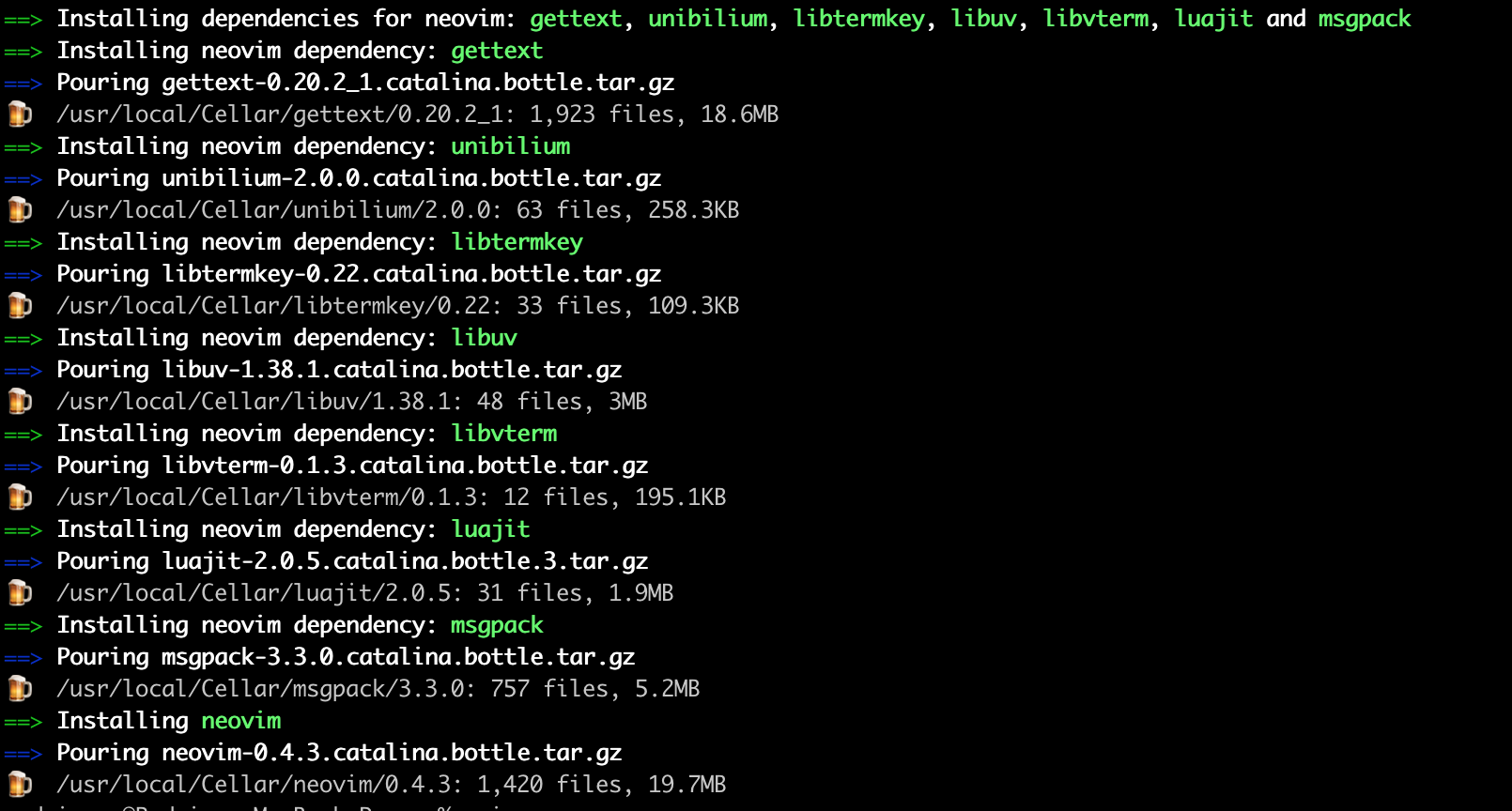
 rodrigore
on 15 Jul 2020
rodrigore
on 15 Jul 2020
fontconfig is consistently crashing during FcObjectLookupOtherTypeById, but it's not yet clear to me why. Unfortunately, the backtrace isn't especially helpful.
libfontconfig.1.dylib`FcObjectLookupOtherTypeById:

->  0x10011ac68 <+32>: ldr    w9, [x8, #0x18]

    0x10011ac6c <+36>: cmp    w9, w19

    0x10011ac70 <+40>: b.eq   0x10011ac84               ; <+60>

    0x10011ac74 <+44>: ldr    x8, [x8]
- thread #1, queue = 'com.apple.main-thread', stop reason = EXC_BAD_ACCESS (code=1, address=0x508b58)
- frame #0: 0x000000010011ac68 libfontconfig.1.dylib
FcObjectLookupOtherTypeById + 32
frame #1: 0x0000000100119bc4 libfontconfig.1.dylib
FcObjectName + 48
frame #2: 0x0000000100122db8 libfontconfig.1.dylibFcEditCreate + 76 frame #3: 0x0000000100121bbc libfontconfig.1.dylibFcEndElement + 4608
frame #4: 0x00000001c5512bec libexpat.1.dylibdoContent + 612 frame #5: 0x00000001c55115e4 libexpat.1.dylibcontentProcessor + 56
frame #6: 0x00000001c5510d0c libexpat.1.dylibdoProlog + 5484 frame #7: 0x00000001c550f680 libexpat.1.dylibprologProcessor + 112
frame #8: 0x00000001c550efdc libexpat.1.dylibXML_ParseBuffer + 160 frame #9: 0x00000001001204c4 libfontconfig.1.dylibFcConfigParseAndLoadFromMemoryInternal + 352
frame #10: 0x00000001001201b8 libfontconfig.1.dylib_FcConfigParse + 696 frame #11: 0x0000000100120120 libfontconfig.1.dylib_FcConfigParse + 544
frame #12: 0x0000000100121aa0 libfontconfig.1.dylibFcEndElement + 4324 frame #13: 0x00000001c5512bec libexpat.1.dylibdoContent + 612
frame #14: 0x00000001c55115e4 libexpat.1.dylibcontentProcessor + 56 frame #15: 0x00000001c550efdc libexpat.1.dylibXML_ParseBuffer + 160
frame #16: 0x00000001001204c4 libfontconfig.1.dylibFcConfigParseAndLoadFromMemoryInternal + 352 frame #17: 0x00000001001201b8 libfontconfig.1.dylib_FcConfigParse + 696
frame #18: 0x0000000100115260 libfontconfig.1.dylibFcInitLoadOwnConfig + 64 frame #19: 0x000000010011548c libfontconfig.1.dylibFcInitLoadOwnConfigAndFonts + 16
frame #20: 0x0000000100109288 libfontconfig.1.dylibFcConfigEnsure + 44 frame #21: 0x0000000100115534 libfontconfig.1.dylibFcInitBringUptoDate + 16
frame #22: 0x0000000100117984 libfontconfig.1.dylibFcFontList + 68 frame #23: 0x0000000100003804 fc-listmain + 432
frame #24: 0x00000001c7a82844 libdyld.dylib`start + 4
- frame #0: 0x000000010011ac68 libfontconfig.1.dylib
mistydemeo
on 15 Jul 2020
Thanks @rodrigore for the list!
I just installed big sur beta 2
On Apple Silicon?
claui
on 15 Jul 2020
Thanks @rodrigore for the list!
I just installed big sur beta 2
On Apple Silicon?
most likely not, as Big Sur Beta 2 has not been released yet on the DTK
rknall
on 15 Jul 2020
I created a break-out issue for fontconfig to keep this page focused.
claui
on 15 Jul 2020
openvpn, opusfile, orc, pinentry, parallel, pipenv, pkcs11-helper, popt, portaudio, pre-commit - installs, tests, arm64
packer - blocked by go
pandoc - blocked by ghc
php, poppler - blocked by libffi
geos - fails to build on Apple Silicon
postgis - blocked by geos
BytesGuy
on 15 Jul 2020
A future note for FFmpeg once its dependencies are resolved:
My company maintains a slimmed down version of FFmpeg for internal use, so we don't need most of the dependencies that Homebrew requires. The ARM64 assembly seems to cause issues on the DTK. Specifically:
./libavutil/aarch64/asm.S:198:21: error: expected compatible register, symbol or integer in range [0, 4095]
        add x4, x4, _ff_cos_32+(0)
                    ^
./libavutil/aarch64/asm.S:221:21: error: expected compatible register, symbol or integer in range [0, 4095]
        add x4, x4, _ff_cos_64+(0)
                    ^
./libavutil/aarch64/asm.S:244:21: error: expected compatible register, symbol or integer in range [0, 4095]
        add x4, x4, _ff_cos_128+(0)

...
I'm currently compiling with --disable-asm to at least get it compiling.
 stack
on 15 Jul 2020
stack
on 15 Jul 2020
Thanks @rodrigore for the list!
I just installed big sur beta 2
On Apple Silicon?
no 😞 , MacBook Pro 2015.
I'm sorry if this info is not so helpful on machines that are not running Apple Silicon.
rodrigore
on 15 Jul 2020
The nmap crash is due to neither RLIMIT_OFILE nor RLIMIT_NOFILE being defined. We've made a change to make this a compile-time error instead; not sure whether macOS moved the definition of this constant and we need to update #includes or whether it's a regression in homebrew.
 dmiller-nmap
on 15 Jul 2020
dmiller-nmap
on 15 Jul 2020
openvpn,opusfile,orc,pinentry,parallel,pipenv,pkcs11-helper,popt,portaudio,pre-commit- installs, tests, arm64
packer- blocked bygo
pandoc- blocked byghc
php,poppler- blocked bylibffi
geos- fails to build on Apple Silicon
postgis- blocked bygeos
Thanks @BytesGuy – all noted. 🍻
claui
on 16 Jul 2020
@claui ack runs on Apple Silicon. Having the same issues with QT here as already described :)
qtkeychain blocked by qt
gitlab-runner blocked by go?`
2020-07-16 21:13:39 +0200

./make.bash
--no-clean

Building Go cmd/dist using /private/tmp/go-20200716-72968-go6gvi/go/gobootstrap. ()
./make.bash: line 181: 73531 Killed: 9               GOROOT="$GOROOT_BOOTSTRAP" GOOS="" GOARCH="" GO111MODULE=off "$GOROOT_BOOTSTRAP/bin/go" build -o cmd/dist/dist ./cmd/dist

HOMEBREW_VERSION: 2.4.7-47-gd579725
ORIGIN: https://github.com/Homebrew/brew
HEAD: d579725f7cc7069e41949e0f29737fe580e5c8db
Last commit: 2 hours ago
Core tap ORIGIN: https://github.com/Homebrew/homebrew-core
Core tap HEAD: 1c6836c0d810e2ba5bfa1c56be132e02f8f410b2
Core tap last commit: 54 minutes ago
HOMEBREW_PREFIX: /usr/local
HOMEBREW_MAKE_JOBS: 8
CPU: octa-core 64-bit arm_vortex_tempest
Homebrew Ruby: 2.6.3 => /System/Library/Frameworks/Ruby.framework/Versions/2.6/usr/bin/ruby
Clang: 12.0 build 1200
Git: 2.24.3 => /Applications/Xcode-beta.app/Contents/Developer/usr/bin/git
Curl: 7.64.1 => /usr/bin/curl
macOS: 11.0-arm64
CLT: N/A
Xcode: 12.0 => /Applications/Xcode-beta.app/Contents/Developer
 xvilo
on 16 Jul 2020
xvilo
on 16 Jul 2020
pgp not work with macos big sur on apple-DTK
 amine2233
on 17 Jul 2020
amine2233
on 17 Jul 2020
Is there a way to force install a catalina x64 bottle on a DTK?
Even with https://github.com/Homebrew/brew/pull/7995 cherry-picked, and inside an Intel shell, brew still downloads the source archive to build the package (htop in my case)
My cmd line is HOMEBREW_NO_AUTO_UPDATE=1 brew install htop --force-bottle
brew --config reports
HOMEBREW_VERSION: 2.4.7-1-ga696975
ORIGIN: https://github.com/Homebrew/brew
HEAD: a696975ac036fdc15b72d02bf58f67926516cd81
Last commit: 6 minutes ago
Core tap ORIGIN: https://github.com/Homebrew/homebrew-core
Core tap HEAD: 04943302eff16871a929686a5c6a97f9dcb3db7b
Core tap last commit: 27 minutes ago
HOMEBREW_PREFIX: /usr/local
HOMEBREW_MAKE_JOBS: 4
CPU: quad-core 64-bit arrandale
Homebrew Ruby: 2.6.3 => /System/Library/Frameworks/Ruby.framework/Versions/2.6/usr/bin/ruby
Clang: 12.0 build 1200
Git: 2.24.3 => /Applications/Xcode-beta.app/Contents/Developer/usr/bin/git
Curl: 7.64.1 => /usr/bin/curl
macOS: 11.0-x86_64
CLT: N/A
Xcode: 12.0 => /Applications/Xcode-beta.app/Contents/Developer
 alcroito
on 17 Jul 2020
alcroito
on 17 Jul 2020
The nmap crash is due to neither
RLIMIT_OFILEnorRLIMIT_NOFILEbeing defined. We've made a change to make this a compile-time error instead; not sure whether macOS moved the definition of this constant and we need to update#includes or whether it's a regression in homebrew.
Thanks for the fix @dmiller-nmap!
Even with your patch applied, the issue persists for me, and there’s no compile-time error. See https://github.com/nmap/nmap/pull/2085 for a suggested fix.
claui
on 18 Jul 2020
Merged the libffi fix.
mistydemeo
on 18 Jul 2020
libpq fails even with krb5 fixed:
Undefined symbols for architecture arm64:
  "___crc32cb", referenced from:
      _pg_comp_crc32c_armv8 in libpgport_srv.a(pg_crc32c_armv8_srv.o)
  "___crc32cd", referenced from:
      _pg_comp_crc32c_armv8 in libpgport_srv.a(pg_crc32c_armv8_srv.o)
  "___crc32ch", referenced from:
      _pg_comp_crc32c_armv8 in libpgport_srv.a(pg_crc32c_armv8_srv.o)
  "___crc32cw", referenced from:
      _pg_comp_crc32c_armv8 in libpgport_srv.a(pg_crc32c_armv8_srv.o)
ld: symbol(s) not found for architecture arm64
clang: error: linker command failed with exit code 1 (use -v to see invocation)
make[2]: *** [postgres] Error 1
make[1]: *** [all-backend-recurse] Error 2
make: *** [all-src-recurse] Error 2
Judging from configure, it thinks these should be available on ARM:
checking for _mm_crc32_u8 and _mm_crc32_u32 with CFLAGS=... no
checking for _mm_crc32_u8 and _mm_crc32_u32 with CFLAGS=-msse4.2... no
checking for __crc32cb, __crc32ch, __crc32cw, and __crc32cd with CFLAGS=... no
checking for __crc32cb, __crc32ch, __crc32cw, and __crc32cd with CFLAGS=-march=armv8-a+crc... yes
checking which CRC-32C implementation to use... ARMv8 CRC instructions with runtime check
https://gist.github.com/mistydemeo/379acbffa34258b952d030c6a5efd486
mistydemeo
on 19 Jul 2020
Apple silicon definitely has these instruction, but the clang that ships with xcode has a fairly low default target CPU (Apple A7 IIRC), so they are not enabled by default. I have an FB in with Apple to raise that. Of course looks like libpq has yet another issue since ARMv8 CRC instructions with runtime check sounds like it anticipated this case, but perhaps the runtime check doesn't work on Darwin (since the feature detection is OS specific).
Keno
on 19 Jul 2020
Looking at that configure output, it correctly determines it needs -march=armv8-a+crc to get it. The logs indicate that's being used, but it seems that Homebrew's superenv is aggressively filtering out the -march flag. This is our bug, not Apple's or libpq's.
mistydemeo
on 19 Jul 2020
libpq fails even with krb5 fixed:
@mistydemeo Can’t reproduce. libpq builds and tests fine for me when I use the latest formula from PR https://github.com/Homebrew/homebrew-core/pull/58191.
Comparing my logfiles with yours, one notable difference is that in my 02.make, the clang command line for pg_crc32c_armv8.c doesn’t contain any -march switches, while yours contains -march=armv8-a+crc. Notably, in my 02.make there’s a single excessive space character in the exact place where yours has -march=armv8-a+crc, which is another piece of evidence that something filters it out for me (but apparently leaves the extraneous space character in place).
If Homebrew filters out the -march flag, then why does it still occur in your log for pg_crc32c_armv8.c? 🤔
Update: I found a couple more differences in 02.make. For example, my log never mentions pg_crc32c_armv8_choose.c while yours has a compilation command for it. Same thing with pg_crc32c_sb8.c.
Several static libs (e. g. libpgport.a) get built including those two object files for you (but get built without them for me).
Update 2: About those lines you mentioned from your configure log, here’s a diff (yours left, mine right):
395,397c395,396
< checking for __crc32cb, __crc32ch, __crc32cw, and __crc32cd with CFLAGS=... no
< checking for __crc32cb, __crc32ch, __crc32cw, and __crc32cd with CFLAGS=-march=armv8-a+crc... yes
< checking which CRC-32C implementation to use... ARMv8 CRC instructions with runtime check
---
> checking for __crc32cb, __crc32ch, __crc32cw, and __crc32cd with CFLAGS=... yes
> checking which CRC-32C implementation to use... ARMv8 CRC instructions
407c406
< configure: using compiler=Apple clang version 12.0.0 (clang-1200.0.22.19)
---
> configure: using compiler=Apple clang version 12.0.0 (clang-1200.0.22.41)
Looks like I'd missed beta 2 of the universal Xcode! I'm guessing Apple has raised the default -march level as of this version because libpq no longer needs to request a specific -march flag to gain access to the CRC instructions and it Just Works.
mistydemeo
on 20 Jul 2020
Found the LLVM error in the logs. It was way back in the scrollback, so easy to miss.
/tmp/llvm-20200719-2288-bsnm08/llvm-10.0.0.src/openmp/runtime/src/z_Linux_asm.S:1752:5: error: unknown directive
    .size __kmp_unnamed_critical_addr,8
    ^
make[2]: *** [projects/openmp/runtime/src/CMakeFiles/omp.dir/z_Linux_asm.S.o] Error 1
make[1]: *** [projects/openmp/runtime/src/CMakeFiles/omp.dir/all] Error 2
make[1]: *** Waiting for unfinished jobs....
[  6%] Building CXX object lib/Support/CMakeFiles/LLVMSupport.dir/CommandLine.cpp.o
I had hoped that fixing out -DLIBOMP_ARCH flag to aarch64 would be enough, but it isn't yet.
mistydemeo
on 21 Jul 2020
Disabling OpenMP for now got us much further. I'm now seeing a failure that I thought we'd already fixed in CMake. While I believe I have the latest CMake installed, I'll confirm that's the case. https://gist.github.com/mistydemeo/5e6c3f8b4776eaed5defececd90eaee9
/Applications/Xcode-beta.app/Contents/Developer/usr/bin/make  -f tools/llvm-shlib/CMakeFiles/LLVM.dir/build.make tools/llvm-shlib/CMakeFiles/LLVM.dir/depend
cd /tmp/llvm-20200721-32081-htbyeo/llvm-10.0.0.src/llvm/build && /usr/local/Cellar/cmake/3.17.3/bin/cmake -E cmake_depends "Unix Makefiles" /tmp/llvm-20200721-32081-htbyeo/llvm-10.0.0.src/llvm /tmp/llvm-20200721-32081-htbyeo/llvm-10.0.0.src/llvm/tools/llvm-shlib /tmp/llvm-20200721-32081-htbyeo/llvm-10.0.0.src/llvm/build /tmp/llvm-20200721-32081-htbyeo/llvm-10.0.0.src/llvm/build/tools/llvm-shlib /tmp/llvm-20200721-32081-htbyeo/llvm-10.0.0.src/llvm/build/tools/llvm-shlib/CMakeFiles/LLVM.dir/DependInfo.cmake --color=
Scanning dependencies of target LLVM
/Applications/Xcode-beta.app/Contents/Developer/usr/bin/make  -f tools/llvm-shlib/CMakeFiles/LLVM.dir/build.make tools/llvm-shlib/CMakeFiles/LLVM.dir/build
make[2]: *** No rule to make target `/usr/lib/libxml2.dylib', needed by `lib/libLLVM.dylib'.  Stop.
make[2]: *** Waiting for unfinished jobs....
EDIT: Upgrading to a HEAD CMake or the new 3.18.0 fixes that. I thought I had the fixed version already. However, it now fails with this: https://gist.github.com/mistydemeo/610d53537faa6ca8681cc45bcc0c8348
-- Performing Test COMPILER_RT_HAS_FUSE_LD_LLD_FLAG - Failed
CMake Error at /tmp/llvm-20200721-65835-1k0xgyf/llvm-10.0.0.src/compiler-rt/cmake/config-ix.cmake:172 (message):
  Please use architecture with 4 or 8 byte pointers.
Call Stack (most recent call first):
  /tmp/llvm-20200721-65835-1k0xgyf/llvm-10.0.0.src/compiler-rt/CMakeLists.txt:236 (include)
Which is weird, given that CMAKE_SIZEOF_VOID_P is definitely "8".
mistydemeo
on 21 Jul 2020
Don't forget to enable cli tools v12 before install fiddle gem.
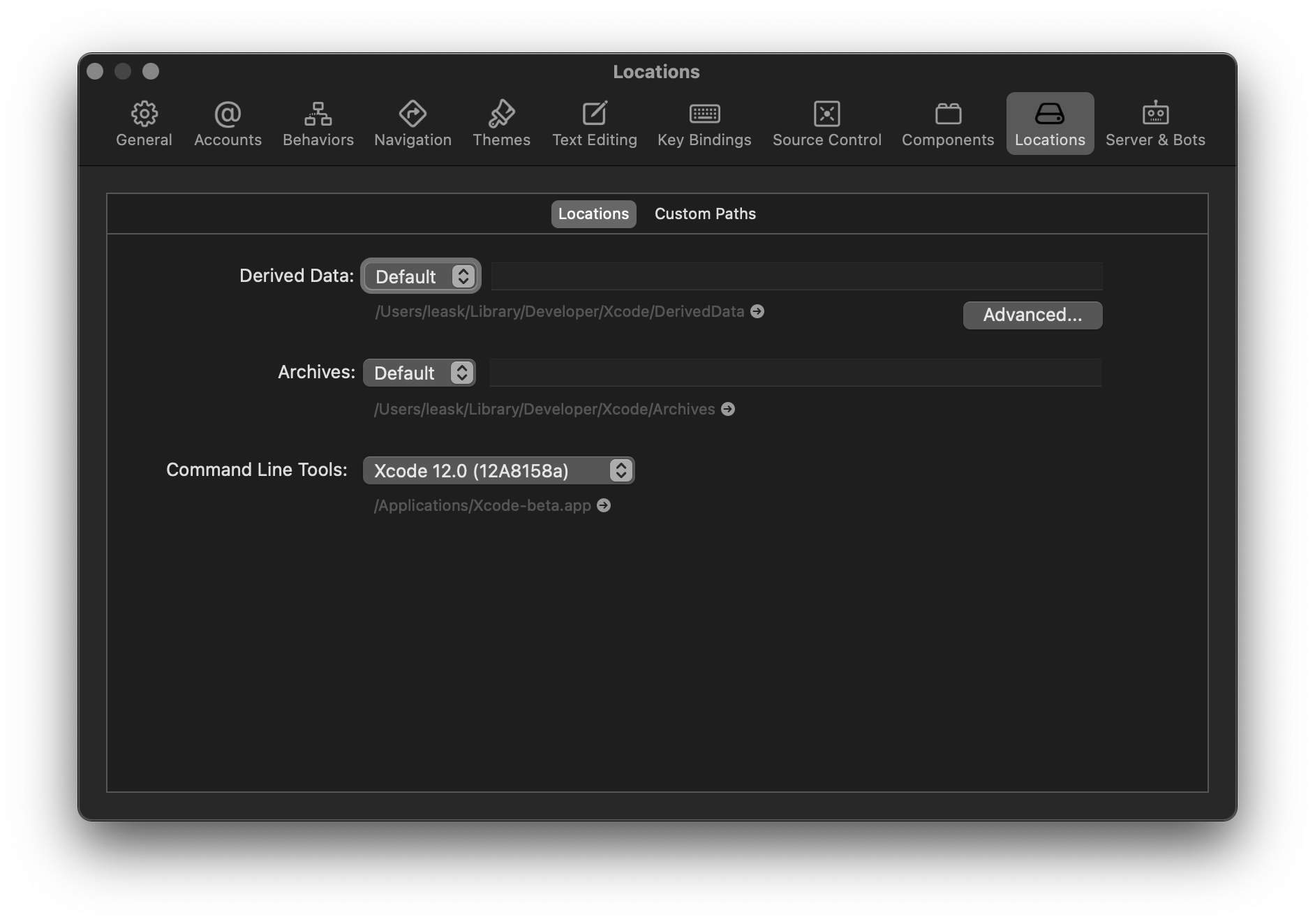
 Leask
on 22 Jul 2020
Leask
on 22 Jul 2020
curl graded back to ⚠️. There seems to be some weird regression involving ~coretls~ SecureTransport.
claui
on 23 Jul 2020
Installing cmake fails with below error.
I think 11.0 and 10.16 are same right. Shouldn't this work out of the box?
==> Downloading https://github.com/Kitware/CMake/releases/download/v3.18.0/cmake-3.18.0.tar.gz
Already downloaded: /Users/xxxxx/Library/Caches/Homebrew/downloads/fa652ee56d1fa456f2cc55468a2762338da5b893062e80beec91a481aa51502e--cmake-3.18.0.tar.gz
Error: Could not find an SDK that supports macOS 11.0.
You may have have an outdated or incompatible CLT.
Homebrew found the following SDKs in the CLT install:
  10.16
  10.15

Please update CLT or uninstall it if no updates are available.
 nitin88
on 23 Jul 2020
nitin88
on 23 Jul 2020
The issue seems to be, that Intel based Big Sur calls itself 10.16, whilst ARM based Big Sur calls itself 11.0. And this seems to have been overlooked. It works on arm-based machines 100% though.
rknall
on 23 Jul 2020
@nitin88 That has been answered earlier in the thread: https://github.com/Homebrew/brew/issues/7857#issuecomment-653446949
claui
on 23 Jul 2020
Getting error Error: Failed to download resource "apr" Download failed: Couldn't determine mirror, try again later. error on macOS 11 beta 3 when installing PHP.
Here is full output.
brew install php
Updating Homebrew...
Warning: You are using macOS 11.0.
We do not provide support for this pre-release version.
You will encounter build failures with some formulae.
Please create pull requests instead of asking for help on Homebrew's GitHub,
Discourse, Twitter or IRC. You are responsible for resolving any issues you
experience while you are running this pre-release version.

==> Downloading https://ftp.gnu.org/gnu/autoconf/autoconf-2.69.tar.gz
######################################################################## 100.0%
==> Downloading https://raw.githubusercontent.com/Homebrew/formula-patches/7e2246542543bbd3111a4ec29
######################################################################## 100.0%
Error: Failed to download resource "apr"
Download failed: Couldn't determine mirror, try again later.
 IamSwap
on 23 Jul 2020
IamSwap
on 23 Jul 2020
All Apache downloads are currently down due to an upstream issue.
Bo98
on 23 Jul 2020
@Bo98 Sorry to bother! Where I can keep an eye for that upstream issue?
IamSwap
on 23 Jul 2020
https://issues.apache.org/jira/browse/INFRA-20592
Should be fixed now!
Bo98
on 23 Jul 2020
@Bo98 Thanks for the link!
It's working now!
IamSwap
on 23 Jul 2020
CLT issues even with non Apple Silicon hardware,
Error: Could not find an SDK that supports macOS 11.0.
You may have have an outdated or incompatible CLT.
Homebrew found the following SDKs in the CLT install:
  10.14
  10.15

Please update CLT or uninstall it if no updates are available.
 kylebrowning
on 24 Jul 2020
kylebrowning
on 24 Jul 2020
@kylebrowning I was getting this error too. In my case, I follow these steps:
- Remove Xcode 11.5 and Xcode 12.
- Cleanup CLT folder at /Library/Developer.
- Run again Xcode 12 and set command-line tools to Xcode-beta.app
After this, I could run again brew
 brennobemoura
on 24 Jul 2020
brennobemoura
on 24 Jul 2020
LLVM status: stable does not (and will not) work, but HEAD works with OpenMP disabled. I'll be filing a bug for OpenMP. I have a couple PRs that are necessary for the formula to build.
mistydemeo
on 24 Jul 2020
I was able to compile GDB 9.2 on Big Sur Beta 3 (x86), but I don't have the first idea of what else would need to be checked to let homebrew install it. If it crashes I'll write back.
The first version of this comment erroneously said GCC instead of GDB. My bad!
 zjp
on 25 Jul 2020
zjp
on 25 Jul 2020
Test device: MacBook Pro 2017
Formulae: Bash
Status: Broken
Reason: redefinition of 'sys_siglist' with a different type:
'char *[32]' vs 'const char *const [32]'
Logs: Here
 DiegoMagdaleno
on 25 Jul 2020
DiegoMagdaleno
on 25 Jul 2020
I was able to test out the following formula on Apple Silicon (build 20A5299w, Xcode 12 beta 2 Universal) and they all seem to function 🥇:
- make
- ncdu
- rsync
- screenresolution
- speedtest-cli
- ssh-copy-id
- the_silver_searcher
- watch
- wimlib
 timsutton
on 26 Jul 2020
timsutton
on 26 Jul 2020
Glib merged the linked patch.
Can some, say ffmpeg, be tested while excluding the known problems, say dav1d?
 tobylane
on 27 Jul 2020
tobylane
on 27 Jul 2020
I'm also getting this error with newly reinstalled macOS Big Sur beta 3 (20A5323l), and only Xcode 12.0 beta 3 (12A8169g) ever installed.
Error: Could not find an SDK that supports macOS 11.0.
You may have have an outdated or incompatible CLT.
Homebrew found the following SDKs in the CLT install:
  10.16
  10.15
I know this issue has been discussed in https://github.com/Homebrew/brew/issues/7857#issuecomment-653341200 & https://github.com/Homebrew/brew/issues/7857#issuecomment-662918624
...and I tried to reinstall the CLT as suggested by https://github.com/Homebrew/brew/issues/7857#issuecomment-653446949 with no luck.
Also, I don't think any further updates are available now.
My brew config output:
HOMEBREW_VERSION: 2.4.8
ORIGIN: https://github.com/Homebrew/brew
HEAD: 13f0d4ad2b0773c01c5fdd5f8cba3e4f312c1c96
Last commit: 10 days ago
Core tap ORIGIN: https://github.com/Homebrew/homebrew-core
Core tap HEAD: bbadd4c3e124c21903010d387d2cb43aa662a9fd
Core tap last commit: 2 hours ago
HOMEBREW_PREFIX: /usr/local
HOMEBREW_MAKE_JOBS: 8
CPU: octa-core 64-bit kabylake
Homebrew Ruby: 2.6.3 => /System/Library/Frameworks/Ruby.framework/Versions/2.6/usr/bin/ruby
Clang: 12.0 build 1200
Git: 2.24.3 => /Applications/Xcode-beta.app/Contents/Developer/usr/bin/git
Curl: 7.64.1 => /usr/bin/curl
Java: 14.0.2, 1.8.0_262
macOS: 11.0-x86_64
CLT: 12.0.0.0.1.1593639290
Xcode: 12.0 => /Applications/Xcode-beta.app/Contents/Developer
Any ideas? Thanks in advance.
 Nekoyue
on 27 Jul 2020
Nekoyue
on 27 Jul 2020
@Nekoyue Apple updated the internal version number to 11 from 10.16. The quick initial patches seem to be targeting 10.16 only and not 11 too. So we need to wait for brew things to get updated to handle this version for x64 stuff as well.
The only work-around would be if there exists some way for us to tell Homebrew "just use 10.16 builds" but... After a quick search that doesn't seem to exist. This is just a pain of being on a developer preview build we need to deal with temporarily.
 Garbee
on 27 Jul 2020
Garbee
on 27 Jul 2020
@Garbee nope, 10.16 is the beta version for Big Sur on Intel builds, 11.0 on arm builds. I much rather assume something is wrong with the initial detection for which Plattform the build is intended
rknall
on 27 Jul 2020
@Garbee @rknall
It seems that macOS Big Sur is using both 10.16 and 11.0 for Intel and arm builds, the returned version number depends a software's SDK version but not the platform, according to this article: https://eclecticlight.co/2020/07/21/big-sur-is-both-10-16-and-11-0-its-official/
Nekoyue
on 27 Jul 2020
Which version of hw are you running on?
rknall
on 27 Jul 2020
- Have the 3rd preview installed on an Intel machine
- Open terminal
- run
sw_vers -productVersion - OBSERVE
11.0is returned
It was previously 10.16 always (at least on Intel, ARM very well could have been 11 previously but without a DTK no way to know.) So, Big Sur is now updated to show itself as 11.0 for Intel chips which did not happen before on the first 2 developer previews. This stuff is volatile given the situation that is occurring. Don't assume preview 1 and 2 are the way things will always be.
For further validation this is the break point, let's look at the Homebrew source code. The version mapper shows it is checking for ARM and saying 11 and anything else is 10.16. Well, this is no longer true, so Homebrew needs an update to properly support 11 being both ARM and amd64 builds.
Garbee
on 27 Jul 2020
In my experience bison doesn't compile on Beta 3.
 ryanbooker
on 28 Jul 2020
ryanbooker
on 28 Jul 2020
- Have the 3rd preview installed on an Intel machine
- Open terminal
- run
sw_vers -productVersion- OBSERVE
11.0is returnedIt was previously 10.16 always (at least on Intel, ARM very well could have been 11 previously but without a DTK no way to know.) So, Big Sur is now updated to show itself as 11.0 for Intel chips which did not happen before on the first 2 developer previews. This stuff is volatile given the situation that is occurring. Don't assume preview 1 and 2 are the way things will always be.
For further validation this is the break point, let's look at the Homebrew source code. The version mapper shows it is checking for _ARM_ and saying 11 and anything else is 10.16. Well, this is no longer true, so Homebrew needs an update to properly support 11 being both ARM and amd64 builds.
This is true, but can be temporarily worked around if necessary, by setting SYSTEM_VERSION_COMPAT=1 in the terminal session.
ryanbooker
on 28 Jul 2020
In my experience
bisondoesn't compile on Beta 3.
I also encountered this problem. After I updated the gettext version, I can compile bison
 qiqizjl
on 28 Jul 2020
qiqizjl
on 28 Jul 2020
In my experience
bisondoesn't compile on Beta 3.I also encountered this problem. After I updated the
gettextversion, I can compilebison
Unfortunately that didn't work for me. It's bison-3.7.
ryanbooker
on 28 Jul 2020
In my experience
bisondoesn't compile on Beta 3.I also encountered this problem. After I updated the
gettextversion, I can compilebisonUnfortunately that didn't work for me. It's
bison-3.7.
To upgrade gettext to 0.21 first, you may need to modify gettext.rb. Because homebrew did not update PR and then install bison-3.7 should be fine
qiqizjl
on 28 Jul 2020
In my experience
bisondoesn't compile on Beta 3.I also encountered this problem. After I updated the
gettextversion, I can compilebisonUnfortunately that didn't work for me. It's
bison-3.7.To upgrade gettext to 0.21 first, you may need to modify gettext.rb. Because homebrew did not update PR and then install bison-3.7 should be fine
Good point! Thanks that worked. :)
ryanbooker
on 28 Jul 2020
@Nekoyue @Garbee
That message appears if you are not using the latest Command Line Tools. Beta 3 of macOS changed the version to 11.0 so you must also update the Command Line Tools to beta 3 to get the 11.0 SDK. They should not be out-of-sync or things break, which the error is trying to tell - I will try update the wording to make more emphasis to the final line of the error (not included in the snippet you posted).
Bo98
on 28 Jul 2020
@Bo98
Thanks for the advice. I found Apple has not yet include CLT beta 3 in their Software Update Tool. I got this after running install.sh.
...
==> Installing Command Line Tools beta 2 for Xcode-12.0
==> /usr/bin/sudo /usr/sbin/softwareupdate -i Command\ Line\ Tools\ beta\ 2\ for\ Xcode-12.0
...
This issue should be resolved soon after Apple releases CLT beta 3 in Software Update Tool. For now, deleting /Library/Developer seems to work for me.
^Update 18 hours after the original post: beta 3 CLT is available now.
Nekoyue
on 28 Jul 2020
That's annoying. Beta 3 is available from https://developer.apple.com/download/more at least.
Bo98
on 28 Jul 2020
Note: My DTK gives me the fiddle error again and @indirect’s workaround no longer has any effect.
https://gist.github.com/claui/3fb9f66bc2cfdecd0c33c3f976cc6125
Would appreciate help so I can continue working on this issue. Thanks!
claui
on 28 Jul 2020
@claui unfortunately, after updating to Big Sur b3, I'm not able to reproduce. :/ Can we DM on Twitter or Discord to troubleshoot further?
indirect
on 29 Jul 2020
@indirect Thank you. Twitter DMs are open.
claui
on 29 Jul 2020
That's annoying. Beta 3 is available from developer.apple.com/download/more at least.
Maybe a bit offtopic but might prove very useful to more people: In case anyone else has trouble downloading andd/or running the Xcode CLT 12 beta 3 for homebrew:
- CLT download fails from Apple website: Use Safari to download it, other browsers were giving some people "network error" at the end
- Brew installations hang: Switch (or reset) Xcode's path with
xcode-select --switch <path>xcode-select --reset; And if you haven't: Install brew from sh script and run Ruby workaround from parent post.
 marnovo
on 29 Jul 2020
marnovo
on 29 Jul 2020
/private/tmp/[email protected]/php-7.2.32/main/reentrancy.c:139:23: error: too few arguments to function call, expected 3, have 2
readdir_r(dirp, entry);
~~~~~ ^
/Library/Developer/CommandLineTools/SDKs/MacOSX11.0.sdk/usr/include/dirent.h:110:1: note: 'readdir_r' declared here
int readdir_r(DIR , struct dirent *, struct dirent ) __DARWIN_INODE64(readdir_r);
^
1 error generated.
make: * [main/reentrancy.lo] Error 1
make: ** Waiting for unfinished jobs....
brew install [email protected]
 846047144
on 29 Jul 2020
846047144
on 29 Jul 2020
The pango build fails: https://gist.github.com/mistydemeo/3fe2f77f927f1df8513197d7acff08cb
../pango/break.c:409:4: error: unannotated fall-through between switch labels [-Werror,-Wimplicit-fallthrough]
          case G_UNICODE_CONTROL:
          ^
I think the pango issue is fixed in the development versions 1.45.x.
Bo98
on 30 Jul 2020
For those wondering about the CLT: the wording of the error has changed a bit to be clearer and will be in brew 2.4.10.
The installer has also been updated to (temporarily) no longer install the CLT until Apple fix softwareupdate supplying an incompatible version.
Bo98
on 30 Jul 2020
PHP crashes during the build: https://gist.github.com/mistydemeo/81f4535de1f6ccb6f76c457157092c0b
/Applications/Xcode-beta.app/Contents/Developer/Toolchains/XcodeDefault.xctoolchain/usr/bin/ranlib: archive member: ext/opcache/.libs/opcache.a(zend_accelerator_debug.o) offset in archive not a multiple of 8 (must be since member is an 64-bit object file)
/bin/sh /private/tmp/php-20200729-1910-2ocdyb/php-7.4.8/libtool --silent --preserve-dup-deps --mode=install cp ext/opcache/opcache.la /private/tmp/php-20200729-1910-2ocdyb/php-7.4.8/modules
Generating phar.php
Generating phar.phar
PEAR package PHP_Archive not installed: generated phar will require PHP's phar extension be enabled.
make: *** [ext/phar/phar.phar] Bus error: 10
make: *** Waiting for unfinished jobs....
@Bo98 Still occurring in the latest HEAD revisions. Their changes for it seem to have been incomplete.
mistydemeo
on 30 Jul 2020
Same line too? This is the commit I would have thought had fixed it: https://github.com/GNOME/pango/commit/0b3cd20be5249c51ec981a66c07a39d54d1d1c9d
Bo98
on 30 Jul 2020
Yep, made sure to test that patch (also tested backporting to stable). https://gist.github.com/mistydemeo/edf4f87ff7de592602866eab79b40aad
clang -Ipango/libpango-1.0.0.dylib.p -Ipango -I../pango -I. -I.. -I/usr/local/Cellar/pcre/8.44/include -I/usr/local/Cellar/glib/2.64.4_1/include/glib-2.0 -I/usr/local/Cellar/glib/2.64.4_1/lib/glib-2.0/include -I/usr/local/opt/gettext/include -I/usr/local/Cellar/libffi/3.3/include -I/usr/local/Cellar/glib/2.64.4_1/include -I/usr/local/Cellar/fribidi/1.0.10/include/fribidi -I/usr/local/Cellar/libpng/1.6.37/include/libpng16 -I/usr/local/opt/freetype/include/freetype2 -I/usr/local/Cellar/graphite2/1.3.14/include -I/usr/local/Cellar/harfbuzz/2.6.8/include/harfbuzz -I/usr/local/Cellar/fontconfig/2.13.1/include -I/usr/local/Cellar/pixman/0.40.0/include/pixman-1 -I/usr/local/Cellar/cairo/1.16.0_3/include/cairo -Xclang -fcolor-diagnostics -pipe -Wall -Winvalid-pch -std=gnu99 -O3 -D_POSIX_C_SOURCE=200809L -D_POSIX_THREAD_SAFE_FUNCTIONS -D_GNU_SOURCE -Wimplicit-function-declaration -Wstrict-prototypes -Wmissing-prototypes -Wnested-externs -Wold-style-definition -Wno-int-conversion -Werror=implicit -Werror=pointer-to-int-cast -fno-strict-aliasing -Wpointer-arith -Wmissing-declarations -Wformat=2 -Wformat-nonliteral -Wformat-security -Wunused -Wcast-align -Wmissing-noreturn -Wmissing-format-attribute -Wmissing-include-dirs -Wno-uninitialized -Wno-shadow -Werror=implicit-fallthrough -Werror=nonnull -Werror=init-self -Werror=main -Werror=missing-braces -Werror=sequence-point -Werror=return-type -Werror=trigraphs -Werror=array-bounds -Werror=write-strings -Werror=address -Werror=int-to-pointer-cast -Werror=empty-body -Werror=write-strings -Wundef -Werror=redundant-decls -fvisibility=hidden -DG_DISABLE_CAST_CHECKS '-DG_LOG_DOMAIN="Pango"' -DG_LOG_USE_STRUCTURED=1 -DPANGO_COMPILATION '-DSYSCONFDIR="/usr/local/Cellar/pango/HEAD-e07fbc2/etc"' '-DLIBDIR="/usr/local/Cellar/pango/HEAD-e07fbc2/lib"' -MD -MQ pango/libpango-1.0.0.dylib.p/break.c.o -MF pango/libpango-1.0.0.dylib.p/break.c.o.d -o pango/libpango-1.0.0.dylib.p/break.c.o -c ../pango/break.c
../pango/break.c:409:4: error: unannotated fall-through between switch labels [-Werror,-Wimplicit-fallthrough]
          case G_UNICODE_CONTROL:
          ^
../pango/break.c:409:4: note: insert '__attribute__((fallthrough));' to silence this warning
          case G_UNICODE_CONTROL:
          ^
          __attribute__((fallthrough));
../pango/break.c:409:4: note: insert 'break;' to avoid fall-through
          case G_UNICODE_CONTROL:
          ^
          break;
../pango/break.c:426:4: error: unannotated fall-through between switch labels [-Werror,-Wimplicit-fallthrough]
          case G_UNICODE_OTHER_LETTER:
          ^
../pango/break.c:426:4: note: insert '__attribute__((fallthrough));' to silence this warning
          case G_UNICODE_OTHER_LETTER:
          ^
          __attribute__((fallthrough));
../pango/break.c:426:4: note: insert 'break;' to avoid fall-through
          case G_UNICODE_OTHER_LETTER:
          ^
          break;
../pango/break.c:602:3: error: unannotated fall-through between switch labels [-Werror,-Wimplicit-fallthrough]
                case G_UNICODE_LINE_SEPARATOR:
                ^
../pango/break.c:602:3: note: insert '__attribute__((fallthrough));' to silence this warning
                case G_UNICODE_LINE_SEPARATOR:
                ^
                __attribute__((fallthrough));
../pango/break.c:602:3: note: insert 'break;' to avoid fall-through
                case G_UNICODE_LINE_SEPARATOR:
                ^
                break;
3 errors generated.
Ah, need this for glib: https://github.com/GNOME/glib/commit/5f38ae5ffca3213addc5b279a46d537792d031db
Again, it's included in a development version: glib 2.65.
Bo98
on 30 Jul 2020
For PHP, see if this pull request fixes things: https://github.com/Homebrew/homebrew-core/pull/58832
Bo98
on 30 Jul 2020
pango is fixed in https://github.com/Homebrew/homebrew-core/pull/58853.
mistydemeo
on 30 Jul 2020
Update: thanks to @indirect’s help, I’m back up and running.
Turns out there’s that directory /Library/Ruby/Gems/2.6.0/specifications/default. It contains a couple of gemspecs you really can’t (and shouldn’t ever) delete.
With the default gemspecs back in place, I could apply the fiddle hack from the top of this page, and got Homebrew working again.
claui
on 30 Jul 2020
x264 should be fixed in https://github.com/Homebrew/homebrew-core/pull/58881
 jnozsc
on 31 Jul 2020
jnozsc
on 31 Jul 2020
berkeley-db4 should be added to the list here (of not working)
 jakeleventhal
on 31 Jul 2020
jakeleventhal
on 31 Jul 2020
I don't see anyone having mentioned this, but FWIW:
Although installing Go with brew doesn't work on the DTK, if you install Go from the .pkg on the website, it seems to work perfectly and happily produces & runs arm64 binaries.
https://golang.org/dl/go1.14.6.darwin-amd64.pkg
It may not be as difficult as perhaps imagined to get it working with Rosetta 2. Still need the upstream stuff to be done before it can work natively of course
Does anyone know why it builds Go within the formula rather than just using the prebuilt binaries?
 billinghamj
on 31 Jul 2020
billinghamj
on 31 Jul 2020
It would be nice if autoconf could be update to a version that includes this commit: http://git.savannah.gnu.org/gitweb/?p=autoconf.git;a=commitdiff;h=3d93e2a2a2d966643daef27a674d5b45511cb1d4
So autoreconf would create a config.guess that includes macOS arm64 and it would be easier to develop and cross compiles some projects.
 galad87
on 3 Aug 2020
galad87
on 3 Aug 2020
I believe it's actually shipped with automake (share/automake-1.16/config.guess) and upstream have not updated config.guess there yet. With that said, we could still do so ourselves by fetching the latest files from https://git.savannah.gnu.org/gitweb/?p=config.git.
Bo98
on 3 Aug 2020
Command-line tools Beta 4 is available from developer.apple.com/download/more. Unfortunately I still get the following when trying to upgrade protobuf to 3.12.4:
==> /usr/local/opt/[email protected]/bin/python3 -c import setuptools... --no-user-cfg install --prefix=/usr/local/Cellar/protobuf/3.12.4/libexec --install-scripts=/usr/loc
Last 15 lines from /Users/bkoehn/Library/Logs/Homebrew/protobuf/06.python3:
      ~~^
/Applications/Xcode-beta.app/Contents/Developer/Toolchains/XcodeDefault.xctoolchain/usr/bin/../include/c++/v1/cmath:326:9: error: no member named 'islessequal' in the global namespace
using ::islessequal;
      ~~^
/Applications/Xcode-beta.app/Contents/Developer/Toolchains/XcodeDefault.xctoolchain/usr/bin/../include/c++/v1/cmath:327:9: error: no member named 'islessgreater' in the global namespace
using ::islessgreater;
      ~~^
/Applications/Xcode-beta.app/Contents/Developer/Toolchains/XcodeDefault.xctoolchain/usr/bin/../include/c++/v1/cmath:328:9: error: no member named 'isunordered' in the global namespace
using ::isunordered;
      ~~^
/Applications/Xcode-beta.app/Contents/Developer/Toolchains/XcodeDefault.xctoolchain/usr/bin/../include/c++/v1/cmath:329:9: error: no member named 'isunordered' in the global namespace
using ::isunordered;
      ~~^
194 warnings and 13 errors generated.
error: command 'clang' failed with exit status 1
 koehn
on 5 Aug 2020
koehn
on 5 Aug 2020
I'll need a full brew gist-logs protobuf in order to suggest anything.
Bo98
on 5 Aug 2020
Sorry; when I run brew gist-logs protobuf I get:
Error: You are using macOS 11.0.
We do not provide support for this pre-release version.
You will encounter build failures with some formulae.
Please create pull requests instead of asking for help on Homebrew's GitHub,
Discourse, Twitter or IRC. You are responsible for resolving any issues you
experience while you are running this pre-release version.
Is there a way to force it to run on Big Sur?
koehn
on 5 Aug 2020
Oh, didn't realise gist-logs did that - that might explain why I haven't seen people using it. Try run HOMEBREW_DEVELOPER=1 brew gist-logs protobuf.
Bo98
on 5 Aug 2020
No worries. Here's the gist: https://gist.github.com/koehn/7fca87c953dbfbbced8c065eca60780f
Thanks!
koehn
on 5 Aug 2020
Make sure Python has been built from source on 11.0 and not installed from a Catalina bottle.
Try brew reinstall -s python.
Bo98
on 5 Aug 2020
That did it! Thanks for all the help!
koehn
on 5 Aug 2020
Make sure Python has been built from source on 11.0 and not installed from a Catalina bottle.
Try
brew reinstall -s python.
Thank you!!! Have had issues for awhile on this and this seems to work
 bradennapier
on 7 Aug 2020
bradennapier
on 7 Aug 2020
Are we open to adding in a no-asm-esque patch to the Node (and other?) formulas? In Node's case, it would be:
    # Remove `--openssl-no-asm` workaround when upstream releases a fix
    # See also: https://github.com/nodejs/node/issues/34043
    args << "--openssl-no-asm" if Hardware::CPU.arm?
Are we open to adding in a
no-asm-esque patch to the Node (and other?) formulas?
Makes sense to me if it's guarded to ARM 👍🏻
MikeMcQuaid
on 10 Aug 2020
Great to hear, thanks!
Also can confirm, with the aforementioned Node patch, yarn seems to work perfectly, and fast too(!) - presumably as it seems to build node as native arm64
billinghamj
on 10 Aug 2020
Make sure Python has been built from source on 11.0 and not installed from a Catalina bottle.
Trybrew reinstall -s python.
Note that you can set HOMEBREW_DEVELOPER=1 and HOMEBREW_SKIP_OR_LATER_BOTTLES=1 to get this behaviour by default.
 jonchang
on 10 Aug 2020
jonchang
on 10 Aug 2020
I believe node and yarn can now be updated to 🥇
billinghamj
on 10 Aug 2020
I can't install the elasticsearch@6
$ brew install elasticsearch@6
elasticsearch@6: Java 1.8 is required to install this formula.
Install AdoptOpenJDK 8 with Homebrew Cask:
  brew cask install homebrew/cask-versions/adoptopenjdk8
Error: An unsatisfied requirement failed this build.
$ brew info elasticsearch@6
elasticsearch@6: stable 6.8.11 (bottled) [keg-only]
Distributed search & analytics engine
https://www.elastic.co/products/elasticsearch
Not installed
From: https://github.com/Homebrew/homebrew-core/blob/HEAD/Formula/[email protected]
License: Apache-2.0
==> Requirements
Required: java = 1.8 ✘
But I already have Java 8 installed
$ brew config
HOMEBREW_VERSION: 2.4.11-76-g3b2a9c3
ORIGIN: https://github.com/Homebrew/brew
HEAD: 3b2a9c3b550face74e5394e10270ac674451a648
Last commit: 3 hours ago
Core tap ORIGIN: https://github.com/Homebrew/homebrew-core
Core tap HEAD: 3fa96c75567774e871f6bb6523d9f0bdf58c0901
Core tap last commit: 63 minutes ago
Core tap branch: master
HOMEBREW_PREFIX: /usr/local
HOMEBREW_CASK_OPTS: []
HOMEBREW_MAKE_JOBS: 16
all_proxy: socks5://127.0.0.1:7891
http_proxy: http://127.0.0.1:7890
https_proxy: http://127.0.0.1:7890
CPU: 16-core 64-bit kabylake
Homebrew Ruby: 2.6.3 => /System/Library/Frameworks/Ruby.framework/Versions/2.6/usr/bin/ruby
Clang: 12.0 build 1200
Git: 2.28.0 => /usr/local/bin/git
Curl: 7.64.1 => /usr/bin/curl
Java: 14.0.2, 1.8.0_265, 1.8.0_261
macOS: 11.0-x86_64
CLT: 12.0.0.0.1.1596224945
Xcode: 12.0 => /Applications/Xcode-beta.app/Contents/Developer
and elasticsearch is normal
$ brew info elasticsearch
elasticsearch: stable 7.8.1 (bottled)
Distributed search & analytics engine
https://www.elastic.co/products/elasticsearch
Not installed
From: https://github.com/Homebrew/homebrew-core/blob/HEAD/Formula/elasticsearch.rb
License: Apache-2.0
==> Dependencies
Build: gradle ✔
Required: openjdk ✔
 zhongjun96
on 14 Aug 2020
zhongjun96
on 14 Aug 2020
What does "$(/usr/libexec/java_home --failfast --version 1.8)/bin/java" -version output?
Bo98
on 14 Aug 2020
What does
"$(/usr/libexec/java_home --failfast --version 1.8)/bin/java" -versionoutput?
I have to specify a version to execute this command
- use 1.8
$ "$(/usr/libexec/java_home --failfast --version 1.8)/bin/java" -version
Unable to locate a Java Runtime that supports (null).
No such process
Please visit http://www.java.com for information on installing Java.
- use 1.8.0_261
$ "$(/usr/libexec/java_home --failfast --version 1.8.0_261)/bin/java" -version
java version "1.8.0_261"
Java(TM) SE Runtime Environment (build 1.8.0_261-b12)
Java HotSpot(TM) 64-Bit Server VM (build 25.261-b12, mixed mode)
- use 1.8.0_265
$ "$(/usr/libexec/java_home --failfast --version 1.8.0_265)/bin/java" -version
openjdk version "1.8.0_265"
OpenJDK Runtime Environment (AdoptOpenJDK)(build 1.8.0_265-b01)
OpenJDK 64-Bit Server VM (AdoptOpenJDK)(build 25.265-b01, mixed mode)
- java_home output
$ /usr/libexec/java_home -V
Matching Java Virtual Machines (3):
    14.0.2 (x86_64) "Oracle Corporation" - "OpenJDK 14.0.2" /Library/Java/JavaVirtualMachines/openjdk-14.0.2.jdk/Contents/Home
    1.8.0_265 (x86_64) "AdoptOpenJDK" - "AdoptOpenJDK 8" /Library/Java/JavaVirtualMachines/adoptopenjdk-8.jdk/Contents/Home
    1.8.0_261 (x86_64) "Oracle Corporation" - "Java SE 8" /Library/Java/JavaVirtualMachines/jdk1.8.0_261.jdk/Contents/Home
/Library/Java/JavaVirtualMachines/openjdk-14.0.2.jdk/Contents/Home
- my JAVA_HOME
$ echo $JAVA_HOME
/Library/Java/JavaVirtualMachines/openjdk-14.0.2.jdk/Contents/Home
I have to specify a version to execute this command
That's not normal behaviour. --version 1.8 works for me and many others.
What path does /usr/libexec/java_home --failfast --version 1.8 on its own output?
Bo98
on 14 Aug 2020
I have to specify a version to execute this command
That's not normal behaviour.
--version 1.8works for me and many others.What path does
/usr/libexec/java_home --failfast --version 1.8on its own output?
I don’t understand, why the jdk can be recognized by installing elasticsearch, but elasticsearch@6 can’t 😩😩
$ /usr/libexec/java_home --failfast --version 1.8
Unable to locate a Java Runtime that supports (null).
No such process
Please visit http://www.java.com for information on installing Java.
- use 1.8.0_261
$ /usr/libexec/java_home --failfast --version 1.8.0_261
/Library/Java/JavaVirtualMachines/jdk1.8.0_261.jdk/Contents/Home
gnutls, emacs and ffmpeg flawlessly work in big sur public beta 1.
The logs are here: https://del.dog/brew-gnutls.txt
 aaryanporwal
on 16 Aug 2020
aaryanporwal
on 16 Aug 2020
why the jdk can be recognized by installing elasticsearch
Because regular elasticsearch relies on brewed openjdk and not the one installed on your system. This isn't possible for elasticsearch@6.
I'm not sure what your issue is unfortunately. I've never seen that error before and even googling it comes with no results.
Bo98
on 16 Aug 2020
why the jdk can be recognized by installing elasticsearch
Because regular elasticsearch relies on brewed openjdk and not the one installed on your system. This isn't possible for elasticsearch@6.
I'm not sure what your issue is unfortunately. I've never seen that error before and even googling it comes with no results.
After upgrading the Big Sur beta 5 version, the problem is solved
zhongjun96
on 20 Aug 2020
Not sure if this has been mentioned before. Starting with Big Sur on ARM-based Macs (not on Intel Macs), all arm64 executables must be properly code-signed. Otherwise they will not run. An ad-hoc signature is sufficient. So brew should automatically code-sign all installed executables at the very least with an ad-hoc signature. It would also be nice to have the option (e.g. in a config file) to specify a real code-signing certificate, e.g. an Apple Developer ID cert or a free Apple Development cert for brew to use instead of an ad-hoc signature.
New in macOS 11 on Apple silicon Mac computers, and starting in the next macOS Big Sur 11 beta, the operating system will enforce that any executable must be signed with a valid signature before it's allowed to run. There isn't a specific identity requirement for this signature: a simple ad-hoc signature issued locally is sufficient, which includes signatures which are now generated automatically by the linker. This new behavior doesn't change the long-established policy that our users and developers can run arbitrary code on their Macs, and is designed to simplify the execution policies on Apple silicon Mac computers and enable the system to better detect code modifications.
This new policy doesn't apply to translated x86 binaries running under Rosetta, nor does it apply to macOS 11 running on Intel platforms. (51911409)
 JayBrown
on 20 Aug 2020
JayBrown
on 20 Aug 2020
Not sure if this has been mentioned before. Starting with Big Sur on ARM-based Macs (not on Intel Macs), all arm64 executables must be properly code-signed. Otherwise they will not run. An ad-hoc signature is sufficient. So
brewshould automatically code-sign all installed executables at the very least with an ad-hoc signature.
Have you actually reproduced this with Homebrew running on Big Sur? This does not match the experience of Homebrew maintainers who have done so.
MikeMcQuaid
on 20 Aug 2020
Are they on the latest public beta and on the Apple Silicon Developer Transition Kit? I don't have the latter, so I wouldn't be able to check it. For what it's worth, Apple clearly state that starting with BS beta 4 "any executable must be signed with a valid signature before it's allowed to run", and I'm just forwarding that information. But maybe they only mean nested executables in apps and other bundles, not standalone executables in /usr/local/Cellar. But then it might still be relevant to Homebrew, namely with regard to brew cask.
Another thing to test on the Transition Kit would be if this block of unsigned executables is (as before) still linked to the existence of the quarantine extended attribute. With brew the quarantine XA usually doesn't get slapped onto installed files. If this hasn't changed, then we're probably good. But Apple also states the reason, namely to detect code manipulation, and that to me sounds like they want any and all code to be signed to increase security.
JayBrown
on 20 Aug 2020
I'm getting this error when I run brew install something
xcrun: error: invalid active developer path (/Library/Developer/CommandLineTools), missing xcrun at: /Library/Developer/CommandLineTools/usr/bin/xcrun
Error: An exception occurred within a child process:
  CompilerSelectionError: gcc cannot be built with any available compilers.
Install GNU's GCC:
  brew install gcc
so I tried to install gcc with brew but it returns the same exact message as above. That issue is generally thrown when you don't have Xcode tools installed, but I have, so to be sure I've tried to run xcode-select --install but that won't complete successfully (I guess there are some issues with Apple side) and therefore I can't test this correctly even though I'm sure that Xcode dev tools are installed because I'm compiling iOS apps right now 🤔 do you have any suggestions?
 MattRighetti
on 20 Aug 2020
MattRighetti
on 20 Aug 2020
Apple clearly state that starting with BS beta 4
They said “starting in the next macOS Big Sur 11 beta” so that might be referring to beta 5, which released less than 24 hours ago. I will evaluate the situation later today but the requirements don’t seem that strict.
Bo98
on 20 Aug 2020
Are they on the latest public beta _and_ on the Apple Silicon Developer Transition Kit?
Yes.
But maybe they only mean nested executables in apps and other bundles
It seems so. Note: we're in direct contact with Apple.
do you have any suggestions?
@MattRighetti We don't support Big Sur, sorry. This thread is maintainers and contributors working together to get Big Sur working rather than supporting people who are running it now.
MikeMcQuaid
on 20 Aug 2020
I'm getting this error when I run
brew install somethingxcrun: error: invalid active developer path (/Library/Developer/CommandLineTools), missing xcrun at: /Library/Developer/CommandLineTools/usr/bin/xcrun Error: An exception occurred within a child process: CompilerSelectionError: gcc cannot be built with any available compilers. Install GNU's GCC: brew install gccso I tried to install
gccwith brew but it returns the same exact message as above. That issue is generally thrown when you don't have Xcode tools installed, but I have, so to be sure I've tried to runxcode-select --installbut that won't complete successfully (I guess there are some issues with Apple side) and therefore I can't test this correctly even though I'm sure that Xcode dev tools are installed because I'm compiling iOS apps right now 🤔 do you have any suggestions?
Have you tried downloading and installing the command line tools from the developer downloads site?
BytesGuy
on 20 Aug 2020
I can confirm, that reinstalling/recompiling xz on Big Sur beta 5 on an Apple DTK works and the signing appears to be happening automatically. But keep in mind, all users of the DTK have Apple developer accounts by design and therefore it might include the certificate automatically anyway
rknall
on 20 Aug 2020
@BytesGuy I've just downloaded the command line tools from Apple and it works fine, I should have tested that before posting here 🙄 but they usually come with Xcode so this is the first time I had to download them separately
MattRighetti
on 20 Aug 2020
Yep I can confirm signing is all done automatically. It's _not_ associated with any particular identity. The code signing seems to be purely for checksumming and not identity verification.
Format=Mach-O thin (arm64)
CodeDirectory v=20400 size=4928 flags=0x20002(adhoc,linker-signed) hashes=151+0 location=embedded
VersionPlatform=1
VersionMin=720896
VersionSDK=720896
Hash type=sha256 size=32
CandidateCDHash sha256=b9f977891e4c9075bb1fb8d054ed0f4e7ccbe474
CandidateCDHashFull sha256=b9f977891e4c9075bb1fb8d054ed0f4e7ccbe4746a8765bd8a6a7d99efd29d05
Hash choices=sha256
CMSDigest=b9f977891e4c9075bb1fb8d054ed0f4e7ccbe4746a8765bd8a6a7d99efd29d05
CMSDigestType=2
Page size=4096
CDHash=b9f977891e4c9075bb1fb8d054ed0f4e7ccbe474
Signature=adhoc
Info.plist=not bound
TeamIdentifier=not set
Sealed Resources=none
Internal requirements=none
No further action should be needed here. Anyone here updating from beta 1-3 should note however that you may need to rebuild anything already installed. Also, as always, ensure you are running the latest version of Xcode/CLT.
Bo98
on 20 Aug 2020
Everything worked OK for me with CLT b5 on DTK
brew install yasm
Works natively on ARM and assembled some of my custom x86 asm code - sort of rosetta2 in reverse :)
So yasm gets a tick in the table for now.
 andygrace
on 21 Aug 2020
andygrace
on 21 Aug 2020
Where's best to work on Homebrew Cask issues? It doesn't look like there's an equivalent issue on that repo.
Currently looking into an issue where it says Error: wrong number of arguments (given 2, expected 0..1) on any brew cask install on beta 5 on ARM.
billinghamj
on 21 Aug 2020
Given the issue is likely in brew itself, here is probably fine to discuss such issues. A full backtrace would be useful, if one is given (maybe try passing --debug).
Bo98
on 21 Aug 2020
Ah, that's super helpful, thank you! Was wondering why I couldn't get more info with --verbose
% brew cask install discord --debug
==> Cask::Installer#install
==> Printing caveats
==> Cask::Installer#fetch
==> Downloading
==> Downloading https://cdn.discordapp.com/apps/osx/0.0.258/Discord.dmg
/usr/bin/curl --disable --globoff --show-error --user-agent Homebrew/2.4.13\ \(Macintosh\;\ arm64\ Mac\ OS\ X\ 11.0\)\ curl/7.64.1 --retry 3 --location --silent --head --request GET https://cdn.discordapp.com/apps/osx/0.0.258/Discord.dmg
Already downloaded: /Users/jb/Library/Caches/Homebrew/downloads/2ba4ba85679945574b88193ea49ac8139df84c7e3c75f07c51e517a40a25e7ab--Discord.dmg
==> Checking quarantine support
/usr/bin/xattr
/usr/bin/swift /usr/local/Homebrew/Library/Homebrew/cask/utils/quarantine.swift
==> Quarantine is available.
==> Verifying Gatekeeper status of /Users/jb/Library/Caches/Homebrew/downloads/2ba4ba85679945574b88193ea49ac8139df84c7e3c75f07c51e517a40a25e7ab--Discord.dmg
/usr/bin/xattr -p com.apple.quarantine /Users/jb/Library/Caches/Homebrew/downloads/2ba4ba85679945574b88193ea49ac8139df84c7e3c75f07c51e517a40a25e7ab--Discord.dmg
==> /Users/jb/Library/Caches/Homebrew/downloads/2ba4ba85679945574b88193ea49ac8139df84c7e3c75f07c51e517a40a25e7ab--Discord.dmg is not quarantined
==> Quarantining /Users/jb/Library/Caches/Homebrew/downloads/2ba4ba85679945574b88193ea49ac8139df84c7e3c75f07c51e517a40a25e7ab--Discord.dmg
/usr/bin/swift /usr/local/Homebrew/Library/Homebrew/cask/utils/quarantine.swift /Users/jb/Library/Caches/Homebrew/downloads/2ba4ba85679945574b88193ea49ac8139df84c7e3c75f07c51e517a40a25e7ab--Discord.dmg https://cdn.discordapp.com/apps/osx/0.0.258/Discord.dmg https://discordapp.com/
Error: wrong number of arguments (given 2, expected 0..1)
/usr/local/Homebrew/Library/Homebrew/cask/exceptions.rb:175:in `initialize'
/usr/local/Homebrew/Library/Homebrew/cask/exceptions.rb:175:in `initialize'
/usr/local/Homebrew/Library/Homebrew/cask/quarantine.rb:128:in `new'
/usr/local/Homebrew/Library/Homebrew/cask/quarantine.rb:128:in `cask!'
/usr/local/Homebrew/Library/Homebrew/cask/download.rb:55:in `quarantine'
/usr/local/Homebrew/Library/Homebrew/cask/download.rb:21:in `perform'
/usr/local/Homebrew/Library/Homebrew/cask/installer.rb:152:in `download'
/usr/local/Homebrew/Library/Homebrew/cask/installer.rb:62:in `fetch'
/usr/local/Homebrew/Library/Homebrew/cask/installer.rb:90:in `install'
/usr/local/Homebrew/Library/Homebrew/cask/cmd/install.rb:39:in `block in run'
/usr/local/Homebrew/Library/Homebrew/cask/cmd/install.rb:38:in `each'
/usr/local/Homebrew/Library/Homebrew/cask/cmd/install.rb:38:in `run'
/usr/local/Homebrew/Library/Homebrew/cask/cmd/abstract_command.rb:86:in `run'
/usr/local/Homebrew/Library/Homebrew/cask/cmd.rb:235:in `run'
/usr/local/Homebrew/Library/Homebrew/cask/cmd.rb:162:in `run'
/usr/local/Homebrew/Library/Homebrew/cmd/cask.rb:14:in `cask'
/usr/local/Homebrew/Library/Homebrew/brew.rb:119:in `<main>'
Error: Kernel.exit
/usr/local/Homebrew/Library/Homebrew/cask/cmd.rb:240:in `exit'
/usr/local/Homebrew/Library/Homebrew/cask/cmd.rb:240:in `rescue in run'
/usr/local/Homebrew/Library/Homebrew/cask/cmd.rb:210:in `run'
/usr/local/Homebrew/Library/Homebrew/cask/cmd.rb:162:in `run'
/usr/local/Homebrew/Library/Homebrew/cmd/cask.rb:14:in `cask'
/usr/local/Homebrew/Library/Homebrew/brew.rb:119:in `<main>'
This is the info provided from there - will have a dig around later today and see if I can get a fix together
Edit: using the below fix, unfortunately a separate quarantining issue comes up - for now, with brew on the master (rather than stable) branch, you can install casks with brew cask install xyz --no-quarantine
billinghamj
on 21 Aug 2020
@billinghamj will be fixed by https://github.com/Homebrew/brew/pull/8419
MikeMcQuaid
on 21 Aug 2020
With beta 4 it seems we need to sign the build .app when running Apple Silicone. Basically Apple is shutting down users to compile stuff and run it easily. :-/
It seems you now need a Apple Developer account to compile and run .app
Does anyone has any luck with this?
Code Signing
New Features in macOS Big Sur 11 Universal Apps Beta 4
Starting with Xcode 12 beta 4, the toolchain will now automatically sign your executables whenever you build from Xcode, or use command-line utilities such as clang(1) or ld(1) . This new mechanism generates signatures directly at link time, and doesn’t cover any resource other than the executable. As a result, it’s expected to be faster than a traditional codesign(1) invocation. If you use a custom workflow involving tools that modify a binary after linking (e.g. strip or install_name_tool ) you might need to manually call codesign(1) as an additional build phase to properly ad-hoc sign your binary.New in macOS 11 on Apple silicon Mac computers, and starting in the next macOS Big Sur 11 beta, the operating system will enforce that any executable must be signed with a valid signature before it’s allowed to run. There isn’t a specific identity requirement for this signature: a simple ad-hoc signature issued locally is sufficient, which includes signatures which are now generated automatically by the linker. This new behavior doesn’t change the long-established policy that our users and developers can run arbitrary code on their Macs, and is designed to simplify the execution policies on Apple silicon Mac computers and enable the system to better detect code modifications.This new policy doesn’t apply to translated x86 binaries running under Rosetta, nor does it apply to macOS 11 running on Intel platforms. (51911409)
 stefcarlens
on 24 Aug 2020
stefcarlens
on 24 Aug 2020
@stefcarlens no. this has already been discussed, and answered, on this exact ticket. the compiler automatically signs binaries as they are created, without an Apple developer account. please leave this ticket for just comments from developers making homebrew work on big sur.
indirect
on 24 Aug 2020
qt, gdal, imagemagick, php (7.4), postgis, guile, libbluray, rav1e, libsndfile, srt, x264, nss, libomp, ilmbase, openexr all seem to have compiled and installed for me today running beta 5 on Intel. None of the packages provided any command line warnings or errors. I can provide logs if desired.
 RedChops
on 26 Aug 2020
RedChops
on 26 Aug 2020
So, I got this error when installing eksctl
Updating Homebrew...
/usr/local/Homebrew/Library/Homebrew/brew.rb (Formulary::TapLoader): loading /usr/local/Homebrew/Library/Taps/weaveworks/homebrew-tap/Formula/eksctl.rb
Warning: You are using macOS 11.0.
We do not provide support for this pre-release version.
You will encounter build failures with some formulae.
Please create pull requests instead of asking for help on Homebrew's GitHub,
Discourse, Twitter or IRC. You are responsible for resolving any issues you
experience while you are running this pre-release version.

==> Installing eksctl from weaveworks/tap
/usr/local/Homebrew/Library/Homebrew/brew.rb (Formulary::FormulaLoader): loading /usr/local/Homebrew/Library/Taps/homebrew/homebrew-core/Formula/kubernetes-cli.rb
/usr/local/Homebrew/Library/Homebrew/brew.rb (Formulary::FormulaLoader): loading /usr/local/Homebrew/Library/Taps/homebrew/homebrew-core/Formula/go.rb
/usr/local/Homebrew/Library/Homebrew/brew.rb (Formulary::FormulaLoader): loading /usr/local/Homebrew/Library/Taps/homebrew/homebrew-core/Formula/aws-iam-authenticator.rb
==> Downloading https://github.com/weaveworks/eksctl/releases/download/0.26.0/eksctl_Darwin_amd64.tar.gz
/usr/bin/curl --disable --globoff --show-error --user-agent Homebrew/2.4.13\ \(Macintosh\;\ Intel\ Mac\ OS\ X\ 11.0\)\ curl/7.64.1 --retry 3 --location --silent --head --request GET https://github.com/weaveworks/eksctl/releases/download/0.26.0/eksctl_Darwin_amd64.tar.gz
Already downloaded: /Users/oo00spy00oo/Library/Caches/Homebrew/downloads/ad06841d8a3e7a4d77ce61af099769dda42239c9d0e5decc01e6e2935fc21276--eksctl_Darwin_amd64.tar.gz
/usr/local/Homebrew/Library/Homebrew/build.rb (Formulary::FormulaLoader): loading /usr/local/Homebrew/Library/Taps/homebrew/homebrew-core/Formula/kubernetes-cli.rb
/usr/local/Homebrew/Library/Homebrew/build.rb (Formulary::FormulaLoader): loading /usr/local/Homebrew/Library/Taps/homebrew/homebrew-core/Formula/aws-iam-authenticator.rb
/usr/local/Homebrew/Library/Homebrew/build.rb (Formulary::FormulaLoader): loading /usr/local/Homebrew/Library/Taps/homebrew/homebrew-core/Formula/go.rb
Error: An exception occurred within a child process:
  NoMethodError: undefined method `path' for nil:NilClass
Did you mean?  paths
/usr/local/Homebrew/Library/Homebrew/extend/os/mac/extend/ENV/super.rb:113:in `setup_build_environment'
/usr/local/Homebrew/Library/Homebrew/build.rb:93:in `install'
/usr/local/Homebrew/Library/Homebrew/build.rb:226:in `<main>'
 oo00spy00oo
on 28 Aug 2020
oo00spy00oo
on 28 Aug 2020
brew install yasm
Works natively on ARM and assembled some of my custom x86 asm code - sort of rosetta2 in reverse :)
So yasm gets a tick in the table for now.
@andygrace I’ve also filed https://github.com/Homebrew/homebrew-core/pull/60368 to fix brew test yasm, which should fail for you (update: work now) on Si.
claui
on 29 Aug 2020
re:
ilmbase- looks like this pull request straightens out arm64 macOS support. Oncecmakebuild is fixed there shouldn't be a problem buildingopenexrandilmbase.
Both openexr and ilmbase now confirmed 🥇.
claui
on 30 Aug 2020
@claui Confirm yarn
❯ brew install -s yarn
Updating Homebrew...
Warning: You are using macOS 11.0.
We do not provide support for this pre-release version.
You will encounter build failures with some formulae.
Please create pull requests instead of asking for help on Homebrew's GitHub,
Discourse, Twitter or IRC. You are responsible for resolving any issues you
experience while you are running this pre-release version.

==> Downloading https://yarnpkg.com/downloads/1.22.5/yarn-v1.22.5.tar.gz
Already downloaded: /Users/shaw/Library/Caches/Homebrew/downloads/b858a5ca4ade7c6cd0a5deeb77770019c86813d12fc8950d70af904e6ded8e17--yarn-v1.22.5.tar.gz
Error: An exception occurred within a child process:
  NoMethodError: undefined method `path' for nil:NilClass
Did you mean?  paths
 shaodahong
on 31 Aug 2020
shaodahong
on 31 Aug 2020
I just learned that @Iains has some work in progress on https://github.com/iains/gcc-darwin-arm64 to port the GCC backend to Apple Silicon.
Mind that Apple Silicon support is going to require GCC 11 even in the best case. The first stable release of GCC 11 may come out in mid-2021 or later. For limited testing on Apple Silicon, Homebrew may consider shipping an unstable GCC 11 but that’s yet to be decided.
claui
on 4 Sep 2020
I just learned that @iains has some work in progress on https://github.com/iains/gcc-darwin-arm64 to port the GCC backend to Apple Silicon.
Mind that Apple Silicon support is going to require GCC 11 even in the best case. The first stable release of GCC 11 may come out in mid-2021 or later. For limited testing on Apple Silicon, Homebrew _may_ consider shipping an unstable GCC 11 but that’s yet to be decided.
@claui
+1 for the unstable GCC 11 for Homebrew team ~may~ consider to release. End of CY2020 will be a boom of Darwin-arm64 usage, and would be great to have brew supporting it, even with huge warnings as already happen when you use a macOS beta release.
 junior
on 5 Sep 2020
junior
on 5 Sep 2020
I have an issue with installing homebrew using the latest beta of Big Sur as of today. I also have the latest Xcode.
andytriboletti@andys-mac openspace-swift % /bin/bash -c "$(curl -fsSL https://raw.githubusercontent.com/Homebrew/install/master/install.sh)"

Password:
==> You are using macOS 11.0.
==> We do not provide support for this pre-release version.
This installation may not succeed.
After installation, you will encounter build failures with some formulae.
Please create pull requests instead of asking for help on Homebrew\'s GitHub,
Discourse, Twitter or IRC. You are responsible for resolving any issues you
experience while you are running this pre-release version.

==> This script will install:
/usr/local/bin/brew
/usr/local/share/doc/homebrew
/usr/local/share/man/man1/brew.1
/usr/local/share/zsh/site-functions/_brew
/usr/local/etc/bash_completion.d/brew
/usr/local/Homebrew

Press RETURN to continue or any other key to abort
==> Downloading and installing Homebrew...
/bin/bash: line 111:  3554 Killed: 9               "$@"
Failed during: git init -q
 andytriboletti
on 6 Sep 2020
andytriboletti
on 6 Sep 2020
@andytriboletti Check your PATH for custom Git binaries other than /usr/bin/git.
Next time, please kindly respect the message we’ve sent to your Terminal:
Please create pull requests instead of asking for help on Homebrew\'s GitHub,
Discourse, Twitter or IRC. You are responsible for resolving any issues you
experience while you are running this pre-release version.
claui
on 6 Sep 2020
It appears that currently, homebrew does not sign binaries:
% codesign -d -vvv /usr/local/bin/rbenv
/usr/local/bin/rbenv: code object is not signed at all
This causes them to be unusable on the DTK
% rbenv init
zsh: killed     rbenv init
% brew --version
Homebrew 2.4.16
Homebrew/homebrew-core (git revision c2e47b; last commit 2020-09-07)
 below
on 7 Sep 2020
below
on 7 Sep 2020
@below The rbenv executable cannot be signed because it’s a script.
The issue is with /usr/local/opt/rbenv/libexec/rbenv-realpath.dylib, which has a signature, albeit an invalid one. That causes the crash when the shell tries to enable it as an external builtin. Until we have a fix, you can work around the issue by running codesign -s - on the dylib after the installation.
The pyenv formula has a similar issue.
claui
on 7 Sep 2020
gitlab-runner and git-lfs both need go to work.
The Intel git-lfs for macOS downloadable from https://git-lfs.github.com/ works fine for now though.
UPDATE:
These seem to work:
- gflags
- glog
- grpc
 hjmallon
on 9 Sep 2020
hjmallon
on 9 Sep 2020
dav1d works fine now. Getting a slightly new, or at least more detailed, error from guile: https://gist.github.com/mistydemeo/2e11652cb07ea9ebba206959688d33cf
  GEN      guile-procedures.texi
allocating JIT code buffer failed: Permission denied
jit.c:5687: fatal: assertion failed
/bin/sh: line 1: 73768 Broken pipe: 13         cat alist.doc array-handle.doc array-map.doc arrays.doc async.doc atomic.doc backtrace.doc boolean.doc bitvectors.doc bytevectors.doc chars.doc control.doc continuations.doc debug.doc deprecated.doc deprecation.doc dynl.doc dynwind.doc eq.doc error.doc eval.doc evalext.doc exceptions.doc expand.doc extensions.doc fdes-finalizers.doc feature.doc filesys.doc fluids.doc foreign.doc fports.doc gc-malloc.doc gc.doc gettext.doc generalized-arrays.doc generalized-vectors.doc goops.doc gsubr.doc guardians.doc hash.doc hashtab.doc hooks.doc i18n.doc init.doc ioext.doc keywords.doc list.doc load.doc macros.doc mallocs.doc memoize.doc modules.doc numbers.doc objprop.doc options.doc pairs.doc ports.doc print.doc procprop.doc procs.doc promises.doc r6rs-ports.doc random.doc rdelim.doc read.doc rw.doc scmsigs.doc script.doc simpos.doc smob.doc sort.doc srcprop.doc srfi-1.doc srfi-4.doc srfi-13.doc srfi-14.doc srfi-60.doc stackchk.doc stacks.doc stime.doc strings.doc strorder.doc strports.doc struct.doc symbols.doc syntax.doc threads.doc throw.doc trees.doc unicode.doc uniform.doc values.doc variable.doc vectors.doc version.doc vports.doc weak-set.doc weak-table.doc weak-vector.doc dynl.doc posix.doc net_db.doc socket.doc regex-posix.doc
     73769 Abort trap: 6           | GUILE_AUTO_COMPILE=0 ../meta/build-env guild snarf-check-and-output-texi > guile-procedures.texi
libsoxr seems to be specifically coming from the attempt to use SIMD32. I checked and this isn't us messing with its flags; it's broken building outside of Homebrew, too.
INTERLEAVE2 and UNINTERLEAVE2 are both macros used in ORDERED_CONVOLVE_SIMD and ORDERED_PARTIAL_CONVOLVE_SIMD - looks like they've been left undefined because __arm__ isn't set on macOS with Apple Silicon, just __arm64__. This is definitely a libsoxr bug and I'll file an upstream bug, but meanwhile we can work around it locally.
mistydemeo
on 16 Sep 2020
From the table in the OP, many depend on go and rust, however the linked issues for them are talking about arm compatibility, which is a subset of Big Sur compatibility, as the majority of users this year will be on Big Sur intel, rather than Big Sur arm.
Can we get a reflection of what Big Sur intel compat is? Tracking Big Sur intel and Big Sur arm compat independently.
 balupton
on 16 Sep 2020
balupton
on 16 Sep 2020
@balupton I feel your feedback is justified.
For example, my own contributions to this issue have focused on Big Sur on Apple Silicon so far simply because that’s what I have personally available for testing.
That’s one of several reasons why this issue has evolved in a direction where it tracks Apple Silicon only.
For now, I feel that the narrower focus is a good thing so maybe it’s time to change the title. Thank you for the feedback.
claui
on 16 Sep 2020
👋 First contribution to this thread, but watch installs and runs fine. Dependencies were compiled from source:
==> Installing watch
==> autoreconf -fiv
==> ./configure --prefix=/usr/local/Cellar/watch/3.3.16 --disable-nls --enable-watch8bit
==> make watch
🍺  /usr/local/Cellar/watch/3.3.16: 10 files, 135.6KB
/101/> file $(which watch)
/usr/local/bin/watch: Mach-O 64-bit executable arm64
Is there any other verification needed to mark as complete in the table above?
 mgarabed
on 17 Sep 2020
mgarabed
on 17 Sep 2020
🏅 for tig: via brew install -s tig
> file $(which tig)
/usr/local/bin/tig: Mach-O 64-bit executable arm64
I believe that Erlang works now if built directly from the maint branch (so we should be good as of the next release.)
I say "believe" because code signing has totally busted on me and codesign -s - /path/to/lib doesn't work because apparently codesign_allocate is failing.
As soon as I figure that part out I will test Elixir and run the full Erlang test suite.
(note this is all without java - will need to check again once openjdk works.)
idyll
on 22 Sep 2020
A note on my previous comment. codesign_allocate seemed to sign one file and start failing. And would fail till I rebooted. But I managed to sign all the openssl libs after a couple reboots and then everything worked.
Elixir and Erlang both work as long as Elixir is compiled from maint (which will be released as 23.1)
Not that this directly impacts homebrew but it looks like some older NIFs (that compile c code) specify an architecture which causes issues as you'd imagine... but newer things that use elixir-make seem to work fine.
I tested Bcrypt Elixir and it compiled and worked without modification.
So it looks like we are just waiting for 23.1 and this should all just work.
Tracing this upstream @tehprofessor fixed the crash so huge thanks!
idyll
on 22 Sep 2020
I'm seeing a similar issue to @idyll. I messed something up, so I completely restored my DTK yesterday. It now seems like code sign works once before it starts failing. This showed up because all of gettext's libraries won't link, causing everything else to fail in brew in bizarre ways. Specifically, everything that attempts to link brew libraries gets killed.
stack
on 22 Sep 2020
I say "believe" because code signing has totally busted on me and codesign -s - /path/to/lib doesn't work because apparently codesign_allocate is failing.
If you haven't already, please file a Feedback report to Apple about this!
mistydemeo
on 22 Sep 2020
If you haven't already, please file a Feedback report to Apple about this!
I've filed a feedback.
idyll
on 22 Sep 2020
What is the state of affairs for macOS 11.0 on x86_64, how ready is it? (Perhaps this ought to be split into a separate issue).
 dimpase
on 24 Sep 2020
dimpase
on 24 Sep 2020
What is the state of affairs for macOS 11.0 on x86_64, how ready is it? (Perhaps this ought to be split into a separate issue).
macOS 11.0 so far is Apple Silicon only. The version for x86_64 is called macOS 10.15 or something similar for now.
rknall
on 25 Sep 2020
macOS 11.0 so far is Apple Silicon only.
There are public betas of macOS 11.0 for x86_64 available. Do you mean to say that Homebrew is not being ported to these for the time being?
dimpase
on 25 Sep 2020
Ok, has to be a newer development, hadn't been the case for the older Betas. So far this page tracks the work to make it run on Apple Silicon. From my pov, it shouldn't be affecting x86_64 except for the signage issue
rknall
on 25 Sep 2020
actually, not so recent - we've been playing with it since about a month, see https://trac.sagemath.org/ticket/30494 (and its spin-off https://trac.sagemath.org/ticket/30651) - it's definitely a nontrivial amount of work, as many things have to updated to be built with XCode 12. I suppose we should try to upstream to you what we found so far.
dimpase
on 25 Sep 2020
So OTP 23.1 (erlang) was released. Which is great because Erlang and Elixir both work on Apple Silicon now with one caveat:
- The current build setup in brew for Erlang requires
fopwhich pulls inopenjdkwhich of course breaks things.
While fop is technically required to build the Erlang PDF documentation it's not needed by the runtime. So I've locally removed it as a dependency for my testing.
I don't have the context to understand why the choice was made to make fop a required dependency but I'd suggest removing it or at the very least making it optional. (Since the PDF documentation is readily available for download this seems redundant and should speedup builds)
idyll
on 28 Sep 2020
If you haven't already, please file a Feedback report to Apple about this!
I've filed a feedback.
@idyll have you been able to solve your issue or get an answer back from Apple? Facing the same issue. For example, building cmake on it's own works fine, installing it from brew leads to it being killed immediately. Not really sure if it is the signing though, resigning does not resolve it. Still think it has something to do with how brew installs certain recipes?
Running beta8 with Xcode 12.2
rknall
on 28 Sep 2020
@idyll have you been able to solve your issue or get an answer back from Apple? Facing the same issue. For example, building cmake on it's own works fine, installing it from brew leads to it being killed immediately. Not really sure if it is the signing though, resigning does not resolve it. Still think it has something to do with how brew installs certain recipes?
Running beta8 with Xcode 12.2
It's an issue with signing - 100% - I was able to manually resign the libs to fix. It appears that the code Apple uses for signing is failing for a bad signature sometimes. And the issue isn't present on my MacBook also running Big Sur so I think it's DTK specific.
We don't actually have command line tools for 12.2 right now, so my hope is that this is resolved when we get them with the next build.
idyll
on 29 Sep 2020
Re: libomp (OpenMP runtime). I have a three-line patch for the assembly-language file z_Linux_asm.S that allows compilation, linking, and app execution on DTK. The patch is under formal review by the llmp/Clang/openmp developers (D88252). Is there interest in incorporating this change into Brew sooner than a future llmp source release? No change to the compiler - just to the run-time library.
 mpiqueca
on 29 Sep 2020
mpiqueca
on 29 Sep 2020
Bash seems to be a problem with clang-12 this would make Bash dependent of GCC to build it.
This behaviour was discovered by: @vpoiesz and I attach the logs here:
https://gist.github.com/DiegoMagdaleno/4684f94978813a07c4b93f1ebe6a65cf
Semes to build without any issue if we use gcc-10.
DiegoMagdaleno
on 29 Sep 2020
Ahoy! Sorry late to the party on this one, and probably not too useful 😬 but FWIW-- here are my specific build settings for posterity, I had zero issues with running Phoenix's test suite and only benign failures in Erlang/OTP's test suite:
ERL_CONFIGURE_OPTIONS="--enable-hipe --without-javac --disable-debug --enable-shared-zlib --enable-dynamic-ssl-lib --enable-sctp --enable-smp-support --enable-threads --enable-kernel-poll --enable-m64-build --with-ssl=/usr/local/opt/[email protected]"
I forget the exact version of Elixir I was using but it really doesn't matter as long as it matches the version of Erlang/OTP you're using.
As @idyll said fop or any jvm related settings are definitely a no-go; until, the JVM is in working (which I haven't checked on since early August). If you're using homebrew to build any of the necessary dependencies make sure to us the -s flag to build from source or even better, until we have a real production-grade ARM64 Mac available, just build it it yourself (also don't use iTerm unless you build it from source and/or know it's the ARM64 variant).
It's worth noting, I personally don't use brew to install Erlang/Elixir 😅. So, I'm not totally sure what brew specific issues could be lurking with the exception of, as @idyll said, code-signing which needs to be re-performed with each beta release (for the time being) and/or external NIF/library issues.
Only final suggestion I have: look through Console.app ** for clues in the system logs.
** I could seriously write a love song about Console.app after my time with the DTK.
 tehprofessor
on 29 Sep 2020
tehprofessor
on 29 Sep 2020
 pavankjadda
on 30 Sep 2020
pavankjadda
on 30 Sep 2020
Code signing issues should be resolved now:
https://developer.apple.com/documentation/xcode-release-notes/xcode-12_2-beta-release-notes/
Apple Clang Compiler
Resolved Issues
Fixed an issue that caused strip, install_name_tool and vtool to corrupt the ad-hoc code signatures generated by the linker for arm64 Mach-O files. (51911417)
idyll
on 30 Sep 2020
Erlang + Elixir: once https://github.com/Homebrew/homebrew-core/issues/61770 is resolved (I have an open PR but I need to write a test for it to be accepted) Erlang and Elixir should be good to go.
idyll
on 30 Sep 2020
Seems (DTK beta 9, Xcode 12.2 beta 2, Cmdline tools 12.2 beta 2) code signing is still broken when trying to install something with brew: gettext's msgfmt gets killed on first call, causing most non-trivial software not to build.
 domschl
on 30 Sep 2020
domschl
on 30 Sep 2020
Code signing issues should be resolved now:
https://developer.apple.com/documentation/xcode-release-notes/xcode-12_2-beta-release-notes/
Apple Clang Compiler
Resolved Issues
Fixed an issue that caused strip, install_name_tool and vtool to corrupt the ad-hoc code signatures generated by the linker for arm64 Mach-O files. (51911417)
Not quite. I am trying to get gettext compiled. Although that runs through, it still doesn't work, as /usr/local/Cellar/gettext/0.21/lib/libintl.8.dylib is not signed correctly. Resigning does not seem to be possible, as the utility codedesign_allocate cannot be found, which is weird, as it is in path.
rknall@MacDevKit build_arm64 % codesign -s - -f /usr/local/Cellar/gettext/0.21/lib/libintl.8.dylib
/usr/local/Cellar/gettext/0.21/lib/libintl.8.dylib: replacing existing signature
/usr/local/Cellar/gettext/0.21/lib/libintl.8.dylib: the codesign_allocate helper tool cannot be found or used
rknall
on 30 Sep 2020
It seems, that it does not affect the binaries (mgfmt or gettext for instance), but rather the libraries. Every library build by gettext is affected and won't work. Signing after the fact does not work either. The codesign_allocate utility issue can be avoided like this:
rknall@MacDevKit build_arm64 % CODESIGN_ALLOCATE=/usr/bin/codesign_allocate codesign -s - -f /usr/local/Cellar/gettext/0.21/lib/libintl.8.dylib
/usr/local/Cellar/gettext/0.21/lib/libintl.8.dylib: replacing existing signature
/usr/local/Cellar/gettext/0.21/lib/libintl.8.dylib: code failed to satisfy specified code requirement(s)
But the library is not accepted by the utility. Seems there is a final step missing. Building from source does not face the same issue it seems, so something is different in the brew build.
rknall
on 30 Sep 2020
So far, only libraries seem to be affected. By chance I have replaced glibtool with a symlink to the system-provided libtool, which seems to produce valid libraries. As I understand the release notes, Apples dev tools sign automatically upon building, which an external tool does not do necessarily. Therefore I currently operate under the assumption, that the libtool dependency as it is set for formulas, currently breaks a bigger installation. Every package not using the libtool dependency works for me right now, as does every package with the dependency if build from source and not with brew.
rknall
on 30 Sep 2020
Resigning does not seem to be possible, as the utility codedesign_allocate cannot be found, which is weird, as it is in path
In my experience the signature on codedesign_allocate itself somehow became invalid. And it was being killed.
A reboot would allow it to function for a short amount of time.
idyll
on 30 Sep 2020
https://apple.stackexchange.com/questions/401899/homebrew-your-clt-does-not-support-macos-11-0
I don't get this error if I install Command Line Tools for Xcode 12 beta 5... why does this happen with the released CLT?
 li-shahn
on 1 Oct 2020
li-shahn
on 1 Oct 2020
https://apple.stackexchange.com/questions/401899/homebrew-your-clt-does-not-support-macos-11-0
I don't get this error if I install Command Line Tools for Xcode 12 beta 5... why does this happen with the released CLT?
You will, if you update to beta 9 & Xcode 12.2. The changes came after beta 6
rknall
on 1 Oct 2020
There are some discussions about running Intel (Rosetta) and Apple Silicon native Homebrew installations concurrently on Apple Silicon Macs, but are there any thoughts of running Apple Silicon Homebrew installations on Intel x86 Macs? The reason I'm asking is that currently my project relies on CI's Homebrew installation to get all dependencies, and I think it's unlikely Travis CI or Github will have Apple Silicon CI good to go on launch, which likely means we will need to cross-compile from Intel x86. That is not a huge deal in itself as Xcode supports it, but it does mean these Intel Macs need to have Apple Silicon libraries installed (e.g. Python, gettext).
 ychin
on 4 Oct 2020
ychin
on 4 Oct 2020
I have found that git seems to no longer work in beta 9 - in fact I was no longer able to run brew update initially.
As info for anyone with similar issues, it seems if you remove any git you have from homebrew - brew uninstall git - brew will then work fine using the standard Apple git installation.
At that point though, even with brew updated and no issues showing on brew doctor, brew install git fails with the following error:
==> make install prefix=/usr/local/Cellar/git/2.28.0 sysconfdir=/usr/local/etc CC=clang CFLAGS= LDFLAGS= NO_TCLTK=1 NO_OPENSSL=1 APPLE_COMMON
Last 15 lines from /Users/jb/Library/Logs/Homebrew/git/01.make:
clang -o builtin/upload-archive.o -c -MF builtin/.depend/upload-archive.o.d -MQ builtin/upload-archive.o -MMD -MP    -I. -DPRECOMPOSE_UNICODE -DPROTECT_HFS_DEFAULT=1 -I/usr/local/include -I/usr/local/opt/gettext/include -DGIT_HOST_CPU="\"arm64\"" -DUSE_LIBPCRE2 -I/usr/local/opt/pcre2/include  -DUSE_CURL_FOR_IMAP_SEND -DNO_OPENSSL -DUSE_ST_TIMESPEC -DSHA1_APPLE -DSHA256_BLK -DSHA1_MAX_BLOCK_SIZE="1024L*1024L*1024L"  -DHAVE_DEV_TTY -DHAVE_BSD_SYSCTL -DHAVE_GETDELIM -DHAVE_NS_GET_EXECUTABLE_PATH  -DAPPLE_COMMON_CRYPTO -DFREAD_READS_DIRECTORIES -DCOMMON_DIGEST_FOR_OPENSSL -DNO_MEMMEM -Icompat/regex -DSHELL_PATH='"/bin/sh"' -DPAGER_ENV='"LESS=FRX LV=-c"'  builtin/upload-archive.c
clang -o builtin/upload-pack.o -c -MF builtin/.depend/upload-pack.o.d -MQ builtin/upload-pack.o -MMD -MP    -I. -DPRECOMPOSE_UNICODE -DPROTECT_HFS_DEFAULT=1 -I/usr/local/include -I/usr/local/opt/gettext/include -DGIT_HOST_CPU="\"arm64\"" -DUSE_LIBPCRE2 -I/usr/local/opt/pcre2/include  -DUSE_CURL_FOR_IMAP_SEND -DNO_OPENSSL -DUSE_ST_TIMESPEC -DSHA1_APPLE -DSHA256_BLK -DSHA1_MAX_BLOCK_SIZE="1024L*1024L*1024L"  -DHAVE_DEV_TTY -DHAVE_BSD_SYSCTL -DHAVE_GETDELIM -DHAVE_NS_GET_EXECUTABLE_PATH  -DAPPLE_COMMON_CRYPTO -DFREAD_READS_DIRECTORIES -DCOMMON_DIGEST_FOR_OPENSSL -DNO_MEMMEM -Icompat/regex -DSHELL_PATH='"/bin/sh"' -DPAGER_ENV='"LESS=FRX LV=-c"'  builtin/upload-pack.c
clang -o builtin/var.o -c -MF builtin/.depend/var.o.d -MQ builtin/var.o -MMD -MP    -I. -DPRECOMPOSE_UNICODE -DPROTECT_HFS_DEFAULT=1 -I/usr/local/include -I/usr/local/opt/gettext/include -DGIT_HOST_CPU="\"arm64\"" -DUSE_LIBPCRE2 -I/usr/local/opt/pcre2/include  -DUSE_CURL_FOR_IMAP_SEND -DNO_OPENSSL -DUSE_ST_TIMESPEC -DSHA1_APPLE -DSHA256_BLK -DSHA1_MAX_BLOCK_SIZE="1024L*1024L*1024L"  -DHAVE_DEV_TTY -DHAVE_BSD_SYSCTL -DHAVE_GETDELIM -DHAVE_NS_GET_EXECUTABLE_PATH  -DAPPLE_COMMON_CRYPTO -DFREAD_READS_DIRECTORIES -DCOMMON_DIGEST_FOR_OPENSSL -DNO_MEMMEM -Icompat/regex -DSHELL_PATH='"/bin/sh"' -DPAGER_ENV='"LESS=FRX LV=-c"'  builtin/var.c
clang -o builtin/verify-commit.o -c -MF builtin/.depend/verify-commit.o.d -MQ builtin/verify-commit.o -MMD -MP    -I. -DPRECOMPOSE_UNICODE -DPROTECT_HFS_DEFAULT=1 -I/usr/local/include -I/usr/local/opt/gettext/include -DGIT_HOST_CPU="\"arm64\"" -DUSE_LIBPCRE2 -I/usr/local/opt/pcre2/include  -DUSE_CURL_FOR_IMAP_SEND -DNO_OPENSSL -DUSE_ST_TIMESPEC -DSHA1_APPLE -DSHA256_BLK -DSHA1_MAX_BLOCK_SIZE="1024L*1024L*1024L"  -DHAVE_DEV_TTY -DHAVE_BSD_SYSCTL -DHAVE_GETDELIM -DHAVE_NS_GET_EXECUTABLE_PATH  -DAPPLE_COMMON_CRYPTO -DFREAD_READS_DIRECTORIES -DCOMMON_DIGEST_FOR_OPENSSL -DNO_MEMMEM -Icompat/regex -DSHELL_PATH='"/bin/sh"' -DPAGER_ENV='"LESS=FRX LV=-c"'  builtin/verify-commit.c
clang -o builtin/verify-pack.o -c -MF builtin/.depend/verify-pack.o.d -MQ builtin/verify-pack.o -MMD -MP    -I. -DPRECOMPOSE_UNICODE -DPROTECT_HFS_DEFAULT=1 -I/usr/local/include -I/usr/local/opt/gettext/include -DGIT_HOST_CPU="\"arm64\"" -DUSE_LIBPCRE2 -I/usr/local/opt/pcre2/include  -DUSE_CURL_FOR_IMAP_SEND -DNO_OPENSSL -DUSE_ST_TIMESPEC -DSHA1_APPLE -DSHA256_BLK -DSHA1_MAX_BLOCK_SIZE="1024L*1024L*1024L"  -DHAVE_DEV_TTY -DHAVE_BSD_SYSCTL -DHAVE_GETDELIM -DHAVE_NS_GET_EXECUTABLE_PATH  -DAPPLE_COMMON_CRYPTO -DFREAD_READS_DIRECTORIES -DCOMMON_DIGEST_FOR_OPENSSL -DNO_MEMMEM -Icompat/regex -DSHELL_PATH='"/bin/sh"' -DPAGER_ENV='"LESS=FRX LV=-c"'  builtin/verify-pack.c
clang -o builtin/verify-tag.o -c -MF builtin/.depend/verify-tag.o.d -MQ builtin/verify-tag.o -MMD -MP    -I. -DPRECOMPOSE_UNICODE -DPROTECT_HFS_DEFAULT=1 -I/usr/local/include -I/usr/local/opt/gettext/include -DGIT_HOST_CPU="\"arm64\"" -DUSE_LIBPCRE2 -I/usr/local/opt/pcre2/include  -DUSE_CURL_FOR_IMAP_SEND -DNO_OPENSSL -DUSE_ST_TIMESPEC -DSHA1_APPLE -DSHA256_BLK -DSHA1_MAX_BLOCK_SIZE="1024L*1024L*1024L"  -DHAVE_DEV_TTY -DHAVE_BSD_SYSCTL -DHAVE_GETDELIM -DHAVE_NS_GET_EXECUTABLE_PATH  -DAPPLE_COMMON_CRYPTO -DFREAD_READS_DIRECTORIES -DCOMMON_DIGEST_FOR_OPENSSL -DNO_MEMMEM -Icompat/regex -DSHELL_PATH='"/bin/sh"' -DPAGER_ENV='"LESS=FRX LV=-c"'  builtin/verify-tag.c
clang -o builtin/worktree.o -c -MF builtin/.depend/worktree.o.d -MQ builtin/worktree.o -MMD -MP    -I. -DPRECOMPOSE_UNICODE -DPROTECT_HFS_DEFAULT=1 -I/usr/local/include -I/usr/local/opt/gettext/include -DGIT_HOST_CPU="\"arm64\"" -DUSE_LIBPCRE2 -I/usr/local/opt/pcre2/include  -DUSE_CURL_FOR_IMAP_SEND -DNO_OPENSSL -DUSE_ST_TIMESPEC -DSHA1_APPLE -DSHA256_BLK -DSHA1_MAX_BLOCK_SIZE="1024L*1024L*1024L"  -DHAVE_DEV_TTY -DHAVE_BSD_SYSCTL -DHAVE_GETDELIM -DHAVE_NS_GET_EXECUTABLE_PATH  -DAPPLE_COMMON_CRYPTO -DFREAD_READS_DIRECTORIES -DCOMMON_DIGEST_FOR_OPENSSL -DNO_MEMMEM -Icompat/regex -DSHELL_PATH='"/bin/sh"' -DPAGER_ENV='"LESS=FRX LV=-c"'  builtin/worktree.c
clang -o builtin/write-tree.o -c -MF builtin/.depend/write-tree.o.d -MQ builtin/write-tree.o -MMD -MP    -I. -DPRECOMPOSE_UNICODE -DPROTECT_HFS_DEFAULT=1 -I/usr/local/include -I/usr/local/opt/gettext/include -DGIT_HOST_CPU="\"arm64\"" -DUSE_LIBPCRE2 -I/usr/local/opt/pcre2/include  -DUSE_CURL_FOR_IMAP_SEND -DNO_OPENSSL -DUSE_ST_TIMESPEC -DSHA1_APPLE -DSHA256_BLK -DSHA1_MAX_BLOCK_SIZE="1024L*1024L*1024L"  -DHAVE_DEV_TTY -DHAVE_BSD_SYSCTL -DHAVE_GETDELIM -DHAVE_NS_GET_EXECUTABLE_PATH  -DAPPLE_COMMON_CRYPTO -DFREAD_READS_DIRECTORIES -DCOMMON_DIGEST_FOR_OPENSSL -DNO_MEMMEM -Icompat/regex -DSHELL_PATH='"/bin/sh"' -DPAGER_ENV='"LESS=FRX LV=-c"'  builtin/write-tree.c
mkdir -p po/build/locale/bg/LC_MESSAGES/ && /usr/local/opt/gettext/bin/msgfmt --check --statistics -o po/build/locale/bg/LC_MESSAGES/git.mo po/bg.po
mkdir -p po/build/locale/ca/LC_MESSAGES/ && /usr/local/opt/gettext/bin/msgfmt --check --statistics -o po/build/locale/ca/LC_MESSAGES/git.mo po/ca.po
/bin/sh: line 1: 46999 Killed: 9               /usr/local/opt/gettext/bin/msgfmt --check --statistics -o po/build/locale/bg/LC_MESSAGES/git.mo po/bg.po
make: *** [po/build/locale/bg/LC_MESSAGES/git.mo] Error 137
make: *** Waiting for unfinished jobs....
/bin/sh: line 1: 47003 Killed: 9               /usr/local/opt/gettext/bin/msgfmt --check --statistics -o po/build/locale/ca/LC_MESSAGES/git.mo po/ca.po
make: *** [po/build/locale/ca/LC_MESSAGES/git.mo] Error 137

Do not report this issue to Homebrew/brew or Homebrew/core!

These open issues may also help:
git-imerge 1.2.0 https://github.com/Homebrew/homebrew-core/pull/61745
git-imerge 1.2.0 https://github.com/Homebrew/homebrew-core/pull/61471
git-hound 1.0.0 (new formula) https://github.com/Homebrew/homebrew-core/pull/61764
git-svn no longer working after upgrade to Catalina 10.15.4 https://github.com/Homebrew/homebrew-core/issues/52490
@claui I think we may need to downgrade git from 🥇 for now - depending on whether others are finding the same issue.
billinghamj
on 5 Oct 2020
@claui I think we may need to downgrade
gitfrom 🥇 for now - depending on whether others are finding the same issue.
killed: 9 is the code signing issue. if you reboot and try brew install git immediately after the reboot I bet it works.
idyll
on 5 Oct 2020
Ahh I see, apologies, I am actually finding the same sort of issue with virtually everything which has to be built.
That said, I have found that it doesn't seem to work even immediately following a reboot. Guess we'll just have to wait for more beta releases.
billinghamj
on 5 Oct 2020
(sadly) It's helpful to have the "Crash Reports" tab of Console open in the background for quick verification that those issues are EXC_BAD_ACCESS (Code Signature Invalid) errors.
@rknall re: your comment:
By chance I have replaced glibtool with a symlink to the system-provided libtool, which seems to produce valid libraries.
Can you expand a bit? I tried symlinking, but executing glibtool raised an error and prompted an installation of the CLT. In any case, non-glibtool formula such as openssl still have the code signing issue on their dylibs.
mgarabed
on 5 Oct 2020
For me, all of cmake, ninja and git (cc @idyll ) are failing on Beta 9, Xcode 12.2. Am I doing it wrong? Any way to help?
below
on 9 Oct 2020
Codesigning dylibs seems to malfunction after 1 or a few signatures after a fresh boot. Hence all projects that depend on dynamic libraries and tools that require dylibs fail.
It is possible to manually resign those libraries, e.g. codesign -s - --preserve-metadata=identifier,entitlements,flags,runtime -f /usr/local/opt/gettext/lib/somelib.dylib. This process will start to fail after a few signature-fixes, and a reboot is necessary in order to be able to sign more libs. Verify with e.g. codesign -v -vvvv --ignore-resources /usr/local/opt/gettext/lib/lib*.dylib.
With several reboots (see @idyll's comment above), I was able to get functioning gettext dylibs.
If you see a killed 9 error during build, there is some tool or lib involved in the build process that has a broken signature, and you need to investigate which dynamic libs are involved and try to fix the signatures.
Basically the toolchain is broken since beta7.
domschl
on 9 Oct 2020
This is such a weird issue. I have reset my system and removed homebrew completely. I then compiled cmake and ninja by hand, using Xcode 12.2 beta 2 and the corresponding CLT. I used the library example from "Modern CMake" (https://gitlab.com/CLIUtils/modern-cmake) and just changed the code for the "simple example" so it would create a shared library, instead of a static one
add_library(MyLibExample SHARED simple_lib.cpp simple_lib.hpp)
Then I ran the following script (from the simple-example directory):
#!/bin/sh

EXITLVL=0
SRCDIR=$(pwd)
BUILDDIR=${SRCDIR}/build

echo "Running in ${BUILDDIR}"
cnt=0

while [ $EXITLVL -eq 0 ] ; do
    cnt=$((cnt + 1))
    [ -e ${BUILDDIR} ] && rm -rf ${BUILDDIR}
    echo "${cnt}. Execution run"
    mkdir -p ${BUILDDIR}
    cd ${BUILDDIR}
    cmake -G Ninja .. > /dev/null
    ninja > /dev/null
    ./MyExample > /dev/null
    EXITLVL=$?
    echo "Exitlevel was: $EXITLVL"
    sleep 1
done
It ran through the night and I stopped at around 35000 executions. So, I do not think the issue is with the codesigning per se, but rather how it is done either from the build-process of homebrew or by using tools that are being build from the homebrew repository, which are not cognitive about the codesigning.
For example, as @mgarabed mentioned above, he is not able to run openssl from homebrew. But compiling it natively works, I can confirm. Same goes for pretty much any other library or tool I tried. Initially I though therefore it is libtool's fault, but of that I am not sure anymore. Maybe the way autoconf/automake generates the Makefiles? Maybe the CC which is called for compiling (using clang, apparently clang calls the codesigning itself).
At this point I am guessing. I am not that deep into build systems, usually more of a front-end guy. I am working on bringing Wireshark native, so that is where my focus is. For the moment I can run extremely well with natively build libraries, but this will fail others and I need brew working for our main users.
rknall
on 9 Oct 2020
All *.dylib files brew generates seem to have broken signatures.
Taking openssl from brew as an example, after brew install openssl:
cd /usr/local/Cellar/[email protected]/1.1.1g/lib
codesign -v -vvvv --ignore-resources *.dylib
results in:
libcrypto.1.1.dylib: invalid signature (code or signature have been modified)
In architecture: arm64
Now fix signatures:
codesign -s - --preserve-metadata=identifier,entitlements,flags,runtime -f *.dylib
libcrypto.1.1.dylib: replacing existing signature
libcrypto.dylib: replacing existing signature
libssl.1.1.dylib: replacing existing signature
libssl.dylib: replacing existing signature
Unfortunately, this fixing fails after some time, starting with (misleading) error messages about codesign_allocate not being found. At this point a reboot is necessary to continue with the signing process.
If you work through all your /usr/local/Cellar/*/lib directories and repair the signatures of dylib files, brew works again.
To check for broken signatures, use:
find /usr/local/Cellar -name "*.dylib" | xargs codesign -v -vvvv --ignore-resources
This will stop on the first broken signature found. Sample output:
/usr/local/Cellar/[email protected]/1.1.1g/lib/engines-1.1/capi.dylib: satisfies its Designated Requirement
/usr/local/Cellar/[email protected]/1.1.1g/lib/libcrypto.1.1.dylib: valid on disk (not all contents verified)
/usr/local/Cellar/[email protected]/1.1.1g/lib/libcrypto.1.1.dylib: satisfies its Designated Requirement
/usr/local/Cellar/[email protected]/3.8.6/Frameworks/Python.framework/Versions/3.8/lib/python3.8/config-3.8-darwin/libpython3.8.dylib: invalid signature (code or signature have been modified)
In architecture: arm64
To find out, which dylib causes an executable to fail, use Console 'crash reports'. It lists the dylib that cause the failure due to broken signatures. dylibs sometimes don't have the ending .dylib (e.g. in case of Python), Console helps to find those non-standard libs.
Sometimes, codesign simply continues to fail. It seems to help to copy the affected dylib somewhere else, sign it and copy it back. After a reboot, the signature should be valid...
domschl
on 9 Oct 2020
After a restart, cmake says this:
==> ./configure --prefix=/usr/local/Cellar/[email protected]/3.8.5 --enable-ipv6 --data
Last 15 lines from /Users/below/Library/Logs/Homebrew/[email protected]/01.configure:
checking for gettimeofday... no
checking for library containing crypt... no
checking for library containing crypt_r... no
checking for crypt_r... no
checking for clock_gettime... no
checking for clock_gettime in -lrt... no
checking for clock_getres... no
checking for clock_getres in -lrt... no
checking for clock_settime... no
checking for clock_settime in -lrt... no
checking for major... no
checking for getaddrinfo... no
So python seems to fail at getaddrinfo
below
on 9 Oct 2020
@below: search /usr/local/Cellar for broken signatures (see comment above). I managed to build python after fixing all broken signatures:
dsc@AppleSilicon ~ % python
Python 3.8.6 (default, Oct  9 2020, 17:46:45)
[Clang 12.0.0 (clang-1200.0.32.6)] on darwin
Type "help", "copyright", "credits" or "license" for more information.
>>>
dsc@AppleSilicon ~ % which python
/usr/local/opt/[email protected]/libexec/bin/python
dsc@AppleSilicon ~ %
Once python is built and works, cmake and ninja can simply be installed with brew without issues.
domschl
on 9 Oct 2020
I can corroborate your suspicion: After fixing about a dozen signatures, I suddenly get
below@Silicon lib % codesign -s - --preserve-metadata=identifier,entitlements,flags,runtime -f libintl.dylib
libintl.dylib: replacing existing signature
libintl.dylib: the codesign_allocate helper tool cannot be found or used
after a restart, codesign worked again.
That said, after fixing all signatures in usr/local/Cellar and brew install cmake ,
/usr/local/Cellar/[email protected]/3.8.6/Frameworks/Python.framework/Versions/3.8/lib/python3.8/config-3.8-darwin/libpython3.8.dylib
had an invalid signature again. Fixing it and rerunning the install broke the signature again.
Has anyone filed the codesign bug already?
below
on 10 Oct 2020
codesign seems to be a bit of a dumpster fire, I guess.
That library /usr/local/Cellar/[email protected]/3.8.6/Frameworks/Python.framework/Versions/3.8/lib/python3.8/config-3.8-darwin/libpython3.8.dylib is a link to ../../../Python (one of those dylibs without .dylib ending):
ls -l /usr/local/Cellar/[email protected]/3.8.6/Frameworks/Python.framework/Versions/3.8/lib/python3.8/config-3.8-darwin/libpython3.8.dylib
lrwxr-xr-x  1 dsc  admin  15 Oct  9 17:47 /usr/local/Cellar/[email protected]/3.8.6/Frameworks/Python.framework/Versions/3.8/lib/python3.8/config-3.8-darwin/libpython3.8.dylib -> ../../../Python
I had to copy that Python file to a different location, (e.g. /Users/username/Python) sign it there, copy it back, and reboot(!).
Then it worked suddenly.
The thing with apple bug reports is: they are utterly intransparent and not traceable...
domschl
on 10 Oct 2020
So all my Cellar libs appear to be properly signed (by chance?), now I get this for brew install cmake
[…]
==> python3.8 -c import setuptools... --no-user-cfg install --prefix=/private/tm
Last 15 lines from /Users/below/Library/Logs/Homebrew/sphinx-doc/01.python3.8:
-c
import setuptools, tokenize
__file__ = 'setup.py'
exec(compile(getattr(tokenize, 'open', open)(__file__).read()
  .replace('\r\n', '\n'), __file__, 'exec'))
--no-user-cfg
install
--prefix=/private/tmp/sphinx-doc--homebrew-virtualenv-20201011-7131-aopg5s/target/vendor
--install-scripts=/private/tmp/sphinx-doc--homebrew-virtualenv-20201011-7131-aopg5s/target/vendor/bin
--single-version-externally-managed
--record=installed.txt

Traceback (most recent call last):
  File "<string>", line 1, in <module>
ModuleNotFoundError: No module named 'setuptools'
Please let me know if this is not the correct place to discuss these issues, and what other steps I can perform to give better information.
(P.S.: In order to find some sort of reproducible error, I ran codesign in a loop … no issues there :/ )
below
on 11 Oct 2020
(P.S.: In order to find some sort of reproducible error, I ran codesign in a loop … no issues there :/ )
That's what I keep saying. codesign and codesign_allocate don't seem to be the issue here. It seems to be the build process. I have successfully managed to build nearly all formulas libraries without homebrew. All of those are properly signed and can be successfully execute. The issue seems to be brew centric.
rknall
on 11 Oct 2020
So all my Cellar libs appear to be properly signed (by chance?), now I get this for
brew install cmake
After you fix the signing for python you need to run brew postinstall [email protected] to rerun the postinstall that failed due to signing issue.
 erikolofsson
on 11 Oct 2020
erikolofsson
on 11 Oct 2020
@rknall: it might be both.
- codesign: it is suspicious that signing dylibs sometimes fails (codesign_allocate not found), and when retried after reboot works without problems. Additionally there are sometimes situations where a file simply fails to sign (usually very large dylibs), and those sign ok, if copied to a new location. That points to either stability issues with codesign, or some sort of signature caching mechanism (e.g. for dylibs) that sometimes maintains wrong state and gets fixed after a reboot.
- Build process: I agree there's a systematic problem with brew's way to build projects that breaks specifically dylib signatures (other stuff seems not to be affected). Maybe some tool (like localization) touches the lib after signature had been applied?
domschl
on 11 Oct 2020
Re dylib codesigning and kernel cache. Perhaps this Apple Developer Forum discussion is helpful: https://developer.apple.com/forums/thread/129977
Summary: Copying new content into a dylib file name (i-node) is not effective; you should create a new file and ‘mv’ it to the named location.
mpiqueca
on 11 Oct 2020
So all my Cellar libs appear to be properly signed (by chance?), now I get this for
brew install cmakeAfter you fix the signing for python you need to run
brew postinstall [email protected]to rerun the postinstall that failed due to signing issue.
Thanks! After I did that, I had to fix code signing again for openssl, then repeated postinstall, and finally brew install cmake worked
below
on 11 Oct 2020
I'm not on the Big Sur train just yet, but I've been following along with any relevant news for when I do upgrade. Anyway, I have this sneaking suspicion that code-signing will become less of an issue once a new release of ruby-macho containing proper support for Apple Silicon is tagged, then vendored here downstream; there might be an Apple-Silicon–affecting bug in that library. It's used in these relevant functions when brew manipulates keg binary information:
(This might well be obvious to maintainers here, but I still thought it could be worth mentioning.)
 RandomDSdevel
on 11 Oct 2020
RandomDSdevel
on 11 Oct 2020
(Oops, missed an 'L' in that second link…)
RandomDSdevel
on 11 Oct 2020
@rknall: it might be both.
- codesign: it is suspicious that signing dylibs sometimes fails (codesign_allocate not found), and when retried after reboot works without problems. Additionally there are sometimes situations where a file simply fails to sign (usually very large dylibs), and those sign ok, if copied to a new location. That points to either stability issues with codesign, or some sort of signature caching mechanism (e.g. for dylibs) that sometimes maintains wrong state and gets fixed after a reboot.
- Build process: I agree there's a systematic problem with brew's way to build projects that breaks specifically dylib signatures (other stuff seems not to be affected). Maybe some tool (like localization) touches the lib after signature had been applied?
conjecture : install_name_tool
 iains
on 12 Oct 2020
iains
on 12 Oct 2020
conjecture : install_name_tool
That's what I was thinking, too, but the codebase doesn't appear to use it directly any more. Just to be explicit: nowadays, brew uses the equivalent functionality from ruby-macho, as I indicated above.
RandomDSdevel
on 12 Oct 2020
conjecture : install_name_tool
That's what I was thinking, too, but the codebase doesn't appear to use it directly any more. Just to be explicit: nowadays,
brewuses the equivalent functionality from ruby-macho, as I indicated above.
Just a question, neither ruby nor brew-buildsystem specialist. But in theory I can pull the change request into the brew installation and test it, right? Would allow us to verify, that this is indeed the case, gettext being such a nice broken package, testing this issue is quite easy
rknall
on 12 Oct 2020
Have been able to verify this indeed happens during some post install Homebrew operations. libssh2 is a nice package to test with since its fast to build, and creates just one dylib:
> brew install --interactive -v -s libssh2
$ ./configure --prefix=/usr/local/Cellar/libssh2/1.9.0_1 --disable-debug --disable-dependency-tracking --disable-silent-rules --disable-examples-build --with-openssl --with-libz --with-libssl-prefix=/usr/local/opt/[email protected]
$ make install
Now, the library has been installed, and it passes the code sign test:
> codesign -s - -v -f  /usr/local/Cellar/libssh2/1.9.0_1/lib/libssh2.1.dylib
/usr/local/Cellar/libssh2/1.9.0_1/lib/libssh2.1.dylib: valid on disk
/usr/local/Cellar/libssh2/1.9.0_1/lib/libssh2.1.dylib: satisfies its Designated Requirement
However, exiting the interactive install changes the lib:
$ exit
==> Cleaning
rm /usr/local/opt/libssh2/lib/libssh2.la
==> Finishing up
ln -s ../Cellar/libssh2/1.9.0_1/include/libssh2.h libssh2.h

<SNIP lots of symbolic links>

/usr/bin/sandbox-exec -f /private/tmp/homebrew20201012-39602-1ddwggu.sb nice ruby -W0 -I $LOAD_PATH -- /usr/local/Homebrew/Library/Homebrew/postinstall.rb /usr/local/Homebrew/Library/Taps/homebrew/homebrew-core/Formula/libssh2.rb
==> Summary
🍺  /usr/local/Cellar/libssh2/1.9.0_1: 180 files, 786.5KB
At this point the lib has been changed, and no longer validates:
> codesign -s - -v -f  /usr/local/Cellar/libssh2/1.9.0_1/lib/libssh2.1.dylib
/usr/local/Cellar/libssh2/1.9.0_1/lib/libssh2.1.dylib: invalid signature (code or signature have been modified)
If the lib is copied before the change its easy to verify the changes via vbindiff (which builds fine in Homebrew).
One odd thing is this formula doesn't specify any post install operations like Python, so not sure where in the Finishing Up step the change actually occurs.
mgarabed
on 12 Oct 2020
@rknall:
…neither ruby nor brew-buildsystem specialist…
Neither am I, but that's where I'd look. Someone else is welcome to chime in and correct me if my (relatively novice, admittedly,) intuition is wrong here.
…But in theory I can pull the change request into the brew installation and test it, right?
You'd have to ask a maintainer to see how they test unreleased changes to vendors gems since 'brew vendor-gems' only pulls their latest stable releases down, but yes.
Those are the only thoughts I have; I'm bowing out of active discussion here now.
RandomDSdevel
on 12 Oct 2020
Wont this change in ruby-macho fix the codesign verify failues at least? https://github.com/Homebrew/ruby-macho/pull/260
hjmallon
on 12 Oct 2020
@hjmallon Yes, it does :)
Just re-ran the installation steps from my previous comment after hacking in the latest code from ruby-macho, and the dylib now passes verification afterwards.
mgarabed
on 12 Oct 2020
@mgarabed not saying this is the solution, but I was able - with the change - to install openssl successfully. All the tests of openssl compiled as well
rknall
on 12 Oct 2020
packages with rust as dependency can be reviewed once rust 1.49 is released. via https://github.com/rust-lang/rust/pull/75991 (merged already)
 fcicq
on 13 Oct 2020
fcicq
on 13 Oct 2020
gitlab-runner can be updated that it needs Go to be rechecked.
watch can be updated to 🥇
[....]
==> Summary
🍺  /usr/local/Cellar/ncurses/6.2: 3,913 files, 9.0MB, built in 56 seconds
==> Installing watch
==> autoreconf -fiv
==> ./configure --prefix=/usr/local/Cellar/watch/3.3.16 --disable-nls --enable-watch8bit
==> make watch
🍺  /usr/local/Cellar/watch/3.3.16: 10 files, 135.6KB, built in 32 seconds
==> Caveats
==> libtool
In order to prevent conflicts with Apple's own libtool we have prepended a "g"
so, you have instead: glibtool and glibtoolize.
==> ncurses
[...]
$ file $(which watch)
/usr/local/bin/watch: Mach-O 64-bit executable arm64
@hjmallon Yes, it does :)
Just re-ran the installation steps from my previous comment after hacking in the latest code from
ruby-macho, and thedylibnow passes verification afterwards.
Thanks, that was the key to the issues I had since upgrading macOS 11 to Beta 6 and I've now passed openssl. The way I did that may be a bit unorthodox, but my hacking essentially involved changing the version of ruby-macho-2.2.0 to ruby-macho-2.3.0 in /usr/local/Homebrew/Library/Homebrew/vendor/bundle/bundler/setup.rb, removing all gems that are inside Homebrew by rm -rf /usr/local/Homebrew/Library/Homebrew/vendor/bundle/ruby and then reinstalling brew via the usual install command (which leaves all changes intact but installs ruby-macho-2.3.0, which does proper resigning after messing around in Mach-O libs). Once this becomes part of the normal homebrew installation I guess one could focus on architecture-specific changes and finally forget about the codesigning issue.
 unrzn0
on 14 Oct 2020
unrzn0
on 14 Oct 2020
The upgrade to Python 3.9 seems to have broken on configuration:
checking size of fpos_t... 8
checking size of size_t... 8
checking size of pid_t... 4
checking size of uintptr_t... 8
checking for long double... yes
checking size of long double... 8
checking size of _Bool... 1
checking size of off_t... 8
checking whether to enable large file support... no
checking size of time_t... 8
checking for pthread_t... yes
checking size of pthread_t... 8
checking size of pthread_key_t... 8
checking whether pthread_key_t is compatible with int... no
configure: error: Unexpected output of 'arch' on OSX
I'm currently preparing a patch for Python 3.9.
mistydemeo
on 17 Oct 2020
I'm trying to build git on Apple Silicon but there is an issue with msgfmt from gettext package. msgfmt is part of git building pipeline and it is unable to execute. I checked its signature and it seems it is fine. Here is the message when I execute it in terminal:
/usr/local/Cellar/gettext/0.21/bin/msgfmt
zsh: killed     /usr/local/Cellar/gettext/0.21/bin/msgfmt
x64 macOS 10.15.7 gives the following output:
/usr/local/Cellar/gettext/0.21/bin/msgfmt: no input file given
Try '/usr/local/Cellar/gettext/0.21/bin/msgfmt --help' for more information.
 C0DEF52
on 17 Oct 2020
C0DEF52
on 17 Oct 2020
See above the comments about ruby-macho. It happens due to the signing issue above
rknall
on 17 Oct 2020
@rknall Thank you for your reply! As I see I have to replace ruby-macho-2.2.0 by ruby-macho-2.3.0. I tried to do that as @unrzn0 but Homebrew goes to initial state after brew update. Also I tried to download ruby-macho-2.3.0
from https://github.com/Homebrew/ruby-macho.git and copied it to /usr/local/Homebrew/Library/Homebrew/vendor/bundle/ruby/2.6.0/gems/ruby-macho-2.3.0
Also I changed a record in /usr/local/Homebrew/Library/Homebrew/vendor/bundle/bundler/setup.rb from 2.2.0 to 2.3.0. When I execute brew doctor it warns about modified files. So, how can I preserve these changes from disappearing when I execute brew update? Or maybe should I patch it in some other way? Sorry for my noob questions I never modified homebrew and never wrote ruby code.
C0DEF52
on 17 Oct 2020
Brew contains ruby-macho-2.3.0 by default now I think. However this did not fix all of the code signing issues for me. I started hitting the codesign_allocate issue mentioned above.
hjmallon
on 17 Oct 2020
@hjmallon I looked a git history of brew and found there is commit with ruby-macho-2.3.0 support above stable branch and later it was reverted back to 2.2.0. Maybe something wrong with it.
C0DEF52
on 17 Oct 2020
Finally I got it to work. Here I'll leave one of the way how to build with ruby-macho-2.3.0 on Apple Silicon for anyone not familiar with brew internals. Set these variables in your profile
export HOMEBREW_NO_AUTO_UPDATE=1
export HOMEBREW_DEVELOPER=1
HOMEBREW_NO_AUTO_UPDATE will prevent brew from calling brew update when you install a package so it will not reset your local modifications. There is a commit 73a5572a0 from Mike McQuaid with ruby-macho-2.3.0, so you can just set your Homebrew to it instead of tweaking /usr/local/Homebrew/Library/Homebrew/vendor/bundle/bundler/setup.rb by yourself.
cd /usr/local/Homebrew
git reset --hard 73a5572a0
Now you can try to install the package
brew install -s git
In my case it worked just fine, git installed and working well.
C0DEF52
on 17 Oct 2020
Is there a fix for bash yet?
"make says, redefinition of 'sys_siglist' with a different type: 'char *[32]' vs 'const char *const [32]'. Logs"
I'm running into this error with the latest code on master. macos 10.15.7 with XCode 12.
(If I have time in the next couple of days I can look into it)
 matbess
on 21 Oct 2020
matbess
on 21 Oct 2020
Is there a fix for bash yet?
"make says, redefinition of 'sys_siglist' with a different type: 'char *[32]' vs 'const char *const [32]'. Logs"
I'm running into this error with the latest code on master. macos 10.15.7 with XCode 12.
(If I have time in the next couple of days I can look into it)
This issue tracks the development of the Apple Silicon platform for homebrew. 10.15.7 is a version for the x86 platform, this issue should be raised directly for the bash recipe
rknall
on 21 Oct 2020
Yes there is a fix for bash @matbess it requires gcc 10 instead of clang 12, as clang 12 did some changes, you can find more information here:
https://gist.github.com/DiegoMagdaleno/4684f94978813a07c4b93f1ebe6a65cf
DiegoMagdaleno
on 21 Oct 2020
Yes there is a fix for bash @matbess it requires gcc 10 instead of clang 12, as clang 12 did some changes, you can find more information here:
https://gist.github.com/DiegoMagdaleno/4684f94978813a07c4b93f1ebe6a65cf
Thanks @DiegoMagdaleno
matbess
on 21 Oct 2020
Yes there is a fix for bash
latest bash 5.1.rc1 has this problem fixed, I think.
dimpase
on 22 Oct 2020
Thanks to @dimpase I think its safe to report from bash 5.1+ we have gold 🥇 compatibility 😄
DiegoMagdaleno
on 22 Oct 2020
Have [email protected] building successfully based on the cpython unified PR for Apple Silicon: https://github.com/python/cpython/pull/22855 . There were a few changes needed to get that built on the 3.9 branch, but it seems to work successfully after limited testing.
Gist with the diff and a small README showing the changes from the original PR: https://gist.github.com/mgarabed/6e8b59139f286246e40009916f5e42c2
Adding this stanza to the [email protected] Formula should be sufficient (mimics the approach from 3.8):
  # Remove this block when upstream adds arm64 compatibility
  if Hardware::CPU.arm?
    # Upstream PRs #22855
    patch do
      url "https://gist.githubusercontent.com/mgarabed/6e8b59139f286246e40009916f5e42c2/raw/c95bd60a5cdda1db06ccc10f8158d1e94fbe0a02/22855.diff"
      sha256 "7e4fdaa81f7228b95007dcf3dba24e274e51c28e0e7868398c58310a245a553c"
    end
  end
@mgarabed, thanks so much for the gist! I just gave it a try but unfortunately it did not work for me. I'm on an arm64 apple developer transition kit, running Big Sur beta (20A5384c). Xcode 12.2 beta 3 installed as well as the Xcode 12.2 beta 3 command line tools. Added your above block to [email protected]. Running brew install [email protected] fails. I do see Applying 22855.diff with many messages reporting the Hunks are successfully applied. But, it eventually fails with:
/bin/sh: line 1: 92108 Killed: 9
DYLD_FRAMEWORK_PATH=/private/tmp/[email protected]/Python-3.9.0 CC='clang'
LDSHARED='clang -bundle -undefined dynamic_lookup
-isysroot /Library/Developer/CommandLineTools/SDKs/MacOSX11.0.sdk
' OPT='-DNDEBUG -g -fwrapv -O3 -Wall' _TCLTK_INCLUDES=''
_TCLTK_LIBS='' ./python.exe -E ./setup.py $quiet build
make: *** [sharedmods] Error 137
Thanks in advance for any pointers on where it might have gone wrong.
 robsussman
on 26 Oct 2020
robsussman
on 26 Oct 2020
Have [email protected] building successfully based on the cpython unified PR for Apple Silicon: python/cpython#22855 . There were a few changes needed to get that built on the
3.9branch, but it seems to work successfully after limited testing.Gist with the diff and a small README showing the changes from the original PR: https://gist.github.com/mgarabed/6e8b59139f286246e40009916f5e42c2
Adding this stanza to the
[email protected]Formula should be sufficient (mimics the approach from 3.8):# Remove this block when upstream adds arm64 compatibility if Hardware::CPU.arm? # Upstream PRs #22855 patch do url "https://gist.githubusercontent.com/mgarabed/6e8b59139f286246e40009916f5e42c2/raw/c95bd60a5cdda1db06ccc10f8158d1e94fbe0a02/22855.diff" sha256 "7e4fdaa81f7228b95007dcf3dba24e274e51c28e0e7868398c58310a245a553c" end end
FWIW, this patch has worked for me on BigSur and Apple Silicon with Xcode beta 3 cmd tools.
 kubkon
on 26 Oct 2020
kubkon
on 26 Oct 2020
Hi @robsussman - If you saw all the Hunk messages and it passed into the configure and make stages, then that's a good sign.
As a double check, I just ran brew reinstall -s [email protected], and it built successfully again.
Some things to check:
- You have your Homebrew repo configured as described in the comment above.
- Double-check that all your dependent brew packages are built with that config (to ensure all dylibs are signed)
- The macOS build differs from mine, are you on the latest Big Sur Beta 10?
Also please note: the python patch is very much a hack at this point, though it seems to work okay from some simple testing. Hopefully it can be helpful to @mistydemeo as she works on a formal patch which will go through a formal review process.
mgarabed
on 27 Oct 2020
@mgarabed, thanks so much for your helpful reply! For the record here is what I had missed:
- I had not reset my repo to commit
73a5572a0as specified in the comment above. - After that, rebuilding the dependent packages as you suggested fixed the error (
brew deps [email protected]was helpful here).
And thanks again. Even though this is a hack it's still quite useful to allow additional testing to take place.
robsussman
on 27 Oct 2020
I’ve found a workaround for the dylib code signature issue while Apple is (hopefully) busy fixing it.
tl;dr whenever codesign -s - fails, the issue seems to be tied to the dylib’s _inode_, not its content. Signing works just fine when the file points to a fresh inode.
Feel free to test this workaround on any formula that gives you a code signing issue. Feedback welcome. Thanks!
claui
on 28 Oct 2020
Yes copying a file that fails to codesign -s, then trying to codesign again at the new file location seems to work always.
According to a discussion in Apple's forum this is an 'oddity' with codesign, probably the dylib and/or signing-information are cached somewhere, and somehow current codesign is not able to update that cached information, if an old failed signature is in that cache. There are two remedies: reboot, or copying the dylib around once an invalid signature is in Apple's cache.
So ideally two things happen at some point:
- homebrew properly signs dylibs (there has been an attempt within
ruby-macho, but that fix (while working for Apple Silicon) seemed to have problems and has been reverted, and it's not clear what the new solution will be). - Apple fixes the signature/dylib cache so that it get's updated on re-signing to avoid quirky workarounds like rebooting to get consistent signature information, or copying files around in order to re-enable the ability to sign them.
domschl
on 28 Oct 2020
The rationale is surely that another process might be using the (old) dylib so its inode could be busy; creating a new .dylib file and then renaming it to its destination name is the only safe way to do the update. This is true regardless of any kernel cacheing, and makes updating a dylib an atomic operation, as it must be.
mpiqueca
on 28 Oct 2020
A variation of the theme by @claui for the case you want to check your entire brew assortment:
How to repair broken brew installs
If brew fails to install a new program:
- Step 1: search for broken signatures in the entire brew cellar:
find /usr/local/Cellar -name "*.dylib" | xargs codesign -v -vvvv --ignore-resources
- Step 2: If broken signatures are found,
cdinto the lib-directory that contains broken signatures:
Example:
cd /usr/local/Cellar/gettext/0.21/lib
and execute (one line):
mkdir bk; cp *.dylib bk; mv -f bk/*.dylib .;rmdir bk;codesign -s - --preserve-metadata=identifier,entitlements,flags,runtime -f *.dylib
This fixes signatures of *.dylib files in the current directory, by copying the libraries around (new inode) and signing them.
Repeat from Step 1 until no more broken signatures are found, and then retry the brew install. If you had to fix libraries for the project you are just trying to install, a brew postinstall <paket> might be necessary after the last fix. (Examples: ruby, [email protected])
Exceptions (Python 3.8)
This handles most cases, but sometimes dylib-files are links to something else (as in case with
Python), and in those cases the copy-trick fails. E.g. for[email protected]the signature of/usr/local/Cellar/[email protected]/3.8.6_1/Frameworks/Python.framework/Versions/3.8/Pythonneeds to be fixed. (And additionallybrew postinstall [email protected]is needed to finish the install, once the Python dylib is fixed.)Some python modules install executables to
/usr/local/bin, those usually have also broken signatures. An example ispowerline-status. Can be fixed withcodesign -s - --preserve-metadata=identifier,entitlements,flags,runtime -f <filename>, e.g.codesign -s - --preserve-metadata=identifier,entitlements,flags,runtime -f powerlineMany brew modules depend on [email protected], and that's still been worked on. In those cases, it often helps to
brew edit <some-formula-with-python-dependency>and replace thedepends_on "[email protected]"andFormula["[email protected]"]with[email protected].
Update for [email protected] (2020-11-11)
- Patches included in the brew for [email protected] are now working, simply follow the equivalent procedure described for [email protected] to sign the
Pythonfile [copyPythonto different location, sign], and do abrew postinstall pythonat the end. So no more need to downgrade other packages to [email protected].
Results
Using the above recipes, macOS Big Sur 11.0.1 RC2, Xcode 12.2 RC, the following seems to work:
- nodejs (v15.1), npm, [email protected], @3.9, ruby, lua, cmake, ninja, vim + tmux (with powerline), perl, git.
So there's hope that basically all the things with medal in the table above should work again.
domschl
on 29 Oct 2020
A variation of the theme by @claui for the case you want to check your entire brew assortment:
How to repair broken brew installs
If brew fails to install a new program:
- Step 1: search for broken signatures in the entire brew cellar:
find /usr/local/Cellar -name "*.dylib" | xargs codesign -v -vvvv --ignore-resources
- Step 2: If broken signatures are found,
cdinto the lib-directory that contains broken signatures:Example:
cd /usr/local/Cellar/gettext/0.21/liband execute (one line):
mkdir bk; cp *.dylib bk; mv -f bk/*.dylib .;rmdir bk;codesign -s - --preserve-metadata=identifier,entitlements,flags,runtime -f *.dylibThis fixes signatures of
*.dylibfiles in the current directory, by copying the libraries around (new inode) and signing them.Repeat from Step 1 until no more broken signatures are found, and then retry the
brew install. If you had to fix libraries for the project you are just trying to install, abrew postinstall <paket>might be necessary after the last fix. (Examples: ruby, [email protected])Exceptions (Python 3.8)
- This handles most cases, but sometimes dylib-files are links to something else (as in case with
Python), and in those cases the copy-trick fails. E.g. for[email protected]the signature of/usr/local/Cellar/[email protected]/3.8.6_1/Frameworks/Python.framework/Versions/3.8/Pythonneeds to be fixed. (And additionallybrew post install [email protected]is needed to finish the install, once the Python dylib is fixed.)- Some python modules install executables to
/usr/local/bin, those usually have also broken signatures. An example ispowerline-status. Can be fixed withcodesign -s - --preserve-metadata=identifier,entitlements,flags,runtime -f <filename>, e.g.codesign -s - --preserve-metadata=identifier,entitlements,flags,runtime -f powerline- Many brew modules depend on [email protected], and that's still been worked on. In those cases, it often helps to
brew edit <some-formula-with-python-dependency>and replace thedepends_on "[email protected]"andFormula["[email protected]"]with[email protected].Results
Using the above recipes, macOS Big Sur 11.0.1 beta 1, Xcode 12.2 beta 3, the following seems to work:
- nodejs (v15), npm, [email protected], ruby, lua, cmake, ninja, vim + tmux (with powerline), perl, git.
So there's hope that basically all the things with medal in the table above should work again.
Just a note for posterity, if anyone is not aware, that the post install cmd is actually brew postinstall and for example, brew postinstall [email protected].
kubkon
on 3 Nov 2020
edited & fixed, tx!
domschl
on 4 Nov 2020
Tracking some of my own progress on this:
erlangshould work, but right now it needsfopwhich needsopenjdkwhich doesn't worksdl2reported upstream: https://bugzilla.libsdl.org/show_bug.cgi?id=5342- formulas impacted by code signing issue:
ruby gtk+ nettle aspell tcl-tk libjpeg-turbohas test failures, probably harmless though: https://github.com/libjpeg-turbo/libjpeg-turbo/issues/468
Now confirmed fixed:
- llvm and libomp patch submitted upstream: https://reviews.llvm.org/D91002
- ghostscript: improved patch proposed https://github.com/Homebrew/homebrew-core/pull/58493
- bash: patch submitted https://savannah.gnu.org/patch/index.php?9991 and https://github.com/Homebrew/homebrew-core/pull/64345
- fish fails because it wants to codesign in a different way than we do: https://github.com/fish-shell/fish-shell/issues/6952 ; https://github.com/fish-shell/fish-shell/issues/7467 ; fixed in https://github.com/Homebrew/homebrew-core/pull/64348
- guile bug (JIT error, probably due to stack execution restriction in Big Sur) reported upstream: https://debbugs.gnu.org/cgi/bugreport.cgi?bug=44505 ; fixed in https://github.com/Homebrew/homebrew-core/pull/64507#pullrequestreview-527919650
- gnutls: upstream patch at https://gitlab.com/gnutls/gnutls/-/issues/1116 , fixed in https://github.com/Homebrew/homebrew-core/pull/64546
- subversion: turned off java bindings https://github.com/Homebrew/homebrew-core/pull/64585
 fxcoudert
on 7 Nov 2020
fxcoudert
on 7 Nov 2020
What I see as major blockers at this point (because they have a lot of dependents):
- compilers: gcc, go, rust, erlang, ghc, etc
- openjdk
- ~subversion (for some software that uses svn sources), because of openjdk~
- ~guile~
- qt
- ~code signing related: ruby gtk+ nettle aspell tcl-tk~ (fixed by https://github.com/Homebrew/brew/pull/9102)
Currently 15 failing from the top 100 formulas, and reason why:
- ~gnutls: because of guile and nettle; Xcode 12 bug https://gitlab.com/gnutls/gnutls/-/issues/1116~
- ~guile: upstream bug https://debbugs.gnu.org/cgi/bugreport.cgi?bug=44505~
- openjdk: totally unsupported for now
- ffmpeg: many dependencies that do not build
- ~nettle: ruby_macho signing issue~
- ~ruby: ruby_macho signing issue~
- libbluray: needs openjdk
- rubberband: makefile.osx needs to be patched, upstream requires registration to submit bugs 😢
- rav1e: needs rust
- gcc: totally unsupported for now, but we can use this fork at some point: https://github.com/iains/gcc-darwin-arm64
- go: unsupported for now
- openblas: needs gcc
- vim: needs ruby
- ~netpbm: needs subversion, which needs openjdk~
- qt: currently broken
fxcoudert
on 7 Nov 2020
Making a fresh brew install on my Apple Silicon test kit, I am consistently failing on installing [email protected]. I tried the above suggestions, but they don't work either. Here the result after "out-of-the-box" build:
==> ./configure --prefix=/usr/local/Cellar/[email protected]/3.9.0_1 --enable-ipv6 --da
==> make
Last 15 lines from /Users/rdm/Library/Logs/Homebrew/[email protected]/02.make:
_PyIntl_bindtextdomain in libpython3.9.a(_localemodule.o)
"_libintl_dcgettext", referenced from:
_PyIntl_dcgettext in libpython3.9.a(_localemodule.o)
"_libintl_dgettext", referenced from:
_PyIntl_dgettext in libpython3.9.a(_localemodule.o)
"_libintl_gettext", referenced from:
_PyIntl_gettext in libpython3.9.a(_localemodule.o)
"_libintl_setlocale", referenced from:
_PyLocale_setlocale in libpython3.9.a(_localemodule.o)
_PyLocale_localeconv in libpython3.9.a(_localemodule.o)
"_libintl_textdomain", referenced from:
_PyIntl_textdomain in libpython3.9.a(_localemodule.o)
ld: symbol(s) not found for architecture arm64
clang: error: linker command failed with exit code 1 (use -v to see invocation)
make: * [Python.framework/Versions/3.9/Python] Error 1
 FonsRademakers
on 9 Nov 2020
FonsRademakers
on 9 Nov 2020
has anyone else noticed a significant slowdown with the RC and XC12RC?
for my experimental GCC branch bootstrap:
before [beta 9 + XC12.2b3]
real 57m37.089s
user 326m10.705s
sys 27m56.876s
after [RC+XC12RC]
real 72m18.471s
user 349m57.039s
sys 44m47.545s
iains
on 9 Nov 2020
A variation of the theme by @claui for the case you want to check your entire brew assortment:
How to repair broken brew installs
If brew fails to install a new program:
- Step 1: search for broken signatures in the entire brew cellar:
find /usr/local/Cellar -name "*.dylib" | xargs codesign -v -vvvv --ignore-resources
- Step 2: If broken signatures are found,
cdinto the lib-directory that contains broken signatures:Example:
cd /usr/local/Cellar/gettext/0.21/liband execute (one line):
mkdir bk; cp *.dylib bk; mv -f bk/*.dylib .;rmdir bk;codesign -s - --preserve-metadata=identifier,entitlements,flags,runtime -f *.dylibThis fixes signatures of
*.dylibfiles in the current directory, by copying the libraries around (new inode) and signing them.Repeat from Step 1 until no more broken signatures are found, and then retry the
brew install. If you had to fix libraries for the project you are just trying to install, abrew postinstall <paket>might be necessary after the last fix. (Examples: ruby, [email protected])Exceptions (Python 3.8)
- This handles most cases, but sometimes dylib-files are links to something else (as in case with
Python), and in those cases the copy-trick fails. E.g. for[email protected]the signature of/usr/local/Cellar/[email protected]/3.8.6_1/Frameworks/Python.framework/Versions/3.8/Pythonneeds to be fixed. (And additionallybrew postinstall [email protected]is needed to finish the install, once the Python dylib is fixed.)- Some python modules install executables to
/usr/local/bin, those usually have also broken signatures. An example ispowerline-status. Can be fixed withcodesign -s - --preserve-metadata=identifier,entitlements,flags,runtime -f <filename>, e.g.codesign -s - --preserve-metadata=identifier,entitlements,flags,runtime -f powerline- Many brew modules depend on [email protected], and that's still been worked on. In those cases, it often helps to
brew edit <some-formula-with-python-dependency>and replace thedepends_on "[email protected]"andFormula["[email protected]"]with[email protected].Results
Using the above recipes, macOS Big Sur 11.0.1 beta 1, Xcode 12.2 beta 3, the following seems to work:
- nodejs (v15), npm, [email protected], ruby, lua, cmake, ninja, vim + tmux (with powerline), perl, git.
So there's hope that basically all the things with medal in the table above should work again.
For Python 3.9 and 3.8 you will have to do this:
Go to the Python 3.9 directory (3.8 is similiar)
cd /usr/local/Cellar/[email protected]/3.9.0_1/Frameworks/Python.framework/Versions/3.9/
Re-sign the file Python
mkdir bk; cp Python bk; mv -f bk/Python .;rmdir bk;codesign -s - --preserve-metadata=identifier,entitlements,flags,runtime -f Python
Run postinstall again
brew postinstall python
 nickwph
on 9 Nov 2020
nickwph
on 9 Nov 2020
The issue for golang has been closed. Proper support for Apple silicon will come with version 1.16. See: https://github.com/golang/go/commit/1948c00b6e49b4481ab1378247020786db1b7129
 chenzhekl
on 11 Nov 2020
chenzhekl
on 11 Nov 2020
What I see as major blockers at this point (because they have a lot of dependents):
- openjdk: totally unsupported for now
OpenJDK with the zero JIT variant builds successfully on Big Sur even on the DTK, see https://github.com/apple/openjdk . Could that help?
 kortenkamp
on 11 Nov 2020
kortenkamp
on 11 Nov 2020
OpenJDK with the zero JIT variant builds successfully on Big Sur even on the DTK, see https://github.com/apple/openjdk . Could that help?
I've been thinking about this for a while. Due to the large number of packages that can be tested once some form of openjdk is available natively, I think it should be readily available somehow although calling it "openjdk" by name sets expectations of a good performing jvm, which won't be available until JEP-391 is in workable order -- and even then -- backported to the necessary LTS versions (e.g. openjdk@11). Would a stop-gap version be welcome? How would brew differentiate it?
A proposal:
- Just have a working
.rbURL (e.g. gist, PR) we use for now, leaving a note in the compatibility table above until JEP-391 is done. (but then recipes that rely on it need to be installed using workarounds)
-- OR -- - Installing openjdk-zero by default, but with a warning?
tresf
on 11 Nov 2020
@tresf Recalling previous discussions about Java formulae/casks throughout the years, I’d say it’s too confusing to hide an alternative JDK distribution behind openjdk on homebrew-core, even as a stop-gap.
A proposal is to just have a working .rb URL (e.g. gist, PR) we use for now, leave in the table until JEP-391 is done?
Sounds reasonable. Happy to link to it from the table (together with a caveat that it’s not endorsed by the Homebrew organization). If I may add, I’d strongly prefer a private tap over a gist because that allows users to get updates. It’s not really more work to create a tap than to create a gist. You could create a GitHub repository whose name starts with homebrew-, then add the formula there.
but then recipes that rely on it need to be installed using workarounds
Good point, although if you really need one or two formulae which depend on openjdk you could always brew edit those to have them point to openjdk-zero.
Installing openjdk-zero by default, but with a warning?
From my experience, most people never read those. The fact that such a warning wouldn’t be actionable isn’t exactly going to help.
claui
on 11 Nov 2020
Sorry, I don't have enough time to look into the details (and may be missing some), but here is another thing I noticed – running an intel openjdk using Rosetta works (at least I did not see a problem) and should be faster than the zero variant. So openjdk-zero and openjdk-rosetta could be two approaches to stop-gap the missing openjdk.
kortenkamp
on 11 Nov 2020
running an intel openjdk using Rosetta works (at least I did not see a problem) and should be faster than the zero variant. So openjdk-zero and openjdk-rosetta could be two approaches to stop-gap the missing openjdk.
Please note that Homebrew doesn’t support mixing-and-matching architectures in a single Homebrew installation.
What I’d recommend instead is to have a dedicated Intel-flavoured Homebrew installation (e. g. at /usr/local/) and another dedicated ARM-flavoured Homebrew installation (e. g. at ~/.homebrew), and keep those strictly separate at all times. You can install openjdk as-is using Rosetta on the Intel flavour, then.
Please also note that we may soon be adding code to Homebrew that enforces the architecture chosen at install time. This is to make it easier for users who keep two separate Homebrew installations and don’t want to switch their Terminal app back and forth into and out of Rosetta repeatedly.
claui
on 11 Nov 2020
Great - thanks for the clarification!
kortenkamp
on 11 Nov 2020
openjdk-rosetta could be [... an approach ...] to stop-gap
Since there are several (nine and counting) apps above that are dependant on a native build to pass on Apple Silicon, the native stop-gap helps the recipes gets past the blocker. e.g. gradle and ant can be started now, instead of later. Mixing x86_64 binaries seems like it will cause more confusion than what it is worth. (and as @claui states, is not supported by Homebrew).
openjdk using Rosetta works (at least I did not see a problem)
Same although word of caution, JavaFX crashes (although so does Chrome last I checked. I guess some JIT instructions aren't yet working. Sorry as this is very Rosetta 2 + jdk-specific and off-topic 🍻 )
tresf
on 11 Nov 2020
Since there are several (nine and counting) apps above that are dependant on a native build to pass on Apple Silicon, the native stop-gap helps the recipes gets past the blocker. e.g.
gradleandantcan be started now, instead of later.
If you’re determined to build a formula for it no matter what, you may try submitting a PR against openjdk.rb that adds a huge if Hardware::CPU.arm? leg with the -zero variant in it. As the openjdk formula is already gargantuous, we may reject your PR, in which case you’d need to fall back to a private tap.
If you add a comment that says something like, # Remove the zero-JIT alternative as soon as the openjdk.java.net distribution works on Apple Silicon, I’m not going to vote actively against such a PR.
claui
on 11 Nov 2020
If you’re determined to build a formula for it no matter what
Sorry for any confusion, I felt your proposal to create a tap was a good compromise. My comments to @koraktor's proposal were to meant to reinforce your concerns for mixed architecture, but more holistically, even non-brew projects which need to get out from behind the blocker. (Downstream example: https://github.com/java-native-access/jna/pull/1238 where Rosetta 2 won't help).
tresf
on 11 Nov 2020
Azul is going to release mac-arm64 builds of zulu pretty soon ( before first m1 macs are received by customers) - https://www.azul.com/press_release/azul-announces-support-of-java-builds-of-openjdk-for-apple-silicon/
zulu11 can be used as openjdk11 build
 VladimirKempik
on 12 Nov 2020
VladimirKempik
on 12 Nov 2020
Is there a convention with brew for installing Intel bin vs Apple Si bin (or is the answer it will be intel unless you do -s)?
Is home-brew officially "supported' on Apple Si yet?
 infa-jowoods
on 12 Nov 2020
infa-jowoods
on 12 Nov 2020
Is there a convention with brew for installing Intel bin vs Apple Si bin
This is being decided
Is home-brew officially "supported' on Apple Si yet?
No, this is a thread for sharing "work in progress" between homebrew developers (and other people helping out)
fxcoudert
on 12 Nov 2020
@fxcoudert - thanks for the reply...
I know this is FOSS, so there is no timeline, its done when its done, but, is there any estimate on when "support" will be official?
Also last thing, when compiling with brew -s, does it use clang? as GCC seems broken atm.
infa-jowoods
on 12 Nov 2020
In theory, erlang + elixir should work on Apple Silicon now that the PR to remove fop has been merged.
I will test today but it would be good to get a couple more people testing it.
idyll
on 12 Nov 2020
Will help test when I receive hardware this week.
infa-jowoods
on 12 Nov 2020
zulu11 can be used as openjdk11 build
@VladimirKempik Thanks for sharing, that will work well for end-users as a stop-gap however Homebrew builds its own binaries from source, offering their own pre-built binaries.
Zulu seems to have a philosophy against offering source code in modern, consumable form, leaving projects like Homebrew to wait until the code makes it upstream, which can take a while.
Edit: Jumped on the AdoptOpenJDK slack channel and found this: https://github.com/microsoft/openjdk-aarch64/releases/tag/16-ea%2B10-macos.
If there's any confusion why this is hosted on Microsoft's repo, it's mutual. I assume it's because a large portion of the team that founded AdoptOpenJDK was hired by Microsoft for Azure. Furthermore, they have experience porting it to Windows ARM64, which may make the Azul changes/integration easier. Quoting Slack:
"Azul and Microsoft are working on the upstream patch. You’ll likely see one or both of them releasing an early access binary in the coming weeks (but it’ll be experimental and based on tip"
In this case, "tip" means openjdk@16.
tresf
on 12 Nov 2020
@tresf @VladimirKempik
Unfortunately AdoptOpenJDK is currently not TCK compliant:
At this stage the London Jamocha Community CIC (aka LJC) has not been able to reach an agreement with Oracle to use the Java SE Technology Compatibility Kit (TCK) under the terms of the OpenJDK Community TCK License Agreement (OCTLA).
We will continue to work with Oracle on this matter.
All AdoptOpenJDK binaries are tested with our suite of functional, integration, stress, and performance tests, including real workloads from popular languages and applications. We are very confident in the quality of our builds.
(see here)
 hcguersoy
on 12 Nov 2020
hcguersoy
on 12 Nov 2020
Unfortunately AdoptOpenJDK is currently not TCK compliant:
I don't believe homebrew's versions are either. I feel like this is quite off-topic for this thread.
For those curious what this "TCK" is, here's a reddit article with a bunch of people discussing the process, or if you really like, the 82-page planning guide from Oracle.
Once the code gets upstreamed, it'll be available for Homebrew's build system. Until it is, the options are:
- openjdk-zero (compile yourself -- no precompiled binaries available)
- Microsoft (download now -- provided above)
- Azul (link will be up shortly)
Edit: I asked the Adopt team on their public slack channel how possible it would be for Homebrew to snag and build, this is the conversation:
Tres Finocchiaro:
Martijn, how hard do you think it’ll be for projects like Homebrew to snag the Apple Silicon code and build it for themselves?Martijn Verburg (microsoft):
@tresf As of today really challenging - We’ve put out our first binary but internally we’re still jumping through hoops to build this thing (edited)
tresf
on 12 Nov 2020
You can try to build openjdk16-ea from this branch, https://github.com/openjdk/jdk-sandbox/commits/JEP-391-branch
we just updated it with lots of macarm fixes
VladimirKempik
on 12 Nov 2020
Um... so does HomeBrew work on BigSur on intel? That is the question I have. I know we’re doing a lot to support Apple Silicon but I’m just curious about those who want to update to BigSur from intel versions.
 justinkaz
on 12 Nov 2020
justinkaz
on 12 Nov 2020
Sigh. Erlang is messed up again. Due to how macOS version numbers are calculated in the configure.in file.
It's fixed in this PR: https://github.com/erlang/otp/pull/2865
Since it's just a 2 character fix to configure.in I'm wondering if it's acceptable to just add a patch to the erlang formula?
idyll
on 13 Nov 2020
if it's acceptable to just add a patch to the erlang formula?
If accepted by upstream, we'll accept it. A homebrew-core PR is welcome.
fxcoudert
on 13 Nov 2020
How to keep brewing
Latest brew versions for Apple silicon do not support /usr/local as path for ARM brews anymore. In order to fix this, uninstall that existing homebrew and start anew at /opt/homebrew, following the remarks for ARM in the guide for manual homebrew installation.
Once brew is installed, make sure that /opt/homebrew/bin is in your path, and use brew doctor to create all necessary directories and owernships.
Once brew doctor is happy, do brew update and start installing. Signing isn't implemented yet, so the repair-remarks above are still valid, in short:
repeat:
find /opt/homebrew/Cellar -name "*.dylib" | xargs codesign -v -vvvv --ignore-resources
to find broken signatures, cd into the lib directory that contains the broken signatures (e.g. cd /opt/homebrew/Cellar/ruby/2.7.2/lib and do:
mkdir bk; cp *.dylib bk; mv -f bk/*.dylib .;rmdir bk;codesign -s - --preserve-metadata=identifier,entitlements,flags,runtime -f *.dylib
to copy dylib-files to a new place (generating a new inode for the file) and back, and then signing the dylib.
Special cases
If a brew install fails with a broken signature in the projekt itself, a
brew postinstall <name>might be necessary after the signatures are repaired (ruby, python)Non-standard library places:
Python: cd /opt/homebrew/Cellar/[email protected]/3.9.0_1/Frameworks/Python.framework/Versions/3.9/, fix with: mkdir bk; cp Python bk; mv -f bk/Python .;rmdir bk;codesign -s - --preserve-metadata=identifier,entitlements,flags,runtime -f Python, then brew postinstall python
Perl: lib is at: /opt/homebrew/Cellar/perl/5.32.0/lib/perl5/5.32.0/darwin-thread-multi-2level/CORE/
Troubleshooting
Use console.app / Crash reports to find locations of libs or executables with broken signatures, example output of console:
Exception Type:        EXC_BAD_ACCESS (Code Signature Invalid)
Exception Codes:       0x0000000000000032, 0x00000001047cc000
Exception Note:        EXC_CORPSE_NOTIFY

Termination Reason:    Namespace CODESIGNING, Code 0x2
...
Application Specific Information:
dyld: launch, loading dependent libraries
/opt/homebrew/Cellar/ruby/2.7.2/lib/libruby.2.7.dylib
@domschl - thanks for detail. Is the lack of support for /usr/local Apple imposed?
I believe historically (from a UNIX point of view), /opt is indeed the place for 3rd party, non-distribution apps, /usr/local was traditionally for Administrator in-house apps, so I suppose it's not a big deal.
I guess this step:
Once brew is installed, make sure that
/opt/homebrew/binis in your path
Wasn't necessary before as /usr/local/bin was always in path.
infa-jowoods
on 13 Nov 2020
A question here, so just that I don't misunderstand this issue: The "Status of core formulae" part, does this only affect the Apple Silicon or is there a general incompatibility with Big Sur for both Intel and Apple Chips?
 NicoAiko
on 13 Nov 2020
NicoAiko
on 13 Nov 2020
A question here, so just that I don't misunderstand this issue: The "Status of core formulae" part, does this only affect the Apple Silicon or is there a general incompatibility with Big Sur for both Intel and Apple Chips?
Apple Si only. Intel on BigSur is fine with these.
A thought though, some users, even if they are in Rosetta shell, installing Intel bottles, if they do a --build-from-source they will end up with a mix (which we should probably avoid), cc @claui
infa-jowoods
on 13 Nov 2020
0.02GBP : I'd suggest using /opt/ anyway .. since things in /usr/local will be found by some tools and not by others. better to be consistent and better to have Arm and Intel platforms behaving the same way.
iains
on 13 Nov 2020
Why is arm Limited to /opt anyway?
 johnalanwoods
on 13 Nov 2020
johnalanwoods
on 13 Nov 2020
Because ARM is not ready on day 1 (we have no CI for now), because not all software is ARM-ready, we want users to be able to have two Homebrew installs coexisting: Intel and ARM. Therefore, we needed to choose a different prefix for ARM. It so happens that we wanted to move away from /usr/local, but could not really do it for backward compatibility reasons: hence the decision reached.
fxcoudert
on 13 Nov 2020
Since when does Apple Silicon not support /usr/local? It's been working fine on the DTK, at least up until now...
---EDIT---
Apparently I can't read, now saw the explanation above.
 uvesten
on 14 Nov 2020
uvesten
on 14 Nov 2020
I'm having an issue install yarn on Big Sur.
==> Downloading https://homebrew.bintray.com/bottles/node-15.2.0.catalina.bottle.tar.gz
Already downloaded: /Users/nolan/Library/Caches/Homebrew/downloads/119ca065000da6e9f92c1b45d0fa840916d9cd3858b9626c3cfc963e06cea0a0--node-15.2.0.catalina.bottle.tar.gz
==> Downloading https://yarnpkg.com/downloads/1.22.10/yarn-v1.22.10.tar.gz
Already downloaded: /Users/nolan/Library/Caches/Homebrew/downloads/1ed0a9b4d5234a1301d4f37d98ad9866a1695d91581d6020ea551b5af4d1b888--yarn-v1.22.10.tar.gz
==> Installing dependencies for yarn: node
==> Installing yarn dependency: node
==> Pouring node-15.2.0.catalina.bottle.tar.gz
==> Caveats
Bash completion has been installed to:
  /usr/local/etc/bash_completion.d
==> Summary
🍺  /usr/local/Cellar/node/15.2.0: 3,262 files, 55.3MB
==> Installing yarn
Error: Your CLT does not support macOS 11.0.
It is either outdated or was modified.
Please update your CLT or delete it if no updates are available.
Error: An exception occurred within a child process:
  SystemExit: exit
 nolyoi
on 14 Nov 2020
nolyoi
on 14 Nov 2020
To add a little bit of background to @fxcoudert’s statement about CI availability in https://github.com/Homebrew/brew/issues/7857#issuecomment-726855118:
We’re not going to support native ARM Homebrew installations because we don’t have an Apple-Silicon-based CI infrastructure yet. With M1-based Macs only just released, the Homebrew organization doesn’t have a timeline yet to build such an infrastructure.
In other words, zero support for native ARM Homebrew installations for months to come.
claui
on 15 Nov 2020
As already pointed out by @domschl in https://github.com/Homebrew/brew/issues/7857#issuecomment-726668719 (thanks!), we’re only going to support one specific install location in the future, which is /opt/homebrew.
So if you’re determined to experiment with native ARM Homebrew (which is entirely unsupported), install it to /opt/homebrew. By doing that, you’ll ensure you’re going to be able to keep your installation seamlessly once full support is there.
claui
on 15 Nov 2020
Echoing this comment offering to help...
https://github.com/Homebrew/brew/issues/7857#issuecomment-726158533
I'm super excited to help out once I get access to Apple Silicon.
 mikemadden42
on 15 Nov 2020
mikemadden42
on 15 Nov 2020
Concerning the new /opt/homebrew location, a good choice as I always found using /usr/local a bit messy as it was used by many other programs as well. However, cmake was used to find most brew libraries in /usr/local as it was looking there by default, however now it does not look by default in /opt/homebrew. Is this something we can patch globally in (brew's) cmake Darwin.cmake?
FonsRademakers
on 15 Nov 2020
Related issues
 paanvaannd
·
4Comments
paanvaannd
·
4Comments
 fooness
·
4Comments
fxcoudert
·
3Comments
fooness
·
4Comments
fxcoudert
·
3Comments
 kirk86
·
3Comments
kirk86
·
3Comments
 javian
·
4Comments
javian
·
4Comments
Most helpful comment
@FigBug Please don't ask us for help while you're running an unsupported version of macOS.