Brew: It seems that there is already a rebase-apply directory
Please note that we will close your issue without comment if you delete, do not read or do not fill out the issue checklist below and provide ALL the requested information. If you repeatedly fail to use the issue template, we will block you from ever submitting issues to Homebrew again.
- [yes] are reporting a bug others will be able to reproduce and not asking a question. If you're not sure or want to ask a question do so on our Discourse: https://discourse.brew.sh
- [yes] ran a
brewcommand and reproduced the problem with multiple formulae? If it's a problem with a single, official formula (not cask) please file this issue at Homebrew/homebrew-core: https://github.com/Homebrew/homebrew-core/issues/new/choose. If it's abrew caskproblem please file this issue at https://github.com/Homebrew/homebrew-cask/issues/new/choose. If it's a tap (e.g. Homebrew/homebrew-php) problem please file this issue at the tap. - [yes] ran
brew updateand can still reproduce the problem? - [yes] ran
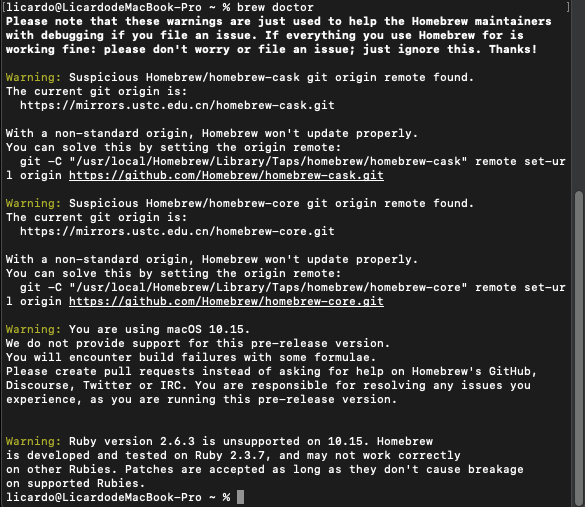
brew doctor, fixed all issues and can still reproduce the problem? - [yes] ran
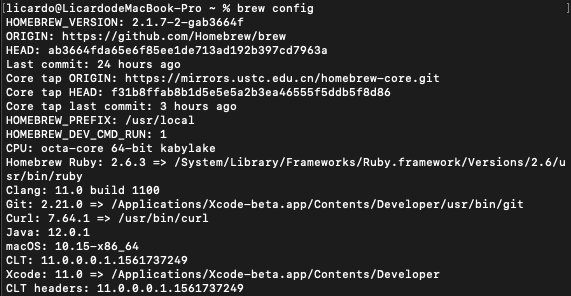
brew configandbrew doctorand included their output with your issue?
What you were trying to do (and why)
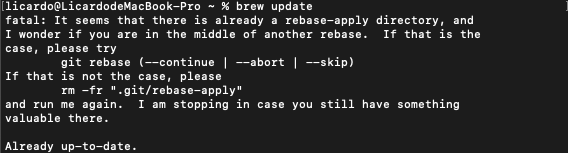
I wanted to update brew with brew update
What happened (include command output)
output a fatal error
Command output
licardo@LicardodeMacBook-Pro ~ % brew update

fatal: It seems that there is already a rebase-apply directory, and

I wonder if you are in the middle of another rebase.  If that is the

case, please try

    git rebase (--continue | --abort | --skip)

If that is not the case, please

    rm -fr ".git/rebase-apply"

and run me again.  I am stopping in case you still have something

valuable there.
Already up-to-date.
licardo@LicardodeMacBook-Pro ~ %
What you expected to happen
I do not want the error show up. I have tried running git rebase --abort and rm -fr ".git/rebase-apply", but it still shows up.
Step-by-step reproduction instructions (by running brew commands)
 L1cardo
All 4 comments
solved by deleting /usr/local/Homebrew/Library/Taps/homebrew/homebrew-cask/.git/rebase-apply
This directory is difficult to find.
L1cardo
on 9 Jul 2019
i find this folder "rebase-apply" use commend find / -name "rebase-apply"
 mnich
on 15 Sep 2019
mnich
on 15 Sep 2019
@mnich thanks!but I wish I would never come across such error.
L1cardo
on 15 Sep 2019
Instead of manually finding the rebase-apply directory, just run brew update-reset instead.
Found this from one of the contributors here.
 joshuapinter
on 6 Nov 2019
joshuapinter
on 6 Nov 2019
Related issues
 cdekok
·
4Comments
cdekok
·
4Comments
 DomT4
·
3Comments
DomT4
·
3Comments
 JaKXz
·
3Comments
JaKXz
·
3Comments
 zelsonia
·
4Comments
zelsonia
·
4Comments
 fooness
·
4Comments
fooness
·
4Comments
Most helpful comment
Instead of manually finding the
rebase-applydirectory, just runbrew update-resetinstead.Found this from one of the contributors here.