Brew: Brew installation fails after clean install - macOS Mojave
- [x] are reporting a bug others will be able to reproduce and not asking a question. If you're not sure or want to ask a question do so on our Discourse: https://discourse.brew.sh
- [ ] ran a
brewcommand and reproduced the problem with multiple formulae? If it's a problem with a single, official formula (not cask) please file this issue at Homebrew/homebrew-core: https://github.com/Homebrew/homebrew-core/issues/new/choose. If it's abrew caskproblem please file this issue at https://github.com/Homebrew/homebrew-cask/issues/new/choose. If it's a tap (e.g. Homebrew/homebrew-php) problem please file this issue at the tap. - [ ] ran
brew updateand can still reproduce the problem? - [ ] ran
brew doctor, fixed all issues and can still reproduce the problem? - [ ] ran
brew configandbrew doctorand included their output with your issue?
Hello,
I just completed a clean install of macOS Mojave, and I am trying to install Homebrew.
I have install Xcode and the CLT w/ Xcode-select --install.
Yet, when I execute the install script, It asks to install the Command Line Tools. This opens a window to install the software, but it fails, giving me this error :
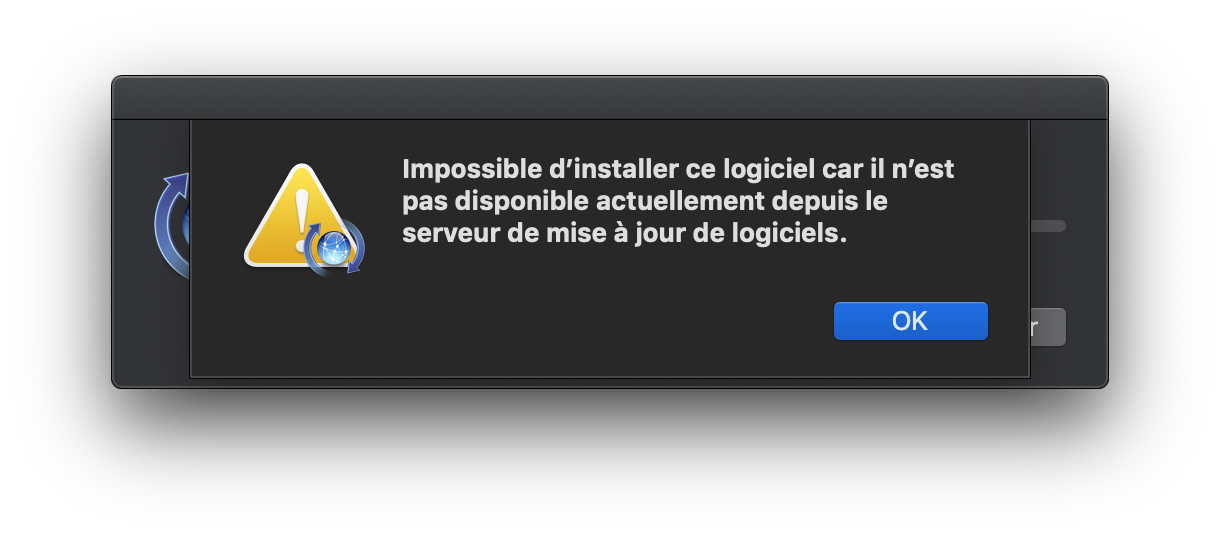
The output of the install script is the following :
$ /usr/bin/ruby -e "$(curl -fsSL https://raw.githubusercontent.com/Homebrew/install/master/install)"
==> This script will install:
/usr/local/bin/brew
/usr/local/share/doc/homebrew
/usr/local/share/man/man1/brew.1
/usr/local/share/zsh/site-functions/_brew
/usr/local/etc/bash_completion.d/brew
/usr/local/Homebrew
==> The Xcode Command Line Tools will be installed.

Press RETURN to continue or any other key to abort
==> Searching online for the Command Line Tools
==> /usr/bin/sudo /usr/bin/touch /tmp/.com.apple.dt.CommandLineTools.installondemand.in-progress
Password:
==> Installing the Command Line Tools (expect a GUI popup):
==> /usr/bin/sudo /usr/bin/xcode-select --install
xcode-select: note: install requested for command line developer tools
Press any key when the installation has completed.
==> /usr/bin/sudo /usr/bin/xcode-select --switch /Library/Developer/CommandLineTools
xcode-select: error: invalid developer directory '/Library/Developer/CommandLineTools'
Failed during: /usr/bin/sudo /usr/bin/xcode-select --switch /Library/Developer/CommandLineTools
To diagnose this issue, I have done :
sudo xcode-select -s /Applications/Xcode.app/Contents/Developer/
$ xcode-select -v
xcode-select version 2354.
$ xcode-select -p
/Applications/Xcode.app/Contents/Developer
Do you have a clue on why this happens ?
Thanks,
Clovel
EDIT 1 : & Xcode-select --install fails as well. Nevertheless, I can use git, gcc, etc. without the "CLT not found" error.
 Clovel
All 9 comments
Hi again.
I hate to do this, but I must admit that I have found the solution on my own and no longer need your help.
Installing the CLT via the terminal is buggy, but I encourage others that encounter my issue to do this :
Go on the Apple website in the Developper section, and download the CLT .dmg archive. Then install it like you would with any other app.
Restart your terminal, and launch the Homebrew install.
This fixes it.
Best regards,
Clovel
Clovel
on 1 Nov 2018
For those getting here from googling for the same problem of the command line tools failing to install during the HomeBrew installation, here's the direct link to the CLT.
Edit: while the link above is correct, it seems that one needs to go through some hoops to get to the file. The main page to get to it is here.
 adavidzh
on 3 Nov 2018
adavidzh
on 3 Nov 2018
@adavidzh this link is not available anymore at least for my apple account.
I've "fixed" function should_install_command_line_tools in install script with these lines:
def should_install_command_line_tools?
    return false
it solved a problem and there is no need to download CLT.
Sure it shouldn't be considered as solution and only applicable for users who sure that have CLT installed on their machines.
Would it possible to have option for user while installing to choose not install CLT in situations if she sure having them?
 setoff
on 6 Nov 2018
setoff
on 6 Nov 2018
@adavidzh this link is not available anymore at least for my apple account.
Thanks. I updated my comment above. While the link is correct, it seems that one needs to go through some more hoops to be able to access it (i.e., more than just being logged in).
adavidzh
on 6 Nov 2018
there is no need to download CLT.
You need to download the CLT or Xcode on Mojave and the CLT and optionally Xcode on all older versions. We cannot automatically download Xcode. There are issues on Apple's end with downloading the CLT automatically but they have been reported.
Would it possible to have option for user while installing to choose not install CLT in situations if she sure having them?
No.
 MikeMcQuaid
on 6 Nov 2018
MikeMcQuaid
on 6 Nov 2018
I'm having a similar issue with a clean install on 10.14.2. Installed Xcode 10.1 via App Store. Installed commandline tools via xcode-select --install, then also installed CLT via downloaded macOS 10.14 (for 10.1) dmg.
When attempting: /usr/bin/ruby -e "$(curl -fsSL https://raw.githubusercontent.com/Homebrew/install/master/install)" I get the following error
-e:1: syntax error, unexpected tINTEGER, expecting end-of-input
HTTP/1.1 200 OK
            ^
 sansSpoon
on 21 Dec 2018
sansSpoon
on 21 Dec 2018
@sansSpoon that's not the same issue.
MikeMcQuaid
on 21 Dec 2018
I've noticed that sometime softwareupdate -l always return nothing. That cause CLT could not be found by script.
 zhengcan
on 5 Jan 2019
zhengcan
on 5 Jan 2019
We'll accept PRs to address this but we're not seeing this as a problem for most people any more now that Apple changed things on their end.
MikeMcQuaid
on 6 Jan 2019
Related issues
 jokeyrhyme
·
3Comments
jokeyrhyme
·
3Comments
 fooness
·
4Comments
fooness
·
4Comments
 javian
·
4Comments
javian
·
4Comments
 Rotonen
·
4Comments
Rotonen
·
4Comments
 cfredhart
·
4Comments
cfredhart
·
4Comments
Most helpful comment
For those getting here from googling for the same problem of the command line tools failing to install during the HomeBrew installation, here's the direct link to the CLT.
Edit: while the link above is correct, it seems that one needs to go through some hoops to get to the file. The main page to get to it is here.