Brew: XCode CLT incorrectly flagged as required under XCode 9.1/MacOS 10.12
- [X] Confirmed this is a problem with running a
brewcommand and notbrew installing or the post-install behaviour of one or more formulae? If it's a formulae-specific problem please file this issue at the relevant tap e.g. for Homebrew/homebrew-core https://github.com/Homebrew/homebrew-core/issues/new - [X] Ran
brew updateand retried your prior step? - [X] Ran
brew doctor, fixed all issues and retried your prior step?
- As much as possible, given the nature of this issue
- [X] Ran
brew configandbrew doctorand included their output with your issue?
Debug Output
Config Output
HOMEBREW_VERSION: 1.3.8
ORIGIN: https://github.com/Homebrew/brew
HEAD: 236b0172306a6f4b233d374fcc20adce5c3e3261
Last commit: 17 hours ago
Core tap ORIGIN: https://github.com/Homebrew/homebrew-core
Core tap HEAD: 4044983a9319949da0b3087e988405f83ab9ea2c
Core tap last commit: 14 minutes ago
HOMEBREW_PREFIX: /usr/local
HOMEBREW_DEV_CMD_RUN: 1
HOMEBREW_GIT_CONFIG_FILE: /usr/local/Homebrew/.git/config
HOMEBREW_NO_ANALYTICS_THIS_RUN: 1
CPU: quad-core 64-bit skylake
Homebrew Ruby: 2.3.3 => /usr/local/Homebrew/Library/Homebrew/vendor/portable-ruby/2.3.3/bin/ruby
Clang: 9.0 build 900
Git: 2.15.0 => /usr/local/bin/git
Curl: 7.54.0 => /usr/bin/curl
Perl: /usr/bin/perl
Python: /usr/bin/python
Ruby: /usr/bin/ruby => /System/Library/Frameworks/Ruby.framework/Versions/2.0/usr/bin/ruby
Java: N/A
macOS: 10.12.6-x86_64
Xcode: 9.1
CLT: N/A
X11: 2.7.11 => /opt/X11
Doctor output
Please note that these warnings are just used to help the Homebrew maintainers
with debugging if you file an issue. If everything you use Homebrew for is
working fine: please don't worry and just ignore them. Thanks!

Warning: Unbrewed dylibs were found in /usr/local/lib.
If you didn't put them there on purpose they could cause problems when
building Homebrew formulae, and may need to be deleted.

Unexpected dylibs:
  /usr/local/lib/libnnz11.dylib
  /usr/local/lib/libociei.dylib
  /usr/local/lib/libocijdbc11.dylib

Warning: Xcode alone is not sufficient on Sierra.
Install the Command Line Tools:
  xcode-select --install
Issue Description
To help us debug your issue please explain:
- What you were trying to do (and why)
- What happened (include command output)
brew upgrade Error: Xcode alone is not sufficient on Sierra. Install the Command Line Tools: xcode-select --install - What you expected to happen
- Brew upgrade to run :wink:
- Step-by-step reproduction instructions (by running
brewcommands)
Since the approximate landing of #3453, brew is flagging my XCode 9.1 install on MacOS 10.12 (Sierra) as missing the CLTs. If I follow the CLT code correctly, XCode 9.1 should be flagged as the latest XCode for this platform for Sierra and not requiring a separate install. xcode-select --install confirms that there is no version available for this platform (ran from multiple locations across multiple days). I do have the command line tools in path and they are located under /Applications/Xcode.app/Contents/Developer as verified via xcode-select -p.
A full Xcode removal and reinstall (both via the App Store and via a terminal initiated xcode-select --install) does not correct this problem. The one step I have not tried, as I'm not sure of it's safety, is to install the 9.0.1 CLTs on top of a XCode 9.1 install.
Thanks for the terrific tool and thanks in advance for the help!
 davidski
All 17 comments
/Applications/Xcode.app/Contents/Developer is not the CLT.
xcode-select --install and then click the install button, not the Get Xcode button.
 ilovezfs
on 21 Nov 2017
ilovezfs
on 21 Nov 2017
Thanks for the fast response!
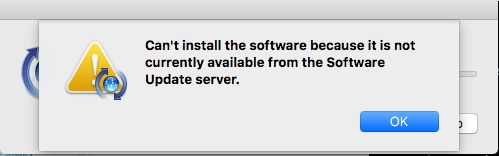
I've been using xcode-select --install and choosing Install repeatedly with no effect. Each time I'm told that there is no software available. I've also reset to the production Apple software update servers and tried this over multiple days.
I'm new to the MacOS side. When I looked at /Applications/Xcode.app/Contents/Developer/usr/bin/, that look to contain the standard dev CLI tools. Where does the Xcode CLT ordinarily go?
Shouldn't these (https://github.com/Homebrew/brew/blob/master/Library/Homebrew/os/mac/xcode.rb#L47-L50) lines identify the CLT as unneeded on Xcode 9.1 on Sierra?
davidski
on 21 Nov 2017
      def latest_sdk_version?
        OS::Mac.version == OS::Mac.latest_sdk_version
      end
So, no, because 10.12 != 10.13
The update server message is weird but is some kind of configuration issue specific to your machine. You can alternatively get the CLT from here https://developer.apple.com/download/more/
ilovezfs
on 21 Nov 2017
Doh. Reading comprehension failure on my part!
The download page only lists CLTs for 9.0.1 for Sierra. I was reluctant to mix and match versions (XCode 9.1 vs. CLT 9.0.1) is that a safe combination?
davidski
on 21 Nov 2017
Yeah that should be fine. Can you post brew config once you have installed 9.0.1?
ilovezfs
on 21 Nov 2017
That worked a treat! brew upgrade and friends are now working again. Thanks for the hand-holding through a process not directly brew related. :)
HOMEBREW_VERSION: 1.3.8
ORIGIN: https://github.com/Homebrew/brew
HEAD: 236b0172306a6f4b233d374fcc20adce5c3e3261
Last commit: 20 hours ago
Core tap ORIGIN: https://github.com/Homebrew/homebrew-core
Core tap HEAD: 4044983a9319949da0b3087e988405f83ab9ea2c
Core tap last commit: 3 hours ago
HOMEBREW_PREFIX: /usr/local
HOMEBREW_DEV_CMD_RUN: 1
HOMEBREW_GIT_CONFIG_FILE: /usr/local/Homebrew/.git/config
HOMEBREW_NO_ANALYTICS_THIS_RUN: 1
CPU: quad-core 64-bit skylake
Homebrew Ruby: 2.3.3 => /usr/local/Homebrew/Library/Homebrew/vendor/portable-ruby/2.3.3/bin/ruby
Clang: 9.0 build 900
Git: 2.15.0 => /usr/local/bin/git
Curl: 7.54.0 => /usr/bin/curl
Perl: /usr/bin/perl
Python: /usr/bin/python
Ruby: /usr/bin/ruby => /System/Library/Frameworks/Ruby.framework/Versions/2.0/usr/bin/ruby
Java: N/A
macOS: 10.12.6-x86_64
Xcode: 9.1
CLT: 9.0.1.0.1.1506734476
X11: 2.7.11 => /opt/X11
Now try running sudo softwareupdate -l
Does it show an upgrade?
ilovezfs
on 21 Nov 2017
No. Nothing new found. Also seeing xcode-select -p still pointing to the same (previous/incorrect) location.
% sudo softwareupdate -l
Password:
Software Update Tool

Finding available software
No new software available.

% xcode-select -p
/Applications/Xcode.app/Contents/Developer
Also seeing xcode-select -p still pointing to the same (previous/incorrect location.
That is correct and what's expected.
No. Nothing new found.
Odd. On Jenkins, we currently have the same Xcode 9.1 / CLT 9.0.1.0.1.1506734476 configuration you do. But softwareupdate -l is listing an upgrade for the 9.1 CLT available.
ilovezfs
on 21 Nov 2017
What's the output of
defaults read /Library/Preferences/com.apple.SoftwareUpdate
Looks pretty standard...
{
    LastAttemptBuildVersion = 16G1036;
    LastAttemptSystemVersion = "10.12.6 (16G1036)";
    LastBackgroundSuccessfulDate = "2017-11-21 06:47:25 +0000";
    LastFullSuccessfulDate = "2017-11-21 16:54:55 +0000";
    LastRecommendedUpdatesAvailable = 0;
    LastResultCode = 2;
    LastSessionSuccessful = 1;
    LastSuccessfulDate = "2017-11-21 16:54:55 +0000";
    LastUpdatesAvailable = 0;
    PrimaryLanguages =     (
        "en-US"
    );
    RecommendedUpdates =     (
    );
    SkipLocalCDN = 0;
}
Some minor differences from ours, which shouldn't matter. But you can try
sudo softwareupdate --clear-catalog
and see if it makes any difference.
ilovezfs
on 21 Nov 2017
Afraid not.
% sudo softwareupdate --clear-catalog
Password:
Changed catalog to Apple production

% sudo softwareupdate -l
Software Update Tool

Finding available software
No new software available.
Just hit the same message and currently installing the CLTs, but this has piqued my curiosity as to how the CLTs differ when you're not on the latest platform. I'd always assumed that Xcode contained exactly the same stuff, so I'd love to hear how they differ 🙂
 pixlwave
on 30 Nov 2017
pixlwave
on 30 Nov 2017
Also, if it's of any help (although I guess it's totally irrelevant anyway) on my machine xcode-select --install fetched this version: CLT: 9.1.0.0.1.1508540944
pixlwave
on 30 Nov 2017
@pixlwave Apple stopped bundling old macOS SDK versions in newer versions of Xcode (so they only had the latest version of macOS not the installed version) which required huge numbers of hacks to work around this. We wanted to remove the hacks hence this change.
 MikeMcQuaid
on 1 Dec 2017
MikeMcQuaid
on 1 Dec 2017
Oh, interesting! That's really useful to know. Thanks for explaining the difference 🙂
pixlwave
on 1 Dec 2017
Related issues
 fxcoudert
·
3Comments
fxcoudert
·
3Comments
 DomT4
·
3Comments
DomT4
·
3Comments
 paanvaannd
·
4Comments
paanvaannd
·
4Comments
 cfredhart
·
4Comments
cfredhart
·
4Comments
 cdekok
·
4Comments
cdekok
·
4Comments