Brave-browser: Cannot Access Linkedin! - Request URL Too Long
Description
Cannot access website: https://linkedin.com/ from brave browser. I can access the same via Chromium (v83) and Firefox (78.4.1esr).
Steps to Reproduce
- Open brave (In normal or Private mode)
- Go to https://linkedin.com/
Actual result:

Expected result:

Reproduces how often:
From 21-11-2020 12:00 IST onwards
Brave version (brave://version info)
Version 1.16.76 Chromium: 86.0.4240.198 (Official Build) (64-bit)
Other Additional Information:
- Encountered as of today
- Tried disabling brave shield
- Tried resetting brave
- Tried to connect in both normal and incognito
- Issue not occurring in chrome and firefox
- Tried connecting via VPN but still no success.
Miscellaneous Information:
Is this some sort of attack?. The url seems to redirect many a times while accessing linkedin?
 gauthamp10
All 20 comments
RE: Max URL Lengths https://stackoverflow.com/a/417184
TLDR: Lol
 nognognoggynog
on 21 Nov 2020
nognognoggynog
on 21 Nov 2020
RE: Max URL Lengths https://stackoverflow.com/a/417184
TLDR: Lol
It's not me who is redirecting....it's Linkedin . It work on chrome and firefox though
gauthamp10
on 21 Nov 2020
RE: Max URL Lengths https://stackoverflow.com/a/417184
TLDR: LolIt's not me who is redirecting....it's Linkedin . It work on chrome and firefox though
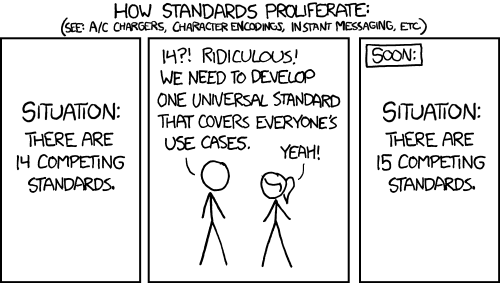
my TLDR: Lol is in reference to the choice of our own "standards"
nognognoggynog
on 21 Nov 2020
SO what's the issue here actaully...any idea? It's was working yesterday and all of a sudden.... Haven't even updated brave. I'm using Debian 10 as my O.S.
gauthamp10
on 21 Nov 2020
SO what's the issue here actaully...any idea? It's was working yesterday and all of the sudden. Haven't even updated brave. I'm using Debian 10 as my O.S.
How many characters is in the URL?
nognognoggynog
on 21 Nov 2020
SO what's the issue here actaully...any idea? It's was working yesterday and all of the sudden. Haven't even updated brave. I'm using Debian 10 as my O.S.
How many characters is in the URL?
The final url has 29505 character... the 'trkInfo' parameter in the screenshot keeps on changing like 15-20 times.
gauthamp10
on 21 Nov 2020
SO what's the issue here actaully...any idea? It's was working yesterday and all of the sudden. Haven't even updated brave. I'm using Debian 10 as my O.S.
How many characters is in the URL?
The final url has 29505 character... the 'trkInfo' parameter in the screenshot keeps on changing like 15-20 times.
Could perhaps open a ticket with LinkedIn in on the URL generation going too far
This is the only reporting link I can find for them, but it should get their attention
https://security.linkedin.com/vulnerabilty-disclosure
They're also on Github here https://github.com/linkedin
nognognoggynog
on 21 Nov 2020
SO what's the issue here actaully...any idea? It's was working yesterday and all of the sudden. Haven't even updated brave. I'm using Debian 10 as my O.S.
How many characters is in the URL?
The final url has 29505 character... the 'trkInfo' parameter in the screenshot keeps on changing like 15-20 times.
Could perhaps open a ticket with LinkedIn in on the URL generation going too far
This is the only reporting link I can find for them
Let me try the same on chromium 86.0.4240.198 before issuing..It's really confusing? Are you reproducing this error? or is it me only?.Thanks BTW.
gauthamp10
on 21 Nov 2020
SO what's the issue here actaully...any idea? It's was working yesterday and all of the sudden. Haven't even updated brave. I'm using Debian 10 as my O.S.
How many characters is in the URL?
The final url has 29505 character... the 'trkInfo' parameter in the screenshot keeps on changing like 15-20 times.
Could perhaps open a ticket with LinkedIn in on the URL generation going too far
This is the only reporting link I can find for them
https://security.linkedin.com/vulnerabilty-disclosureLet me try the same on chromium 86.0.4240.198 before issuing..It's really confusing? Are you reproducing this error? or is it me only?.Thanks BTW.
Could try turning off the shields and see if it works better and if it does, add a site exlusion
nognognoggynog
on 21 Nov 2020
SO what's the issue here actaully...any idea? It's was working yesterday and all of the sudden. Haven't even updated brave. I'm using Debian 10 as my O.S.
How many characters is in the URL?
The final url has 29505 character... the 'trkInfo' parameter in the screenshot keeps on changing like 15-20 times.
Could perhaps open a ticket with LinkedIn in on the URL generation going too far
This is the only reporting link I can find for them
https://security.linkedin.com/vulnerabilty-disclosureLet me try the same on chromium 86.0.4240.198 before issuing..It's really confusing? Are you reproducing this error? or is it me only?.Thanks BTW.
Could try turning off the shields and see if it works better
No effect.
gauthamp10
on 21 Nov 2020
I have the same exact issue, which just started occurring about the same time you reported this issue. I've been trying to figure it out for hours. I'm using Chrome and accessing my computer through "Remote Desktop". This is very frustrating!
 wengier123
on 21 Nov 2020
wengier123
on 21 Nov 2020
Don't bother using chrome or edge, best to save your headache and use mozilla firefox instead. At least that browser is working for me.
 aberraabdu
on 22 Nov 2020
aberraabdu
on 22 Nov 2020
Don't bother using chrome or edge, best to save your headache and use mozilla firefox instead. At least that browser is working for me.
It's not the point. We are users of brave which for instance is built based on chromium and not Firefox..So no hope. I just love brave, even though they are trying out other modes of advertisements for increasing the odds of existence in a huge market.
gauthamp10
on 22 Nov 2020
I've contacted the LinkedIn security team and they told me it's not a security issue and no more comments from their part! Do anyone have a clue? I don't want to run two browsers just to access a specific website.
gauthamp10
on 22 Nov 2020
I have the same exact issue, which just started occurring about the same time you reported this issue. I've been trying to figure it out for hours. I'm using Chrome and accessing my computer through "Remote Desktop". This is very frustrating!
What version of brave or chrome are you using on the remote desktop?
gauthamp10
on 22 Nov 2020
Workaround: Please update brave browser to the latest stable Release v1.17.73 and the issue will be gone.
gauthamp10
on 22 Nov 2020
Hi Everyone, I was able to fix this problem by rolling back the version of chrome 2 versions earlier (the august one). It is very clearly some interaction with chrome latest version + linkedin.
Linkedin's authwall is designed to prevent user scraping so it will block non-browser-like activity or trying to view linkedin without an account. I don't use scrapers. The problem started to occur as I logged off an account. Then the api key starts changing rapidly. I'm assuming its something related to this or a false positive. I certainly dont use any scrapers etc.
Let me know if this works for you.
 JamesM12345
on 22 Nov 2020
JamesM12345
on 22 Nov 2020
I got this issue from yesterday 22/Nov IST. Didn't did any updates. It just started showing up.
Whats the fix?
 Kumaraguru-Muthuraj
on 22 Nov 2020
Kumaraguru-Muthuraj
on 22 Nov 2020
I got this issue from yesterday 22/Nov IST. Didn't did any updates. It just started showing up.
Whats the fix?
Just update your browser to the latest stable version. It will work.
gauthamp10
on 22 Nov 2020
https://github.com/brave/brave-browser/issues/12825#issuecomment-731706056 Closing per comment to update to latest 1.17.73.
 rebron
on 23 Nov 2020
rebron
on 23 Nov 2020
Related issues
 fmarier
·
3Comments
fmarier
·
3Comments
 hollons
·
3Comments
hollons
·
3Comments
 simonhong
·
3Comments
simonhong
·
3Comments
 AlexCombas
·
3Comments
AlexCombas
·
3Comments
 kjozwiak
·
3Comments
kjozwiak
·
3Comments
Most helpful comment
Hi Everyone, I was able to fix this problem by rolling back the version of chrome 2 versions earlier (the august one). It is very clearly some interaction with chrome latest version + linkedin.
Linkedin's authwall is designed to prevent user scraping so it will block non-browser-like activity or trying to view linkedin without an account. I don't use scrapers. The problem started to occur as I logged off an account. Then the api key starts changing rapidly. I'm assuming its something related to this or a false positive. I certainly dont use any scrapers etc.
Let me know if this works for you.