Brave-browser: [Android] Supported Links not Opening in External Apps
Description
When following a link that is supported (and configured to open) in an installed app, the link is not passed to that app, but instead Brave opens it instead.
For simplicity, the reproduction steps below will demonstrate the issue for YouTube specifically, however _all_ links and their corresponding apps are affected the same way.
Steps to reproduce
- Ensure the official YouTube app is installed and set to open supported links (Settings > Apps and notifications > YouTube > Open by default > Open supported links > Allow app to open supported links).
- Visit a search engine (DuckDuckGo, Google, Bing, etc.).
- Search for something that returns video results from YouTube (Such as "cool videos").
- Tap on any YouTube video link to open it.
Actual result
The selected link will open in Brave (m.youtube.com).
Expected result
The selected link will open in the YouTube app (com.google.android.youtube).
Issue reproduces how often
Easily reproduced.
Version/Channel Information:
- Can you reproduce this issue with the current Play Store version?: Yes.
- Can you reproduce this issue with the current Play Store Beta version?: Yes (According to other users).
- Can you reproduce this issue with the current Play Store Nightly version?: Yes (According to other users).
Device details
- Install type (ARM, x86): ARM64
- Device type (Phone, Tablet, Phablet): Phone (Google Pixel 3a)
- Android version: 11 (RP1A.201005.004)
Brave version
1.15.76
Website problems only
- Does the issue resolve itself when disabling Brave Shields?: No.
- Does the issue resolve itself when disabling Brave Rewards?: No.
- Is the issue reproducible on the latest version of Chrome?: No (According to other users).
Additional information
Others facing the same issue can be found on Brave's Subreddit here and here.
 Hazbelll
All 42 comments
Found various other users who have reported this issue on Brave's own forum here, here and here.
It seems this bug might be cause of a regression introduced in Brave version 1.15.76 from reading.
Hazbelll
on 27 Oct 2020
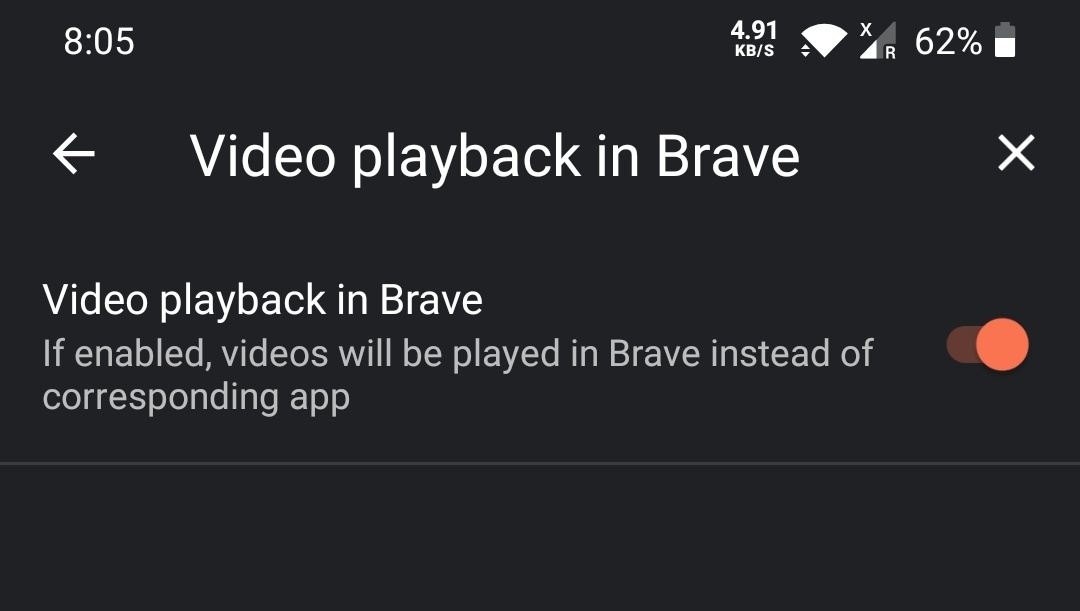
Can you try disabling Video playback in Brave under site settings (last option). This is enabled by default.
 srirambv
on 27 Oct 2020
srirambv
on 27 Oct 2020
@srirambv This has already been disabled, and others have confirmed the same in the above links.
As stated in the OP, this issue is _not_ specifically related to YouTube links. Links to Wikipedia articles, Facebook posts, Twitter posts, etc. all suffer the same issue, not opening in their corresponding apps when configured to anymore.
Hazbelll
on 27 Oct 2020
I have this same issue on a Pixel 3a. I also have Video playback in Brave disabled.
 jordanbtucker
on 27 Oct 2020
jordanbtucker
on 27 Oct 2020
@srirambv Please remove the '_needs-more-info_' tag from this issue as it has been provided, unless further clarification is required?
Hazbelll
on 28 Oct 2020
Another user facing this issue can be found Here.
As they mention, it seems certain links that open the Play Store to recommend the user to download an app that can handle such links still work.
I just tested by opening a link to a Reddit thread in Brave, to which the webpage nags me to download the Reddit app. When tapping the link to do so, the Play Store is opened to the official Reddit app's download page successfully. Tested with Imgur too, same result.
Unsure if this might be related, although following any links that would normally open a corresponding installed app still fail. Brave might incorrectly open the Play Store of a recommended app when following such links instead of opening in an installed app that can already handle/set to open the followed link (In my case, Boost for Reddit would launch when following Reddit links).
Hazbelll
on 28 Oct 2020
@srirambv Has anyone from the Brave Team been able to successfully reproduce this issue?
Is there anything else we could do to assist?
Hazbelll
on 30 Oct 2020
I can't reproduce with YT links. This is what I see on the current release build
@Hazbelll let me know if I am doing anything different?

opening a link to a Reddit thread in Brave, to which the webpage nags me to download the Reddit app
Unfortunately, that is something the site has made up mind to annoy users with and opening playstore is right if you don't have the app installed. If installed it should switch to the app
srirambv
on 30 Oct 2020
I've followed those same steps, and it's still not opening m.youtube.com links in the YouTube app.
jordanbtucker
on 30 Oct 2020
@srirambv I too have followed your steps, same as @jordanbtucker and too experience links opening in m.youtube.com instead of the YouTube app.
Are you able to test with other apps other than YouTube? For example, Wikipedia using the same steps.
Very interesting to see this issue has suddenly appeared for some users, but not all. I wonder why.
I would appreciate anyone who might be reading this attempt to reproduce it on their devices if possible.
Hazbelll
on 30 Oct 2020
@srirambv @jordanbtucker Would you mind stating what version of Android is running on your devices?
I'm on 11 myself.
Hazbelll
on 30 Oct 2020
Android 11 on a Pixel 3a.
jordanbtucker
on 30 Oct 2020
Another user facing this issue Here.
I'm starting to believe this issue only occurs for Android 11 users. It looks like everyone affected is running a device with the latest Android OS anyway.
@srirambv Please comment.
Hazbelll
on 31 Oct 2020
Another report Here.
Again, running Android 11.
Hazbelll
on 31 Oct 2020
Same issue here. Tested with both YouTube and Wikipedia apps. Works in Chrome.
Brave 1.15.76
Android 11; build RP1A.201005.006
Pixel 4a
 Dayofthejackalope
on 31 Oct 2020
Dayofthejackalope
on 31 Oct 2020
@bsclifton Perhaps you could elevate the severity of this issue?
It's affecting many users that are using a combination of Brave Version 1.15.76 (Or newer) and Android 11 (On any device).
We are happy to assist in any way possible.
Hazbelll
on 31 Oct 2020
Issue persists in Brave Version 1.16.70.
@srirambv @bsclifton Would greatly appreciate this issue not be ignored considering this isn't BAT/Rewards related...
Hazbelll
on 1 Nov 2020
@deeppandya are you able to reproduce this on Android 11?
 bsclifton
on 1 Nov 2020
bsclifton
on 1 Nov 2020
I have tried the steps on Pixel 3xl with Android 11 and OnePlus 6T with Android 10 and can't reproduce. For YT it always switches to the YouTube app. Tried disabling and force stop Brave and tried again it works. I do notice this prompt for Wiki page and selecting Wikipedia always opens the links in the dedicated app.

The one thing that folks can try is force stop Brave and clear storage and try again but it would be like resetting the app so everything will be nuked(bookmarks/history/rewards)
srirambv
on 2 Nov 2020
I have already tried resetting the app and configuring the proper settings, but it still won't open YouTube links in the YouTube app.
jordanbtucker
on 2 Nov 2020
+1 from @eturk1 via #12446
srirambv
on 2 Nov 2020
Also banking site that has a button "Click here to pay with your banking app" doesn't work. Nothing happens when I spam that button. Disabled Brave shield, issue still persists. It's working fine on chrome. The url is bancontact.girogate.be
Same with Philips Hue app. The app asks me to sign in, it opens brave, when I sign in it doesn't redirect me back to the app.
 said50
on 2 Nov 2020
said50
on 2 Nov 2020
Thank you @bsclifton and @srirambv for casting attention to this issue! Incredibly strange you are not experiencing this issue @srirambv, even on Android 11.
I and others can confirm (@jordanbtucker and a User Here) that resetting Brave to its initial state does _not_ correct the issue.
This issue began with the release of Brave Version 1.15.76 so perhaps might be worth looking into what - changed that could be causing this?
Hazbelll
on 2 Nov 2020
@Hazbelll
Confirmed. Removing and reinstalling stable, beta, nightly does not change the issue of Brave not opening apps.
+1 from @eturk1 via #12446
Thanks for closing #12446 & tagging me here.
Pixel 4 XL / Android 11
 eturk1
on 2 Nov 2020
eturk1
on 2 Nov 2020
@deeppandya Are you able to reproduce this issue?
Hazbelll
on 3 Nov 2020
@bsclifton @Hazbelll I tried to open YouTube link from twitter on latest build from play store and it redirected to m.youtube.com instead of opening the YouTube app.
 deeppandya
on 3 Nov 2020
deeppandya
on 3 Nov 2020
@deeppandya Thank you for your response! I assume you mean Twitter within Brave and not the App? Other Apps that aren't Brave will continue to open Supported Links in External Apps (Such as the Outlook App opening the GitHub App when following a GitHub link).
Anyway, It sounds like you have successfully reproduced this issue, although I'm unsure what the real cause is now @srirambv confirmed they were unable to reproduce the issue on Android 11.
Again, this issue was introduced in Brave Version 1.15.76 and a User already confirmed Here downgrading to below this version resolved the issue, but of course is only a workaround and not a fix.
Hazbelll
on 3 Nov 2020
Another report Here.
@bsclifton @deeppandya @srirambv Please provide transparency as to why this Issue appears to be of low priority/not of concern considering it's affecting many users now as can be seen from the comments/links provided here, in addition to disrupting workflow for all those affected.
I'm getting really tired of having to constantly nudge you all, as I'm sure you are too. My apologies, as I respect you might be busy with other affairs, but the lack of transparency/communication is concerning, especially as we're all on standby willing to assist wherever possible.
Hazbelll
on 5 Nov 2020
@Hazbelll assigned a priority 3 - definitely something we want to fix. If you look at the issue log, we have over 2,600 issues and for each report we need to assess the impact to users and prioritize. My apologies for not responding sooner on here - there have been a lot of other problems (like reCAPTCHA being shown all the time, Chromium upgrades, etc) that take priority
@deeppandya maybe you can help narrow it down. Is this Android 11 specific? Seems to be. @srirambv are you on Android 11?
bsclifton
on 5 Nov 2020
@bsclifton Thank you kindly for your response and escalating the issue. I do respect you and the team have many other concerns and must prioritise accordingly (Especially Chromium Updates/reCAPTCHA issues which are understandable), but the lack of transparency or engagement to discussion can be quite disheartening at times.
@srirambv stated in an earlier comment they failed to reproduce this issue on both Android 11 (Pixel 3 XL) and Android 10 (OnePlus 6T), but appears to be the only one so far unaffected.
For others reading, please state your Device Model + Android Version + Brave Version if you haven't already and wish to assist!
Hazbelll
on 5 Nov 2020
Test example:
Amazon app not loading on nightly & v1.14.86
Example page to recreate:
https://youtu.be/72AHENDeTEI
Tap any of the Amazon links in description. Chrome first shows the youtube link then load Amazon app. Brave stays in browser.
(Pixel 4 XL on Android 11)
eturk1
on 5 Nov 2020
Same issue on pixel 3 with Android 11!
 Sauceee
on 5 Nov 2020
Sauceee
on 5 Nov 2020
Same here with
Pixel 4 XL and Android 11
 tomocrafter
on 6 Nov 2020
tomocrafter
on 6 Nov 2020
Issue persists in Brave Version 1.16.74.
Hazbelll
on 6 Nov 2020
A reminder @deeppandya that we are awaiting your response to @bsclifton.
Hazbelll
on 6 Nov 2020
@Hazbelll @SergeyZhukovsky is looking into and it's our priority. We will update you soon.
deeppandya
on 6 Nov 2020
I'm having the same trouble with a mobile payment app on Android 11 too and did some research. I'm not an Android dev, but maybe my findings help anyway.
Chrome has a permission named andoird.permissions.QUERY_ALL_PACKAGES which seems to be newly added in Android 11 and the name may indicate a relation to the issue.
It seems the visibility of apps to other apps has changed in Android 11 and without the permission an app is no longer allowed to see all other app. See https://developer.android.com/about/versions/11/privacy/package-visibility for more details.
Not all apps may use the new permission, but browsers are allowed too. See https://developer.android.com/training/basics/intents/package-visibility#all-apps for details.
Maybe enabling this permissions for Brave might help fixing the issue.
 marcobeierer
on 6 Nov 2020
marcobeierer
on 6 Nov 2020
+1 from Reddit
OnePlus 8 with OxygenOS 11
https://www.reddit.com/r/brave_browser/comments/jp820g/brave_is_opening_youtube_and_reddit_links/
 aaronsantamaria
on 6 Nov 2020
aaronsantamaria
on 6 Nov 2020
I'm having the same trouble with a mobile payment app on Android 11 too and did some research. I'm not an Android dev, but maybe my findings help anyway.
Chrome has a permission named
andoird.permissions.QUERY_ALL_PACKAGESwhich seems to be newly added in Android 11 and the name may indicate a relation to the issue.It seems the visibility of apps to other apps has changed in Android 11 and without the permission an app is no longer allowed to see all other app. See https://developer.android.com/about/versions/11/privacy/package-visibility for more details.
Not all apps may use the new permission, but browsers are allowed too. See https://developer.android.com/training/basics/intents/package-visibility#all-apps for details.
Maybe enabling this permissions for Brave might help fixing the issue.
@marcobeierer you are right, thanks for the reply. I just found out as well that queue on registered apps require that permission starting from Android 11. The fix will appear in the Play Store sometime next week. Thank you everyone for patience and understanding.
 SergeyZhukovsky
on 6 Nov 2020
SergeyZhukovsky
on 6 Nov 2020
@SergeyZhukovsky Thank you very much for looking into it and fixing the issue!
marcobeierer
on 6 Nov 2020
Brilliant!
Thank you kindly @marcobeierer and @SergeyZhukovsky for your diligence in squashing this pesky bug and an extended thanks to the whole Brave Team and everyone else for their co-operation!
Hazbelll
on 6 Nov 2020
Verification passed on Asus Zenfone (x86) with Android 6.0 running 1.16.75 Bravex86.apk
- Verified test plan from https://github.com/brave/brave-core/pull/7080
Verification PASSED on Pixel 2 XL running Android 11 using 1.16.75 CR: 86.0.4240.193
- Verified the STR/Cases outlined via https://github.com/brave/brave-core/pull/7080#issue-516986513
- Checked with both
Video playback in Braveenabled/disabled
- Checked with both
Verification passed on Brave v1.16.75 on Samsung Galaxy Tab S5e (Android 9.0)
- Verified test plan from https://github.com/brave/brave-core/pull/7080
 LaurenWags
on 10 Nov 2020
LaurenWags
on 10 Nov 2020
Related issues
 kerry-perret
·
3Comments
bsclifton
·
3Comments
kerry-perret
·
3Comments
bsclifton
·
3Comments
 bbondy
·
3Comments
bbondy
·
3Comments
 traffisco
·
3Comments
traffisco
·
3Comments
 qingxiang-jia
·
3Comments
qingxiang-jia
·
3Comments
Most helpful comment
I'm having the same trouble with a mobile payment app on Android 11 too and did some research. I'm not an Android dev, but maybe my findings help anyway.
Chrome has a permission named
andoird.permissions.QUERY_ALL_PACKAGESwhich seems to be newly added in Android 11 and the name may indicate a relation to the issue.It seems the visibility of apps to other apps has changed in Android 11 and without the permission an app is no longer allowed to see all other app. See https://developer.android.com/about/versions/11/privacy/package-visibility for more details.
Not all apps may use the new permission, but browsers are allowed too. See https://developer.android.com/training/basics/intents/package-visibility#all-apps for details.
Maybe enabling this permissions for Brave might help fixing the issue.