Brave-browser: Google Maps trackpad zoom is oversensitive
Description
Google Maps zoom is very twitchy with two-finger drag up and down on trackpad.
Steps to Reproduce
- Open maps.google.com
- Zoom in or out by swiping two fingers up or down
Actual result:
Map view jumps dramatically across several levels of zoom.
Expected result:
Map view gradually zooms in or out.
Reproduces how often:
Always
Brave version (brave://version info)
Brave | 1.17.48 Chromium: 86.0.4240.111 (Official Build) dev (x86_64)
-- | --
Revision | b8c36128a06ebad76af51591bfec980224db5522-refs/branch-heads/4240@{#1290}
OS | macOS Version 10.15.7 (Build 19H2)
Other Additional Information:
Does the issue resolve itself when disabling Brave Shields?
noIs the issue reproducible on the latest version of Chrome?
no
Miscellaneous Information:
Using the + and - buttons on the website interface is a workaround, though it loses zoom animation steps that Chrome shows during the zoom level transition.
 stshank
All 23 comments
Running into the above as well. It becomes really painful to use Google Maps. Takes a lot of patience to actually get it zoomed to your desired view. I just started using Google Maps on mobile instead when I need to check something quickly.
Reproduced on macOS 10.15.7 x64 using the following build:
Brave | 1.18.10 Chromium: 86.0.4240.111 (Official Build) nightly (x86_64)
-- | --
Revision | b8c36128a06ebad76af51591bfec980224db5522-refs/branch-heads/4240@{#1290}
OS | macOS Version 10.15.7 (Build 19H2)
Also seems to be happening on Win 10 x64 when using the trackpad. However, when you use a mouse with a wheel, experience is pretty good.
 kjozwiak
on 27 Oct 2020
kjozwiak
on 27 Oct 2020
@rebron mind checking this on your Win 10 x64 laptop? Do you get the same experience/results when using the trackpad?
kjozwiak
on 27 Oct 2020
@kjozwiak Same fast zoom on Windows. I'm actually missing a "slow streets" layer as well which is showing up in Chrome. There is a slower, smoother scrolling.
cc: @pes10k @pilgrim-brave Any ideas on this one? maps.google.com has a smoother/slower zoom in/out behavior via trackpad on Windows or macOS in comparison to us where it's a much more faster/extreme zoom.
 rebron
on 28 Oct 2020
rebron
on 28 Oct 2020
If you take a closer look on zoom factor of url address, Brave increase/decrease the factor by 1, while other browsers can do it by granular fraction
 darkdh
on 28 Oct 2020
darkdh
on 28 Oct 2020
+1 on this one. It makes me consider going back to Google Chrome, sadly. I am on MacOS Catalina 10.15.7 with a magic trackpad, Brave Version 1.16.68 Chromium: 86.0.4240.111 (Official Build) (x86_64)
 fabricapo
on 30 Oct 2020
fabricapo
on 30 Oct 2020
Can y'all check whether GPU rendering is available on Google Maps? Switch to satellite view -> check the lower right hand corner for "3D Earth is not available" text. If the text is there, then you're using the tile based map rather than the vector/GPU based map which has far fewer features.
I think these complaints are all a symptom of a much more annoying problem, that Google Maps isn't serving the GPU accelerated version of the app to Brave. That feature enables fractional zoom, 3d buildings, and a lot of other QOL stuff.
 kaytwo
on 2 Nov 2020
kaytwo
on 2 Nov 2020
Nope, I do not see the "3D Earth is not available" text when I switch to Satellite view.
"Google Maps isn't serving the GPU accelerated version of the app to Brave" means it will never happen, or do you think there will be a trick to activate it? If the probability is low, I'll move back to Chrome (sadly)
fabricapo
on 2 Nov 2020
I do see the "3D Earth not available" text on Brave. However, IIRC Safari
doesn't advertise GPU availability and it zooms in and out smoothly. (I
could be out of date re. Safari.)
>
stshank
on 2 Nov 2020
Hi @stshank @kaytwo and @fabricapo, i have a candidate for the issue here (looks like one of our WebGL related fingerprinting protections is getting applied w/o checking whether shields is at "default" or "max" protections). Im working testing a fix now and hope to have a solution (or at least crossed off a potential cause) shortly. Thanks all for your help!
 pes10k
on 2 Nov 2020
pes10k
on 2 Nov 2020
Awesome! FYI I run www.google.com with shields down and am still seeing this issue. Feel free to ask for more info.
kaytwo
on 2 Nov 2020
@stshank @kaytwo and @fabricapo just a heads up that a fix for this is in nightly now, should be in the next nightly build, and will get uplifted to 1.17. Thanks again for the reports and help!
pes10k
on 3 Nov 2020
Thanks! Fix works for bringing back GPU accelerated (vector maps, fractional zoom) maps, but Brave seems to not be getting the 3d version of satellite maps, even in nightly with shields down. I can definitely open a new issue for this, I dunno how many other people are having this issue.
kaytwo
on 5 Nov 2020
@kaytwo how can i test for that? I can get a 3d version of google maps (nightly, macos build here, 1.18.43), though I dont know if its touching the GPU. Is there a place you're checking that explicitly says "3d accelerated" and it says no? Or are you just not getting any 3d version at all?
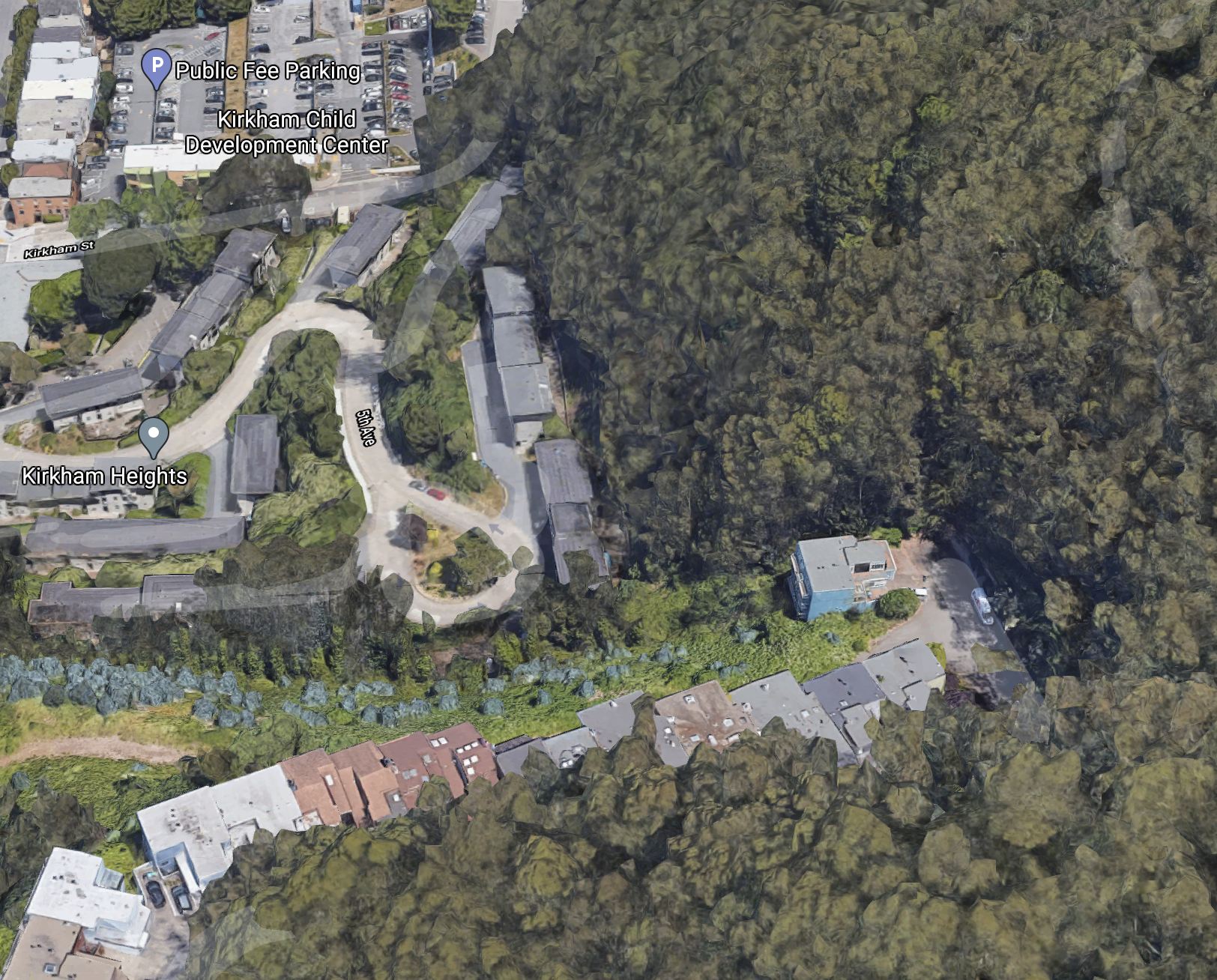
Also, i know we had some issues a while back with GPU's not getting trigged on some linux machines (iirc, some chromium-side GPU code was only being turned on by Google's field-trials code, so was off for all Brave users). I think we sorted that out, but if you're on linux that might be the issue. If thats the case, can you let me know what you see at brave://gpu/ and I can make sure the right people see it?
Thanks again! :)
(edit; probably just the "Graphics Feature Status" part of brave://gpu would be helpful tbh)
pes10k
on 10 Nov 2020
I figured it out. My Chrome install had logged me in to Google so it was picking up my "default to globe view" setting, but Brave Nightly didn't have that, and to get globe view you've got to click the little globe in the lower right hand corner. Everything works now, this is user error.
FWIW beta chrome://gpu and (beta & nightly) brave://gpu are bit for bit identical (however brave://gpu still sets the page title to chrome://gpu).
Thanks for following up!
kaytwo
on 10 Nov 2020
Phew! Thanks for letting me know @kaytwo , glad its sorted :)
pes10k
on 10 Nov 2020
Can y'all check whether GPU rendering is available on Google Maps? Switch to satellite view -> check the lower right hand corner for "3D Earth is not available" text. If the text is there, then you're using the tile based map rather than the vector/GPU based map which has far fewer features.
I think these complaints are all a symptom of a much more annoying problem, that Google Maps isn't serving the GPU accelerated version of the app to Brave. That feature enables fractional zoom, 3d buildings, and a lot of other QOL stuff.
My Google Maps is doing the weird zooming thing for the past few days, and I just checked and it says "3D Earth is not available". Shields are down for all google sites for me -- how do I fix this?
 yamnitsky
on 11 Nov 2020
yamnitsky
on 11 Nov 2020
Are you on Beta or release channel? The fix for this issue is currently in nightly but not yet in Beta/Release.
kaytwo
on 11 Nov 2020
I believe I'm on the release channel, Version 1.16.75 Chromium: 86.0.4240.193 (Official Build) (x86_64)
yamnitsky
on 11 Nov 2020
Verified that zooming in and out is looking good for me, smoother scrolling as expected versus scrolling several levels on swipe up/down or pinch on:
Brave | 1.17.69 Chromium: 87.0.4280.60 (Official Build) (x86_64)
-- | --
Revision | 12697cfeb273d7de95cf9b18350d2c457f58224c-refs/branch-heads/4280@{#1352}
OS | macOS Version 11.0.1 (Build 20B29)
rebron
on 16 Nov 2020
Ah, yes, now working for me as well on Brave dev channel.
From: Rafael Ebron notifications@github.com
Sent: Monday, November 16, 2020 11:56 AM
To: brave/brave-browser brave-browser@noreply.github.com
Cc: Stephen Shankland sshankland@redventures.com; Mention mention@noreply.github.com
Subject: Re: [brave/brave-browser] Google Maps trackpad zoom is oversensitive (#12310)
External: Scrutinize Sender
Verified that zooming in and out is looking good for me, smoother scrolling as expected versus scrolling several levels on swipe up/down or pinch on:
Brave 1.17.69 Chromium: 87.0.4280.60 (Official Build) (x86_64)
Revision 12697cfeb273d7de95cf9b18350d2c457f58224c-refs/branch-heads/4280@{#1352https://nam02.safelinks.protection.outlook.com/?url=https%3A%2F%2Fgithub.com%2Fbrave%2Fbrave-browser%2Fissues%2F1352&data=04%7C01%7Csshankland%40redventures.com%7C75915aedd063452d61af08d88a614f9e%7C4289d6102cfd46218c9644a1518ddb0a%7C0%7C0%7C637411497842786607%7CUnknown%7CTWFpbGZsb3d8eyJWIjoiMC4wLjAwMDAiLCJQIjoiV2luMzIiLCJBTiI6Ik1haWwiLCJXVCI6Mn0%3D%7C1000&sdata=JyMFOBvrjQtd37rfV3HelQjBSvLFO9tILapmG%2BFcnxo%3D&reserved=0}
OS macOS Version 11.0.1 (Build 20B29)
—
You are receiving this because you were mentioned.
Reply to this email directly, view it on GitHubhttps://nam02.safelinks.protection.outlook.com/?url=https%3A%2F%2Fgithub.com%2Fbrave%2Fbrave-browser%2Fissues%2F12310%23issuecomment-728258177&data=04%7C01%7Csshankland%40redventures.com%7C75915aedd063452d61af08d88a614f9e%7C4289d6102cfd46218c9644a1518ddb0a%7C0%7C0%7C637411497842796604%7CUnknown%7CTWFpbGZsb3d8eyJWIjoiMC4wLjAwMDAiLCJQIjoiV2luMzIiLCJBTiI6Ik1haWwiLCJXVCI6Mn0%3D%7C1000&sdata=P%2Fdh9Zo4UqYYDxQgwRZgx2O3Rl2tNSkJl9yyQGGJZvM%3D&reserved=0, or unsubscribehttps://nam02.safelinks.protection.outlook.com/?url=https%3A%2F%2Fgithub.com%2Fnotifications%2Funsubscribe-auth%2FAEANVY4NEKW5RI3NBPCCYQ3SQFYVLANCNFSM4S5V5M3Q&data=04%7C01%7Csshankland%40redventures.com%7C75915aedd063452d61af08d88a614f9e%7C4289d6102cfd46218c9644a1518ddb0a%7C0%7C0%7C637411497842806598%7CUnknown%7CTWFpbGZsb3d8eyJWIjoiMC4wLjAwMDAiLCJQIjoiV2luMzIiLCJBTiI6Ik1haWwiLCJXVCI6Mn0%3D%7C1000&sdata=NfLf21J34FtvJ1o5SG4qmnahRNEJtT5n7vAkkp85fDo%3D&reserved=0.
stshank
on 16 Nov 2020
Verification PASSED on macOS 10.15.7 x64 using the following build:
Brave | 1.17.69 Chromium: 87.0.4280.60 (Official Build) (x86_64)
-- | --
Revision | 12697cfeb273d7de95cf9b18350d2c457f58224c-refs/branch-heads/4280@{#1352}
OS | macOS Version 10.15.7 (Build 19H2)
Ensured that zooming in/out via the mouse/trackpad wasn't as sensitive as before.
Verification PASSED on Win 10 x64 using the following build:
Brave | 1.17.69 Chromium: 87.0.4280.60 (Official Build) (64-bit)
-- | --
Revision | 12697cfeb273d7de95cf9b18350d2c457f58224c-refs/branch-heads/4280@{#1352}
OS | Windows 10 OS Version 2009 (Build 19042.630)
Ensured that zooming in/out via the mouse/trackpad wasn't as sensitive as before.
kjozwiak
on 17 Nov 2020
I'm still experiencing this issue with Brave 1.17.73 on Mac OS 11.0.1.
Brave | 1.17.73 Chromium: 87.0.4280.67 (Official Build) (x86_64)
-- | --
Revision | 0e5d92df40086cf0050c00f87b11da1b14580930-refs/branch-heads/4280@{#1441}
OS | macOS Version 11.0.1 (Build 20B50)
 mattmodarres
on 30 Nov 2020
mattmodarres
on 30 Nov 2020
@mattmodarres do you have strict / max fingerprinting protections? If so, then this is not a bug; those are advertised as potentially breaking sites.
if you're seeing the issue in the default configuration, please let us know
pes10k
on 30 Nov 2020
Related issues
kjozwiak
·
3Comments
 moritzhaller
·
3Comments
moritzhaller
·
3Comments
 bsclifton
·
3Comments
bsclifton
·
3Comments
 bbondy
·
3Comments
bbondy
·
3Comments
 fmarier
·
3Comments
fmarier
·
3Comments
Most helpful comment
Ah, yes, now working for me as well on Brave dev channel.
From: Rafael Ebron notifications@github.com
Sent: Monday, November 16, 2020 11:56 AM
To: brave/brave-browser brave-browser@noreply.github.com
Cc: Stephen Shankland sshankland@redventures.com; Mention mention@noreply.github.com
Subject: Re: [brave/brave-browser] Google Maps trackpad zoom is oversensitive (#12310)
External: Scrutinize Sender
Verified that zooming in and out is looking good for me, smoother scrolling as expected versus scrolling several levels on swipe up/down or pinch on:
Brave 1.17.69 Chromium: 87.0.4280.60 (Official Build) (x86_64)
Revision 12697cfeb273d7de95cf9b18350d2c457f58224c-refs/branch-heads/4280@{#1352https://nam02.safelinks.protection.outlook.com/?url=https%3A%2F%2Fgithub.com%2Fbrave%2Fbrave-browser%2Fissues%2F1352&data=04%7C01%7Csshankland%40redventures.com%7C75915aedd063452d61af08d88a614f9e%7C4289d6102cfd46218c9644a1518ddb0a%7C0%7C0%7C637411497842786607%7CUnknown%7CTWFpbGZsb3d8eyJWIjoiMC4wLjAwMDAiLCJQIjoiV2luMzIiLCJBTiI6Ik1haWwiLCJXVCI6Mn0%3D%7C1000&sdata=JyMFOBvrjQtd37rfV3HelQjBSvLFO9tILapmG%2BFcnxo%3D&reserved=0}
OS macOS Version 11.0.1 (Build 20B29)
—
You are receiving this because you were mentioned.
Reply to this email directly, view it on GitHubhttps://nam02.safelinks.protection.outlook.com/?url=https%3A%2F%2Fgithub.com%2Fbrave%2Fbrave-browser%2Fissues%2F12310%23issuecomment-728258177&data=04%7C01%7Csshankland%40redventures.com%7C75915aedd063452d61af08d88a614f9e%7C4289d6102cfd46218c9644a1518ddb0a%7C0%7C0%7C637411497842796604%7CUnknown%7CTWFpbGZsb3d8eyJWIjoiMC4wLjAwMDAiLCJQIjoiV2luMzIiLCJBTiI6Ik1haWwiLCJXVCI6Mn0%3D%7C1000&sdata=P%2Fdh9Zo4UqYYDxQgwRZgx2O3Rl2tNSkJl9yyQGGJZvM%3D&reserved=0, or unsubscribehttps://nam02.safelinks.protection.outlook.com/?url=https%3A%2F%2Fgithub.com%2Fnotifications%2Funsubscribe-auth%2FAEANVY4NEKW5RI3NBPCCYQ3SQFYVLANCNFSM4S5V5M3Q&data=04%7C01%7Csshankland%40redventures.com%7C75915aedd063452d61af08d88a614f9e%7C4289d6102cfd46218c9644a1518ddb0a%7C0%7C0%7C637411497842806598%7CUnknown%7CTWFpbGZsb3d8eyJWIjoiMC4wLjAwMDAiLCJQIjoiV2luMzIiLCJBTiI6Ik1haWwiLCJXVCI6Mn0%3D%7C1000&sdata=NfLf21J34FtvJ1o5SG4qmnahRNEJtT5n7vAkkp85fDo%3D&reserved=0.