Brave-browser: [Desktop] Autoplay Blocking not working on Brave
Autoplay Blocking not working on all sites. I switch autoplay off and videos still playing automatically on all sites (YouTube ....etc)
Brave Desktop v1.8.86 on Archlinux
Thanks,
 ZorinArch
All 35 comments
Since version 1.8.86 on Windows all Videos played automatically.
Chromium and other browsers don't.
 Johann999
on 4 May 2020
Johann999
on 4 May 2020
Funny thing is, this isn't even a bug, it's just the default setting for autoplay has been changed back to "Always" from "Block".
 Bj007pro
on 5 May 2020
Bj007pro
on 5 May 2020
cc: @pes10k
 bsclifton
on 5 May 2020
bsclifton
on 5 May 2020
cc: @pilgrim-brave
 pes10k
on 5 May 2020
pes10k
on 5 May 2020
I'm seeing this behavior too and even though the default changed, it's gotta be a bug. I'm on sites where autoplay block used to work and now it doesn't... I've tried toggling autoplay block on/off and restarting Brave. Just updated to the latest today. Hope this gets fixed soon!
 jonahcoyote
on 6 May 2020
jonahcoyote
on 6 May 2020
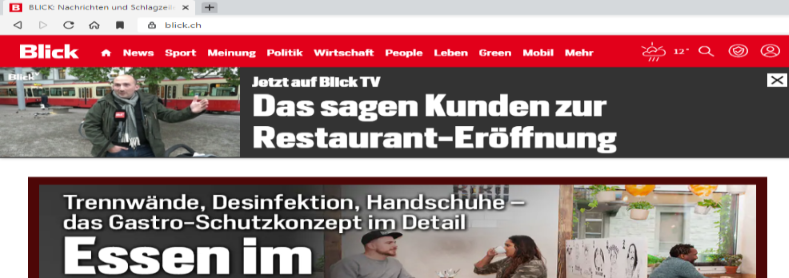
In version 1.8.xx the video in the top left is played automatically, but not in version 1.7.98.
Johann999
on 6 May 2020
Same issue, it's not asking me if I want to block autoplay or not. About 2 months ago it was perfectly working.
 Snaxeko
on 24 May 2020
Snaxeko
on 24 May 2020
Brave has mostly removed any differences w/ Chromium dealing autoplay, mostly bc Chromium has gotten much better about autoplay since way back when when Brave started going with a list approach (that got too tricky to manage).
Are you seeing differences between what Brave and Chrome do (re autoplay)? If so, thats likely a bug. If not, then thats likely the current intended behavior
pes10k
on 26 May 2020
The thing is, even if you specifically add a site to the option's block list, its videos will still autoplay. Are you actually saying that having an option that does not do what it claims and has no effect is intended?
 Ziusudra
on 30 May 2020
Ziusudra
on 30 May 2020
It seems to work for me if I add [*.]cnn.com to the block list.
 timkgh
on 30 May 2020
timkgh
on 30 May 2020
@pilgrim-brave should this be fixed with the recent autoplay fix? If so, could we uplift?
pes10k
on 30 May 2020
It seems to work for me if I add
[*.]cnn.comto the block list.
So yes, adding [*.]cnn.com does stop videos from autoplaying on cnn.com - too bad I never go there. If I add [*.]reddit.com and [*.]gfycat.com to the block list, videos still autoplay on https://www.reddit.com/r/gfycats/. Article pages on [*.]theroot.com still autoplay a "recent video". [*.]steampowered.com still autoplays.
So, only the block list occasionally works.
Ziusudra
on 30 May 2020
Not sure if you need to block the domains where videos are loaded from or the domain you are on. May be worth looking at the source of one of the videos and trying to block that.
timkgh
on 30 May 2020
The address of the gfycats is gfycat.com; the address of the videos on theroot is theroot.com. Adding [*.]akamaihd.net does not stop them from autoplaying on steampowered.com.
And there is still problem that the option claims to block autoplay on all sites.
Ziusudra
on 30 May 2020
just to repeat, there is a known bug, we expect to have a fix in nightly Monday or Tuesday, and to uplift to other channels ASAP afterwards
pes10k
on 30 May 2020
Bless you @pes10k !
 umbraesoulsbane
on 30 May 2020
umbraesoulsbane
on 30 May 2020
@umbraesoulsbane please direct that kindness to @pilgrim-brave :)
pes10k
on 2 Jun 2020
Re-opening and removing from the 1.11.x milestone as this was reverted as per https://github.com/brave/brave-core/pull/5784 & https://github.com/brave/brave-core/pull/5808. CCing @rebron @bsclifton @bbondy.
 kjozwiak
on 10 Jun 2020
kjozwiak
on 10 Jun 2020
This bug is very annoying. Please correct.
Thank you.
Johann999
on 16 Jun 2020
Re-opening after revert done with https://github.com/brave/brave-core/pull/5966
bsclifton
on 29 Jun 2020
Is it fixed on nightly ?
Snaxeko
on 30 Jun 2020
@Snaxeko unfortunately, we hit another snag here, and found a couple of corner cases the update broke. So, this is the PR to watch that should solve in nightly once and for all 🤞 https://github.com/brave/brave-core/pull/5970
Its turned out to be a surprisingly subtle and tricky thing to get 100% right. Thanks for bearing with us
pes10k
on 30 Jun 2020
Marking as QA/Blocked - need a new build to test, 1.11.92 or newer.
 btlechowski
on 8 Jul 2020
btlechowski
on 8 Jul 2020
Removing QA/Blocked label since https://github.com/brave/brave-browser/releases/tag/v1.11.92 is available
 LaurenWags
on 8 Jul 2020
LaurenWags
on 8 Jul 2020
Verification PASSED on macOS 10.15.5 x64 using the following build:
Brave | 1.11.92 Chromium: 84.0.4147.68 (Official Build) dev (64-bit)
-- | --
Revision | e7b7234037639b407e69c5428c891ce018cd6c0d-refs/branch-heads/4147@{#772}
OS | macOS Version 10.15.5 (Build 19F101)
- Verified using the STR/Case outlined via https://github.com/brave/brave-core/pull/5970#issue-441582754.
Verification passed on
Brave | 1.11.92 Chromium: 84.0.4147.68 (Official Build) dev (64-bit)
-- | --
Revision | e7b7234037639b407e69c5428c891ce018cd6c0d-refs/branch-heads/4147@{#772}
OS | Windows 10 OS Version 1903 (Build 18362.900)
- Verified using the STR/Case outlined via https://github.com/brave/brave-core/pull/5970#issue-441582754.
Verification passed on
Brave | 1.11.92 Chromium: 84.0.4147.68 (Official Build) dev (64-bit)
-- | --
Revision | e7b7234037639b407e69c5428c891ce018cd6c0d-refs/branch-heads/4147@{#772}
OS | Ubuntu 18.04 LTS
Verified using the test plan in https://github.com/brave/brave-core/pull/5970
Logged https://github.com/brave/brave-browser/issues/10666
kjozwiak
on 9 Jul 2020
Bug has not been fixed in version 1.11.97.
Johann999
on 17 Jul 2020
@Johann999 just so we can recreate exactly what you're seeing, can you please share a link to a site thats demonstrating the behavior, and the behavior you're expecting? We can then better sort out whats going wrong
pes10k
on 17 Jul 2020
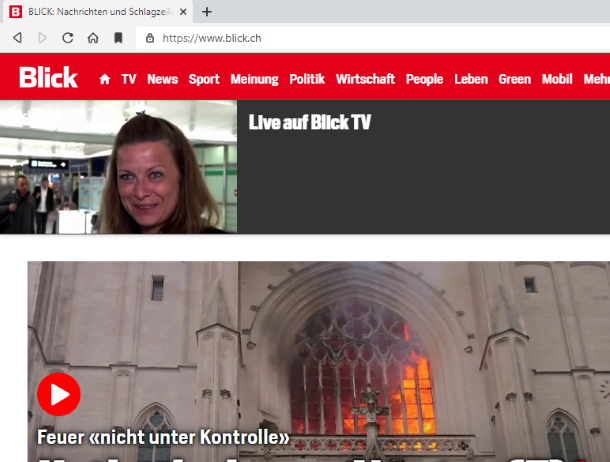
the video in the top left is played automatically:
Johann999
on 18 Jul 2020
Thanks @Johann999 good catch! I'm realizing that currently we don't do anything with that settings (its just vestigial, from the previous approach, where Brave's policy was different than Chrome's).
Im going to open a new issue for this, since its different from what we were using this issue to track (which was "change Brave so that it does what chrome does, now that chrome has better autoplay policy than it used to"). We'll use https://github.com/brave/brave-browser/issues/10807 to track that discussion, if you're interested.
Thanks again for taking the time and letting us know about this @Johann999 !
pes10k
on 19 Jul 2020
@Johann999 you have to manually specified block autoplay in content setting.
 darkdh
on 19 Jul 2020
darkdh
on 19 Jul 2020
Just verified
per site autoplay setting works

global autoplay setting doesn't work
issue tracked here
(https://github.com/brave/brave-browser/issues/10807)

darkdh
on 19 Jul 2020
That used to be such a valuable feature of Brave, the #1 reason why I used Brave. I do not understand why browsers in general do not give an option to users to not autoplay videos. It is super annoying when videos start blasting their audio, with a delay after a page loads. It feels like it's such a basic feature to provide.
timkgh
on 19 Jul 2020
For me, neither the global setting nor the site specific setting will block autoplay on cnn:
https://www.cnn.com/2020/07/19/politics/unemployment-benefits-economy-congress/index.html
However, if I create a new profile, then the global setting does block autoplay on the above.
 warwickmm
on 19 Jul 2020
warwickmm
on 19 Jul 2020
As mentioned above, I made the following settings:
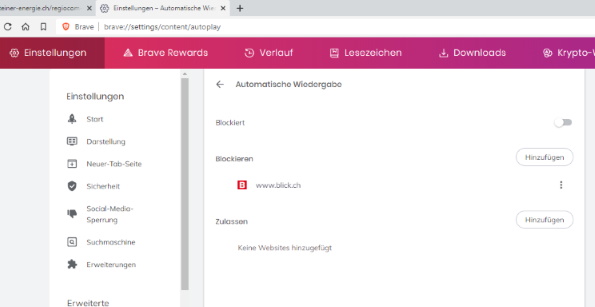
Autoplay on www.blick.ch is now blocked:

Many thanks.
Johann999
on 20 Jul 2020
The issue isn't fixed at all, and Brave doesn't ask anymore if I want to allow or block it on each new website.
Just try here (click on any article) , 2 hypotheses:
1) Autoplay is blocked in brave://settings/content/autoplay like in the previous comment with the old Brave setting (global blocking option).
--> It works only if you refresh. But if you go for the first time on any article of this website, it will autoplay video. Everytime i go back to the home page then clicking on any article, the video autoplays.
2) Autoplay (previous setting) is not blocked, it should ask for each new website I visit like in Chrome.
--> It doesn't ask anything, no pop up from Brave, the video autoplays. I think this issue cannot be fixed easily, Ouest-france.fr bypass the autoplay detection system and I don't expect the devs to fix this.
Now I try on another website that asks me if I want to enable autoplay or not (2nd hypothesis), like here (Twitch video).
--> It works only the first time, when Brave pops up the window that ask me if I want to allow or block autoplay. If I click on block, it will not work the second time i go on the website.
It's probably because I'm now in the 1st hypothesis, i.e. old Brave setting that doesn't work. Instead of using the old buggy setting, why not fixing this issue by just disabling the popup if the user clicks on "block" ? So it would "ask" the user without any popup (annoying to close) and block effectively autoplay.
Using Brave V1.15.72
Issue #10807 is irrelevant here
Snaxeko
on 12 Oct 2020
Related issues
 AlexCombas
·
3Comments
kjozwiak
·
3Comments
AlexCombas
·
3Comments
kjozwiak
·
3Comments
 simonhong
·
3Comments
bsclifton
·
3Comments
simonhong
·
3Comments
bsclifton
·
3Comments
 bbondy
·
3Comments
bbondy
·
3Comments
Most helpful comment
just to repeat, there is a known bug, we expect to have a fix in nightly Monday or Tuesday, and to uplift to other channels ASAP afterwards