Brave-browser: Emoji not displaying on Kubuntu 19.04 stable
Description
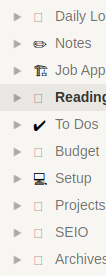
Emoji do not appear anymore at all, a blank rectangle is displayed instead.
Work-around
See https://github.com/brave/brave-browser/issues/7397#issuecomment-572756439
Steps to Reproduce
Open any website with emoji such as Twitter. Emoji can also be copypasted from Emojipedia. I had one in a bookmark which is also not displaying correctly anymore.
Actual result:

Expected result:
orange heart emoji
Reproduces how often:
always
Brave version (brave://version info)
Brave   1.1.21 Chromium: 79.0.3945.79 (Official Build) (64-bit)
Revision    29f75ce3f42b007bd80361b0dfcfee3a13ff90b8-refs/branch-heads/3945@{#916}
OS  Linux
JavaScript  V8 7.9.317.31
Flash   (Disabled)
User Agent  Mozilla/5.0 (X11; Linux x86_64) AppleWebKit/537.36 (KHTML, like Gecko) Chrome/79.0.3945.79 Safari/537.36
Command Line    /opt/brave.com/brave/brave --enable-dom-distiller --disable-domain-reliability --no-pings --extension-content-verification=enforce_strict --extensions-install-verification=enforce --enable-oop-rasterization=Enabled --sync-url=https://no-thanks.invalid --enable-features=PasswordImport,WebUIDarkMode,SimplifyHttpsIndicator --disable-features=AutofillServerCommunication,NotificationTriggers,AudioServiceOutOfProcess,SmsReceiver,LookalikeUrlNavigationSuggestionsUI,WebXR,WebXrGamepadModule,UnifiedConsent,AllowPopupsDuringPageUnload,SyncUSSBookmarks --flag-switches-begin --flag-switches-end --disable-webrtc-apm-in-audio-service
Executable Path /opt/brave.com/brave/brave
Profile Path    /home/mitsunee/.config/BraveSoftware/Brave-Browser/Default
Version/Channel Information:
- Can you reproduce this issue with the current release? Yes
Other Additional Information:
- Does the issue resolve itself when disabling Brave Shields? No
- Does the issue resolve itself when disabling Brave Rewards? No
- Is the issue reproducible on the latest version of Chrome? I do not have Chrome, the issue does not appear in Discord (Client) if that helps.
Miscellaneous Information:
I don't know if graphics drivers are related to fonts in any way but I recently updated to nvidia driver 430, tho I have noticed a broken emoji in bookmarks about 2 brave updates prior.
 Mitsunee
All 12 comments
You need to install fonts that support special characters like emoji. The browser will pick up the system font to show it. You might want to install fonts-symbola for your distro using the package manager or use Ubuntu package. This should support most if not all types of font emoji.
 srirambv
on 15 Dec 2019
srirambv
on 15 Dec 2019
Going to close this out - but @Mitsunee please let us know if @srirambv 's suggestion fixes the issue 😄 If not, we can re-open and investigate more
 bsclifton
on 17 Dec 2019
bsclifton
on 17 Dec 2019
This issue is not caused by a specific font-family. Emojis stopped working with a recent update in Brave only. Other software can display emoji just fine, even bash and gedit can.

The same emoji pasted into brave does not display anywhere, I tried this very input field I'm typing into right now, the devtools and bookmarks.
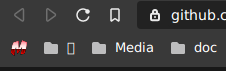
Please stop closing unsolved issues before even giving me a chance to respond.
Mitsunee
on 17 Dec 2019
It's re-opened (and you have ability to reopen)
bsclifton
on 17 Dec 2019
for future reference, I upgraded to Kubuntu19.10:
Brave   1.1.22 Chromium: 79.0.3945.79 (Official Build) (64-bit)
Revision    29f75ce3f42b007bd80361b0dfcfee3a13ff90b8-refs/branch-heads/3945@{#916}
OS  Linux
JavaScript  V8 7.9.317.31
Flash   (Disabled)
User Agent  Mozilla/5.0 (X11; Linux x86_64) AppleWebKit/537.36 (KHTML, like Gecko) Chrome/79.0.3945.79 Safari/537.36
Command Line    /opt/brave.com/brave/brave --enable-dom-distiller --disable-domain-reliability --no-pings --extension-content-verification=enforce_strict --extensions-install-verification=enforce --enable-oop-rasterization=Enabled --sync-url=https://no-thanks.invalid --enable-features=PasswordImport,WebUIDarkMode,SimplifyHttpsIndicator --disable-features=AutofillServerCommunication,SyncUSSBookmarks,AllowPopupsDuringPageUnload,WebXR,AudioServiceOutOfProcess,SmsReceiver,LookalikeUrlNavigationSuggestionsUI,NotificationTriggers,WebXrGamepadModule,UnifiedConsent --flag-switches-begin --flag-switches-end --disable-webrtc-apm-in-audio-service
Executable Path /opt/brave.com/brave/brave
Profile Path    /home/mitsunee/.config/BraveSoftware/Brave-Browser/Default
Issue still unchanged, no emoji display in any textboxes, bookmarks or anything while they do display in most other software (spotify doesn't, but that's the smallest issue that software has on linux...)
Mitsunee
on 18 Dec 2019
+1 in Brave Browser 1.1.23 and Ubuntu 19.04
Previous versions of Brave Browser had emojis working, since last two updates (updates 1.1.x) stopped working.

 aparedero
on 23 Dec 2019
aparedero
on 23 Dec 2019
+1 on Ubuntu 19.10 and Brave 1.1.23
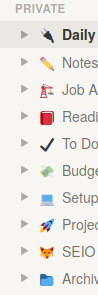
Whereas in Firefox:
 gondyb
on 26 Dec 2019
gondyb
on 26 Dec 2019
I had the same issue with the latest release (on Ubuntu 19.10) and fixed it by removing and reinstalling fonts-noto-color-emoji. Might help you people.
 chrsengel
on 9 Jan 2020
chrsengel
on 9 Jan 2020
I realised this problem also occurs on Google Chrome, so is something realted to Chromium.
The solution from @chrsengel seems to work. I tried
sudo apt-get reinstall fonts-noto-color-emoji
and after closing all Brave / Google Chrome Windows and reopening is working in both browsers
aparedero
on 10 Jan 2020
@Mitsunee can you try the above suggestion please?
bsclifton
on 13 Jan 2020
I already put a like reaction to show that I tried it and it worked. As I don't know how it worked I didn't leave a comment.
Mitsunee
on 13 Jan 2020
update: I keep having to repeat the workaround after every new update and/or reboot, which is especially annoying because I have to reboot a lot due to a problem with the nvidia drivers...
Mitsunee
on 24 Jan 2020
Related issues
 kjozwiak
·
3Comments
kjozwiak
·
3Comments
 simonhong
·
3Comments
kjozwiak
·
3Comments
simonhong
·
3Comments
kjozwiak
·
3Comments
 bbondy
·
3Comments
bbondy
·
3Comments
 AlexCombas
·
3Comments
AlexCombas
·
3Comments
Most helpful comment
I had the same issue with the latest release (on Ubuntu 19.10) and fixed it by removing and reinstalling
fonts-noto-color-emoji. Might help you people.