Brave-browser: PasswordManagerEnabled Windows registry value requested.
Description
Brave can't manage both password tool (internal and external) like Chrome
A solution was made for chrome by using a registry key, it forces internal way working along with an external extension like Roboform.
This is a post that explains how to set up this for Chrome.
Can you add the same part of code for Brave browser?
I too am deeply frustrated by this change to RoboForm. While I understand their perspective that it can be confusing to have two password managers both simultaneously trying to save passwords and fill in forms, many of us find this quite beneficial.
RoboForm support tells me that they're "investigating the feasibility of providing both options." Well, 30 seconds of spelunking through their Chrome extension's code reveals that this is a trivial change for them to make. There's certainly no technical barrier to simply not calling browser.privacy.services.autofillEnabled.clear() in background-chrome.js.
So, while we wait for the developers to come to their senses, there is good news: there is a trivial work-around to prevent RoboForm from disabling form fill! Chrome provides group policy settings that are intended to allow enterprise installations of chrome to control the availability and state of various settings, one of which is the password manager. You can download the Chrome administrative templates, add them to the Windows group policy management console, and configure password management there, but there's a simpler way as well.
Just run (Win + R) this simple command to enable the Password Manager setting:
reg add HKLM\SOFTWARE\Policies\Google\Chrome /v PasswordManagerEnabled /t REG_DWORD /d 1This adds a registry value that maps to Chrome's group policy setting for the password manager. Machine-level group policy takes higher precedence than an extension's manipulation of a setting, so RoboForm is now unable to disable the password manager.
Steps to Reproduce
Install the Roboform app extension and enable it, it will disable the internal password code.
Actual result:
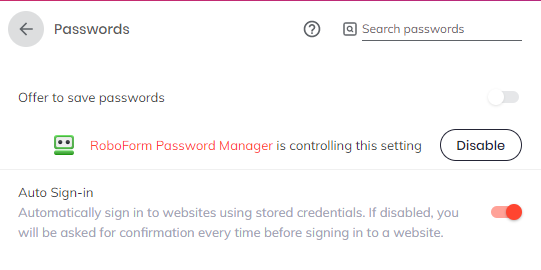
Expected result:
Have both password manager running at the same time.
Reproduces how often:
Brave version (brave://version info)
Brave 0.68.131 Chromium: 76.0.3809.100 (Official Build) (64-bit)
Revision ed9d447d30203dc5069e540f05079e493fc1c132-refs/branch-heads/3809@{#990}
OS Windows 10 OS Version 1903 (Build 18965.1005)
JavaScript V8 7.6.303.29
Flash 32.0.0.238 C:\WINDOWS\system32\Macromed\Flash\pepflashplayer64_32_0_0_238.dll
User Agent Mozilla/5.0 (Windows NT 10.0; Win64; x64) AppleWebKit/537.36 (KHTML, like Gecko) Chrome/76.0.3809.100 Safari/537.36
Command Line "C:\Program Files (x86)\BraveSoftware\Brave-Browser\Application\brave.exe" --enable-dom-distiller --disable-domain-reliability --disable-chrome-google-url-tracking-client --no-pings --extensions-install-verification=enforce_strict --enable-features=NewExtensionUpdaterService,SimplifyHttpsIndicator --disable-features=AutofillServerCommunication,NetworkService,UnifiedConsent,TranslateUI --flag-switches-begin --flag-switches-end
Executable Path C:\Program Files (x86)\BraveSoftware\Brave-Browser\Application\brave.exe
Profile Path C:\Users\sebastien\AppData\Local\BraveSoftware\Brave-Browser\User Data\Default
Variations d74ef32b-ca7d8d80
Other Additional Information:
- Is the issue reproducible on the latest version of Chrome?
Yes
Miscellaneous Information:
Please add this possibility of registry key :)
 Sebastiii
All 5 comments
Have you tried changing the registry path to be Brave instead of Chrome? Does that work?
 rebron
on 30 Aug 2019
rebron
on 30 Aug 2019
Hi Rebron,
Yes tried it and it doesn't works :(
I have tried :
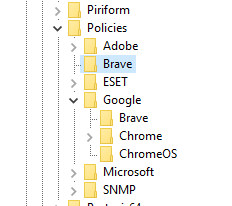
So :
HKEY_LOCAL_MACHINE\SOFTWARE\Policies\Brave
and also
HKEY_LOCAL_MACHINE\SOFTWARE\Policies\Google\Brave
with DWORD : PasswordManagerEnabled to 1.
Sebastiii
on 30 Aug 2019
I found this link from Chromium regarding Policies: https://www.chromium.org/developers/how-tos/enterprise/adding-new-policies
It says that you can write the registry keys to Software\Policies\Chromium (for Chromium builds) or Software\Policies\Google\Chrome (for Google Chrome branded builds).
Since Brave is a Chromium build, theoretically you should use:
HKEY_LOCAL_MACHINE\SOFTWARE\Policies\Chromium
I tried adding a Policy this way, and apparently it works.
 figura
on 17 Sep 2019
figura
on 17 Sep 2019
@figura thanks :) it did works.
I didn't find it myself, you are great.
We can close the ticket.
Thanks again.
Sebastiii
on 18 Sep 2019
Closing. Thanks @figura
rebron
on 18 Sep 2019
Related issues
 bbondy
·
3Comments
bbondy
·
3Comments
 GeetaSarvadnya
·
3Comments
bbondy
·
3Comments
GeetaSarvadnya
·
3Comments
bbondy
·
3Comments
 traffisco
·
3Comments
traffisco
·
3Comments
 Sondro
·
3Comments
Sondro
·
3Comments