Brave-browser: Mozilla location api not accurate in some instances
I'm using Brave version 0.68.131 Chromium: 76.0.3809.100 (Offizieller Build) (64-Bit)
If I make use of Google Maps and hit the allow location button, my position is fetched nearly 117 meters wrong.
How to reproduce:
- Open Google Maps
- Give permission to make use of your localization
- Wait for around 10 seconds to proceed
- Results in a wrong fetched location. See screenie.
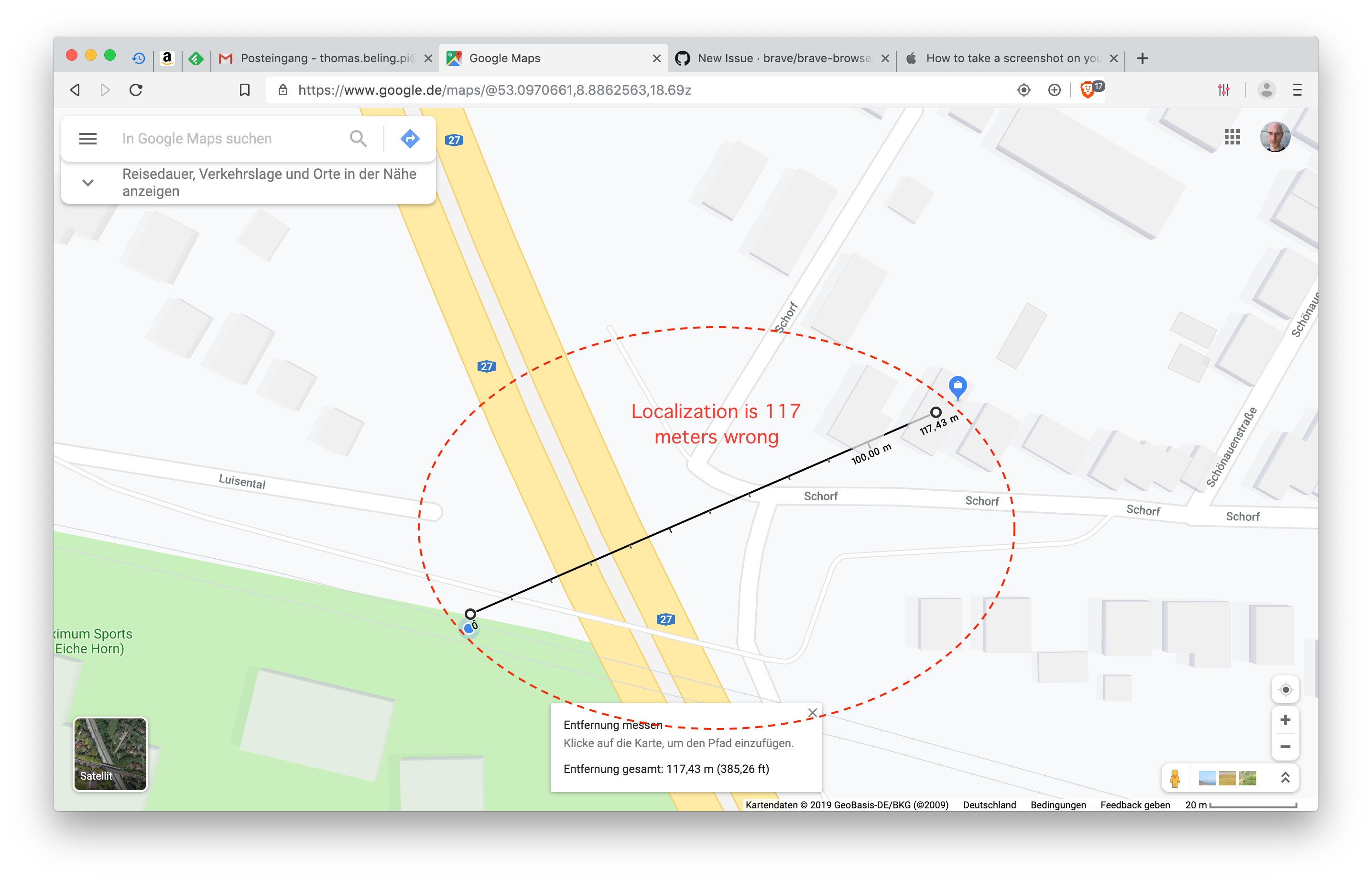
Expected result:
- Correctly fetched position.
Reproduces how often:
- Easily reproducible with each session.
Brave version:
- Version 0.68.131 Chromium: 76.0.3809.100 (Offizieller Build) (64-Bit)
Version/Channel Information:
- No idea, I'm using the stable release.
- Can you reproduce this issue with the current release? Yes
- Can you reproduce this issue with the beta channel? N/A
- Can you reproduce this issue with the dev channel? N/A
- Can you reproduce this issue with the nightly channel? N/A
Other Additional Information:
- Does the issue resolve itself when disabling Brave Shields? NO
- Does the issue resolve itself when disabling Brave Rewards? NO
- Is the issue reproducible on the latest version of Chrome? NO
 thommesborg
All 38 comments
I believe we're using the Mozilla service for geo-location, which would explain the difference
@thommesborg do you happen to have Firefox installed? If so, I'm curious if it's wrong there too?
cc: @bridiver
 bsclifton
on 26 Aug 2019
bsclifton
on 26 Aug 2019
Hi Brian,
Safari and Chrome are working correctly, only Brave shows this issue.
Firefox is not installed on that device.
Chrome is the latest stable release and has the same chromium base like
Brave but Chrome works fine.
Regards
Thomas
Brian Clifton notifications@github.com schrieb am Mo. 26. Aug. 2019 um
10:03:
I believe we're using the Mozilla service for geo-location, which would
explain the difference@thommesborg https://github.com/thommesborg do you happen to have
Firefox installed? If so, I'm curious if it's wrong there too?cc: @bridiver https://github.com/bridiver
—
You are receiving this because you were mentioned.
Reply to this email directly, view it on GitHub
https://github.com/brave/brave-browser/issues/5795?email_source=notifications&email_token=AJXHX26QVJ4G4RABXWDTXXLQGOE3PA5CNFSM4IPIT5CKYY3PNVWWK3TUL52HS4DFVREXG43VMVBW63LNMVXHJKTDN5WW2ZLOORPWSZGOD5DTTAQ#issuecomment-524761474,
or mute the thread
https://github.com/notifications/unsubscribe-auth/AJXHX232VDRJEN5ESDQMK2TQGOE3PANCNFSM4IPIT5CA
.
thommesborg
on 26 Aug 2019
@thommesborg it's impossible for us to reproduce this issue without actually being on the same network so the only way to determine if it's a Brave issue (vs Mozilla geo service) is to compare to the location given by Firefox. If they are identical then there's nothing for us to do.
 bridiver
on 27 Aug 2019
bridiver
on 27 Aug 2019
@bridiver I had the time to check the results in Firefox and Firefox shows the right location, so this issue will only appear using the Brave browser.
Regards,
Thomas
thommesborg
on 1 Sep 2019
I'm not sure how to troubleshoot this- basically, it all comes down to a service call. The location shown isn't determined using a GPS, it's where the service thinks you're located (based on IP, etc). With Brave, Chrome, and Firefox the locations for mine are all different and all wrong (shows me being in the next town over)
I suppose it's possible that we're calling a different geo service than Firefox? (maybe they have a new endpoint)
bsclifton
on 2 Sep 2019
I've been having this problem ever since I moved. Google Maps always assumes that I'm at my old address. I assumed it was something to do with Google caching my location based on the name of my Wifi or something, but Opera (Chromium based), Firefox and my Android phone all show me in the right location on Google Maps. It's only Brave that's getting this wrong, so there must be something wrong in Brave.
 twinklebob
on 18 Sep 2019
twinklebob
on 18 Sep 2019
Firefox release and beta uses the Google location service (see geo.wifi.uri in about:config). Only Firefox Nightly uses the Mozilla location service.
 fmarier
on 18 Sep 2019
fmarier
on 18 Sep 2019
A good way to fix this in locations where the Mozilla Location service isn't very accurate is to walk around the block running Mozilla Stumbler on an Android phone. It will contribute data anonymously to the service.
fmarier
on 18 Sep 2019
Thanks all for your replies. At this moment I think it's up to the dev's to fix the issue. For me the following browsers show the right location: Safari, Chrome and Firefox. The only browser that shows a wrong location is Brave. Brave does this for websites using location services. Tested Google Maps and Open Street Maps.
thommesborg
on 3 Oct 2019
Closing as wontfix since there's not a clear action for us to take (other than switching which service we use)
bsclifton
on 3 Oct 2019
Yep, I think I’m OK with switching the service you use.
thommesborg
on 3 Oct 2019
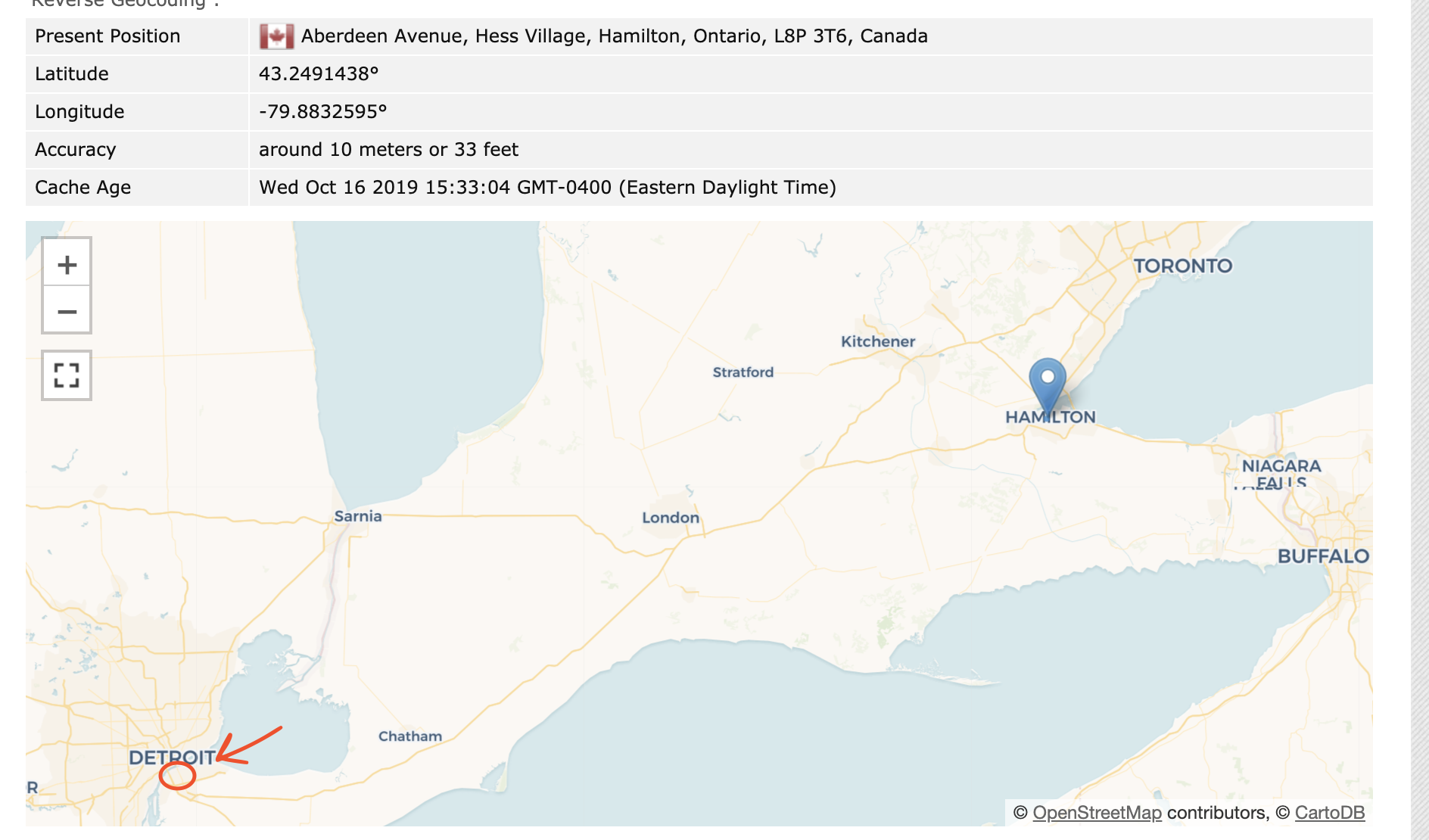
I ran into this as well while going through the manual passes for 0.70.x. When going through a few geolocation websites, it placed me ~400km away from my current location. However, Chrome & Firefox were both displaying the correct locations.
Looks like FX uses Google's service as @fmarier mentioned via https://github.com/brave/brave-browser/issues/5795#issuecomment-532814403:

Example of the inaccuracy of the FX's geolocation service:
 kjozwiak
on 16 Oct 2019
kjozwiak
on 16 Oct 2019
With today's update to v78 I don't get any location with Brave. Firefox, Chrome and Safari still working fine.
thommesborg
on 25 Oct 2019
@thommesborg you're not getting any location? What happens on visiting maps.google.com?
I'm getting a non-precise location, but it is working for me
bsclifton
on 28 Oct 2019
@bsclifton sure I did. Checked Google Maps and OSM. Usually I got a wrong location but with latest update I never get a location-marker.
thommesborg
on 28 Oct 2019
No location at all suggests API limits. Do we know whether we have exceeded our Mozilla API key limits?
fmarier
on 28 Oct 2019
I am getting a reading that is around 10km off.
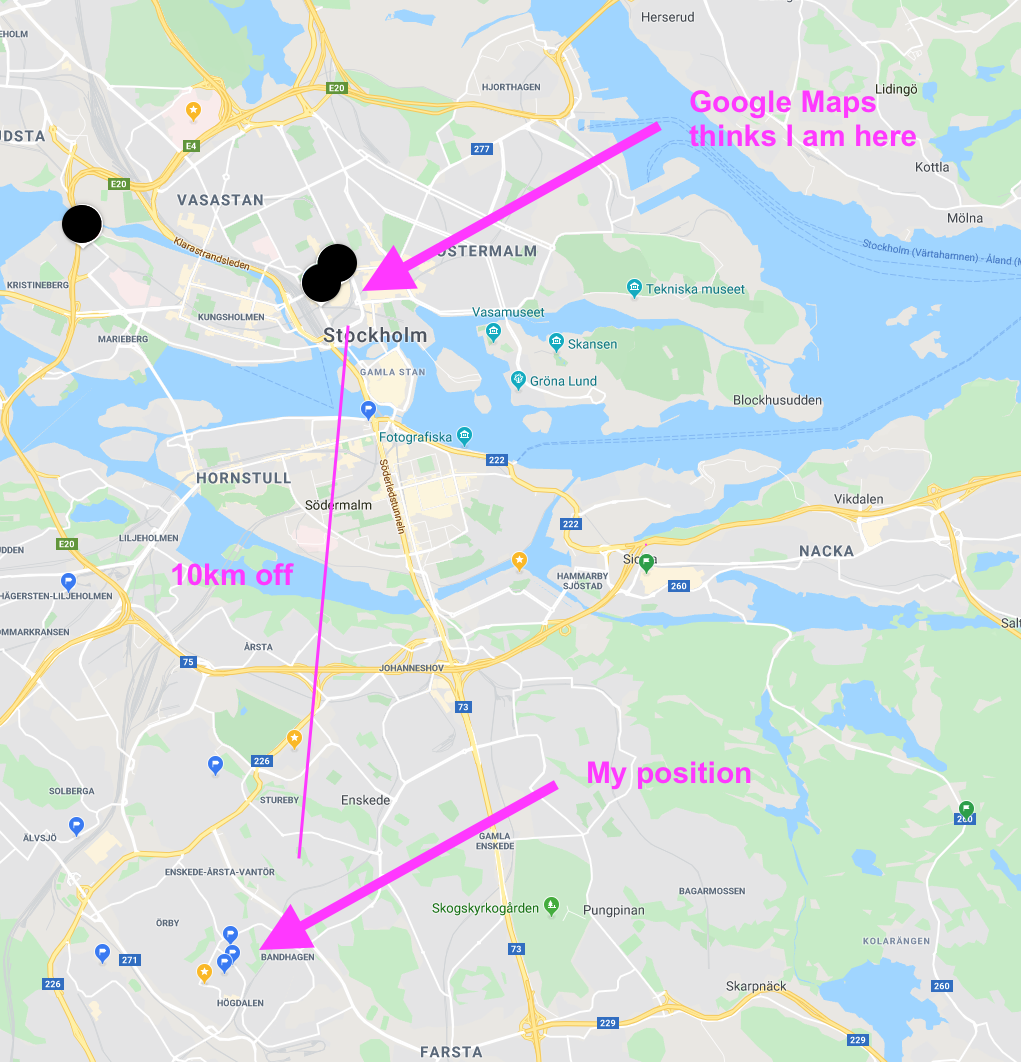
If I switch to Chrome, it finds my exact position correctly.
I am using Brave Version 0.70.123 Chromium: 78.0.3904.97 (Official Build) (64-bit)
on: macOS Catalina 10.15
 bobmoff
on 11 Nov 2019
bobmoff
on 11 Nov 2019
As of Catalina 10.15.1 I don’t get any location. No error message and no false location, just nothing.
thommesborg
on 11 Nov 2019
For now it’s not possible to assess this issue because of macOS Catalina. With macOS Catalina Apple must have changed a lot according to the location access. Brave and Chrome won’t have a toggle under system settings > privacy and location and granting location access via the browser’s prompt won’t give a location in Brave nor in Chrome. I got feedback that with Brave Dev (actual) it should work again in macOS.
thommesborg
on 29 Nov 2019
I'm seeing this issue on mojave, with chrome & firefox reporting the correct location, and brave is 400 miles off!!
 jaredly
on 7 Dec 2019
jaredly
on 7 Dec 2019
@thommesborg MacOS location settings are not relevant to Brave, Chrome or Firefox because all of them use a separate geoip services (Brave uses the same service as Firefox)
bridiver
on 8 Dec 2019
@bridiver thanks for your reply! I thought the same but I didn’t knew for sure. I got confused by a recently seen screenshot from macOS' location-settings showing an entry for Firefox.
But now neither Chrome nor Brave get my location on latest macOS 10.15.1
thommesborg
on 8 Dec 2019
I'm not sure how it can be reporting a different position than Firefox since we use the same endpoint. @jaredly can you tell me the lat/lon reported by Brave vs Firefox in google maps? A difference of ~400 miles would be ~7 degrees.
bridiver
on 9 Dec 2019
@bobmoff can you also give me the lat/lon reported in both?
bridiver
on 9 Dec 2019
I'm not sure how it can be reporting a different position than Firefox since we use the same endpoint. @jaredly can you tell me the lat/lon reported by Brave vs Firefox in google maps? A difference of ~400 miles would be ~7 degrees.
Firefox release does _not_ use the Mozilla Location Service. It uses Google's. This is why we get a different location than Firefox.
Only Firefox Beta and Nightly use the Mozilla Location Service. Those pre-release versions should return the same location information as Brave.
fmarier
on 9 Dec 2019
@fmarier Firefox beta (72.0b4 (64-bit)) reports the correct location (around 40.5,-112)
and brave (1.0.1) reports (36.8,-108.02)
cc @bridiver
jaredly
on 10 Dec 2019
I tried running brave beta, and it "quit unexpectedly" 🙃 so I can't verify there.
jaredly
on 10 Dec 2019
Chrome
59.2715776,18.0363264
Brave
59.3333,18.05
bobmoff
on 10 Dec 2019
To staff-members: as I started this report it was for macOS-only. It got changed by a staff member.
As of now and as I don’t get any location in Brave nor Chrome on macOS Catalina, should I start over with a new bug-report?
thommesborg
on 10 Dec 2019
@fmarier Firefox beta (72.0b4 (64-bit)) reports the correct location (around 40.5,-112)
and brave (1.0.1) reports (36.8,-108.02)
That is unexpected. We should be getting the same results as Firefox Beta.
fmarier
on 10 Dec 2019
As of now and as I don’t get any location in Brave nor Chrome on macOS Catalina, should I start over with a new bug-report?
Yes, please file a new issue for this. We'll keep #5795 for the location accuracy problems.
fmarier
on 10 Dec 2019
Is there any update to fixing location? Safari and Chrome have my correct location but the past month or so Brave has been showing me about 5 miles from home. I have cleared cache and cookies like suggested in some community posts. However most community posts about this same issue have been closed without resolution. Thank you.
 ajacobs21e
on 8 Apr 2020
ajacobs21e
on 8 Apr 2020
Is there any update to fixing location? Safari and Chrome have my correct location but the past month or so Brave has been showing me about 5 miles from home. I have cleared cache and cookies like suggested in some community posts. However most community posts about this same issue have been closed without resolution. Thank you.
Hi @ajacobs21e originally this issue was opened by me for Brave on macOS Catalina. Later, at this issue changed from a Catalina-issue to a location-accuracy-issue, I did a new one for macOS.
Brave on macOS Catalina won’t get any location #7309
As of now Brave nor Chrome on _macOS Catalina_ will get any location. Firefox does, Safari does. I reported this issue also to the chrome-bug-tracker and there it has a priority 3, what means: "yeah, maybe, next year or so, if wo don't have another issue and enough coffee".
The issues are here:
https://bugs.chromium.org/p/chromium/issues/detail?id=1035290
https://bugs.chromium.org/p/chromium/issues/detail?id=1051591
thommesborg
on 8 Apr 2020
Thanks @thommesborg. If my issue is not Catalina related (I'm still on Mojave), is this the right ticket to follow?
ajacobs21e
on 8 Apr 2020
@ajacobs21e as long as you stay on Mojave yes. After an update to Catalina, no.
thommesborg
on 8 Apr 2020
I'm going to close this issue since we actually stopped using the Mozilla Location Service in February due to their announcement that they would terminate our access to it. We are currently using a thin service that we built based purely on looking up IP addresses in the MaxMind database.
I suggest that follow-ups be directed to the new issue we have to improve the quality of the geo-location in Brave by using the operating system location services when available.
fmarier
on 8 Apr 2020
Hi @fmarier closing is not the right option, because Brave will still fail in getting a correct location.
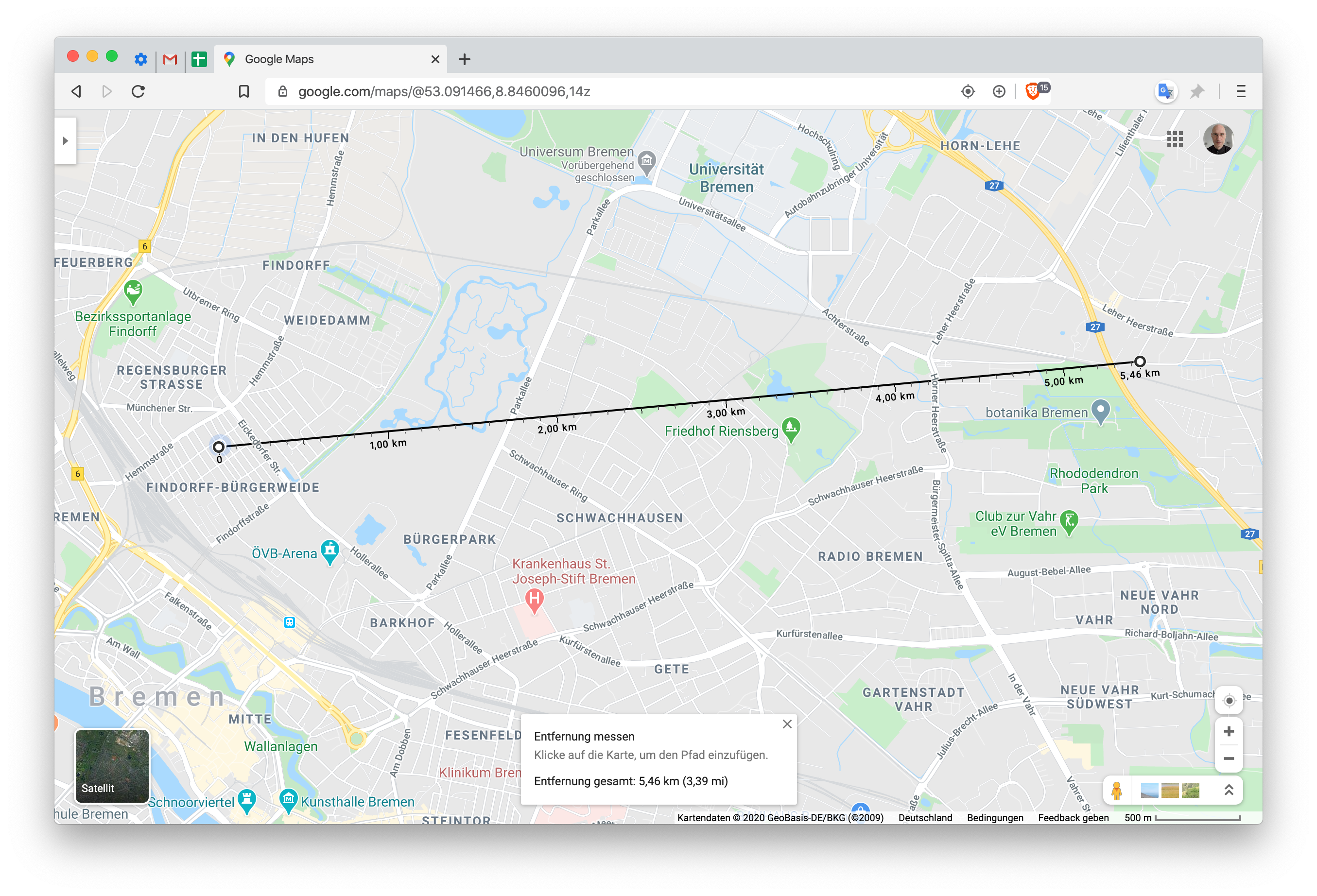
On the screenie you see to the left the marked location Brave "thinks" I am and to the right my real location.
thommesborg
on 9 Apr 2020
@thommesborg We're definitely aware of these limitations of IP-address-based geolocation and that's what we're hoping to fix by using the built-in operating system location services (see issue #8451).
fmarier
on 9 Apr 2020
Related issues
 kerry-perret
·
3Comments
kerry-perret
·
3Comments
 simonhong
·
3Comments
simonhong
·
3Comments
 lansana
·
3Comments
kjozwiak
·
3Comments
lansana
·
3Comments
kjozwiak
·
3Comments
 AlexeyBarabash
·
3Comments
AlexeyBarabash
·
3Comments