Brave-browser: Brave Freezing Issue
Description
When Brave is being used, duckduckgo and some other pages freeze. When looking in the network tab it is observed that the fonts (and on occasion the css) take anywhere between 6 to 14 seconds to load.
Steps to Reproduce
- Install Brave: Version 0.68.104 Chromium: 75.0.3770.100 (Official Build) unknown (64-bit)
or
Install Brave: Version 0.69.77 Chromium: 76.0.3809.62 (Official Build) unknown (64-bit) - Open the network tab.
- Browse to duckduckgo.com or try a few random other pages.
Actual result:
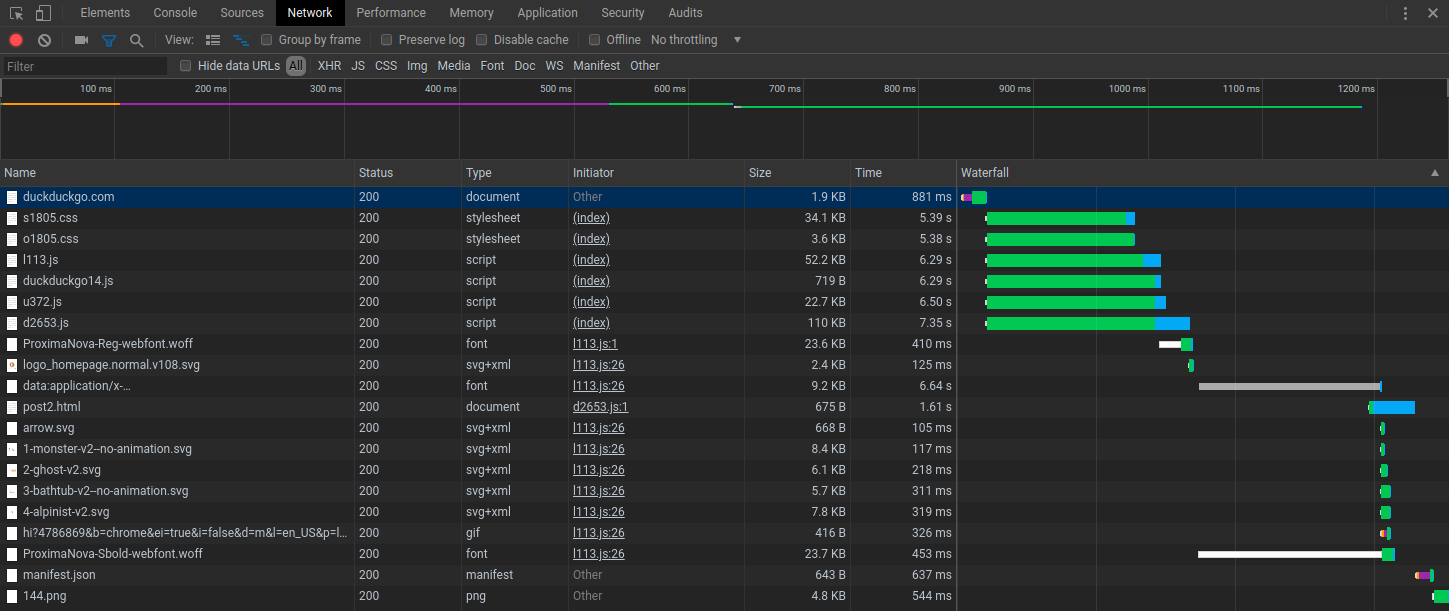
Expected result:
A more reasonable time to load fonts.
Reproduces how often:
Easily reproduced
Brave version (brave://version info)
Brave: Version 0.68.104 Chromium: 75.0.3770.100 (Official Build) unknown (64-bit)
Brave: Version 0.69.77 Chromium: 76.0.3809.62 (Official Build) unknown (64-bit)
Version/Channel Information:
Dev and Nightly
- Can you reproduce this issue with the current release? I can't compile that one.
- Can you reproduce this issue with the beta channel? I can't compile that one.
- Can you reproduce this issue with the dev channel? Yes
- Can you reproduce this issue with the nightly channel? Yes
Other Additional Information:
- Does the issue resolve itself when disabling Brave Shields? No, it only helps a tiny bit.
- Does the issue resolve itself when disabling Brave Rewards? No.
- Is the issue reproducible on the latest version of Chrome? I rather not install Chrome due to privacy reasons. But from looking online I don't see any Chrome users with the same issue.
Miscellaneous Information:
None.
 EncryptTown
All 11 comments
@kjozwiak is there any more information I can provide to resolve this issue?
Thank you so much.
EncryptTown
on 28 Jul 2019
Not sure if this is related, but I also see freezes in loading pages with
very large logs from ci-jobs in gitlab.
example:
https://gitlab.com/gitlab-org/gitlab-services/design.gitlab.com/-/jobs/264387571
this particular page does not show the problem, but I have internal project where the logs are larger (~4000 lines, so not even that large), where I see this:

- As you can see I, I get the 'page unresponsive' popup.
- It is 100% reproduceable, so if you tell me how to gather more information, I will provide it.
- In Chrome the same page always loads normally
 janwilmans
on 2 Aug 2019
janwilmans
on 2 Aug 2019
Same with the reddit share button on some pages. Click it a few times and all the tabs & windows on brave freezes.
 niknah
on 2 Aug 2019
niknah
on 2 Aug 2019
Might be adblock related. cc: @snyderp
 rebron
on 9 Aug 2019
rebron
on 9 Aug 2019
Ok I'll bite, the gitlab is self hosted and does not contain ads, however since it reproduces 100% its a.simple test. However that might make the page malfunction...
janwilmans
on 9 Aug 2019
If Does the issue resolve itself when disabling Brave Shields? No, it only helps a tiny bit. is true, doesn't sound like its adblock / filter list related.
 pes10k
on 9 Aug 2019
pes10k
on 9 Aug 2019
I tried it, for the gitlab case, it doesn't matter if shields are disabled or not. The page still freezes. I just noticed, that other CI builds that have much less data in the log window (3300 lines in stead of 18.000) do not experience this problem.
janwilmans
on 9 Aug 2019
I'm not sure if this is related or not, I thought I saw a thread about my specific problem before but I haven't been able to find it again. When I go to a web page with particular fonts for the first time or open my Popular folder on my bookmark bar it triggers a total UI freeze for more than a few seconds on my linux desktop (I haven't seen this issue on macos are you guys using linux?).
The desktop is a beast with an i7 and an NVMe SSD and it still freezes for around 10 seconds or so for the bookmark folder. If I open the browser and go straight to facebook it also freezes but not quite as long and if I open the bookmark folder it freezes again but not quite as long. I did a systrace on all of my brave processes and the first process named brave (ie the one with the lowest pid but not brave-browser,) shows a huge list of lines like these:
access("/usr/share/fonts/truetype/noto/NotoSansOlChiki-Regular.ttf", R_OK) = 0
madvise(0x250c6a237000, 602112, MADV_DONTNEED) = 0
followed by a huge list of lines like these:
openat(AT_FDCWD, "/usr/share/fonts/truetype/noto/NotoSansTelugu-Regular.ttf", O_RDONLY) = 228
fstat(228, {st_mode=S_IFREG|0644, st_size=169152, ...}) = 0
mmap(NULL, 169152, PROT_READ, MAP_PRIVATE, 228, 0) = 0x7f5ff6658000
close(228)
There are more fonts being loaded and processed than there are items in my Popular folder. My guess is that facebook and my popular folder use fonts that aren't installed and they trigger a system wide search. I'm assuming that the facebook fonts are actually found but that there is a font missing for my Popular folder and so the search goes through all known font locations and processes all fonts without having any sort of persistent mapping of fonts to filenames. I'm not sure why I don't see it on my mac, perhaps mac has a system wide API that handles this sort of thing or I simply have the fonts I need in locations that are quickly found...
 ReenigneCA
on 7 Dec 2019
ReenigneCA
on 7 Dec 2019
Just updated to the Ubuntu 1.1.20 package and the freezing issue is gone for me.
Edit: it's gone when I open the bookmarks toolbar. Facebook still seems to freeze up while loading even if I don't shutdown the browser and just navigate back. This happens with and without shields up. A good deal of this appears to be a Facebook problem. Firefox generally doesn't have an issue, chrome has it occasionally, Brave has it a lot.
ReenigneCA
on 11 Dec 2019
Having the same issue, most of it is resolved in brave-dev-bin 1.6.49-4 except for when I press this button:
Pressing it freezes Brave for like 8 seconds.
 arch-btw
on 24 Feb 2020
arch-btw
on 24 Feb 2020
Alright fam, time for a celebration, it's all fixed in:
Version 1.6.53 Chromium: 80.0.3987.122 (Official Build) unknown (64-bit)

arch-btw
on 1 Mar 2020
Related issues
 AlexeyBarabash
·
3Comments
AlexeyBarabash
·
3Comments
 kjozwiak
·
3Comments
kjozwiak
·
3Comments
 qingxiang-jia
·
3Comments
kjozwiak
·
3Comments
qingxiang-jia
·
3Comments
kjozwiak
·
3Comments
 lansana
·
3Comments
lansana
·
3Comments
Most helpful comment
Alright fam, time for a celebration, it's all fixed in:
Version 1.6.53 Chromium: 80.0.3987.122 (Official Build) unknown (64-bit)