Brave-browser: Allow user to show/hide background images on New Tab Page
Test plan
See https://github.com/brave/brave-core/pull/2668#event-2422895312
Description
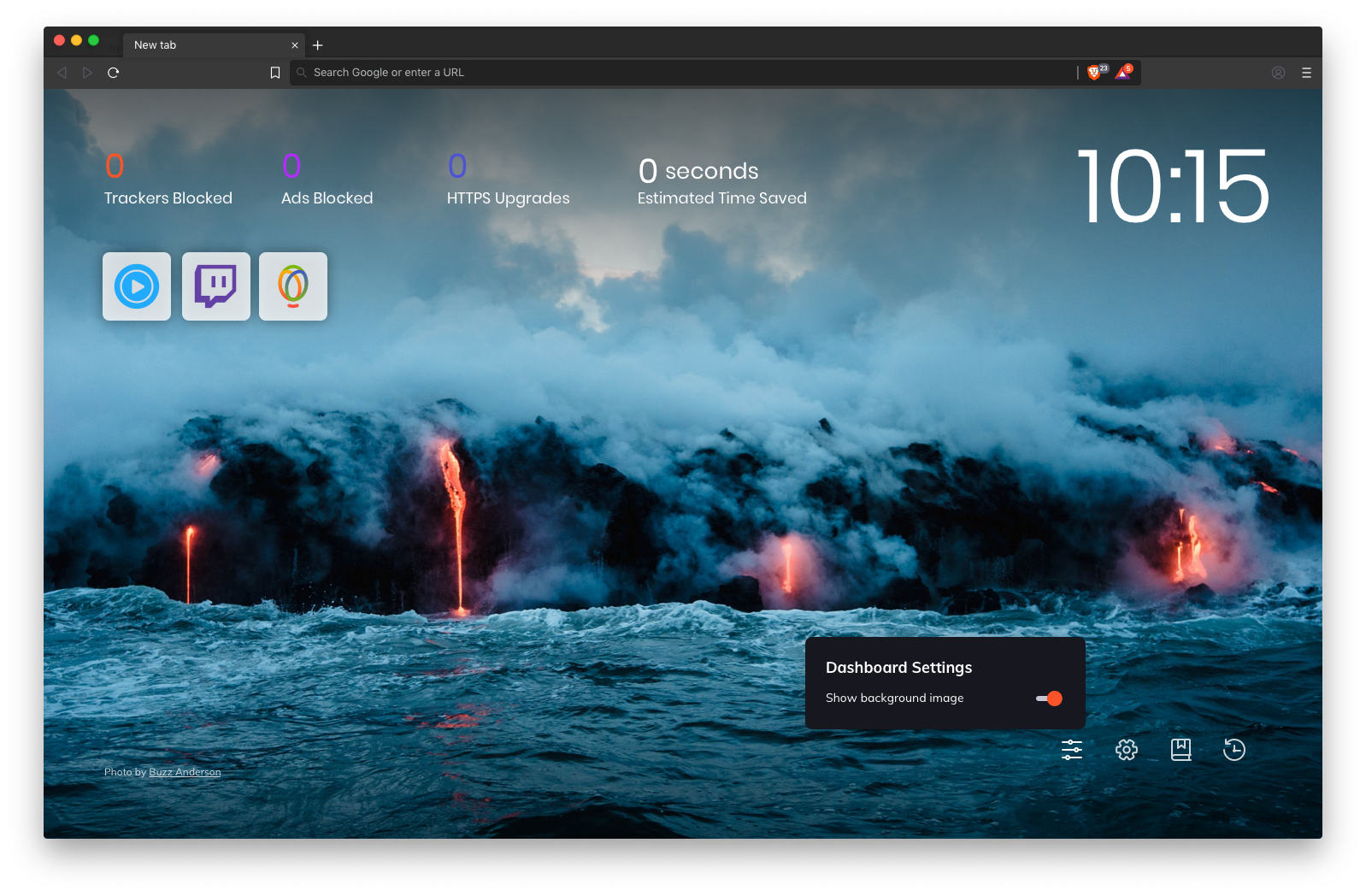
Provide users with the ability to show/hide background images on the New Tab page.
Designs
Add a new icon on the NTP that represents Dashboard settings:

Clicking or tab selecting the icon shows a menu with dashboard settings:

Clicking or tab selecting the toggle keeps the menu open while turning off the background image:

Clicking anywhere outside the menu closes it:

Design Specs

The Dashboard Settings menu should support dark theme set at the OS level:
Abstract link for more CSS/layout: https://share.goabstract.com/9563ae1d-93af-40ef-811b-4c3f384fe8f4
 karenkliu
All 10 comments
@imptrx reach out to @rossmoody for guidance on front-end components in our design system
karenkliu
on 21 May 2019
@karenkliu with no background image is it going to be the gradient colour? or is that customized to pick the system colour scheme because Windows and Mac now supports dark theme to be used?
 srirambv
on 22 May 2019
srirambv
on 22 May 2019
@srirambv to start the no background image will be a gradient color. We will of course be supporting more options for the background image in the future (pick your own image, set to a solid color, pick a solid color from color picker, pick a different gradient) etc.
karenkliu
on 22 May 2019
Huge +1 for custom colour picker for new tab page.
srirambv
on 27 May 2019
@karenkliu There are now 4 buttons here that look the same, but do very different things - one unintrusively pops up a toggle, the others load whole different pages. Can we make it intuitive that 3 of them are links to different pages, and 1 of them will lead to a menu? Perhaps by putting an arrow on that button.
 petemill
on 30 May 2019
petemill
on 30 May 2019
@petemill We can temporarily resolve that by making new icons for Settings, Bookmarks, and History that has an arrow on them.
Or, we can wait for planned updates to the Top Sites behavior, where the user can add/remove any site, including browser pages such as Settings, Bookmarks, and History, to that section. At this point we would remove the persistent icons at the bottom right, leaving just the Dashboard Settings icon. Need to discuss with @rebron whether we want to invest in the stopgap solution (new icon) or be OK with this discrepancy for now while waiting for fixes to the Top Sites widget.
karenkliu
on 3 Jun 2019
@karenkliu Stopgap with new icons per @petemill's suggestion.
 rebron
on 12 Jun 2019
rebron
on 12 Jun 2019
@rebron I created a separate issue #4930 to update the icons.
karenkliu
on 15 Jun 2019
Updated labelling to help with QA and edited original post to link to test plan 👍
 bsclifton
on 25 Jun 2019
bsclifton
on 25 Jun 2019
Verification passed on
Brave | 0.68.106 Chromium: 76.0.3809.62 (Official Build) dev (64-bit)
-- | --
Revision | 7b77856b3aa34d72f246d12340fc1ded8b2c0e83-refs/branch-heads/3809@{#798}
OS | Windows 10 OS Version 1803 (Build 17134.523)
- Verified the test plan from https://github.com/brave/brave-core/pull/2668
- Logged https://github.com/brave/brave-browser/issues/5452

- Verified New tab page by changing the Theme and Brave color
Verification passed on
Brave | 0.68.109 Chromium: 76.0.3809.62 (Official Build) dev (64-bit)
-- | --
Revision | 7b77856b3aa34d72f246d12340fc1ded8b2c0e83-refs/branch-heads/3809@{#798}
OS | Ubuntu 18.04 LTS
- Verified the test plan from https://github.com/brave/brave-core/pull/2668

Verified passed with
Brave | 0.68.116 Chromium: 76.0.3809.87 (Official Build) beta (64-bit)
-- | --
Revision | 111fe1e15d5ced26080a7dc239bcfe70f6c49aad-refs/branch-heads/3809@{#967}
OS | Mac OS X
- Verified test plan from https://github.com/brave/brave-core/pull/2668

 GeetaSarvadnya
on 21 Jul 2019
GeetaSarvadnya
on 21 Jul 2019
Related issues
 qingxiang-jia
·
3Comments
bsclifton
·
3Comments
qingxiang-jia
·
3Comments
bsclifton
·
3Comments
 simonhong
·
3Comments
simonhong
·
3Comments
 lansana
·
3Comments
lansana
·
3Comments
 moritzhaller
·
3Comments
moritzhaller
·
3Comments
Most helpful comment
Huge +1 for custom colour picker for new tab page.