Brave-browser: Add an option in Settings to install/enable and uninstall/disable Widevine Plugin (Muon parity)
Description
We have an open issue to make the "install/run widevine" prompt more obvious to the user and to display on all sites that require it (rather than having to navigate to Netflix or Hulu to do so). I have seen several users, however, ask if there is a way for the to uninstall Widevine on their machine.
Currently, there's no way to uninstall Widevine without uninstalling Brave entirely. In Brave Muon, there was a switch in Preferences --> Plugins --> Widevine that allowed this functionality. It would be useful to make this accessible to Core builds as well.

Additional Information
One user here from Reddit asking how to disable Widevine - will continue to add reports to this thread as I see them:
https://www.reddit.com/r/brave_browser/comments/abp4vq/how_to_disable_widevine/
 Brave-Matt
All 15 comments
Check media license in clear data modal under advance. This removes any media related settings that is set on the active profile. It will prompt again to install and run when you visit the site again. This avoids the uninstall/reinstall component problem. This is the safest way to ensure the component is installed but only works after you explicitly make it run.
 srirambv
on 3 Jan 2019
srirambv
on 3 Jan 2019
@srirambv, I have a few users saying that this doesn't always fix the issue. The option is also buried fairly deep in content settings. I think components like this should be surfaced as much as possible.
Brave-Matt
on 7 Jan 2019
Should go in the same area where we display WebTorrent pref.
 rebron
on 8 Jan 2019
rebron
on 8 Jan 2019
It would be really helpful to have an option to just install or uninstall it through the settings menu. I'm running into an issue where the install prompt isn't coming up on Netflix. It worked fine when I tried on Windows but isn't working at all on ubuntu using the normal release or Dev.
 tamj0rd2
on 3 Feb 2019
tamj0rd2
on 3 Feb 2019
In case anyone else comes across this issue and is still wondering how the heck one can get netflix to work with Brave, here is the solution:
Put shields down. Refresh. Check top right corner for pop-up icon. Right besides Brave rewards. Accpet widewine install. Watch netflix. Keep shields down.
Source:
https://www.reddit.com/r/BATProject/comments/a9uqk4/widevine_install_problems_for_brave_browser/
This should not be that hard, took me almost an hour to find the solution.
Please improve usability for such cases.
 johnsen32
on 3 Mar 2019
johnsen32
on 3 Mar 2019
@johnsen32 thanks for the feedback 😄Definitely important for us to solve this issue
In the meantime, we do have a more obvious notification (fixed in master). This will be making its way through the channels (dev, beta, release). Check out a preview of how it looks here:
https://github.com/brave/brave-browser/issues/1940#issuecomment-436438375
 bsclifton
on 4 Mar 2019
bsclifton
on 4 Mar 2019
+1 from Reddit:
https://www.reddit.com/r/brave_browser/comments/abp4vq/how_to_disable_widevine/ekcnl66?utm_source=share&utm_medium=web2x
Brave-Matt
on 8 Apr 2019
+2 from Community:
https://community.brave.com/t/remove-drm-from-brave/54081
Brave-Matt
on 16 Apr 2019
@tamj0rd2 can you try Netflix/Widevine again on Ubuntu in current release or any channel you prefer (beta/dev/nightly). We have widevine working now as of 62.x.
rebron
on 17 Apr 2019
Should go in the same area where we display WebTorrent pref.
Would it be possible to use it on a per site basis like with camera, microphone, camera etc?
 deoxal
on 18 Apr 2019
deoxal
on 18 Apr 2019
+1 from reddt:
https://www.reddit.com/r/brave_browser/comments/c86e03/would_like_a_flag_or_setting_to_gloablly_disable/
Brave-Matt
on 3 Jul 2019
+1 from Community:
https://community.brave.com/t/how-to-completelly-remove-widevine-from-brave-ubuntu/73658
Brave-Matt
on 2 Aug 2019
Several +1s from Reddit thread:
https://www.reddit.com/r/brave_browser/comments/fpuc9z/netflix_and_spotify_on_brave_uninstall_widevine/
Brave-Matt
on 27 Mar 2020
+1 from Reddit. Can't uninstall WideVine from Brave, and what's worse, the "Clear Media Licenses" options (under Settings --> Adv. --> Privacy and Security --> Content --> Clear browsing data) that Brave Team responded with in this Reddit thread seems to have disappeared since their response :
https://www.reddit.com/r/brave_browser/comments/abp4vq/how_to_disable_widevine/
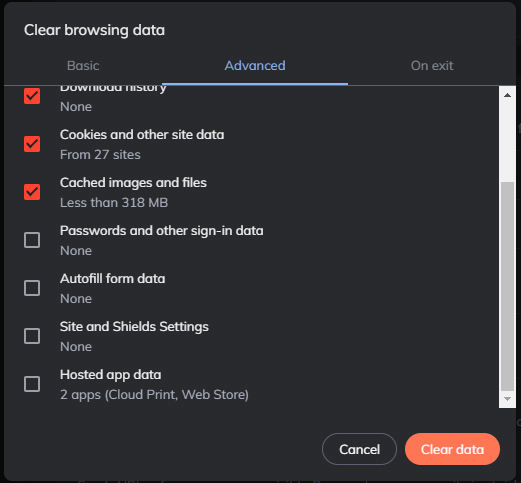
How does one either uninstall OR disable WideVine from Brave. Both options would be ideal here. Thanks.
 reelnoncents
on 29 Apr 2020
reelnoncents
on 29 Apr 2020
+1 from Reddit:
https://www.reddit.com/r/brave_browser/comments/g9q5ot/how_to_remove_windvine_without_uninstalling_brave/
Brave-Matt
on 29 Apr 2020
Related issues
 qingxiang-jia
·
3Comments
qingxiang-jia
·
3Comments
 moritzhaller
·
3Comments
moritzhaller
·
3Comments
 bbondy
·
3Comments
bbondy
·
3Comments
bsclifton
·
3Comments
bbondy
·
3Comments
bbondy
·
3Comments
bsclifton
·
3Comments
Most helpful comment
+1 from Reddit:
https://www.reddit.com/r/brave_browser/comments/abp4vq/how_to_disable_widevine/ekcnl66?utm_source=share&utm_medium=web2x