Brave-browser: Bookmark folder gets duplicated on desktop when edited on Android device while sync is in progress
Description
Bookmark folder gets duplicated on desktop when edited on Android device while sync is in progress
Devices
Device 1: Ubuntu running bc beta 0.59.8
Device 2: Samsung tab running 1.0.71(Sync2) build
Steps to Reproduce
- Create sync chain on desktop
- Add an Android device to the sync chain
- Add a couple of bookmarks on desktop, ensure it sync to mobile
- Add a couple of bookmarks on mobile, ensure it syncs to desktop
- Import a bookmark html file on desktop (brave_sorted_1000.zip)
- When empty root folder
Importedis created, edit the HTML folder in Android and rename toImported HTML - Wait for sync to complete
Imported HTMLis the root folder on bookmarks bar and inside it has anotherImportedbookmark folder which was the root folder in step 5
Actual result:

Android has the same folder structre
Expected result:
Imported HTML should contain one sub folder Bookmarks Bar which should further contain 2 nested bookmarks folder 0-99 and Bookmarks Toolbar.
Reproduces how often:
Easy
Brave version (brave://version info)
Brave | 0.59.8 Chromium: 71.0.3578.98 (Official Build) beta(64-bit)
-- | --
Revision | 15234034d19b85dcd9a03b164ae89d04145d8368-refs/branch-heads/3578@{#897}
OS | Linux
Reproducible on current release:
Does it reproduce on brave-browser dev/beta builds?
YesWebsite problems only:
Does the issue resolve itself when disabling Brave Shields? NA
- Is the issue reproducible on the latest version of Chrome? NA
Additional Information
cc: @darkdh @AlexeyBarabash @brave/legacy_qa
 srirambv
All 16 comments
Hi, @srirambv .
I hadn't fully understand the STR.
`
- When empty root folder Imported is created, edit the HTML folder in Android and rename to Imported HTML
I treated this step as6. When empty root folder Imported is created on Android device, rename it "Imported" => "Imported HTML" in Android`
After step 5 I have this structure on desktop:
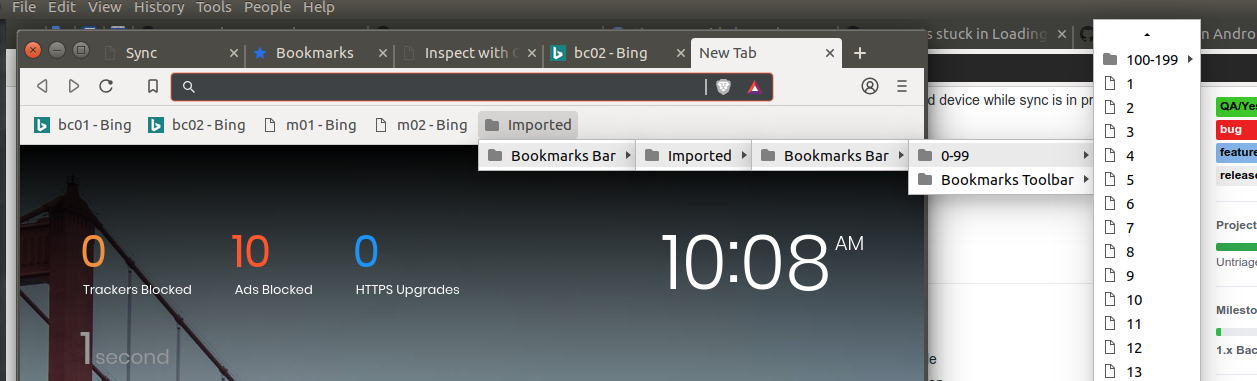
After step 8 I have this structure on desktop:
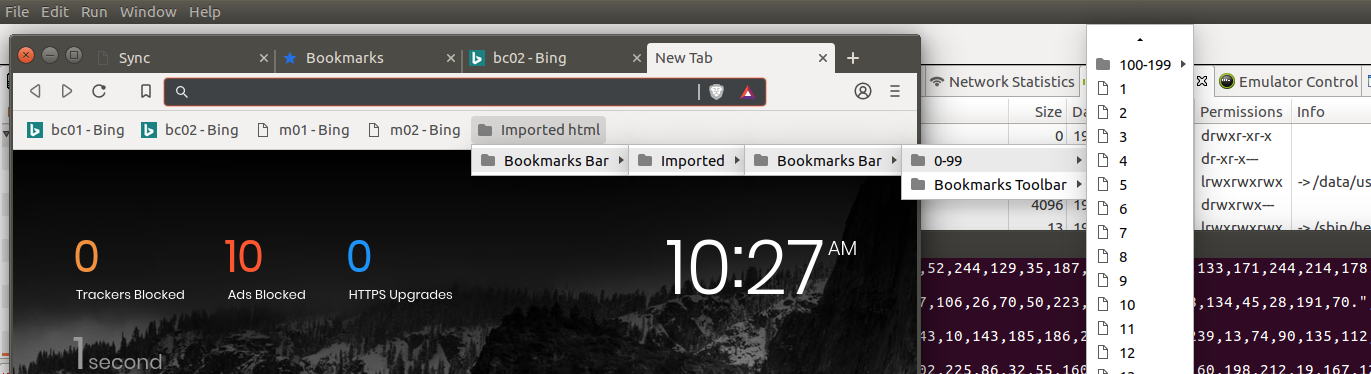
Root folder on desktop was renamed "Imported" => "Imported HTML" as a reflecting of changes on Android.
So I cannot understand what is the issue or it was fixed with a fix for some other issues.
Tested with Android 1.0.71(sync3) and Desktop:
Brave 0.61.0 Chromium: 71.0.3578.98 (Developer Build) (64-bit)
Revision 15234034d19b85dcd9a03b164ae89d04145d8368-refs/branch-heads/3578@{#897}
 AlexeyBarabash
on 18 Dec 2018
AlexeyBarabash
on 18 Dec 2018
@AlexeyBarabash Here's what the imported bookmarks folder structure looks like when you import the bookmarks on bc
[+] Root bookmark toolbar
   [-] Imported
     [-] Bookmarks Bar
        [-] 0-99
        [-] Bookmarks toolbar
           [-] 100-199
             [-] .....
Here's what it looks like after you edit the empty Imported bookmark folder on Android which is basically wrong.
[+] Root bookmark toolbar
   **[-] Imported HTML**
     **[-] Bookmarks Bar**
         [-] Imported
           [-] Bookmarks bar
              [-] 0-99
              [-] Bookmarks toolbar
                 [-] 100-199
                    [-] .....
On Android you don't create a new folder and move the bookmarks so it should just rename the existing Imported bookmark folder to Imported HTML folder. This is the folder structre am expecting after I edit the folder name on Android.
[+] Root bookmark toolbar
   [-] Imported HTML
     [-] Bookmarks Bar
        [-] 0-99
        [-] Bookmarks toolbar
           [-] 100-199
             [-] .....
Its creating a new root level folder for the Imported folder and pulling in the entire html file under it.
Can see two possibility to overcome this
- Do not allow editing bookmarks/folders on Android until the sync is complete (doubt this is possible)
- Batch sync entire folder structure instead of just sending 50 items per sync call (current behaviour) so that even if the folder/bookmark is edited should avoid this issue
srirambv
on 24 Dec 2018
Thanks @srirambv.
I have tried again.
To achieve the structure after import you have shown of
[+] Root bookmark toolbar
   [-] Imported
     [-] Bookmarks Bar
        [-] 0-99
        [-] Bookmarks toolbar
           [-] 100-199
             [-] .....
I skipped STR these steps:
3. Add a couple of bookmarks on desktop, ensure it sync to mobile
4. Add a couple of bookmarks on mobile, ensure it syncs to desktop
I could not rename Imported => Imported html while Imported was empty, because it rapidly had filled with ~ 200 bookmarks.
But after rename the bookmarks were continued to arrive.
After sync has been near the finish, I could see the following structure on the Android device:
Mobile bookmarks
  Imported html
    Bookmarks bar
      0-99
        ...
Tried twice to reproduce, but no luck.
Android: 1.0.72(sync-3)
Brave-core: own debug build based on brave-core at
commit 929bdb9f49cfddd9677e5d5c43b894ec08ff6518
Merge: bd5796b c1e10ae
Author: Nejc Zdovc <[email protected]>
Date:   Sun Dec 23 13:38:59 2018 -0500

    Merge pull request #1186 from brave/tip-unverified

    Removes image for unverified from tip table
@brave/legacy_qa needs to retest this once new beta build is out
srirambv
on 15 Jan 2019
I have similar problems with sync:
For example on my bookmark bar I have 3 folders :+1:
A B C
After sync form android I get
A A B B C C
The content of those folders is most of the time complete. I am not sure if I leave it working the folders would be multiplied even further like AAA BBB CCC and so on. I disabled it for now until this bug is fixed.
I am sorry that I did not keep a screenshot, But I think that I can replicate it if needed.
 bhlevca
on 8 Mar 2019
bhlevca
on 8 Mar 2019
1+ https://community.brave.com/t/bookmarks-and-passwords-sync-issue/53566/4
One more scenario on duplicate bookmarks sync.
- Clean profile 0.61.52
- Start sync chain on Desktop windows
- Join sync chain through a QR code on Android
- Import 1000 bookmarks on Desktop
- Make sure 1000 bookmarks synced on Android
- Reset sync chain on Desktop
- Create a sync chain again between Desktop and Android ( copied sync code from Android)
- Verify that duplicate bookmarks synced again on both Desktop and Android
 GeetaSarvadnya
on 14 Apr 2019
GeetaSarvadnya
on 14 Apr 2019
running version Version 0.64.77 Chromium: 74.0.3729.169 (Official Build) (64-bit), the steps outlined by @GeetaSarvadnya are what I experienced. This is a valid use case and outcome.
 djsalmon
on 4 Jun 2019
djsalmon
on 4 Jun 2019
@AlexeyBarabash we should probably take another look at this as we've received several +1 from the community.
 kjozwiak
on 6 Jun 2019
kjozwiak
on 6 Jun 2019
@kjozwiak just re-checked the original STR and STR of two messages above from @GeetaSarvadnya , could not reproduce any of them.
AlexeyBarabash
on 6 Jun 2019
@AlexeyBarabash I can reproduce it every time. You need to be a little patient and try to sync on both sides. Perhaps a few times. Try to add on both sides. I can reproduce it even if it is not during sync.
bhlevca
on 6 Jun 2019
@bhlevca are you talking about steps from @srirambv or about steps from @GeetaSarvadnya ?
AlexeyBarabash
on 6 Jun 2019
@AlexeyBarabash I am closer to what @GeetaSarvadnya did.
bhlevca
on 6 Jun 2019
@AlexeyBarabash but I did not use the nightly, Just the standard download.
bhlevca
on 6 Jun 2019
Same @GeetaSarvadnya experience here
 leobel96
on 9 Jul 2019
leobel96
on 9 Jul 2019
Thank you for closing the bug, but what's the need for the wontfix label if if was already fixed on May 28?
bhlevca
on 2 Jul 2020
Sorry for the confusion @bhlevca, wanted to log for future filtering. This will be fixed in the coming Brave Sync version 2 which you can find currently in Desktop nightly and Android nightly.
 jsecretan
on 4 Jul 2020
jsecretan
on 4 Jul 2020
Related issues
 fmarier
·
3Comments
fmarier
·
3Comments
 simonhong
·
3Comments
simonhong
·
3Comments
 qingxiang-jia
·
3Comments
qingxiang-jia
·
3Comments
 kerry-perret
·
3Comments
kerry-perret
·
3Comments
 lansana
·
3Comments
lansana
·
3Comments
Most helpful comment
1+ https://community.brave.com/t/bookmarks-and-passwords-sync-issue/53566/4
One more scenario on duplicate bookmarks sync.