Brave-browser: Unexpected end of JSON input - YouTube Thumbnail Error
Description
Whenever I try to change my YouTube's thumbnail picture, I just can't and gives mt this error: "Unexpected end of JSON input"
Steps to Reproduce
- Upload A Video To YouTube
- Go To YouTube Studio (Old one)
- Try to change the thumbnail
Actual result:
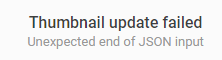
Expected result:
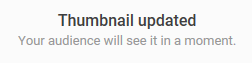
Reproduces how often:
Everytime, it's not working
Brave version (brave://version info)
0.56.12 Chromium: 70.0.3538.77 (Official Build) (64-bit)
Reproducible on current release:
Does it reproduce on brave-browser dev/beta builds?
I don't knowWebsite problems only:
Does the issue resolve itself when disabling Brave Shields? No
- Is the issue reproducible on the latest version of Chrome? Yes
Additional Information
 ghost
ghost
All 14 comments
I couldnt reproduce the error. Could you try recording a video of this using Licecap.
 srirambv
on 13 Nov 2018
srirambv
on 13 Nov 2018
I also have this issue when uploading youtube videos. It works fine in Chrome.
ghost
on 26 Nov 2018
I believe this problem is not browser-specific. It happens to me all the time using Chrome. It is affecting quite a lot of youtube creators, but obviously not the majority or youtube would have noticed it. It is probably a bug in youtube's client Javascript or in their server code. The error is obviously given by json.parse but in what context I don't know.
 pvfpvf
on 13 Feb 2019
pvfpvf
on 13 Feb 2019
FYI It happens when I use Chromium too.
 VikOlliver
on 21 Mar 2019
VikOlliver
on 21 Mar 2019
Changing my 3rd-party cookies worked for me.
A lot of the time when a website's functionality isn't working for me, I find temporarily changing my cookie settings will make it work.
In Chrome: Settings -> Advanced -> Content Settings -> Cookies -> Block Third-Party Cookies (Turn this off, then back on if you would like after you are finished).
Hope this helps!
 allenfonseca
on 5 Apr 2019
allenfonseca
on 5 Apr 2019
Thanks, Allen. I just tried that. It does stop the explicit JSON error message, but the upload still doesn't happen and instead I get this error in Chrome browser. Probably some other security feature in newer Chrome browsers. It's just a bit annoying that Google owns youtube, Google tightens Chrome security and encourages us to use it, and they can't even get their own software to work with it!

pvfpvf
on 6 Apr 2019
I got this error because while my YouTube video was uploading, I WAS DOING OTHER WORK, AND I SWITCHED MY GOOGLE ACCOUNT TO THE GOOGLE ACCOUNT OF MY FATHER. When I switched the account back, and I attempted to change the thumbnail, I was successful. I no longer received the error "Unexpected end of JSON input".
 NightTerrors-B
on 18 May 2019
NightTerrors-B
on 18 May 2019
Hey. Just had exactly same issue myself. Workaround: do it in Firefox. I'm not sure what's happening behind the scenes, but this worked.
 h00diesoul
on 24 May 2019
h00diesoul
on 24 May 2019
Neither solution suggested by NightTerrors-B or h00diesol fixes it for me. I've always been able to use Studio beta to change the trhumbnail after upload has finished. And I think I'm logged in correctly to Google and Youtube.
pvfpvf
on 24 May 2019
Yeah, I have to resort to Studio Beta too.
VikOlliver
on 26 May 2019
I had the same issue because I was switched to a different account in a different tab. Once I switched back, no problemo.
 glewisut
on 16 Jun 2019
glewisut
on 16 Jun 2019
Issue was fixed when i used a different browser
 sanles1
on 19 Jun 2019
sanles1
on 19 Jun 2019
hi,
I have solved the problem. First of all read the terms and conditions of the thumbnail.
Switch You YouTube account to STUDIO BETA. and then click on your video that you want to add thumbnail. now upload thumbnail and its done. Dont thank me You can subscribe my channel its
https://www.youtube.com/channel/UClLGKXetgERax9gHzhRLn7Q?view_as=subscriber
 irawatpravin
on 19 Jun 2019
irawatpravin
on 19 Jun 2019
I tried different file formats. but couldn't be able to solve it.
 ManulMax
on 18 Sep 2019
ManulMax
on 18 Sep 2019
Related issues
 moritzhaller
·
3Comments
moritzhaller
·
3Comments
 AlexCombas
·
3Comments
AlexCombas
·
3Comments
 jonathansampson
·
3Comments
jonathansampson
·
3Comments
 traffisco
·
3Comments
traffisco
·
3Comments
 kerry-perret
·
3Comments
kerry-perret
·
3Comments