Braintree-web: 3DS V2 iframe events
General information
- SDK version: 3.46.0-beta-3ds.8
- Environment: Sandbox
- Browser and OS Chrome 75 on Windows 10
Issue description
In the 3DS v1 implementation it was possible to specify addFrame/removeFrame callbacks, allowing us to customize the modal dialog, hosting the banks iframe.
These methods are apparently no longer being called as part of V2.
Specifically im looking for ways to:
- Inline (instead of modal) the content in the page on smaller devices (iphone 5/SE)
- Add an 'X' button in the top-left corner of the modal dialog (same behaviour as cancel)
- Adjust the height of the frame to avoid vertical scrolling on larger screens
- Detect when the 'Cancel' button has been pressed inside the iframe, to skip sending the nonce which is apparently always generated but with a
liabilityshiftpossible = trueliabilityshifted = false
Perhaps there is a new way ?
 Fraaankes
All 14 comments
For 2.0, the UI is now entirely controlled by Cardinal's songbird.js library. We have no control over it, so we can't expose those kind of hooks/ui changes.
For
Detect when the 'Cancel' button has been pressed inside the iframe, to skip sending the nonce which is apparently always generated but with a liabilityshiftpossible = true liabilityshifted = false
Cardinal documents that there should be a specific error (10011) when the customer cancels the flow, which we expose as THREEDS_CARDINAL_SDK_CANCELED.
The good news is for 2.0, the challenge should rarely be shown.
FYI, here are the docs for Cardinal's songbird.js SDK https://cardinaldocs.atlassian.net/wiki/spaces/CC/pages/557065/Songbird.js
I double checked to make sure there weren't additional hooks we could expose.
 crookedneighbor
on 1 Jul 2019
crookedneighbor
on 1 Jul 2019
Looking at the Cardinal docs you linked, it looks to me like it would be possible for the Braintree lib to expose the same functionality as 3DS v1, but with a bit more work on the users side.
It would require the options given to ThreeDSecure.prototype.create(options) to have an object like payment: { view: 'inline', framework: 'bootstrap3', displayLoading: true }, flow that into instance._setupSongbird(..), and then into global.Cardinal.configure(...)
This would then enable the triggering, and handling of this event: Cardinal.on('ui.inline.setup', function (htmlTemplate, details, resolve, reject) for merchants to handle injecting the iframe content into their own page, same as today.
Am I completely wrong here ?
Fraaankes
on 2 Jul 2019
Ahh, didn't even see that there was a whole separate section for UI events. I'll bring this to our fraud tools team and see what they think.
crookedneighbor
on 2 Jul 2019
Any news from the team ?
On the Cancel button issue, I am still seeing strange behaviour comming from the sandbox system.
The error you mention is not being triggered by pressing the button, and inspecting the response being passed into this event from Cardinal it looks like this:
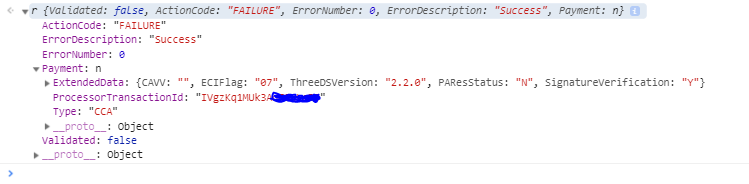
which clearly will not trigger the correct case, causing the promise to resolve instead of reject.
Fraaankes
on 22 Jul 2019
Got some updates now.
Inline (instead of modal) the content in the page on smaller devices (iphone 5/SE)
We updated our configuration to use this, and it had no effect. We've opened a ticket with Cardinal to see what we're missing regarding this, or if there's a bug on their end.
On the Cancel button issue, I am still seeing strange behaviour comming from the sandbox system.
The error you mention is not being triggered by pressing the button, and inspecting the response being passed into this event from Cardinal it looks like this:
We'll have to investigate this a bit more. Looking more closely at the cancel error code, it looks like it only applies to alternative payment methods (apple pay, google pay), so it's irrelevant for this card integration.
https://cardinaldocs.atlassian.net/wiki/spaces/CC/pages/100401153/Error+Codes#ErrorCodes-SongbirdErrorCodes
It looks like Cardinal doesn't differentiate between a FAILURE caused by failed authentication or that the user cancelled. In this case, we can't change the default behavior, but we can add a config option to have the call reject in the case of a FAILURE status. (rather than resolving with liabilityShifted: false)
crookedneighbor
on 13 Aug 2019
We're opening a ticket with Cardinal to see if they can provide some info on when authentication is cancelled.
crookedneighbor
on 13 Aug 2019
More updates!
Increase Frame Size for Smaller Screens
In the Web Drop-in repo, we're applying some special styles to overcome an iOS scrolling bug and increase the iframe size on small devices:
https://github.com/braintree/braintree-web-drop-in/blob/master/src/less/cardinal-overrides.less#L7-L24
@media only screen and (max-height: 700px) {
#Cardinal-Modal {
top: 10px !important;
bottom: 10px !important;
left: 10px !important;
right: 10px !important;
transform: none !important;
overflow: scroll !important;
-webkit-overflow-scrolling: touch !important;
}
#Cardinal-Modal iframe {
height: 100% !important;
width: 100% !important;
}
#Cardinal-ModalContent {
height: 100% !important;
}
}
We hope to remove these styles once Cardinal actually fixes the underlying issue.
You could apply these styles to your integration as well.
Inline Iframe Flow (an alternative, if you want complete control over the iframe authentication)
We're working to support Cardinal's inline iframe flow. The proposed API would look something like:
braintree.threeDSecure.create({
client: clientInstance,
framework: 'inline-iframe' // instead of using version: 2
}).then(function (threeDSecure) {
threeDSecure.on('authentication-iframe-available', function (element, next) {
document.body.appendChild(element);
next(); // call next only after element is on the page
});
// tokenize a credit card
threeDSecure.verifyCard({
nonce: nonceFromTokenization,
bin: binFromTokenization,
amount: '100.00',
onLookupComplete: function (data, next) {
next();
},
// additional 3ds fields
}).then(function (payload) {
// inspect 3ds info in payload
// send payload.nonce to server
})
});
Would love to hear your feedback on this API if you're interested in using it.
cancel
When the customer cancels the 3DS flow from within the bank iframe, the bank does not differentiate between a user cancelling a 3ds authentication and a user failing the authentication.
If you were to use the proposed inline frame option in the previous section, you'd be able to create your own cancel button outside of the iframe, but if a customer cancelled from within the iframe, you would still not be able to tell the difference.
crookedneighbor
on 5 Sep 2019
We've added an undocumented beta feature to use support the inline frame option provided by cardinal. You can try it out like this, by using a framework param instead of version:
braintree.threeDSecure.create({
  client: clientInstance,
  framework: 'inline-iframe'
}, function (createError, threeDSecure) {
  // set up lookup-complete listener
  // you may omit this and continue to use the onLookupComplete callback
  // in the verifyCard instead, if you wish
  threeDSecure.on('lookup-complete', function (data, next) {
    // check lookup data
    next();
  });
  // set up iframe listener
  threeDSecure.on('authentication-iframe-available', function (event, next) {
    var element = event.element; // an html element that contains the iframe

   document.body.appendChild(element); // put it on your page

    next(); // let the sdk know the element has been added to the page
  });

  // collect tokenized credit card
  threeDSecure.verifyCard({
    nonce: nonceFromTokenizationPayload,
    bin: binFromTokenizationPayload,
    amount: '100.00',
    // additional verify card params if available
  }).then(function (payload) {
    // inspect payload
    // send payload.nonce to your server
  });
});
We're still solidifying the exact API for how to expose this, so keep an eye on the CHANGELOG for breaking changes. We will also keep this open until the feature is out of beta.
crookedneighbor
on 25 Sep 2019
Thanks @crookedneighbor, the inline-iframe flow seems to work well.
Two questions:
Since there's no remove-iframe callback/event, when is it safe to remove the iframe from our document tree? We're currently doing it once the verifyCard() promise resolves/rejects, but maybe this isn't the prefered way?
Also, there's an error raised in the console under certain circumstances. Steps to reproduce (pseudo code):
instance = threeDSecure.create(...)
nonce = instance.verifyCard(...)
instance.teardown()
// nonce is checked at our API endpoint, something's not right, error displayed to the user
// customer tries again
instance = threeDSecure.create(...)
verifyCard(...)
// lookup completes
// console shows:
Base.Events: Event [ui.inline.setup] callback resulted in an exception: BraintreeError: _emit cannot be called after teardown.
Are we doing something wrong?
 martinandert
on 3 Oct 2019
martinandert
on 3 Oct 2019
Since there's no remove-iframe callback/event, when is it safe to remove the iframe from our document tree? We're currently doing it once the verifyCard() promise resolves/rejects, but maybe this isn't the prefered way?
This is correct. When verifyCard concludes, you remove the iframe.
Also, there's an error raised in the console under certain circumstances. Steps to reproduce (pseudo code):
I'll take a look at this. Seems like something isn't being cleaned up correctly.
crookedneighbor
on 3 Oct 2019
The error you were seeing was indeed an issue on our side, we forgot to call off on the inline listener when tearing the component down. I've adjusted the code so this will happen automatically, and will be fixed in the next release. In addition, we've decided to go with this api naming convention instead for the creation:
threeDSecure.create({
  client: clientInstance,
  version: '2-inline-iframe'
})
That should be an easier transition than deprecating version and creating a new framework parameter.
crookedneighbor
on 3 Oct 2019
The error you were seeing should be fixed now in the latest release. Going to close this.
crookedneighbor
on 28 Oct 2019
What would be a callback from the iframe to close the dialog and dispose the iframe.
 Dzivo
on 30 Oct 2019
Dzivo
on 30 Oct 2019
When verifyCard completes or errors, you remove it.
crookedneighbor
on 30 Oct 2019
Related issues
 I3undy
·
7Comments
I3undy
·
7Comments
 dimitarnestorov
·
5Comments
dimitarnestorov
·
5Comments
 jackocnr
·
4Comments
jackocnr
·
4Comments
 simeyla
·
11Comments
simeyla
·
11Comments
 guy-shahine
·
7Comments
guy-shahine
·
7Comments
Most helpful comment
We've added an undocumented beta feature to use support the inline frame option provided by cardinal. You can try it out like this, by using a
frameworkparam instead ofversion:We're still solidifying the exact API for how to expose this, so keep an eye on the CHANGELOG for breaking changes. We will also keep this open until the feature is out of beta.