Braintree-web: "Tabbing" through fields on mobile keyboards not working
General information
- SDK version: 3.34.1, using hosted fields
- Environment: Sandbox, currently... but seems to be occurring on production
- Browser and OS Nexus 6, Android 7.1.1, Chrome 68.0.3440.70 (and iOS, all that I've tried)
Issue description
On the keyboards of these devices, the previous/next field buttons seem to have no affect. These work on all other form fields on my checkout, but fail to work on the hosted iframe credit card fields.
On the Nexus, specifically, on all other fields on my form, where the "enter" key would be on the mobile keyboard, that button works as a "go to next field" but on the credit card fields, it actually acts as an enter key and tries to submit the form. Is there any way to prevent that?
 adamshafer
All 18 comments
Thanks for the report, we'll take a look.
 crookedneighbor
on 31 Jul 2018
crookedneighbor
on 31 Jul 2018
This has been mostly addressed in v3.44.1. I'm going to leave this issue open for now because it could still be improved.
Specifically, tabbing between form fields on a soft keyboard is now fully functional. Additionally, the last field in the form will default to a "Submit" or "Go" button on a soft keyboard. Still to be improved is tabbing into and out of a set of hosted fields.
 gesa
on 10 Apr 2019
gesa
on 10 Apr 2019
Thanks for the update, gesa! Will update to 3.44.1.
adamshafer
on 10 Apr 2019
Hi,
We've debugged an issue where we have a credit card number and a cvv fields created via hostedFields.create where the credit card number is displayed first, followed by a non-braintree field for card expiry date, followed by the cvv field. To be extra clear, the order is:
- credit card number (braintree)
- expiry date (non-braintree)
- cvv (braintree)
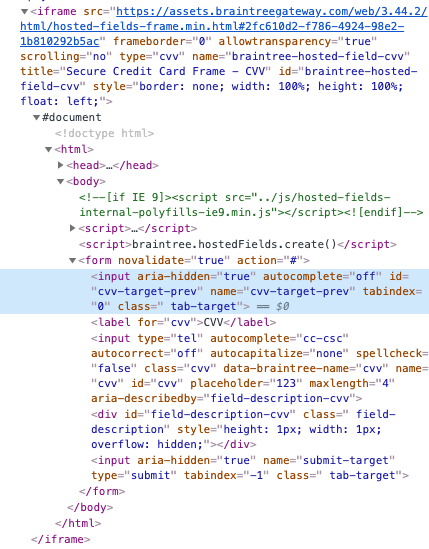
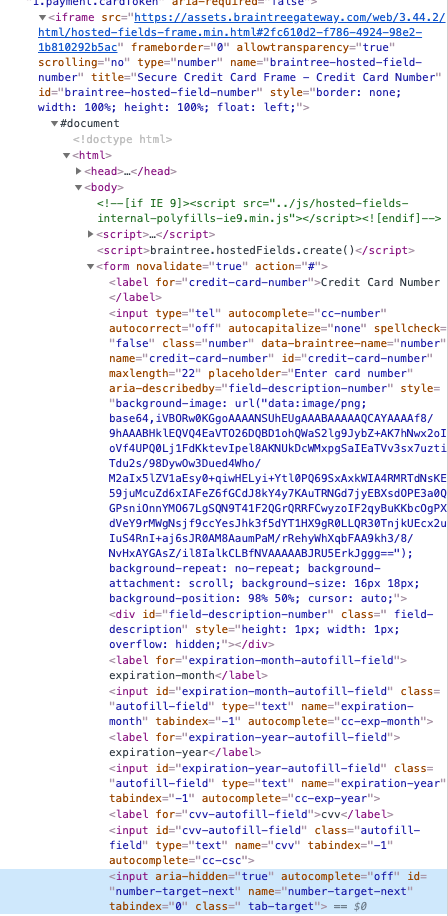
What happens when tabbing down towards these elements is that the expiry date field gets jumped over. This is due to a couple of input tags present in the iframes of credit card number and cvv that have tabindex=0.
Changing the tabindex of the credit card number to -1 enables tabbing from credit card to expiry date, but hitting tab on the expiry field goes back to credit card number. The user would then be stuck in a loop between these two fields.
Changing the tabindex of the cvv field to -1 solves this problem and the user is able to tab through these fields as expected.
See the screenshots below with the iframes of each of the fields and the inputs set to 0 highlighted.
Is there a functional purpose to having the tabindex of these inputs set to 0? Otherwise, how complex would it be to deliver a fix for these fields?
Thanks
 Andi24
on 1 Aug 2019
Andi24
on 1 Aug 2019
Hey @Andi24, I'll take a look at this and get back to you. Thanks for the question, it's a good one.
gesa
on 1 Aug 2019
Hey @gesa, have you had a chance to take a look at the issue reported by @Andi24?
 rtkaleta
on 15 Aug 2019
rtkaleta
on 15 Aug 2019
Yes I have! I was actually looking at it for a good chunk of yesterday. So the reason it's set up the way it is ("0" on the inputs, "-1" on the submit) is because of the work to allow tabbing between fields on devices using software keyboards. as I had discovered back in April, manipulating the next/previous targets of a software keyboard when some of your inputs are in related iframes and the others aren't is _really tricky_. lots of mental gymnastics. i think i'm on to something, but the problem is any solution I come up with is going to make some amount of assumptions about the implementation. i definitely haven't forgotten about this issue. more like https://www.xkcd.com/356/.
gesa
on 16 Aug 2019
I think we should consider scoping the soft keyboard code to run only on mobile devices (based on useragent). We'll lose the soft key fixes for custom mobile browsers that don't present a clean useragent that maps to iOS or Android, but we'll restore the normal tabbing behavior for desktop environments
crookedneighbor
on 16 Aug 2019
agreed. i had just started playing with that thought (as in now it's in some uncommitted comment somewhere) when i walked away yesterday evening
gesa
on 16 Aug 2019
FYI .. On desktop, the tabbing was working in 3.44.0 but was then broken from 3.44.1 onwards.
My use case is you have a hosted field ( card number ), followed by a non-hosted field ( card name ), then 2 more hosted fields ( expiration and CVV ), just like how it is shown on most credit cards.
Attached is a ZIP file with a self-contained HTML using 3.44.0 and using hosted fields. Just replace the "sandbox_xxxxxxxx" with your own static authorisation key, then open with your browser. The tabbing works and flows naturally.
Then try changing the HTML below to use 3.44.1, reload in browser, repeat the test, then you see tabbing is now broken.
e.g.
1) If you set focus on the card number hosted field, then tab, "Name on card" input field ( which sits between card number and CVV hosted field ) is skipped.
2) If you select with your mouse the "name on card" input field, and then tab .. focus goes to the anchor beside the CVV ( correct ), then tab again, focus goes to the card number ( incorrect ! )
 ghost
on 3 Sep 2019
ghost
on 3 Sep 2019
@jmsjr2 Thanks. We're working on a solution and hope to get a release out soon.
crookedneighbor
on 3 Sep 2019
Hi @crookedneighbor ,
Is the fix for the tabbing scheduled for a specific release ?
 jmsjr
on 5 Sep 2019
jmsjr
on 5 Sep 2019
@jmsjr 😅 I'm almost done with it. Had a trip in there and have been juggling multiple projects. Literally working on tests for it _right now_.
gesa
on 5 Sep 2019
This is out now in 3.52.1.
Going to close this now, because the issues _should_ all be resolved now. If a new issue is discovered, create a new issue so we can track it.
crookedneighbor
on 13 Sep 2019
Also, big shout out to @gesa for their amazing dedication to finding an elegant solution for this problem!
crookedneighbor
on 13 Sep 2019
@crookedneighbor & @gesa - this fixed it for us, thanks a bunch for investing the effort to have this issue resolved, so great to be able to tab seamless between fields!
Andi24
on 13 Sep 2019
@crookedneighbor and @gesa Thank you !
Tabbing forward now works. A lot better than before.
However, Shift-Tab ( to go backwards ) from a hosted field ...:
1) Works with Chrome
2) Does not work In IE ( IE11 at work ) ...e g. stuck on the hosted field
3) Works only if you do it twice In Firefox ... e.g. do Shift-Tab twice to get unstuck from hosted field
From the sample braintree-test.zip that I attached in an earlier comment, I simply changed the version and you can observe both [2] and [3].
Will create a new issue as per @crookedneighbor
jmsjr
on 14 Sep 2019
New issue raised at https://github.com/braintree/braintree-web/issues/455
jmsjr
on 14 Sep 2019
Related issues
 fazpu
·
6Comments
fazpu
·
6Comments
 alexstrutly
·
3Comments
alexstrutly
·
3Comments
 gabrycaos
·
3Comments
gabrycaos
·
3Comments
 directrix1
·
6Comments
directrix1
·
6Comments
 EmilsK
·
8Comments
EmilsK
·
8Comments
Most helpful comment
Also, big shout out to @gesa for their amazing dedication to finding an elegant solution for this problem!