Braintree-web: Braintree Paypal issues on IE 11
Hi,
I have created a test project in ASP.NET Webforms using the example given in
https://github.com/braintree/braintree_aspnet_example
I am using all the latest versions of Braintree SDK's(2.60) and latest Js Library (2.24.1)
I have created a sandbox account in braintree and used all the required keys.
Everything works fine in all browsers except IE.
When i click the paypal button on IE, Paypal iframe opens up and shows a blank page.

When I opened IE developer tools, I can see that the "Access is denied" for the following files.
1) inline-frame.html
2) modal-frame.html

Also I opened the following link
https://developers.braintreepayments.com/start/hello-client/javascript/v2 in IE11 and tried to test the demo example. On clicking the paypal button following error was shown

On all the other browsers it worked properly.
Any help would be Appreciated.
Thanks,
Laxman
 laxman4434
All 40 comments
We are unable to reproduce the issue with IE11 at https://developers.braintreepayments.com/start/hello-client/javascript/v2

It's possible that this only affects specific builds of IE11. Do you mind telling us the exact browser version you are able to reproduce this in?
 mrak
on 27 May 2016
mrak
on 27 May 2016
Thanks for your reply. I am using the following version

Also i have downloaded the sample ASP.NEt project from
https://github.com/braintree/braintree_aspnet_example and tried with my sandbox keys.
It worked in every browser except IE.
Is there anything that I am doing wrong
laxman4434
on 30 May 2016
We are still unable to reproduce in the IE11 version in your screenshot :(
Do you have any IE extensions installed or Internet Zones in use on your system?
mrak
on 31 May 2016
There are no extensions installed on my system. IE is configured to some proxy settings.
laxman4434
on 6 Jun 2016
Hi @laxman4434 -
When you say IE is configured to some proxy settings, which proxy settings are those?
 intelliot
on 10 Jun 2016
intelliot
on 10 Jun 2016
@laxman4434 We're happy to keep troubleshooting this if you provide us with the proxy settings so we can attempt to reproduce. Feel free to re-open this issue.
 crookedneighbor
on 7 Jul 2016
crookedneighbor
on 7 Jul 2016
Hi,
Also and I have the same issue, In all web browsers is all good, except in IE 11.
When I click the PayPal button on IE, PayPal page opens up and shows a blank page.
 zlristovski
on 12 Aug 2016
zlristovski
on 12 Aug 2016
Hi,
I found a solution, add the following link: https://checkout.paypal.com in Security Sites and the pop-up will open in IE 11
zlristovski
on 12 Aug 2016
Hi,
I have squid proxy settings.
I have added the link https://checkout.paypal.com in Trusted sites under Security settings in Internet Explorer options, as zlristovski suggested and it worked for me.
But how can we tell all the normal users to add these settings while using our website on IE.
laxman4434
on 15 Aug 2016
Hi,
We have reproduced this issue and will be investigating further.
 skunkworks
on 16 Aug 2016
skunkworks
on 16 Aug 2016
@laxman4434 Could we trouble you to reset your IE security settings and seeing if the problem persists? We think it might be related to some custom security rules but aren't sure which ones.
 EvanHahn
on 24 Aug 2016
EvanHahn
on 24 Aug 2016
We also faced this issue on some user's phones. After disabling the new vault flow (Settings -> Processing -> PayPal), users were able to log in and proceed with the checkout.
 Tyrdall
on 29 Aug 2016
Tyrdall
on 29 Aug 2016
@Tyrdall Do you have any information on what phone models (and browser) were having this issue?
crookedneighbor
on 29 Aug 2016
@crookedneighbor Unfortunately not. I will try to contact a relevant user.
Tyrdall
on 31 Aug 2016
@crookedneighbor iOS + Safari.
Tyrdall
on 31 Aug 2016
For those of you experiencing this problem, what version of our SDK are you using, and have you tried updating to the latest? As of this writing, 2.28.0 is the latest version for our 2.x series.
mrak
on 1 Sep 2016
This issue exists in 2.27.0
 visormatt
on 6 Sep 2016
visormatt
on 6 Sep 2016
@visormatt @tyrdall Could you try updating to the latest v2 version, 2.28.0?
EvanHahn
on 6 Sep 2016
@EvanHahn I already did, but I also disabled the new vault flow.
Tyrdall
on 6 Sep 2016
@Tyrdall If this issue occurs in iOS + Safari, would you mind creating a new issue for us to track it? We're scoping this issue (#166) to the original post about IE11.
Please include any additional details you have. Anything is helpful.
intelliot
on 6 Sep 2016
@intelliot Sure.
Tyrdall
on 6 Sep 2016
@EvanHahn @intelliot
I've updated our implementation to use 2.28.0 and do still see the issue. That being said, I do think there is something timing related in play with this issue. What I am seeing is as follows:
- initial authorization succeeds, but our UI allows for saved PayPal nonce or the ability to
editand essentially re-trigger the account selection. - it's when the user tries to
editthat the authorization screen goes white - now... If I wait (we've tested 2 minutes) before hitting the
editlink, it will work.
-- When it fails, very briefly, the auth window will show the PayPal loader
I can create a video to demo this out if that would be helpful, but let me know who to share within the PayPal Organization as the I'm running through these on a staging environment.
visormatt
on 7 Sep 2016
@visormatt Could you take the screencast and email it to [email protected]? If possible, could you make sure any devtools console is open so that we can see errors? We'll take a look from there.
EvanHahn
on 9 Sep 2016
@EvanHahn another team member @matthewhaguemh has sent an email with two videos attached
visormatt
on 12 Sep 2016
Hi @EvanHahn ,
Sorry for the late reply.
I did reset all my IE settings and tried. But the problem still persists.
laxman4434
on 11 Oct 2016
Did this get anywhere ? Find a fix ?
 mabergh
on 2 Dec 2016
mabergh
on 2 Dec 2016
We are still unable to reproduce this. We'd really appreciate it if someone can give us any of the following:
- Reliable reproduction steps. Ideally, these steps would work in one of Microsoft's official IE virtual machines
- JavaScript errors from the developer console
- Any settings you or your corporate network has changed in Internet Explorer
- Which version of Braintree.js you're using
We believe that this happens when trying to checkout in a corporate-managed Internet Explorer setup. Some people have had success when adding *.paypal.com as a Trusted Site in their Internet Explorer settings.
Sorry we don't have a better answer—please send us steps to reproduce this problem!
EvanHahn
on 2 Dec 2016
@mabergh and @EvanHahn we've abstracted and reworked our Redux implementation which seems to have fixed our IE issue around popup blockers 👍.
However, I can't say with any certainty whether or not the timing issue noted above is relevant. If it was purely an issue of an indirect (non-touch event / callback) method being blocked, I would think regardless of 2 seconds or 2 minutes it would still block the popup which was not what we were seeing.
visormatt
on 2 Dec 2016
@EvanHahn We are also having this issue the FIRST time PayPal popup window executes on IE 11. It looks like the preflight CORS request is aborted, causing the tokenization to fail. On subsequent requests, the popup appears no problem.
 eschie
on 20 Jan 2017
eschie
on 20 Jan 2017
@eschie This sounds like a bug that we've observed in IE 11 and Microsoft Edge. In these browsers, we will occasionally receive HTTP 408 (Request timeout) responses.
Modern browsers use something called TCP preconnect to improve performance. This means the browser will often open a TCP connection with Braintree servers from your site before the user has requested it.
Because we have a timeout on our servers to avoid keeping open stale connections, these preconnections are often closed before the client actually needs to use them. In most browsers, they will simply reopen a new connection. Edge and IE11 have a bug where they try to reuse the already-closed connection. Because this connection has already been closed, the browser reports the HTTP 408 request timeout error.
We have reached out to Microsoft about this issue, but until it is addressed, you may try the following workaround: "use" and correctly close the unhealthy pre-connect, causing subsequent requests to open a new connection. For example:
braintree.setup(/* … */, {
  // …
  onReady: function () {
    if (isInternetExplorer || isMicrosoftEdge) {
      $.get('https://api.braintreegateway.com', $.noop);
    }
  }
});
(This example uses jQuery and omits browser detecting code.)
The get request discards any response, since its only purpose is to reset the connection to a healthy state. This worked for us in our testing, but it is definitely a workaround. If you implement this, let us know if you see a drop in the number of failures you see.
Thanks!
intelliot
on 23 Jan 2017
Thank you for working on this. I appreciate the effort
On 24 Jan 2017 04:51, "Elliot Lee" notifications@github.com wrote:
@eschie https://github.com/eschie This sounds like a bug that we've
observed in IE 11 and Microsoft Edge. In these browsers, we will
occasionally receive HTTP 408 (Request timeout) responses.Modern browsers use something called TCP preconnect to improve
performance. This means the browser will often open a TCP connection with
Braintree servers from your site before the user has requested it.Because we have a timeout on our servers to avoid keeping open stale
connections, these preconnections are often closed before the client
actually needs to use them. In most browsers, they will simply reopen a new
connection. Edge and IE11 have a bug where they try to reuse the
already-closed connection. Because this connection has already been closed,
the browser reports the HTTP 408 request timeout error.We have reached out to Microsoft about this issue, but until it is
addressed, you may try the following workaround: "use" and correctly close
the unhealthy pre-connect, causing subsequent requests to open a new
connection. For example:braintree.setup(/* … */, {
// …
onReady: function () {
if (isInternetExplorer || isMicrosoftEdge) {
$.get('https://api.braintreegateway.com', $.noop);
}
}
});(This example uses jQuery and omits browser detecting code.)
The get request discards any response, since its only purpose is to reset
the connection to a healthy state. This worked for us in our testing, but
it is definitely a workaround. If you implement this, let us know if you
see a drop in the number of failures you see.Thanks!
—
You are receiving this because you were mentioned.
Reply to this email directly, view it on GitHub
https://github.com/braintree/braintree-web/issues/166#issuecomment-274580932,
or mute the thread
https://github.com/notifications/unsubscribe-auth/AXLwrKPiKOgbmy1qsDDuvI3yxoN5Hvolks5rVPavgaJpZM4IoK-5
.
mabergh
on 24 Jan 2017
@intelliot Aside from the following 3 console errors in IE11, the workaround seems to now work the FIRST time:
- Origin not found in
Access-Control-Allow-Originheader - Network Error 80700013 (on GET)
- FORBIDDEN 403 (on https://api.braintreegateway.com)
We will be monitoring our production deploy and will update here if/when there's a decrease in error rate. Thanks for your help!
eschie
on 25 Jan 2017
Still having issue with this. I have done the ff as mentioned above:
- added *.paypal.com and https://checkout.paypal.com to trusted sites
- enabled data sources across domains in internet, local intranet, and trusted sites
- 2-minute waiting time
the mock sandbox purchase flow window opens but when i clicked 'Proceed with Sandbox Purchase' i would get this error:

i got this console info >> "The code on this page disabled back and forward caching. For more information, see: http://go.microsoft.com/fwlink/?LinkID=291337"
settings: IE 11.0.9600.18426, braintree web sdk 3.9.0, debugging in vs
code:
        braintree.client.create({
                        authorization: '@ViewBag.AuthToken'
                    }, function (clientErr, clientInstance) {
                        braintree.paypal.create({
                            client: clientInstance
                        }, function (paypalErr, paypalInstance) {
                            $('.paypal-button').click(function () {
                                $(".paypal-button").prop('disabled', true);
                                paypalInstance.tokenize({
                                    flow: 'checkout',
                                    amount: amount,
                                    currency: '@System.Configuration.ConfigurationManager.AppSettings["pg:Cur"]',
                                }, function (tokenizeErr, payload) {
                                    if (tokenizeErr) {
                                        $(".paypal-button").prop('disabled', false);
                                    } else {
                                       /*some ajax call*/
                                    }
                                });
                            });
                        });
                    });
it works in chrome and opera..
 danmbuen
on 9 Mar 2017
danmbuen
on 9 Mar 2017
@danmbuen Can you inspect the page elements and find the "dispatch frame" iframe element? It should look something like this:

I think there might be something that is blocking the content of this iframe, which is used to communicate between the main window and the popup. A bit of casual Googling brought up some results about an IE11 bug that blocks the loading of some iframes.
If you can confirm that the iframe content is not loading, can you try updating IE11 with this KB update to see if this fixes the issue?
skunkworks
on 23 Mar 2017
Closing this issue for now -- please let us know if the KB patch update fixes this behavior.
skunkworks
on 3 Apr 2017
Right now I encounter that issue as well. Both on our site and on the Braintree doc site https://developers.braintreepayments.com/start/hello-client/javascript/v2
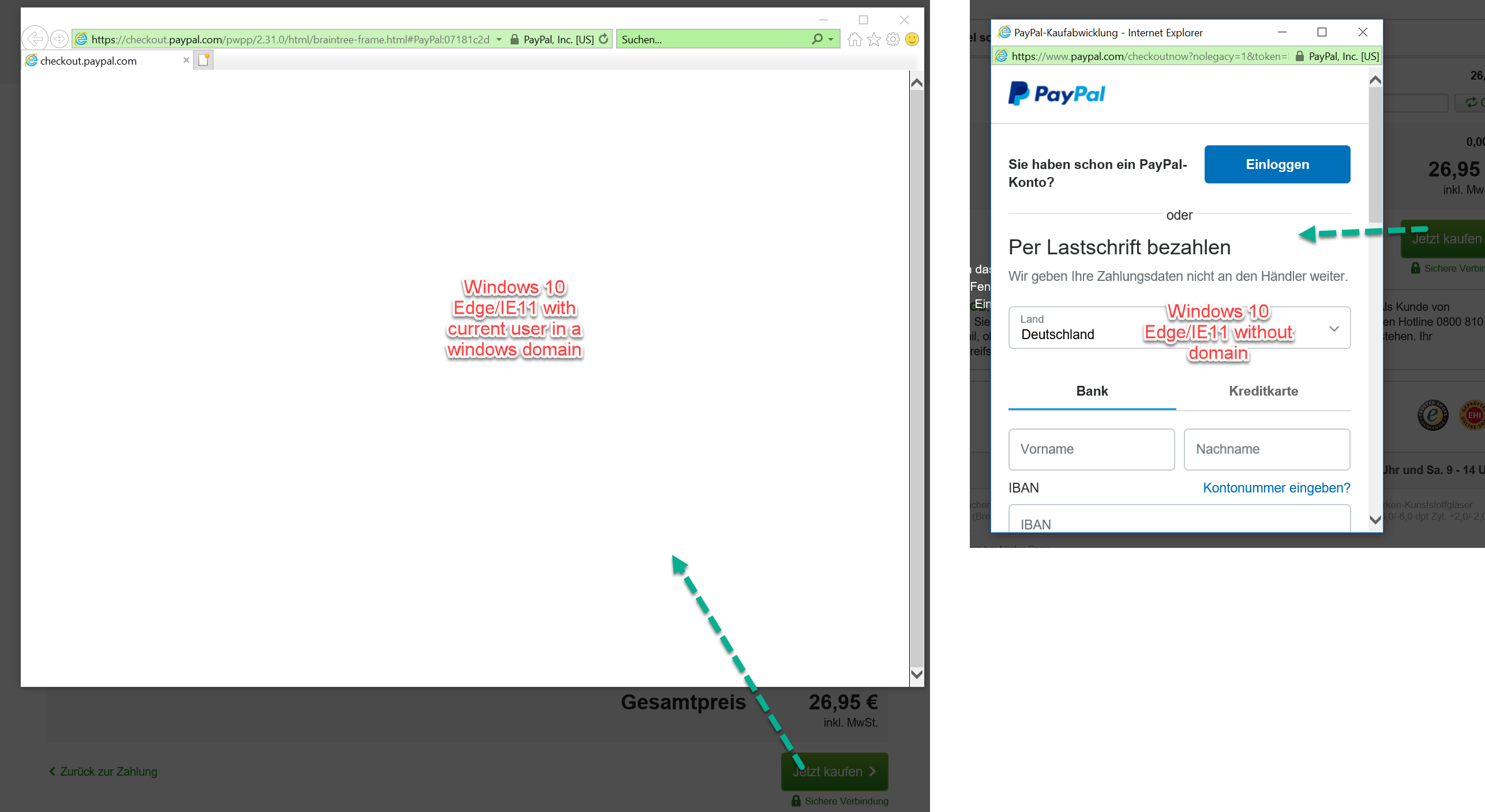
The difference between working and not working seems to be the domain assignment of the windows user. There must be some policy restrictions in place which cause the popup to be a full window instead of a real popup. I guess the JavaScript from the initiating page loses connection to the popup and it stays empty. So far I was not able to spot the configuration which makes a difference here.
Any help is welcome.
IE version: 11.192.16299
Edge version: 41.16299.15.0
 svenbluege
on 11 Apr 2018
svenbluege
on 11 Apr 2018
v2 is no longer receiving updates and bug fixes. Can you try upgrading to v3 of the SDK? https://developers.braintreepayments.com/guides/paypal/client-side/javascript/v3
The UI is now governed by PayPal's checkout.js script and should mitigate issues like this.
crookedneighbor
on 11 Apr 2018
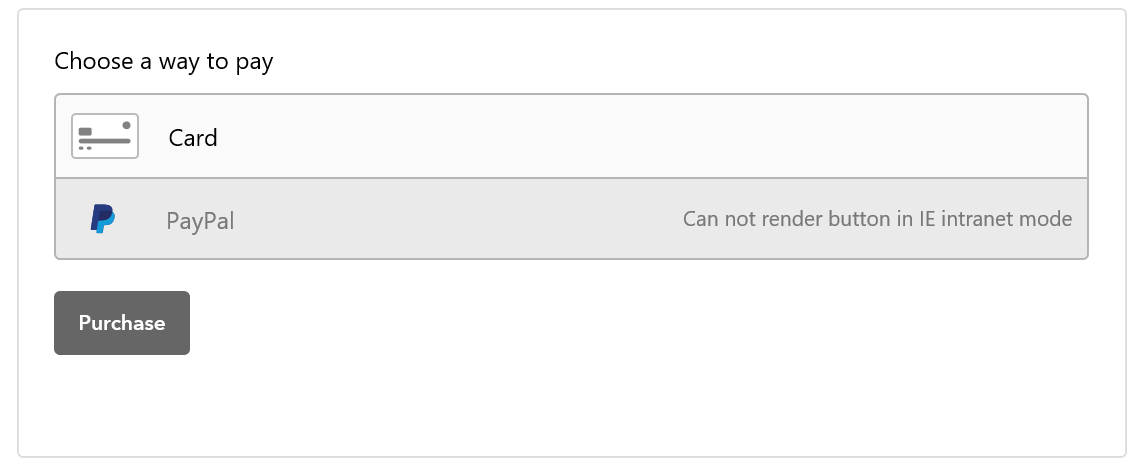
Seems like v3 can handle the IE intranet mode... whatever this is :)
svenbluege
on 11 Apr 2018
crookedneighbor
on 11 Apr 2018
Thanks a lot!
svenbluege
on 11 Apr 2018
Related issues
 coxy
·
9Comments
coxy
·
9Comments
 jackocnr
·
4Comments
jackocnr
·
4Comments
 JulianoRodrigues
·
4Comments
JulianoRodrigues
·
4Comments
 alexstrutly
·
3Comments
alexstrutly
·
3Comments
 raRaRa
·
6Comments
raRaRa
·
6Comments