Brain.js: NaN training error when importing training data from JSON
What is wrong?
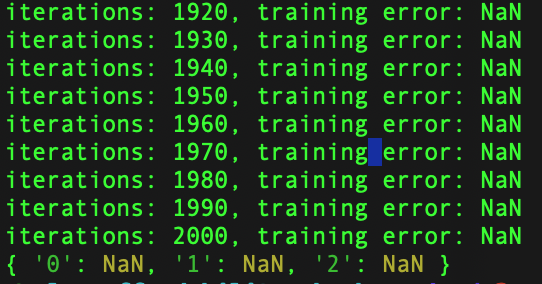
When loading training data from a local JSON file, stringify and parsing, running the network results in a training error of: NaN.
Where does it happen?
I'm running Brain JS on my Macbook with an i7 processor within a Node JS script, executed locally through my terminal
How do we replicate the issue?
My code is as follows:
dataset-dedupe-cleansed.json
[
  {
    "input":"[0.97,0.94,0.56,0.94]",
    "output":"[1]"
  },
  {
    "input":"[0.24,0.54,0.35,0.74]",
    "output":"[1]"
  }
]
app.js
// test users
const testUsers = [
  { name1: 100, name2: 5, name3: 1000, name4: 200 },
  { name1: 1200, name2: 12, name3: 2000, name4: 900 }
]

// get a random user
const user = testUsers[Math.floor(Math.random() * testUsers.length)];

// normalize based on min/max
function normalize (val, max, min) {
  return (val - min) / (max - min);
}

// round number
function round (val, precision) {
  var multiplier = Math.pow(10, precision || 0)
  return Math.round(val * multiplier) / multiplier
}

// specify training options
const trainingOptions = {
  log: true,
  iterations: 20000,
  errorThresh: 0.005,
  learningRate: 0.3,
  timeout: Infinity
}

// get JSON training data (format is array of objects)
const trainingDataSet = JSON.parse(fs.readFileSync('./training/dataset-dedupe-cleansed.json', 'utf8'))

// init network
const network = new brain.NeuralNetwork({hiddenLayers: [4, 1]})

// format training data
const trainingData = JSON.parse(JSON.stringify(trainingDataSet))

// train the network
network.train(trainingDataSet, trainingOptions)

// run the network
var checkRisk = network.run([
  round(normalize(user.name1, 100, 5000), 2),
  round(normalize(user.name2, 1, 36), 2),
  round(normalize(user.name3, 400, 2000), 2),
  round(normalize(user.name4, 0, 4800), 2)
]);

// Result
console.log(checkRisk)
I do have a Code Pen that I've set up for this, for tinkering: https://codepen.io/sts-ryan-holton/pen/bGdNOGr
Note: the training data is stripped right back, but in my local environment I have a few hundred objects in my array. I've got the functions normalize and round to "normalize the network" as well 👍
How important is this (1-5)?
5
Expected behavior (i.e. solution)
I should get a correct training error returned by Brain JS when log is set to true
Other Comments
When logging checkRisk, I get some random response back? I'm trying to get my training data to essentially be the following from the JSON file:
const trainingData = {
  { input: [0.97,0.94,0.56,0.94], output: [1] },
  { input: [0.24,0.54,0.35,0.74], output: [1] }
}
I should get a Float32 returned
 sts-ryan-holton
All 8 comments
You JSON file looks malformed. Arrays are converted into strings. That is why network is not able to train. Fixed here: https://stackblitz.com/edit/js-dm7w2c?file=index.js
 mubaidr
on 16 Feb 2020
mubaidr
on 16 Feb 2020
@mubaidr Thanks for the reply, however, using Brain JS wouldn't be practical if I can't load training data from an external JSON file as mentioned:
I'm trying to get my training data to essentially be the following from the JSON file:
trainingDataSet in my example is purely a mocked version, this would essentially be loaded from a JSON file with the following:
const trainingDataSet = JSON.parse(fs.readFileSync('./training/dataset-dedupe-cleansed.json', 'utf8'))
How would you suggest I convert the data?
sts-ryan-holton
on 16 Feb 2020
You can load data rom external json file, its just that your data does not seem to be valid.
Here is working demo of above data:
https://stackblitz.com/edit/js-cpsecv?file=index.js
mubaidr
on 16 Feb 2020
@mubaidr I'm lost as to how you're able to declare a const variable twice in your example and get it to work? Doing this locally, and reasonably, will throw a:
SyntaxError: Identifier 'trainingDataSet' has already been declared
when declaring the Array, removing this array then produces the following error:
ReferenceError: trainingDataSet is not defined
Which again, is perfectly reasonable because the first of these two lines then has nothing to reference:
fs.writeFileSync(path.join(__dirname, 'dataset.json'), JSON.stringify(trainingDataSet))

const trainingDataSet = JSON.parse(fs.readFileSync(path.join(__dirname, 'dataset.json')))
I simply do not see how your example is working? I've tried, and from a technical point of view it doesn't work
--
With your code, it suggests that the following would work:
const trainingDataSet = JSON.parse(fs.readFileSync(path.join(__dirname, 'dataset.json')))
network.train(trainingDataSet, trainingOptions)
I have fixed/ updated the link to clear the confusion: https://stackblitz.com/edit/js-cpsecv?file=index.js
i.e.
// read json data from file
const trainingDataSet = JSON.parse(fs.readFileSync(path.join(__dirname, 'dataset.json')))
// train network
network.train(trainingDataSet, trainingOptions)
Again make sure the JSON data is not malformed in your JSON file.
mubaidr
on 17 Feb 2020
@mubaidr Does this mean that I've got to copy the contents of my 5,000 JSON objects and paste into the data array? That appears to be what's happening here?
I don't get the purpose of defining data with my array when I want to include it into the project with a file.
sts-ryan-holton
on 17 Feb 2020
Data is defined to only overcome the issue in the online pen. Main thing is the part of code which follows after that. i.e. You can load JSON file and train network as required.
// load json dataset
const trainingDataSet = JSON.parse(fs.readFileSync(path.join(__dirname, 'dataset.json')))

// init network
const network = new brain.NeuralNetwork({hiddenLayers: [4, 1]})

// train the network
network.train(trainingDataSet, trainingOptions)
@mubaidr Great, but this is what I tried that returns the NaN training errors, even if I empty my local JSON file and copy & paste from your JSON file I get NaN training errors. Only when I don't use JSON and use a Javascript array does it work for me, and this isn't practical with large datasets
sts-ryan-holton
on 17 Feb 2020
Related issues
 dan-ryan
·
4Comments
dan-ryan
·
4Comments
 SCMorgan
·
3Comments
SCMorgan
·
3Comments
 VEXLife
·
4Comments
VEXLife
·
4Comments
 TomDobbelaere
·
6Comments
TomDobbelaere
·
6Comments
 lucaspojo
·
5Comments
lucaspojo
·
5Comments