
What is wrong?
Nothing, i'm just really psyched about NodeJS GPU acceleration.
Gpu.js V2 is in pre-release (https://github.com/gpujs/gpu.js/releases/tag/2.0.0-rc.1), we must wait a official release before expect a BrainJS release where use (in NodeJS) brain.NeuralNetworkGPU ?
How important is this (1-5)?
5
Other Comments
You're grait guys 👍
 AndreaFranchini
All 55 comments
Okay okay okay, GPU acceleration in NodeJS would be very very very great! +1
 Joinfield
on 19 Feb 2019
Joinfield
on 19 Feb 2019
gpu.js v2, rc2 came out yesterday.
 robertleeplummerjr
on 19 Feb 2019
robertleeplummerjr
on 19 Feb 2019
Hey! Does that mean we might have GPU support finished soon?
 AFIDclan
on 20 Feb 2019
AFIDclan
on 20 Feb 2019
Yup. I'm working on handling multiple draw targets right now. Sorry I've been so seemingly absent, I can promise that isn't the case. I'm trying to get it wrapped up so we have a solid foundation moving forward.
robertleeplummerjr
on 20 Feb 2019
How is this coming along?
 toumas
on 29 Mar 2019
toumas
on 29 Mar 2019
Multiple draw targets is solved and merged into GPU.js, down to one last bug to do with floats and arrays not having to pack and unpack them when available. Should be resolved sometime this week.
Once that is resolved, this is full steam ahead.
robertleeplummerjr
on 29 Mar 2019
An alpha should come tomorrow guys, yes you heard right, an ALPHA for Brain.js v2 for the NeuralNetwork and FeedForward classes running for both GPU and CPU in NodeJS. This marks a milestone for the new Brain.js API, as it is fully running on NodeJS with uncompromised GPU support. Guys, this is huge.
Ty to everyone for not giving up on what seemed like an endless rabbit hole of requirements to pull off GPU accelerated neural networks in Javascript!
What is next? Once released, we can close this issue, start hardening the api, get 100% code coverage, finish the other layers such as those required for convolution, and finish the Recurrent class.
robertleeplummerjr
on 7 Aug 2019
https://www.npmjs.com/package/brain.js/v/2.0.0-alpha.1
We do have some housekeeping, however. We need to cleanup the changes from neural-network.js, utilities/, and recurrent/, and all the unit tests, as the branches have diverged a bit. I'll start on this next. If someone wants to help, by all means, let me know.
robertleeplummerjr
on 8 Aug 2019
Here is a test that compares all 3 of the neural networks:
const NeuralNetwork = require('./src/neural-network-gpu');
const NeuralNetworkGPU = require('./src/neural-network-gpu');
const { FeedForward } = require('./src/feed-forward');
const { input, feedForward, target } = require('./src/layer');
const { GPU } = require('gpu.js');
const { setup } = require('./src/utilities/kernel');

const xorTrainingData = [
  { input: [0, 1], output: [1] },
  { input: [0, 0], output: [0] },
  { input: [1, 1], output: [0] },
  { input: [1, 0], output: [1] }];

function demoXOR(net) {
  const status = net.train(xorTrainingData, { iterations: 5000, errorThresh: 0.01 });
  console.log(status);
  console.log(net.run([0,1]));
  console.log(net.run([0,0]));
  console.log(net.run([1,1]));
  console.log(net.run([1,0]));
}

demoXOR(new NeuralNetwork());
demoXOR(new NeuralNetworkGPU());


setup(new GPU({ mode: 'gpu' }));
demoXOR(new FeedForward({
  inputLayer: () => input({ height: 2 }),
  hiddenLayers: [
    inputLayer => feedForward({ height: 3 }, inputLayer),
    inputLayer => feedForward({ height: 1 }, inputLayer),
  ],
  outputLayer: inputLayer => target({ height: 1 }, inputLayer),
  praxisOpts: {
    decayRate: 0.99
  }
}));
And of course, the outputs:
{ error: 0.008964718203060329, iterations: 4100 }
Float32Array [ 0.9124099016189575 ]
Float32Array [ 0.07465076446533203 ]
Float32Array [ 0.12014257162809372 ]
Float32Array [ 0.9117812514305115 ]
{ error: 0.008559548179619014, iterations: 4900 }
Float32Array [ 0.9109527468681335 ]
Float32Array [ 0.07235145568847656 ]
Float32Array [ 0.11744531989097595 ]
Float32Array [ 0.9167425632476807 ]
{ error: 0.0063020425054262676, iterations: 1100 }
[ Float32Array [ 0.9540754556655884 ] ]
[ Float32Array [ 0.006092028692364693 ] ]
[ Float32Array [ 0.14279137551784515 ] ]
[ Float32Array [ 0.9560279250144958 ] ]
Guys, 1100 iterations! This thing learns fast!
robertleeplummerjr
on 8 Aug 2019
I think I actually drooled. Good job!!
We (aka You) are gonna leave TensorFlow in the dust.
 Symbitic
on 16 Aug 2019
Symbitic
on 16 Aug 2019
Congratulations! I hope lstm support arrives soon
 ahmtcn123
on 16 Aug 2019
ahmtcn123
on 16 Aug 2019
So I tried your code on my PC (Windows 10, GTX 1080 Ti) and got very different results.
{ error: 0.00972243514843285, iterations: 3700 }
Float32Array [ 0.9049152135848999 ]
Float32Array [ 0.0769592821598053 ]
Float32Array [ 0.12523652613162994 ]
Float32Array [ 0.9116957187652588 ]
{ error: 0.009068147861398757, iterations: 4200 }
Float32Array [ 0.9111356139183044 ]
Float32Array [ 0.07544977217912674 ]
Float32Array [ 0.12063305079936981 ]
Float32Array [ 0.9121456742286682 ]
{ error: 0.25609971717576574, iterations: 5000 }
[ Float32Array [ 0.560400664806366 ] ]
[ Float32Array [ 0.560400664806366 ] ]
[ Float32Array [ 0.5586352348327637 ] ]
[ Float32Array [ 0.5586352348327637 ] ]
Am I missing something? Are there prerequisites that I should have done? Or is this all normal?
toumas
on 17 Aug 2019
Did you just try it once? I'm working on unit testing everything, so if there is an issue somewhere, we'll find it.
robertleeplummerjr
on 17 Aug 2019
How do you mean? I ran the script multiple times but for gpu.js demo the iterations was always 5000
toumas
on 17 Aug 2019
How do you mean? I ran the script multiple times but for gpu.js demo the iterations was always 5000
I've been playing with this over the last few days on PopOS/Linux mint and though the GPU does train in fewer iterations the time to do these is far longer than on the cpu.
 vorticalbox
on 26 Nov 2019
vorticalbox
on 26 Nov 2019
@vorticalbox What GPU model is that?
 sbrl
on 26 Nov 2019
sbrl
on 26 Nov 2019
@sbrl I am running a Quadro 4200m
messed with my linux drivers and now getting this :)
//NN
train: 16596.945ms
{ error: 0.009785442496649921, iterations: 5000 }

//NN GPU
train: 12906.870ms
{ error: 0.009218098130077124, iterations: 3800 }

//feed forward
train: 7488.021ms
{ error: 0.0035175927333030692, iterations: 900 }
Using my reply to https://github.com/BrainJS/brain.js/issues/478
node: 12.13.1
//NN
train: 91.356ms
{ error: 0.00999934990087284, iterations: 4531 }
Float32Array [ 6.996815500315279e-7 ] //should be near 0
Float32Array [ 0.9466075301170349 ] //should be near 1

//NN GPU
train: 245967.470ms
{ error: 0.009882520486343528, iterations: 4600 }
Float32Array [ 5.942779921497277e-7 ] //should be near 0
Float32Array [ 0.9476390480995178 ] //should be near 1

// FF GPU
train: 2116149.176ms
{ error: 0.028584935002547416, iterations: 20000 }
[ Float32Array [ 0.00003221989391022362 ] ] //should be near 0
[ Float32Array [ 0.5658852458000183 ] ] //should be near 1
as you can see NeuralNetworkGPU trains around the same interactions as NeuralNetwork but take far longer to complete.
vorticalbox
on 4 Dec 2019
I've been playing with this over the last few days on PopOS/Linux mint and though the GPU does train in fewer iterations the time to do these is far longer than on the cpu.
I believe the reason is that we're dealing with 4 inputs. This is a proof of concept, but 4 inputs would negate using the GPU. It is like using a rocket to launch a ham sandwich into space.
Using my reply to #478
node: 12.13.1
Looking into this.
robertleeplummerjr
on 4 Dec 2019
Reproduced, fyi.
robertleeplummerjr
on 4 Dec 2019
Been trying to find some time to debug, been doing some R&R and will get back more focused on this soon in the next week or week.5, fyi.
robertleeplummerjr
on 6 Dec 2019
Update: when I put the FeedForward network in cpu mode, it seems to work fine, and in-fact trains in under 1000 iterations. That must have been where I was training it last. When I put it in gpu mode, it doesn't train correctly, until I go to compare the results just in time. When I do that, the GPU and CPU follow each other. I think something isn't being set active that should be, like a program, or a target or something. Still investigating.
robertleeplummerjr
on 12 Dec 2019
The issue was found! It had to do with how texture cloning was being handled. I talked at length with @ddsol who coined a fantastically simple solution that lets us reuse textures and further debugged it with @sebavan. I released a new version of GPU.js yesterday and will have a new version of brain.js out in the next day or two. But my immediate results are that brain.js has the same output now as the CPU. Woot woot!
robertleeplummerjr
on 24 Dec 2019
Released GPU.js v2.4.1: https://twitter.com/robertlplummer/status/1209840924517376006
robertleeplummerjr
on 25 Dec 2019
This issue will be closed either today or tomorrow, for sure.
robertleeplummerjr
on 25 Dec 2019
I published with working GPU for NeuralNetworkGPU and FeedForward classes, but only non-min files: https://www.npmjs.com/package/brain.js/v/2.0.0-alpha.10 as there are still some issues with minification. The following (aside from all the unit tests) is what I was testing it locally with:
const { FeedForward, layer, NeuralNetworkGPU, NeuralNetwork } = require('./src');
const { input, feedForward, target } = layer;
const net = new FeedForward({
  inputLayer: () => input({ height: 2, name: 'input' }),
  hiddenLayers: [
    inputLayer => feedForward({ height: 3 }, inputLayer),
    inputLayer => feedForward({ height: 1 }, inputLayer),
  ],
  outputLayer: inputLayer => target({ height: 1, name: 'output' }, inputLayer),
});

const xorTrainingData = [
  { input: [0, 0], output: [0] },
  { input: [0, 1], output: [1] },
  { input: [1, 0], output: [1] },
  { input: [1, 1], output: [0] },
];

net.train(xorTrainingData, { log: true });
Here are the different versions:
FeedForwardXOR
- Still takes about 5 times longer (though generally it trains in less intervals), after profiling, than
NeuralNetworkGPU, I'm looking into that, but first fixing the min-file issue. - Sometimes it doesn't train completely, but I believe this is an issue with the praxis, and not the class itself, and will need to be resolved in.
- Still takes about 5 times longer (though generally it trains in less intervals), after profiling, than
NeuralNetworkGPUXOR trains pretty fast and is now upgraded to use the new texture management features from GPU.js.
- Keep in mind the largest matrix we're training here is
2 * 3 = 6, and generally the point at which the GPU is faster then the CPU is around 500+ or so, and here we're simply showcasing that the GPU works. - Here is an image that shows the matrix speed from GPU.js for reference.
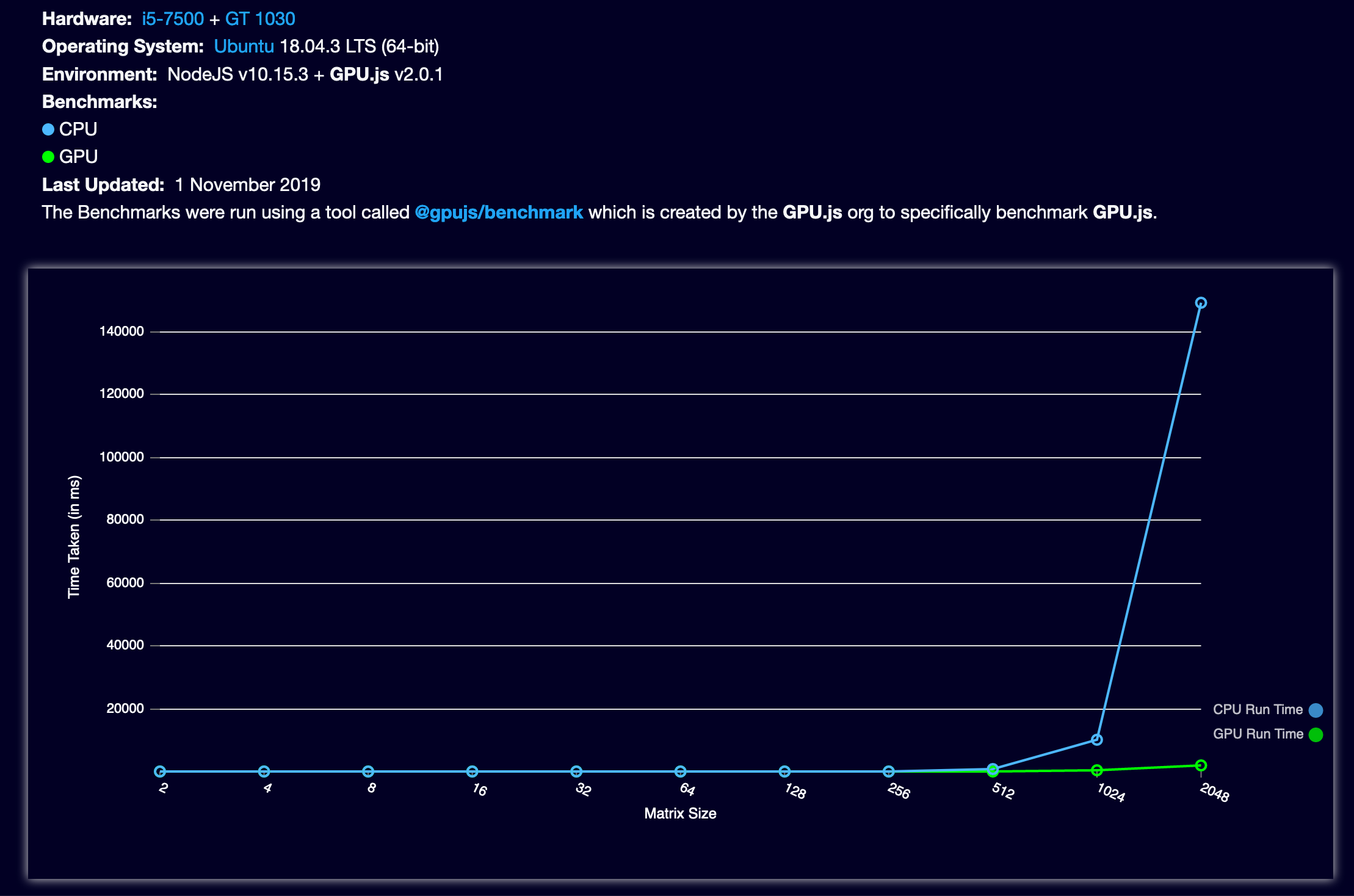
- Keep in mind the largest matrix we're training here is
NeuralNetworkXOR trains pretty fast
I'm fixing the issue with minification here.
Then, next, the Recurrent class.
robertleeplummerjr
on 31 Dec 2019
The issues with minification are now handled (https://github.com/gpujs/gpu.js/releases/tag/2.5.0, and https://github.com/BrainJS/brain.js/blob/342f055af18ff65e337bd110956fd82cd01de6ea/src/neural-network-gpu.js#L253), published https://www.npmjs.com/package/brain.js/v/2.0.0-alpha.12 this morning, with working FeedForward class, and upgraded NeuralNetworkGPU. NeuralNetworkGPU is currently slightly faster with XOR because we're writing several textures at once, where as FeedForward is using more matrix transformations, where each layer manages its own textures. We can further optimize this in the future, but for the time being I'll go ahead and get working on the Recurrent GPU implementation so that it is released, likely, next.
As far as concern of speed between NeuralNetworkGPU and FeedForward: I expect once we're using any size data that matters, rather than a 1x2 or 2x3, sized matrix, this won't be of any noticeable concern. Just keeping you guys in the loop.
robertleeplummerjr
on 19 Jan 2020
I've been slammed at work... Last week I was able to get Recurrent training, but feeding in inputs is still a bit wonky. It's first iteration will be essentially a time step, then we can work on the parts to get a real RNN up, etc.
robertleeplummerjr
on 6 Feb 2020
Ok guys, https://github.com/BrainJS/brain.js/tree/rnn-cleanup has the latest. I've adjusted the Recurrent architecture to match that the baseline RNNTimeStep, and am doing end to end tests and they mostly match up. Something isn't matching up perfectly every time, but we're super close.
robertleeplummerjr
on 9 Mar 2020
Yesterday I got the Recurrent class up and running. Just committed this morning: https://github.com/BrainJS/brain.js/commit/5e8670e059986e91eba80c3cbb5bdd11bdfb157f
robertleeplummerjr
on 11 Mar 2020
Unit tests everywhere are next.
robertleeplummerjr
on 11 Mar 2020
Hello!
When i tried your code,
i got an error, only when try use the Gpu.
The error: "
Error: Source and destination textures are the same. Use immutable = true and manually cleanup kernel output texture memory with texture.delete()"
I use, webpack and typescript, the lib was work corretcly without GPU.
Thank's for helping, i think this package is a very well job!
 ticituc
on 25 Mar 2020
ticituc
on 25 Mar 2020
GPU.js had an upgrade that introduced this recently. I'll be handling as soon as I have time next.
robertleeplummerjr
on 25 Mar 2020
Thank's the answer!
I'm looking forward to this!
:)
ticituc
on 25 Mar 2020
Hi!
Will it be possible to train LSTMTimeStep with GPU acceleration?
 kmaximur
on 17 Apr 2020
kmaximur
on 17 Apr 2020
Yes, that is what I'm working on now, but have been pretty covered up with regular work. I mostly have it fixed locally, but there seems to be a memory issue somewhere.
robertleeplummerjr
on 22 Apr 2020
I found time today to find the exact issue with LSTM. It turned out to be something super simple, as it normally does:
https://github.com/BrainJS/brain.js/pull/536/files#diff-a3003ab433fa67623d9a6392649a99e2R58
I was back-propagating into this.deltas, which is a no-no, I should have back-propagated into this.inputLayer1.deltas, and this.inputLayer2.deltas.
It's the simple things in life. PR opened, and we're going to aim for May 31st for a release candidate.
robertleeplummerjr
on 30 Apr 2020
Merged.
robertleeplummerjr
on 30 Apr 2020
Error: Source and destination textures are the same. Use immutable = true and manually cleanup kernel output texture memory with texture.delete()"
I'm also getting that. Was it meant to be fixed already? Am I missing some update?
I get the error on node 10.19, with vanilla js.
 goferito
on 10 May 2020
goferito
on 10 May 2020
@ticituc did you find a solution/workaround?
goferito
on 16 May 2020
@goferito Hy!
At this time no with gpu, i changed my mind and i create an other solution to feeding the AI.
But maybe can a solution if you not use the GPU at this time.
Are u use the leatest verstion?
ticituc
on 17 May 2020
If you guys use master, and re run npm i do you still see the same issue?
robertleeplummerjr
on 17 May 2020
I do. On my package.json: "brain.js": "^2.0.0-alpha.12",
I just deleted node_modules and then npm i again.
On the first run I get the following error:
node: symbol lookup error: .../node_modules/gl/build/Release/webgl.node: undefined symbol: _Z15XextFindDisplayP15_XExtensionInfoP9_XDisplay
I compile headless-gl to fix it (as I saw on other issues), and copy webgl.node to my node_modules. Then I get this error:
.../node_modules/gpu.js/src/backend/web-gl/kernel-value/number-texture.js:58
              throw new Error(sameError);
              ^

Error: Source and destination textures are the same.  Use immutable = true and manually cleanup kernel output texture memory with texture.delete()
    at WebGLKernelValueNumberTexture.updateValue (.../node_modules/gpu.js/src/backend/web-gl/kernel-value/number-texture.js:58:21)
I'm using Node 10.19, Ubuntu 20.04, on a Thinkpad P1.
goferito
on 17 May 2020
Ok, I changed now my package.json to "brain.js": "github:BrainJS/brain.js", and now it works. I still have to compile headless-gl, but then it works.
I guess someone should update to the last version on npm?
Edit: It works, but it is extremely slow. Orders of magnitude slower than CPU. It's unusable. I've tried with different implementations an I get always the same results.
goferito
on 17 May 2020
brain.js version 2.0.0-beta.1 has been published, hopefully it will solve this solve.
 mubaidr
on 17 May 2020
mubaidr
on 17 May 2020
Unfortunately not.
I just tried again rm -r node_modules, npm i, try it and get the first error, cp the compiled webgl.node to fix it, run again with CPU and then GPU, and CPU is still a lot faster.
goferito
on 17 May 2020
Please share code? jsfiddle?
mubaidr
on 17 May 2020
const brain = require('brain.js');

const trainingData = [
  { input: [0, 1], output: [1] },
  { input: [0, 0], output: [0] },
  { input: [1, 1], output: [0] },
  { input: [1, 0], output: [1] },
  { input: [0, 1], output: [1] },
  { input: [0, 0], output: [0] },
  { input: [1, 1], output: [0] },
  { input: [1, 0], output: [1] }
];

const net = new brain.NeuralNetwork({
//const net = new brain.NeuralNetworkGPU({
  hiddenLayers: [ 12, 8 ]
})
net.train(trainingData, {
  iterations: 50000,   // maximum training iterations
  log: true,           // console.log() progress periodically
  logPeriod: 1000,     // number of iterations between logging
})
Could you reproduce it? Or is it only slow for me?
goferito
on 19 May 2020
This issue is being tracked here: https://github.com/BrainJS/brain.js/issues/519
mubaidr
on 19 May 2020
Please keep this thread related to discussion about GPU version and release updates discussion only.
Create new thread to report any bugs related to GPU acceleration.
mubaidr
on 19 May 2020
sorry, but i don't understand. Is LSTM network able to user GPU acceleration in node on brain 2.0.0-beta.2 ?
i've read https://github.com/BrainJS/brain.js/issues/364 and https://github.com/BrainJS/brain.js/issues/363
but unfortunately there is no answer for me
 blackforest-t
on 2 Oct 2020
blackforest-t
on 2 Oct 2020
Is an LSTM nework only GPU accelerated when using the new Recurrent class? It doesn't appear from testing that recurrent.LSTM() uses gpu.js from what I could tell. I would like to test this new Recurrent class, and this jsfiddle code is my attempt, but with errors. Is it possible at this time to test Recurrent from unpkg or node with 2.0.0-beta.2? thank you.
 p40sp40r0us
on 5 Dec 2020
p40sp40r0us
on 5 Dec 2020
Related issues
 sts-ryan-holton
·
4Comments
sts-ryan-holton
·
4Comments
 shopsoy
·
3Comments
robertleeplummerjr
·
6Comments
shopsoy
·
3Comments
robertleeplummerjr
·
6Comments
 grigori-gru
·
4Comments
sts-ryan-holton
·
3Comments
grigori-gru
·
4Comments
sts-ryan-holton
·
3Comments
Most helpful comment
An alpha should come tomorrow guys, yes you heard right, an ALPHA for Brain.js v2 for the NeuralNetwork and FeedForward classes running for both GPU and CPU in NodeJS. This marks a milestone for the new Brain.js API, as it is fully running on NodeJS with uncompromised GPU support. Guys, this is huge.
Ty to everyone for not giving up on what seemed like an endless rabbit hole of requirements to pull off GPU accelerated neural networks in Javascript!
What is next? Once released, we can close this issue, start hardening the api, get 100% code coverage, finish the other layers such as those required for convolution, and finish the Recurrent class.