Brain.js: Not possible to require or import?
I switched to this maintained library from the old one. Just doing the switch, I am no longer able to use a standard const brain = require('brain.js') (I basically just changed from brain to brain.js in the require), because the module will not be exported but put on the global window variable.
Is there a reason for this? For now I just access the library using window.brain, but it would be nice to actually import/require the module to achieve a modern build process using e.g. webpack.
Any info on this and explanation why it is done this way would be nice.
//edit: I'm using brain inside the browser, I also tried brain.js/browser and it is also adding brain to window instead of exporting it.
 embiem
All 17 comments
Is this in the browser?
 robertleeplummerjr
on 28 Jul 2017
robertleeplummerjr
on 28 Jul 2017
Yes
On 28 Jul 2017 18:22, "Robert Plummer" notifications@github.com wrote:
Is this in the browser?
—
You are receiving this because you authored the thread.
Reply to this email directly, view it on GitHub
https://github.com/harthur-org/brain.js/issues/80#issuecomment-318698893,
or mute the thread
https://github.com/notifications/unsubscribe-auth/ADr_WcJ3Jd2qPUdtYKun0GuZjClimHgdks5sSgrZgaJpZM4OmzVm
.
embiem
on 28 Jul 2017
I will address this shortly, very good points being made here.
robertleeplummerjr
on 31 Jul 2017
Is the intention to go with the ES6-style
import { xxx } from brain;
?
That would be my humble recommendation, at least. This would presumably allow existing implementations of require('brain.js') that expect it to be attached to window not to break, at least for now.
To wit, are there cases in which the browser variant is called and there is _not_ an available window?
@robertleeplummerjr If you've not yet gotten around to it, I'd be interested in working on this.
 michaelsanford
on 4 Aug 2017
michaelsanford
on 4 Aug 2017
I believe this is now resolved.
@michaelsanford the library uses (at least I looked) import { xxx } from whatever;, (src/neural-network.js, for example) but does not in index.js which gets files from ./dist, which are es5.
If you'd like to use the es6 files, simply use import brain from 'brain.js/src'; or import brain from 'brain.js/src/index'; _I think_.
@robertleeplummerjr If you've not yet gotten around to it, I'd be interested in working on this.
I didn't see that till it was too late. Feel free to check the wiki, the direction, and any outstanding bugs. Committers & forks are wanted and loved.
Ty!
robertleeplummerjr
on 4 Aug 2017
Sweet! Perfect timing.
And I'm happy to hear that: I'll definitely poke around this _most intriguing_ library. 👍
michaelsanford
on 4 Aug 2017
Just wait till you see what we have planned next. Full on GPU power for web and node.
robertleeplummerjr
on 4 Aug 2017
fiy: https://github.com/harthur-org/brain.js/tree/nn-gpu
It isn't like "we plan on doing this... someday" no, it is already running. We just want to simplify it so that anyone can learn ai.
robertleeplummerjr
on 4 Aug 2017
That's awesome! Thanks for fixing and very cool to see this library still being actively developed.
embiem
on 7 Aug 2017
Thanks for helping us make it better
robertleeplummerjr
on 7 Aug 2017
Sadly does not work using the /src solution described above. It throws an import error. (Using babel and webpack). Odd regression re something as simple as module loading.
Here's what works in 1.0.0-rc.3:
require('brain.js/browser.js');
This attaches brain to window.brain.
For those who use webpack, you'll get a complaint about a pre-built javascript file.
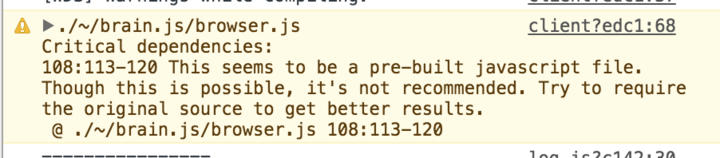
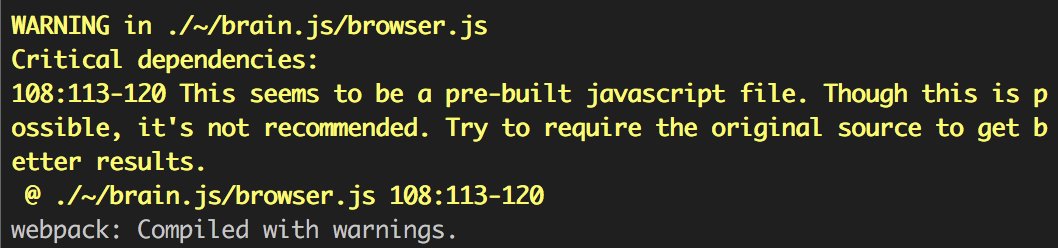
You can make the warning go away by adding noParse to your webpack config:
module: {
  noParse: [
    /node_modules\/brain.js\/browser.js/
  ],
  preLoaders: []
}
 jasonhargrove
on 19 Oct 2017
jasonhargrove
on 19 Oct 2017
To aid those searching, the error we experienced that resulted from the upgrade is TypeError: brain.NeuralNetwork is not a constructor. (Because it's not loading properly anymore.)
jasonhargrove
on 19 Oct 2017
webpack needs a node file, use: require('brain.js'); I _think_ should fix it.
robertleeplummerjr
on 19 Oct 2017
Did the above solution help at all?
robertleeplummerjr
on 26 Dec 2017
Hopefully, this is helpful if someone is reading this in the future:
For the ES6 import to work I used: import brain from 'brain.js/src/index';
 treyreynolds
on 12 Jan 2018
treyreynolds
on 12 Jan 2018
@jasonhargrove this should be resolved now, can you confirm?
robertleeplummerjr
on 18 Feb 2018
Module not found: Can't resolve 'brain.js' in react
this can solve importing brain js
import brain from 'brain.js/src/index'
 nadeeraka
on 27 Dec 2020
nadeeraka
on 27 Dec 2020
Related issues
 nezzard
·
5Comments
robertleeplummerjr
·
6Comments
nezzard
·
5Comments
robertleeplummerjr
·
6Comments
 panzad3
·
5Comments
panzad3
·
5Comments
 lynxionxs
·
5Comments
lynxionxs
·
5Comments
 akii0008
·
5Comments
akii0008
·
5Comments
Most helpful comment
I believe this is now resolved.
@michaelsanford the library uses (at least I looked)
import { xxx } from whatever;, (src/neural-network.js, for example) but does not inindex.jswhich gets files from./dist, which are es5.If you'd like to use the es6 files, simply use
import brain from 'brain.js/src';orimport brain from 'brain.js/src/index';_I think_.I didn't see that till it was too late. Feel free to check the wiki, the direction, and any outstanding bugs. Committers & forks are wanted and loved.
Ty!