Brackets: Live Preview Error - Not detecting index.html files or html files with different name
On Working with index.html

On Working with opened .html files with different name.

Console Log :
Download the React DevTools for a better development experience: http://fb.me/react-devtools
/utils/DeprecationWarning.js:90 PreferencesManager.convertPreferences() has been deprecated. Please upgrade to the current Preferences system (https://github.com/adobe/brackets/wiki/Preferences-System#conversion-from-the-pre-36-preferences-system).
    at Object.convertPreferences (/preferences/PreferencesManager.js:325:28)
    at Object.eval (/utils/Resizer.js:548:24)
    at Object.context.execCb (file:///C:/Program%20Files%20(x86)
/LiveDevelopment/MultiBrowserImpl/transports/NodeSocketTransport.js:87 NodeSocketTransport - start
My System is running on Win 7 64 Bit
With Brackets Version : Release 1.4 build 1.4.0-16380 (release 273804eb3)
 sedhuait
All 69 comments
After trying few times, it throws Max connection attempts reached
/thirdparty/react.js:4486 Download the React DevTools for a better development experience: http://fb.me/react-devtools
/utils/DeprecationWarning.js:90 PreferencesManager.convertPreferences() has been deprecated. Please upgrade to the current Preferences system (https://github.com/adobe/brackets/wiki/Preferences-System#conversion-from-the-pre-36-preferences-system).
    at Object.convertPreferences (/preferences/PreferencesManager.js:325:28)
    at Object.eval (/utils/Resizer.js:548:24)
    at Object.context.execCb (file:///C:/Program%20Files%20(x86)
/LiveDevelopment/MultiBrowserImpl/transports/NodeSocketTransport.js:87 NodeSocketTransport - start
/filesystem/FileSystem.js:896 Failed to watch root:  C:/Project/Web/ Max connection attempts reached
/project/ProjectManager.js:751 Error watching project root:  C:/Project/Web/ Max connection attempts reached
70/utils/NodeConnection.js:89 WebSocket connection to 'ws://localhost:50297/' failed: WebSocket opening handshake timed out
/project/ProjectManager.js:776 Error unwatching project root:  C:/Project/Web/ RootNotBeingWatched
Health Report :
{
    "uuid": "d2fddec3-fbf7-4201-a03c-151f25246cf0",
    "snapshotTime": 1438328283595,
    "os": "win",
    "userAgent": "Mozilla/5.0 (Windows NT 6.1; WOW64) AppleWebKit/537.36 (KHTML, like Gecko) Brackets/1.4.0.0 Chrome/39.0.2171.36 Safari/537.36",
    "osLanguage": "en-US",
    "bracketsLanguage": "en-US",
    "bracketsVersion": "1.4.0-16380",
    "fileStats": {
        "openedFileExt": {
            "html": 3,
            "css": 1
        },
        "workingSetFileExt": {
            "html": 1
        }
    },
    "projectLoadTimes": ":81:5(25)45[20]",
    "fileOpenTimes": ":139",
    "ModuleDepsResolved": 607,
    "AppStartupTime": 1418,
    "prefNodeSearchDisabled": false,
    "prefInstantSearchDisabled": false,
    "installedExtensions": [],
    "bracketsTheme": "light-theme"
}
It looks like the node process is not respnding.
If you are in win 8.1 or later try this>
Cloase brackets,
Open task manager> kill process Evented I/O for v8 JavaScript (node.exe)
Relaunch brackets.
 abose
on 31 Jul 2015
abose
on 31 Jul 2015
@abose : Sorry I'm using Win 7 Professional
sedhuait
on 31 Jul 2015
Its the same
It looks like the node process is not respnding.
If you are in win 7 try this>
Cloase brackets,
Open task manager> node.exe or brackets node.exe
Relaunch brackets.
abose
on 31 Jul 2015
@abose : Sorry Arun. There is no task in that name
sedhuait
on 31 Jul 2015
Or try
File menu> enable experimental live view.
abose
on 31 Jul 2015
@abose hey, i found something. When I checked in other machine ( which has Brackets 1.3 ) , there is node 32 process is getting started when running Brackets. But in my machine, that node 32 process is missing.
I think it is the cause for it.
sedhuait
on 31 Jul 2015
@abose and menu> enable experimental live view is enabled.
sedhuait
on 31 Jul 2015
@abose and when i tried to restart node -- > Debug Menu - Restart Node, got the following error

sedhuait
on 31 Jul 2015
also try deleting the brackets folder at %appdata%/brackets [this will reset brackets] . If that dosen't fix it, try reinstalling brackets, and restart windows, that might fix it. The reason is that brackets -node process is not present in the machine.
abose
on 31 Jul 2015
I tried this before, it works for a the first time ( few times only not all the times ) and then it fails !! Back to the same stage.
sedhuait
on 31 Jul 2015
for the time being try disabling menu> enable experimental live view
Will need to see why this happens.
abose
on 31 Jul 2015
Sorry @abose : that didnt help. when "experimental live view " is disabled, it opens a new chrome window then it stops.

and brackets says :

Console Log :

sedhuait
on 31 Jul 2015
open debug>preferences> and add "findInFiles.nodeSearch": false,
restart the system.
abose
on 1 Aug 2015
@abose : its doesn't help.
sedhuait
on 3 Aug 2015
All the error shown in the console seems to be brackets not able to contact with chrome remote debugging port. Our old live dev workflow required chrome with RDP. But the new experimental live view should not have the problem.
file> Enable Experimental live view->make sure that the option is ticked, restart the machine, and if there is an error in the dev console, please paste it here.
abose
on 3 Aug 2015
@abose As he already stated above, he had "Experimental Live Preview" enabled before, and it didn't work either.
Also, as he found at that Node is not running, that's the cause - not something wrong with Chrome's RDP or similar.
 MarcelGerber
on 3 Aug 2015
MarcelGerber
on 3 Aug 2015
@abose : No error in the console and also live preview is not working as well. Please find the logs below.
Download the React DevTools for a better development experience: http://fb.me/react-devtools
/utils/DeprecationWarning.js:90 PreferencesManager.convertPreferences() has been deprecated. Please upgrade to the current Preferences system (https://github.com/adobe/brackets/wiki/Preferences-System#conversion-from-the-pre-36-preferences-system).
    at Object.convertPreferences (/preferences/PreferencesManager.js:325:28)
    at Object.eval (/utils/Resizer.js:548:24)
    at Object.context.execCb (file:///C:/Program%20Files%20(x86)
/LiveDevelopment/MultiBrowserImpl/transports/NodeSocketTransport.js:87 NodeSocketTransport - start


Error watching project root:  C:/xxxxx/yyyyyyy/ Max connection attempts reached
@sedhuait Do you have Teamviewer so I can take a look at the files Brackets is using? Teamviewer is free software that lets you or someone else remotely connect to your computer or another computer. Sometimes people (like me) need to physically see what's happening in order to further help with the issue. I would like to see it, since you and @abose have already gone over lots of console logs, screenshots, and etc.
 HanSolo0001
on 6 Aug 2015
HanSolo0001
on 6 Aug 2015
@HanSolo0001 :Yes I have. When are you available? It can be today (6 hrs left) or Monday.
sedhuait
on 7 Aug 2015
Hey @sedhuraja are you available this Sunday say about 8:00pm EST?
On Friday, August 7, 2015, sedhuraja [email protected] wrote:
@HanSolo0001 https://github.com/HanSolo0001 :Yes I have. When are you
available? It can be today (6 hrs left) or Monday.—
Reply to this email directly or view it on GitHub
https://github.com/adobe/brackets/issues/11519#issuecomment-128607348.
Thanks,
Daniel
HanSolo0001
on 8 Aug 2015
@HanSolo0001 : Hey this issue happens only in my work system. So I can give you access only during my office hours. 11AM - 7PM IST.
sedhuait
on 11 Aug 2015
Hey if it's only in your work system, then it could be your work's Internet
blocking it through their firewall. Have you tried getting in touch with
your IT guys there first?
On Tue, Aug 11, 2015 at 1:37 AM, sedhuraja [email protected] wrote:
@HanSolo0001 https://github.com/HanSolo0001 : Hey this issue happens
only in my work system. So I can give you access only during my office
hours. 11AM - 7PM IST.—
Reply to this email directly or view it on GitHub
https://github.com/adobe/brackets/issues/11519#issuecomment-129711228.
Thanks,
Daniel
HanSolo0001
on 11 Aug 2015
@HanSolo0001 : But it works in my colleague's machine. How about Team viewer access now ?
sedhuait
on 11 Aug 2015
That's interesting. Well sorry I missed you. Let me see if I can get some
screenshot's of my Brackets and send it to you, and if you have all the
files then we'll go from there and try to set up a date and all for
Teamviewer. I'm off work tomorrow (8/12/15 Wednesday). I'm in the Eastern
Standard Time zone (EST).
On Tue, Aug 11, 2015 at 3:56 AM, sedhuraja [email protected] wrote:
@HanSolo0001 https://github.com/HanSolo0001 : But it works in my
colleague's machine. How about Team viewer access now ?—
Reply to this email directly or view it on GitHub
https://github.com/adobe/brackets/issues/11519#issuecomment-129748464.
Thanks,
Daniel
HanSolo0001
on 12 Aug 2015
Ok was going to get some screenshots, but there would be way too many. So
let's just try and set up a time and date where we can Teamviewer, and
hopefully I might be able to help you out.
On Tue, Aug 11, 2015 at 11:07 PM, Daniel Hildreth [email protected]
wrote:
That's interesting. Well sorry I missed you. Let me see if I can get some
screenshot's of my Brackets and send it to you, and if you have all the
files then we'll go from there and try to set up a date and all for
Teamviewer. I'm off work tomorrow (8/12/15 Wednesday). I'm in the Eastern
Standard Time zone (EST).On Tue, Aug 11, 2015 at 3:56 AM, sedhuraja [email protected]
wrote:@HanSolo0001 https://github.com/HanSolo0001 : But it works in my
colleague's machine. How about Team viewer access now ?—
Reply to this email directly or view it on GitHub
https://github.com/adobe/brackets/issues/11519#issuecomment-129748464.
Thanks,
Daniel
Thanks,
Daniel
HanSolo0001
on 12 Aug 2015
@HanSolo0001 : hey how some time on Thursday then? Some time in the early morning of your time (ET). So like 7:00 AM - 9:30 AM ET.
sedhuait
on 12 Aug 2015
That unfortunately won't work for me. Would next Tuesday (8/18/2015) or
Wednesday (8/19/2015) work say around 11am EST?
On Wed, Aug 12, 2015 at 1:06 AM, sedhuraja [email protected] wrote:
@HanSolo0001 https://github.com/HanSolo0001 : hey how some time on
Thursday then? Some time in the early morning of your time (ET). So like
7:00 AM - 9:30 AM ET.—
Reply to this email directly or view it on GitHub
https://github.com/adobe/brackets/issues/11519#issuecomment-130167192.
Thanks,
Daniel
HanSolo0001
on 12 Aug 2015
I just connected to @sedhuait's PC to dive into this issue.
So...:
- The node process is running (it shows up in the task manager and
brackets.app.getNodeState()doesn't return an error) localhostis correctly mapped to127.0.0.1(and::1)- StaticServer's NodeDomain cannot connect to Node (its
_domainLoadedis alwaysfalse) - The only extension installed is Beautify, which does not interfere with Node at all
MarcelGerber
on 13 Aug 2015
So I did some digging with the Node Domain stuff and found this actually on
GitHub. Maybe it'll help? It also has some debugging issues down at the
bottom of the page.
https://github.com/adobe/brackets/wiki/Brackets-Node-Process:-Overview-for-Developers
On Thu, Aug 13, 2015 at 6:39 AM, Marcel Gerber [email protected]
wrote:
I just connected to @sedhuait https://github.com/sedhuait's PC to dive
into this issue.
So...:
- The node process is running (it shows up in the task manager and
brackets.app.getNodeState() doesn't return an error)- localhost is correctly mapped to 127.0.0.1 (and ::1)
- StaticServer's NodeDomain cannot connect to Node (its _domainLoaded
is always false)—
Reply to this email directly or view it on GitHub
https://github.com/adobe/brackets/issues/11519#issuecomment-130608645.
Thanks,
Daniel
HanSolo0001
on 14 Aug 2015
I have the same problem. I have the experimental mode enabled and Chrome isn't installed...
Node doesn't run when Brackets is closed, but it does when it's open. :/
Using Brackets 1.4 on Windows 10 Home 64-bit.
 TheInitializer
on 25 Aug 2015
TheInitializer
on 25 Aug 2015
I clicked "Enable Node Debugger" and "Log Node State to Console" and it works now... Odd. :/
TheInitializer
on 25 Aug 2015
After restarting Brackets it stopped working. I clicked those two buttons again and it still doesn't work
TheInitializer
on 25 Aug 2015
I figured out the problem. I'd marked the html files as Django files because I'd worked with Django before and it was more convenient then. Sorry for the trouble.
@sedhuait do you have your html files marked as anything other than html?
TheInitializer
on 25 Aug 2015
@TheInitializer I have .jsp files. Please check the screenshot attached above.
sedhuait
on 2 Sep 2015
@sedhuait they seem to be marked as html, so you _should_ be fine...
however it seems that you aren't. hm
TheInitializer
on 17 Sep 2015
i had same issue... but got fixed... i had changed file type to svg instead of html in lower right corner of the window... then same error was coming... i struggled for 5-6 hours... reinstalled both chrome and brackets several times... :D but then i tried setting that file type to "html" in lower right corner and it worke.... :D
 theprash007
on 28 Nov 2015
theprash007
on 28 Nov 2015
@sedhuait Did you find out what was wrong? I am having the exact same issue and cannot figure it out. I am new to all of this. Thank you.
 SDeamer
on 30 Dec 2015
SDeamer
on 30 Dec 2015

theprash007
on 30 Dec 2015
I was having this constant problem with 1.5. I updated to 1.6 and it was still giving me the same error. The below steps worked for me:
- Delete Brackets.app folder in Applications
- Installed Brackets 1.6 again in Applications folder
- Opened .HTML file with Brackets 1.6
- I did not have "Enable Experimental Live Preview" checked. (File > Enable Experimental Live Preview)
After I did this, it worked. Hope this helps.
(Using El Capitan 10.11.2)
 laurencaponong
on 30 Jan 2016
laurencaponong
on 30 Jan 2016
@TheInitializer @SDeamer @sedhuait
I actually made a github account just to answer this question,
I've been experiencing the same problem, I reinstalled Brackets, deleted folders and closed node in the task manager etc. What did the job for me eventually, was making a new folder on my desktop: file (top left corner) > open folder > desktop > right mouseclick> new > folder. Then I changed my html name to "index.html" and it did the job. I restarded Brackets a few times during the progress since sometimes changes don't work unless you restart your program.
I hope this comment (and account xd) helped anyone out.
 martijntjuhhh
on 1 Feb 2016
martijntjuhhh
on 1 Feb 2016
@martijntjuhhh This worked for me! Thanks!
 zmasinelli
on 22 Apr 2016
zmasinelli
on 22 Apr 2016
@zsmasinelli You're welcome!
martijntjuhhh
on 28 Apr 2016
@TheInitializer @SDeamer : I haven't figured it out. It works after a system restart or app restart.
I think Node Evented IO for Javascript is causing it.
sedhuait
on 29 Apr 2016
@TheInitializer : It even happens with very basic app with one index.html n main.js project.
sedhuait
on 29 Apr 2016
interesting...
TheInitializer
on 29 Apr 2016
@sedhuait @HanSolo0001 ...
I had seen few comments mentioning to create a folder in bottom right.... or folder deletion and re-installing...
Now I got the issue after updating the app. Even I have issues with extensions...
I think the issue is with new update. Sorry for mentioning.
Below screenshot of "failed live preview".

Below screenshot.. "Not able update an extension (even nt able 2 remove)"

_Extensionn Name_ [Extension highlighter]
System : Win 10 (latest update!)
 Yeswanth-JG
on 23 Nov 2016
Yeswanth-JG
on 23 Nov 2016
- Using Version 1.9 Edition 1.9.0-17312
- Windows 8.1
Hi,
As this issue
Not detecting index.html files or html files with different name
might happen when I was opening Brackets first and then my folder fromopen folder >, etc., I just tried to reverse the process, i.e : first using the right mouseclick on my folder - wich is on a USB flash drive - to open it with Brackets and then activating "the Enable Experimental Live Preview".
And it worked...
 Interned
on 26 Apr 2017
Interned
on 26 Apr 2017
I fixed by opening the folder containing the whole project instead of individual files in Brackets. When you have all the folder files loaded within brackets the live preview works.
 tintinve
on 13 Sep 2017
tintinve
on 13 Sep 2017
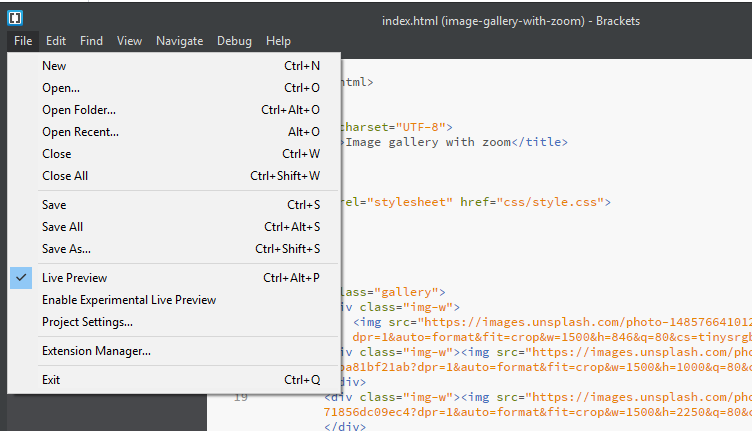
I am facing the same problem in Brackets 1.11. I found the solution for live preview.
First, disable the enableExpermintalPreview then select your index file and enable the Live Preview.
See below screenshot
 arpit999
on 23 Oct 2017
arpit999
on 23 Oct 2017
I was having this same issue but one thing I did notice that I was working in the Getting Started folder event though I was saving to a different one. It wasn't until I read "martijntjuhhh commented on Feb 1, 2016"
They mentioned opening file>open folder> click on New Folder and giving it a name. Then save your index.html there. It should open now in experimental preview
 uniqorn2009
on 3 Nov 2017
uniqorn2009
on 3 Nov 2017
uniqorn2009: Perfect, that helped!
Although my index.html was selected in brackets, the selected folder seemed to be my "css" folder. Choosing "open folder", selecting the root folder, then selecting the index.html again, did the trick. Now the experimental live preview seem to work :)
 baerus
on 4 Feb 2018
baerus
on 4 Feb 2018
Im in linux parrot sec as a root user
Brackets does'nt even launch ,
Tried removing noroot from brackets.profile still not launching
Need help thank you
 marakmuna
on 1 Apr 2018
marakmuna
on 1 Apr 2018
I know it's an old post,
but I installed Brackets IDE now for the third time and always the same problem.
Reading how many people face the same issue and the fact that it is still not being solved till today, late 2018, tells me to steer clear of this IDE. It's most annoying to always uninstall your IDE and reinstall - only to get another few days out of and then do all again. Waste of time.
Tried it, done it, done _With_ it.
 renegaders
on 18 Sep 2018
renegaders
on 18 Sep 2018
I am facing the same problem in Brackets 1.11. I found the solution for live preview.
First, disable the enableExpermintalPreview then select your index file and enable the Live Preview.See below screenshot
Tried that, and many other things in the latest version 1.13 and it always failed. A few times I though I figured it out until, after a few days later, same problem popped up again. Then it was something else, Next time something else again. It's like chasing the geese.
renegaders
on 18 Sep 2018
Im in linux parrot sec as a root user
Brackets does'nt even launch ,
Tried removing noroot from brackets.profile still not launching
Need help thank you
That's another reason why I totally quit on Brackets. There is no assistance available at all. You ask for help when, April? It's mid September now. If you don't wanna wait another 2 years, I suggest you get yourself an IDE that works, for a start, and should you run into problems, least you get help. I don't know about the others, but I don't have time waiting for eternity to find a solution. :)
renegaders
on 18 Sep 2018
Just go to File Menu, Open Folder and then select the .html file and preview it.
 altiseven
on 15 Oct 2018
altiseven
on 15 Oct 2018
I solved this issue just by running Brackets as Administrator... (with the experimental preview enabled)
Right click on Brackets icon -> Run as Administrator -> Yes
Sorted out
 javist94
on 18 Nov 2018
javist94
on 18 Nov 2018
I had the same problem. However, I realized that the error happened soon after installing extensions, for some reason the extensions generated this error. Then I removed the last extensions installed before the problem and everything was solved. ---> And do not forget to restart your Brackets Editor after removing the extensions.
 renatoschroepfer
on 6 Feb 2019
renatoschroepfer
on 6 Feb 2019
I had this issue, when enabling "Experimental Live Preview".
I solved it by spamming Debug->Restart Node, Debug->Enable Node Debugger, and Debug->Log Node State to Console.
After that, pressing "Live Preview" would do nothing.
Then, after restarting Brackets, the issue was solved.
 theol0403
on 10 Jun 2019
theol0403
on 10 Jun 2019
Thanks theol0403, .... followed your steps and it solve my problem too.
"I had this issue, when enabling "Experimental Live Preview".I solved it by spamming Debug->Restart Node, Debug->Enable Node Debugger, and Debug->Log Node State to Console.After that, pressing "Live Preview" would do nothing.Then, after restarting Brackets, the issue was solved."
 mjkode
on 18 Oct 2019
mjkode
on 18 Oct 2019
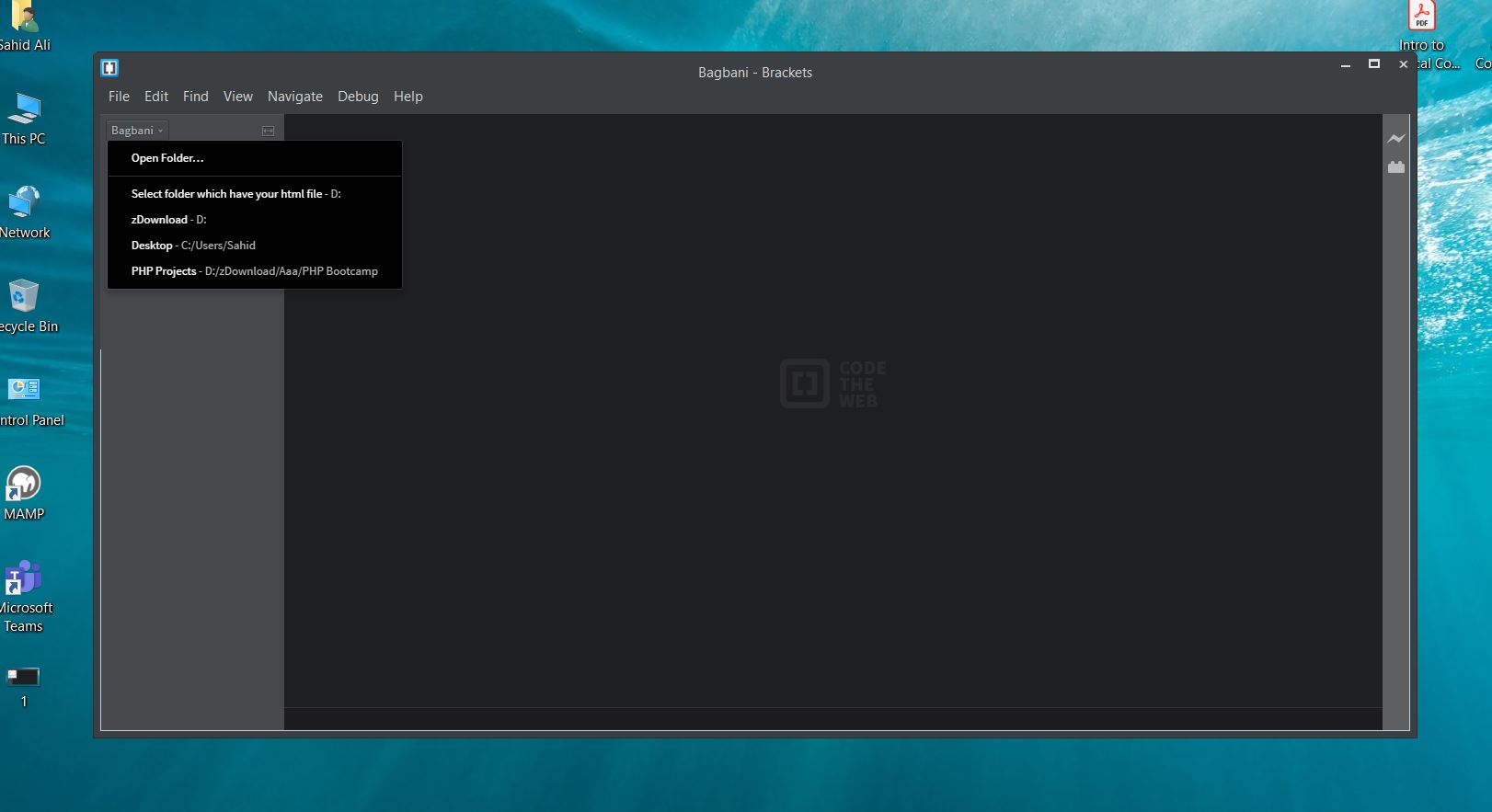
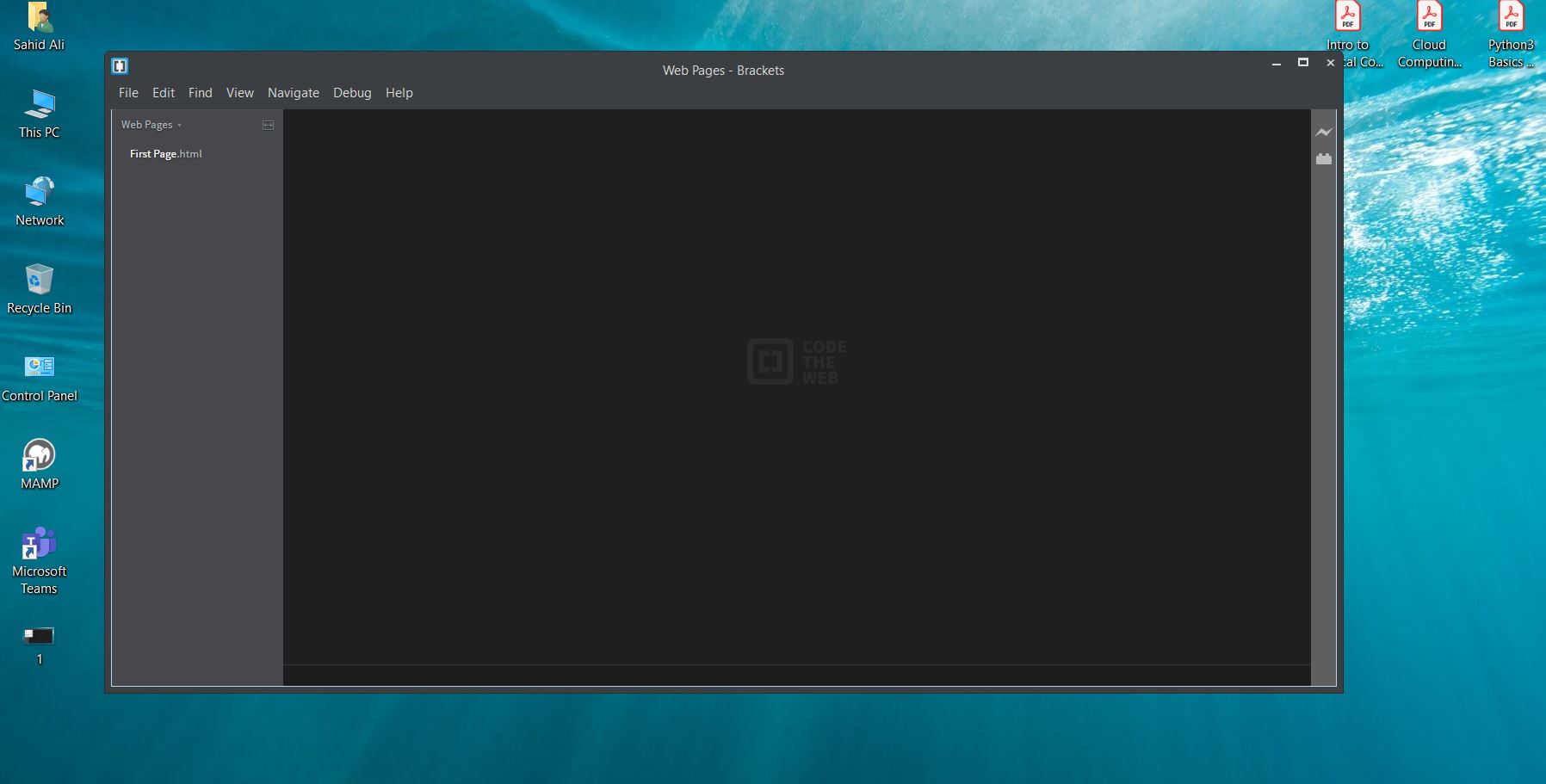
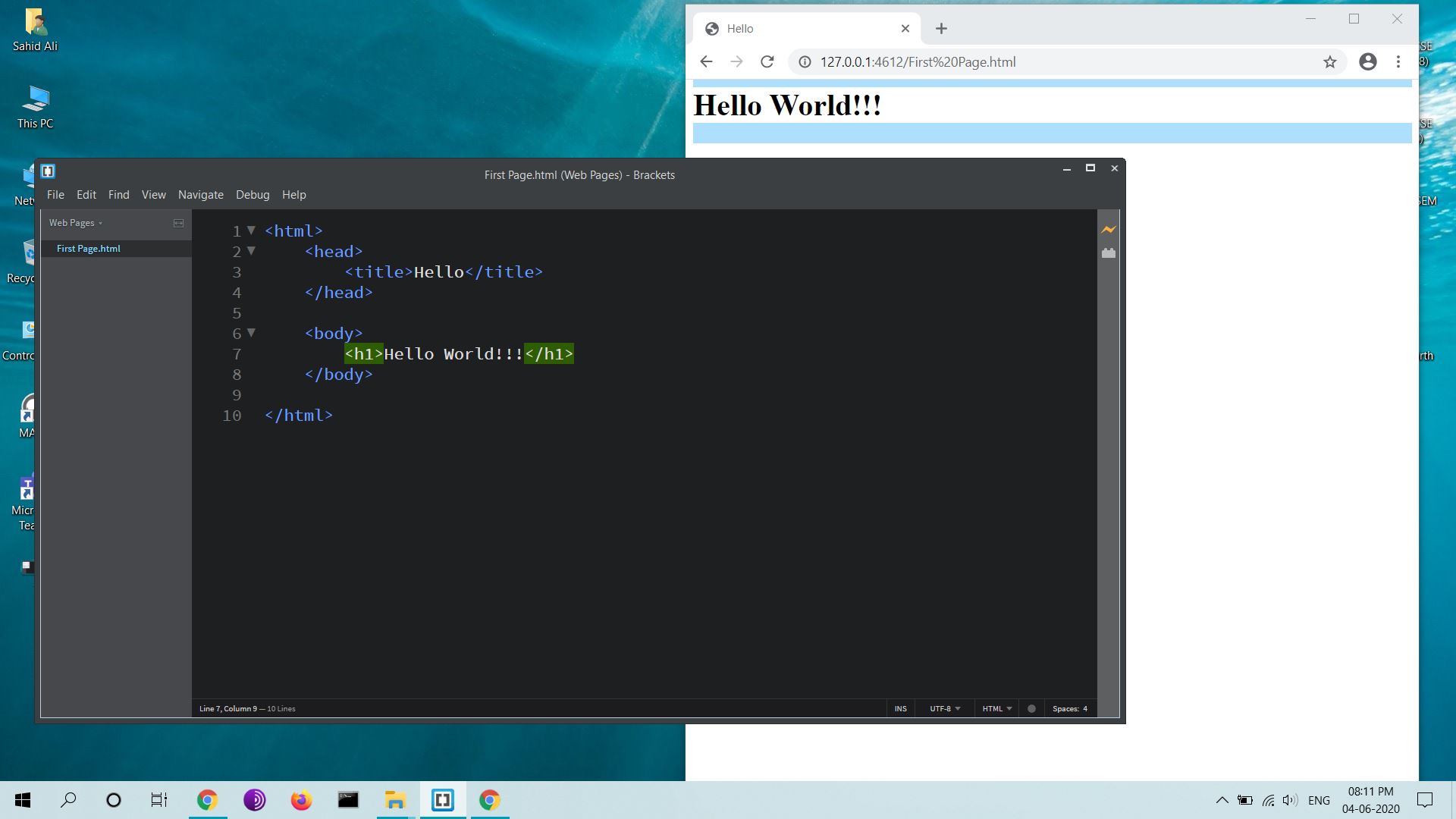
For everyone, this problem can be resolved by following steps:-
On menu bar, go to File --> Open Folder (folder which have your html file for live preview)
Select Folder
Select your html file from left side bar for live preview
Click on bolt icon on right (preview button)
All it melts down to the fact, that you need that folder(which have your file) selected to view your output in live preview.
Let me know, if it helps someone. :)

 blind0x
on 4 Jun 2020
blind0x
on 4 Jun 2020
All it melts down to the fact, that you need that folder(which have your
file) selected to view your output in live preview.
That's what I Always have. It might be "required" in Brackets but really,
it's kinda common sense, Tahid. ;-)
Maybe Brackets has some human trails built in and is moody, doesn't like
certain people, me included, lol.
All it melts down to the fact, that you need that folder(which have your
file) selected to view your output in live preview.
On Fri, 5 Jun 2020 at 00:57, Sahid Ali notifications@github.com wrote:
For everyone, this problem can be resolved by following steps:-
1.
On menu bar, go to File --> Open Folder (folder which have your html
file for live preview)
2.Select Folder
3.Select your html file from left side bar for live preview
4.Click on bolt icon on right (preview button)
All it melts down to the fact, that you need that folder(which have your
file) selected to view your output in live preview.
Let me know, if it helps someone. :)
[image: 2]
https://user-images.githubusercontent.com/16700931/83773066-b4b61a00-a6a1-11ea-8207-2483d9852f62.JPG
[image: 3]
https://user-images.githubusercontent.com/16700931/83773071-b67fdd80-a6a1-11ea-991b-d9d3094d39a5.JPG
[image: 4]
https://user-images.githubusercontent.com/16700931/83773074-b67fdd80-a6a1-11ea-9971-a0b692ed6b98.JPG
[image: 5]
https://user-images.githubusercontent.com/16700931/83773076-b7187400-a6a1-11ea-8fac-269a65ca9d92.JPG—
You are receiving this because you commented.
Reply to this email directly, view it on GitHub
https://github.com/adobe/brackets/issues/11519#issuecomment-638904526,
or unsubscribe
https://github.com/notifications/unsubscribe-auth/AGBFU3CCNJLUAZUZKR5OCXTRU6Y6BANCNFSM4BMNEQGQ
.
renegaders
on 7 Jun 2020
Sahid, sorry.
On Sun, 7 Jun 2020 at 08:43, Pinocchio olowol@gmail.com wrote:
All it melts down to the fact, that you need that folder(which have your
file) selected to view your output in live preview.
That's what I Always have. It might be "required" in Brackets but really,
it's kinda common sense, Tahid. ;-)
Maybe Brackets has some human trails built in and is moody, doesn't like
certain people, me included, lol.
All it melts down to the fact, that you need that folder(which have your
file) selected to view your output in live preview.On Fri, 5 Jun 2020 at 00:57, Sahid Ali notifications@github.com wrote:
For everyone, this problem can be resolved by following steps:-
1.
On menu bar, go to File --> Open Folder (folder which have your html
file for live preview)
2.Select Folder
3.Select your html file from left side bar for live preview
4.Click on bolt icon on right (preview button)
All it melts down to the fact, that you need that folder(which have your
file) selected to view your output in live preview.
Let me know, if it helps someone. :)
[image: 2]
https://user-images.githubusercontent.com/16700931/83773066-b4b61a00-a6a1-11ea-8207-2483d9852f62.JPG
[image: 3]
https://user-images.githubusercontent.com/16700931/83773071-b67fdd80-a6a1-11ea-991b-d9d3094d39a5.JPG
[image: 4]
https://user-images.githubusercontent.com/16700931/83773074-b67fdd80-a6a1-11ea-9971-a0b692ed6b98.JPG
[image: 5]
https://user-images.githubusercontent.com/16700931/83773076-b7187400-a6a1-11ea-8fac-269a65ca9d92.JPG—
You are receiving this because you commented.
Reply to this email directly, view it on GitHub
https://github.com/adobe/brackets/issues/11519#issuecomment-638904526,
or unsubscribe
https://github.com/notifications/unsubscribe-auth/AGBFU3CCNJLUAZUZKR5OCXTRU6Y6BANCNFSM4BMNEQGQ
.
renegaders
on 7 Jun 2020
Brackets have a lot of issues, I have just started using it and have seen a lot of them myself. But hey, we are all developers here, solving these problems is our work. And bro @renegaders sometimes, common sense is not so common, so chill n help your fellows .
blind0x
on 7 Jun 2020
If you have the live preview error, just check your project settings. And if you have a localhost to display your project, just set it back to default which is blank or remove anything you have in that url box. I had 127.0.0.1 for localhost and deleted it; it worked fine. Make sure you copy whatever you have in the box in case you have it for specific purposes. Also, if it does not work uninstall and re-install brackets that will also work.
 calvodioni
on 5 Jul 2020
calvodioni
on 5 Jul 2020
Brackets is one of the most easiest and stable editor to edit projects
calvodioni
on 5 Jul 2020
For live previwe error just open your defaultpreferneces.json file and find line 268, Just remove the word "false" and change it to true that will solve the problem with live view "livedev.multibrowser": true,
calvodioni
on 8 Jul 2020
Related issues
 theman1616
·
4Comments
theman1616
·
4Comments
 declanmarks
·
3Comments
declanmarks
·
3Comments
 mrapino
·
3Comments
mrapino
·
3Comments
 armandbancila
·
4Comments
armandbancila
·
4Comments
 Codigo-G
·
4Comments
Codigo-G
·
4Comments
Most helpful comment
@abose and menu> enable experimental live view is enabled.