Prerequisites
- [ ] Can you reproduce the problem with
Debug -> Reload Without Extensions? - [ ] Did you perform a cursory search to see if your bug or enhancement is already reported?
- [ ] Did you read the Troubleshooting guide?
For more information on how to write a good bug report read here
For more information on how to contribute read here
Description
[Description of the bug or feature]
Steps to Reproduce
- [First Step]
- [Second Step]
- [and so on...]
Expected behavior: [What you expected to happen]
Actual behavior: [What actually happened]
Versions
Please include the OS and what version of the OS you're running.
Please include the version of Brackets. You can find it under Help -> About Brackets (Windows and Linux) or Brackets -> About Brackets (macOS)
 pakaymc
All 17 comments
When I open Brackets I'm receiving an error saying I need to install php7 runtime. How do I install php runtime?
pakaymc
on 10 May 2019
You need PHP7 runtime only if you work with PHP files and want to enable PHP specific features.
Go through this: https://github.com/adobe/brackets/issues/14783 or PHP Support in Brackets to understand how to setup PHP in Brackets.
 shubhsnov
on 10 May 2019
shubhsnov
on 10 May 2019
you need to download PHP runtime from net. Wait, I have a video on that. Just go to youtube and type PHP runtime error . click on the the video from the creator askvaibhav. it's very accurate and i fixed that error while watching that video.
 Vaibhav227
on 12 Jun 2019
Vaibhav227
on 12 Jun 2019
I do not have PHP installed on my PC. I'm using a third party server to run my files.
pakaymc
on 20 Jun 2019
If it's not showing any error it's ok..else download php runtime and then follow the steps followed in this video. This video also shows how to download php runtime.
https://youtu.be/P30t9gK4ZKQ
Vaibhav227
on 20 Jun 2019
You need PHP only if you want PHP related tooling features.
Go toDebug -> Open Preferences File
In brackets.json, add entry
"php": {
    "enablePhpTooling": false
}
This should disable the warning, if you don't want PHP related tooling features.
shubhsnov
on 20 Jun 2019
If it's not showing any error it's ok..else download php runtime and then follow the steps followed in this video. This video also shows how to download php runtime.
https://youtu.be/P30t9gK4ZKQ
Vaibhav227
on 20 Jun 2019
shubhsnov, when I addyour code I'm receiving a new error, "Your preference file is not valid JASON"
"php": {
"enablePhpTooling": false
}
pakaymc
on 20 Jun 2019
pakaymc why not you try what i am saying.
See this and do the same ( follow the steps)
https://youtu.be/P30t9gK4ZKQ
Vaibhav227
on 20 Jun 2019
Vaibhav227 This did not work.
pakaymc
on 20 Jun 2019
shubhsnov This code did work. I needed to add a comma after the }
Thank you for the help.
pakaymc
on 20 Jun 2019
pakaymc you didn't followed the steps properly.
You missed something i think.
Vaibhav227
on 20 Jun 2019
I addyour code I'm receiving a new error, "Your pr
Same problem here, tried different approaches but same error all the time. I do not want PHP features, so do not want to install PHP. The error message still there...
 joxerg
on 13 Jul 2019
joxerg
on 13 Jul 2019
@sorburu Make sure the JSON is valid.
Use a JSON validator like this one https://jsonlint.com/
for example if your JSON currently ends somethings like this
    "key1" : {
         "subkey" : "value1"
    },
    "key2" : "value2"
}
then it will become
    "key1" : {
         "subkey" : "value1"
     },
    "key2" : "value2", //add comma
    "php": {
        "enablePhpTooling": false //this will disable php features
     } //add just befofe last brace
}
Try this method
https://www.youtube.com/watch?v=HoIkCeuBUng&t=1s
Steps:
- Copy the php path from your computer (ex: - C:wampbinphpphp7.3.5)
- Go to start menu and type “Advanced System Settings and press enter”
- Click on “Environment Variables”
- Select “path” inside the system variables and click “edit”
- Click on “new”
- Paste the path which you copied earlier and click on ok.
- Done
 madurasnvrtn
on 29 Jul 2019
madurasnvrtn
on 29 Jul 2019
pakaymc why not you try what i am saying.
See this and do the same ( follow the steps)
https://youtu.be/P30t9gK4ZKQ
This answer works! Thank you!!!
 kayoinc
on 15 Nov 2019
kayoinc
on 15 Nov 2019
So, you found this page because you keep getting the PHP7 Runtime Error or You are now getting an Encountered Runtime Error Code 1 when running the PHP Process.
Well, after hours of work on this, finally I figured out the issue.
For me, I kept trying to use the wrong Versions, The latest PHP version does not work with Release 1.14 of Brackets.
The one I did get to work was version 7.3.15 (Non Thread Safe) x64 Version.
Here is a Download Link from the PHP site:
https://windows.php.net/downloads/releases/php-7.3.15-nts-Win32-VC15-x64.zip
PHP Downloads Page (If you want to try something else):
https://windows.php.net/download
- Extract the Files where ever you want (Keep the folder open, you will need that path)
PUTTING THE LOCATION in YOUR Systems PATH ENVIRONMENT VARIABLE IS ABSOLUTELY UNNECESSARY (Referring to all the help videos out there)
The ONLY reason you may need to do that is so many application can find it and you can just run it from anywhere without knowing the absolute path, and if you did need it there, you would have it there already!
So the RIGHT way to do this:
Is to either follow the directions from the Wiki Here:
https://github.com/adobe/brackets/wiki/PHP-Support-in-Brackets
BUT they can be a bit confusing and has more to it than there needs to be, since you can not have comments in the json.
So here is a quick rundown:
- Open the Preferences in Brackets (Debug -> Open Preferences File)
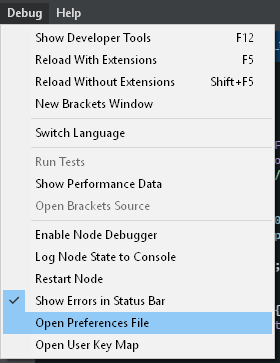
- Go to brackets.json ( I am going to do a step by step in case someone is not familiar with json, but I hope anyone that is using brackets is probably a developer anyway, but either way)
- Before the last "
}" add a comma (,) after the last entry 
- Then add this code below that comma:
"php": {
"executablePath": "C:\\path\\to\\php.exe"
} - Make sure you use double backslashed.
- So my location to my php.exe is here: E:\Servers\php-7.3.15-nts-Win32-VC15-x64\php.exe
- So mine looks like this:
"php": {
"executablePath": "E:\\Servers\\php-7.3.15-nts-Win32-VC15-x64\\php.exe"
} - Here is what it should look sort of like:
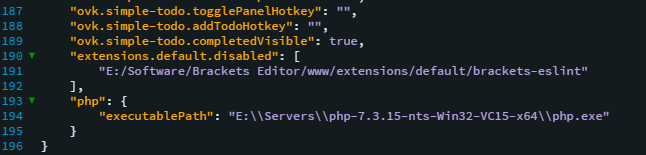
- Save the file
- Restart Brackets
- You should now have it working and also have code completion working.
I hope this helps someone that could not figure out why they can not get it working. For me, I was doing everything right, I was just using the wrong PHP Version, As of this writing, the latest PHP Version is 7.4.3 which does not work.
I was able to get the next Version Down working 7.3.15.
Note: I have not tried to use any other 7.3.15 Version except the Non Thread Safe x64, since it work, I left it, you can test the other versions if you want. It will not hurt anything.
Brackets has a Developer Console Just like Chrome/Firefox, that show output log info if there are errors it is easy to get to, just click the Errors, But you can also Press F12 or Go to ( Debug -> Show Developer Tools )


It will pop up the Developer Tools and you can click on Console to the the log output. It will help to know if you have an issue with the PHP.
If it is working, it should look something like this:


HAVE FUN AND HAPPY CODING!
~ Smugger | STAG
 Smugger21
on 28 Feb 2020
Smugger21
on 28 Feb 2020
Related issues
 zaggino
·
4Comments
zaggino
·
4Comments
 brendonmm
·
4Comments
brendonmm
·
4Comments
 ghost
·
3Comments
ghost
·
3Comments
 mrapino
·
3Comments
mrapino
·
3Comments
 naphipps
·
4Comments
naphipps
·
4Comments