Brackets: "PHP7 runtime not found. " Error Dialog
-Windows 7 / windows 10 (64 bit versions.)
-Using Wamp or Mamp environment in cooperation with Brackets.
-The issue started after accepting the 1.14 update yesterday. It occurs on several
laptops running different windows versions 64 bit.
After accepting the auto update of brackets 1.14 ,brackets started sucking a lot.
-symtoms:
An error pop up comes up after starting brackets.
"PHP runtime not found. Install the PHP 7 runtime and update "executablePath" in PHP preferences appropriatly.....blah blah... "
What I tried:
-modifiying defaultpreferences.json, preferences.json
-changing extension_dir ="c:/wamp/bin/php/php7.2.14/.php.exe" or
to: extension_dir ="c:wampbinphpphp7.2.14php.exe"
-renaming all config files in "C:UsersuserAppDataRoamingBrackets....."
and remove and reinstall brackets completely (purge similar like)
-adding a environment variable for PHP in windows as some forums suggested...
-and offcourse: clicking the "open preferences" button in the error pop up as suggested in brackets 1.14....
It still sucks.
I was not happy since I am working on a exam in a student project.
I realise I can use it for free, but please test out your stuff, before suggesting auto updates.
How can I stop this annoying error? I put 2 hours of time in it. The other students here like to learn to. Thanks in advance.
D.

 leeuwtjex
All 14 comments
In Brackets the preferences are set in brackets.json not defaultPreferences.json. The defaultPreferences.json file is not recognized. It's there just to guide the user about different preferences available.
- Go to
Debug > Open Preferences File
Assuming "C:\\wamp\\bin\\php\\php7.2.14\\php.exe" is a valid php path, paste the following in brackets.json. It should stop showing the error.
"php": {
        "enablePhpTooling": true,
    "executablePath": "C:\\wamp\\bin\\php\\php7.2.14\\php.exe",
    "memoryLimit": "4095M",
    "validateOnType": "false"
}
Note: Also make sure brackets.json _doesn't_ have any comments, since comments in JSONs are not allowed.
 shubhsnov
on 7 May 2019
shubhsnov
on 7 May 2019
Hi Shubhsnov,
Thanks for the quick answer! I tried to follow your instructions.
The result in my brackets.json lookes like this:
{
"brackets-eslint.gutterMarks": true,
"brackets-eslint.useLocalESLint": false,
"fonts.fontSize": "16px",
"fonts.fontFamily": "'SourceCodePro-Medium', MS ゴシック, 'MS Gothic', monospace"
}
"php": {
"enablePhpTooling": true,
"executablePath": "C:\wamp\bin\php\php7.2.14\php.exe",
"memoryLimit": "4095M",
"validateOnType": "false"
}
I pasted your mods behind the default content in the file.
After restarting brackets it gives a "not valid JSON' now....
As far I can see I there are not any comments in the file, as you mentioned.
For experimenting I tried also: c:wampbinphpphp7.2.14php.exe
and removing the ""php": " part.
Didn't work either. What are those \ double slashes for?
leeuwtjex
on 7 May 2019
Ah! That's not how JSONs work.
A valid JSON will always have the form:
{
"key" : value
}
Where key will always be a string and value can be any primitive value like number, string, another valid JSON object, or array of valid JSON values or objects.
Multiple keys are separated by comma:
```javascript
{
"key1" : value,
"key2" : value2,
"key3" : value3
}
In your case you have to add the modification inside the` {}` for it to be a valid json, like this:
```json
{
"brackets-eslint.gutterMarks": true,
"brackets-eslint.useLocalESLint": false,
"fonts.fontSize": "16px",
"fonts.fontFamily": "'SourceCodePro-Medium', MS ゴシック, 'MS Gothic', monospace",
"php": {
        "enablePhpTooling": true,
    "executablePath": "C:\\wamp\\bin\\php\\php7.2.14\\php.exe",
    "memoryLimit": "4095M",
    "validateOnType": "false"
}
}
Also note that the hierarchy of keys should always match that of defaultPreferences.json, the values may differ.
In future, you can check the validity of JSON on https://jsonlint.com
As for \, in Windows the path separator is \, but a single \ is used as an escape sequence in strings for characters like n (newline) or r (carriage return). So to denote a single slash in strings we use double slash.
shubhsnov
on 7 May 2019
The error has disappeared instantly!
Thanks for this! I'm sure many other users like it to.
I'm trying some other things now, but it looks good.
Just why isn't this handled in the default config after installing 1.14
on a windows system?
leeuwtjex
on 7 May 2019
Just why isn't this handled in the default config after installing 1.14
on a windows system?
It is handled. We try to figure out the default PHP7 executable path on installation. In case it's not present, then as soon as you open a PHP file we prompt the error dialog, which then means that you will have to set the PHP path manually like this instance.
By the way, are you using Brackets to write PHP code? Because this dialog should only come in case if the users are working with PHP files.
Do let us know in case there are any other issues.
shubhsnov
on 7 May 2019
Yes , we write php. Further I have only 3 extensions installed.
Emmet, Reverse Emmet and Run script. Just in case it is useful for you.
Will the default PHP7 executable path work, if users program on WAMP/MAMP/XAMP
GUI local webservers? (like this site shows: http://www.wampserver.com/en/ )
Wamp installs a php7 version by default in c:wamp, like you can see in the config file I use now...
Thanks for this support.
leeuwtjex
on 7 May 2019
@leeuwtjex
Will the default PHP7 executable path work, if users program on WAMP/MAMP/XAMP
GUI local webservers?
If the error is gone, and the PHP7 path set correctly then you should get all the features working.
You can look here to know how to use the PHP features in Brackets
shubhsnov
on 8 May 2019
Thank you, but I think we misunderstood. About the (WMX)AMP GUI .
In your answers yesterday I understood that since 1.14 Brackets will check the php installation ,and it is a new function. So, I thought that if brackets from now on will check " the default PHP7 executable path installation" first thing after every startup of the application, (WMX)AMP users will get into problems after every fresh installation of brackets, since (WMX)AMP doesn't use a default PHP location when it installs PHP for the (WMX)AMP system. If so, maybe it would be an idea to make an extra installation checkbox for Brackets, saying "Do you intend to use Brackets in cooperation with any of the following local webserver types like WAMP,MAMP or XAMP? " The user could have an option then to adapt to the correct php installation path. Just an idea. Thanks for all help!
leeuwtjex
on 8 May 2019
i have made a video on it which perfectly suits your question. you have to install php runtime on your pc. click on the link below
https://youtu.be/P30t9gK4ZKQ
https://www.youtube.com/watch?v=P30t9gK4ZKQ
 Vaibhav227
on 11 Jun 2019
Vaibhav227
on 11 Jun 2019
Try this method
https://www.youtube.com/watch?v=HoIkCeuBUng&t=1s
Steps:
- Copy the php path from your computer (ex: - C:wampbinphpphp7.3.5)
- Go to start menu and type “Advanced System Settings and press enter”
- Click on “Environment Variables”
- Select “path” inside the system variables and click “edit”
- Click on “new”
- Paste the path which you copied earlier and click on ok.
- Done
 madurasnvrtn
on 29 Jul 2019
madurasnvrtn
on 29 Jul 2019
Try this method
https://www.youtube.com/watch?v=HoIkCeuBUng&t=1s
Steps:
- Copy the php path from your computer (ex: - C:wampbinphpphp7.3.5)
- Go to start menu and type “Advanced System Settings and press enter”
- Click on “Environment Variables”
- Select “path” inside the system variables and click “edit”
- Click on “new”
- Paste the path which you copied earlier and click on ok.
- Done
Thank you! This worked perfect for me on my Windows machine. Thanks aot!
 kayoinc
on 10 Jan 2020
kayoinc
on 10 Jan 2020
So, you found this page because you keep getting the PHP7 Runtime Error or You are now getting an Encountered Runtime Error Code 1 when running the PHP Process.
Well, after hours of work on this, finally I figured out the issue.
For me, I kept trying to use the wrong Versions, The latest PHP version does not work with Release 1.14 of Brackets.
The one I did get to work was version 7.3.15 (Non Thread Safe) x64 Version.
Here is a Download Link from the PHP site:
https://windows.php.net/downloads/releases/php-7.3.15-nts-Win32-VC15-x64.zip
PHP Downloads Page (If you want to try something else):
https://windows.php.net/download
- Extract the Files where ever you want (Keep the folder open, you will need that path)
PUTTING THE LOCATION in YOUR Systems PATH ENVIRONMENT VARIABLE IS ABSOLUTELY UNNECESSARY (Referring to all the help videos out there)
The ONLY reason you may need to do that is so many application can find it and you can just run it from anywhere without knowing the absolute path, and if you did need it there, you would have it there already!
So the RIGHT way to do this:
Is to either follow the directions from the Wiki Here:
https://github.com/adobe/brackets/wiki/PHP-Support-in-Brackets
BUT they can be a bit confusing and has more to it than there needs to be, since you can not have comments in the json.
So here is a quick rundown:
- Open the Preferences in Brackets (Debug -> Open Preferences File)
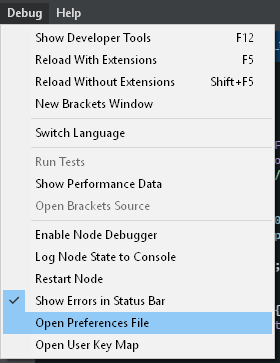
- Go to brackets.json ( I am going to do a step by step in case someone is not familiar with json, but I hope anyone that is using brackets is probably a developer anyway, but either way)
- Before the last "
}" add a comma (,) after the last entry 
- Then add this code below that comma:
"php": {
"executablePath": "C:\\path\\to\\php.exe"
} - Make sure you use double backslashed.
- So my location to my php.exe is here: E:Serversphp-7.3.15-nts-Win32-VC15-x64php.exe
- So mine looks like this:
"php": {
"executablePath": "E:\\Servers\\php-7.3.15-nts-Win32-VC15-x64\\php.exe"
} - Here is what it should look sort of like:
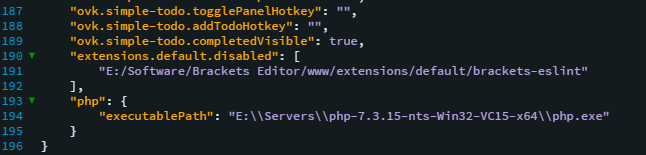
- Save the file
- Restart Brackets
- You should now have it working and also have code completion working.
I hope this helps someone that could not figure out why they can not get it working. For me, I was doing everything right, I was just using the wrong PHP Version, As of this writing, the latest PHP Version is 7.4.3 which does not work.
I was able to get the next Version Down working 7.3.15.
Note: I have not tried to use any other 7.3.15 Version except the Non Thread Safe x64, since it work, I left it, you can test the other versions if you want. It will not hurt anything.
Brackets has a Developer Console Just like Chrome/Firefox, that show output log info if there are errors it is easy to get to, just click the Errors, But you can also Press F12 or Go to ( Debug -> Show Developer Tools )


It will pop up the Developer Tools and you can click on Console to the the log output. It will help to know if you have an issue with the PHP.
If it is working, it should look something like this:


HAVE FUN AND HAPPY CODING!
~ Smugger | STAG
 Smugger21
on 28 Feb 2020
Smugger21
on 28 Feb 2020
Only paste this path into Environment variable C:xamppphp
thats it DONE. Hope so your problem is resolved
 Ehtisham555
on 3 May 2020
Ehtisham555
on 3 May 2020
That is making a bunch of assumptions,
- That they installed or are using XAMPP at all
- That they installed XAMPP in that location
- They already know how to add environment variables
Adding stuff to your PATHs Environment Variables is completely unnecessary and can cause future problems if you really don't understand what you are doing, adding stuff to the PATHs allows anything in that folder to be accessed globally without absolute paths, which could be helpful sometimes if you need that (like for JAVA development), but if you don't and all you need PHP for is Brackets. Then adding it to the PATHs is not the best way of doing it.
Smugger21
on 6 May 2020
Related issues
 theman1616
·
4Comments
theman1616
·
4Comments
 armandbancila
·
4Comments
armandbancila
·
4Comments
 naphipps
·
4Comments
naphipps
·
4Comments
 10polarbears
·
3Comments
10polarbears
·
3Comments
 KSSS10
·
3Comments
KSSS10
·
3Comments
Most helpful comment
In Brackets the preferences are set in brackets.json not defaultPreferences.json. The defaultPreferences.json file is not recognized. It's there just to guide the user about different preferences available.
Debug > Open Preferences FileAssuming "
C:\\wamp\\bin\\php\\php7.2.14\\php.exe"is a valid php path, paste the following inbrackets.json. It should stop showing the error.Note: Also make sure brackets.json _doesn't_ have any comments, since comments in JSONs are not allowed.
Click here to know more about the PHP support in Brackets.