Brackets: Brackets is forcing to have libcurl3, and does not accept libcurl4
Prerequisites
- [x] Can you reproduce the problem with
Debug -> Reload Without Extensions? - [x] Did you perform a cursory search to see if your bug or enhancement is already reported?
- [x] Did you read the Troubleshooting guide?
Description
I have Ubuntu 18.04, and the program curl recently requires libcurl4, when I tried to install brackets it asked me to remove libcurl4 and install libcurl3 so I had to remove curl in order to remove libcurl4.
Steps to Reproduce
On Ubuntu with latest curl 7.58.0, if I try to install brackets I have to remove curl.
Expected behavior:
I thought brackets depends on libcurl3 or more, so it should be happy with newer version of libcurl (i.e. version 4 libcurl4).
Actual behavior:
I had to choose between brackets 1.12 OR curl.
For time being I did choose to remove curl and have brackets
Versions
OS: Ubuntu 18.04 (develpoment branch, will be released next month).
Release 1.12 build 1.12.0-17621 (release d3b783b99)
build timestamp: Thu Feb 01 2018 12:36:24 GMT+0000
 Qussayyon
All 69 comments
Same issue on my Ubuntu 18.04. I have to remove Virtualbox to install Brackets.
 ghost
on 27 Mar 2018
ghost
on 27 Mar 2018
Even worse on Ubuntu Server version it asks to remove package ubuntu-server when trying to install libcurl3
 avidwriter
on 25 Apr 2018
avidwriter
on 25 Apr 2018
Same here. I can't even install Virtualbox on Ubuntu 18.04 because it asks for libcurl4, but I also need Brackets that much.
 alherrera42
on 28 Apr 2018
alherrera42
on 28 Apr 2018
I can confirm this issue too.
 elhoir
on 29 Apr 2018
elhoir
on 29 Apr 2018
On Ubuntu 18.04 Bionic it asks to remove Virtualbox 5.2.10 and libcurl4.
Removing virtualbox-5.2 (5.2.10-122088~Ubuntu~bionic) ...
Removing libcurl4:amd64 (7.58.0-2ubuntu3) ..
That's a real deal-breaker. Is there any solution in sight?
 pmario
on 3 May 2018
pmario
on 3 May 2018
samesies
 joshmckibbin
on 12 May 2018
joshmckibbin
on 12 May 2018
I just fixed it but had to rebuild the deb package.
- Download the ._deb_ installer file
- Inside the folder your downloaded the file run
dpkg-deb -R ./Brackets.Release.1.12.64-bit.deb Brackets - Edit file
Brackets/DEBIAN/controland replacelibcurl3withlibcurl4 - Rebuild .deb installer running
dpkg-deb -b Brackets Brackets-fixed.deb - Install Brackets using the fixed installer running
sudo dpkg -i Brackets-fixed.deb
At least the program opens. Don't know if there's anything broken though.
 jsanta
on 16 May 2018
jsanta
on 16 May 2018
@jsanta
Thanks, it get installed, but extensions manager is not retrieving anything!
Qussayyon
on 19 May 2018
@Qussayyon that's weird 'cause I installed a few extensions on my own installation of Brackets. I suspect mileage will vary depending on other factors (OS, other packages, any running firewalls, or else).
Sorry I can't give you any other hints.
jsanta
on 24 May 2018
@jsanta,
Thanks, I figured it out, as I don't have any firewall or anything. also, I was unable to see files in files tree. It turns out that it needs to run as: sudo brackets
I thought I was not the only who facing the issue.
Qussayyon
on 26 May 2018
trick suggested by @jsanta worked for me too
installing extra modules works
no sudo required
slight modification though: I replaced "libcurl3" by the statement "libcurl3|libcurl4"
(seems less intrusive, and a possibility to have a Brackets deb that can work for more people accross the board (independt of them having either of those packages on board)
got the suggestion from reading this comment: https://bugs.launchpad.net/ubuntu/+source/curl/+bug/1754294/comments/55
 marc-portier
on 24 Jun 2018
marc-portier
on 24 Jun 2018
@marc-portier
gr8 trick, I was looking for a way to include either, but I didn't know how deb packages represent OR operation.
Qussayyon
on 26 Jun 2018
Confirmed on Debian Buster. Can't install Brackets because libcurl4 issue.
Trick suggested by @jsanta worked tough
 koudeIka
on 24 Jul 2018
koudeIka
on 24 Jul 2018
For now, Brackets version provided in WebUpd8 PPA works with libcurl4. https://launchpad.net/~webupd8team/+archive/ubuntu/brackets
 Eskander
on 25 Jul 2018
Eskander
on 25 Jul 2018
trick suggested by @jsanta worked for me too!
 slipttees
on 6 Aug 2018
slipttees
on 6 Aug 2018
Confirmed and fix @jsanta worked 4 me too.
 lloony
on 15 Aug 2018
lloony
on 15 Aug 2018
Same issue on Linux Mint 19., asked me to remove R-cran and relative packages.
@jsanta solution worked for me, including installing extra modules.
 Gabrock94
on 9 Oct 2018
Gabrock94
on 9 Oct 2018
Same issue on elementary 5.0 Juno, and @jsanta 's solution works great!
 louis993546
on 19 Oct 2018
louis993546
on 19 Oct 2018
@jsanta it works perfectly :-)
 disorder75
on 29 Oct 2018
disorder75
on 29 Oct 2018
Question: Why don't we just fix the deb release to allow both versions of libcurl? This has been on for a while and it's really silly to have to repackage the deb yourself when it's such a simple fix.
 RustyRaptor
on 5 Nov 2018
RustyRaptor
on 5 Nov 2018
Perhaps a noobish observation but checking the code I cant find libcurl3 (or libcurl4) in it. Is this added during packaging? Im trying to make it work with both libcurl3 and libcurl4 as @marc-portier and @RustyRaptor suggested.
UPDATE
nvm I found it. The build instruction are here: https://github.com/adobe/brackets-shell/blob/master/installer/linux/debian/control
 PlamenSh
on 5 Dec 2018
PlamenSh
on 5 Dec 2018
Perhaps a noobish observation but checking the code I cant find libcurl3 (or libcurl4) in it. Is this added during packaging? Im trying to make it work with both libcurl3 and libcurl4 as @marc-portier and @RustyRaptor suggested.
UPDATE
nvm I found it. The build instruction are here: https://github.com/adobe/brackets-shell/blob/master/installer/linux/debian/control
scroll up. It's added into the .deb file configuration. There are insructions above in the comments on how to unpack, edit, then repack the deb file to have it use whatever version of curl you need.
RustyRaptor
on 5 Dec 2018
@RustyRaptor yea the idea is to avoid this in future installs. Pull req with fix is sent for it.
PlamenSh
on 5 Dec 2018
Confirm issue.
 thunderamur
on 4 Jan 2019
thunderamur
on 4 Jan 2019
I just fixed it but had to rebuild the deb package.
- Download the ._deb_ installer file
- Inside the folder your downloaded the file run
dpkg-deb -R ./Brackets.Release.1.12.64-bit.deb Brackets- Edit file
Brackets/DEBIAN/controland replacelibcurl3withlibcurl4- Rebuild .deb installer running
dpkg-deb -b Brackets Brackets-fixed.deb- Install Brackets using the fixed installer running
sudo dpkg -i Brackets-fixed.debAt least the program opens. Don't know if there's anything broken though.
It's installed but it doesn't work!
 OmarAlbelbaisy
on 11 Jan 2019
OmarAlbelbaisy
on 11 Jan 2019
I am still having this issue, seems kind of crazy it's been going on this long. Rebuilding the deb package seems to have worked, although I have not tested it extensively. If it's so easy to fix this, why is the .deb listed on the main website not the fixed version?
 k4kfh
on 1 Feb 2019
k4kfh
on 1 Feb 2019
Confirms issue, was able to rebuild the pkg and install it. I'm running Debian Buster (soon to be stable) and libcurl3 is deprecated. It's a pity that this still is an issue!
 nilsjha
on 12 Feb 2019
nilsjha
on 12 Feb 2019
Now I'm using ubuntu 18.10 (cosmic) and same issue here.
The official .deb file won't install on ubuntu cosmic and I going to install the snap version of brackets.
Here what I encounter:
$ sudo gdebi Brackets.Release.1.13.64-bit.deb
Reading package lists... Done
Building dependency tree
Reading state information... Done
Reading state information... Done
This package is uninstallable
Dependency is not satisfiable: libcurl3
$ apt-cache policy libcurl3
libcurl3:
  Installed: (none)
  Candidate: (none)
  Version table:
$ apt-cache policy libcurl
N: Unable to locate package libcurl
$ apt-cache policy libcurl4
libcurl4:
  Installed: 7.61.0-1ubuntu2.3
  Candidate: 7.61.0-1ubuntu2.3
  Version table:
 *** 7.61.0-1ubuntu2.3 500
        500 http://archive.ubuntu.com/ubuntu cosmic-updates/main amd64 Packages
        500 http://archive.ubuntu.com/ubuntu cosmic-security/main amd64 Packages
        100 /var/lib/dpkg/status
     7.61.0-1ubuntu2 500
        500 http://archive.ubuntu.com/ubuntu cosmic/main amd64 Packages
$ brackets

Command 'brackets' not found, but can be installed with:

sudo snap install brackets
$ snap info brackets
name:      brackets
summary:   Brackets is a modern code editor for HTML, CSS and JavaScript.
publisher: Snapcrafters
contact:   https://github.com/snapcrafters/brackets/issues
license:   Proprietary
description: |
  Brackets is an open-source editor for web design and development
  built on top of web technologies such as HTML, CSS and JavaScript.
  The project was created and is maintained by Adobe, and is released
  under an MIT License.

  This snap is maintained by the Snapcrafters community, and is not necessarily endorsed or
  officially maintained by the upstream developers.
snap-id: NbcB8ZtSfH5bQIfyRynnlBeIIOyGurxD
channels:
  stable:    1.13 2019-02-04  (99) 103MB classic
  candidate: ↑
  beta:      1.13 2019-02-04  (99) 103MB classic
  edge:      1.13 2019-02-12 (100) 103MB classic
 arf1372
on 16 Feb 2019
arf1372
on 16 Feb 2019
I just fixed it but had to rebuild the deb package.
- Download the ._deb_ installer file
- Inside the folder your downloaded the file run
dpkg-deb -R ./Brackets.Release.1.12.64-bit.deb Brackets- Edit file
Brackets/DEBIAN/controland replacelibcurl3withlibcurl4- Rebuild .deb installer running
dpkg-deb -b Brackets Brackets-fixed.deb- Install Brackets using the fixed installer running
sudo dpkg -i Brackets-fixed.debAt least the program opens. Don't know if there's anything broken though.
Hey guys, as a workaround you can make the change mentioned above but instead of adding the dependency for libcurl4, just remove libcurl3 altogether. At the moment it seems that libcurl3 might even be a stale dependency, and won't have any impact if removed. _I'm able to use Brackets with this change and without any issues with VirtualBox etc. on Ubuntu 18.04 LTS._
Do let me know if there are any other issues that you encounter with this change. Thanks for reporting the issue. We're working on fixing it in the main build as well.
 shubhsnov
on 23 Apr 2019
shubhsnov
on 23 Apr 2019
... instead of adding the dependency for libcurl4, just remove libcurl3 altogether. At the moment it seems that libcurl3 might even be a stale dependency, ...
good point, however: "adding" in stead of "replacing" has (at least, had, one might observe) the benefit of (also) supporting those (stale) environments that just provide the v3 dependency
All of the above discussion is, of course, as time goes on with this issue unresolved, even while carrying an available pull request (thx @PlamenSh), pretty much: an archetypical moot-point. After all, the current position seems to be "We 've gone off the idea of support (for users or their platforms). It is overrated."
Sorry for my #h2gt2g inflicted irony there; I'll be lying in front of my bulldozer waiting for this case to get anyhwere. We'll see who rusts first!
marc-portier
on 23 Apr 2019
@marc-portier I think I might have misphrased but what I meant was "removing", not replacing or adding, because, well Brackets just doesn't need it. I've looked at @PlamenSh's PR (thanks for the fix). He's adding an OR dependency for both v3 and v4. We wouldn't want to do that if neither is needed which is how it seems at the moment. I'm still working on the issue, the above is just a workaround for those who wish to use Brackets and VirtualBox (or any other app which needs v4) together with the current build.
Thanks for the feedback. Do try out the workaround and let me know of any issues.
shubhsnov
on 23 Apr 2019
well Brackets just doesn't need it
ah, didn't read it like that, totally makes sense, will try to find some time to test that out
marc-portier
on 23 Apr 2019
This issue still exists in Brackets 1.14
joshmckibbin
on 2 May 2019
This is really bad. It shouldn't be an issue just to include the fix in the release. What's going on?
RustyRaptor
on 2 May 2019
What?!? This is a deal breaker. I'm using PhpStorm and the built in web server went south. So I had used Brackets before in the past and figured I would just use Bracket's live reload to test my HTML, etc.
So I download and go to install the deb and it wants to REMOVE these (curl incompatibilities I can _kindasorta_ understand but this thing wants to remove cmake and ukuu?!?):
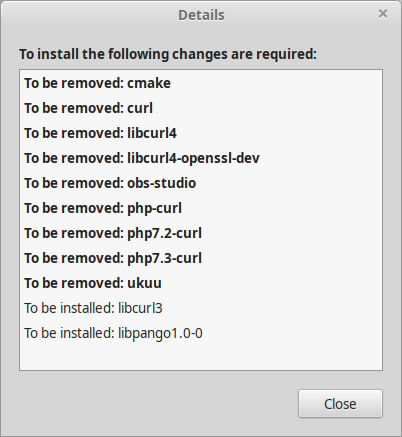
 RyanNerd
on 17 May 2019
RyanNerd
on 17 May 2019
@joshmckibbin @RustyRaptor @RyanNerd
We are onto it, please allow us some time. The dependencies listed for Brackets were decided by the dependencies that Chromium had. We're in the process of updating CEF (the Chromium-based shell we use) for Linux (https://github.com/adobe/brackets-shell/pull/666) to almost the latest version and then update the dependencies accordingly. Once that is done the dependencies will come up to date with Chrome 60+, which means that Brackets would install without any issues if Chrome does as well.
Since CEF was a big change we wanted to be sure and fix the issue at the root cause rather than just patching the dependency list, and it was too much to pack in the previous release.
Meanwhile please use this workaround to tackle the issue: https://github.com/adobe/brackets/issues/14786
shubhsnov
on 17 May 2019
Version 1.14 and the problem with curl version is still persistent!
ghost
on 23 May 2019
I can't install either. How can this still be an issue after over a year?
 MostHated
on 1 Jun 2019
MostHated
on 1 Jun 2019
It is July 27 and I still can't install version 1.14 on Ubuntu 19.04, though I tried to remove libcurl3. WTF?
 dan0nchik
on 27 Jul 2019
dan0nchik
on 27 Jul 2019
Yeah, I agree this is a little crazy. It's been over a year and it still
requires manual screwing with packages to install on one of the most
beginner-friendly and well known Linux distros. I'm not a contributor, and
I hate to sound whiny, because maybe it really is a difficult problem to
solve. But it certainly seems like this is not getting the priority it
deserves.
On Sat, Jul 27, 2019, 11:56 AM danon4ik notifications@github.com wrote:
It is July 27 and I still can't install version 1.14 on Ubuntu 19.04,
though I tried to remove libcurl3. WTF?—
You are receiving this because you commented.
Reply to this email directly, view it on GitHub
https://github.com/adobe/brackets/issues/14171?email_source=notifications&email_token=ACRUJB6VAMOZHAXQN64KZP3QBR43NA5CNFSM4EXINMUKYY3PNVWWK3TUL52HS4DFVREXG43VMVBW63LNMVXHJKTDN5WW2ZLOORPWSZGOD26O6JI#issuecomment-515698469,
or mute the thread
https://github.com/notifications/unsubscribe-auth/ACRUJBZDZUP4IM65KCWQZKDQBR43NANCNFSM4EXINMUA
.
k4kfh
on 27 Jul 2019
I hope this gets resolved soon.
RustyRaptor
on 29 Jul 2019
I gave up on Brackets and decided to just switch to Visual Studio Code. It works just as well if not better.
joshmckibbin
on 29 Jul 2019
@joshmckibbin, +++
dan0nchik
on 29 Jul 2019
I just got it from the flatpack software center and it installed just fine that way. After all that time and fuss I remembered that I didn't even really like it that much.
MostHated
on 29 Jul 2019
The thing that keeps me on Brackets is the live preview. It's second to none. So far I haven't found a plugin for any other editor that is as good. But I agree, I pretty much only use Brackets for web development now because it's not as well suited for "traditional" programming, and because now it's a PITA to install...lol
k4kfh
on 29 Jul 2019
@k4kfh, I started using VS Code and I really miss live preview(((
dan0nchik
on 29 Jul 2019
@k4kfh, I started using VS Code and I really miss live preview(((
VSCode has a live-preview server plugin that works similar to the one in Brackets. Sadly doesn't scroll to the place when you click an element at least last time I checked.
RustyRaptor
on 3 Aug 2019
Another possible (and cleaner?) workaround is this PPA that replaces libcurl4 with a version that explicitly provides libcurl3 - and thus works for other packages stuck on it as well.
 ElSaico
on 15 Aug 2019
ElSaico
on 15 Aug 2019
May I suggest the following workaround: Installing Brackets 1.14 as a snap via Snapcraft.io. Works for me in Lubuntu 18.04, i.e. it does not uninstall libcurl4.
 its-thomas
on 20 Aug 2019
its-thomas
on 20 Aug 2019
Another possible (and cleaner?) workaround is this PPA that replaces libcurl4 with a version that explicitly provides libcurl3 - and thus works for other packages stuck on it as well.
There is a reason why Ubuntu moved from libcurl3 to libcurl4, it's the security!
Qussayyon
on 22 Aug 2019
ERROR
i had same issue while installing curl.
sudo apt-get install curl
_curl_ : Depends: libcurl4 (= 7.58.0-2ubuntu3.8ppa2) but it is not going to be installed
when i try to install curl4 it give me error:
sudo apt-get install libcurl4 curl
_mongodb-org-server_ : Depends: libcurl3 (>= 7.16.2) but it is not going to be installed
but i had already curl3 with latest version.
Solution
i have Ubuntu 18.04.2 LTS codname bionic
i execute following commands:
first i install curl4 required version:
sudo apt-get install libcurl4=7.58.0-2ubuntu3.8ppa2
above command will remove error of culr3 and curl4
then i execute command install curl
sudo apt-get install curl
curl installed successfully
 amankakar
on 18 Sep 2019
amankakar
on 18 Sep 2019
Same issue here, I just installed Brackets (and loving it) on Ubuntu 18.04 LTS using the ".deb" package and it is working great! but Ubuntu is giving be an error/notification of unmet dependencies.
When I run "sudo apt upgrade" I get the following error:
The following packages have unmet dependencies:
brackets : Depends: libcurl3 but it is not installed
E: Unmet dependencies. Try 'apt --fix-broken install' with no packages (or specify a solution).
 Ray6464
on 4 Oct 2019
Ray6464
on 4 Oct 2019
There is a duplicate issue #14667
Ray6464
on 4 Oct 2019
I used @jsanta 's solution on Parrot OS and Brackets was installed but it never opens or start
 PeterNdomano
on 8 Nov 2019
PeterNdomano
on 8 Nov 2019
I just fixed it but had to rebuild the deb package.
1. Download the .**_deb_** installer file

2. Inside the folder your downloaded the file run `dpkg-deb -R ./Brackets.Release.1.12.64-bit.deb Brackets `

3. Edit file `Brackets/DEBIAN/control `and replace `libcurl3` with `libcurl4`

4. Rebuild .deb installer running `dpkg-deb -b Brackets Brackets-fixed.deb`

5. Install Brackets using the fixed installer running `sudo dpkg -i Brackets-fixed.deb `
At least the program opens. Don't know if there's anything broken though.
Its been over a year and people still have to google around for this solution, meanwhile 1.14.1 just got released. Why couldn't this have been already fixed ?
 i0x71
on 5 Dec 2019
i0x71
on 5 Dec 2019
2020 overthere and this still here. They don't give a shi** for us. Moving for VS Code...
 rodrigofbm
on 30 Dec 2019
rodrigofbm
on 30 Dec 2019
For now, Brackets version provided in WebUpd8 PPA works with libcurl4. https://launchpad.net/~webupd8team/+archive/ubuntu/brackets
Can confirm it works on Bionic and it's my favorite editor ever, so loving this poster more than ice cream rn. <3 <3
 LDLanagan
on 16 Feb 2020
LDLanagan
on 16 Feb 2020
Not fixed by now :/
Xubuntu 20.04
 eaxode
on 15 Jul 2020
eaxode
on 15 Jul 2020
Been using VSCode for the past 2 years. I'm still reminded every month by Github that this is still an issue. Tragic.
RustyRaptor
on 16 Jul 2020
August 31, 2020 4:51PM Chicago, IL USA
I've been looking for an answer to file tree not showing up and none of the solutions I've found haven't worked. 2.5 years from the first post and this issue is still an issue. I've wasted more time than I can count any more and I'm getting frustrated, I also tried to install an extension and the extension manager just spins and will not connect, I waited 15 minutes and nothing.
Can we still trust Brackets to be a valuable tool? Not me
I was using Brackets on Ubuntu 18.04 and had no issues and after the upgrade to Ubuntu 20.04 I lost the file tree
FIX IT NOW!
 440music
on 31 Aug 2020
440music
on 31 Aug 2020
I used @jsanta 's solution on Parrot OS and Brackets was installed but it never opens or start
Same here in Debian 10.
 M-DVD
on 16 Oct 2020
M-DVD
on 16 Oct 2020
Same issue on Linux Mint 19., asked me to remove R-cran and relative packages.
@jsanta solution worked for me, including installing extra modules.
Same for me, 2 years later (Linux Mint 19.2). I wanted to give Brackets a try since I'm learning some web development, but I need R so there's no way I'm installing Brackets. And I'm not an expert, but isn't curl like a very basic Bash program? (in the sense that it sounds like a bad idea to remove it)
 AleBG
on 18 Oct 2020
AleBG
on 18 Oct 2020
thanks it works on MX_LINUX petito feo 19
 sk8807307
on 29 Oct 2020
sk8807307
on 29 Oct 2020
I just fixed it but had to rebuild the deb package.
1. Download the .**_deb_** installer file

2. Inside the folder your downloaded the file run `dpkg-deb -R ./Brackets.Release.1.12.64-bit.deb Brackets `

3. Edit file `Brackets/DEBIAN/control `and replace `libcurl3` with `libcurl4`

4. Rebuild .deb installer running `dpkg-deb -b Brackets Brackets-fixed.deb`

5. Install Brackets using the fixed installer running `sudo dpkg -i Brackets-fixed.deb `
At least the program opens. Don't know if there's anything broken though.
Tysm this worked
 yonderbread
on 4 Nov 2020
yonderbread
on 4 Nov 2020
I give up, this worked good for me:
sudo apt install kate
kate is actually a nice editor, I think I will see what I can do to change its appearance a bit, then I will be happy with it.
 xekon
on 20 Nov 2020
xekon
on 20 Nov 2020
Does anyone know if there are any Major forks of Brackets? ones with more active development?
xekon
on 20 Nov 2020
Does anyone know if there are any Major forks of Brackets? ones with more active development?
i wasnt able to find any, but if youre looking for a good editor just use Notepad++
yonderbread
on 21 Nov 2020
Adobe Inc. is increasingly fighting against insignificance. Therefore it is not so tempting to try to get or keep a contract with them.
You can see that very well on https://github.com/adobe/brackets/graphs/contributors
I'm afraid you'll have to fix it yourself or switch to a software with active development. Keeping them up is easy.
eaxode
on 19 Dec 2020
Related issues
 edlau
·
3Comments
edlau
·
3Comments
 rugk
·
4Comments
rugk
·
4Comments
 AgamlaRage
·
4Comments
ghost
·
3Comments
AgamlaRage
·
4Comments
ghost
·
3Comments
 brendonmm
·
4Comments
brendonmm
·
4Comments
Most helpful comment
I just fixed it but had to rebuild the deb package.
dpkg-deb -R ./Brackets.Release.1.12.64-bit.deb BracketsBrackets/DEBIAN/controland replacelibcurl3withlibcurl4dpkg-deb -b Brackets Brackets-fixed.debsudo dpkg -i Brackets-fixed.debAt least the program opens. Don't know if there's anything broken though.