I have migrated flows from botpress 10.x to 11.x and i have replaced state.$r === 0 to temp.$r === 0 in main.flow.json but it seems caching.. and I'm getting below error always.
22:29:15.742 DialogEngine Error processing "state.$r === 0"
Err: state is not defined
Flow: main.flow.json
Node: welcome
I cannot find state.$r in my main.flow.json
Is this a known issue ? how can i solve it !
- I am running:
official binary - My OS is:
osx
 JijeshP
All 7 comments
@JijeshP There is caching for flows, but when you edit the file manually and save it, the cache is cleared.
When the server is restarted, it's also freshly loaded from the files.
My guess is that there is still some places that use the state.$r property. What are the exact steps that you took to migrate your bot? What files did you move between the two? What did you edit? Are you running in production using the ghost / postgres?
Thanks
 allardy
on 10 Mar 2019
allardy
on 10 Mar 2019
@allardy I have tried restarting the server multiple times and it didn't worked. but when i start the server next day it worked. :)
I have followed the below steps as described in the docs
Copy the content of generated/content to data/bots/bot-name/content-elements
Copy the content of generated/flows to data/bots/bot-name/flows
Copy the content of generated/intents to data/bots/bot-name/intents
Then i changed all state.$r to temp.$r and user.$r
I have edited the flow using the studio and then i confirmed the changes in JSON file.
I'm running on local and not using ghost / progress
Thanks
JijeshP
on 11 Mar 2019
@JijeshP Very strange, I don't see where this can be coming from. Great to hear it fixed itself tho, please let me know if you have other issues with the migration. The guide was kind of short and maybe some steps are missing
allardy
on 11 Mar 2019
@JijeshP Just to let you know, I found the culprit. When you discuss with the bot, the context is saved in the database. If there's a processing error, the context will not clear itself and will stay on that instruction. The error disappeared the next day because the session of 30 minutes expired, so context was cleared
allardy
on 11 Mar 2019
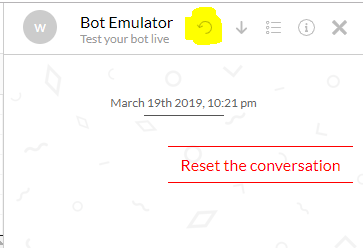
@allardy what's the way to clear the context manually.
JijeshP
on 16 Mar 2019
@JijeshP The reset button can be used during a conversation:
allardy
on 20 Mar 2019
This issue has been automatically marked as stale because it has not had recent activity. It will be closed if no further activity occurs. Thank you for your contributions.
![stale[bot] picture](https://avatars.githubusercontent.com/in/1724?v=4&s=40) stale[bot]
on 16 Sep 2019
stale[bot]
on 16 Sep 2019
Related issues
 rainmakerho
·
4Comments
rainmakerho
·
4Comments
 rt3norio
·
7Comments
rt3norio
·
7Comments
 mhjb
·
6Comments
mhjb
·
6Comments
 eyalcohen4
·
12Comments
eyalcohen4
·
12Comments
 jcampbell05
·
6Comments
jcampbell05
·
6Comments
Most helpful comment
@JijeshP Just to let you know, I found the culprit. When you discuss with the bot, the context is saved in the database. If there's a processing error, the context will not clear itself and will stay on that instruction. The error disappeared the next day because the session of 30 minutes expired, so context was cleared