Botkit: Slash command request is received by webserver but doesn't trigger `slash_command`
Despite what seems to be a properly configured slack app (according to https://api.slack.com/tutorials/easy-peasy-slash-commands), the following bot does not work.
minimal_botkit.js
// boilerplate suggested at https://api.slack.com/tutorials/easy-peasy-slash-commands
var Botkit = require('botkit');

var appConfig = {
    clientId: process.env.SLACK_CLIENT_ID,
    clientSecret: process.env.SLACK_CLIENT_SECRET,
    scopes: ['commands']
};

var controller = Botkit.slackbot({ debug: true }).configureSlackApp(appConfig);

controller.setupWebserver(process.env.PORT, function (err, webserver) {
    if (err) process.exit(1);

    webserver.use(function (req, res, next) {
        console.log("Incoming web request: " + JSON.stringify(req.body, null, 2));
        next();
    });
    controller.createWebhookEndpoints(webserver);
});

controller.on('slash_command', function (bot, message) {
    console.log("slash_command callback fired -- SUCCESS");
    bot.replyPublic(message, "received `" + message.command + " " + message.text + "`");
});
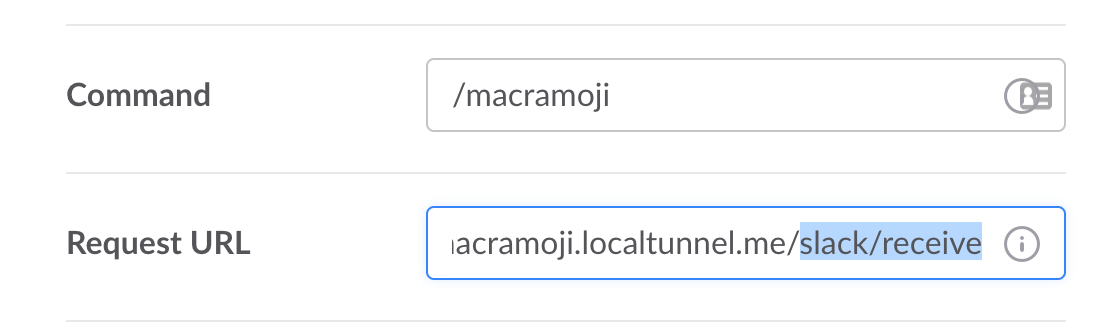
Its output:
$ SLACK_CLIENT_ID=11111111.22222222  \
  SLACK_CLIENT_SECRET=abcdefg1234567890 \
  SLACK_VERIFICATION_TOKEN=redacted \
  PORT=4390 \
  node minimal_botkit
Initializing Botkit v0.5.4
info: ** No persistent storage method specified! Data may be lost when process shuts down.
debug: Setting up a handler for spawned
debug: Setting up a handler for heard_trigger
debug: Setting up a handler for command_triggered
debug: Setting up a handler for remote_command_end
info: ** Setting up custom handlers for processing Slack messages
debug: Setting up a handler for message_received
info: ** Configuring app as a Slack App!
debug: Setting up a handler for slash_command
info: ** Starting webserver on port 4390
info: ** Serving webhook endpoints for Slash commands and outgoing webhooks at: http://0.0.0.0:4390/slack/receive
Incoming web request: {
  "token": "redacted",
  "team_id": "T024WU76V",
  "team_domain": "boston",
  "channel_id": "D3BFX94CE",
  "channel_name": "directmessage",
  "user_id": "U3BG8NXFH",
  "user_name": "ifreecarve",
  "command": "/macramoji",
  "text": "foo",
  "response_url": "https://hooks.slack.com/commands/T024WU76V/201087949059/KZ3pYvWejktRd8nJ4af6tWyE"
}

I'm fairly certain that my slack app is configured correctly; the following non-botkit code works and produces an echo.
minimal_slack_express.js
var slackExpress = require("slack-express");

slackExpress.slash('/macramoji', function (payload, message) {
    console.log("OK! " + JSON.stringify(payload, null, 2));
    message({ text: "received `" + payload.raw.command + " " + payload.raw.text + "`" });
});

slackExpress.start();
slack-express listens on /:
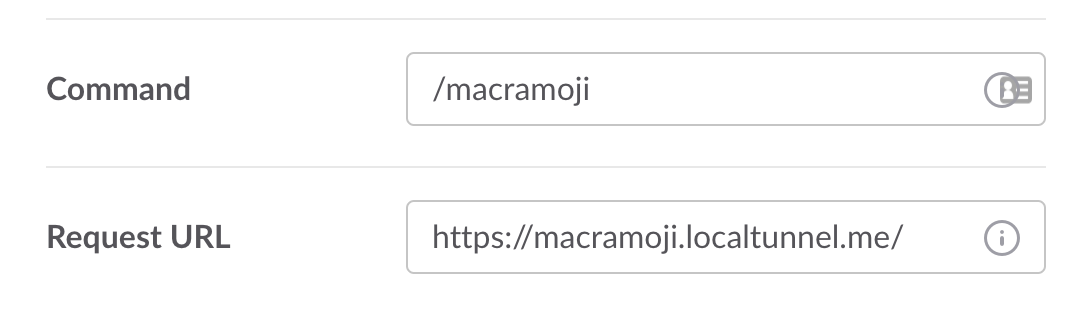
Its output:
$ SLACK_CLIENT_ID=11111111.22222222  \
  SLACK_CLIENT_SECRET=abcdefg1234567890 \
  SLACK_VERIFICATION_TOKEN=redacted \
  PORT=4390 \
  NODE_ENV=development \
  APP_NAME=macramoji \
  node minimal_slack_express
#!/slack-app> http://localhost:4390
OK! {
  "ok": false,
  "raw": {
    "token": "redacted",
    "team_id": "T024WU76V",
    "team_domain": "boston",
    "channel_id": "D3BFX94CE",
    "channel_name": "directmessage",
    "user_id": "U3BG8NXFH",
    "user_name": "ifreecarve",
    "command": "/macramoji",
    "text": "foo",
    "response_url": "https://hooks.slack.com/commands/T024WU76V/201154960946/ZPc0mFGvKZmaa8ByNbDCLLJb"
  },
  "account": {},
  "message": {
    "token": "redacted",
    "response_url": "https://hooks.slack.com/commands/T024WU76V/201154960946/ZPc0mFGvKZmaa8ByNbDCLLJb",
    "channel_id": "D3BFX94CE",
    "channel_name": "directmessage",
    "command": "/macramoji",
    "text": "foo"
  },
  "text": "find method returned an error"
}

Other details:
OSX 10.12.5 (16F73)
node v7.4.0
npm 4.0.5
└─┬ [email protected]
  └── [email protected]
 ianfixes
All 6 comments
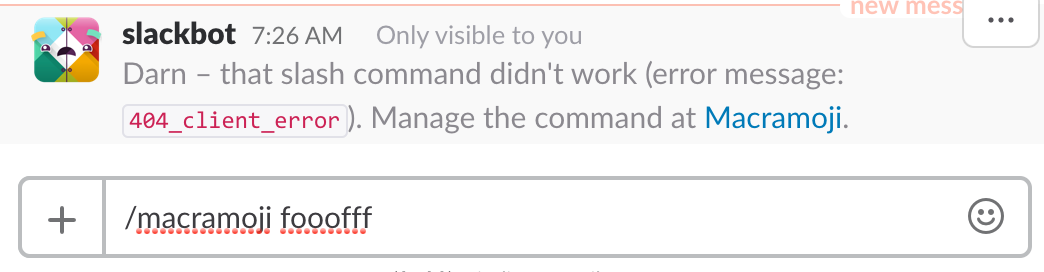
I can confirm that some part of the webserver is working in botkit, because if I use the slack-express endpoint of / instead of /slack/receive, the Slack client (properly) picks up the 404 from the webserver:
ianfixes
on 21 Jun 2017
We figured out this issue!
For Slack bots to work, you have to go through the oauth process AND make sure you are using a storage system to persist team details. In the process of receiving a webhook, Botkit validates the team information against the database. If the team does not exist (IE, botkit does not think the team has installed the app), the webhook is rejected.
 benbrown
on 21 Jun 2017
benbrown
on 21 Jun 2017
I'm not sure whether this issue is resolved. I'm supplying the token, which is tied to the team. If botkit needs it so badly, a simple API call using my supplied token could retrieve it. Right? I mean, the slack-express example works and it uses the same input information.
ianfixes
on 22 Jun 2017
Botkit no longer supports slash commands on "custom integrations" - the type where you pass in a single team token. This feature is marked by Slack for deprecation.
It is required to use the oauth login if you want to offer Slash commands in your app.
benbrown
on 22 Jun 2017
I think oauth is what I'm using. Is this the deprecated token type you're referring to?

ianfixes
on 22 Jun 2017
@ifreecarve Hi Ian, not sure if this will help you due to inactivity, but want to place it here, in order to help new users, that want to use slash commands, but don't know where to look at it
To receive a reply you need:
- to setup a slash command with '..../slack/receive' URL
- type /test1 message (test1 is my actual slash command from Slack App setup)
- get a reply from your slack bot like: _received /test1 message_ && get message to your console: _slash_command callback fired -- SUCCESS_
  controller.on('slash_command', function (bot, message) {

    controller.storage.users.get(message.user, function(err, user) {

       console.log("slash_command callback fired -- SUCCESS");
       bot.reply(message, "received `" + message.command + " " + message.text + "`");

    });
 atherdon
on 7 Nov 2017
atherdon
on 7 Nov 2017
Related issues
 fieldcorbett
·
4Comments
fieldcorbett
·
4Comments
 koubenecn
·
3Comments
koubenecn
·
3Comments
 iworkforthem
·
3Comments
iworkforthem
·
3Comments
 imjul1an
·
3Comments
imjul1an
·
3Comments
 stelio
·
4Comments
stelio
·
4Comments
Most helpful comment
@ifreecarve Hi Ian, not sure if this will help you due to inactivity, but want to place it here, in order to help new users, that want to use slash commands, but don't know where to look at it
To receive a reply you need: