Botframework-webchat: Oauth error unhandled in SDK
Github issues should be used for bugs and feature requests. Use Stack Overflow for general "how-to" questions.
Versions
What package version of the SDK are you using. -> 4.10.3
What nodejs version are you using ->10.13.0
What browser version are you using -> Chrome
What os are you using -> Windows
Describe the bug
The first time user sign in will prompt a permission request like this:
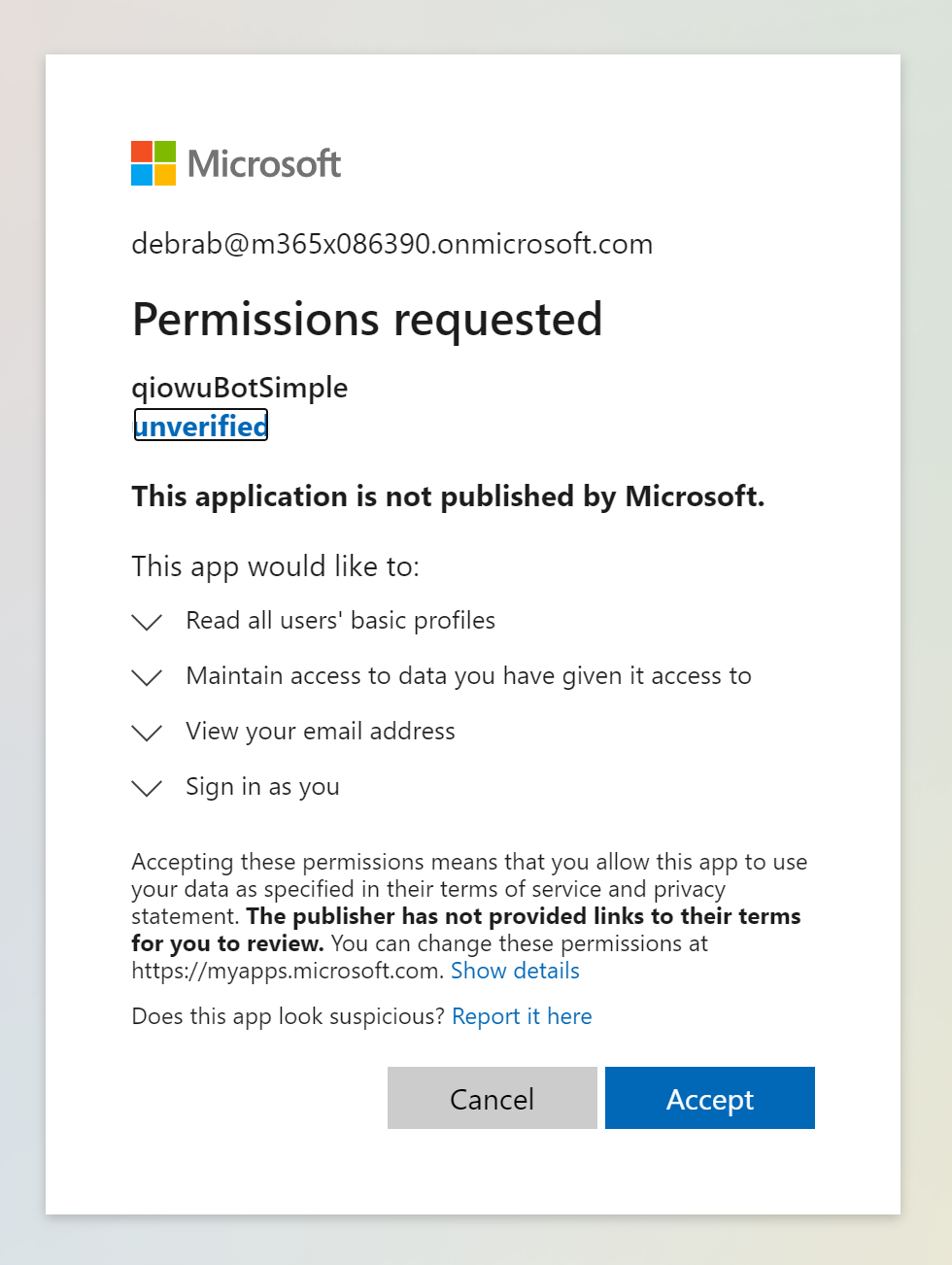
When doing single sign on, tokens retrieved in from parent website without passing this permission request will return success from sdk. Which cause error for user's first time sign in(result = 'sent' in client but failed with exception in bot.)
To Reproduce
- Enlist & setup https://github.com/microsoft/BotFramework-WebChat/tree/master/samples/07.advanced-web-chat-apps/e.sso-on-behalf-of-authentication with contoso account
- Use a new account who never sign in to bot to sign in with SSO directly
- See the repro.
Expected behavior
Client get "send failed" and fall back to tradition sign-in for first time.
Screenshots
bot's error:
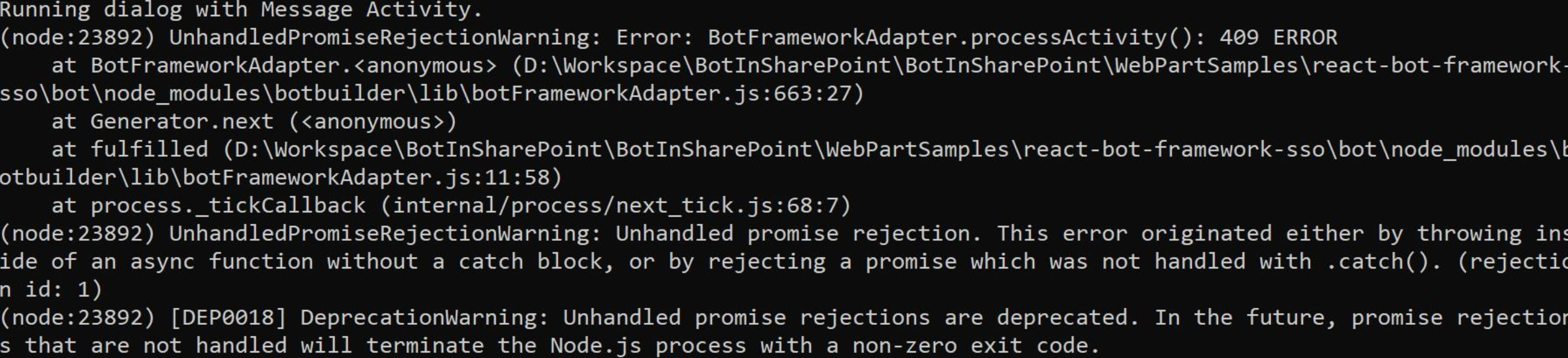
Additional context
Add any other context about the problem here.
 DingmaomaoBJTU
All 27 comments
@DingmaomaoBJTU, I can't repro this issue using your code from https://github.com/pnp/sp-dev-fx-webparts/pull/1590. I set up an Active Directory OAuth connection and tried various ways of existing the auth flow without granting permission.
In the Dotnet code you linked to the exception handling you mention only logs and then re-throws the exception which bubbles it up. We can add some extra logging to the JS SDK but the exception will end up bubbling up either way. You can also check the OauthPrompt.ts code, the exchangeToken call is, itself, wrapped in a try-catch that ignores the error.
Can you provide a code sample or more repro steps? Thanks!
 joshgummersall
on 28 Jan 2021
joshgummersall
on 28 Jan 2021
@joshgummersall Sorry for the late response. Did you try the single sign on from sharepoint? For example, if you are testing with contoso, please remind don't use your admin account or other accounts (i.e. megan) which had been logged in to the bot before in emulator or webchat, use a brand new account like alex.
DingmaomaoBJTU
on 20 Mar 2021
Adding support to get a repro.
 carlosscastro
on 25 Mar 2021
carlosscastro
on 25 Mar 2021
@DingmaomaoBJTU - I'm sorry but this issue is pretty confusing to me.
You start by saying "The first time user sign in will prompt a permission request like this." Sign in to what? Isn't sign-in behavior dependent on the channel client?
Then you say "When doing single sign on, tokens retrieved in from parent website without passing this permission request will return success from sdk. Which cause error for user's first time sign in(result = 'sent' in client but failed with exception in bot.)" Which is it? Is the SDK successful, or is there an error?
To reproduce, you say "Try sso scenario with JS bot, with first sign-in user." Could I get more detailed repro steps? Is there a specific SSO sample I should follow?
For your expected behavior, you say "Client get 'send failed' and fall back to tradition sign-in for first time." To be clear, is this behavior you're observing in the .NET SDK and not observing in the Node SDK?
Please message me in Teams in order to help me reproduce the problem. I have no experience with SharePoint so I may need a lot of help if SharePoint is necessary for the repro.
@joshgummersall - How did you find this link? https://github.com/pnp/sp-dev-fx-webparts/pull/1590
It doesn't look like it was mentioned in the issue.
@carlosscastro - It looks like this may be more of a parity issue having to do with error logging than a typical bug. The source code in question is already linked to in the issue. What am I trying to reproduce exactly?
 v-kydela
on 30 Mar 2021
v-kydela
on 30 Mar 2021
@v-kydela I actually don't recall exactly where I found it - perhaps the user's public repos or contributions (at the time).
joshgummersall
on 30 Mar 2021
@v-kydela could you please update on this issue, thanks!
 msomanathan
on 31 Mar 2021
msomanathan
on 31 Mar 2021
@msomanathan - You can see that @DingmaomaoBJTU has not responded yet
v-kydela
on 1 Apr 2021
@DingmaomaoBJTU - I'm sorry but this issue is pretty confusing to me.
You start by saying "The first time user sign in will prompt a permission request like this." Sign in to what? Isn't sign-in behavior dependent on the channel client?
Ans: Please check https://github.com/pnp/sp-dev-fx-webparts/tree/master/samples/react-bot-framework-sso this sample of SSO from sharepoint.
Then you say "When doing single sign on, tokens retrieved in from parent website without passing this permission request will return success from sdk. Which cause error for user's first time sign in(result = 'sent' in client but failed with exception in bot.)" Which is it? Is the SDK successful, or is there an error?
Ans: Yes, the SDK returns with success, but it should return failed as the user didn't grant permission yet.
To reproduce, you say "Try sso scenario with JS bot, with first sign-in user." Could I get more detailed repro steps? Is there a specific SSO sample I should follow?
Ans: Please check https://github.com/pnp/sp-dev-fx-webparts/tree/master/samples/react-bot-framework-sso
For your expected behavior, you say "Client get 'send failed' and fall back to tradition sign-in for first time." To be clear, is this behavior you're observing in the .NET SDK and not observing in the Node SDK?
Ans: Yes.
Please message me in Teams in order to help me reproduce the problem. I have no experience with SharePoint so I may need a lot of help if SharePoint is necessary for the repro.
Ans: Sure~ Sorry I didn't provide much information.
DingmaomaoBJTU
on 7 Apr 2021
@v-kydela are there any status updates on this issue?
 peterinnesmsft
on 8 Apr 2021
peterinnesmsft
on 8 Apr 2021
@peterinnesmsft - I am in contact with Qiong Wu on Teams, and I'm also waiting on a reply from Carlos
v-kydela
on 8 Apr 2021
Thanks to @v-kydela we got a simpler repro with https://github.com/microsoft/BotFramework-WebChat/tree/master/samples/07.advanced-web-chat-apps/e.sso-on-behalf-of-authentication and also verify that C# bot had the same issue.
DingmaomaoBJTU
on 20 Apr 2021
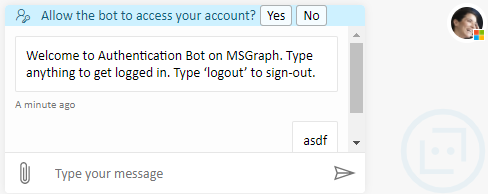
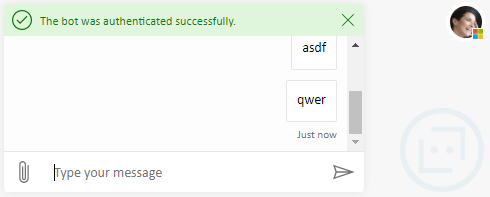
@DingmaomaoBJTU - It looks like you edited the original post to remove the reference to the C# code so that this no longer looks like a parity issue. I believe there is still a parity issue, but that's different from the issue you want to resolve here. You want to resolve the issue where Web Chat sample 7e says authentication was successful even when it wasn't:
Running dialog with Message Activity.
(node:22472) UnhandledPromiseRejectionWarning: Error: BotFrameworkAdapter.processActivity(): 412 ERROR
    at BotFrameworkAdapter.<anonymous> (C:\Source\BotFramework-WebChat\samples\07.advanced-web-chat-apps\e.sso-on-behalf-of-authentication\bot\node_modules\botbuilder\lib\botFrameworkAdapter.js:739:27)
    at Generator.next (<anonymous>)
    at fulfilled (C:\Source\BotFramework-WebChat\samples\07.advanced-web-chat-apps\e.sso-on-behalf-of-authentication\bot\node_modules\botbuilder\lib\botFrameworkAdapter.js:12:58)
    at processTicksAndRejections (internal/process/task_queues.js:97:5)
(node:22472) UnhandledPromiseRejectionWarning: Unhandled promise rejection. This error originated either by throwing inside of an async function without a catch block, or by rejecting a promise which was not handled with .catch(). To terminate the node process on unhandled promise rejection, use the CLI flag `--unhandled-rejections=strict` (see https://nodejs.org/api/cli.html#cli_unhandled_rejections_mode). (rejection id: 1)
(node:22472) [DEP0018] DeprecationWarning: Unhandled promise rejections are deprecated. In the future, promise rejections that are not handled will terminate the Node.js process with a non-zero exit code.
Running dialog with Message Activity.
Let me see if my understanding is correct. You believe this is an SDK issue because the "Allow the bot to access your account?" button sends a message to the bot so that the bot can call the exchangeToken function and return a response to the client indicating whether the exchange was successful or not, and the presence of the success message in the client indicates that the bot responded incorrectly. Is that correct? How do you know it's the bot that's responding incorrectly rather than the client that's interpreting the response incorrectly? Could this possibly be a client problem?
@compulim - This issue is outside my area of expertise. Are you able to help with this issue or recommend someone who can?
v-kydela
on 22 Apr 2021
@DingmaomaoBJTU - Can you please respond?
v-kydela
on 27 Apr 2021
@joshgummersall
@carlosscastro
@msomanathan
@peterinnesmsft
It looks like I'm having some difficulty getting attention here, but you acted like this issue was important. Given that I was able to reproduce the issue, what would you like me to do now?
v-kydela
on 29 Apr 2021
@v-kydela the 412 error logged issue is the same as https://github.com/microsoft/botbuilder-js/issues/3601. I was able to reproduce that just now using the sample mentioned above on the initial login. While annoying, it's not really an unhandled exception inside the SDK. The issue is that calls to adapter.processActivity yield a promise, so that promise needs to either have an await and a try/catch or a call to .catch(...) added. If this is indeed the same issue as microsoft/botbuilder-js#3601 the same code can be used to catch the error and ignore it.
joshgummersall
on 29 Apr 2021
Oh I'm just now noticing that the error message I posted does say 412 but the message in the original post says 409. I wonder why there's this discrepancy.
v-kydela
on 29 Apr 2021
@joshgummersall - It sounds like you're saying the error would not have negative effects like authentication failing on the bot side. Well whether or not the error is related to authentication failing, we can see that authentication has failed because the dialog doesn't continue.
v-kydela
on 30 Apr 2021
@v-kydela Yes, your understanding is correct.
How do you know it's the bot that's responding incorrectly rather than the client that's interpreting the response incorrectly? Could this possibly be a client problem?
Ans: I don't have more details, but as the sample client & sharepoint client both have the same problem, It doesn't seem like a client problem. Maybe we should debug deeper to get more information.
DingmaomaoBJTU
on 30 Apr 2021
@DingmaomaoBJTU - But the SharePoint client is based on sample 7e, right? My investigation seems to indicate that the problem is that the client only checks if the state of the activity it sent is "sent" or "send failed" without considering the actual response that the bot sent back to the client. That could be true for both clients, right?
v-kydela
on 1 May 2021
@v-kydela I'm finding the same thing.
- The client sends an activity to the bot here
- Then the code here checks the status of that activity, i.e. if it was sent or not, and renders a success message
- The client then makes a request to Directline with the token as an invoke request
- The bot then tries to exchange the token, which fails due to a consent required error, and returns an HTTP 412 error to Directline
- Directline then replies to the client with an error that appears to be unhandled
As far as I can tell, the SDK and the Bot are behaving as intended and the client is not properly handling errors.
joshgummersall
on 3 May 2021
@tdurnford - You wrote sample 7e, right? Do you think it should be fixed to account for this problem?
v-kydela
on 4 May 2021
@joshgummersall @v-kydela Thank you very much for your detailed explanation! Let me try if I can fix it on client side~
DingmaomaoBJTU
on 4 May 2021
@DingmaomaoBJTU - Did it work?
v-kydela
on 8 May 2021
@joshgummersall @v-kydela Sorry I still could not make it work... I checked all the activities the client received, and none of them have error information. Here is the one with "sent":
"{\"type\":\"invoke\",\"id\":\"3uxv5UatFzY59ZvijgYjZE-l|0000003\",\"timestamp\":\"2021-05-10T10:56:11.1272372Z\",\"serviceUrl\":\"https://directline.botframework.com/\",\"channelId\":\"webchat\",\"from\":{\"id\":\"dl_1620644129\",\"name\":\"\",\"role\":\"user\"},\"conversation\":{\"id\":\"3uxv5UatFzY59ZvijgYjZE-l\"},\"recipient\":{\"id\":\"qiowuSSOSample@xJP-GtGtSGY\",\"name\":\"qiowuSSOSample\"},\"locale\":\"en-US\",\"channelData\":{\"invokeId\":\"ws2hb6h0pf\",\"clientActivityID\":\"1620644148350t0cor6vsymf\",\"clientTimestamp\":\"2021-05-10T10:55:48.35Z\",\"state\":\"sent\"},\"value\":{\"id\":\"19038e58-27cb-496c-a912-4b7cfc4784f2\",\"connectionName\":\"botOAuthConnection\",\"token\":\"eyJ0eXAiOiJKV1QiLCJhbGciOiJSUzI1NiIsImtpZCI6Im5PbzNaRHJPRFhFSzFqS1doWHNsSFJfS1hFZyJ9.eyJhdWQiOiIyYmVhYzE5ZS1iNDk4LTRiMDMtOGFlZC0xNjhkNWU3YTUzMzciLCJpc3MiOiJodHRwczovL2xvZ2luLm1pY3Jvc29mdG9ubGluZS5jb20vMTI4YTFjMDAtODIwOS00YWZjLWI1NDctNjM3OWVlZmU3NTdmL3YyLjAiLCJpYXQiOjE2MjA2NDM2ODMsIm5iZiI6MTYyMDY0MzY4MywiZXhwIjoxNjIwNjQ3NTgzLCJhaW8iOiJBVFFBeS84VEFBQUEzZ1FBL0kveFhKN2lWclBKanRoRFl5YVZENEovZTUxaGsrNkY1b3JBQXlITW9iY29oVWs5S0dMajNOUUZralZHIiwiYXpwIjoiOTIyZGU5MjgtOTZiMC00OWQ1LTkxNDMtMDE2ZmE0MWYyNGYyIiwiYXpwYWNyIjoiMCIsIm5hbWUiOiJDaHJpc3RpZSBDbGluZSIsIm9pZCI6Ijg4YTdmMGIwLWFlZTctNDQ1Zi05ZDM2LTU0YjliNjViNDNkZCIsInByZWZlcnJlZF91c2VybmFtZSI6IkNocmlzdGllQ0BNMzY1eDg5NDMxNC5Pbk1pY3Jvc29mdC5jb20iLCJyaCI6IjAuQVFFQUFCeUtFZ21DX0VxMVIyTjU3djUxZnlqcExaS3dsdFZKa1VNQmI2UWZKUElEQU9NLiIsInNjcCI6InNjb3BlIiwic3ViIjoidWZ2aUd5Nkg2QUhIN1RCRUNra1o0WWxIbjFQOGE2RnJXeUMxeHRjc3NzWSIsInRpZCI6IjEyOGExYzAwLTgyMDktNGFmYy1iNTQ3LTYzNzllZWZlNzU3ZiIsInV0aSI6IkYxbG9xVGN3ZkVDWFp0U3B5X3NSQUEiLCJ2ZXIiOiIyLjAifQ.hU0QNF3MnoS4D53-2V0vRKlGQOdRliKzo6ElGE_P6XW4NoYkO6HlgWILo5iPWzgv4CnVREp3N34RWVZrjVDUjAHc9gKiwR91sTawZFxwBJIoKAaaZX18VDPv5P0QvuGadlKIX85-Hyk-sTjAd3xT573Bf15hfsEcoJUNHyNnC1vbpNfKD11hV6AvapJ9N0Of09XbzT6hj7Z14drsQPj6_O0qOrLjlKcRPKZY_pv4tfccGmYYbUmOQCZoKgn2hySGn4B9_f2hcVl6aTfcZE1qy03pZEPr_fK_imVxZPcTpfvLotY1MHTZWJl8I2mqv1UX-zXjMacTYZM7AMmuy0Wimg\"},\"name\":\"signin/tokenExchange\"}"
DingmaomaoBJTU
on 10 May 2021
Could you give me some advice on how to detect errors on client side?
DingmaomaoBJTU
on 10 May 2021
@compulim, does Webchat expose the invoke response activity to the client if an OAuth token exchange call yields an error?
joshgummersall
on 10 May 2021
I've transferred this issue to the Web Chat repo in the hopes that it might get the attention it needs
v-kydela
on 11 May 2021
Related issues
 prashanthsridhar
·
3Comments
prashanthsridhar
·
3Comments
 corinagum
·
3Comments
corinagum
·
3Comments
 Stardox
·
3Comments
Stardox
·
3Comments
 compulim
·
3Comments
compulim
·
3Comments
 electrobabe
·
4Comments
electrobabe
·
4Comments
Most helpful comment
@v-kydela I'm finding the same thing.
As far as I can tell, the SDK and the Bot are behaving as intended and the client is not properly handling errors.