Botframework-webchat: Speech is echoed when implemented with angular
Screenshots
Multiple calls being made to the custom speech endpoint

Version
Using webchat.js 4.7.0
Using it in angular
Describe the bug
The output speech is getting echoed when the component is
Steps to reproduce
activities call to /v3/directline/conversations
and multiple calls to /cognitiveservices/v1
Additional info:
                                               directline           cognitiveservices
open bot once:                                   1                               1
close bot open again                             1                               2
close bot open again                             1                               3
and so on. Find screenshot below
The renderWebchat function is listed in the first comment
please find sample to reproduce this issue here :
https://github.com/prashanthsridhar/WebchatSample
substitute the keys as required.
Once you are on localhost,click the "click me" button, say hi,click on it again to hide the chat window. Follow this three times. The third time the reply will be hello voiced out three times
Please feel free to get back with doubts/recommendation on the implementation
Expected behavior
No echo. That is no multiple voices.
Additional context
Using custom voice and speech.
Implemented with angular.
connected to 2835
 prashanthsridhar
All 13 comments
Hi @prashanthsridhar, please see the proposed solution in issue #2835. It should fix the issue you are experiencing. If not, please continue the conversation in that thread.
Thanks.
 stevkan
on 20 Feb 2020
stevkan
on 20 Feb 2020
Hi @stevkan @tdurnford , the solution provided does not solve the issue.
Removing speechRecognitionEndpointId and speechSynthesisDeploymentId from the code basically means no custom voice and custom speech. As provided in the additional context in the bug details we are using both. Even after removing the said properties the bug exists. Please reopen the issue
prashanthsridhar
on 21 Feb 2020
Hi @stevkan @tdurnford ,this has been an issue we are facing for more than a month.Can you please confirm if this issue exists in webchat.
prashanthsridhar
on 24 Feb 2020
I am facing something like this as well. It started behaving like this sometime in january.
 priyanka-shetty
on 24 Feb 2020
priyanka-shetty
on 24 Feb 2020
I am trying out Web Chat 4.7.1 + Angular 8.2.14, no Custom Speech.
Is it related to Custom Speech?

My code, very ugly.
import { Component, ElementRef, ViewChild } from "@angular/core";

const { createCognitiveServicesSpeechServicesPonyfillFactory, createDirectLine, renderWebChat } = window['WebChat'];

function createFetchSpeechServicesCredentials() {
  let expireAfter = 0;
  let lastPromise;

  return () => {
    const now = Date.now();

    // Fetch a new token if the existing one is expiring.
    // The following article mentioned the token is only valid for 10 minutes.
    // We will invalidate the token after 5 minutes.
    // https://docs.microsoft.com/en-us/azure/cognitive-services/authentication#authenticate-with-an-authentication-token
    if (now > expireAfter) {
      expireAfter = now + 300000;
      lastPromise = fetch(
        "https://webchat-mockbot.azurewebsites.net/speechservices/token",
        {
          method: "POST"
        }
      ).then(
        res => res.json(),
        err => {
          expireAfter = 0;

          return Promise.reject(err);
        }
      );
    }

    return lastPromise;
  };
}

const fetchSpeechServicesCredentials = createFetchSpeechServicesCredentials();

@Component({
  selector: "app-root",
  templateUrl: "./app.component.html",
  styleUrls: ["./app.component.css"]
})
export class AppComponent {
  @ViewChild("botWindow", { static: true }) botWindowElement: ElementRef;

  public ngOnInit(): void {
    const webSpeechPonyfillFactory = createCognitiveServicesSpeechServicesPonyfillFactory({
      // We are passing the Promise function to the "credentials" field.
      // This function will be called every time the token is being used.
      // credentials: fetchSpeechServicesCredentials,

      // The following code is needed only for Web Chat < 4.8.
      // Starting from 4.8, we will support the newer "credentials" option, which is preferred over "authorizationToken" and "region".
      authorizationToken: () =>
        fetchSpeechServicesCredentials().then(
          ({ authorizationToken }) => authorizationToken
        ),
      region: "westus2"
    });

    const directLine = createDirectLine({
      secret: "DIRECT_LINE_SECRET",
      webSocket: false
    });

    renderWebChat(
      {
        directLine: directLine,
        userID: "USER_ID",
        webSpeechPonyfillFactory
      },
      this.botWindowElement.nativeElement
    );

    directLine
      .postActivity({
        from: { id: "USER_ID", name: "USER_NAME" },
        name: "requestWelcomeDialog",
        type: "event",
        value: "token"
      })
      .subscribe(
        id => console.log(`Posted activity, assigned ID ${id}`),
        error => console.log(`Error posting activity ${error}`)
      );
  }
}
 compulim
on 28 Feb 2020
compulim
on 28 Feb 2020
I don't think it's related to custom speech, because when I tried after removing the keys, it was reproduced in the default tts
prashanthsridhar
on 28 Feb 2020
Please check the repo mentioned in the description for easily reproducing the issue.
prashanthsridhar
on 28 Feb 2020
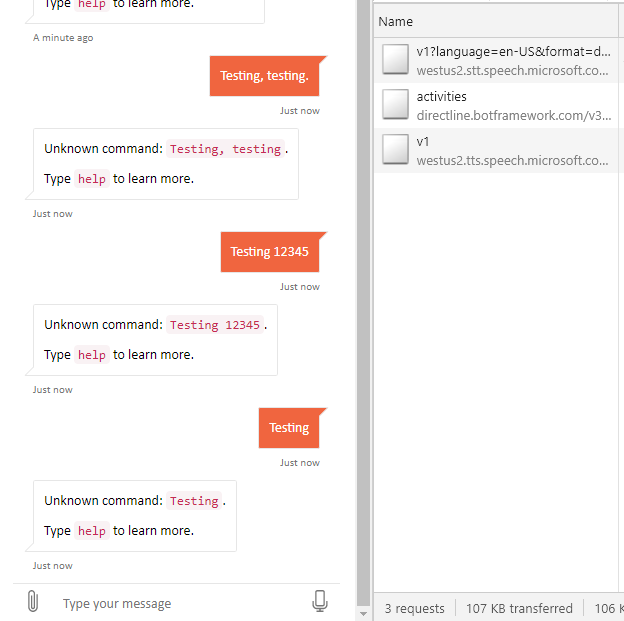
@prashanthsridhar still didn't see it from your repo.
I didn't enable Custom Speech and custom voice font. It will take us some time to setup because we don't have any sample models.
Can you verify if it is Custom Speech or voice font?
compulim
on 28 Feb 2020
Hi @compulim, just to be extra sure, click the click me button five times before actually testing.
i tried the same without putting the recognition and speech ids.
Here are the results.

prashanthsridhar
on 2 Mar 2020
Will look at this one over the next couple of days.
compulim
on 6 Mar 2020
Sorry, lost this one from my radar, will take a look again.
compulim
on 2 Apr 2020
Hi @prashanthsridhar, I am still not able to repro. I just fresh-cloned your repository and do a npm install. I updated with our Azure Bot Services secret, Speech Services subscription key, Custom Speech endpoint ID, and Custom Voice deployment ID.
Can you look at the video I attached below to see if my repro steps are correct or not?
I have been clicking the "Click me" button 5 times to start 3 recordings, and also spam-click on it 5 times.
I have turned on both Custom Speech and Custom Voice (you will see deployment ID in the network trace).
compulim
on 24 Apr 2020
closing due to inactivity
 cwhitten
on 30 Apr 2020
cwhitten
on 30 Apr 2020
Related issues
 adriantan08
·
3Comments
adriantan08
·
3Comments
 naveen-vijay
·
4Comments
naveen-vijay
·
4Comments
 corinagum
·
3Comments
compulim
·
3Comments
compulim
·
3Comments
corinagum
·
3Comments
compulim
·
3Comments
compulim
·
3Comments