Botframework-webchat: White area in the middle of the Webchat with version 4.7.1 or 4.7.0 or latest
Issue with webchat version : 4.7.1 or 4.7.0 or latest

Sample of the issue (the scrollbar end in the middle of the webchat)
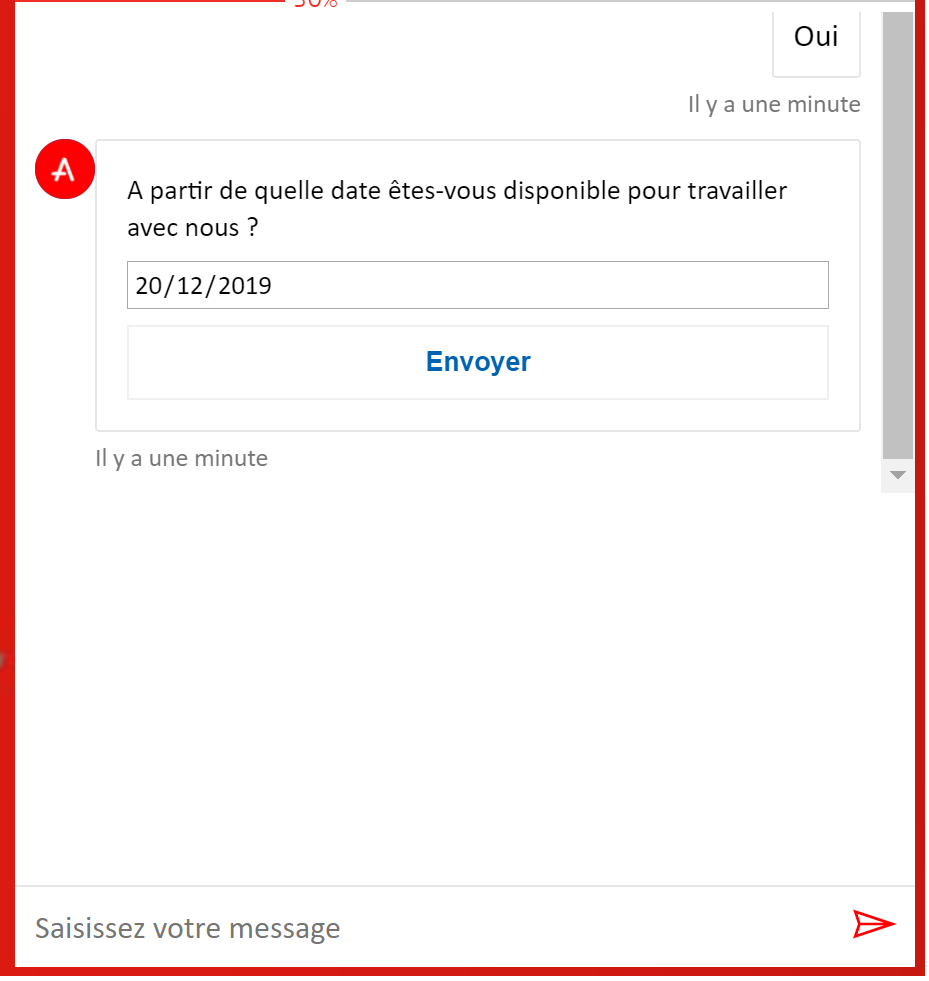
No issue with version : 4.6.0
Thank you in advance,
 didaskein
All 16 comments
Could you please share your html files (with secrets, etc removed) so we can reproduce the issue?
Thank you!
 corinagum
on 6 Jan 2020
corinagum
on 6 Jan 2020
Html send by email
didaskein
on 8 Jan 2020
All of the links provided are using 4.6 of Web Chat, so I'm not able to see the styling error.
How is the code written? Is it in an HTML file, JavaScript, etc? Please share that code with me, as opposed to the links to the deployed site. I am hoping to looking at the Web Chat-specific code to see what implementation differences there might be. I don't currently need to see the live site deployed code. You don't need to provide the entire website(s), just the code related to Web Chat. Thanks!
corinagum
on 8 Jan 2020
Sorry, now it's fixed in the page and i send you an email. sorry :)
didaskein
on 9 Jan 2020
@didaskein, I was able to repro the issue and determined that the issue is around the document.querySelector() and selector.lastChild.scrollIntoView() functions.
Starting with scrollIntoView(), the block value should be set from "start" to "end" (bot.cshtml, line #432). When set to "start", we are effectively telling the page to go to the last child of the list (correct) but then scroll upwards (incorrect). Strangely, instead of scrolling to the top, it starts to condense the transcript window upwards.
By changing the value to "end", the page goes to the last child of the list and then scrolls downward (correct).
However, I noticed that because we are query selecting on the ul element, the "last child" ("li") doesn't always come into full view when scrollIntoView() is called. I suspect that, while it is scrolling to the "last child" and it is scrolling downwards, it is only navigating to the top of the "last child" (i.e. the beginning of the element). Hence, the element doesn't always fully display.
Instead of selecting the .lastChild, simply use the "selector" element, which is the wrapper, and call scrollIntoView() on that. Following the change, my testing showed the last li (activity) almost always fully displayed which I found to be a significant improvement. Your mileage may vary, but worth checking out.
const selector = document.querySelector( 'ul[role="list"]' );
if ( selector ) {
  selector.scrollIntoView( { behavior: 'smooth', block: 'end' } );
}
Hope of help!
 stevkan
on 10 Jan 2020
stevkan
on 10 Jan 2020
@didaskein, I was able to repro the issue and determined that the issue is around the document.querySelector() and selector.lastChild.scrollIntoView() functions.
Starting with scrollIntoView(), the block value should be set from "start" to "end" (bot.cshtml, line #432). When set to "start", we are effectively telling the page to go to the last child of the list (correct) but then scroll upwards (incorrect). Strangely, instead of scrolling to the top, it starts to condense the transcript window upwards.
By changing the value to "end", the page goes to the last child of the list and then scrolls downward (correct).
However, I noticed that because we are query selecting on the ul element, the "last child" ("li") doesn't always come into full view when scrollIntoView() is called. I suspect that, while it is scrolling to the "last child" and it is scrolling downwards, it is only navigating to the top of the "last child" (i.e. the beginning of the element). Hence, the element doesn't always fully display.
Instead of selecting the .lastChild, simply use the "selector" element, which is the wrapper, and call scrollIntoView() on that. Following the change, my testing showed the last li (activity) almost always fully displayed which I found to be a significant improvement. Your mileage may vary, but worth checking out.
const selector = document.querySelector( 'ul[role="list"]' );
if ( selector ) {
selector.scrollIntoView( { behavior: 'smooth', block: 'end' } );
}
Hope of help!
@stevkan , Hello Steven.
We have added this code to fix a scrolling issue of the bot. we have noticed a scroll issue on mobile phone, sometime the bot is not scrolling at the Bottom of the conversation after receiving a new activity. (speciflcly when the user reply to an hero card or adaptive card)
Is it still the case with the latest version of the bot? Maybe this code is not necessary anymore.
Could you confirm it?
Thanks
 FabienFrancini
on 14 Jan 2020
FabienFrancini
on 14 Jan 2020
@didaskein, which mobile OS and which browser (and version) are you seeing this on?
stevkan
on 14 Jan 2020
@stevkan : we see it on a lot of different phone (Android Chrome, Edge & Iphone Safari)
didaskein
on 15 Jan 2020
Greetings,
I too have a similar issue with the rendering on iOS and IE/Edge
https://fast2aibotweb.azurewebsites.net/Home/Webbot
I tried @stevkan' suggestion above to no avail (or I'm doing it wrong).
any help would be greatly appreciated.
Thanks,
Geo
 gtejeda
on 18 Jan 2020
gtejeda
on 18 Jan 2020
@gtejeda This is a styling issue from the hosting page. I wrote down some notes below. I think the code stevkan provided above is not related to your particular problem, so I recommend removing that code. :)
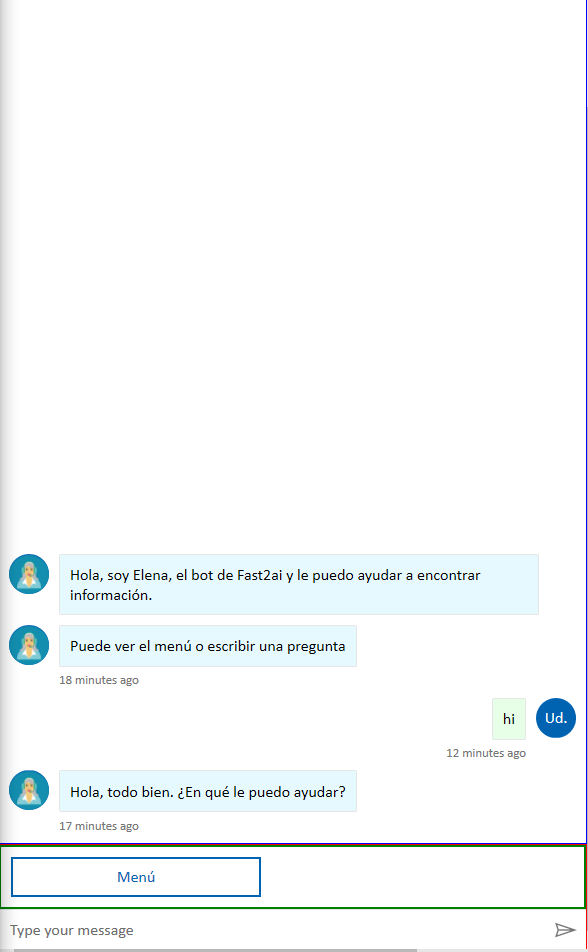
- The 'main' container in Web Chat (Send Box) is causing a problem. It looks like you are inserting the menu button into the Connectivity Status container, and this is stretching to take up most of the screen. (Green border, with menu button)
- Your transcript has
overflow: hidden, which is making the chat bubbles disappear immediately, since the menu button is stretching to take up extra space. (blue border) - The form of the Send Box had some kind of margin set up inside that was making 'Type your message' disappear, though I couldn't find where that margin was set. I set the form to
margin: 0and the UI returned to normal. (red container)
See below for my result. I added the borders to for visibility.
We don't recommend using a combination of idiosyncratic styling and branding styling (see our samples) together. If you need to make DOM changes, please use the component samples for suggestions on how to use our Web Chat components and build them around the UI you want to add. I see you might be using JS to manipulate the DOM, and this could also be interacting with React and causing errors.
Finally, it looks like this code is coming from the Direct Line Speech sample, but you are not using speech in this bot. I recommend starting from one of getting-started samples (like full-bundle) to get rid of extra code. I don't know for sure that any of it is interfering with your code, but it is a possibility.
hope that helps! :)
corinagum
on 19 Jan 2020
Onmobile we also detect a regression on the keyboard management in the lastest version of the Webchat.
With 4.7.1 & 4.7.0 the keyboard keeps opening up after each question.
With 4.6 we need to set the focus on the textbox in order to show up the keyboard. It's was better in order to maximize the size of the screen for the conversartion rendering.
Thank in advance,
didaskein
on 20 Jan 2020
Thanks for your answer @corinagum,
I did follow the samples provided as best as possible to come up with this one.
Where do you see I'm not following the samples?
I am not modifying the container or anything related to the webchat via javascript.
the only thing I customized, which can be seen in the previous link i sent here, is that I changed the width of the suggested actions in the javascript (you can even search // Added by Geo in that custom 4.7.1 file)
If you see a difference, then that's what I may be missing.
Really appreciate the help
Thanks,
Geo
gtejeda
on 20 Jan 2020
@gtejeda please see #2837 and continue our conversation there.
corinagum
on 21 Jan 2020
@didaskein, with regards to your keyboard regression issue, I am going to move that conversation offline as it is unrelated to the current issue being discussed. Please look for a response to the email you have sent me.
stevkan
on 21 Jan 2020
@stevkan i send you a new email as i have not received your reply.
didaskein
on 22 Jan 2020
@didaskein, I appreciate the call we had the other day. If I remember correctly from our discussion, it appears this particular issue has been resolved (i.e. auto-scrolling). I'm going to go ahead and close this. Please feel free to reopen if the issue returns.
stevkan
on 24 Jan 2020
Related issues
 adriantan08
·
3Comments
adriantan08
·
3Comments
 Stardox
·
3Comments
corinagum
·
3Comments
Stardox
·
3Comments
corinagum
·
3Comments
 felixhauserch
·
3Comments
felixhauserch
·
3Comments
 naveen-vijay
·
4Comments
naveen-vijay
·
4Comments