Botframework-webchat: Adaptive media does not start after play button click - Safari browser
Screenshots
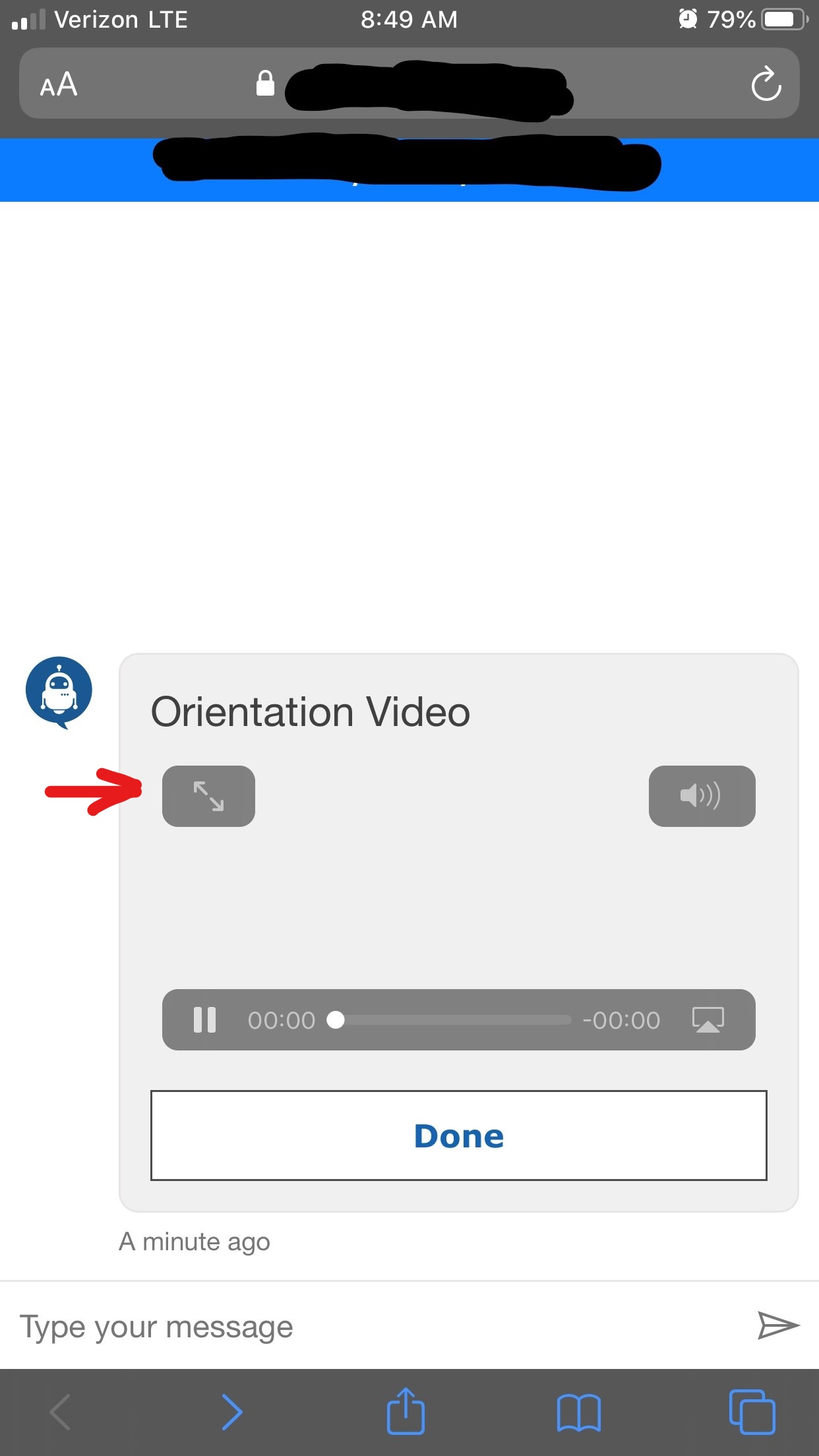
After adaptive media load:

After play button clicked:

Version
CDN v4.6.0
iPhone
Describe the bug
After clicking the play button of an adaptive media (video) the media control's action panel appears on the box and the default play button switches to pause but the actual video does not start playing.
Steps to reproduce
- Use web chat with adaptive media
- Click on the play button of the video.
- The video action controls appear on the box but video does not start.
Expected behavior
The video should start and take the full screen.
Additional context
In the provided screenshot 2 if I click on full screen action icon then the video will take the full screen and start playing.
AdaptiveCard Json
{
  "type": "AdaptiveCard",
  "version": "1.1",
  "body": [
    {
      "type": "TextBlock",
      "size": "large",
      "isSubtle": true,
      "text": "Orientation Video"
    },
    {
      "type": "Media",
      "id": "orientationVideo",
      "sources": [
        {
          "mimeType": "video/mp4",
          "url": "some video url"
        }
      ]
    }
  ],
  "actions": [
    {
      "type": "Action.Submit",
      "data": {
        "CardType": "OrientationVideoCard",
        "ModelType": "System.String",
        "ActionTitle": "Done"
      },
      "title": "Done"
    }
  ]
}
 arman-g
All 13 comments
@arman-g Can you please add the JSON for your Adaptive Card?
 tdurnford
on 9 Dec 2019
tdurnford
on 9 Dec 2019
@arman-g Can you please add the JSON for your Adaptive Card?
Added, thanks.
arman-g
on 9 Dec 2019
@arman-g Where is your video hosted - YouTube, Vimeo, self-hosted?
tdurnford
on 9 Dec 2019
@tdurnford It is self hosted.
arman-g
on 9 Dec 2019
@tdurnford just curios how do you use YouTube video in an adaptive media?
arman-g
on 9 Dec 2019
@arman-g When I reproduce your issue it looks like the video is taking a long time to load. If you let the chat sit for a couple of minutes, does the video start to play? I'll need to investigate further to determine if this is a Web Chat, Adaptive Card, or video hosting issue.
I'm not sure if Adaptive Cards supports YouTube Media; however, Web Chat supports Video Cards that support both YouTube and Vimeo Videos. Take a look at the code snippet below.
Bot Framework SDK v4.6 (Node)
await context.sendActivity({
  type: 'message',
  attachments: [{
    contentType: 'video/mp4',
    contentUrl: 'https://www.youtube.com/watch?v=rIJRFHDr1QE',
    name: 'Vision Keynote Highlights // Microsoft Build 2019'
  }]
});
@tdurnford on desktop using Chrome, Edge or Firefox it works as excepted. Starts playing as soon the overlay play button is clicked. The problem happens on iPhone and I am not sure if this is a safari problem or iPhone. One thing for sure, on iPhone when you play a video it automatically goes to full screen. I think it has something to do with this. I mean maybe in order for this to work on iPhone when the overlay play button is clicked it should also make it full screen. I expect this to be handled by the platform but who knows if this step is required for small IOS devices. This is my two cents what it is worth :). In my case if you click on the full screen action icon after clicking the overlay play button, or pause and play button right after, it will start playing with out waiting 1 or two minutes as it is in your case.
Thanks for the sample code! I am using AdaptiveCards framework but good to know that it is possible.
arman-g
on 10 Dec 2019
@tdurnford My further tests show that this happens on Safari browser only. So this is not a iPhone issue but Safari.
arman-g
on 11 Dec 2019
@arman-g we can't reproduce this behavior. Is it possible the video is loading very slowly in your environment?
 cwhitten
on 9 Jan 2020
cwhitten
on 9 Jan 2020
Hi @cwhitten, I don't think it is related to the video loading. The problem can only be reproduced on iPhone and safari on IOS.
On iPhone, when the play button is tapped we get the screen that I provided in the below image. Video will start only if I tap on full screen icon or tap on pause and play again.
Under iPhone I tested it with Safari, Chrome and Firefox browsers. Results are the same for all. It seems under iPhone the video must go to full screen for it to start playing.On Safair on IOS, when play button is clicked we get similar screen like the image provided below. Video will start playing if I click the full screen icon or click pause and play icon again.
No issues under windows desktop Edge, Chrome or Firefox browsers.
- No issues under Android.
arman-g
on 10 Jan 2020
Hi @arman-g, I'm not reproducing your scenario unfortunately. When I press the play button, the video goes into fullscreen mode but immediately starts playing. This is on both Safari and Chrome. My understanding is that your video doesn't play unless you tap twice, is that correct?
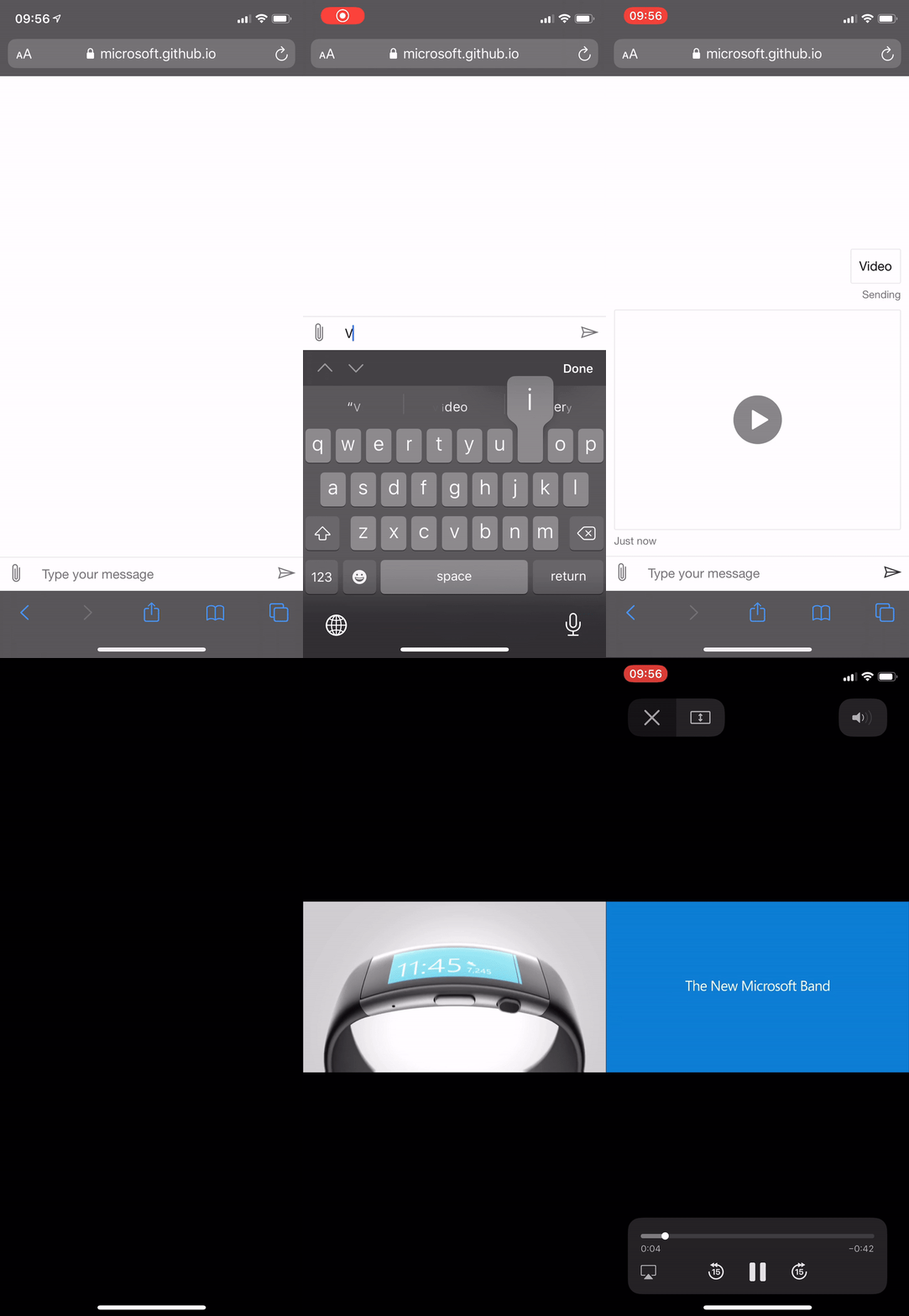
I'm hoping another customer has run into your issue so that we can get more data.
 corinagum
on 13 Jan 2020
corinagum
on 13 Jan 2020
@corinagum The Mock Bot Video command is a video card. This issue is related to videos in Adaptive Cards. I'm working on trying to repro the issue outside the scope of Web Chat to see if it's an issue with Adaptive Cards.
tdurnford
on 13 Jan 2020
@arman-g This appears to be an issue with Adaptive Cards - not Web Chat. I've opened an issue in the Adaptive Cards Repo and you can track the progress of the issue here. Thanks for reporting the issue!
tdurnford
on 13 Jan 2020
Related issues
 GewoonMaarten
·
3Comments
GewoonMaarten
·
3Comments
 adriantan08
·
3Comments
adriantan08
·
3Comments
 vikramdadwal
·
3Comments
vikramdadwal
·
3Comments
 AndreMantas
·
4Comments
AndreMantas
·
4Comments
 naveen-vijay
·
4Comments
naveen-vijay
·
4Comments