Botframework-webchat: Custom Speech integration using createCognitiveServicesSpeechServicesPonyfillFactory is not working
Screenshots
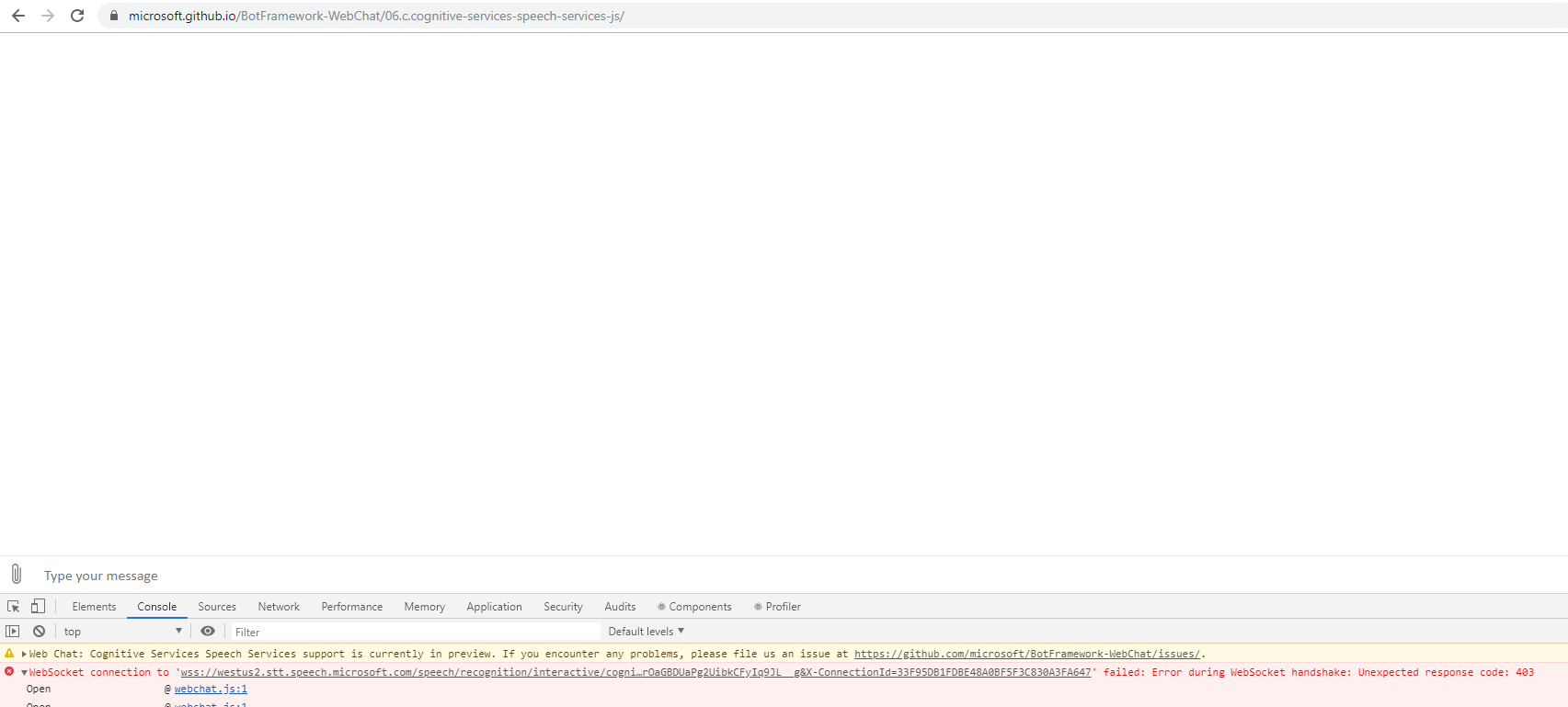
Version
The issue can be reproduced in the Sample version hosted at:
https://github.com/microsoft/BotFramework-WebChat/tree/master/samples/06.c.cognitive-services-speech-services-js
Click on "Try out MockBot"
Describe the bug
When user clicks the Mic icon, the speech is not recognized and failed with error: "failed: Error during WebSocket handshake: Unexpected response code: 403"
To Reproduce
Steps to reproduce the behavior:
- Go to 'https://microsoft.github.io/BotFramework-WebChat/06.c.cognitive-services-speech-services-js/'
- Click on Microphone icon to speak
- Say 'hello'
- See error in dev tools
Expected behavior
Speech should be recognized
Additional context
[Bug]
 renil
renil
All 4 comments
@renil I tried this on Chrome and did not run into any issues. What browser are you using with the above repro steps?
 corinagum
on 18 Sep 2019
corinagum
on 18 Sep 2019
I have tried today again with Chrome Version 77.0.3865.90 (Official Build) (64-bit) and is getting same error. Attached is the HAR file from the network tab.
microsoft.github.io.txt
renil
on 19 Sep 2019
It looks like SSL intercept happening at office network is causing the issue. Closing the ticket.
renil
on 19 Sep 2019
If of interest:
I was able to repro this issue a few times, but it is _very_ sporadic. The first two times matched the users error, however the last few displayed an 'HTTP Authentication failed' message, shown below. I'm not certain about the 403, but the HTTP error seems to occur after a set period of time has elapsed with no interaction. I haven't nailed down the time frame, but roughly between 10-30 mins causes it.
This is the console error for the HTTP error. I was unable to capture the 403 console error as my window unexpectedly refreshed.
webchat.js:1 WebSocket connection to 'wss://westus2.stt.speech.microsoft.com/speech/recognition/interactive/cognitiveservices/v1?language=en-US&format=detailed&Authorization=eyJhbGciOiJodHRwOi8vd3d3LnczLm9yZy8yMDAxLzA0L3htbGRzaWctbW9yZSNobWFjLXNoYTI1NiIsInR5cCI6IkpXVCJ9.eyJpc3MiOiJ1cm46bXMuY29nbml0aXZlc2VydmljZXMiLCJleHAiOiIxNTY4OTIxNDU4IiwicmVnaW9uIjoid2VzdHVzMiIsInN1YnNjcmlwdGlvbi1pZCI6IjU2ZjNmMDFlZjgxZDQwNmQ5ZWVhYTBlNTkyNjU3ZTdjIiwicHJvZHVjdC1pZCI6IlNwZWVjaFNlcnZpY2VzLkYwIiwiY29nbml0aXZlLXNlcnZpY2VzLWVuZHBvaW50IjoiaHR0cHM6Ly9hcGkuY29nbml0aXZlLm1pY3Jvc29mdC5jb20vaW50ZXJuYWwvdjEuMC8iLCJhenVyZS1yZXNvdXJjZS1pZCI6Ii9zdWJzY3JpcHRpb25zLzRiM2NkMDA3LTgzYWMtNDU3My1iZmQ2LWEyODVjY2ZmZGJmMS9yZXNvdXJjZUdyb3Vwcy93ZWJjaGF0LW1vY2tib3QtY3VzdG9tc3BlZWNoL3Byb3ZpZGVycy9NaWNyb3NvZnQuQ29nbml0aXZlU2VydmljZXMvYWNjb3VudHMvd2ViY2hhdC1tb2NrYm90LWN1c3RvbXNwZWVjaCIsInNjb3BlIjoic3BlZWNoc2VydmljZXMiLCJhdWQiOiJ1cm46bXMuc3BlZWNoc2VydmljZXMud2VzdHVzMiJ9.GGA75Gx8i8g0L8llqqzZTrZvXPuN3D_XvuJUQboc-Jo&X-ConnectionId=F09C69963DEA4307BA87A4807A98F014' failed: HTTP Authentication failed; no valid credentials available
Open @ webchat.js:1
Open @ webchat.js:1
(anonymous) @ webchat.js:1
(anonymous) @ webchat.js:1
ExecuteSuccessCallback @ webchat.js:1
on @ webchat.js:1
ContinueWithPromise @ webchat.js:1
FetchConnection @ webchat.js:1
(anonymous) @ webchat.js:1
(anonymous) @ webchat.js:1
ExecuteSuccessCallback @ webchat.js:1
Resolve @ webchat.js:1
Resolve @ webchat.js:1
(anonymous) @ webchat.js:1
ExecuteSuccessCallback @ webchat.js:1
Resolve @ webchat.js:1
Resolve @ webchat.js:1
(anonymous) @ webchat.js:1
ExecuteSuccessCallback @ webchat.js:1
Resolve @ webchat.js:1
Resolve @ webchat.js:1
(anonymous) @ webchat.js:1
The console error points to this text in the bundled webchat.js package, specifically "new WebSocket":
try{i.websocketClient=new WebSocket(i.uri),i.websocketClient.binaryType="arraybuffer",i.receivingMessageQueue=new r.Queue,i.disconnectDeferral=new r.Deferred,i.sendMessageQueue=new r.Queue,i.ProcessSendQueue()}catch(e){return i.connectionEstablishDeferral.Resolve(new r.ConnectionOpenResponse(500,e)),i.connectionEstablishDeferral.Promise()
 stevkan
on 19 Sep 2019
stevkan
on 19 Sep 2019
Related issues
 joshm998
·
3Comments
joshm998
·
3Comments
 stevengum
·
4Comments
stevengum
·
4Comments
 adriantan08
·
3Comments
corinagum
·
3Comments
adriantan08
·
3Comments
corinagum
·
3Comments
 vikramdadwal
·
3Comments
vikramdadwal
·
3Comments
Most helpful comment
@renil I tried this on Chrome and did not run into any issues. What browser are you using with the above repro steps?