Botframework-webchat: Enable HTML formatting in Web Chat Channel for V4
We want to migrate from WebChat V3 to V4. We're using only Web Chat channel and have enabled HTML using the suggestion here. I'm trying to build the V4 after cloning the project.
However, I was not able to find the botchat.css and botchat.js files as seen in V3. Our main customization goal is to be able to display HTML formatted text in the web chat. Any suggestions on how to achieve this. As mentioned earlier, we're targeting only Web Chat channel currently
 vijaysaimutyala
All 19 comments
This looks like a duplicate of this Stack Overflow question. Web Chat no longer generates css files.
 tdurnford
on 8 Aug 2019
tdurnford
on 8 Aug 2019
Please take a look at our branding samples to learn more about styling in v4.
 corinagum
on 8 Aug 2019
corinagum
on 8 Aug 2019
@corinagum @tdurnford Yeah, I understand that Web Chat does not generate css files anymore. U was just looking for a way to know how can I enable HTML on WebChat
vijaysaimutyala
on 8 Aug 2019
Can you be more specific with your question? I'm not entirely sure what you mean by "how can I enable HTML on WebChat." It's a fairly broad topic.
tdurnford
on 8 Aug 2019
There's a provision in the V3 of Web Chat where I can enable displaying HTML formatted text like tables, colored text etc..in the Web Chat in addition to the default markdown that Web Chat supports. The link in my original issue/question explains how to enable this.
vijaysaimutyala
on 8 Aug 2019
Web Chat no longer allows you to set the HTML option in the markdown renderer - the value is set to false. https://github.com/microsoft/BotFramework-WebChat/blob/08468b33f5825ab31e6ed88f27fee275492a3c87/packages/bundle/src/renderMarkdown.js#L52
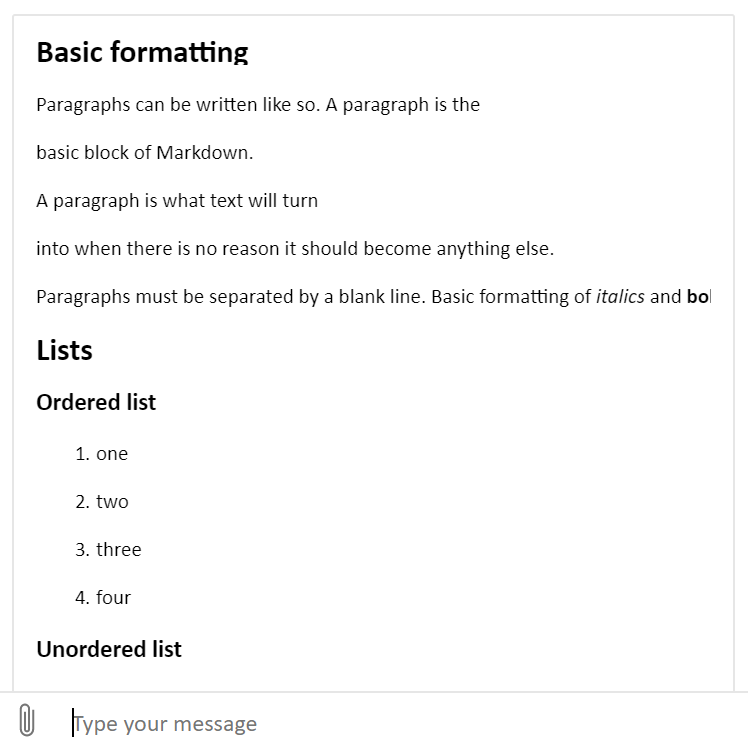
You can, however, send an activity from the bot with Markdown and Web Chat will render it into HTML.
Bot Framework SDK v4 (Node)
await context.sendActivity({
type: 'message',
textFormat: 'markdown',
text: `## Basic formatting\r\n\r\nParagraphs can be written like so. A paragraph is the \r\nbasic block of Markdown. \r\nA paragraph is what text will turn \r\ninto when there is no reason it should become anything else.\r\n\r\nParagraphs must be separated by a blank line. Basic formatting of *italics* \nand **bold** is supported. This *can be **nested** like* so.\r\n\r\n## Lists\r\n\r\n### Ordered list\r\n\r\n1. one\r\n2. two\r\n3. three\r\n4. four\r\n\r\n### Unordered list\r\n\r\n* An item\r\n* Another item\r\n* Yet another item\r\n* And there\'s more...\r\n\r\n## Paragraph modifiers\r\n\r\n### Code block\r\n\r\n\`\`\`\r\nCode blocks are very useful for developers and other \r\npeople who look at code or other things that are written \r\nin plain text. As you can see, it uses a fixed-width font.\r\n\`\`\`\r\n\r\nYou can also make \`inline code\` to add code into other things.\r\n\r\n### Quote\r\n\r\n> Here is a quote. What this is should be self explanatory. \r\n> Quotes are automatically indented when they are used.\r\n\r\n# h1\r\n## h2\r\n### h3\r\n#### h4\r\n\r\n### Headings *can* also contain **formatting**\r\n\r\n## URLs\r\n\r\nURLs can be made in a handful of ways:\r\n\r\n* A named link to [MarkItDown][3]. The easiest way to do these is to\n select what you want to make a link and hit \`Ctrl+L\`.\r\n* Another named link to [MarkItDown](http://www.markitdown.net/)\r\n* Some links have [query strings](https://bing.com?q=some value) \nthat need encoding\r\n* Sometimes you just want a URL like <http://www.markitdown.net/>.\r\n\r\n## Horizontal rule\r\n\r\nA horizontal rule is a line that goes across the middle of the page.\r\n\r\n---\r\n\r\nIt\'s sometimes handy for breaking things up.\r\n\r\n\r\n## Table\r\n|header1|header 2|\r\n|----|----|\r\n| cell 1 | cell 2|\r\n| cell three | cell four|\r\n\r\n## Whitespace\r\n\r\nHere\'s a line.\r\n\r\nThis has the standard two newlines before it.\r\n\r\n\r\n\r\nThis has four newlines before it.\r\n\r\n\r\n\r\n\r\n\r\nThis has six newlines before it.\r\n\r\n<br/><br/><br/><br/>This has two newlines and four <br/> tags before it.`
});
Screenshot
tdurnford
on 8 Aug 2019
Alternatively, you can create your own render markdown function that has HTML enabled and pass that as a prop to Web Chat. Then in the markdown string you send to Web Chat from your bot you could include basic HTML.
const markdownIt = new MarkdownIt({ html: true, linkify: true, typographer: true });
const renderMarkdown = text => markdownIt.render(text);

 ...

window.WebChat.renderWebChat({
  directLine: window.WebChat.createDirectLine({ token }),
  renderMarkdown
}, document.getElementById('webchat'));
@tdurnford Almost yes. But the tables we wanted to display do not actually look good when MarkDown renders them. I am looking at something like below. This is what we have currently implement customizing Web Chat V3.
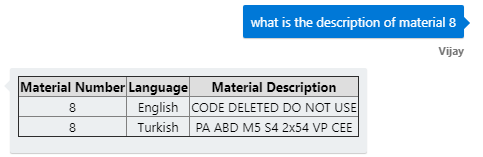
The tables rendered by MarkDown do not look as good as the one in the screenshot I shared.
vijaysaimutyala
on 8 Aug 2019
const markdownIt = new MarkdownIt({ html: true, linkify: true, typographer: true });
This is what I was looking at. For V3 I've altered the html to true from false and build the css and js files. So does this markdown function now go into the index.html page ?
vijaysaimutyala
on 8 Aug 2019
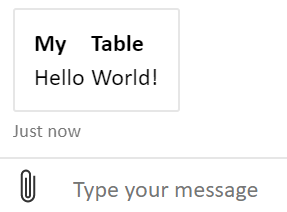
What is the markdown string you are sending? Tables should look like this:
Bot Framework SDK v4 (Node)
  await context.sendActivity({
    type: 'message',
    textFormat: 'markdown',
    text: `| My | Table |  \n|-------|--------|  \n| Hello | World! |`
  });
Screenshot
And yes for your follow up question - the Markdown function would go in the index.html file. Take a look at the Markdown-it for more details getting started building your custom markdown renderer.
tdurnford
on 8 Aug 2019
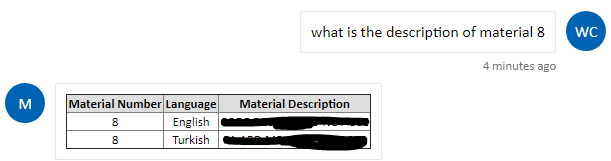
I cannot provide an example of MarkDown table right now. But I've worked on it earlier and the results are not that good. I'm adding the MarkDown render as you suggested. I'll get back in case I've any issues. Thanks for the help @tdurnford
vijaysaimutyala
on 8 Aug 2019
Got it working @tdurnford . Biggest of the issues solved. Thanks
vijaysaimutyala
on 8 Aug 2019
Web Chat no longer allows you to set the HTML option in the markdown renderer - the value is set to false.
You can, however, send an activity from the bot with Markdown and Web Chat will render it into HTML.
Bot Framework SDK v4 (Node)
await context.sendActivity({ type: 'message', textFormat: 'markdown', text: `## Basic formatting\r\n\r\nParagraphs can be written like so. A paragraph is the \r\nbasic block of Markdown. \r\nA paragraph is what text will turn \r\ninto when there is no reason it should become anything else.\r\n\r\nParagraphs must be separated by a blank line. Basic formatting of *italics* \nand **bold** is supported. This *can be **nested** like* so.\r\n\r\n## Lists\r\n\r\n### Ordered list\r\n\r\n1. one\r\n2. two\r\n3. three\r\n4. four\r\n\r\n### Unordered list\r\n\r\n* An item\r\n* Another item\r\n* Yet another item\r\n* And there\'s more...\r\n\r\n## Paragraph modifiers\r\n\r\n### Code block\r\n\r\n\`\`\`\r\nCode blocks are very useful for developers and other \r\npeople who look at code or other things that are written \r\nin plain text. As you can see, it uses a fixed-width font.\r\n\`\`\`\r\n\r\nYou can also make \`inline code\` to add code into other things.\r\n\r\n### Quote\r\n\r\n> Here is a quote. What this is should be self explanatory. \r\n> Quotes are automatically indented when they are used.\r\n\r\n# h1\r\n## h2\r\n### h3\r\n#### h4\r\n\r\n### Headings *can* also contain **formatting**\r\n\r\n## URLs\r\n\r\nURLs can be made in a handful of ways:\r\n\r\n* A named link to [MarkItDown][3]. The easiest way to do these is to\n select what you want to make a link and hit \`Ctrl+L\`.\r\n* Another named link to [MarkItDown](http://www.markitdown.net/)\r\n* Some links have [query strings](https://bing.com?q=some value) \nthat need encoding\r\n* Sometimes you just want a URL like <http://www.markitdown.net/>.\r\n\r\n## Horizontal rule\r\n\r\nA horizontal rule is a line that goes across the middle of the page.\r\n\r\n---\r\n\r\nIt\'s sometimes handy for breaking things up.\r\n\r\n\r\n## Table\r\n|header1|header 2|\r\n|----|----|\r\n| cell 1 | cell 2|\r\n| cell three | cell four|\r\n\r\n## Whitespace\r\n\r\nHere\'s a line.\r\n\r\nThis has the standard two newlines before it.\r\n\r\n\r\n\r\nThis has four newlines before it.\r\n\r\n\r\n\r\n\r\n\r\nThis has six newlines before it.\r\n\r\n<br/><br/><br/><br/>This has two newlines and four <br/> tags before it.` });Screenshot
How to achieve this in C# SDK?
Also, by adding this, will it be rendered in the bot chat emulator?
We are trying to get <br> tag working.
 alokraj68
on 8 Oct 2019
alokraj68
on 8 Oct 2019
If you want to enable HTML rendering, you will have to create a custom Markdown renderer and pass it to your Web Chat client. There really isn't anything you need to change on your bot.
No, adding these changes will not work on the emulator since you cannot pass a custom renderer to the emulator.
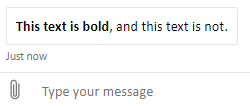
If you are just trying to make text bold, I would recommend just using markdown. It should work in both Web Chat and the Emulator, and you don't need to add a custom renderer to do this.
Bot Framework SDK v4 (Node)
await context.sendActivity('**This text is bold**, and this text is not.');
Screenshot
tdurnford
on 8 Oct 2019
@alokraj68 Check my question on SO here
vijaysaimutyala
on 16 Oct 2019
Web Chat no longer allows you to set the HTML option in the markdown renderer - the value is set to false.
You can, however, send an activity from the bot with Markdown and Web Chat will render it into HTML.
Bot Framework SDK v4 (Node)
await context.sendActivity({ type: 'message', textFormat: 'markdown', text: `## Basic formatting\r\n\r\nParagraphs can be written like so. A paragraph is the \r\nbasic block of Markdown. \r\nA paragraph is what text will turn \r\ninto when there is no reason it should become anything else.\r\n\r\nParagraphs must be separated by a blank line. Basic formatting of *italics* \nand **bold** is supported. This *can be **nested** like* so.\r\n\r\n## Lists\r\n\r\n### Ordered list\r\n\r\n1. one\r\n2. two\r\n3. three\r\n4. four\r\n\r\n### Unordered list\r\n\r\n* An item\r\n* Another item\r\n* Yet another item\r\n* And there\'s more...\r\n\r\n## Paragraph modifiers\r\n\r\n### Code block\r\n\r\n\`\`\`\r\nCode blocks are very useful for developers and other \r\npeople who look at code or other things that are written \r\nin plain text. As you can see, it uses a fixed-width font.\r\n\`\`\`\r\n\r\nYou can also make \`inline code\` to add code into other things.\r\n\r\n### Quote\r\n\r\n> Here is a quote. What this is should be self explanatory. \r\n> Quotes are automatically indented when they are used.\r\n\r\n# h1\r\n## h2\r\n### h3\r\n#### h4\r\n\r\n### Headings *can* also contain **formatting**\r\n\r\n## URLs\r\n\r\nURLs can be made in a handful of ways:\r\n\r\n* A named link to [MarkItDown][3]. The easiest way to do these is to\n select what you want to make a link and hit \`Ctrl+L\`.\r\n* Another named link to [MarkItDown](http://www.markitdown.net/)\r\n* Some links have [query strings](https://bing.com?q=some value) \nthat need encoding\r\n* Sometimes you just want a URL like <http://www.markitdown.net/>.\r\n\r\n## Horizontal rule\r\n\r\nA horizontal rule is a line that goes across the middle of the page.\r\n\r\n---\r\n\r\nIt\'s sometimes handy for breaking things up.\r\n\r\n\r\n## Table\r\n|header1|header 2|\r\n|----|----|\r\n| cell 1 | cell 2|\r\n| cell three | cell four|\r\n\r\n## Whitespace\r\n\r\nHere\'s a line.\r\n\r\nThis has the standard two newlines before it.\r\n\r\n\r\n\r\nThis has four newlines before it.\r\n\r\n\r\n\r\n\r\n\r\nThis has six newlines before it.\r\n\r\n<br/><br/><br/><br/>This has two newlines and four <br/> tags before it.` });Screenshot
Hi
Web Chat no longer allows you to set the HTML option in the markdown renderer - the value is set to false.
You can, however, send an activity from the bot with Markdown and Web Chat will render it into HTML.
Bot Framework SDK v4 (Node)
await context.sendActivity({ type: 'message', textFormat: 'markdown', text: `## Basic formatting\r\n\r\nParagraphs can be written like so. A paragraph is the \r\nbasic block of Markdown. \r\nA paragraph is what text will turn \r\ninto when there is no reason it should become anything else.\r\n\r\nParagraphs must be separated by a blank line. Basic formatting of *italics* \nand **bold** is supported. This *can be **nested** like* so.\r\n\r\n## Lists\r\n\r\n### Ordered list\r\n\r\n1. one\r\n2. two\r\n3. three\r\n4. four\r\n\r\n### Unordered list\r\n\r\n* An item\r\n* Another item\r\n* Yet another item\r\n* And there\'s more...\r\n\r\n## Paragraph modifiers\r\n\r\n### Code block\r\n\r\n\`\`\`\r\nCode blocks are very useful for developers and other \r\npeople who look at code or other things that are written \r\nin plain text. As you can see, it uses a fixed-width font.\r\n\`\`\`\r\n\r\nYou can also make \`inline code\` to add code into other things.\r\n\r\n### Quote\r\n\r\n> Here is a quote. What this is should be self explanatory. \r\n> Quotes are automatically indented when they are used.\r\n\r\n# h1\r\n## h2\r\n### h3\r\n#### h4\r\n\r\n### Headings *can* also contain **formatting**\r\n\r\n## URLs\r\n\r\nURLs can be made in a handful of ways:\r\n\r\n* A named link to [MarkItDown][3]. The easiest way to do these is to\n select what you want to make a link and hit \`Ctrl+L\`.\r\n* Another named link to [MarkItDown](http://www.markitdown.net/)\r\n* Some links have [query strings](https://bing.com?q=some value) \nthat need encoding\r\n* Sometimes you just want a URL like <http://www.markitdown.net/>.\r\n\r\n## Horizontal rule\r\n\r\nA horizontal rule is a line that goes across the middle of the page.\r\n\r\n---\r\n\r\nIt\'s sometimes handy for breaking things up.\r\n\r\n\r\n## Table\r\n|header1|header 2|\r\n|----|----|\r\n| cell 1 | cell 2|\r\n| cell three | cell four|\r\n\r\n## Whitespace\r\n\r\nHere\'s a line.\r\n\r\nThis has the standard two newlines before it.\r\n\r\n\r\n\r\nThis has four newlines before it.\r\n\r\n\r\n\r\n\r\n\r\nThis has six newlines before it.\r\n\r\n<br/><br/><br/><br/>This has two newlines and four <br/> tags before it.` });Screenshot
>
Hi @tdurnford This helped me Thank You for this answer.
This solution worked for normal text messages from bot. But,
Can you help me in markdowning text in Cards?
Thank You.
 saleemnasa
on 11 May 2020
saleemnasa
on 11 May 2020
const markdownIt = new MarkdownIt({ html: true, linkify: true, typographer: true });
MarkdownIt throw an error "ReferenceError: MarkdownIt is not defined"
How to use it then?
 primesagar
on 27 May 2020
primesagar
on 27 May 2020
Alternatively, you can create your own render markdown function that has HTML enabled and pass that as a prop to Web Chat. Then in the markdown string you send to Web Chat from your bot you could include basic HTML.
const markdownIt = new MarkdownIt({ html: true, linkify: true, typographer: true });
const renderMarkdown = text => markdownIt.render(text);

 ...

window.WebChat.renderWebChat({
  directLine: window.WebChat.createDirectLine({ token }),
  renderMarkdown
}, document.getElementById('webchat'));
@tdurnford
MarkdownIt throw an error "ReferenceError: MarkdownIt is not defined"
How to use it then?
primesagar
on 31 May 2020
@primesagar I would recommend taking a look at the MarkdownIt GitHub repo for help implementing their Markdown renderer.
tdurnford
on 1 Jun 2020
Related issues
 electrobabe
·
4Comments
electrobabe
·
4Comments
 vikramdadwal
·
3Comments
vikramdadwal
·
3Comments
 compulim
·
3Comments
compulim
·
3Comments
 1Copenut
·
3Comments
1Copenut
·
3Comments
 GewoonMaarten
·
3Comments
GewoonMaarten
·
3Comments
Most helpful comment
Please take a look at our branding samples to learn more about styling in v4.