Botframework-webchat: Text exceeds chat bubble in the "QnAmaker-prompting" sample bot
Note: this is using v3 of Web Chat on Azure Portal
Sample information
- Sample type: sample
- Sample language: csharp dotnetcore
- Sample name: qnamaker-prompting
Describe the bug
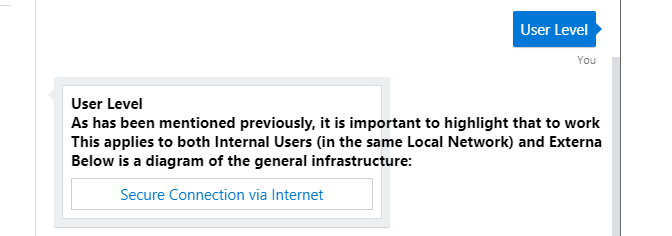
Text exceeds the chat bubble using the default "QnAmaker-prompting" sample bot and while in the Web Chat channel.
To Reproduce
Steps to reproduce the behavior:
- Create a default qnamaker Knowledge Base with the "multi-turn" feature enabled.
- Create the basic bot from the Azure Portal and link it to the QnA KB.
- Load the "qnamaker-prompting" sample bot downloaded from GitHub, just modify the appsettings file and publish it to Azure from Visual Studio so it replaces the default Bot.
- Once you ask the bot for a multi-prompt reply you will see the error. Thanks
Expected behavior
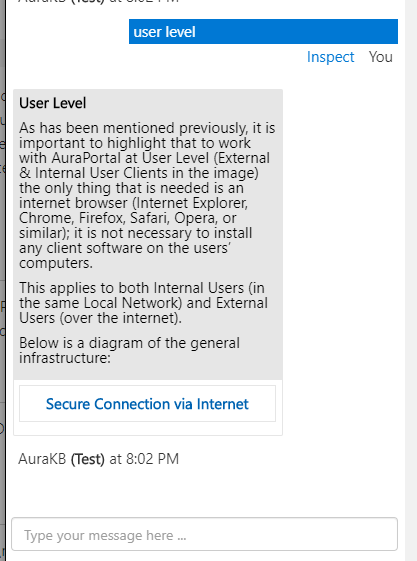
I would expect the Bot to behave as the QnA maker Test "ChatBot", meaning once an answer has multi-promt, the text will fit the bubble.
Screenshots
[bug]
 juanbello15
All 22 comments
Hi @juanbello15, could you tell me if you are experiencing this on Web Chat or Emulator, and what version you are using?
 corinagum
on 30 May 2019
corinagum
on 30 May 2019
Hi @corinagum, I'm using Web Chat and don't know the exact version but since I created a new bot yesteday with the template I assume is the v4.
Please tell me if you need anyhing else or how could I check the Web Chat version. Thanks!
juanbello15
on 30 May 2019
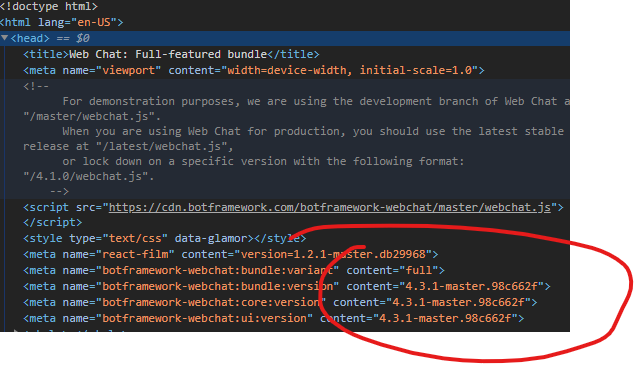
Hey @juanbello15, great thanks for updating. An easy way to check what version of Web Chat you are using is by opening the inspector on your webpage that is hosting Web Chat. It should be listed in the <head>'s meta tags, like so:
corinagum
on 30 May 2019
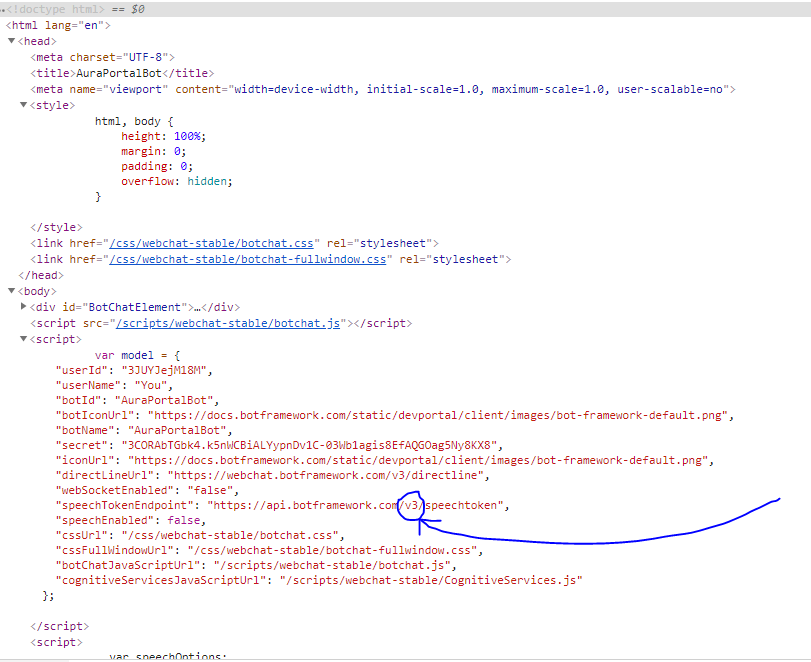
Hi @corinagum, sorry for the delay, I've been having troubles finding the html code on your pic, maybe I have a different version of the WebChat, this is what mine has:
Thanks again!
juanbello15
on 30 May 2019
No problem. It looks like you're using v3 of Web Chat, which is with iframe via Azure Portal.
corinagum
on 30 May 2019
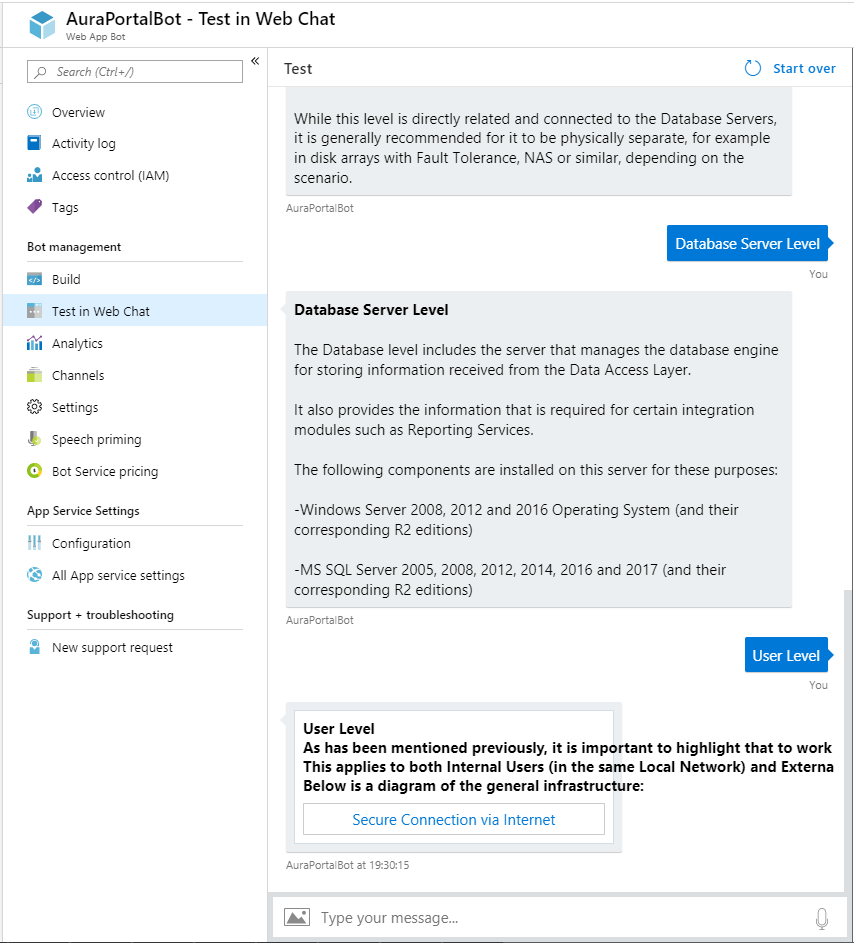
Great, the same happens inside the Test Web Chat via Azure Portal:
Should I try to change anything? Thanks for your help @corinagum!!
juanbello15
on 30 May 2019
@juanbello15, sorry for the delay in getting information to you.
V3 of Web Chat is currently in sunset mode. We only implement fixes that are related to security issues right now. The timing is really unfortunate, because we have v4 of Web Chat ready to be dialed on in Azure Portal, but we're just waiting on some technical decisions to be made on the team before users begin to experience the switch to v4.
I'd like to see if this bug is also applicable to v4. Would you mind testing this out for me? Using your bot, we're going to use v4 of Web Chat to see if the text overflow problem persists.
- Take a look at the 01.a sample to temporarily try out v4.
- Save the index.html file from the sample above to your machine. This will host Web Chat. You don't need to build a server around the webpage or anything. This is just a quick test.
- Instead of creating a token server, insert your secret into directline. (Note, this is not recommended for deployed versions of Web Chat. This is just a test to see if we can reproduce your error in v4) Your HTML should look something like this (line 35 of the sample index.html):
directLine: window.WebChat.createDirectLine({ secret: 'PASTESECRETFROMAZUREPORTALHERE' }) - Note that you can delete lines 25-33 from the
index.htmlsample. - Save this file and open it in a browser. Talk to the bot with the same conversation you provided above. Does the qna response overflow like it did in v3?
Please send me a screenshot of your results, and let me know if I can help clarify anything.
corinagum
on 30 May 2019
Hi @corinagum, no need to be sorry, you are being of a great help!
I tried your steps, even with the page inside a web app, but in both cases it's just showing a white page:

I tried running it on different browsers with the same result. Would it be ok if I give you the secret of my bot? Thanks!
juanbello15
on 30 May 2019
Based on what I'm seeing, this should be working. Could you check for a Sendbox at the bottom? It should look like this:
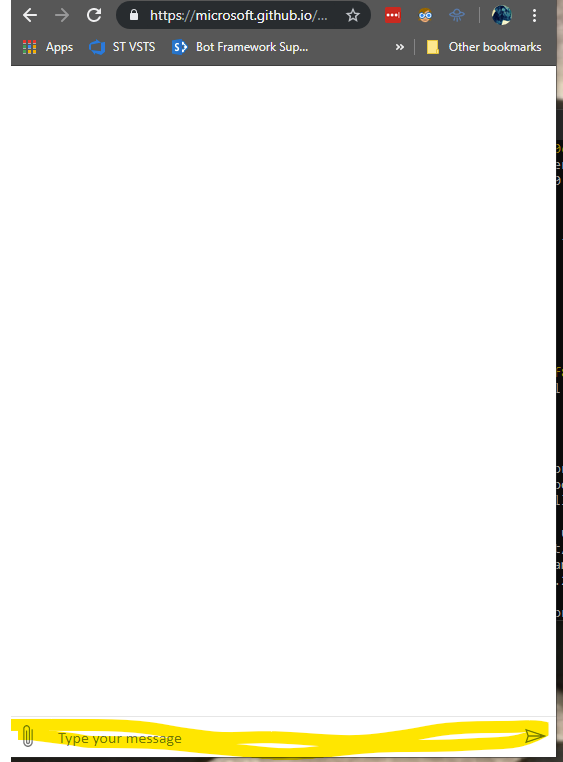
If there is a send box, try sending a message through the send box.
If this is not what you're seeing, please take a look at the console and check for errors.
corinagum
on 30 May 2019
Hi @corinagum,
Hope you don't mind (it's just a test bot so don't worry), but here it is the secret: 3CORAbTGbk4.k5nWCBiALYypnDv1C-03Wb1agis8EfAQGOag5Ny8KX8
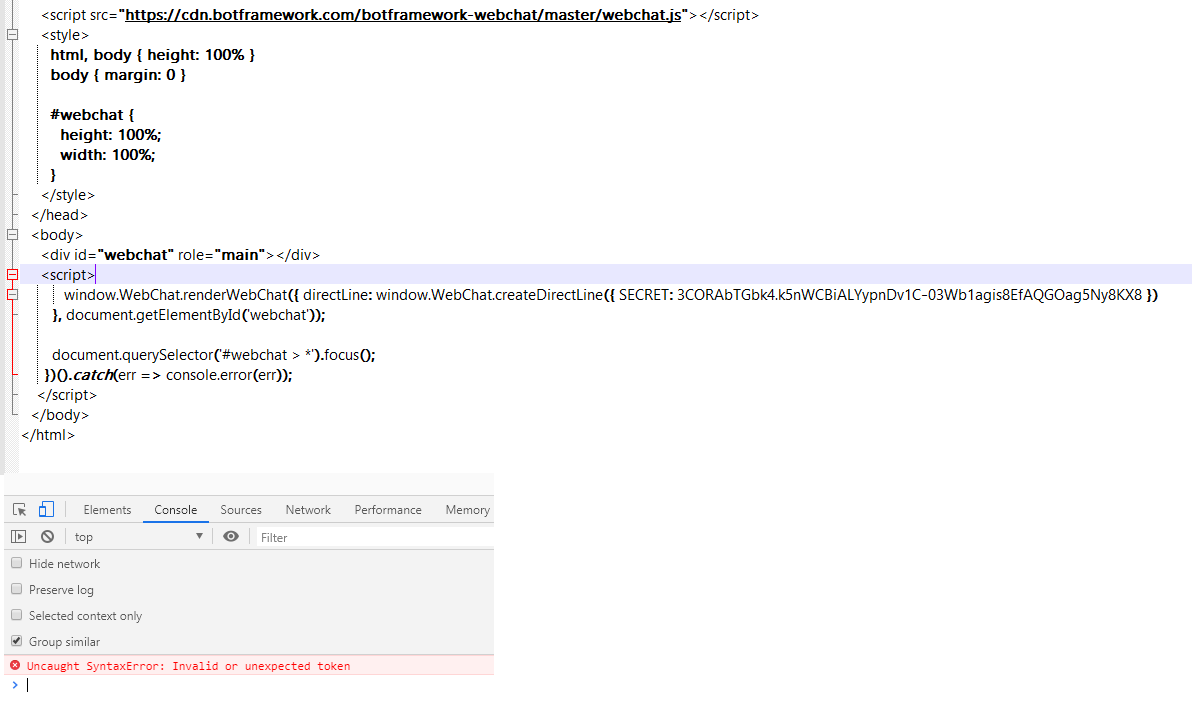
And find below the console error and the html code that I used. Hope it helps and thanks again!
juanbello15
on 30 May 2019
Hi @juanbello15 ,
It seems that secret, the key name, should be lowercase because property name is case sensitive. (it looks uppercase)
Moreover, the value of secret should be enclosed in single-quotation (or double-quotation).
Could you try to rewrite as the following code?
directLine: window.WebChat.createDirectLine({ secret: 'YOUR_SECRET_KEY' })
 nt-7
on 31 May 2019
nt-7
on 31 May 2019
Hi @nt-7,
I tried before with lowercase and single-quotation, but no luck, it's giving me the following error:
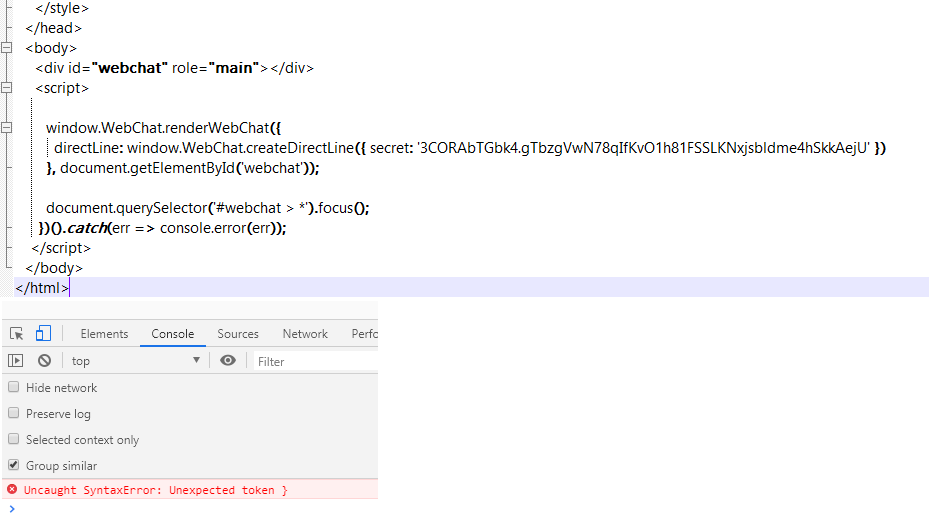
Thanks for your guidance!!
juanbello15
on 31 May 2019
It looks like the Adaptive Card is rendering properly in the most recent version of Web Chat.
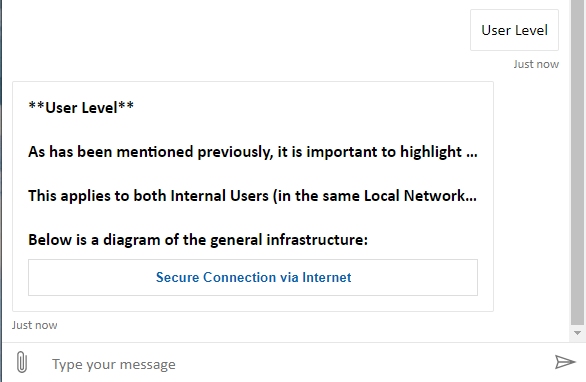
@juanbello15 If you need an immediate fix, I would recommend switching to Web Chat v4 - I added some starter code for you below. Otherwise, Test in Web Chat on Azure should be updated soon.
<!DOCTYPE html>
<html lang="en-US">
<head>
  <title>WebChat</title>
  <script src="https://cdn.botframework.com/botframework-webchat/master/webchat.js"></script>
  <style>
    html, body { height: 100% }
    body {
      margin: 0;
      }

    #webchat {
      height: 100%;
    }

  </style>
</head>
<body>

  <div id="webchat" role="main"></div>

  <script>
    (async function() {

      // Note, for the simplicity of this example, we are fetching the DirectLine token here;
      // however, it is recommended that you create a backend REST API to generate and manage
      // your tokens.
      const res = await fetch('https://directline.botframework.com/v3/directline/tokens/generate', {
        method: 'POST',
        headers: {
          'Authorization': `Bearer <SECRET>`
        }
      });

      const { token } = await res.json();

      window.WebChat.renderWebChat({
      directLine: window.WebChat.createDirectLine({ token })
    }, document.getElementById('webchat'));

    })().catch(err => console.log(err));

  </script>
</body>
For more details, please feel free to peruse our samples, which provide a lot of ideas and foundation for customizing your version of Web Chat.
If you have any 'How to' questions as you get started with Web Chat, please feel free to open questions on StackOverflow with the Web Chat tag and the Support Team will be sure assist you there.
Hope this helps!
 tdurnford
on 31 May 2019
tdurnford
on 31 May 2019
Hi @tdurnford, thanks for looking at it, but in your pic the problem is still there. The text is not overflowing but instead, it is showing just the beginning of the paragraph.
Please check this pic on how it's behaving on the QnA Test Chat Bot:
Thanks!
juanbello15
on 31 May 2019
reopening
corinagum
on 31 May 2019
@juanbello15 Would you mind sharing your Web Chat secret again? The one provided from earlier is no longer working.
tdurnford
on 31 May 2019
@tdurnford Sure, here you have: 3CORAbTGbk4.2AegAQwJvXh1-ua-_OLxOVafS2P1woScXCW3sfVF0Uw
And another one, just in case: 3CORAbTGbk4.CMi3ce9I-HSk0jZvv9vBQORGJ984PCI9oYd9_1FWEhU
Please let me know if you need anything else!
juanbello15
on 31 May 2019
@juanbello15
It looks like the Bot is sending the QnA result as a Hero Card and the text is exceeding the character limit. Are you creating the HeroCard or is it being created by QnA Maker? If you are creating the card yourself, can you please add your code?
tdurnford
on 31 May 2019
It looks like if you map the QnA result to an AdaptiveCard and set the wrap property of the TexBlock to true instead of using a Hero Card, it works fine in the newest version of Web Chat and Test in Web Chat on the Azure Portal.
Screenshot

Bot Code - onMessage - Node
this.onMessage(async (context, next) => {

  const qnaResults = await this.qnaMaker.getAnswers(context);

  if (qnaResults[0]) {
      const { answer, context: { prompts }} = qnaResults[0];

      let reply;
      if (prompts.length) {

        const card = {
          "type": "AdaptiveCard",
          "body": [
              {
                  "type": "TextBlock",
                  "text": answer,
                  wrap: true
              }
          ],
          "actions": prompts.map(({ displayText }) => ({ type: "Action.Submit", title: displayText, data: displayText })),
          "$schema": "http://adaptivecards.io/schemas/adaptive-card.json",
          "version": "1.1"
        }

        reply = { attachments: [CardFactory.adaptiveCard(card)] };
      } else {
        reply = answer;
      }

      await context.sendActivity(reply);

  // If no answers were returned from QnA Maker, reply with help.
  } else {
      await context.sendActivity('No QnA Maker answers were found.');
  }

  // By calling next() you ensure that the next BotHandler is run.
  await next();
});
}
Please let me know how you are creating the card and if you are using an AdaptiveCard instead of a Hero Card, solves your issue.
Hope this helps!
tdurnford
on 31 May 2019
It looks like the SDK Team is working on a better solution to support QnA Maker Prompt Cards. Take a look at this issue https://github.com/microsoft/botbuilder-dotnet/issues/1906
tdurnford
on 3 Jun 2019
Hi @tdurnford,
It's being created by the QnA Maker, I've been using the default code on the "qnamaker-prompting" bot (proposed also in the thread you linked): https://github.com/microsoft/BotBuilder-Samples/tree/master/experimental/qnamaker-prompting/csharp_dotnetcore
I'll wait for the new version of the Web Chat to be realeased and will apply your changes.
Thanks a lot for all your help!
juanbello15
on 3 Jun 2019
@juanbello15
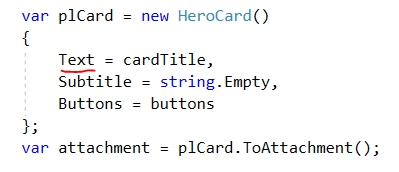
I was using the template and ran into that problem as well. A quick fix would be to switch from using a title to just text in getHeroCard method in the cardHelper class. You can do that as follows:
 imdat1guy
on 20 Jun 2019
imdat1guy
on 20 Jun 2019
Related issues
 electrobabe
·
4Comments
electrobabe
·
4Comments
 AndreMantas
·
4Comments
AndreMantas
·
4Comments
 compulim
·
3Comments
compulim
·
3Comments
 naveen-vijay
·
4Comments
naveen-vijay
·
4Comments
 felixhauserch
·
3Comments
felixhauserch
·
3Comments
Most helpful comment
@juanbello15
I was using the template and ran into that problem as well. A quick fix would be to switch from using a title to just text in getHeroCard method in the cardHelper class. You can do that as follows: