Botframework-webchat: Code not working in Sharepoint Online and IE 11
Hello,
So i have deployed custom webchat following this documentation here
Here's the code:
<!DOCTYPE html>
<html>
<head>
    <script src="https://cdn.botframework.com/botframework-webchat/master/webchat.js"></script>
    <style>
      html, body { height: 100% }
      body { margin: 0 }

      #webchat {
        height: 100%;
        width: 100%;
      }
    </style>
  </head>
  <body>
    <div id="webchat" role="main"></div>
    <script>

      window.WebChat.renderWebChat({
          directLine: window.WebChat.createDirectLine({ token: 'Token goes here' }),
          styleOptions: {
            hideUploadButton: true,
            bubbleBackground: 'rgba(0, 0, 255, .1)',
            bubbleFromUserBackground: 'rgba(0, 255, 0, .1)',

            botAvatarInitials: 'FB',
            userAvatarInitials: 'YOU',
            userAvatarImage: ''
          }
        }, document.getElementById('webchat'));
    </script>
  </body>
</html>
I don't know if there is something missing here or what
 Rykimaruh
All 16 comments
Please take a look at our es5 sample. For Web Chat to work you will need to use /webchat-es5.js/
Dupe of #1585
 corinagum
on 20 Mar 2019
corinagum
on 20 Mar 2019
@corinagum, I tried it and still having issues with IE11. Why is this closed? my issue has not been resolved yet...
Rykimaruh
on 21 Mar 2019
Hi @Rykimaruh, you asked a question that has been asked frequently before and has accessible documentation explaining why the es5 bundle is necessary. If you'll search for "Internet Explorer" in our issues search bar, you will note that this question has been asked several times. I also linked the most recent duplicate comment above.
Please provide repro steps, details on what exactly the bug you are experiencing is, and information that indicates to me or the team that this is a different issue from the previous, "Web Chat doesn't work on IE 11" issues, and I will be happy to reopen this one for you.
corinagum
on 21 Mar 2019
1830 indicates @Rykimaruh is using Sharepoint Online. I'll link this related issue: https://github.com/Microsoft/BotFramework-WebChat/issues/1722
corinagum
on 21 Mar 2019
@corinagum As I mentioned, I tried the solutions and I still have the issue going on, so I believe it's a different behavior to what other users tried.
As I mentioned, my custom webchat works in all browsers except IE11 inside SharePoint Online site.
The SharePoint site I have is a Publishing Site (Classic site)
I literally embedded the code you see above to a "Script Editor" webpart and nothing happens. Just a blank space where the webchat should be. However I do the same thing for Chrome and Firefox, it works fine.
As a matter of fact, this code actually works when I open it on a separate IE11 tab, but when it's inside the SharePoint Online site, nothing happens. So I suppose either:
- IE11 is blocking it for sharepoint online
- Weird compatibility between sharepoint online and the custom webchat
I made a webapp where I have the code hosted on. Then made an Iframe so I can embed it in the SharePoint Online site. Because this is a temporary link for testing, here's the Iframe code I tried embedding on the site
<iframe src='https://webchattest123.azurewebsites.net' style='min-width: 400px; width: 100%; min-height: 500px;'></iframe>
Rykimaruh
on 21 Mar 2019
@Rykimaruh, we have another issue https://github.com/Microsoft/BotFramework-WebChat/issues/1394 that indicates that SharePoint Online does not work with iframe, but let's investigate further. Would you be willing to try the non-embed option to see if that will work SharePoint for you? You can follow our basic samples (like what you linked above), but be sure to use the polyfill CDN when you try it out.
It would still be really helpful if you can provide your console errors that you receive when trying this out.
corinagum
on 21 Mar 2019
@dmvtech is the team's SharePoint expert and may have some tips he wants to add in.
corinagum
on 21 Mar 2019
@Rykimaruh I know you're getting the problem on the classic view and not modern, but I wonder if you might be hitting the same issue as here. The problem there is that SharePoint wants the width and height attributes on the iframe element instead of within a style attribute.
If you can quickly test that, that would at least rule this issue out (if it doesn't resolve it). I will see if I can reproduce the same that you are experiencing.
 dmvtech
on 21 Mar 2019
dmvtech
on 21 Mar 2019
@dmvtech , I followed the instructions in the StackOverflow link and made the changes :
Unfortunately, it still doesn't work in IE11 SharePoint Online site.
I attached the code used to render the custom webchat using the es5 sample and then I uploaded it to a WebApp in Azure to create the iframe you see above.
Rykimaruh
on 21 Mar 2019
Hey @Rykimaruh!!
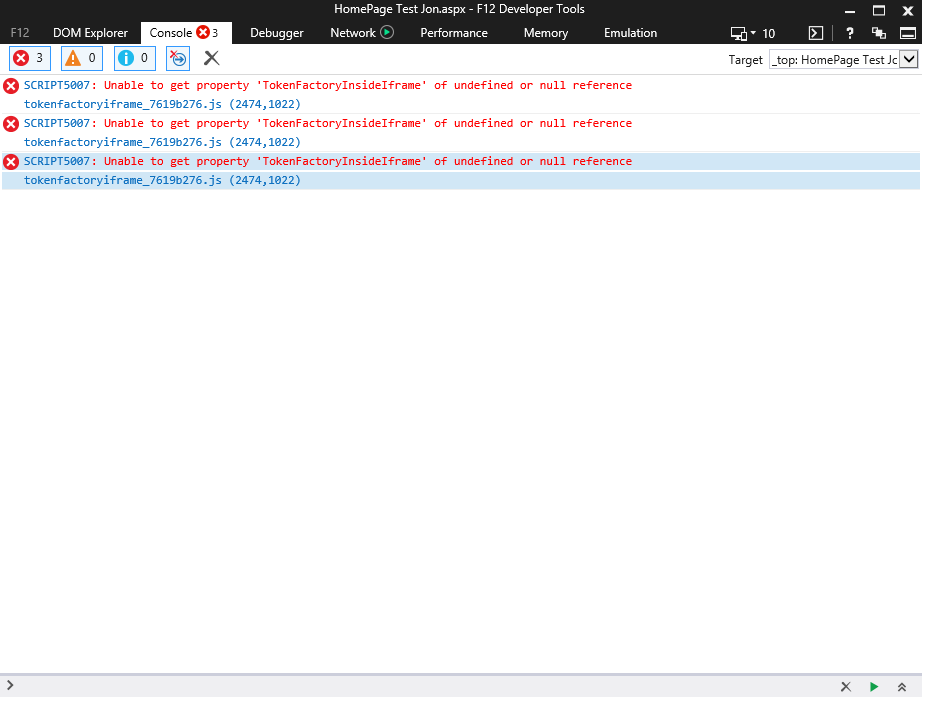
Can you post a screenshot of the error in your console?
 jwiley84
on 21 Mar 2019
jwiley84
on 21 Mar 2019
@jwiley84 , Interesting, for a few minutes there are no errors in the console, however it eventually displays some messages. As shown in the picture
Rykimaruh
on 22 Mar 2019
I wasn't able to reproduce the issue. :(
IE11, SharePoint online, classic publishing page using _your_ iframe.

If you haven't already, you might want to test from another IE11 machine (maybe on different/no domain, etc), just to isolate whether or not it has anything to do with your specific install/build/implementation of IE.
dmvtech
on 23 Mar 2019
Weird, I will investigate and try this out
Rykimaruh
on 23 Mar 2019
Let me know if you find any other variables; I will try them out.
dmvtech
on 23 Mar 2019
@dmvtech , hello again. It would seem the issue lies with the particular sharepoint site I am trying to deploy the bot to. I created a new sharepoint site and it worked fine in IE11. I suppose something in that site is either blocking or creating issues with the webchat render
Rykimaruh
on 25 Mar 2019
Interesting. Yeah, might be the flight/version of SPO that is being used, etc.
I'll go ahead and close this one down as we have a cause.
dmvtech
on 25 Mar 2019
Related issues
 AndreMantas
·
4Comments
AndreMantas
·
4Comments
 Kellym-Kainos
·
4Comments
Kellym-Kainos
·
4Comments
 joshm998
·
3Comments
joshm998
·
3Comments
 prashanthsridhar
·
3Comments
prashanthsridhar
·
3Comments
 felixhauserch
·
3Comments
felixhauserch
·
3Comments
Most helpful comment
Hey @Rykimaruh!!
Can you post a screenshot of the error in your console?