Botframework-webchat: Choice prompt UI changes depending on Text size?
I have noticed that the Prompt UI changes based on the size of the option text:
"Home" - is displayed fine
"Do some other action that is bigger" - is displayed as a list in the response
In order for me to select the large option, the user must type out the text.
Is there already a workaround for this?
If not I think this would be a valuable feature to look at, let me know your thoughts
 Jhanbury
All 6 comments
@Jhanbury do you have screenshots or a working bot example that displays your issue? If you could provide code that creates this issue that would be great as well.
 corinagum
on 11 Feb 2019
corinagum
on 11 Feb 2019
@corinagum my apologies here is the UI results of what's happening:
Here is the normal scenario where the action text is under 20 characters:
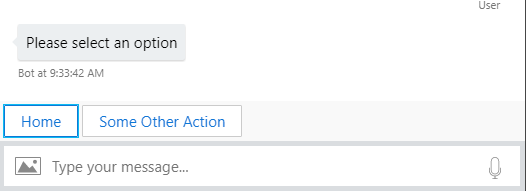
And here is the result of what happens when the action's text is > 20 characters:
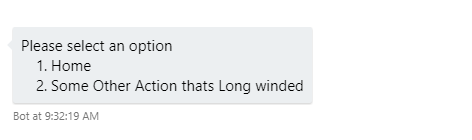
As you can see it now requires the user to input the text rather than the suggested actions.
Recreation
As for code Im simply adding the choices to the Choices property of PromptOptions
options.Choices.Add(new Choice { Value = "Home" });
Is this a setting I can modify?
Or is there a valid reason for why the action text cannot be more than 20 characters long, maybe for horizontal space?
Jhanbury
on 12 Feb 2019
Could this be the source of the issue:
What does the flipperSize represent?
Apologies I am not very familiar with the internals of the repository
Jhanbury
on 12 Feb 2019
@Jhanbury Thanks for the details!
Looking at the botbuilder code, it appears there is a 20 character max on suggested actions. I don't know of a workaround, but I have forwarded this issue to the SDK team for further insight. Hope that helps!
corinagum
on 12 Feb 2019
@Jhanbury can you provide more code on how you're creating the prompt? If you change the Style attribute on your ChoicePrompt instance, you can specify SuggestedActions by using ListStyle.SuggestedActions.
// Not a strong C# dev, but I believe this should work...
var choicePrompt = new ChoicePrompt("someId") {
    Style = ListStyle.SuggestedActions
}
Let me know if this solves the issue, thanks!
 stevengum
on 13 Feb 2019
stevengum
on 13 Feb 2019
@stevengum your solution is correct,I was not explicitly setting the style.
The result is the actions buttons are displayed with a cut off as shown in the photo:
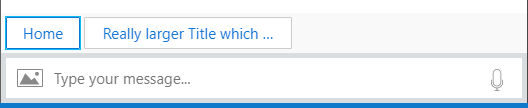
If you wish to see the full title you just have to hover over the button for the tooltip (nice feature).
Thanks @corinagum and @stevengum for your help
Jhanbury
on 13 Feb 2019
Related issues
 joshm998
·
3Comments
corinagum
·
3Comments
joshm998
·
3Comments
corinagum
·
3Comments
 electrobabe
·
4Comments
corinagum
·
3Comments
electrobabe
·
4Comments
corinagum
·
3Comments
 mmalaiarasan-conga
·
3Comments
mmalaiarasan-conga
·
3Comments
Most helpful comment
@stevengum your solution is correct,I was not explicitly setting the style.
The result is the actions buttons are displayed with a cut off as shown in the photo:
If you wish to see the full title you just have to hover over the button for the tooltip (nice feature).
Thanks @corinagum and @stevengum for your help