Botframework-webchat: Buttons loading as list
I am using a thumbnail card to display a title, subtitle and buttons. The buttons appear fine in emulator. However using web chat on server, the buttons are appearing as bullet list, i.e. _thumbnail is not loading correctly in web chat_.
 JasmeetVirdi
All 12 comments
This sounds familiar and I remember there is an issue (or by design) on Bot Builder SDK side.
@corinagum can you help and look it up? @stevengum might know more about it.
 compulim
on 10 Jan 2019
compulim
on 10 Jan 2019
@JasmeetVirdi could you share your thumbnail card for reproduction purposes? Thank you!
 corinagum
on 10 Jan 2019
corinagum
on 10 Jan 2019
Here is the code that i use,
private static void ShowThumbnailCard(IMessageActivity replyMessage)
        {
            List<CardImage> cardImages = new List<CardImage>();
            cardImages.Add(new CardImage(url: "*****"));
            List<CardAction> cardButtons = new List<CardAction>();
            CardAction plButton1 = new CardAction()
            {
                Value = "is",
                Type = "postBack",
                Title = "IS Services",
                Text = "is",
            };
            CardAction plButton2 = new CardAction()
            {
                Value = "erp",
                Type = "postBack",
                Title = "ERP Process",
                Text = "erp"
            };
            CardAction plButton3 = new CardAction()
            {
                Value = "retail",
                Type = "postBack",
                Title = "RETAIL",
                Text = "retail"
            };
            CardAction plButton4 = new CardAction()
            {
                Value = "hr",
                Type = "postBack",
                Title = "HR Policy",
                Text = "hr"
            };
            CardAction plButton5 = new CardAction()
            {
                Value = "I want to log an it call",
                Type = "postBack",
                Title = "Log a case in ***",
                Text = "Transaction"
            };
            cardButtons.Add(plButton1);
            cardButtons.Add(plButton2);
            cardButtons.Add(plButton3);
            cardButtons.Add(plButton4);
            cardButtons.Add(plButton5);
            ThumbnailCard plCard = new ThumbnailCard()
            {
                Title = "Select One of the Domain",
                Subtitle = "your search engine is here...",
                Images = cardImages,
                Buttons = cardButtons
            };
            Attachment plAttachment = plCard.ToAttachment();
            replyMessage.Attachments.Add(plAttachment);
        }
@JasmeetVirdi, a few questions...
- Which version of webchat are you using? Which version of the emulator?
- Which version of the SDK are you using?
Also, could you provide a screenshot of the behavior in webchat? Thanks!
 stevengum
on 10 Jan 2019
stevengum
on 10 Jan 2019
@compulim - I rediscovered our related issue: https://github.com/Microsoft/BotFramework-WebChat/issues/1333
corinagum
on 14 Jan 2019
Hello @stevengum ,apologies for late reply.
I am using SDK version 3
The version of emulator is 3.5.36
i am not really sure abt the webchat version.
Also, @corinagum the related issue's overall conclusion is not clear.Will need some help regarding that.
JasmeetVirdi
on 16 Jan 2019
@JasmeetVirdi oops sorry, I should have been more clear - I was pointing out that we have had this issue reported before. Getting your Web Chat version will be a big help for us.
As for the version of Web Chat, are you using iframe on your page? If so, your Web Chat is v3. If you are using NPM or CDN, please tell me the version or package number and we can figure out from there. :)
corinagum
on 16 Jan 2019
Hi @corinagum sorry for late reply,
i am using iframe on my page so that will be Web Chat v3.
JasmeetVirdi
on 28 Jan 2019
Thanks @JasmeetVirdi. I will need to investigate if this problem is reproduce-able on v4. Let me get back to you!
corinagum
on 29 Jan 2019
Hi @JasmeetVirdi, I'm sorry about the delay in getting back to you!
I looked into this issue, and unfortunately I'm not able to repro it in v3. I used the thumbnail code you provided me and got it to display as expected in v3
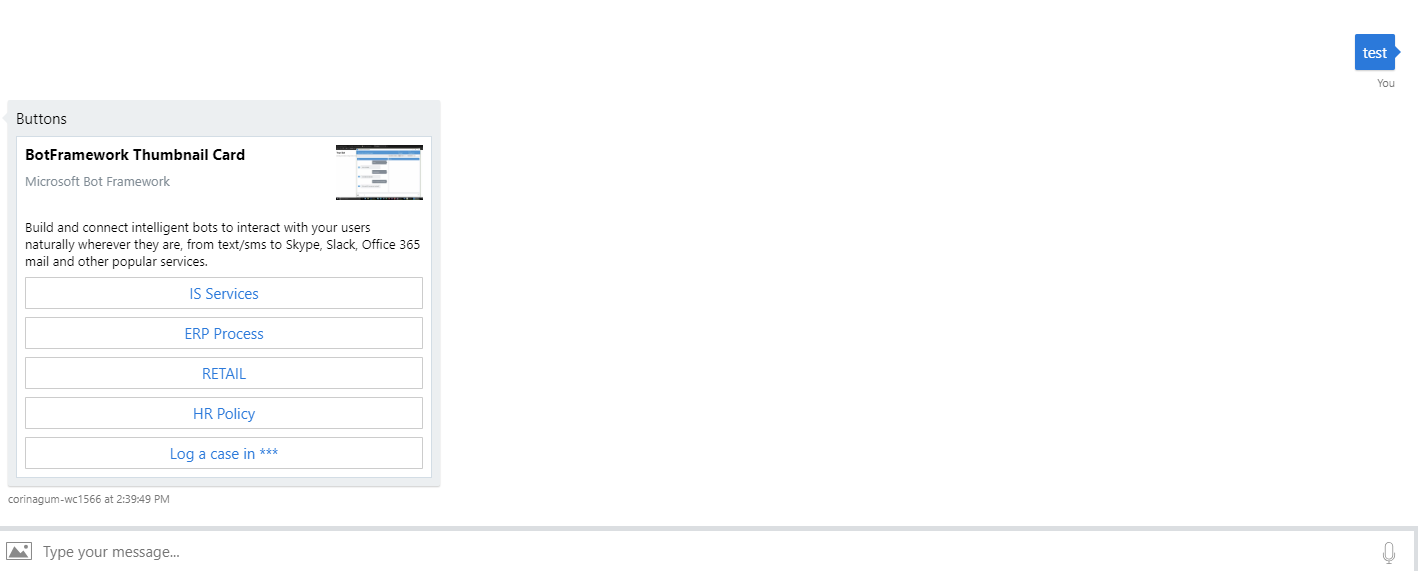
The only thing I can think of that may be causing this issue is that perhaps you haven't set your reply to have an attachment layout of type List?
reply.AttachmentLayout = AttachmentLayoutTypes.List;
reply.Attachments = new List<Attachment>();
reply.Attachments.Add(cardAttachment);
await context.PostAsync(reply);
Since this appears to be a bot implementation issue, I recommend taking this to Stack Overflow if you are still having problems. Thanks again for your patience!
corinagum
on 13 Feb 2019
@corinagum The screenshot you provided is from webchat or emulator?The thumbnail appears fine in emulator but not in webchat for me.
JasmeetVirdi
on 15 Feb 2019
The screenshot is in v3 Web Chat. :)
corinagum
on 15 Feb 2019
Related issues
 felixhauserch
·
3Comments
felixhauserch
·
3Comments
 electrobabe
·
4Comments
electrobabe
·
4Comments
 adriantan08
·
3Comments
adriantan08
·
3Comments
 naveen-vijay
·
4Comments
naveen-vijay
·
4Comments
 vikramdadwal
·
3Comments
vikramdadwal
·
3Comments