Botframework-webchat: Adaptive Card not rendering correctly when showing images
Web Chat control not rendering AdaptiveCard correctly when showing an image.
When using the emulator and directline tests everything works fine.

 djpirra
All 12 comments
This is the adaptive card schema I am using:
{
"$schema": "http://adaptivecards.io/schemas/adaptive-card.json",
"type": "AdaptiveCard",
"version": "1.0",
"body": [
{
"type": "TextBlock",
"size": "default",
"text": "1. Right click on the report menu and select open from the task list:",
"wrap": true,
"maxLines": 0
},
{
"type": "Image",
"url": "https://********.azurewebsites.net/Images/Print1.JPG",
"size": "auto",
"horizontalAlignment": "center",
"selectAction": "No"
}
]
}
(Edited by @compulim for code formatting)
djpirra
on 11 Nov 2018
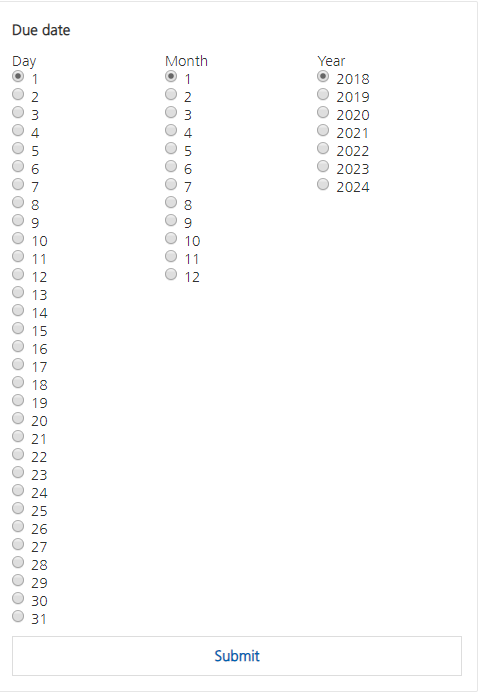
I have the same problem, in BotFramework emulator it displays good but in webchat integration, proactive messages and adaptive cards don't display as they have to.

 elena20ruiz
on 12 Nov 2018
elena20ruiz
on 12 Nov 2018
I believe there are few separate issues.
Suggested actions issue
One of the issue is related to Direct Line service treating Web Chat as a SMS client so they turns all suggested actions into (1) Yes (2) No. @stevengum do you know anything about this? If yes, could you fill in more details? If no, please let me know, I will figure it out.
Image issue
The second one, about the Adaptive Cards image not showing correctly. We will investigate. Thanks for sending in the Adaptive Cards JSON, it really help.
Multi-choice not in compact mode
The third one, @elena20ruiz are you using Web Chat v3 or v4? Or @corinagum, can you verify if this is a problem in v4 too? I know it is affecting v3. If it repro in v4, please open a bug.
Adaptive Cards do not show multiple choices in compact mode (drop down), they show it in expanded mode (checkboxes). You can workaround it by providing your own Adaptive Cards Host Config file, you can do it in both v3 and v4.
 compulim
on 13 Nov 2018
compulim
on 13 Nov 2018
Hi @compulim, about adaptive card multi-choice, I am using v4, and tried with master version. But I will try to generate my own Adaptive Card Host Config file. Thanks.
elena20ruiz
on 13 Nov 2018
I'm having the same issue when creating either a ChoicePrompt or ConfrimPrompt in a Waterfall Dialog. I'm using the v4 .Net Core C# SDK. Always get '(1) Yes (2) No' in the browser, but it works fine in the emulator.
 baldrin
on 16 Nov 2018
baldrin
on 16 Nov 2018
I was able to resolve my issue. In the v4 C# SDK. After some debugging it appears the Choice.Style defaults to 'Auto'. The result is when using the directline channel it causes the choice to appear as '1) Yes 2) No'. I changed my code from
AddDialog(new ChoicePrompt(VerifyInfoPrompt));
to
AddDialog(new ChoicePrompt(VerifyInfoPrompt)
{
    Style = ListStyle.SuggestedAction,
});
The above code makes the choices show up as buttons again. I'd like to take this moment to thank myself for my tenaciousness in trying to resolve this issue. :)
baldrin
on 18 Nov 2018
@baldrin that's a good one. I know that is a bug on the SDK but I never know it can be workaround-ed.
I always dig into the (JavaScript) source code whenever I hit some obstacles.
- I am always the expert of my own problem
- If I found the bug in the code, I can just point it to the authors and they can fix it right away
- Talking in code is easier than talking in English, the "code -> English -> code" translation introduce lost in fidelity 🤣
Hope it isn't too difficult to debug into C# code.
compulim
on 27 Nov 2018
Need to investigate the JSON missing image problem.
 corinagum
on 29 Nov 2018
corinagum
on 29 Nov 2018
Guys, any updates on the AdaptiveCards problem? That was the main issue here.
djpirra
on 6 Dec 2018
Hi @djpirra, sorry for the delay. We still need to do some investigation on this one.
To investigator:
take adaptive card JSON that djpirra provided and test on MockBot
corinagum
on 8 Dec 2018
Hi All,
We need to have a clarification/update on this since we are missing a big selling opportunity here.
Thank you
djpirra
on 17 Dec 2018
@djpirra Sorry for the delay in getting back to you. I tested this Adaptive Card and I am able to get it to render normally on both v3 and v4 of Web Chat.
Are you using the Azure Portal iframe embed? If yes, one error I noticed is that you are using version 1.0 of Adaptive Cards, but v3 only supports up through 0.6.1 right now. We are excited to update to Azure Portal with v4, and that progress can be tracked here: https://github.com/Microsoft/BotFramework-WebChat/issues/1086
If you need to use Adaptive Cards version 1.0 are willing to update to v4 (not using embed), it's possible that this issue may be resolved by bumping Web Chat.
here is my screencap:

If you'd like to try out Web Chat v4, please take a look at our samples for how to get started. 01.a.getting-started-full-bundle
corinagum
on 15 Jan 2019
Related issues
 electrobabe
·
4Comments
electrobabe
·
4Comments
 filipjakov
·
4Comments
filipjakov
·
4Comments
 marcasmar94
·
3Comments
marcasmar94
·
3Comments
 prashanthsridhar
·
3Comments
compulim
·
3Comments
prashanthsridhar
·
3Comments
compulim
·
3Comments
Most helpful comment
I was able to resolve my issue. In the v4 C# SDK. After some debugging it appears the Choice.Style defaults to 'Auto'. The result is when using the directline channel it causes the choice to appear as '1) Yes 2) No'. I changed my code from
AddDialog(new ChoicePrompt(VerifyInfoPrompt));to
AddDialog(new ChoicePrompt(VerifyInfoPrompt)
{
    Style = ListStyle.SuggestedAction,
});
The above code makes the choices show up as buttons again. I'd like to take this moment to thank myself for my tenaciousness in trying to resolve this issue. :)