Botframework-webchat: Latest WebChat : IE11 Compatibility
Hi
I am using the latest version of the webchat framework. I took the full-bundle sample from the github repository.
<script src="https://cdn.botframework.com/botframework-webchat/latest/botchat-es5.js"></script>
<script src="https://cdn.botframework.com/botframework-webchat/master/webchat.js"></script>
<style>
  html, body { height: 100% }
  body { margin: 0 }

  #webchat,
  #webchat > * {
    height: 100%;
    width: 100%;
  }
</style>
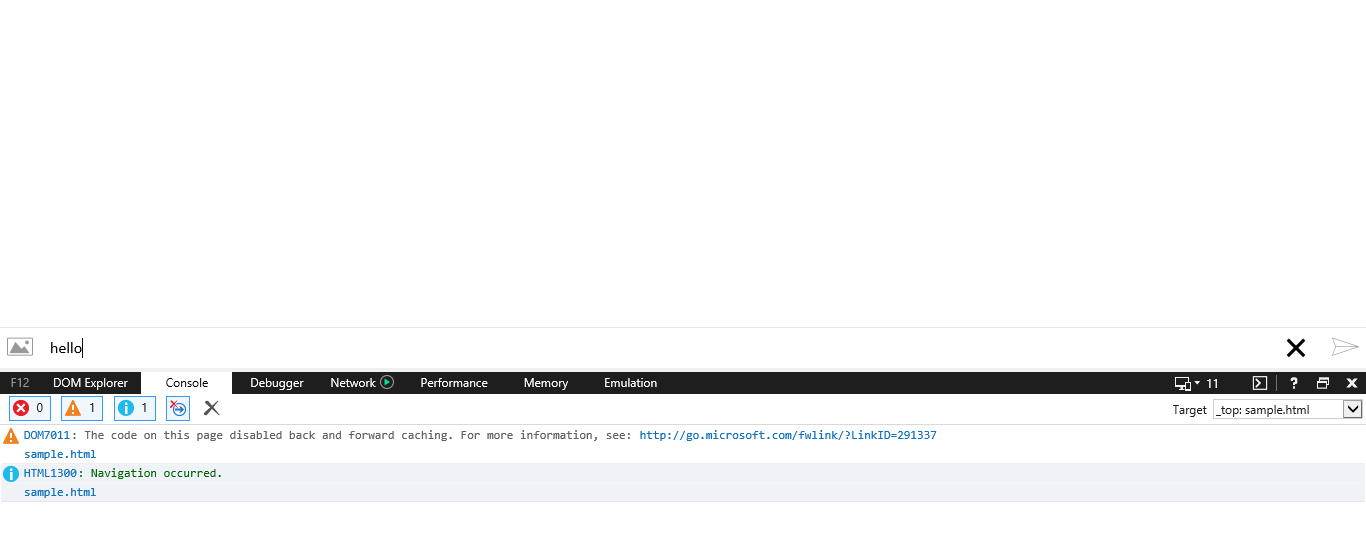
After typing the message, when I press the enter, the message is not posting to the bot
Thanks in advance
I encountered the same issue and finally, I've remarked that the messages itself are shown in DOM but I cannot see them. The problem was when the div with the webchat id was included in another div.
Please find here a working example (if you uncomment the commented lines will see that will not work anymore):
<!DOCTYPE html>
<html lang="en-US">
<head>
    <script src="https://cdn.botframework.com/botframework-webchat/master/webchat-es5.js"></script>
    <style>
      html, body { height: 100% }
      body { margin: 0 }

      #webchat {
        height: 100%;
        width: 100%;
      }
    </style>

</head>
<body>
    <!--<div class="chatbot-popup" id="chatbotForm">-->
        <div id="webchat"></div>
    <!--</div>-->

    <script type="text/javascript" language="JavaScript">
          var botConnection = new window.WebChat.createDirectLine({
            token: "myToken"
          });

          var styleOptions = {
            botAvatarInitials: 'IDA',
            userAvatarInitials: 'ME'
          };

          window.WebChat.renderWebChat({
            directLine: botConnection,
            styleOptions: styleOptions
          }, document.getElementById('webchat'));
    </script>
</body>
</html>
Here is also the official example:
https://github.com/Microsoft/BotFramework-WebChat/tree/master/samples/01.b.getting-started-es5-bundle
 linuradu
on 19 Apr 2019
linuradu
on 19 Apr 2019
All 6 comments
It looks like to use IE11 you need to register it differently. Below is the sample from https://github.com/Microsoft/BotFramework-WebChat/blob/master/samples/es5-bundle/index.html
window.fetch('https://webchat-mockbot.azurewebsites.net/directline/token', { method: 'POST' })
.then(function (res) {
  return res.json();
})
.then(function (json) {
  const token = json.token;
  window.WebChat.renderWebChat({
    directLine: window.WebChat.createDirectLine({
      token: token
    })
  }, document.getElementById('webchat'));
  document.querySelector('#webchat > *').focus();
});
 rosskyl
on 8 Nov 2018
rosskyl
on 8 Nov 2018
@rosskyl Thanks for answering this, you are correct IE11 doesn't support async keyword and need to use thenable instead. 😉
@chinnivyshnavi You only need webchat-es5.js, not both botchat-es5.js and webchat.js.
 compulim
on 8 Nov 2018
compulim
on 8 Nov 2018
Thank you guys... there are no errors in the IE console but the message is not posting in the conversation.
my updated code:
<script src="https://cdn.botframework.com/botframework-webchat/latest/webchat-es5.js"></script>
<style>
  html, body { height: 100% }
  body { margin: 0 }

  #webchat,
  #webchat > * {
    height: 100%;
    width: 100%;
  }
</style>
After typing the message, when I press the enter, the message is not posting to the bot
Thanks in advance
 chinnivyshnavi
on 10 Nov 2018
chinnivyshnavi
on 10 Nov 2018
@Support Could someone take over this issue? If the send button is disabled (as indicated in the screencap), there may be a JS error or the connection failed.
 corinagum
on 29 Nov 2018
corinagum
on 29 Nov 2018
I need to enable webSpeechPonyfillFactory in es5, but the code is working fine in chrome and firefox not in IE.
Below is the code I am using, plz guide me to fix the issue in IE.
Code:
var webSpeechPonyfillFactory;
var region = "westeurope";
    var authorizationToken;
    var directLineToken;


    window.fetch('/BotTest/GetBothToken', { method: 'POST' })
        .then(function (res) {
            return res.json();
        })
        .then(function (json) {
            authorizationToken = json.speechToken;
            directLineToken = json.directLineToken;

            window.WebChat.createCognitiveServicesSpeechServicesPonyfillFactory({ authorizationToken: authorizationToken, region: region }).then(function (res) {
                webSpeechPonyfillFactory = res;
                return;
            }).then(function () {


                window.WebChat.renderWebChat({
                    directLine: window.WebChat.createDirectLine({
                        token: directLineToken
                    }),
                    webSpeechPonyfillFactory: webSpeechPonyfillFactory
                }, document.getElementById('webchat'));

                document.querySelector('#webchat > *').focus();
            });
        });
 Akkilz
on 14 Mar 2019
Akkilz
on 14 Mar 2019
Thank you guys... there are no errors in the IE console but the message is not posting in the conversation.
my updated code:
Web Chat: Full-featured bundle <script src="https://cdn.botframework.com/botframework-webchat/latest/webchat-es5.js"></script> <style> html, body { height: 100% } body { margin: 0 } #webchat, #webchat > * { height: 100%; width: 100%; } </style>
After typing the message, when I press the enter, the message is not posting to the bot
Thanks in advance
I encountered the same issue and finally, I've remarked that the messages itself are shown in DOM but I cannot see them. The problem was when the div with the webchat id was included in another div.
Please find here a working example (if you uncomment the commented lines will see that will not work anymore):
<!DOCTYPE html>
<html lang="en-US">
<head>
    <script src="https://cdn.botframework.com/botframework-webchat/master/webchat-es5.js"></script>
    <style>
      html, body { height: 100% }
      body { margin: 0 }

      #webchat {
        height: 100%;
        width: 100%;
      }
    </style>

</head>
<body>
    <!--<div class="chatbot-popup" id="chatbotForm">-->
        <div id="webchat"></div>
    <!--</div>-->

    <script type="text/javascript" language="JavaScript">
          var botConnection = new window.WebChat.createDirectLine({
            token: "myToken"
          });

          var styleOptions = {
            botAvatarInitials: 'IDA',
            userAvatarInitials: 'ME'
          };

          window.WebChat.renderWebChat({
            directLine: botConnection,
            styleOptions: styleOptions
          }, document.getElementById('webchat'));
    </script>
</body>
</html>
Here is also the official example:
https://github.com/Microsoft/BotFramework-WebChat/tree/master/samples/01.b.getting-started-es5-bundle
linuradu
on 19 Apr 2019
Related issues
 vikramdadwal
·
3Comments
vikramdadwal
·
3Comments
 electrobabe
·
4Comments
compulim
·
3Comments
electrobabe
·
4Comments
compulim
·
3Comments
 adriantan08
·
3Comments
adriantan08
·
3Comments
 1Copenut
·
3Comments
1Copenut
·
3Comments