Botframework-webchat: Support for bot avatar
Is there a way to show bot avatar like any other chat, example:
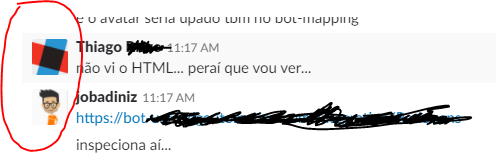
 JobaDiniz
All 8 comments
Sorry, currently it is not supported. But as a workaround, you should be able to hack into our CSS to add the avatar icon.
To enable avatar icon broadly, Direct Line might need to be updated to retrieve avatar icon from various sources (e.g. Skype, Slack, Facebook). And it also implies that we might want to support multi-party conversations.
 compulim
on 13 Mar 2018
compulim
on 13 Mar 2018
Can someone leave some code for hacking the css in the IFRAME? I have tried everything and I cannot get this to work. I am trying to inject the style.
 MichaelBartlettGitHub
on 5 Apr 2018
MichaelBartlettGitHub
on 5 Apr 2018
This basic UI feature seems to be sorely missing from the bot framework. There's also no direction on how, if possible, this is done in directline.
 bauhaux
on 24 Apr 2018
bauhaux
on 24 Apr 2018
This is coming as a customization feature.
We talked about avatar long time ago, there are multiple things we need to handle:
- Direct Line API does not have a way to retrieve bot icon you saved on the bot channel registration
- Multi channel/user support means Web Chat may need to ask Skype for icons for some users
- If no icon is loaded, we need to use the user initial to generate an avatar icon, but then it may lack of customizability
We aimed big, but these issues are not easy to solve (e.g. multi channels). Now we are backtracking and just allow dev to put any icons.
Anyway, it's coming.
compulim
on 15 Jun 2018
Hey, I resolved this issue doing the follow hack at botchat.scss.
`.wc-message-from-bot .wc-message-content {
background-color: $c_messageFromThem;
color: #44555f;
    &:after {
        float: left;
        content: "";
        background-color: black;
        width: 23.5px;
        height: 23.5px;
        margin-right: 2px;
        margin-top: -20px;
        margin-left: -50px;
    }
}`
For any questions let me know and I'll try help you :D
 diegobcunha
on 8 Aug 2018
diegobcunha
on 8 Aug 2018
i found this place a good alternative
.format-markdown{
background-image: url(../../src/assets/img/svg/myAvatar.svg);
background-repeat: no-repeat;
background-position: left top;
background-size: 30px 30px;
}
.format-markdown>p {
margin-bottom: 0px;
padding: 30px;
}
 peltemm
on 18 Oct 2018
peltemm
on 18 Oct 2018
I tried to change botchat.js and botchat.css, It works but the same image is being shown for user and bot. I just wanted it for bot. Since, minified botchat.js is tough to debug and modify, can anyone please guide me how do I add bot icon only for each bot message in webchat using Directline. bot image is constant and will be only hosted on webchat.
@compulim
 Chitma
on 30 Oct 2018
Chitma
on 30 Oct 2018
Please refer to #882 for tracking.
 corinagum
on 29 Nov 2018
corinagum
on 29 Nov 2018
Related issues
 stevengum
·
4Comments
compulim
·
3Comments
corinagum
·
3Comments
stevengum
·
4Comments
compulim
·
3Comments
corinagum
·
3Comments
 Kellym-Kainos
·
4Comments
Kellym-Kainos
·
4Comments
 felixhauserch
·
3Comments
felixhauserch
·
3Comments
Most helpful comment
This is coming as a customization feature.
We talked about avatar long time ago, there are multiple things we need to handle:
We aimed big, but these issues are not easy to solve (e.g. multi channels). Now we are backtracking and just allow dev to put any icons.
Anyway, it's coming.