Botframework-webchat: How to get directline token and how to refresh it after expire?
I get directline token from here ( https://botchattest.herokuapp.com/) adding my app id but after sometime chat is not working. Again i try to get token from your site there is no token. So i want to know how to create driectline token and how to refresh it
 Malith1994124
All 15 comments
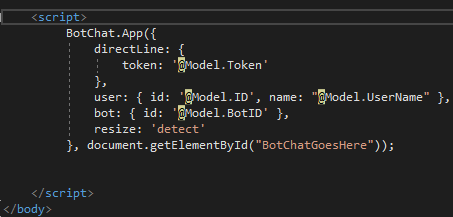
My html code
Malith1994124
on 14 Mar 2017
Everything starts with a Direct Line secret. You get that by provisioning a Direct Line (not WebChat) channel for your bot in the Bot Framework portal. You can test that with the same code you have above, replacing {token: your_token} with {secret: your_secret}. Once that's working you can consider whether you need to use tokens instead of secrets. There is some discussion here.
You mentioned https://botchattest.herokuapp.com/ - that is a sample app that shows an example of a server generating a token from a secret and passing it to the client.
I'm closing this issue as there are no problems with the code, but feel free to add more comments if you need help.
 billba
on 14 Mar 2017
billba
on 14 Mar 2017
i need to know how to get that token [token: your_token]
Malith1994124
on 14 Mar 2017
@billba
I am able to produce the token, but how can i refresh it? I am using .net and creating a bot chat using the inline script code. How to check if the token has expired and if yes how to update it?
 annevah
on 25 Sep 2017
annevah
on 25 Sep 2017
@annevah WebChat will automatically refresh the token for you.
billba
on 25 Sep 2017
@billba I'm sorry to trouble you. But if I'm replying to the bot after a very long gap then the chat bot appears to be like this
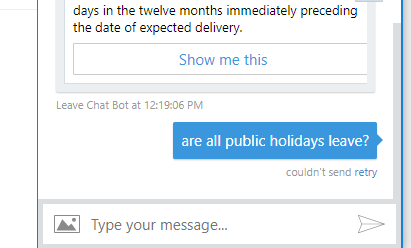
There was a 2 hour gap.
I am guessing it is because of the token expiring. If so can you advise me on what to do. Thank you so much for your help.
annevah
on 26 Sep 2017
Hi @annevah - is your bot using the .NET SDK? If so you might want to try adding a call to
MicrosoftAppCredentials.TrustServiceUrl(serviceUrl)
 danmarshall
on 26 Sep 2017
danmarshall
on 26 Sep 2017
@annevah WebChat will keep refreshing the token until the heat death of the universe, but if it loses connectivity (e.g. by closing your laptop) then that will break the refresh cycle.
billba
on 26 Sep 2017
@danmarshall I tried it, but i got the same result. :/
@billba Is there any way I could increase the refresh time?
annevah
on 28 Sep 2017
@annevah to answer your question directly, you would need to build your own copy of DirectLineJS and change this line.
But if you are dealing with connectivity breaks, then a more robust solution is to let your web page provide a new token. Read about it here.
billba
on 28 Sep 2017
I am having connectivity issues, I am not understanding how to get the conservation object
var conversation = /* a Conversation object obtained from your app's server */;
directLine.reconnect(conversation);
annevah
on 6 Oct 2017
@annevah you need to get a new conversation object from Direct Line as documented here. This requires your bot's secret, which you may not want to expose in your web page. So what we are suggesting is that your web page request this from its web server (e.g. via fetch). Your web server would in turn request the conversation object from Direct Line and return it to the web page, which would call directLine.reconnect(conversation). On the client side this code might look something like:
import { DirectLine, ConnectionStatus } from 'botframework-directlinejs';

var directLine = DirectLine({ token: /* token obtained from your server */ });

directLine.connectionStatus$
.subscribe(connectionStatus => {
    if (connectionStatus == ConnectionStatus.ExpiredToken) {
        fetch('https://yourwebsite/reconnect').then(conversation => directLine.reconnect(conversation))
    }
});
The implementation of https://yourwebsite/reconnect would depend on your web server, but it really is just calling the Direct Line reconnect API with the bot secret, and returning that resultant conversation object.
I hope this helps.
billba
on 6 Oct 2017
If you are working in C# you can get token using following code()
```C#
var token = string.Empty;
var clnt = new HttpClient();
clnt.DefaultRequestHeaders.Authorization = new AuthenticationHeaderValue("Bearer", "Your_Directline_Secret");
        var rsp = clnt.PostAsync("https://directline.botframework.com/v3/directline/tokens/generate", new StringContent(string.Empty, Encoding.UTF8, "application/json")).Result;

        if (rsp.IsSuccessStatusCode)
        {
            var str = rsp.Content.ReadAsStringAsync().Result;
            var obj = JsonConvert.DeserializeObject<DirectlineResponse>(str);
            token = obj.token;//You can use this token whereever you want
        }
Use following DirectlineResponse class
```C#

class DirectlineResponse
    {
        public string conversationId { get; set; }
        public string token { get; set; }
        public int expires_in { get; set; }
    }
At this stage token is ready to use. If expired you can refresh your token using
https://directline.botframework.com/v3/directline/tokens/refresh
 shahbazkhurram
on 16 Oct 2017
shahbazkhurram
on 16 Oct 2017
Could you help me work something out?
We are not using web-chat, we have built our own react front end and using directlineJs.
We have an API that retrieves a token through https://directline.botframework.com/v3/directline/conversations. Upon API response we connect to DirectLine.
Everything works fine, however the token dies in 30 minutes and the conversation locks up.
What we are now trying to do is send a refresh message to https://directline.botframework.com/v3/directline/tokens/refresh passing in our original token, we get a new token back but are unsure what to do next?
 morrisond91
on 24 Jul 2018
morrisond91
on 24 Jul 2018
This is a great question, but it is not an issue with either Web Chat or DirectLineJS. If you will ask it on Stack Overflow with tag botframework, and post a link to the question here, I will answer it there.
billba
on 26 Jul 2018
Related issues
 joshm998
·
3Comments
joshm998
·
3Comments
 marcasmar94
·
3Comments
marcasmar94
·
3Comments
 corinagum
·
3Comments
corinagum
·
3Comments
 compulim
·
3Comments
compulim
·
3Comments
 electrobabe
·
4Comments
electrobabe
·
4Comments
Most helpful comment
@annevah you need to get a new
conversationobject from Direct Line as documented here. This requires your bot's secret, which you may not want to expose in your web page. So what we are suggesting is that your web page request this from its web server (e.g. viafetch). Your web server would in turn request theconversationobject from Direct Line and return it to the web page, which would calldirectLine.reconnect(conversation). On the client side this code might look something like:The implementation of
https://yourwebsite/reconnectwould depend on your web server, but it really is just calling the Direct Line reconnect API with the bot secret, and returning that resultantconversationobject.I hope this helps.