Botframework-webchat: Supply history on startup
Some folks are interested in initializing WebChat with a history.
Since DirectLine doesn't archive messages, the bot would have to archive them separately.
Here are a couple of possible approaches:
- The web page could get the archived message out of band, e.g. by calling an endpoint provided by the bot. Then passes those to a new property and/or API in WebChat.
- The Bot Framework could enable a hook on the channel side where the bot supplies an
archiveProviderof some kind. If it exists, DirectLine sends those messages to the WebChat. This has the advantage of working with any deployment of WebChat out of the box, but requires a lot of new plumbing in the Bot Framework.
This is clearly half-baked so I'm opening up a dialog.
 billba
All 77 comments
Maybe they can send in a JSON serialized list of messages in the initial options ?
 danmarshall
on 10 Mar 2017
danmarshall
on 10 Mar 2017
@danmarshall Yes that's the first approach.
billba
on 10 Mar 2017
@billba & @danmarshall is it possible somehow to send in a JSON serialized the list of messages to the chat component? If yes, can you tell me please on what props? Or is there another method? I keep the messages in DB, but I want to display them when the chat is initialized.
Thanks!
 andreiciungan
on 26 Apr 2017
andreiciungan
on 26 Apr 2017
No. The purpose of this proposal is to measure demand for such a feature, and discuss exactly how it might be exposed to the developer.
billba
on 26 Apr 2017
We're also interested in such a feature. Would save us some time since we don't have to render the history somewhere else and the UX is much better. Please let us know if you plan on supporting this feature or give us some tips on how to do it ourselves.
Thanks ;)
 ancashoria
on 30 Apr 2017
ancashoria
on 30 Apr 2017
@billba @danmarshall I know you guys are trying to figure out a solution that integrates nicely with all the botframework systems, but we are doing message saving ourselves and we just need to be able to pass previous messages to the chat component using props.
We're actually thinking about hacking the component ourselves since we need that asap. What would be the best approach?
Do you think we could just extend it and get the job done in the constructor, or we should start from source and rebuild it ourselves?
Thanks
ancashoria
on 4 May 2017
I don't think anyone in Microsoft is actively working on this feature. It is a great candidate for a contribution from the community.
In broad strokes the idea is to add a property to ChatProps containing an array of messages and use that to initialize the activities field of the history store. The devil, as always, will be in the details.
billba
on 4 May 2017
@billba I was amazed how straightforward it was to build this feature by wrapping Chat component in an obvious SuperChat component that overrides the constructor and dispatches Receive_Message action for each message from history.
class SuperChat extends Chat {
constructor(props) {
super(props);
const history = this.buildHistory(props.conversation, props.user);
history.forEach(activity => {
this.store.dispatch({
type: 'Receive_Message',
activity
});
});
}
}
To build the proper activity object I used react inspector to see how the actual messages were creating their activity object.
Works flawlessly so far.
Perhaps this is a candidate for a sample since it's not integrated directly into WebChat
What do you think?
ancashoria
on 4 May 2017
Hah! I never would have considered doing it that way! Why not build it into Chat itself?
billba
on 4 May 2017
I am using webchat and directline and i am hoping to achieve the same functionality. The chat bot is embedded as an iframe on the footer of my website. When i navigate across to another tab , i would like to retain the chat history.
Can anyone please help if they were able to achieve similar functionality using webchat?
 kalykodu
on 18 May 2017
kalykodu
on 18 May 2017
+1. Option of having pagination with scroll would be great too.
 microsoftly
on 13 Jun 2017
microsoftly
on 13 Jun 2017
@matts310 This seems like a very different issue. How would this be different than the built-in pagination you get with every OS?
billba
on 14 Jun 2017
@billba There may be a lot of history being loaded at startup. It may be better to load chunks either from memory or external requests when scrolling to older portions of the history. I was envisioning this through some form of pagination.
microsoftly
on 14 Jun 2017
My current approach is from the web "push notification" in the browsers, actually, rather than from the chat framework itself. This WebChatPush project can recall chat history from previous windows by clicking on desktop push notifications: https://github.com/doristchen/WebChatPush
 SarahSexton
on 20 Jul 2017
SarahSexton
on 20 Jul 2017
@ancashoria thanks. Could you give more details on how its done exactly? Maybe give a link to a forked repo with your code?
 morphaxceed
on 13 Sep 2017
morphaxceed
on 13 Sep 2017
In addition, how would I set the WebChat session ID? I mean, besides manually adding the messages, like @ancashoria did, I want the context to be continued, rather than re-start a new conversation. Any suggestion?
morphaxceed
on 13 Sep 2017
@morphaxceed here's the full code:
import { Chat } from 'botframework-webchat'

export interface IMessage {
  from: string,
  text: string,
  attachments?: any[],
  date?: string,
}

class SuperChat extends Chat {
  constructor(props: IProps) {
    super(props)
    const history = this.buildHistory(
      props.conversation.messages,
      0,
      props.conversation.customerAddress,
      props.user.id
    )
    this.injectMessages(history)
  }

  buildHistory(messages, startIndex, customerAddress, agentId) {
    const conversationId = customerAddress.conversation.id
    const customerName = customerAddress.user.name
    return messages.map((message, messageIndex) => ({
      type: "message",
      text: message.text,
      from: {
        id: message.from === 'agent' || message.from === 'bot' ? agentId : '',
        name: message.from === 'user' ? customerName : message.from
      },
      attachments: message.attachments,
      timestamp: message.date,
      id: `${conversationId}|${startIndex + messageIndex}`,
    }))
  }

  injectMessages(messages: any[]) {
    messages.forEach(activity => {
      this.store.dispatch({
        type: 'Receive_Message',
        activity
      })
    })
  }
}
customerAddress is created by botframework and you can get it from session object
Here's the interface for customerAddress https://docs.botframework.com/en-us/node/builder/chat-reference/interfaces/_botbuilder_d_.iaddress.html
In buildHistory() I do extra checks that you don't need. Make sure you return the same object structure and you should be fine.
Also, this code is tested only on webchat version 0.10.8
Hope it helps
ancashoria
on 13 Sep 2017
Prefer option 1 and we persist our whole Redux store.
 compulim
on 24 Sep 2017
compulim
on 24 Sep 2017
@billba, any updates?
 Mozart100
on 4 Apr 2018
Mozart100
on 4 Apr 2018
You can add the conversationId to the BotChat component in react:
      ReactDOM.render(
        <BotChat.Chat
          chatTitle={false}
          rootId='apd-form'
          bot={{
            id: 'BOT_ID',
            name: 'Porter'
          }}
          user={{
            id: 'USER_ID',
            name: 'Sam'
          }}
          directLine={{
            // To continue with a previous conversation we need to pass the conversationId, this isn't needed when we start a new one
            conversationId: 'DXhOx67kZVB8Rmc83BrvLi',
            // For now we are using the secret from DirectLine but moving forward we'll need to get a token
            secret: 'XXXXX',
            // domain: params.domain,
            // token: params.t,
            // In order to receive the history on a previous conversation we can't use polling for now
            webSocket: false
          }}
          locale={ params.locale }
          resize="detect"
          // sendTyping={ true }    // defaults to false. set to true to send 'typing' activities to bot (and other users) when user is typing
        />,
        document.getElementById('BotChatGoesHere')
      );
It remembers the last step and continues on. If you turn off websockets it also loads the entire history of the chat, although I'm unsure how long this will be stored for as it doesn't appear to be stored in my Azure state.
Would be great for some guidance as to whether this history is being pulled from and when it will expire and also whether we can make it work with websockets.
P.S. Ignore the 'rootId' - I've created a custom build to accept an initial message to I can trigger a dialog in the bot automatically.
 SamuelTassell
on 18 Apr 2018
SamuelTassell
on 18 Apr 2018
Hi, +1 for this feature !
Should we wait for an official implementation or try to follow the path of SuperChat ?
It seems the store.dispatch() is private, it would be great to also expose this method to allow external script to inject messages in the html view
 JpEncausse
on 30 Jul 2018
JpEncausse
on 30 Jul 2018
It's up to you whether you wait or use a short term hack. However it would be bad practice to make store.dispatch() public, as the use of Redux is an implementation detail. A future version of Web Chat might not use Redux at all.
billba
on 30 Jul 2018
any c# examples of restoring chat history in web chat? :)
 jamiemaguiredotnet
on 23 Nov 2018
jamiemaguiredotnet
on 23 Nov 2018
There should be an official implementation for this feature. Meanwhile, any pointers to achieve this over C# would help...
 godwin3737
on 27 Nov 2018
godwin3737
on 27 Nov 2018
@ckkashyap can you tell more about the story?
compulim
on 27 Nov 2018
Semi-related to #936
@seaen To finish this work, we need an E2E story. If not, we can close this as Resolved but William would still prefer to have a sample on BotBuilder-Samples for NodeJS, #22 (Conversation History)
 corinagum
on 28 Nov 2018
corinagum
on 28 Nov 2018
Any update ?? I am using nodejs
 vinayak99999
on 26 Dec 2018
vinayak99999
on 26 Dec 2018
We ended up rolling our own solution in C# using a combination of:
- JS
- Direct Line
- Local Storage variables
- Azure Blob Storage
jamiemaguiredotnet
on 11 Jan 2019
We ended up rolling our own solution in C# using a combination of:
Could you please share details about such implementation?
 sashaeve
on 15 Jan 2019
sashaeve
on 15 Jan 2019
I've been thinking of putting together a series of blog posts that walk through the key points and learnings I arrived at to help me solidify my understanding.
Is it something people would be interested in?
(www.jamiemaguire.net)
jamiemaguiredotnet
on 16 Jan 2019
@jamiemaguiredotnet that will be certainly of value...
godwin3737
on 16 Jan 2019
@jamiemaguiredotnet https://github.com/jamiemaguiredotnet Sure!
On Wed, Jan 16, 2019 at 11:40 AM Godwin Paul notifications@github.com
wrote:
@jamiemaguiredotnet https://github.com/jamiemaguiredotnet that will
certainly of value...—
You are receiving this because you are subscribed to this thread.
Reply to this email directly, view it on GitHub
https://github.com/Microsoft/BotFramework-WebChat/issues/365#issuecomment-454663937,
or mute the thread
https://github.com/notifications/unsubscribe-auth/AQousBXn4Aw7jLwqunuCxSbfCrpK7YqNks5vDsI-gaJpZM4MYsZW
.
 ankit-maheshwari
on 16 Jan 2019
ankit-maheshwari
on 16 Jan 2019
Any updates on how this could be done? I'm struggling with getting this implemented using localStorage and the Redux store.
 raghukrishnamoorthy
on 4 Feb 2019
raghukrishnamoorthy
on 4 Feb 2019
It's look like there is interest in a blog post regarding this, I'll look into pulling something together on my blog at www.jamiemaguire.net which covers the basics.
jamiemaguiredotnet
on 4 Feb 2019
@jamiemaguiredotnet Is it okay if i shoot you an email about this?
raghukrishnamoorthy
on 4 Feb 2019
Sure.
jamiemaguiredotnet
on 4 Feb 2019
Done. Thank you.
raghukrishnamoorthy
on 4 Feb 2019
@jamiemaguiredotnet Please share you post with the community when it's ready!
corinagum
on 4 Feb 2019
For sure! Incredibly busy myself but will get a blog post out, I have about 20 topics for bot framework blog posts as I've learned a lot in these last 12 months moving from BFv3 to BFv4!
jamiemaguiredotnet
on 4 Feb 2019
For those looking to store history, please feel free to check out this sample 17.chat-send-history. This sample shows implementors how to retrieve sent history from the user using the up/down arrows. Although this doesn't achieve the same thing, they are related enough that I thought to point it out. :)
corinagum
on 4 Feb 2019
Thanks for pointing the sample out but it involves creating the bot in React. I just want to use the CDN and store history.
I've gone as far as creating the store and persisting it to sessionStorage. This has all the conversation data. I simply cannot figure out how to restore the state again when I open it in a new tab.
const store = window.WebChat.createStore(
                {},
                ({ dispatch }) => next => action => {
                    if (action.type === 'WEB_CHAT/SEND_MESSAGE') {
                        // After connected, we will send a message by dispatching a Redux action.
                    } else if (action.type === 'DIRECT_LINE/INCOMING_ACTIVITY') {
                        // When receiving an activity of type "event" with name of "sample:backchannel", prompt it out.
                        const { activity } = action.payload;
                        if (activity.type === 'event' && activity.name === 'sample:backchannel') {
                            alert(JSON.stringify(activity, null, 2));
                        }
                    }
                    return next(action);
                }
            );

            store.subscribe(() => {
                sessionStorage.setItem('MY_REDUX_STORE', JSON.stringify(store.getState()));
            });

            window.WebChat.renderWebChat({
                directLine: window.WebChat.createDirectLine({ secret: 'redacted' }),
                // We will use a custom version of Redux store, which we added middleware to handle backchannel messages.
                store
            }, document.getElementById('webchat'));
            document.querySelector('#webchat > *').focus();
        })().catch(err => console.error(err));
@raghukrishnamoorthy
At a high level, here is what I've done.
- Setup Azure blob storage
- Write a custom js function to invoke a bot connection over the direct line API.
- Whilst this happens, create a local storage cookie and timestamp which saves the conversation id to the clients browser.
- When your page refreshes, you check for the existence of the local storage variable, if it exists, you send a direct line message to the bot with the Event activity type, intercept this and load it from your storage and send the activities from your bot to your client.
jamiemaguiredotnet
on 4 Feb 2019
I'm doing 2, 3 and 4 and found it to be a bit hacky. But this seems like the only working solution as of now. Thank you @jamiemaguiredotnet
raghukrishnamoorthy
on 5 Feb 2019
You're welcome @raghukrishnamoorthy.
I agree but its the best way I can think of for the time being until it's offered as a core feature.
jamiemaguiredotnet
on 5 Feb 2019
@jamiemaguiredotnet Hi Jamie, how did you get the conversationID in order to use it to store inside the localstorage? Thanks
 khmerforce
on 6 Feb 2019
khmerforce
on 6 Feb 2019
@khmerforce you can get the conversationId from the directline object you create on the frontend JS.
This would be mydirectlineObj.ConversationId
Does that answer your question?
raghukrishnamoorthy
on 7 Feb 2019
@raghukrishnamoorthy yes I did that but it is empty. Do you know why? I looked in Blob, a conversationId is being stored
khmerforce
on 11 Feb 2019
Post an event to the bot using directline.postActivity. In the subscribe part try to get the conversation Id. See if it comes up empty then.
Yes, conversationId is how the corresponding history gets fetched.
raghukrishnamoorthy
on 12 Feb 2019
@raghukrishnamoorthy
At a high level, here is what I've done.
- Setup Azure blob storage
- Write a custom js function to invoke a bot connection over the direct line API.
- Whilst this happens, create a local storage cookie and timestamp which saves the conversation id to the clients browser.
- When your page refreshes, you check for the existence of the local storage variable, if it exists, you send a direct line message to the bot with the Event activity type, intercept this and load it from your storage and send the activities from your bot to your client.
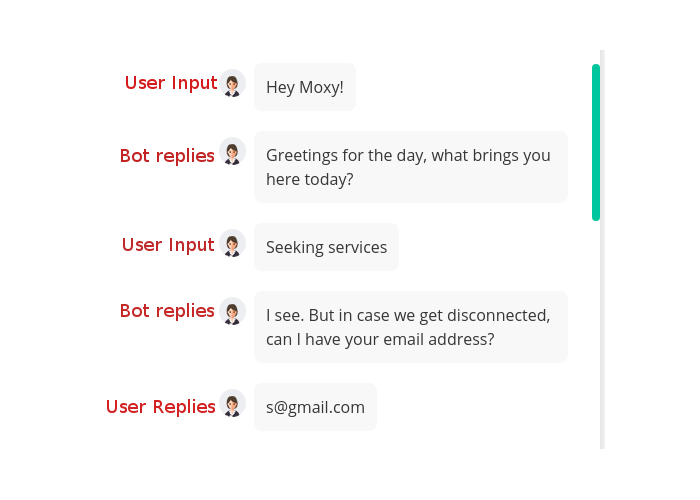
Hi @raghukrishnamoorthy, we have followed your steps to resume MS chatbot conversation, but here we are facing some issues - all conversation data (User Input and Bot replies) are displaying only for User Input. In the attached screenshot all the text with "User Input" annotation should be display with user icon (right hand side).
 sivanandh
on 12 Feb 2019
sivanandh
on 12 Feb 2019
@sivanandh Are you using the sendConversationHistory method to send the history? https://github.com/Microsoft/botbuilder-js/blob/master/libraries/botframework-connector/src/connectorApi/operations/conversations.ts#L153
 EricDahlvang
on 13 Feb 2019
EricDahlvang
on 13 Feb 2019
@sivanandh Are you using the sendConversationHistory method to send the history? https://github.com/Microsoft/botbuilder-js/blob/master/libraries/botframework-connector/src/connectorApi/operations/conversations.ts#L153
Thanks @EricDahlvang , but not getting clear view, because currently we are using version3 and nodejs. here I couldn't able to find the sendConversationHistory, but we are tried few conversation method(privateConversationData, conversationData). Here we are sharing our code snippet https://github.com/sivanandh/chatbot-code/blob/master/chat_code. Kindly review the code and give some suggestion.
sivanandh
on 15 Feb 2019
@sivanandh sendConversationHistory is in the latest BotBuilder V3 node sdk as well: https://github.com/Microsoft/BotBuilder-V3/blob/master/Node/core/lib/botbuilder.d.ts#L4381
Note the method description:
This method allows you to upload the historic activities to the conversation.
Sender must ensure that the historic activities have unique ids and appropriate timestamps. The
ids are used by the client to deal with duplicate activities and the timestamps are used by the
client to render the activities in the right order.
Using this method to send conversation history to WebChat will ensure the items are displayed as they should be (bot on left, user on right).
EricDahlvang
on 15 Feb 2019
@sivanandh sendConversationHistory is in the latest BotBuilder V3 node sdk as well: https://github.com/Microsoft/BotBuilder-V3/blob/master/Node/core/lib/botbuilder.d.ts#L4381
Note the method description:
This method allows you to upload the historic activities to the conversation.
Sender must ensure that the historic activities have unique ids and appropriate timestamps. The
ids are used by the client to deal with duplicate activities and the timestamps are used by the
client to render the activities in the right order.Using this method to send conversation history to WebChat will ensure the items are displayed as they should be (bot on left, user on right).
Hi @EricDahlvang thanks for your updates,
we have tried with sendConversationHistory but some promises rejection-warning is happening when i try with the method(sendconversation history). and i am following below github URL's for sample codes:
csharp updated the conversation history ( 22.conversation-history -
https://github.com/Microsoft/BotBuilder-Samples/tree/master/samples/csharp_dotnetcore/ ) code but nodejs conversation sample code is not available ( 22.conversation-history not available - https://github.com/Microsoft/BotBuilder-Samples/tree/master/samples/javascript_nodejs ) in github
sivanandh
on 18 Feb 2019
@raghukrishnamoorthy I can't use Directline. When I called it, it said it is undefine. I am using webchat v4 to call my bot now. Please help me people. How can I get the conversationID? Thanks
window.WebChat.renderWebChat({
directLine: window.WebChat.createDirectLine({ secret: 'USER SECRET' }),
userID: 'USER_ID',
botAvatarImage: 'https://docs.microsoft.com/en-us/azure/bot-service/v4sdk/media/logo_bot.svg?view=azure-bot-service-4.0',
// Passing "styleSet" when rendering Web Chat
styleSet,
botAvatarInitials: ' ',
}, document.getElementById('webchat'));
khmerforce
on 18 Feb 2019
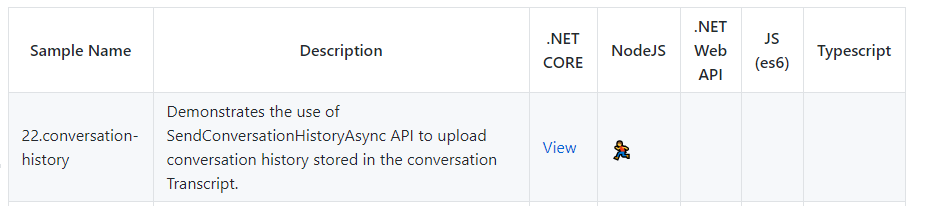
@sivanandh Correct, the node conversation-history sample is currently 'planned or in progress':
From https://github.com/Microsoft/BotBuilder-Samples on 2.18.2018:
EricDahlvang
on 18 Feb 2019
@EricDahlvang do you know when it will be completed for NodeJS?
khmerforce
on 19 Feb 2019
@khmerforce I do not know when the NodeJS Conversation-History sample will be completed. Please open an issue on the Samples Repository to pursue further: https://github.com/Microsoft/BotBuilder-Samples/issues
EricDahlvang
on 19 Feb 2019
@khmerforce Here is a node conversation-history sample: https://github.com/EricDahlvang/BotBuilder-Samples/blob/eric/node_conversationHistory/samples/javascript_nodejs/22.conversation-history/README.md
EricDahlvang
on 21 Feb 2019
@EricDahlvang
I got the history to work on webchat v3 but I want to make it work on webchat v4. This is my code:
  var convoCookie = sessionStorage.getItem("conversationId");

if (convoCookie == null || convoCookie == 'undefined') {
    console.log("conversationId not available " + convoCookie);
   var chatbot = new WebChat.createDirectLine({
        secret: BOT_SECRET,
        webSocket:false,
        pollingInterval:2000

  });
   chatbot.connectionStatus$.subscribe(function (status) {
                sessionStorage.setItem('conversationId',  chatbot.conversationId);
      });
} else {
    console.log("conversationId available " + convoCookie);
     var chatbot = new WebChat.createDirectLine({
        secret: BOT_SECRET,
           conversationId: sessionStorage.getItem("conversationId"),
        webSocket:false,
        pollingInterval:2000
        });
    }
  WebChat.renderWebChat({
    directLine: chatbot,
    userID: 'USERID',
     botAvatarInitials: ' ',
  }, document.getElementById('webchat'));
but it doesn't not reloading the chat history. Do you know why? Did I do it wrong?
khmerforce
on 21 Feb 2019
@khmerforce I think you've found a bug. WebChat V4 does not use the conversationId when constructing the DirectLine object. I've filed a new issue for this here: https://github.com/Microsoft/BotFramework-WebChat/issues/1753
EricDahlvang
on 23 Feb 2019
@EricDahlvang thank you so much Eric. Do you know when the bugs will be fixed? I tried to put the conversationId inside the render. It also doesn't restore the history.
WebChat.renderWebChat({
directLine: chatbot,
conversationId: sessionStorage.getItem("conversationId"),
userID: 'USERID',
botAvatarInitials: ' ',
}, document.getElementById('webchat'));
khmerforce
on 23 Feb 2019
@khmerforce The fix for this is already complete: https://github.com/Microsoft/BotFramework-WebChat/commit/beabb417ea9bb7d20bea83e17030f9885de80216#diff-db9380a3e8a1078e72acda6485454171 It just has not been released yet.
EricDahlvang
on 25 Feb 2019
@EricDahlvang thank you Eric. I got it to work now but please help me with storing the history conversation to Blobstorage using Node.Js. Right now, everything is being stored into a 1 list but I want each users to have their own history conversation storage.
        const { BotFrameworkAdapter, ConversationState, MemoryStorage } = require('botbuilder');
       const restify = require('restify');

      // Create server.
     // let server = restify.createServer();
    // server.listen(process.env.port || process.env.PORT || 3978, function () {
    //    console.log(`${server.name} listening to ${server.url}`);
   // });

  // Create adapter.
 // const adapter = new BotFrameworkAdapter({
  //    appId: process.env.MICROSOFT_APP_ID,
 //    appPassword: process.env.MICROSOFT_APP_PASSWORD
  //  });

 // Add memory storage.
 var storage = new MemoryStorage();

 // const conversationState = new ConversationState(storage);
// adapter.use(conversationState);

  // Listen for incoming requests - adds storage for messages.
  server.post('/api/messages', (req, res) => {
  adapter.processActivity(req, res, async (context) => {

    if (context.activity.type === 'message') {
        // Route to main dialog.
        await myBot.onTurn(context);
        // Save updated utterance inputs.
        await logMessageText(storage, context);
    }
    else {
        // Just route to main dialog.
        await myBot.onTurn(context);
      }
    });
    });

  // This function stores new user messages. Creates new utterance log if none exists.
  async function logMessageText(storage, context) {
  let utterance = context.activity.text;
  try {
      // Read from the storage.
      let storeItems = await storage.read(["UtteranceLogJS"])
    // Check the result.
    var UtteranceLogJS = storeItems["UtteranceLogJS"];

    if (typeof (UtteranceLogJS) != 'undefined') {
        // The log exists so we can write to it.
        storeItems["UtteranceLogJS"].turnNumber++;
        storeItems["UtteranceLogJS"].UtteranceList.push(utterance);
        // Gather info for user message.
        var storedString = storeItems.UtteranceLogJS.UtteranceList.toString();
        var numStored = storeItems.UtteranceLogJS.turnNumber;

        try {
            await storage.write(storeItems)
            context.sendActivity(`${numStored}: You stored: ${storedString}`);
        } catch (err) {
            context.sendActivity(`Write failed of UtteranceLogJS: ${err}`);
        }

     } else {
        context.sendActivity(`Creating and saving new utterance log`);
        var turnNumber = 1;
        storeItems["UtteranceLogJS"] = { UtteranceList: [`${utterance}`], "eTag": "*", turnNumber }
        // Gather info for user message.
        var storedString = storeItems.UtteranceLogJS.UtteranceList.toString();
        var numStored = storeItems.UtteranceLogJS.turnNumber;

        try {
            await storage.write(storeItems)
            context.sendActivity(`${numStored}: You stored: ${storedString}`);
        } catch (err) {
            context.sendActivity(`Write failed: ${err}`);
        }
    }
} catch (err) {
    context.sendActivity(`Read rejected. ${err}`);
};
   }
This conversation history example demonstrates using the AzureBlobTranscriptStore provided by botbuilder-azure and TranscriptLoggerMiddleware
const { TranscriptLoggerMiddleware } = require('botbuilder-core');
const { AzureBlobTranscriptStore  } = require('botbuilder-azure');

const blobStorageConfig = botConfig.findServiceByNameOrId(BLOB_CONFIGURATION);
// The transcript store has methods for saving and retrieving bot conversation transcripts.
let transcriptStore = new AzureBlobTranscriptStore({storageAccountOrConnectionString: blobStorageConfig.connectionString,
                                                    containerName: blobStorageConfig.container
                                                    });
// Create the middleware layer responsible for logging incoming and outgoing activities
// into the transcript store.
var transcriptMiddleware = new TranscriptLoggerMiddleware(transcriptStore);
adapter.use(transcriptMiddleware);
Thank you so much @EricDahlvang. This is great but is there a way I can store a suggestedAction that is a type 'OpenUrl'? So that I know what action the user clicked on. Thanks
khmerforce
on 6 Mar 2019
@khmerforce This issue is about supplying history on startup of WebChat.
If you need assistance with Suggested Actions, please ask a question on Stack Overflow using the Bot Framework tag https://stackoverflow.com/questions/tagged/botframework The Bot Framework Support team monitors Stack Overflow and will gladly answer your question there. Ref: https://docs.microsoft.com/en-us/azure/bot-service/bot-service-resources-links-help
EricDahlvang
on 6 Mar 2019
Hi, Is it possible to keep webSocket: true and pass conversationId to preserve the chat history?
currently when i keep the webSocket: false it works fine, but not with webSocket: true
 keshavnagpal
on 11 Apr 2019
keshavnagpal
on 11 Apr 2019
@keshavnagpal I am not sure if there is an out of box option yet for supplying conversation history with websockets set to true. You could try to work around it by preserving the redux store state in local storage.
 srimajji
on 18 Apr 2019
srimajji
on 18 Apr 2019
Preserving the history using direct line (with existing token and coversationId) may be slow (you need to request the activities from the direct line which makes the user wait) and the token can get expired
Workaround - the framework's redux state has activities property. Map this property to your component's state using react-redux, save in local storage and pass to createStore as the initial state
 artemvalmus
on 9 May 2019
artemvalmus
on 9 May 2019
@artemvalmus I can't use react in this project so I have to stick with javascript only. Is there a way we can preserve history with websocket on without using react ?
keshavnagpal
on 9 May 2019
@keshavnagpal I guess the idea is similar without React also. You need to provide the redux state with the initial activities. But I tried only with React so let us know if you manage to do it with JS
artemvalmus
on 10 May 2019
I'm storing my activities in DynamoDB. @artemvalmus, how did you pass the activities to the redux state on startup?
SamuelTassell
on 21 Jul 2019
Ignore me. As you said and I didn't read properly... pass the activities in the initial state.. for example:
const store = createStore({ activities: conversationHistory }, ({ dispatch }: { dispatch: any }) => (next: any) => (action: any) => {
  ...
  return next(action);
});
@SamuelTassell Hi, may i ask if there is an example that I can follow for "conversationhistory"? Not sure what the format is for activities.
Here is what I have, but this activity doesnt show up.
const store = window.WebChat.createStore(
    {
        activities: '{"type":"message","id":"conversationId|000002","timestamp":"2019-10-26T15:26:14.0829475Z","channelId":"directline","from":{"id":"botid","name":"botname","role":"bot"},"conversation":{"conversationId"},"text":"something here","speak":"somethinghere","inputHint":"ignoringInput","attachments":[],"entities":[],"replyToId":"conversationId|000002"}'
    },
    ({ dispatch }: { dispatch: any }) => (next: any) => (action: any) => {
        if (action.type === 'DIRECT_LINE/INCOMING_ACTIVITY') {
            const { activity } = action.payload;

            if (activity.type === 'event' && activity.name === 'sample:backchannel') {
                alert(JSON.stringify(activity, null, 2));
            }
        }

        return next(action);
    }
)
Thanks!
 Lewin8687
on 30 Oct 2019
Lewin8687
on 30 Oct 2019
@SamuelTassell Nvm, I found the answer in source code Lol.
  const activities = [
    {
      type: 'message',
      id: '6266x5ZXhXkBfuIH0fNx0h-o|0000000',
      timestamp: '2019-08-08T16:41:12.9397263Z',
      from: {
        id: 'dl_654b35e09ab4149595a70aa6f1af6f50',
        name: '',
        role: 'user'
      },
      textFormat: 'plain',
      text: 'echo "Hello, World!"'
    },
    {
      type: 'message',
      id: '6266x5ZXhXkBfuIH0fNx0h-o|0000001',
      timestamp: '2019-08-08T16:41:13.1835518Z',
      from: {
        id: 'webchat-mockbot',
        name: 'webchat-mockbot',
        role: 'bot'
      },
      text: 'Echoing back in a separate activity.'
    },
    {
      type: 'message',
      id: '6266x5ZXhXkBfuIH0fNx0h-o|0000002',
      timestamp: '2019-08-08T16:41:13.3963019Z',
      from: {
        id: 'webchat-mockbot',
        name: 'webchat-mockbot',
        role: 'bot'
      },
      text: 'Hello, World!'
    }
  ];
Hi everyone! I am a bit late to the party. I am currently trying to display previous messages.For that first I am fetching messages on my backend (in Node).Once these messages are fetched, I am trying to send them in the form of activities to the frontend(react.js).
So,basically I am creating an array of activities of the form:
{type: 'message', text: 'Hello..Testing messages ahead!', from: {id : 'userid', name : 'username' }}.
And using _await context.sendActivity()_ to send them.
So,lets say I have a user message U1 and B1 (bot reply to U1) in the database. I am fetching U1,and B1.Once obtained, sending out an activity of the form {type: 'message', text:U1, from: {id : 'userid', name : 'username' }} for U1
and {type: 'message', text: B1, from: {id : 'botid', name : 'botname }} for B1.
But currently, both these messages get sent out by the bot itself. i,e, both messages appear on left side of the screen instead of appearing alternatively.
Is this the right approach? Fetching messages from the database on the backend and then sending out in the form of activities on the frontend?
Or should I directly call my database(CosmosDB) from the frontend itself and populate my initial activities with the previous messages?
Can someone help me with this?
 smit-1999
on 3 Jul 2020
smit-1999
on 3 Jul 2020
@smit-1999 I am facing the same issue did you find the solution?
https://stackoverflow.com/questions/64553794/how-to-display-saved-bot-transcripts-on-the-bot-how-to-retrieve-the-right-trans
I asked this question in stackoverflow. Would be nice if someone can help with this.
Thanks
 sharatssj4
on 28 Oct 2020
sharatssj4
on 28 Oct 2020
Related issues
 1Copenut
·
3Comments
1Copenut
·
3Comments
 felixhauserch
·
3Comments
felixhauserch
·
3Comments
 filipjakov
·
4Comments
filipjakov
·
4Comments
 marcasmar94
·
3Comments
marcasmar94
·
3Comments
 joshm998
·
3Comments
joshm998
·
3Comments
Most helpful comment
@morphaxceed here's the full code:
customerAddressis created by botframework and you can get it fromsessionobjectHere's the interface for
customerAddresshttps://docs.botframework.com/en-us/node/builder/chat-reference/interfaces/_botbuilder_d_.iaddress.htmlIn
buildHistory()I do extra checks that you don't need. Make sure you return the same object structure and you should be fine.Also, this code is tested only on webchat version 0.10.8
Hope it helps