Botframework-solutions: Issue 3763 Extension : TranscriptLoggerMiddleware logActivity failed: "Converting circular structure to JSON"
What project is affected?
sample-assistant and sample-skill
What language is this in?
Typescript
We are using the below versions
"botbuilder": "^4.11.0",
"botbuilder-ai": "^4.11.0",
Typescript
Node Js: v11.6.0
Windows 10
What happens?
Getting below error on Every time dialog is end
TranscriptLoggerMiddleware logActivity failed: "Converting circular structure to JSON"
TypeError: Converting circular structure to JSON
at JSON.stringify ()
at AzureBlobTranscriptStore. (D:\Workspace\Ecolab\EVA-IT-TEST\EVA-IT-SKILL\node_modules\botbuilder-azure\lib\azureBlobTranscriptStore.js:65:31)
What were you expecting to happen?
This error shouldn't come.
Can you share any logs, error output, etc.?
TranscriptLoggerMiddleware logActivity failed: "Converting circular structure to JSON"
TypeError: Converting circular structure to JSON
at JSON.stringify ()
at AzureBlobTranscriptStore. (D:\Workspace\Ecolab\EVA-IT-TEST\EVA-IT-SKILL\node_modules\botbuilder-azure\lib\azureBlobTranscriptStore.js:65:31)
at Generator.next ()
at D:\Workspace\Ecolab\EVA-IT-TEST\EVA-IT-SKILL\node_modules\botbuilder-azure\lib\azureBlobTranscriptStore.js:14:71
at new Promise ()
at __awaiter (D:\Workspace\Ecolab\EVA-IT-TEST\EVA-IT-SKILL\node_modules\botbuilder-azure\lib\azureBlobTranscriptStore.js:10:12)
at AzureBlobTranscriptStore.logActivity (D:\Workspace\Ecolab\EVA-IT-TEST\EVA-IT-SKILL\node_modules\botbuilder-azure\lib\azureBlobTranscriptStore.js:60:16)
at TranscriptLoggerMiddleware. (D:\Workspace\Ecolab\EVA-IT-TEST\EVA-IT-SKILL\node_modules\botbuilder-core\lib\transcriptLogger.js:104:54)
at Generator.next ()
at fulfilled (D:\Workspace\Ecolab\EVA-IT-TEST\EVA-IT-SKILL\node_modules\botbuilder-core\lib\transcriptLogger.js:11:58)
Any screenshots or additional context?
We have created an issue with the same description (3763), but due to inactivity, this is been closed.
Meanwhile, we have got one clue, It may be helpful in analyzing the root cause. Below is the sample activity object
{
    text: "Ok, you're signed out.",
    inputHint: 'acceptingInput',
    channelId: 'msteams',
    locale: 'en-US',
    serviceUrl: 'https://smba.trafficmanager.net/amer/',
    conversation: {
        conversationType: 'personal',
        tenantId: 'XXXX',
        id: 'a:XXXXXXdsdd4ExT71NzIYu1lNSFGsrHmEPV4ks1TUCNcnsAeh_XXXXXX-wHHR3USdkBCugRrHfG7qOtHHK-q'
    },
    from: {
        id: '28:XXXX-4c8d-bd6b-XXXX',
        name: 'EVA-DEV'
    },
    recipient: {
        id: '29:1XXXX-AjeWxuDhuwRkag3KpifTNTmzIC4BWph5HDLg-fYo35cQAqak1yCGiOpXXXXXX',
        name: 'Yammanure, Sreekanth Reddy',
        aadObjectId: 'XXX-b078-XXX-a85e-XXXXXXXXXXXXXX',
        role: 'user'
    },
    replyToId: '1620380962526',
    type: 'message',
    speak: "Ok, you're signed out.",
    id: '1620380969094',
    timestamp: 2021-05-07T09:49:29.211Z
}
When I try validating the above JSON, it giving an error at timestamp property. It's causing the issue. The value should be if type string for timestamp property.
Thanks,
Sreekanth (Ecolab)
 SreekanthOAuth
All 12 comments
@Batta32, could you take a look?
 tsuwandy
on 7 May 2021
tsuwandy
on 7 May 2021
Sure @tsuwandy! Thanks @SreekanthOAuth for reporting this issue. We will be reviewing this and as soon as we have any update, we will back to you here 😊.
 Batta32
on 7 May 2021
Batta32
on 7 May 2021
Hi @SreekanthOAuth we were not able to reproduce the mentioned issue.
In order to narrow it we came up with some questions:
- Can you specify the steps that you are following to reproduce the issue?
- Can you answer these questions related to your environment:
- Can you confirm which version of TypeScript bots are you using?
- 0.8 TypeScript
- 1.0.1 Bot-Solutions
- master branch - Virtual Assistant
- master branch - Skill
- 1.0 TypeScript
- PR #3583 - Bot-Solutions
- PR #3584 - Virtual Assistant
- PR #3585 - Skill
- 0.8 TypeScript
- Can you verify in the
package-lock.jsonwhich version of botbuilder-azure are you using? (Check here) - In which channel are you having the issue? Have you tested in Emulator?
- Can you confirm which version of TypeScript bots are you using?
- Have you tested to replace the
AzureBlobTranscriptStoretoBlobsTranscriptStore(suggested by @mdrichardson). AzureBlobTranscriptStore was marked as deprecated in the PR microsoft/botbuilder-js#3666
- Install
botbuilder-azure-blobs: "4.11.0" - Replace AzureBlobTranscriptStore to BlobsTranscriptStore in the defaultAdapter.ts
- Install
```typescript
const transcriptStore: TranscriptStore = new BlobsTranscriptStore(settings.blobStorage.connectionString, settings.blobStorage.container);
```
- Can you share a reduced branch of your environment/code so we can reproduce the issue on our side?
Thanks in advance.
 fran893
on 11 May 2021
fran893
on 11 May 2021
@fran893 - Please find the answers to questions,
- Can you specify the steps that you are following to reproduce the issue?
We have created VA by following this document. - Can you answer these questions related to your environment: 0.8 TypeScript
Can you verify in the package-lock.json which version of botbuilder-azure are you using? 4.12.0
In which channel are you having the issue? Have you tested in Emulator? - Both Webchat & Emulator. - Have you tested to replace the AzureBlobTranscriptStore to BlobsTranscriptStore - Yes. It's giving another exception
TranscriptLoggerMiddleware logActivity failed: "`activity.localTimezone` must be defined"
Error: `activity.localTimezone` must be defined
    at Object.assertCondition (D:\Workspace\Ecolab\EVA-IT\IT_EVA\node_modules\botbuilder-azure-blobs\node_modules\botbuilder-stdlib\lib\assertExt.js:15:15)
    at condition (D:\Workspace\Ecolab\EVA-IT\IT_EVA\node_modules\botbuilder-azure-blobs\node_modules\botbuilder-stdlib\lib\types.js:26:17)
    at D:\Workspace\Ecolab\EVA-IT\IT_EVA\node_modules\botbuilder-azure-blobs\node_modules\botbuilder-stdlib\lib\types.js:40:13
    at Object.string (D:\Workspace\Ecolab\EVA-IT\IT_EVA\node_modules\botbuilder-azure-blobs\node_modules\botbuilder-stdlib\lib\types.js:347:5)
    at Object.exports.assertActivity (D:\Workspace\Ecolab\EVA-IT\IT_EVA\node_modules\botbuilder-azure-blobs\node_modules\botframework-schema\lib\index.js:134:32)
    at BlobsTranscriptStore.<anonymous> (D:\Workspace\Ecolab\EVA-IT\IT_EVA\node_modules\botbuilder-azure-blobs\lib\blobsTranscriptStore.js:204:31)
    at Generator.next (<anonymous>)
    at D:\Workspace\Ecolab\EVA-IT\IT_EVA\node_modules\botbuilder-azure-blobs\lib\blobsTranscriptStore.js:10:71
    at new Promise (<anonymous>)
    at __awaiter (D:\Workspace\Ecolab\EVA-IT\IT_EVA\node_modules\botbuilder-azure-blobs\lib\blobsTranscriptStore.js:6:12)
- Can you share a reduced branch of your environment/code so we can reproduce the issue on our side? It will be difficult to share. Is it possible to set up the meeting?
SreekanthOAuth
on 12 May 2021
A couple quick notes on this issue:
- All
botbuilderandbotframeworkpackages need to be on the same version. Looks like you've got some on4.12and some on4.11, based on what you've posted above. - Have you fixed the shared variables issue mentioned in this comment and further explained in this one? I have seen this problem manifest itself in lots of weird, unexpected ways. Even if it's not causing this issue, it will definitely cause concurrency issues in the future.
- Could this be related to this issue? It should have been fixed in 4.11, but it's the only existing issue that sounds related.
 mdrichardson
on 12 May 2021
mdrichardson
on 12 May 2021
@mdrichardson - Thanks for the response.
1.Getting errors if we make the package version names to static. Sharing with you both package.json and package-lock.json files. Please check and let us know which modules do we need to update.
errors.txt
package.txt
package-lock.txt
2.We are looking into this issue.
3.Yeah. Not sure why it's happening even we are on or above 4.11.
SreekanthOAuth
on 13 May 2021
Hi @SreekanthOAuth, we were not able to reproduce the issue, using the package.json and package-lock.json you shared, neither testing the activity object attached here.
We researched about the error "_Converting circular structure to JSON_" and occurs when the object sent in the stringify() has a circular references, this means it's internally calling itself.
Regarding the issues:
- _Converting circular structure to JSON_: we can confirm that the problem is not the SDK neither the base Virtual Assistant/Skill Sample. Can you confirm if you are not placing a circular reference in the activities? (according to this comment)
- Disparity between botbuilder & botframework versions: as mentioned here, the SDK versions should be on the same one, we recommend to you use SDK version 4.11.0
Further reading:
fran893
on 13 May 2021
@fran893 - When we try to keep them in sync getting errors as mentioned in the previous comment.
Could you please let us know which modules (dependent) do I need to update?
SreekanthOAuth
on 19 May 2021
Hi @SreekanthOAuth, we shared this branch which contains the necessary changes to sync the SDK to version 4.11.0 as mentioned here.
Please, follow these steps:
- Open your TypeScript Virtual Assistant
- Copy the
package.json&package-lock.jsonfile from this commit - Remove the
node_modules&libfolders from your Virtual Assistant - Replace the
package.json&package-lock.jsonwith the one you copied from the step 2 - Execute
npm installto install the dependencies - Execute
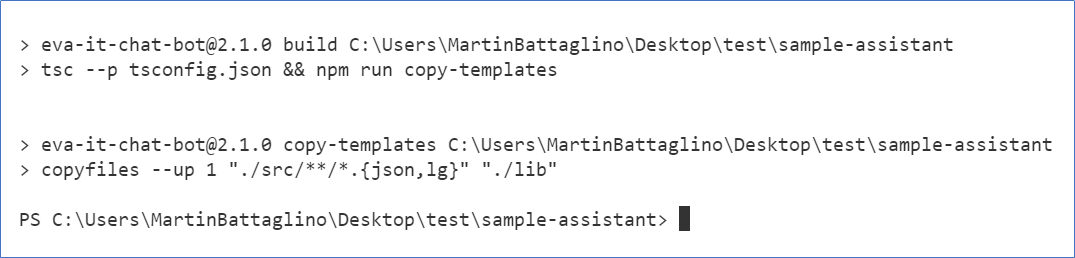
npm run buildto compile the solution - See that the bot is correctly building
_TypeScript Virtual Assistant building with SDK 4.11.0_
fran893
on 19 May 2021
@batta32 any update on this?
 johnataylor
on 1 Jun 2021
johnataylor
on 1 Jun 2021
Hi @johnataylor, we are waiting the confirmation after the sync of botbuilder and bot-framework packages as we shared here.
However, 13 days have passed since the last update. If you are ok, we can close this issue as it's inactive, but the user can reopen it if the issue persists.
Batta32
on 1 Jun 2021
Closing due to inactivity, reopen if needed
Batta32
on 2 Jun 2021
Related issues
 waqarghani
·
3Comments
waqarghani
·
3Comments
 jbonet07
·
4Comments
jbonet07
·
4Comments
 lauren-mills
·
3Comments
lauren-mills
·
3Comments
 hansmbakker
·
3Comments
hansmbakker
·
3Comments
 ericmaino
·
3Comments
ericmaino
·
3Comments
Most helpful comment
@fran893 - Please find the answers to questions,
We have created VA by following this document.
Can you verify in the package-lock.json which version of botbuilder-azure are you using? 4.12.0
In which channel are you having the issue? Have you tested in Emulator? - Both Webchat & Emulator.