Botframework-solutions: Unable to send POST via REST API
What project is affected?
VA Skill Template 4.9.1.2
What language is this in?
C#
What happens?
POST is sent to endpoint, the response is 200 but live metrics show an error of Value cannot be null(Parameter clientSecret).
Local testing does not have error. We are getting the Bearer token authorization and sending this to the bot in the header.
What are the steps to reproduce this issue?
Rerun Node https request to send the message
What were you expecting to happen?
Use Messagefactory to send the message to the user based on conversationID though the defaultactivityhandler
Can you share any logs, error output, etc.?
Find attached call stack error from Azure.
output blurb.txt
Any screenshots or additional context?
Below is the OnMessageActivityAsync that we are using.
protected override async Task OnMessageActivityAsync(ITurnContext
{
if(turnContext.Activity.From.Role == "Flex")
{
//echo what twilio said
await turnContext.SendActivityAsync(MessageFactory.Text(turnContext.Activity.From.Name + ": " + turnContext.Activity.Text), cancellationToken);
turnContext.Activity.Text = null;
await _dialog.RunAsync(turnContext, _dialogStateAccessor, cancellationToken);
 Kmeredith-hcg
All 12 comments
Hi @Kmeredith-hcg, thanks for reporting this issue! We have some questions in order to understand your environment and the repro steps that you are following:
- Can you detail step by step the repro steps that you are following?
- Can you mention the environment that you are using? (e.g. channel, C# VA connected to C# Skill, version of SDK)
- What do you mean with
Rerun Node https request to send the message? - Have you tested these repro steps in other channel? E.g. BotFramework Emulator
- Have you applied changes to your bots apart from the attached
onMessageActivityAsyncmethod? If so, which ones? - What do you mean with
Live Metrics? - Are you following any documentation that you can provide us so we can follow the same information?
As soon as we have any update, we will back to you here 😊.
 Batta32
on 4 May 2021
Batta32
on 4 May 2021
Apologies for the very brief explanation of the issue. I shall elaborate more and provide the code that we are using. We are doing this as a proof of concept and testing to develop a connection with Twilio Flex and enabling MS Teams to connect to Twilio Flex using the bot as a middle man.
Can you detail step by step the repro steps that you are following? The skill bot is deployed into Azure and we are using a node.js function to perform an HTTPS POST to the /api/messages endpoint. Attached is the node.js function as text file with what we are sending over. Local testing, this method is working as what we want in final production but while it is in Azure we are getting the 'Value cannot be null (Parameter clientSecret)'. Full steps to produce are starting a conversation in the emulator adjusting the attached code with the serviceurl, conversationid, recipient id to the bot information, from information can be anything except for the role as the bot code is looking for that role to then perform the following within the OnMessageActivityAsync in DefaultActivityHandler:
if(turnContext.Activity.From.Role == "Flex")
{
//echo what twilio said
await turnContext.SendActivityAsync(MessageFactory.Text(turnContext.Activity.From.Name + ": " + turnContext.Activity.Text), cancellationToken);
VScodefunction.txtCan you mention the environment that you are using? (e.g. channel, C# VA connected to C# Skill, version of SDK) C# VA parent bot to C# VA skill, SDK is V4.9
What do you mean with Rerun Node https request to send the message? Please see the attached node function. We are going to be utilizing the same code in our Twilio environment to send messages to the skill bot.
Have you tested these repro steps in other channel? E.g. BotFramework Emulator Yes. We tested it in the emulator first, adjusted the skill's code to grab the From.Role as stated above then deployed to Azure, started a conversation which sent the information required to our Twilio environment, put that information into the node function and attempted a POST which resulted in the issue.
Have you applied changes to your bots apart from the attached onMessageActivityAsync method? If so, which ones? The parent bot has a change to get the oAuth token from a user when signing in and a few changes to responses. The skill bot has changes in the dialogs to perform a PostAsync to our Twilio environment for creating a channel in Twilio and sending the message to Twilio. Attached is the defaultactivityhandler, we made changes to it based on our findings from previous testing but I assume they are not causing the issue. Please see attached:
defaultactivityhandler.txtWhat do you mean with Live Metrics? Live Metrics on the Azure Applications Insight blade for the skill.
Are you following any documentation that you can provide us so we can follow the same information? All the work we are performing is based on this doc: https://docs.microsoft.com/en-us/azure/bot-service/rest-api/bot-framework-rest-overview?view=azure-bot-service-4.0 Assumption was that we could perform a POST to the bot posing as a user from Twilio to respond to a user in MS Teams.
Kmeredith-hcg
on 5 May 2021
@Kmeredith-hcg - thanks for the detailed information! We will be reviewing the information and the issue.
We will let you know as soon as we have any update 😊.
Batta32
on 5 May 2021
Hi @Kmeredith-hcg, thank you for the response.
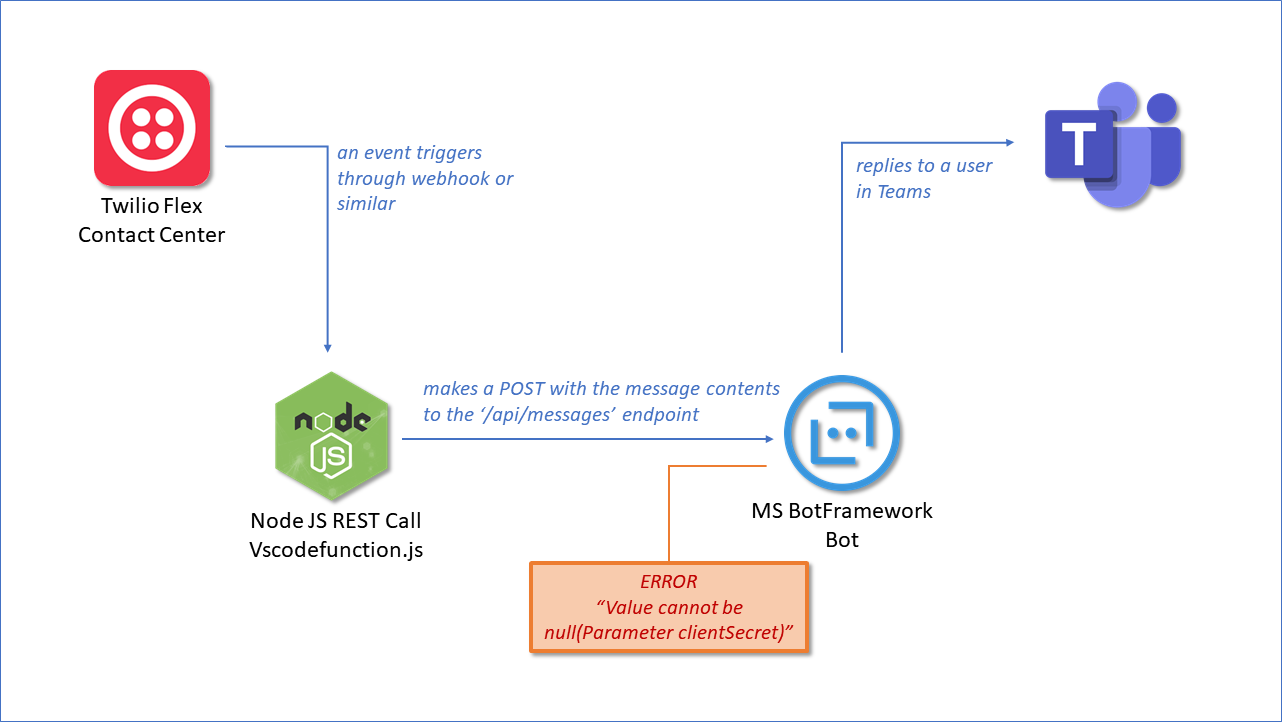
We want to validate with you that we understood the flow with the given information. Please confirm if this is correct:
- Twilio Flex receives a message
- Twilio Flex triggers the NodeJS code using a webhook or similar functionality
- The NodeJS function in turn calls the bot's endpoint with the Twilio message
a. At this step we assume that the issue is happening - The bot posts the message in Teams
See the diagram below.
Thanks
 matiasroldan6
on 7 May 2021
matiasroldan6
on 7 May 2021
@matiasroldan6 Yes, that is the flow.
- User engages skill in teams
- Skill bot sends message to Twilio Flex webhook
- Twilio Flex receives a message
- Twilio Flex triggers the NodeJS code using a webhook or similar functionality
- The NodeJS function in turn calls the bot's endpoint with the Twilio message
- At this step we assume that the issue is happening
- The bot posts the message in Teams
We are passing information to Twilio Flex from the bot so that we ensure the message is then delivered to the appropriate person in Teams. In local testing, this has been working in the emulator without issue.
The information passed is the following to our Twilio webhook:
var createchat = new Dictionary
{
{"identity", stepContext.Context.Activity.From.Id }, //User's UPN so Service Desk can grab tickets, change for production
{"chatFriendlyName", stepContext.Context.Activity.From.Name }, //User's name here for consistency
{"access_token", bearerToken.access_token },
{"user", stepContext.Context.Activity.From.Name },
{"channelID", stepContext.Context.Activity.ChannelId },
{"serviceURL", stepContext.Context.Activity.ServiceUrl },
{"activityID", stepContext.Context.Activity.Id },
{"botID", stepContext.Context.Activity.Recipient.Id },
{"botName", stepContext.Context.Activity.Recipient.Name },
{"botRole", stepContext.Context.Activity.Recipient.Role },
{"conversationID", stepContext.Context.Activity.Conversation.Id }
};
var json = JsonConvert.SerializeObject(createchat);
data = new StringContent(json, Encoding.UTF8, "application/json");
var response = await client.PostAsync(url, data);
We are getting the bearer token within the bot itself and then sending that to Flex so that it can respond.
var getToken = new Dictionary
{
{ "grant_type", "client_credentials" },
{ "client_id", "APP_ID" },
{ "client_secret", "APP_SECRET" },
{ "scope", "https://api.botframework.com/.default" }
};
var url = "https://login.microsoftonline.com/botframework.com/oauth2/v2.0/token";
var client = new HttpClient();
var response = await client.PostAsync(url, new FormUrlEncodedContent(getToken));
var result = response.Content.ReadAsStringAsync().Result;
bearerToken = JsonConvert.DeserializeObject
Kmeredith-hcg
on 10 May 2021
@matiasroldan6 We are getting the issue locally now and the stack trace is showing the same in local as Azure.
Stack Trace info:
System.ArgumentNullException: Value cannot be null. (Parameter 'clientSecret')
at Microsoft.IdentityModel.Clients.ActiveDirectory.ClientCredential..ctor(String clientId, String clientSecret)
at Microsoft.Bot.Connector.Authentication.MicrosoftAppCredentials.
at System.Lazy1.ViaFactory(LazyThreadSafetyMode mode)
at System.Lazy1.ExecutionAndPublication(LazyHelper executionAndPublication, Boolean useDefaultConstructor)
at System.Lazy1.CreateValue()
at System.Lazy1.get_Value()
at Microsoft.Bot.Connector.Authentication.AppCredentials.
at System.Lazy`1.ViaFactory(LazyThreadSafetyMode mode)
--- End of stack trace from previous location where exception was thrown ---
I think the SDK is looking for the appid and password instead of the Bearer token. I say this because when we comment out the appid and password in the appsettings, we can successfully send the POST. I am going to try and troubleshoot more locally.
Kmeredith-hcg
on 12 May 2021
I believe I have found the issue with being able to POST to the bot in Azure from Twilio. With a lot of local debugging, I found that I could POST to the emulator with the appid and password enabled in appsettings using the Bearer token that is sent to the bot via the emulator.
I extracted it from the BotController.cs:
public async Task PostAsync()
{
await _adapter.ProcessAsync(Request, Response, _bot);
}
It is one of the items in the Request object, Header, Authorization. I plugged this into the Node.js function and it successfully sends. If I use a different token or one that is generated from:
POST https://login.microsoftonline.com/botframework.com/oauth2/v2.0/token
Host: login.microsoftonline.com
Content-Type: application/x-www-form-urlencoded
grant_type=client_credentials&client_id=MICROSOFT-APP-ID&client_secret=MICROSOFT-APP-PASSWORD&scope=https%3A%2F%2Fapi.botframework.com%2F.default
per the document, it fails.
Here is the Node function used:
const https = require('http');
function httpsPost({body, ...options}) {
return new Promise((resolve,reject) => {
const req = https.request({
method: 'POST',
...options,
}, res => {
const chunks = [];
console.log(res);
res.on('data', data => chunks.push(data))
res.on('end', () => {
let body = Buffer.concat(chunks);
switch(res.headers['content-type']) {
case 'application/json':
body = JSON.parse(body);
break;
}
resolve(body)
})
})
req.on('error',reject);
if(body) {
req.write(body);
}
req.end();
})
}
async function main() {
const res = await httpsPost({
// For local testing
hostname:'localhost',
port:3978,
path:'/api/messages',
headers: {
'Content-Type': 'application/x-www-form-urlencoded',
'Authorization':'Bearer [token from the debug object]'
},
body: JSON.stringify({
     'type': 'message',
  'ServiceUrl': 'http://localhost:51788',
  'ChannelId': 'emulator',
  'from':
    {
        'id':'IM7d80643655fb41e78a3d1d5f85d82229',
        'name':'Kaileb VSCode',
        'role':'Flex'
    },
  'conversation': {
      //Change Conversation ID to the correct situation for local, azure, or webchat
    'id':"d8510190-b35d-11eb-aec8-a7130eba1469|livechat"
  },
  'recipient': {
      //Change the following as needed for local, azure, or webchat
      "id":"4e14c370-b319-11eb-aec8-a7130eba1469",
      "name":"Bot",
      "role":"bot"
  },
  'locale': 'en-US',
  'text': 'Testing from VS Code'
    })
})
}
main().catch(err => {
console.log(err)
})
Published the bot to Azure using the script in the template and attempted to use a bearer token per the document and what we send to Twilio and it is failing with the original error of "Value cannot be null (Parameter 'clientSecret')". I can only assume that the Authorization Bearer token is not being accepted for the conversation.
Kmeredith-hcg
on 12 May 2021
Hi @Kmeredith-hcg, sorry for the delay. Thanks for confirming the flow and for providing the helpful information.
After analyzing the call stack attached here we can confirm that it expects to receive the MicrosoftAppId and MicrosoftAppPassword which you should configure in the appsettings.json of the bot, as you mentioned.
Once the bot receives the request, the SDK expected flow is the following:
- Executes sendToConversationWithHttpMessagesAsync method in Conversations class
- Sets credentials executing processHttpRequestAsync method
- Gets the OAuth access token executing getTokenAsync method
- BuildAuthenticator is executed to collect the token
- The ClientCredential class expects to receive MicrosoftAppId and MicrosoftAppPassword which are the credentials of the client requesting the token
As it's explained here, you will need the MicrosoftAppId and MicrosoftAppPassword to get an access token and use them in the request. Once the request succeeds, you will receive an HTTP 200 response with the access token which you can use to reply to the user's message as a Authorization header.
To understand how the Authentication works, check this document.
Let us know if this helps you.
matiasroldan6
on 13 May 2021
Thank you for the response but we are following that document and getting the error. We are performing the token request in the code to send to Twilio for storage and we are getting the error explained. Local testing can reproduce this error consistently. Our code in a dialog:
//var getToken = new Dictionary
//{
// { "grant_type", "client_credentials" },
// { "client_id", "[appid]" },
// { "client_secret", "[apppassword]" },
// { "scope", "https://api.botframework.com/.default" }
//};
//var url = "https://login.microsoftonline.com/botframework.com/oauth2/v2.0/token";
//var client = new HttpClient();
//var response = await client.PostAsync(url, new FormUrlEncodedContent(getToken));
//var result = response.Content.ReadAsStringAsync().Result;
//bearerToken = JsonConvert.DeserializeObject
The token received from this is causing the error. I noticed that the one in the local debug bot is shorter than the one received from the token request.
Kmeredith-hcg
on 13 May 2021
Hi @Kmeredith-hcg, sorry for the delay. We successfully reproduced the issue by using the Node JS code to locally send a REST call to the api/messages endpoint of the Bot.
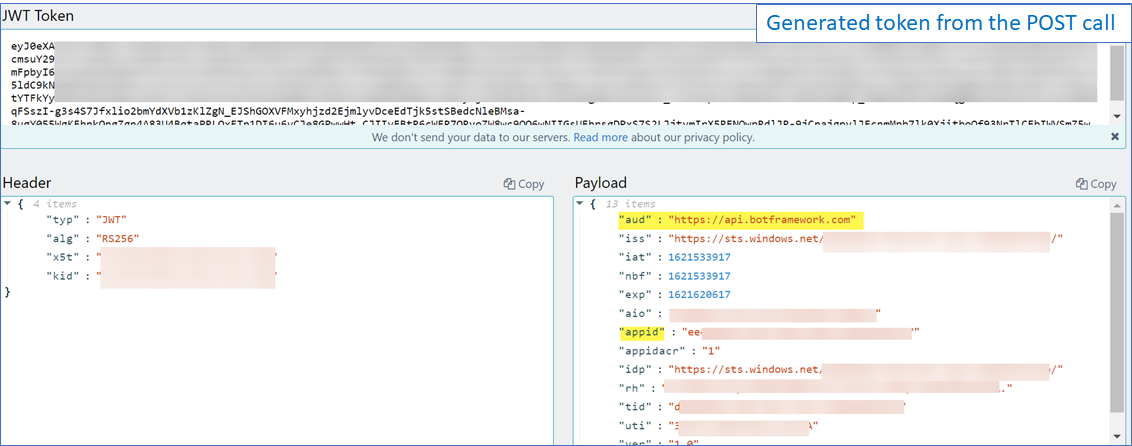
Can you try and use a JWT Decoder to check if the aud property in the failing tokens contains the scope you used in the POST call (oauth2/v2.0/token) to obtain the token?
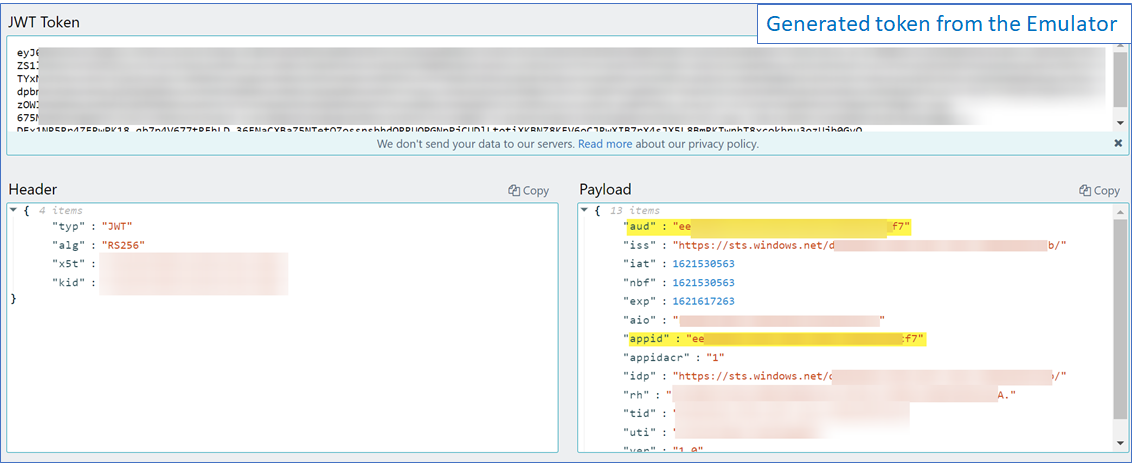
We compared, using the JWT Decoder, the generated Bearer token from the POST call (oauth2/v2.0/token) and the one that the user sends to the bot using the Emulator to be authenticated and found the following two cases:
- FAILURE - The bearer token generated from the POST call (oauth2/v2.0/token):
audproperty contains the _scope URL_ - SUCCESS - The bearer token that the user sends to the bot from Emulator:
audproperty contains the _appId of the bot_
The aud property is consumed by the SDK to create a connector client that should obtain the appId. If the aud property is null, it will search for the appId.
To accomplish all of this, we followed these steps:
- Obtain the access_token executing the following script in a terminal
> curl -k -X POST https://login.microsoftonline.com/botframework.com/oauth2/v2.0/token -d "grant_type=client_credentials&client_id=&client_secret= &scope=https%3A%2F%2Fapi.botframework.com%2F.default" - Replace the obtained access_token in the attached Node JS function
- Start the Bot
- Execute Node JS function to send the request to the Bot
- See the
clientSecret parameter is requirederror
Last but not least, we tested that using the appId, appPassword, and the Bearer token from the communication between the bot and the user in Emulator, the POST works using those values in the Node JS function.
We will continue researching and finding a solution for you, as soon as we have any update, we will let you know.
_Wrong token generated from the POST call_
_Correct token generated from the Emulator ("aud" and "appid" both contain the AppId)_
matiasroldan6
on 20 May 2021
Hi @Kmeredith-hcg, re-analyzing the flow you described in this comment, we reached the conclusion that you can implement one of the following approaches:
HandOff Live Agent (we think this is what you might be trying to do, suggested by the presence of Twilio)
Proactive messages Useful when you need to send a message to a user without having to invoke the bot first, like notifications or messages that are not a response to a previous message from the user. Some resources and examples:
- Send proactive messages, the official documentation on how to implement proactive messaging.
- Microsoft Bot Framework v4: Send proactive messages to Teams channels and users, blogpost describing how to implement proactive message on Teams
- Proactive Messages sample from BotBuilder Samples repository
- Teams Proactive Messaging Samples from Microsoft Teams Samples repository
- Teams Proactive Bot Messaging Sample from Microsoft Teams Development Community Samples repository
If you have further questions about configuring these approaches, we can suggest opening a thread in BotFramework's StackOverflow.
matiasroldan6
on 26 May 2021
Closing due to inactivity, reopen if needed
Batta32
on 3 Jun 2021
Related issues
 gabog
·
3Comments
gabog
·
3Comments
 hansmbakker
·
3Comments
hansmbakker
·
3Comments
 manish-95
·
3Comments
manish-95
·
3Comments
 elaine-chang
·
4Comments
elaine-chang
·
4Comments
 nestoralonsovina
·
4Comments
nestoralonsovina
·
4Comments