Botframework-solutions: recipientName is not coming in BotMessageSend telemetry event
What project is affected?
Virtual Assistant
What language is this in?
Typescript
What happens?
In the old version of botbuilder,
we were able to get the recipientName as part of BotMessageSend event.
"botbuilder": "^4.6.0",
"botbuilder-ai": "^4.6.2",
"botbuilder-applicationinsights": "^4.6.2",
"botbuilder-azure": "^4.6.2",
"botbuilder-core": "^4.6.2",
"botbuilder-dialogs": "^4.6.2",
"botbuilder-skills": "^4.4.9",
"botbuilder-solutions": "^4.4.9",
"botframework-config": "^4.6.2",
"botframework-connector": "^4.6.2",
"botframework-schema": "^4.6.2",
BotMessageSend is
{
    "conversationId": "9upLfgGwZVz4gY9A6J8gLq-5",
    "locale": "en-US",
    "activityType": "message",
    "conversationName": "",
    "replyActivityId": "9upLfgGwZVz4gY9A6J8gLq-5|0000029",
    "recipientName": "{\"employeeId\":\"20117131\",\"displayName\":\"Sreekanth, Reddy\",\"id\":\"XXXXXX-XXXX-4c45-96b1-5853a6b32XX\",\"mail\":\"[email protected]\",\"givenName\":\"Sreekanth\",\"surname\":\"Reddy\",\"department\":\"XXXXX\",\"officeLocation\":\"USA-Remote Worker-XXX\",\"preferredLanguage\":null,\"mobilePhone\":\"+1 (XXX) XXXXX\",\"jobTitle\":\"XXXXXXX\",\"country\":\"USA\",\"usageLocation\":\"US\",\"postalCode\":\"XXXX\"}",
    "activityId": "9upLfgGwZVz4gY9A6J8gLq-5|0000029",
    "channelId": "directline",
    "recipientId": "dl_XXXXXX-XXXXXX-4c45-96b1-5853a6b32XXX"
}
With the new version of botbuilder,
"botbuilder": "^4.11.0",
"botbuilder-ai": "^4.11.0",
"botbuilder-applicationinsights": "^4.11.0",
"botbuilder-azure": "^4.11.0",
"botbuilder-dialogs": "^4.11.0",
"botbuilder-lg": "^4.11.0",
"botframework-config": "^4.11.0",
"botframework-connector": "^4.11.0",
And BotMessageSend is
{
    "conversationId": "4JmAxNo8yQZHsFQ4Me8GqP-f",
    "activityType": "event",
    "activityId": "4JmAxNo8yQZHsFQ4Me8GqP-f|0000004",
    "channelId": "directline",
    "conversationName": "",
    "recipientId": "dl_XXXXXX-XXX-42e1-ac82-817f94c13XXX",
    "locale": "en-US",
    "replyActivityId": "4JmAxNo8yQZHsFQ4Me8GqP-f|0000004",
    "attachments": "[{\"contentType\":\"application/vnd.microsoft.card.hero\",\"content\":{\"title\":\"Please provide a detailed description of your request. If you are reporting an outage, please contact the IT Help Center directly.\",\"buttons\":[{\"type\":\"openUrl\",\"title\":\" IT Help Center\",\"value\":\"https://ecolab.service-now.com/sp?id=kb_article_view&sysparm_article=KB0014470\"}]}}]",
    "speak": "Please provide a detailed description of your request. If you are reporting an outage, please contact the IT Help Center directly."
}
We have cross-checked in code, and don't see anywhere we are manually updating the event in either of the versions.
What are the steps to reproduce this issue?
Create the virtual assistant by the following below Url
What were you expecting to happen?
recipientName should come in BotMessageSend telemetry event
Please let us know if you need any further details on this.
Thanks,
Sreekanth(Ecolab)
 SreekanthOAuth
All 7 comments
Hi @SreekanthOAuth, thanks for reporting this issue. We will start working on this issue the next week, as soon as we have any update, we will let you know here 😊.
 Batta32
on 15 Apr 2021
Batta32
on 15 Apr 2021
@Batta32 - Thanks for the prompt response.
Please look into it on high priority. This is impacting our analysis dashboard.
Thanks,
Sreekanth
SreekanthOAuth
on 16 Apr 2021
Hi @SreekanthOAuth, we are currently working on this issue. We will let you know the updates!
Batta32
on 19 Apr 2021
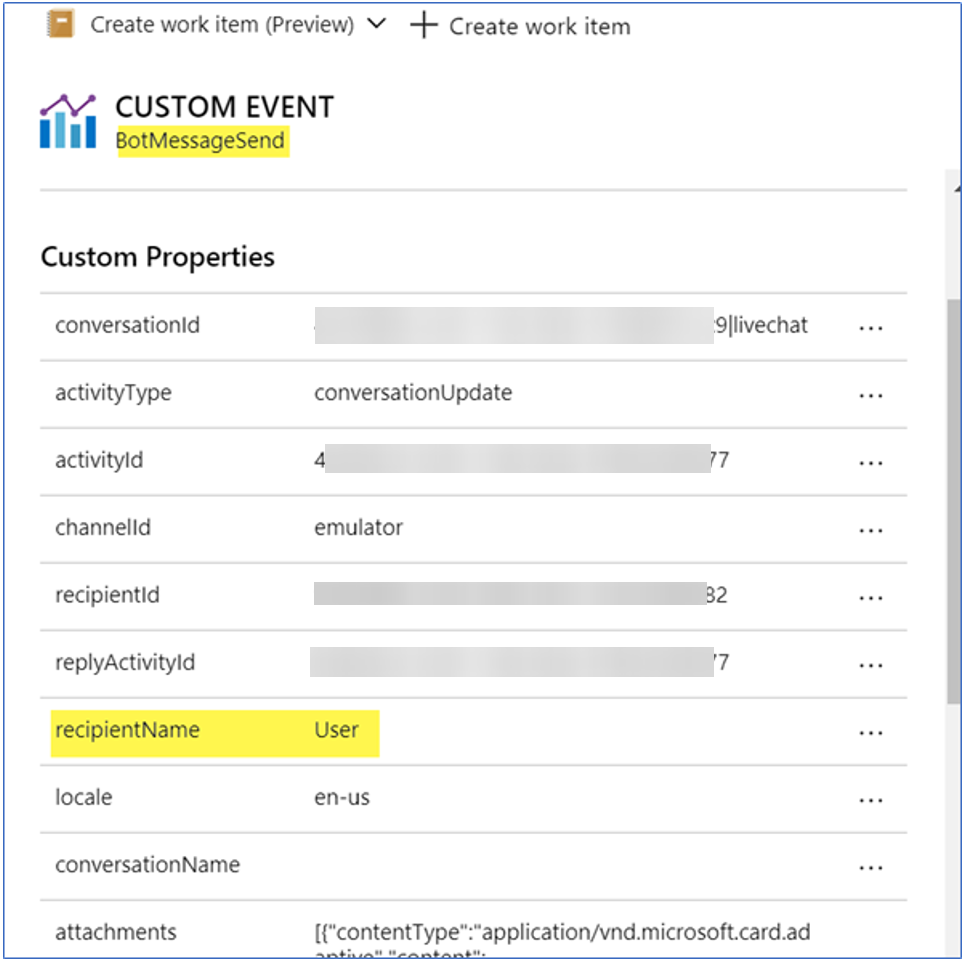
Hi @SreekanthOAuth, we couldn't reproduce the issue as we received the recipientName property correctly populated in BotMessageSend telemetry event of the Application Insights resource.
We came up with some questions:
- Have you allowed the PII in the
TelemetryLoggerMiddleware? (see thetruevalue)
typescript const telemetryLoggerMiddleware: TelemetryLoggerMiddleware = new TelemetryLoggerMiddleware(telemetryClient, true); - Can you attach your environment and detailed repro steps?
- Can you debug the TelemetryLoggerMiddleware to check if the recipientName is populated?
- Which channel are you using? Have you checked if this happens in the emulator?
- Is this happening in all the
activityTypes?
The TelemetryLoggerMiddleware validates if the PII flag is enabled to populate the recipientName. Also, we were reviewing the code changes between JS SDK 4.6.0 - 4.13.0 and we didn't identify any change in the behavior of the middleware in the SDK.
_BotMessageSend event populated with the recipientName value_
Batta32
on 19 Apr 2021
@Batta32 - Thanks for the information.
Please find the below answers for your questions,
- Have you allowed the PII in the TelemetryLoggerMiddleware? (see the true value) - YES
Can you attach your environment and detailed repro steps?
We have created the virtual assistant by following below URL. And then we have updated botbuilder packages to 4.11.0 versions.
https://microsoft.github.io/botframework-solutions/virtual-assistant/tutorials/create-assistant/typescript/3-create-project/And we have used the below sample to enable the directline channel. However, we have updated some changes according to our project.
- Can you debug the TelemetryLoggerMiddleware to check if the recipientName is populated?
Here, we are getting name as empty.
{
    "type": "message",
    "attachmentLayout": "list",
    "attachments": [
        {
            "contentType": "application/vnd.microsoft.card.hero",
            "content": {
                "title": "Welcome Sreekanth reddy. How can the IT Help Center assist you today? Ask a question, or type or say 'Help' to see a list of your options.",
                "images": [
                    {
                        "url": "https://XXXXXX/images/XXXXX.jpg"
                    }
                ],
                "buttons": []
            }
        }
    ],
    "inputHint": "acceptingInput",
    "speak": "Welcome Sreekanth reddy. How can the IT Help Center assist you today? Ask a question, or type or say 'Help' to see a list of your options.",
    "channelId": "directline",
    "locale": "en-US",
    "serviceUrl": "https://directline.botframework.com/",
    "conversation": {
        "id": "Htw8JHwtFhC5MARxmZGw8Y-f"
    },
    "from": {
        "id": "XXXXXX@vLojGrm-9k4",
        "name": "XXX-DEV"
    },
    "recipient": {
        "id": "dl_XXXXXXXXXXXX",
        "name": "",
        "role": "user"
    },
    "replyToId": "Htw8JHwtFhC5MARxmZGw8Y-f|0000000"
}
Which channel are you using? Have you checked if this happens in the emulator? - We are using directline. And issue persists in the emulator also.
Is this happening in all the activityTypes - We have verified for both event and message. And in both types, we don't see this.
Please let us know if you any further details on this.
SreekanthOAuth
on 21 Apr 2021
Hi @SreekanthOAuth, we still couldn't reproduce the issue as we identified that the recipientName is populated.
We came up with some questions to narrow the problem:
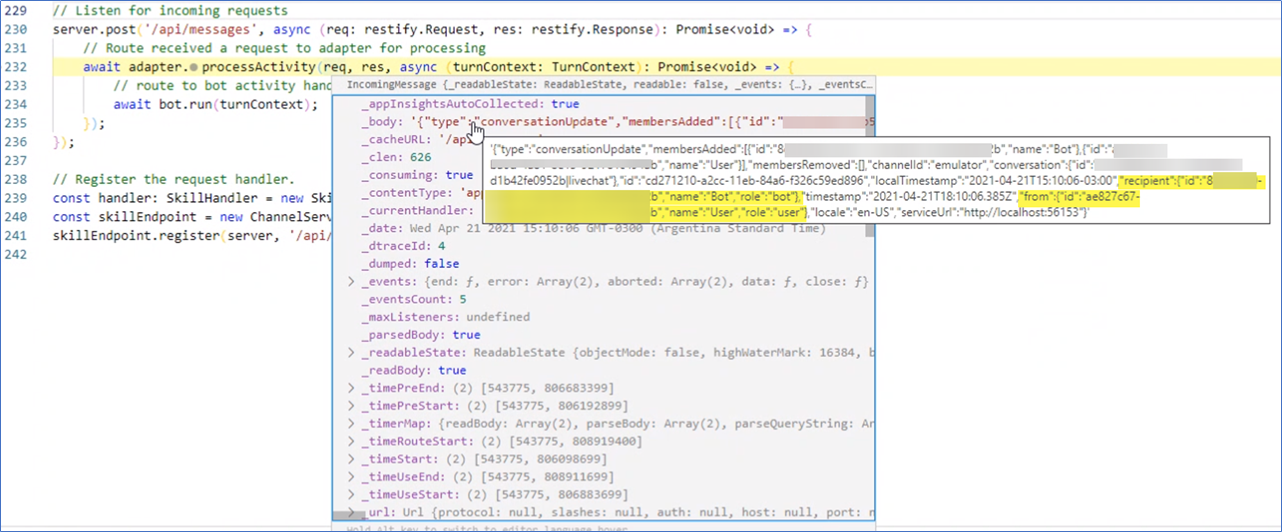
- Can you verify if the request received by the bot contains the
recipientandfromproperties populated? (Add a breakpoint here and see picture 1) - Can you check if the
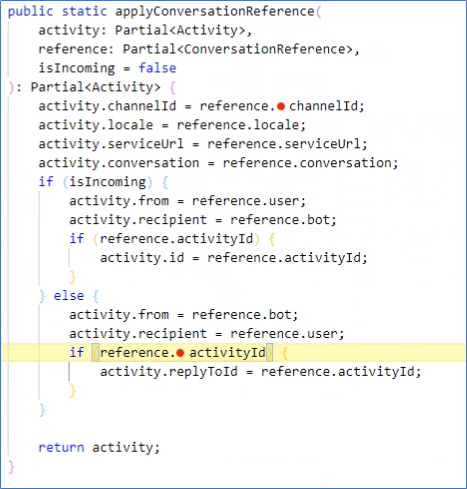
recipientandfromvalues are inverted to send the activity from the user to the bot? (Add a breakpoint here and see picture 2) - Can you attach the
botbuilderversion which is installed in thepackage-lock.jsonfile of your Virtual Assistant? - Where have you obtained the JSON attached in this comment? We noticed that the
nameproperty of therecipientis empty and that's why therecipientNameis not populated (see here). We think that the problem is not related to the Application Insights, but how the activity is created. - Is there any possibility to share a reduced sample so we can use it to test and reproduce the issue in Emulator?
We tested using these environments:
- generator-bot-virtualassistant version 1.0.1 to generate the Virtual Assistant (using BotBuilder version greater than 4.9.2)
- generator-botbuilder-assistant version 1.0.1 to generate the Virtual Assistant (using BotBuilder version 4.6.2)
- BotBuilder version 4.6.2, 4.11.0 and 4.13.0
- BotFramework-Emulator version 4.11.0 and 4.13.0
_Recipient and From properties populated when the request is coming from the bot_
_From and Recipient values set when the request is sent to the bot_
Batta32
on 21 Apr 2021
@Batta32 - We found the issue. The above steps helped us to identify the issue.
We are now passing user details to attribute 'username' ReactWebChat component.
Thank you so much for your help.
SreekanthOAuth
on 23 Apr 2021
Related issues
 lauren-mills
·
4Comments
lauren-mills
·
4Comments
 darrenj
·
3Comments
darrenj
·
3Comments
 esoler-sage
·
3Comments
esoler-sage
·
3Comments
 samaea
·
3Comments
samaea
·
3Comments
 igor17400
·
4Comments
igor17400
·
4Comments