Botframework-solutions: Getting issue while enabling direct line app service extension in azure bot service with VA template bot
What project is affected?
Virtual Assistant
What language is this in?
C#
What happens?
Getting issue while enabling direct line app service extension in azure bot service with VA template bot
What are the steps to reproduce this issue?
I have followed the exact steps mentioned in below Microsoft link:
Still the value of ib and ob are coming false:
{"v":"1.0.0.0.55fa54091a1e3b168628d4000ee2b06a88bbc2ac","k":true,"ib":false,"ob":false,"initialized":true}
Bot in webchat stops working after adding OutOfProcess setting in .csproj file.
webchaterror
Also am not able to generate token from the below link:
https://[my bot name here].azurewebsites.net/.bot/v3/directline/tokens/generate
I had replicate the same config on two bots but no luck. Please help me on this its urgent.
I have attached my changes, please let me know where i'm getting wrong or is this the issue with Microsoft.
apllication settings
ib and on values
namedpipe
outofprocess
web socket config
What were you expecting to happen?
bot should connect with bot channel registration.
Can you share any logs, error output, etc.?
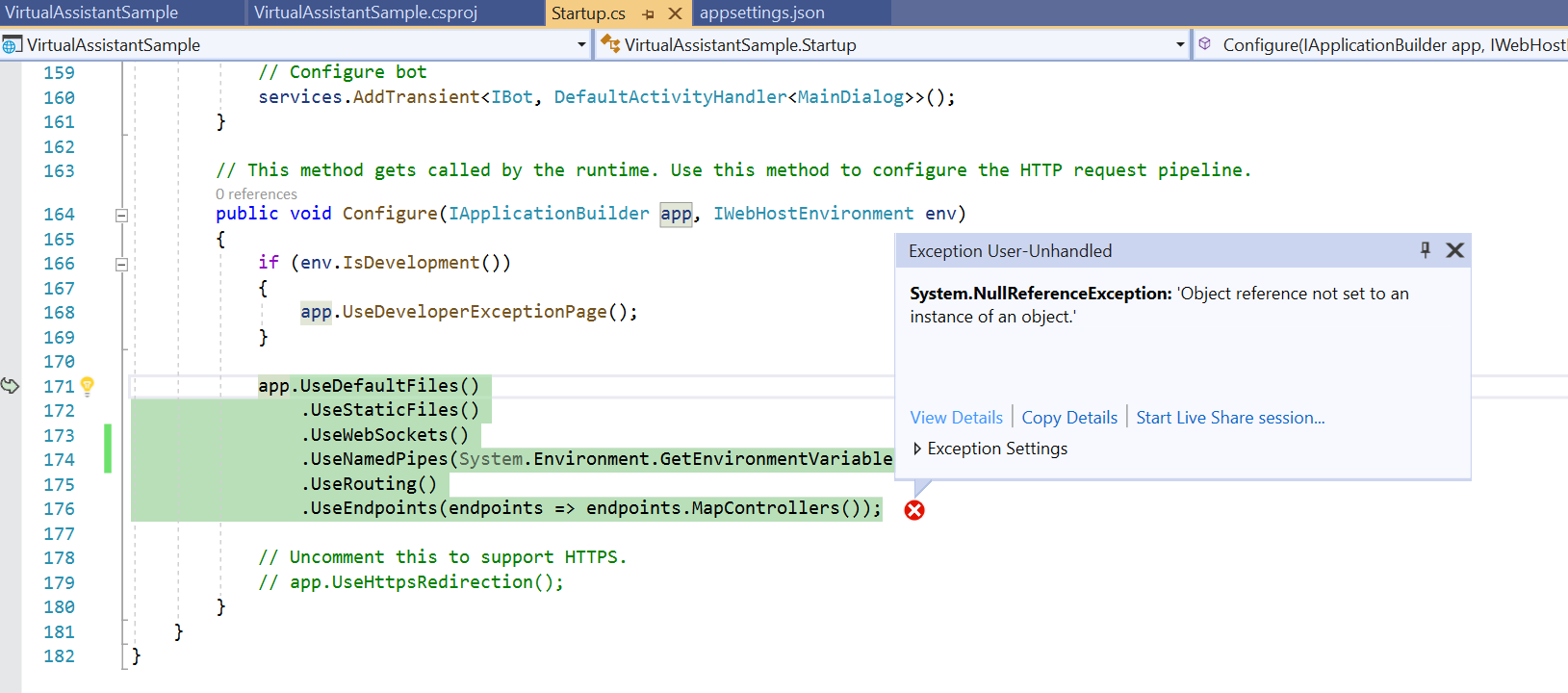
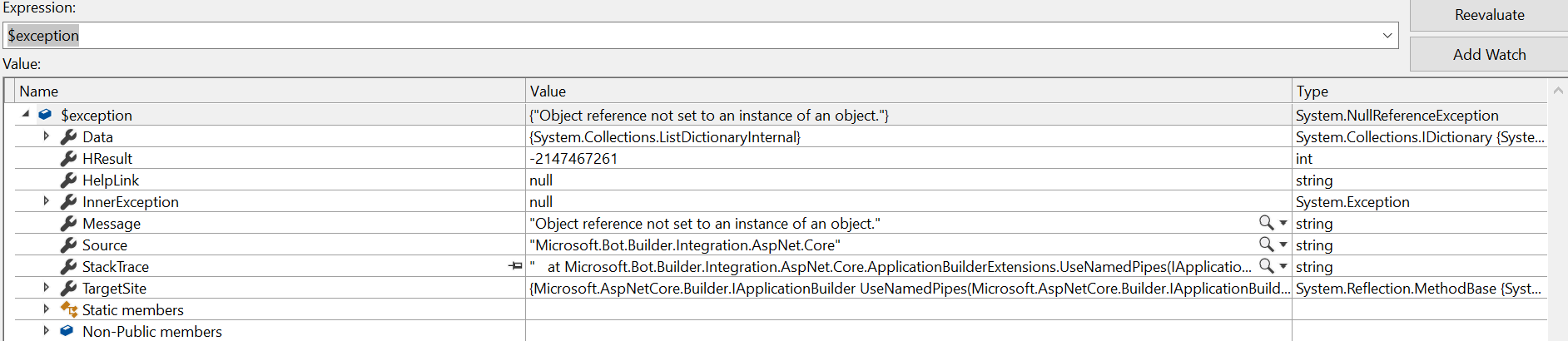
I have tried debugging it & error is coming in UseNamedPipes middleware and found below exception:
I am using latest virtual assistant template:
https://github.com/microsoft/botframework-solutions/tree/master/samples/csharp/assistants/virtual-assistant
image
image
Stack Trace
at Microsoft.Bot.Builder.Integration.AspNet.Core.ApplicationBuilderExtensions.UseNamedPipes(IApplicationBuilder applicationBuilder, String pipeName)
at VirtualAssistantSample.Startup.Configure(IApplicationBuilder app, IWebHostEnvironment env) in C:\Users\Taruna.Soni\Desktop\virtual-assistant\VirtualAssistantSample\Startup.cs:line 171
at System.RuntimeMethodHandle.InvokeMethod(Object target, Object[] arguments, Signature sig, Boolean constructor, Boolean wrapExceptions)
at System.Reflection.RuntimeMethodInfo.Invoke(Object obj, BindingFlags invokeAttr, Binder binder, Object[] parameters, CultureInfo culture)
at Microsoft.AspNetCore.Hosting.ConfigureBuilder.Invoke(Object instance, IApplicationBuilder builder)
at Microsoft.AspNetCore.Hosting.ConfigureBuilder.<>c__DisplayClass4_0.b__0(IApplicationBuilder builder)
at Microsoft.AspNetCore.Hosting.GenericWebHostBuilder.<>c__DisplayClass13_0.b__2(IApplicationBuilder app)
at Microsoft.ApplicationInsights.AspNetCore.ApplicationInsightsStartupFilter.<>c__DisplayClass2_0.b__0(IApplicationBuilder app)
at Microsoft.AspNetCore.Mvc.Filters.MiddlewareFilterBuilderStartupFilter.<>c__DisplayClass0_0.g__MiddlewareFilterBuilder|0(IApplicationBuilder builder)
at Microsoft.AspNetCore.Server.IISIntegration.IISSetupFilter.<>c__DisplayClass4_0.b__0(IApplicationBuilder app)
at Microsoft.AspNetCore.HostFilteringStartupFilter.<>c__DisplayClass0_0.b__0(IApplicationBuilder app)
at Microsoft.AspNetCore.Hosting.GenericWebHostService.d__31.MoveNext()
Any screenshots or additional context?
Above issue raised also here : https://github.com/MicrosoftDocs/bot-docs/issues/1965
 SSanjeevi
All 17 comments
I will suggest we update to the latest SDK and try again..
 xieofxie
on 26 Mar 2021
xieofxie
on 26 Mar 2021
@xieofxie Using latest GA version only.
Microsoft.Bot.Solutions Version 1.0.1
Botframework version 4.9.3
Virtual Assistant generated from visual studio extension version 4.9.1.2
SSanjeevi
on 28 Mar 2021
@SSanjeevi we are working on a major release, so apologies for the delay in getting to this issue. We will respond back with a resolution as soon as we can.
 msomanathan
on 30 Mar 2021
msomanathan
on 30 Mar 2021
@SSanjeevi Edit Startup.cs class and update the below line in ConfigureServices Method.
services.AddSingleton
services.AddSingleton
Cheers. Thanks me later.
 gourav-madan
on 2 Apr 2021
gourav-madan
on 2 Apr 2021
Hi @SSanjeevi,
@gourav-madan has the right of it - thank you for the assistance! Please attempt the following adjustment above and let us know if this helps resolve your issue. If not, we can investigate further.
 peterinnesmsft
on 5 Apr 2021
peterinnesmsft
on 5 Apr 2021
@gourav-madan i updated as per your suggestion even the build solution failed then - i fixed it by updating the below in BotController:
BotFrameworkHttpAdapter to IBotFrameworkHttpAdapter
then code able to build and then i deployed to app service and then followed this document:
https://docs.microsoft.com/en-us/azure/bot-service/bot-service-channel-directline-extension-net-bot?view=azure-bot-service-4.0
after that got the below correct values.

but when connecting from bot webchat got the token generated but got error saying websocket connection failed error in browser console.
then in log of app service got the below error:
2021-04-06 11:00:40.948 +00:00 [Error] Microsoft.AspNetCore.Diagnostics.DeveloperExceptionPageMiddleware: An unhandled exception has occurred while executing the request.System.InvalidOperationException: StatusCode cannot be set because the response has already started.at Microsoft.AspNetCore.Server.Kestrel.Core.Internal.Http.HttpProtocol.ThrowResponseAlreadyStartedException(String value)at Microsoft.AspNetCore.Server.Kestrel.Core.Internal.Http.HttpProtocol.set_StatusCode(Int32 value)at Microsoft.AspNetCore.Server.Kestrel.Core.Internal.Http.HttpProtocol.Microsoft.AspNetCore.Http.Features.IHttpResponseFeature.set_StatusCode(Int32 value)at Microsoft.AspNetCore.Http.Internal.DefaultHttpResponse.set_StatusCode(Int32 value)at Microsoft.AspNetCore.Mvc.StatusCodeResult.ExecuteResult(ActionContext context)at Microsoft.AspNetCore.Mvc.ActionResult.ExecuteResultAsync(ActionContext context)at Microsoft.AspNetCore.Mvc.Internal.ResourceInvoker.InvokeResultAsync(IActionResult result)at Microsoft.AspNetCore.Mvc.Internal.ResourceInvoker.InvokeNextResultFilterAsync[TFilter,TFilterAsync]()at Microsoft.AspNetCore.Mvc.Internal.ResourceInvoker.Rethrow(ResultExecutedContext context)at Microsoft.AspNetCore.Mvc.Internal.ResourceInvoker.ResultNext[TFilter,TFilterAsync](State& next, Scope& scope, Object& state, Boolean& isCompleted)at Microsoft.AspNetCore.Mvc.Internal.ResourceInvoker.InvokeResultFilters()at Microsoft.AspNetCore.Mvc.Internal.ResourceInvoker.InvokeNextResourceFilter()at Microsoft.AspNetCore.Mvc.Internal.ResourceInvoker.Rethrow(ResourceExecutedContext context)at Microsoft.AspNetCore.Mvc.Internal.ResourceInvoker.Next(State& next, Scope& scope, Object& state, Boolean& isCompleted)at Microsoft.AspNetCore.Mvc.Internal.ResourceInvoker.InvokeFilterPipelineAsync()at Microsoft.AspNetCore.Mvc.Internal.ResourceInvoker.InvokeAsync()at Microsoft.AspNetCore.Routing.EndpointMiddleware.Invoke(HttpContext httpContext)at Microsoft.AspNetCore.Routing.EndpointRoutingMiddleware.Invoke(HttpContext httpContext)at Microsoft.AspNetCore.StaticFiles.StaticFileMiddleware.Invoke(HttpContext context)at Microsoft.AspNetCore.Builder.Extensions.MapWhenMiddleware.Invoke(HttpContext context)at Microsoft.AspNetCore.Cors.Infrastructure.CorsMiddleware.InvokeCore(HttpContext context)at Microsoft.AspNetCore.Diagnostics.DeveloperExceptionPageMiddleware.Invoke(HttpContext context)
2021-04-06 11:00:40.955 +00:00 [Error] Microsoft.AspNetCore.Server.Kestrel: Connection id "0HM7OT1NVBJ5M", Request id "0HM7OT1NVBJ5M:00000001": An unhandled exception was thrown by the application.System.InvalidOperationException: StatusCode cannot be set because the response has already started.at Microsoft.AspNetCore.Server.Kestrel.Core.Internal.Http.HttpProtocol.ThrowResponseAlreadyStartedException(String value)at Microsoft.AspNetCore.Server.Kestrel.Core.Internal.Http.HttpProtocol.set_StatusCode(Int32 value)at Microsoft.AspNetCore.Server.Kestrel.Core.Internal.Http.HttpProtocol.Microsoft.AspNetCore.Http.Features.IHttpResponseFeature.set_StatusCode(Int32 value)at Microsoft.AspNetCore.Http.Internal.DefaultHttpResponse.set_StatusCode(Int32 value)at Microsoft.AspNetCore.Mvc.StatusCodeResult.ExecuteResult(ActionContext context)at Microsoft.AspNetCore.Mvc.ActionResult.ExecuteResultAsync(ActionContext context)at Microsoft.AspNetCore.Mvc.Internal.ResourceInvoker.InvokeResultAsync(IActionResult result)at Microsoft.AspNetCore.Mvc.Internal.ResourceInvoker.InvokeNextResultFilterAsync[TFilter,TFilterAsync]()at Microsoft.AspNetCore.Mvc.Internal.ResourceInvoker.Rethrow(ResultExecutedContext context)at Microsoft.AspNetCore.Mvc.Internal.ResourceInvoker.ResultNext[TFilter,TFilterAsync](State& next, Scope& scope, Object& state, Boolean& isCompleted)at Microsoft.AspNetCore.Mvc.Internal.ResourceInvoker.InvokeResultFilters()at Microsoft.AspNetCore.Mvc.Internal.ResourceInvoker.InvokeNextResourceFilter()at Microsoft.AspNetCore.Mvc.Internal.ResourceInvoker.Rethrow(ResourceExecutedContext context)at Microsoft.AspNetCore.Mvc.Internal.ResourceInvoker.Next(State& next, Scope& scope, Object& state, Boolean& isCompleted)at Microsoft.AspNetCore.Mvc.Internal.ResourceInvoker.InvokeFilterPipelineAsync()at Microsoft.AspNetCore.Mvc.Internal.ResourceInvoker.InvokeAsync()at Microsoft.AspNetCore.Routing.EndpointMiddleware.Invoke(HttpContext httpContext)at Microsoft.AspNetCore.Routing.EndpointRoutingMiddleware.Invoke(HttpContext httpContext)at Microsoft.AspNetCore.StaticFiles.StaticFileMiddleware.Invoke(HttpContext context)at Microsoft.AspNetCore.Builder.Extensions.MapWhenMiddleware.Invoke(HttpContext context)at Microsoft.AspNetCore.Cors.Infrastructure.CorsMiddleware.InvokeCore(HttpContext context)at Microsoft.AspNetCore.Diagnostics.DeveloperExceptionPageMiddleware.Invoke(HttpContext context)at Microsoft.AspNetCore.Diagnostics.DeveloperExceptionPageMiddleware.Invoke(HttpContext context)at Microsoft.AspNetCore.Server.IISIntegration.IISMiddleware.Invoke(HttpContext httpContext)at Microsoft.AspNetCore.Builder.Extensions.UsePathBaseMiddleware.Invoke(HttpContext context)at Microsoft.AspNetCore.Server.Kestrel.Core.Internal.Http.HttpProtocol.ProcessRequests[TContext](IHttpApplication
1 application)
`
Further checking the VA template code we see implementation of default adapter with HTTP adapter with BotFrameworkHttpAdapter -doubt whether this is causing any issue and another thing in start up file:
services.AddSingleton<BotAdapter>(sp => sp.GetService<BotFrameworkHttpAdapter>());
SSanjeevi
on 6 Apr 2021
HI @SSanjeevi, I'll spend some time investigating this today and get back to you shortly.
peterinnesmsft
on 9 Apr 2021
@Batta32 - could you take a look at this follow up issue and see if there is any suggestions for how this scenario can be enabled? Thanks!
 lauren-mills
on 13 Apr 2021
lauren-mills
on 13 Apr 2021
Sure @lauren-mills, we will start working on this issue asap! We will back as soon as we have any updates.
 Batta32
on 13 Apr 2021
Batta32
on 13 Apr 2021
Hi @SSanjeevi, we were able to reproduce part of the issue you are describing, specifically the correct ib and ob values.
However, we are following this document to integrate WebChat, but we are not being able to generate the token as you said.
We will let you know as soon as we have an update.
The values of in and ob after setting OutOfProcess in .csproj

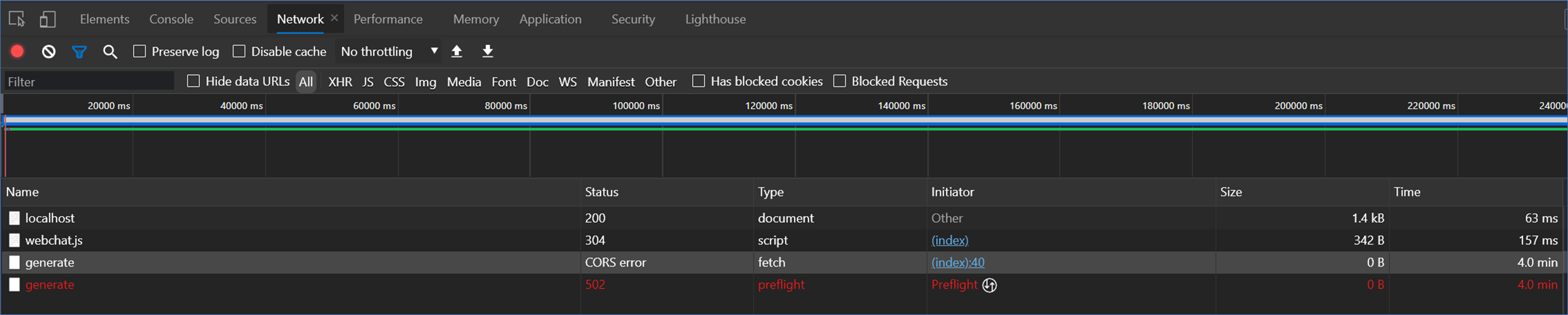
The error when running the WebChat client
 VictorGrycuk
on 16 Apr 2021
VictorGrycuk
on 16 Apr 2021
Hi @SSanjeevi, we successfully obtained the token using the web chat, and we got the web socket connection failed error that you mentioned. However, we were not able to find the App Services log that you shared.
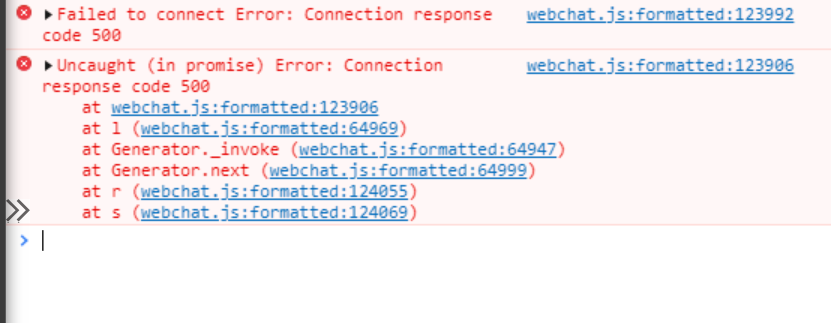
We noticed that enabling the Web Socket option in the App Service resource, the web socket connection failed error is fixed, but the following error appears: Failed to connect Error: Connection response code 500 .
In order to narrow the issue, we came up with some questions:
- Where do you find the App Service logs?
- Which Web Chat are you using?
- Have you enabled the Web Socket option in your App Service resources as this document suggest?
- Are you able to talk with the bot through the Emulator or the embedded web chat in the web app bot resource?
These were our repro steps:
- Create Virtual Assistant using the Template
- Deploy Virtual Assistant using deploy.ps1
- Configure DL App Service Extension with named pipes following the attached document Configure .NET bot for extension
- Apply this change
- Configure the bot to run OutOfProcess, as it's described here
- Publish the virtual assistant using publish.ps1
- Cloned the repo BotFramework-WebChat
- Use Web chat with DL App Service extension following the attached document Use Web Chat with the direct line app service extension
- Run sample 01.getting-started
- See token correctly generated in the web console
- If you don't have enabled the web socket option in App Services resources you will see the
web socket connection failed error, but if you have it enabled you will see thefailed to connect error: connection response code 500
We will continue reviewing this issue, and as soon as we have any update we will back to you 😊 .
_Web socket connection failed error with the expected token_

VictorGrycuk
on 16 Apr 2021
Hi @VictorGrycuk,
I also able to generate token after enabling web socket connection but getting 500 error as you mentioned. After getting the 500 error I seen the logs in app service it shown that log trace I shared.
I have wrote some code to log the exceptions in startup class that log shown that error logs. I have been seeing the logs in log stream in app service.
I haven't tested with emulator, will check and let you know.
SSanjeevi
on 17 Apr 2021
@SSanjeevi could you please share program.cs file code?
I think code is breaking in this class only.
gourav-madan
on 17 Apr 2021
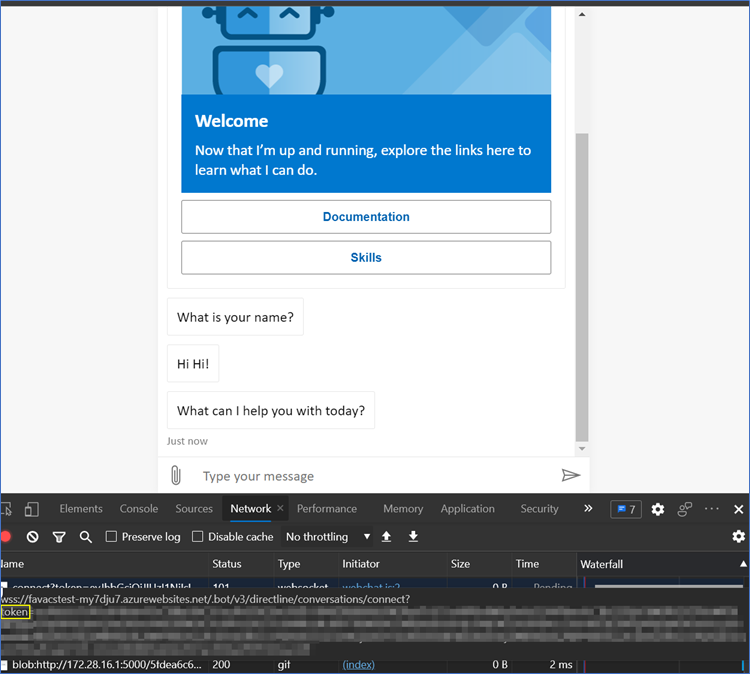
Hi @SSanjeevi we successfully communicated with the bot through the Web Chat, enabling DL ASE.
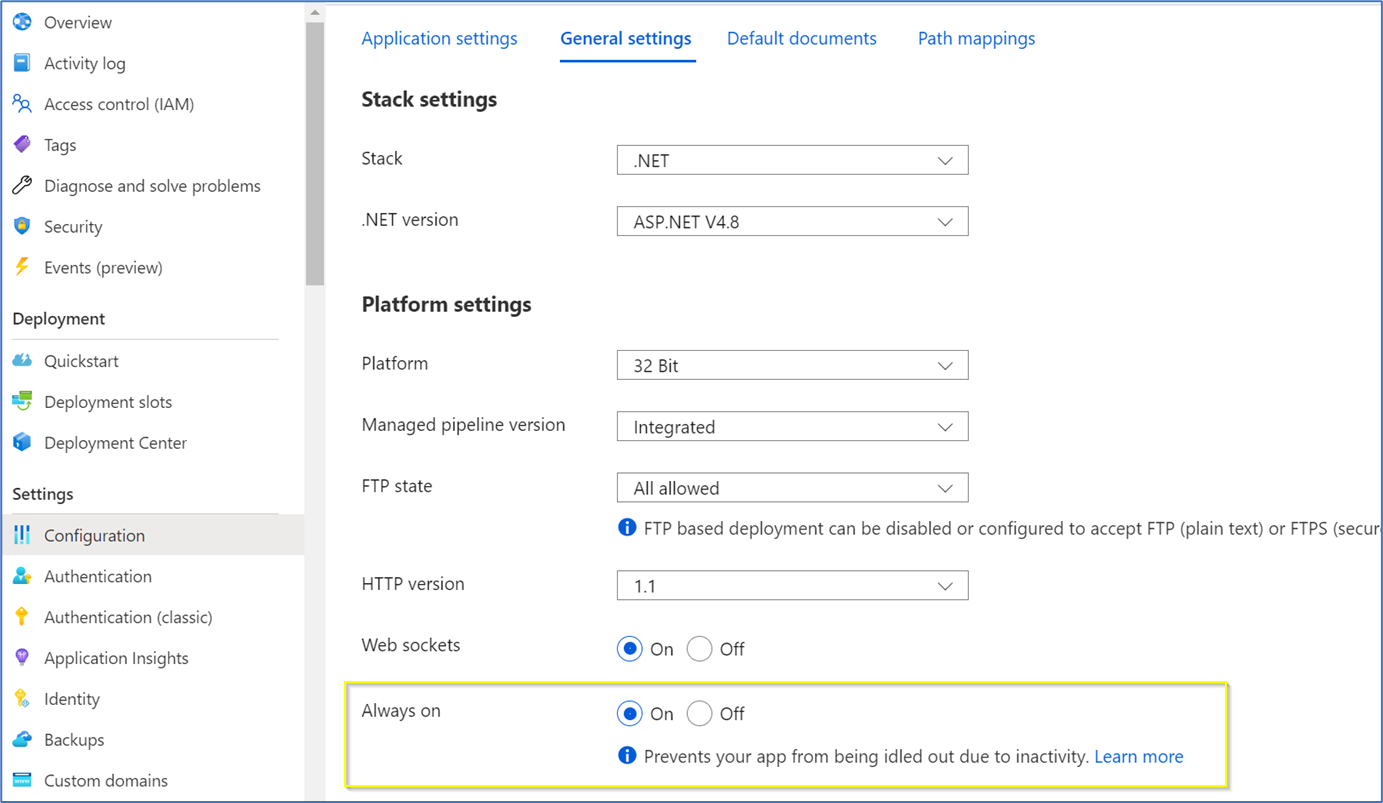
As we noticed that there is a timeout period in the App Service, we configured the "Always On" option in the App Service general settings in on. By doing this we prevent the Failed to connect Error: Connection response code 500 and the manual reactivation of the App Service.
We put together all the required changes in Virtual Assistant in this commit. Here you can see:
- The required changes in the
StartupandBotControllerclasses - The configuration of OutOfProcess option, in the
.csprojfile.
We followed these steps:
- Apply the changes above
- Follow the instructions of the documentation Configure .NET bot for extension
- Follow the instructions of the documentation Use Web Chat with the direct line app service extension
- Follow these instructions to run the index.html and run the Web Chat
_Virtual Assistant responding in Web Chat with token_
_Always on option_
Let us know if this helps 😊 .
VictorGrycuk
on 19 Apr 2021
Closing due to inactivity, reopen if needed
Batta32
on 3 May 2021
@Batta32 - can we check this issue now?
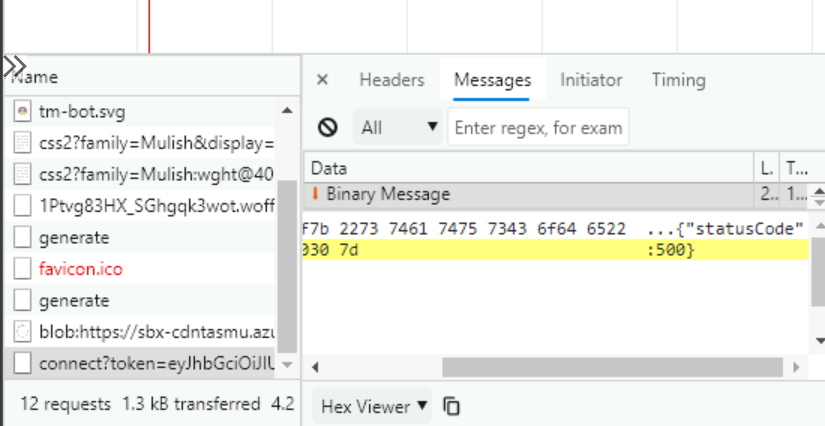
I followed your steps and now am able to generate token for the app service bot with directline extension setup - but still getting 500 error in response of websocket connection.
SSanjeevi
on 18 May 2021
its working fine
thanks for the guidance.
SSanjeevi
on 18 May 2021
Related issues
 BillStrait
·
3Comments
BillStrait
·
3Comments
 waqarghani
·
3Comments
waqarghani
·
3Comments
 hansmbakker
·
3Comments
hansmbakker
·
3Comments
 darrenj
·
3Comments
darrenj
·
3Comments
 igor17400
·
4Comments
igor17400
·
4Comments
Most helpful comment
its working fine
thanks for the guidance.